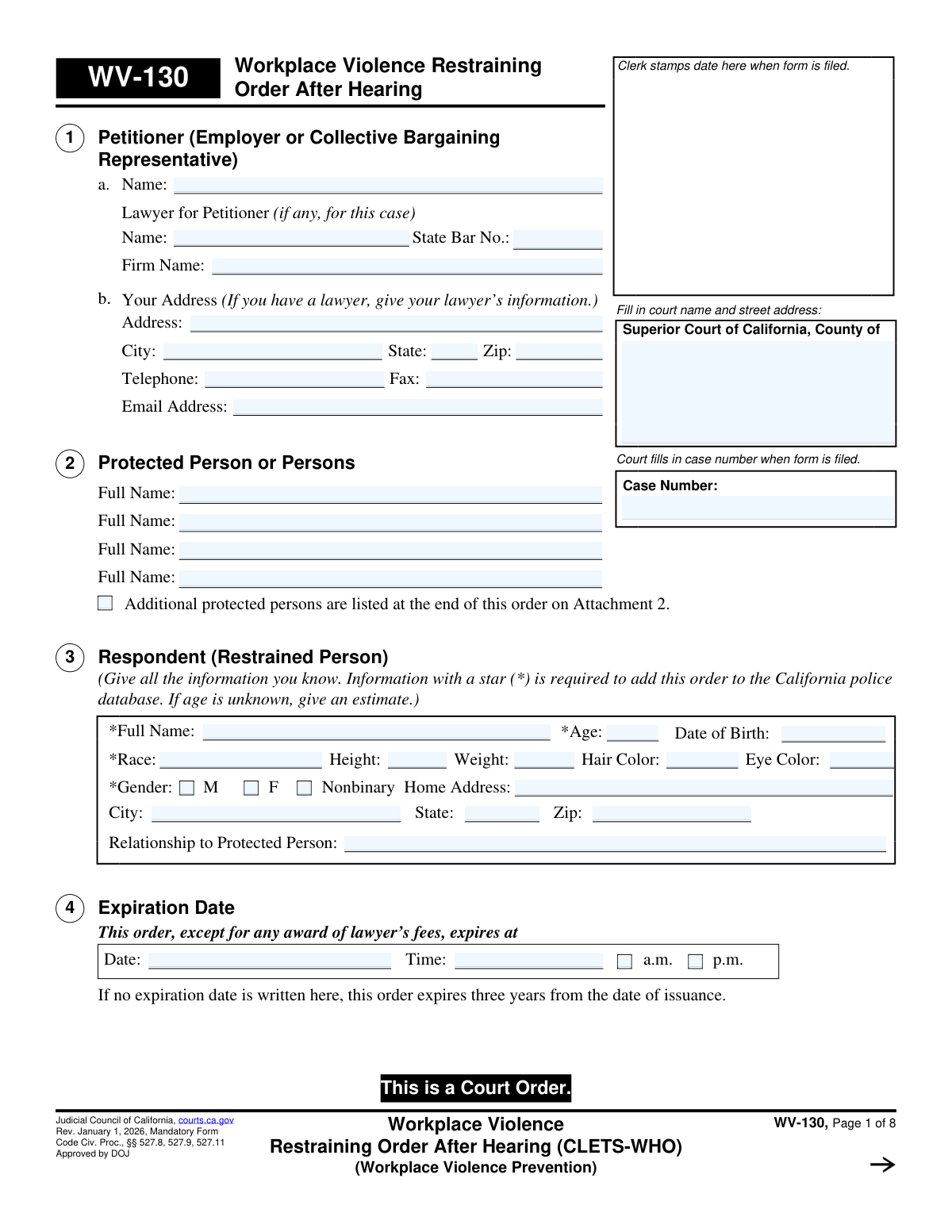
Yes! You can use AI to fill out Form WV-130, Workplace Violence Restraining Order After Hearing (CLETS-WHO)

The Workplace Violence Restraining Order After Hearing (Form WV-130) is a legal document issued by the Superior Court of California. It formalizes the court's decision after a hearing to protect an employee or group of employees from violence, threats, or harassment by a specific individual (the respondent). This order is crucial as it outlines legally enforceable prohibitions, such as no-contact and stay-away rules, and carries criminal penalties for violations. Today, this form can be filled out quickly and accurately using AI-powered services like Instafill.ai, which can also convert non-fillable PDF versions into interactive fillable forms.
WV-130 is part of the California court forms and restraining order forms categories on Instafill.
Our AI automatically handles information lookup, data retrieval, formatting, and form filling.
It takes less than a minute to fill out WV-130 using our AI form filling.
Securely upload your data. Information is encrypted in transit and deleted immediately after the form is filled out.

Form specifications

Form name: Form WV-130, Workplace Violence Restraining Order After Hearing (CLETS-WHO)
Number of fields: 176
Number of pages: 1
Language: English
main-image

Instafill Demo: How to fill out PDF forms in seconds with AI

How to Fill Out WV-130 Online for Free in 2026

Are you looking to fill out a WV-130 form online quickly and accurately? Instafill.ai offers the #1 AI-powered PDF filling software of 2026, allowing you to complete your WV-130 form in just 37 seconds or less.
Follow these steps to fill out your WV-130 form online using Instafill.ai:
  1. 1 Navigate to Instafill.ai and upload or select the Form WV-130.
  2. 2 Use the AI assistant to accurately input the court name, address, and case number in the designated fields.
  3. 3 Enter the full details of the petitioner (employer), the protected person(s), and the respondent (restrained person), including identifying information.
  4. 4 Fill in the specifics of the court hearing, such as the date, time, department, and the names of those present.
  5. 5 Check the appropriate boxes to indicate the specific personal conduct orders and stay-away orders granted by the court, including the required distance.
  6. 6 Detail any orders concerning firearms, ammunition, or body armor, and note the date for any compliance review hearings.
  7. 7 Review all the information entered for completeness and accuracy before the judicial officer signs and dates the order to make it official.

Our AI-powered system ensures each field is filled out correctly, reducing errors and saving you time.

Why Choose Instafill.ai for Your Fillable WV-130 Form?

Speed

Complete your WV-130 in as little as 37 seconds.

Up-to-Date

Always use the latest 2026 WV-130 form version.

Cost-effective

No need to hire expensive lawyers.

Accuracy

Our AI performs 10 compliance checks to ensure your form is error-free.

Security

Your personal information is protected with bank-level encryption.

Frequently Asked Questions About Form WV-130

This form is the official court order issued by a judge after a hearing to protect employees from violence, threats, or harassment. It details the specific restrictions placed on the restrained person and is enforceable by law enforcement.

The petitioner is the employer or a collective bargaining representative filing on behalf of the employee(s) needing protection. The court clerk typically completes this final order form based on the judge's rulings from the hearing.

The order's expiration date is specified in Section 4. If no date is written, the order automatically expires three years from the date it was issued by the judge.

Detailed information like name, age, and physical description is required to enter the order into the California Law Enforcement Telecommunications System (CLETS). This allows any police officer in the state to immediately verify and enforce the restraining order.

The order prohibits the restrained person from owning or possessing firearms, parts, or ammunition. They must turn in any prohibited items to law enforcement or sell them to a licensed dealer within 24 hours of being served with the order.

If the restrained person attended the court hearing, they are considered notified. If they were not present, the order must be formally served on them by mail or in person, as directed by the court in Section 16.

Violating a restraining order is a crime. The person can be arrested, charged with a crime, and face penalties including up to one year in jail and a fine of up to $1,000.

Yes, Section 2 allows for multiple employees to be listed as 'Protected Persons' under the same restraining order. If there isn't enough space on the first page, an attachment can be used to list additional people.

A Temporary Restraining Order (TRO, Form WV-110) is granted for immediate, short-term protection before a full court hearing. The WV-130 is the final, long-term order issued by a judge after hearing evidence from both sides.

These orders require the restrained person to stay a specific distance, such as 100 yards, away from the protected person(s). They also apply to specific locations like the person's workplace, home, school, and vehicle.

Yes, services like Instafill.ai use AI to help you accurately auto-fill the initial petition forms, which can save time and reduce errors. The AI helps ensure all necessary fields are completed correctly before you file with the court.

Simply upload the form's PDF to the Instafill.ai platform. Its AI will identify all the fields, allowing you to type your information directly into an interactive version of the form, which you can then download or print.

You can use a service like Instafill.ai, which is designed to convert flat, non-fillable PDFs into interactive forms. This allows you to easily type your information into the fields before printing the completed document.

CLETS stands for the California Law Enforcement Telecommunications System. Entering the order into this statewide police database makes it immediately accessible to any law enforcement officer, ensuring they can verify and enforce it anywhere in California.

Compliance WV-130
Validation Checks by Instafill.ai

1
Respondent CLETS Data Completeness
This check verifies that all fields marked with a star (*) in Section 3 (Respondent) are filled. These fields, including Full Name, Age, Race, and Gender, are required to enter the restraining order into the California Law Enforcement Telecommunications System (CLETS). Failure to provide this information will prevent the order from being added to the statewide police database, making it difficult for law enforcement to verify and enforce.
2
Respondent Age and Date of Birth Consistency
This validation cross-references the respondent's 'Age' and 'Date of Birth' in Section 3. If both fields are provided, the system calculates the age from the date of birth and flags any discrepancy with the entered age. This ensures data accuracy for identification purposes, which is critical for law enforcement. An inconsistency could lead to rejection or delays in processing.
3
Order Expiration Date Validity
Ensures the 'Expiration Date' entered in Section 4 is a valid, future date. A restraining order cannot expire in the past or on the day it is issued. This check is crucial for defining the active period of the order's enforceability. If the date is invalid, the order would be legally ambiguous and unenforceable.
4
Continued Hearing Date Requirement
This check is triggered if checkbox 5c, 'The hearing is continued,' is selected. It validates that both a future date and a time are entered for the continued hearing. Missing this information would leave the legal proceeding in an undefined state, failing to notify the parties of their next required court appearance. The form would be considered incomplete and could be rejected by the clerk.
5
Stay-Away Distance Specification
Verifies that if any checkbox is marked in Section 7a ('Stay-Away Orders'), the corresponding distance field ('yards away from') contains a positive numerical value. An order to 'stay away' is meaningless without a specified distance. Failure to provide a number makes the stay-away provision vague and unenforceable by law enforcement.
6
CARPOS Entry Method Selection
This validation ensures that exactly one of the three options (15a, 15b, or 15c) is selected to designate how the order will be entered into the CARPOS database. The court must specify the responsible party for data entry to ensure the order becomes active in the law enforcement system. Selecting zero or multiple options creates ambiguity and could result in the order never being entered.
7
CARPOS Law Enforcement Agency Details
If option 15c is checked, indicating the petitioner's lawyer will deliver the order, this validation confirms that the 'Name of Law Enforcement Agency' and its 'Address' are filled out. Without this information, the petitioner would not know where to deliver the order for entry into CLETS. This would delay or prevent the order from becoming enforceable.
8
Service of Order Method Selection
This check ensures that either option 16a (respondent attended the hearing) or 16b (respondent did not attend) is selected. This information is legally required to determine if further service of the order is necessary for it to be enforceable. An invalid or missing selection creates ambiguity about the order's legal status and whether the respondent has been properly notified.
9
Case Number Consistency Across Pages
This validation verifies that the 'Case Number' entered on page 1 is correctly populated and identical on all subsequent pages of the document. A consistent case number is essential for ensuring all pages are correctly associated with the same legal case file. Mismatched or missing numbers can lead to filing errors and parts of the order being lost or misfiled.
10
Protected Person Requirement
Validates that at least one 'Full Name' is entered in Section 2, 'Protected Person or Persons'. A restraining order is fundamentally designed to protect specific individuals, and without at least one named person, the order has no legal subject. The form would be invalid and rejected as it fails to identify who is being protected.
11
Petitioner Contact Information Completeness
If no lawyer is listed in Section 1, this check verifies that the petitioner's full address (Address, City, State, Zip) is provided. This information is required for the court to send official correspondence and notices to the petitioner. Failure to provide this contact information when there is no legal representative can halt the legal process.
12
State Bar Number Format
If a 'Lawyer for Petitioner' name is provided in Section 1, this check validates that the 'State Bar No.' field is filled and contains a properly formatted number. The State Bar number is the official identifier for a licensed attorney in California, and its presence confirms the lawyer's authority to represent the petitioner. An invalid or missing number could call the representation into question.
13
Firearms Compliance Hearing Date Requirement
If a firearms compliance review hearing is ordered in Section 12, this validation ensures that a future 'Date' and 'Time' for the hearing are specified. This hearing is a critical enforcement step to confirm the respondent has surrendered their weapons. Without a scheduled date, the court cannot follow up on compliance, undermining a key safety provision of the order.

Common Mistakes in Completing WV-130

Incomplete or Incorrect Respondent Information

Users often fail to provide all known information for the Respondent in Section 3, especially the starred fields (Full Name, Age, Gender, Race) required for the police database. This mistake occurs due to missing information or overlooking the instructions. An incomplete profile prevents the order from being entered into the California Law Enforcement Telecommunications System (CLETS), making it unenforceable by officers in the field who cannot verify the order's existence.

Confusing Petitioner, Lawyer, and Protected Persons

Filers frequently mix up the entities in Sections 1 and 2, for example, by putting an individual employee's name as the Petitioner (Section 1) instead of the employer's legal name. They may also list the employer's address in Section 1b when they have a lawyer, though the form directs them to use the lawyer's information. This confusion can lead to legal notices being sent to the wrong party and can create ambiguity about who is seeking protection versus who is being protected.

Failing to List All Necessary Protected Persons

In Section 2, an employer might only list the primary employee who was threatened, neglecting to include other employees who are also at risk or work in the same area. A restraining order only protects the specific individuals named on the form. Failing to list all affected persons leaves them legally unprotected by the order, even if they were intended to be covered.

Filling in Court-Use-Only Sections

Many sections of this form, such as the Case Number, the Expiration Date (Section 4), and Hearing details (Section 5), are intended to be filled out by the court clerk or judicial officer. Anxious or overly thorough filers may attempt to complete these fields themselves, leading to the form's rejection by the clerk and causing delays. It is crucial to only fill in the sections designated for the petitioner.

Using Nicknames or Abbreviations for Legal Names

In Sections 2 and 3, filers may use common nicknames (e.g., 'Mike' for 'Michael') or abbreviations instead of the full legal names of the protected persons and the respondent. For the order to be effective and enforceable, especially for entry into the CLETS database, the full legal name as it appears on government identification is required. Using incorrect names can cause a failure to identify the respondent during a law enforcement encounter.

Omitting Stay-Away Distance and Locations

When filling out Section 7 (Stay-Away Orders), users sometimes forget to specify the distance in yards or fail to check all applicable locations (workplace, home, vehicle, etc.) from which the respondent must stay away. This ambiguity makes the order difficult to enforce, as a police officer cannot determine if a violation has occurred without a specific distance. A clear, numeric distance is essential for the order's effectiveness.

Forgetting to Reference and Attach Additional Pages

The form provides checkboxes to indicate that additional information (e.g., more protected persons, other orders, firearm details) is included on an attachment. A common mistake is to prepare the attachment but forget to check the corresponding box on the main form. This can lead to the attachment being overlooked or legally separated from the order, rendering the information on it invalid.

Vague or Missing Firearm Descriptions

In Section 9, when listing firearms the respondent possesses, petitioners may provide vague descriptions like 'handgun' or leave the section blank if they are unsure. For law enforcement to effectively remove prohibited items, they need as much detail as possible, including make, model, serial number, and last known location. Providing incomplete information hinders the enforcement of the firearms prohibition, which is a critical safety component of the order.

Misunderstanding Service Requirements

Section 16 outlines how the order must be served on the respondent, with different rules depending on whether the respondent attended the hearing. Petitioners often misunderstand these legal requirements, assuming service is automatic or not their responsibility. Failure to properly serve the order according to the court's direction can render the entire restraining order invalid and unenforceable until service is correctly completed.

Attempting to Fill a Non-Fillable PDF

Often, legal forms are found online as flat, non-fillable PDFs, leading to users printing them and filling them out by hand. This can result in illegible handwriting, mistakes that are hard to correct, and an unprofessional appearance that may be scrutinized by the court. To avoid this, AI-powered tools like Instafill.ai can convert non-fillable PDFs into interactive, fillable forms, ensuring clarity, accuracy, and a professional submission.
Saved over 80 hours a year

“I was never sure if my IRS forms like W-9 were filled correctly. Now, I can complete the forms accurately without any external help.”

Kevin Martin Green

Your data stays secure with advanced protection from Instafill and our subprocessors

Robust compliance program

Transparent business model

You’re not the product. You always know where your data is and what it is processed for.

ISO 27001, HIPAA, and GDPR

Our subprocesses adhere to multiple compliance standards, including but not limited to ISO 27001, HIPAA, and GDPR.

Security & privacy by design

We consider security and privacy from the initial design phase of any new service or functionality. It’s not an afterthought, it’s built-in, including support for two-factor authentication (2FA) to further protect your account.

Fill out WV-130 with Instafill.ai

Worried about filling PDFs wrong? Instafill securely fills form-wv-130-workplace-violence-restraining-order-after-hearing-clets-who forms, ensuring each field is accurate.

Related forms by category

California court forms Judicial Council of California Form SC-105, Request for Court Order and Answer (Small Claims), Judicial Council of California Form SC-120, Defendant’s Claim and ORDER to Go to Small Claims Court (Small Claims), Judicial Council of California Form SER-001, Request for Sheriff to Serve Court Papers, Judicial Council of California Form SER-001, Request for Sheriff to Serve Court Papers, Affidavit for Collection of Personal Property California Probate Code Section 13100, Form POS-040, Proof of Service—Civil, Declaration of Facts of Death (California Superior Court), declaration-of-marriage-for-court-proceeding-california-family-law, ADOPT-200, Adoption Request, ADOPT-200, Stepparent Adoption Request, ADOPT-210, Adoption Agreement, ADOPT-310, Contact After Adoption Agreement, Judicial Council of California Form ADOPT-200, Adoption Request, Form ADR-107, Mediation Attendance Sheet, Form ADR-110, Order Appointing Referee, Form ADR-109, Stipulation or Motion for Order Appointing Referee, Form ADR-102, Request for Trial De Novo After Judicial Arbitration, Form ADR-108, Referee's Report (Code Civ. Proc., §§ 638, 639), Form ADR-106, Petition to Confirm, Correct, or Vacate Contractual Arbitration Award, Form ADR-104, Rejection of Award and Request for Trial After Attorney-Client Fee Arbitration · + 557 more →
restraining order forms Form DV-100, Request for Domestic Violence Restraining Order, DV-100, Request for Domestic Violence Restraining Order (Domestic Violence Prevention), Judicial Council of California Form DV-110, Temporary Restraining Order (CLETS-TRO) (Domestic Violence Prevention), Form DV-116, Order on Request to Continue Court Hearing (Temporary Restraining Order) (CLETS-TRO) (Domestic Violence Prevention), Form DV-130, Restraining Order After Hearing (Order of Protection) (Domestic Violence Prevention), Form CH-110, Temporary Restraining Order (CLETS-TCH) (Civil Harassment Prevention), Form CH-120, Response to Request for Civil Harassment Restraining Orders, Form CH-130, Civil Harassment Restraining Order After Hearing (CLETS-CHO), Order on Request to Modify/Terminate Civil Harassment Restraining Order (Civil Harassment Prevention), Form CH-100, Request for Civil Harassment Restraining Orders (Civil Harassment Prevention), Form CH-620, Response to Request to Modify/Terminate Civil Harassment Restraining Order (Civil Harassment Prevention), Form CIV-025, Application and Order for Reissuance of Order to Show Cause and Temporary Restraining Order, Form CD-190, Application for Temporary Restraining Order (Claim and Delivery), Order on Request to Continue Hearing (Temporary Restraining Order) (CLETS-TCH) (Civil Harassment Prevention), Form CH-610, Notice of Hearing on Request to Modify/Terminate Civil Harassment Restraining Order (Civil Harassment Prevention), Form CH-700, Request to Renew Restraining Order (Civil Harassment Prevention), Form CH-730, Order Renewing Civil Harassment Restraining Order (CLETS), Form DV-120, Response to Request for Domestic Violence Restraining Order (Domestic Violence Prevention), Form DV-300, Request to Change or End Restraining Order (Domestic Violence Prevention), Form DV-310, Notice of Court Hearing and Temporary Order to Change or End Restraining Order (Domestic Violence Prevention) · + 52 more →