Yes! You can use AI to fill out Form GC-210(CA), Child Information Attachment to Probate Guardianship Petition

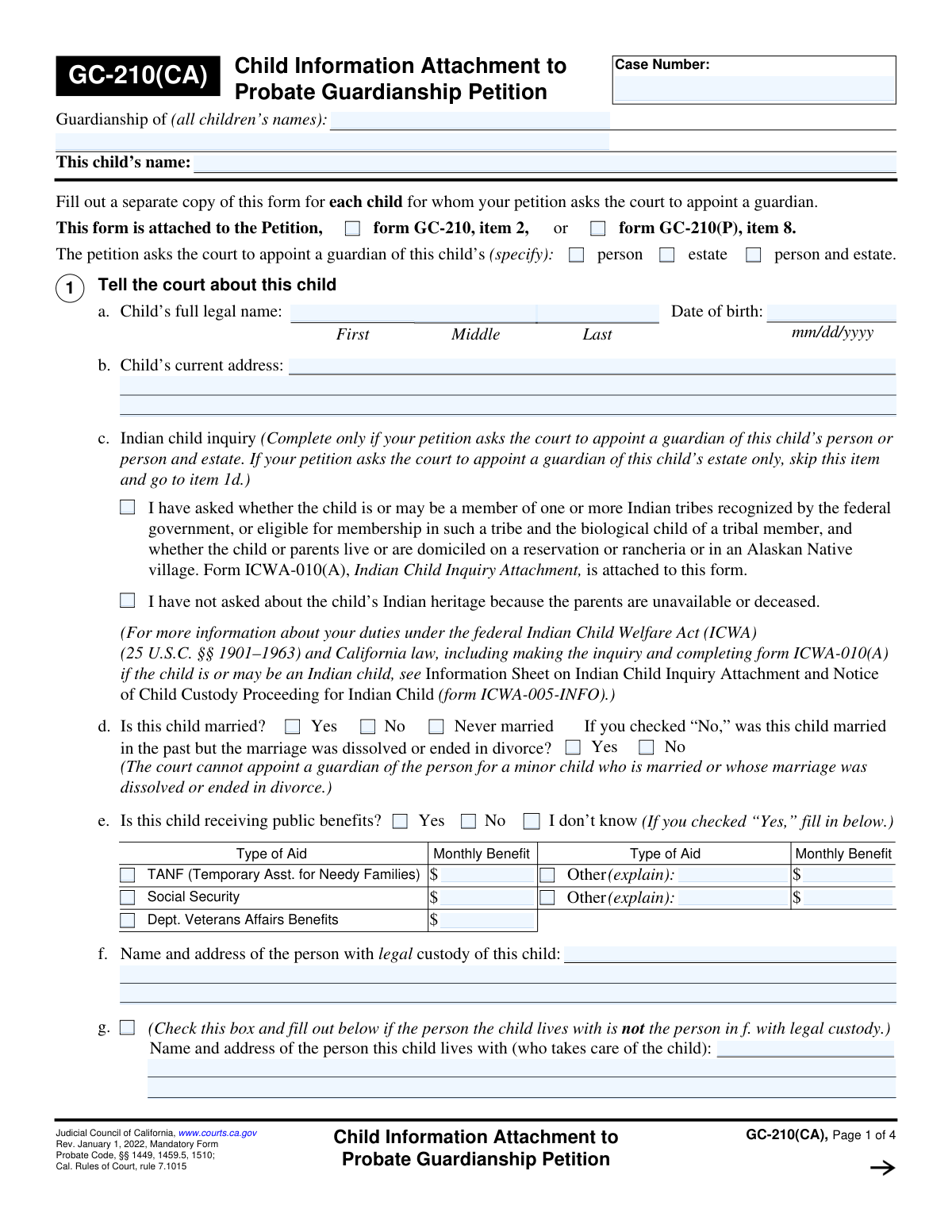
Form GC-210(CA) is a mandatory California Judicial Council form used as an attachment to a Petition for Probate Guardianship. It is used to provide the court with specific, detailed information about each child for whom a guardian is being proposed, including personal details, relatives, and any special circumstances. A separate GC-210(CA) must be completed for each child involved in the petition. Today, this form can be filled out quickly and accurately using AI-powered services like Instafill.ai, which can also convert non-fillable PDF versions into interactive fillable forms.
GC-210(CA) is part of the California court forms and California probate forms categories on Instafill.
Our AI automatically handles information lookup, data retrieval, formatting, and form filling.
It takes less than a minute to fill out GC-210(CA) using our AI form filling.
Securely upload your data. Information is encrypted in transit and deleted immediately after the form is filled out.

Form specifications

Form name: Form GC-210(CA), Child Information Attachment to Probate Guardianship Petition
Number of fields: 167
Number of pages: 1
Language: English
main-image

Instafill Demo: How to fill out PDF forms in seconds with AI

How to Fill Out GC-210(CA) Online for Free in 2026

Are you looking to fill out a GC-210(CA) form online quickly and accurately? Instafill.ai offers the #1 AI-powered PDF filling software of 2026, allowing you to complete your GC-210(CA) form in just 37 seconds or less.
Follow these steps to fill out your GC-210(CA) form online using Instafill.ai:
  1. 1 Navigate to Instafill.ai and upload or select the GC-210(CA) form.
  2. 2 Enter the case number and the names of all children involved in the guardianship at the top of the form.
  3. 3 Complete Section 1 with the specific child's personal information, including their name, address, ICWA status, and any public benefits received.
  4. 4 List the names and addresses of the child's relatives, including parents, grandparents, and siblings, in Section 2.
  5. 5 Provide information about the proposed guardian and their relationship to the child in Section 3.
  6. 6 In Sections 4 and 5, explain why the guardianship and the specific proposed guardian are in the child's best interest.
  7. 7 Review all the information populated by the AI for accuracy, make any necessary edits, and then download or print the completed form for filing with the court.

Our AI-powered system ensures each field is filled out correctly, reducing errors and saving you time.

Why Choose Instafill.ai for Your Fillable GC-210(CA) Form?

Speed

Complete your GC-210(CA) in as little as 37 seconds.

Up-to-Date

Always use the latest 2026 GC-210(CA) form version.

Cost-effective

No need to hire expensive lawyers.

Accuracy

Our AI performs 10 compliance checks to ensure your form is error-free.

Security

Your personal information is protected with bank-level encryption.

Frequently Asked Questions About Form GC-210(CA)

This form is a mandatory attachment to a probate guardianship petition in California. It provides the court with detailed information about a specific child for whom guardianship is being requested.

Yes, you must complete a separate and full copy of Form GC-210(CA) for each child involved in the guardianship petition. Each form will be specific to one child's information.

Yes, you are legally required to inquire if the child has Native American heritage to comply with the Indian Child Welfare Act (ICWA). You must complete and attach Form ICWA-010(A) to document this inquiry.

Under California law, a court cannot appoint a guardian of the person for a minor who is married or has had a marriage dissolved. This question helps the court determine if it has the authority to grant the guardianship of the person.

In these sections, you must explain why the guardianship is necessary (e.g., parents are deceased or unable to provide care) and why the proposed guardian is the best person to care for the child. Be specific about the stability, safety, and support the proposed guardian can offer.

You must make a diligent effort to locate all relatives listed, as they are entitled to legal notice of the proceedings. If you cannot find an address after a thorough search, you may need to explain your efforts to the court.

You must indicate their disagreement in section 6 of the form. The court will set a hearing where the parents can state their objections, and the judge will make a final decision based on what is in the child's best interest.

This form is an attachment and cannot be filed alone. It must be attached to the main Petition for Appointment of Guardian of Minor (Form GC-210) and submitted as part of a complete filing package.

Yes, services like Instafill.ai use AI to help auto-fill form fields accurately and efficiently. This can save you time and help reduce errors, especially when filling out multiple related forms.

You can use a service like Instafill.ai to easily fill out this form online. Simply upload the PDF, and the platform's tools will allow you to type your information directly into the correct fields before printing.

If you have a non-fillable or 'flat' PDF, you can use a service like Instafill.ai. Their platform can convert the document into an interactive, fillable form that you can complete on your computer.

A guardian of the 'person' makes decisions about the child's daily care, education, and health. A guardian of the 'estate' manages the child's finances, property, and assets. You must specify which type of authority you are requesting.

In addition to the main petition, you may need to attach other forms like the Indian Child Inquiry Attachment (ICWA-010(A)) or a written nomination of the guardian from a parent (Attachment 3c).

The form provides checkboxes for sections where you might need more space. If you check a box, use a separate sheet of paper, write 'Form GC-210(CA),' the child's name, and the attachment number (e.g., 'Attachment 4') at the top, and attach it to your form.

Compliance GC-210(CA)
Validation Checks by Instafill.ai

1
Validates Child's Date of Birth Format and Age
This check ensures the 'Date of birth' in item 1a is entered in a valid 'mm/dd/yyyy' format and represents a real date in the past. It also calculates the child's age to confirm they are a minor (under 18), as guardianship petitions are for minors. If the date is invalid, improperly formatted, or indicates the person is an adult, the form submission should be rejected to prevent legal and processing errors.
2
Ensures Completeness of Child's Full Legal Name
This validation verifies that the 'First' and 'Last' name fields for the child in item 1a are not empty. The full legal name is a fundamental identifier for the child in all court proceedings and legal documents. Failure to provide a complete name would make the petition legally insufficient and cause it to be rejected by the court clerk.
3
Verifies Header Information Consistency Across Pages
This check confirms that the 'Case Number' and 'This child’s name' fields in the header are filled out and are identical on every page of the form. Consistent identification is crucial for ensuring all pages of the attachment are correctly associated with each other and with the proper case file. Mismatched or missing information could lead to the misfiling of documents or the rejection of the petition.
4
Requires Selection of Guardianship Type
This validation ensures that at least one of the checkboxes ('person', 'estate', or 'person and estate') is selected at the top of the form to specify the type of guardianship being requested. This selection is critical as it dictates which legal standards apply and which subsequent sections of the form are mandatory. An omission here makes the petition's intent unclear and would halt the legal process.
5
Flags Conflict Between Marital Status and Guardianship of Person
This check cross-references the child's marital status in item 1d with the type of guardianship requested. If the child is marked as currently married ('Yes') or previously married, and the petition is for guardianship of the 'person' or 'person and estate', a warning is triggered. This is important because the form explicitly states the court cannot appoint a guardian of the person for a married or divorced minor, and failing to catch this conflict early wastes time and resources.
6
Conditional Requirement for Public Benefits Details
This validation enforces a rule on item 1e: if 'Yes' is selected for the child receiving public benefits, then at least one specific benefit type must be checked and its corresponding 'Monthly Benefit' amount must be entered. The benefit amount must be a valid numerical or currency value. This information is required for the court to understand the child's financial situation, and incomplete data can delay the proceedings.
7
Conditional Requirement for Caregiver's Information
This check ensures that if the checkbox in item 1g is marked, indicating the child lives with someone other than the person with legal custody, the corresponding name and address fields are filled out. This information is vital for the court and investigators to know the child's current living situation and to contact the primary caregiver. Leaving this section blank after checking the box would create a critical information gap.
8
Conditional Requirement for Prior Court Case Details
This validation confirms that if the checkbox in item 1h is checked, signifying the child's involvement in other court cases, the details for at least one case (Type, Court, and Case Number) must be provided. This is crucial for legal jurisdiction and to prevent conflicting court orders. Failure to disclose this information can have serious legal consequences and lead to the dismissal of the petition.
9
Ensures Completeness of Parent Information
This check verifies that the 'Name' and 'Home Address' fields for both the 'Mother' and 'Father' in item 2 are completed. This information is legally required to provide proper notice to the parents about the guardianship proceedings. If a parent is deceased or their location is unknown, the field should contain that specific information rather than being left blank, as an empty field suggests an incomplete form.
10
Validates Proposed Guardian Relationship Details
This check ensures that in item 3b, either the 'Relative' or 'Not a relative' checkbox is selected, and its corresponding detail field is filled. If 'Relative' is chosen, the specific relationship must be specified; if 'Not a relative' is chosen, the explanation of connection must be provided. This clarifies the proposed guardian's standing to the court, and failing to provide the required detail makes the application incomplete.
11
Conditional Requirement for Cohabitation Duration
This validation rule applies to item 3d. If the user answers 'Yes' to the question 'Does this child currently live with the proposed guardian(s)?', the subsequent field asking for the duration (years, months) must be filled out. This information helps the court assess the stability and history of the child's relationship with the proposed guardian. A 'Yes' answer without a duration is an incomplete response.
12
Mandatory 'Best Interest' Explanations
This check verifies that the free-text explanation fields in item 4 and item 5 are not left empty. These sections, which explain why the guardianship and the specific guardian are in the child's best interest, form the core legal argument for the petition. An empty or missing explanation would result in an automatic denial of the petition for failing to meet the fundamental legal standard.
13
Indian Child Inquiry for Guardianship of Person
This validation ensures that if the petition requests guardianship of the child's 'person' or 'person and estate', one of the two options in the Indian child inquiry (item 1c) must be selected. This inquiry is mandatory under federal (ICWA) and state law to protect the rights of Indian children and tribes. Skipping this section when required would be a fatal flaw in the petition, causing immediate processing delays or rejection.
14
Validates Parent Agreement Name Entry
This check ensures that if a parent's name is entered in item 6a(1) to indicate their agreement on the need for a guardian, a name is also entered in the corresponding field in 6a(2) regarding agreement on the proposed guardian. This ensures the questions are answered for the same parent(s). Inconsistent or missing names would make it impossible to determine which parent agrees to what, rendering the section useless.

Common Mistakes in Completing GC-210(CA)

Submitting a Single Form for Multiple Children

The form explicitly states to 'Fill out a separate copy of this form for each child.' Petitioners, often trying to save time, may attempt to list all children on a single GC-210(CA) form. This will lead to the court clerk rejecting the entire petition, as each child's circumstances must be documented and considered individually. To avoid this, meticulously create a complete and separate attachment for every child involved in the guardianship petition.

Mishandling the Indian Child Welfare Act (ICWA) Inquiry

Item 1c is a critical legal requirement, not just a checkbox. People often misunderstand their 'duty to inquire' about the child's potential Native American heritage, or they check a box without attaching the mandatory Form ICWA-010(A). Failure to comply with ICWA can lead to significant delays, jurisdictional challenges, and even the potential invalidation of the guardianship order down the road. Always complete the inquiry and attach the required forms.

Providing Incomplete or Outdated Relative Information

Item 2 requires names and addresses for numerous relatives, which are used for legal notification purposes. A common mistake is listing 'Unknown' for addresses without documenting the effort made to find the person. This can cause the court to deem the notification process incomplete, halting the case. You must demonstrate due diligence in trying to locate each relative; if unsuccessful, you may need to file a declaration explaining your search efforts.

Confusing 'Legal Custody' with 'Physical Residence'

Petitioners often incorrectly interchange the person with 'legal custody' (Item 1f) and the person the child 'lives with' (Item 1g). Legal custody is a formal status granted by a court order, whereas physical residence is simply where the child currently sleeps. This error provides inaccurate information to the court and can complicate the legal analysis of the case. Carefully distinguish between a formal court-ordered custodian and the child's current caregiver.

Writing Vague 'Best Interest' Explanations

In Items 4 and 5, many people write emotional or conclusory statements like 'It's best for the child' instead of providing concrete, factual reasons. The court needs specific facts explaining why the parents are unable to provide care and why the proposed guardian's home is a stable and appropriate environment. Failing to provide this detail can result in the judge not having sufficient evidence to grant the petition, leading to delays or denial.

Forgetting to Include Required Attachments

This form frequently requires attachments, such as the ICWA form (Attachment to 1c), parental nominations (Attachment 3c), or extra pages for explanations. A frequent oversight is checking a box indicating an attachment exists but failing to include the actual document with the filing. This renders the petition incomplete and guarantees a delay. Create a checklist of all required documents before submission to ensure nothing is missed. If the form is a non-fillable PDF, a tool like Instafill.ai can convert it to a fillable version, making it easier to manage and attach necessary documents digitally.

Using Nicknames or Inconsistent Names

Throughout the form, especially in Item 1a, it is crucial to use the child's full legal name as it appears on their birth certificate. Using nicknames, shortened names, or even slightly different spellings can create legal discrepancies that cause issues with background checks, official records, and the final court order. This error can require later legal action to correct. AI-powered tools like Instafill.ai can help prevent this by saving and consistently applying the correct legal name across all documents.

Failing to Disclose All Prior Court Cases

In Item 1h, petitioners may forget or intentionally omit prior court cases involving the child, such as parental divorce, juvenile dependency, or other custody battles. The court needs to know about these cases to understand the full legal history and avoid jurisdictional conflicts. Failure to disclose can be seen as misleading the court and will cause significant delays when the other cases are discovered.

Inconsistent Information Across Pages

This multi-page document requires the case number and child's name to be filled in at the top of each page. It is very common for people to fill this out incorrectly on one page or forget it entirely on subsequent pages. This makes the filing appear unprofessional and can cause pages to be misplaced or the document to be rejected for being incomplete. Using a form-filling tool like Instafill.ai ensures that this repetitive header information is populated consistently and accurately across all pages of the document.

Incorrectly Answering the Child's Marital Status

In Item 1d, a petitioner might check 'No' for the child being married but overlook the critical follow-up question about whether a past marriage was dissolved. The law specifies that the court cannot appoint a guardian of the person for a minor who is or has been married. Answering this section incorrectly can lead to the petition being automatically ineligible for approval, wasting the petitioner's time and filing fees.
Saved over 80 hours a year

“I was never sure if my IRS forms like W-9 were filled correctly. Now, I can complete the forms accurately without any external help.”

Kevin Martin Green

Your data stays secure with advanced protection from Instafill and our subprocessors

Robust compliance program

Transparent business model

You’re not the product. You always know where your data is and what it is processed for.

ISO 27001, HIPAA, and GDPR

Our subprocesses adhere to multiple compliance standards, including but not limited to ISO 27001, HIPAA, and GDPR.

Security & privacy by design

We consider security and privacy from the initial design phase of any new service or functionality. It’s not an afterthought, it’s built-in, including support for two-factor authentication (2FA) to further protect your account.

Fill out GC-210(CA) with Instafill.ai

Worried about filling PDFs wrong? Instafill securely fills form-gc-210ca-child-information-attachment-to-probate-guardianship-petition-1 forms, ensuring each field is accurate.

Related forms by category

California court forms Judicial Council of California Form SC-105, Request for Court Order and Answer (Small Claims), Judicial Council of California Form SC-120, Defendant’s Claim and ORDER to Go to Small Claims Court (Small Claims), Judicial Council of California Form SER-001, Request for Sheriff to Serve Court Papers, Judicial Council of California Form SER-001, Request for Sheriff to Serve Court Papers, Affidavit for Collection of Personal Property California Probate Code Section 13100, Form POS-040, Proof of Service—Civil, Declaration of Facts of Death (California Superior Court), declaration-of-marriage-for-court-proceeding-california-family-law, ADOPT-200, Adoption Request, ADOPT-200, Stepparent Adoption Request, ADOPT-210, Adoption Agreement, ADOPT-310, Contact After Adoption Agreement, Judicial Council of California Form ADOPT-200, Adoption Request, Form ADR-107, Mediation Attendance Sheet, Form ADR-110, Order Appointing Referee, Form ADR-109, Stipulation or Motion for Order Appointing Referee, Form ADR-102, Request for Trial De Novo After Judicial Arbitration, Form ADR-108, Referee's Report (Code Civ. Proc., §§ 638, 639), Form ADR-106, Petition to Confirm, Correct, or Vacate Contractual Arbitration Award, Form ADR-104, Rejection of Award and Request for Trial After Attorney-Client Fee Arbitration · + 434 more →
California probate forms Judicial Council of California Form DE-111, Petition for Probate (Probate—Decedents Estates), Judicial Council of California Form DE-111, Petition for Probate (Probate—Decedents Estates), Affidavit for Collection of Personal Property California Probate Code Section 13100, Form DE-142/DE-111(A-3e), Waiver of Bond by Heir or Beneficiary (Probate—Decedents Estates), Form DE-140, Order for Probate, Form DE-150, Letters (Probate), Form DE-154/GC-035, Request for Special Notice (Probate), Form DE-157, Notice of Administration to Creditors, Form DE-120(P), Proof of Personal Service of Notice of Hearing—Decedent's Estate or Trust, Form DE-131, Proof of Subscribing Witness (Probate), Form DE-172, Creditor's Claim (Probate), Form DE-174, Allowance or Rejection of Creditor's Claim, Form DE-221, Spousal or Domestic Partner Property Petition (Probate—Decedents Estates), Form DE-270 / GC-070, Ex Parte Petition for Authority to Sell Securities and Order, Form DE-315, Order Determining Succession to Primary Residence, Form DE-351/GC-101, Order Appointing Guardian Ad Litem—Probate, Form DE-115/GC-015, Notice of Hearing on Petition to Determine Claim to Property, Attachment to Notice of Hearing Proof of Service by Mail (Probate—Decedents' Estates and Guardianships and Conservatorships), Attachment to Notice of Hearing Proof of Personal Service (Probate—Decedents' Estates and Guardianships and Conservatorships), Form DE-125, Summons (Probate) · + 13 more →