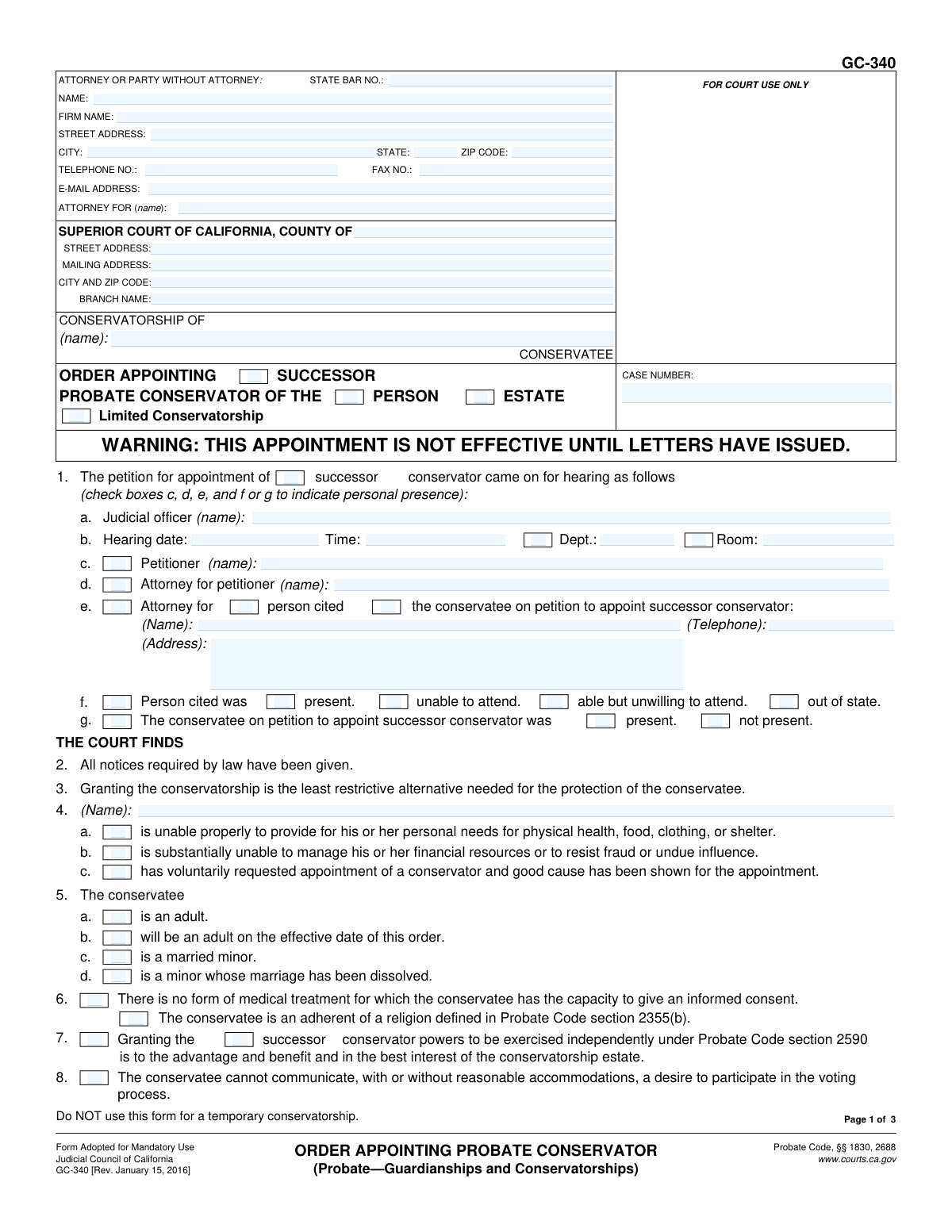
Yes! You can use AI to fill out Form GC-340, Order Appointing Probate Conservator (Probate—Guardianships and Conservatorships)
Form GC-340, the Order Appointing Probate Conservator, is a legal document issued by a California Superior Court to formalize the appointment of a conservator. This order is granted after a court hearing and specifies the scope of the conservator's authority over the conservatee's personal decisions (person) or financial matters (estate). It is a critical document that legally establishes the conservatorship and outlines the specific powers and duties of the appointed individual or entity. Today, this form can be filled out quickly and accurately using AI-powered services like Instafill.ai, which can also convert non-fillable PDF versions into interactive fillable forms.
Our AI automatically handles information lookup, data retrieval, formatting, and form filling.
It takes less than a minute to fill out GC-340 using our AI form filling.
Securely upload your data. Information is encrypted in transit and deleted immediately after the form is filled out.
Form specifications
| Form name: | Form GC-340, Order Appointing Probate Conservator (Probate—Guardianships and Conservatorships) |
| Number of fields: | 168 |
| Number of pages: | 1 |
| Language: | English |
Instafill Demo: How to fill out PDF forms in seconds with AI
How to Fill Out GC-340 Online for Free in 2026
Are you looking to fill out a GC-340 form online quickly and accurately? Instafill.ai offers the #1 AI-powered PDF filling software of 2026, allowing you to complete your GC-340 form in just 37 seconds or less.
Follow these steps to fill out your GC-340 form online using Instafill.ai:
- 1 Navigate to Instafill.ai and upload the GC-340 form or select it from the template library.
- 2 Enter the court information, including the county, branch, and case number, along with the name of the conservatee.
- 3 Provide the details of the petitioner, attorneys, and the appointed conservator as prompted by the AI assistant.
- 4 Indicate the court's findings by checking the relevant boxes concerning the conservatee's condition, presence at the hearing, and the necessity of the conservatorship.
- 5 Specify the details of the appointment, including whether it is for the person, the estate, or both, and list the appointed conservator's information.
- 6 Define the terms of the conservatorship, such as bond requirements, any blocked accounts, and the specific powers granted or limitations imposed on the conservator.
- 7 Review the entire completed order for accuracy, then download the document to be signed by the judicial officer and filed with the court.
Our AI-powered system ensures each field is filled out correctly, reducing errors and saving you time.
Why Choose Instafill.ai for Your Fillable GC-340 Form?
Speed
Complete your GC-340 in as little as 37 seconds.
Up-to-Date
Always use the latest 2026 GC-340 form version.
Cost-effective
No need to hire expensive lawyers.
Accuracy
Our AI performs 10 compliance checks to ensure your form is error-free.
Security
Your personal information is protected with bank-level encryption.
Frequently Asked Questions About Form GC-340
This form is a court order signed by a judge that officially appoints a conservator for an adult who cannot manage their personal or financial affairs. It finalizes the court's decision after a hearing and specifies the powers and duties of the appointed conservator.
While a judge ultimately signs this order, it is typically prepared by the petitioner's attorney, or the petitioner themselves if they are self-represented. It is then submitted to the court for the judge's review and signature at the conservatorship hearing.
No, this form is explicitly for appointing a general or successor probate conservator. You must use a different set of forms to petition for a temporary conservatorship.
A conservator of the person makes decisions about the conservatee's personal life, such as healthcare, food, and housing. A conservator of the estate manages the conservatee's financial matters, like paying bills, managing investments, and protecting assets.
After the judge signs this order, the appointed conservator must complete any required steps, like filing a bond. Once those are done, the court clerk issues a separate document called 'Letters of Conservatorship,' which is the official proof of the conservator's legal authority to act.
A bond is a type of insurance that protects the conservatee's assets from loss due to mismanagement or fraud by the conservator of the estate. The judge determines if a bond is required and sets the amount based on the value of the estate's assets.
A limited conservatorship is specifically for adults with developmental disabilities. It grants the conservator only the specific powers the person needs help with, allowing the limited conservatee to retain as many rights as possible.
If the court finds the conservatee has dementia, this order can grant the conservator special authority. This may include the power to place the conservatee in a secured care facility and to authorize specific medications for the treatment of dementia, as detailed in item 28.
Generally, the conservatee is expected to be present. However, the court can excuse their attendance if a medical professional submits a declaration stating they are medically unable to attend, as noted in item 9 of the form.
You will need the court and case information, the names of the petitioner, conservatee, and the appointed conservator. Most importantly, you must accurately reflect the judge's specific rulings from the hearing regarding bond, the conservator's powers, and any restrictions.
Yes, services like Instafill.ai use AI to help you accurately fill out legal forms. These tools can auto-fill repetitive information, guide you through the sections, and help minimize errors, saving you significant time.
You can upload the GC-340 PDF to the Instafill.ai platform. The service will make it an interactive, fillable form, allowing you to easily type your information into the correct fields online before printing the completed form for court submission.
If you have a non-fillable or 'flat' PDF, you can use a service like Instafill.ai. It can convert the document into an interactive, fillable form that you can complete on your computer.
A successor conservator is a person appointed to take over the duties of the primary conservator if they resign, die, or are removed by the court. This form can be used to formalize the appointment of a successor.
Compliance GC-340
Validation Checks by Instafill.ai
1
Case Number Consistency Across Pages
This check ensures that the 'CASE NUMBER' field is populated and consistent on all pages of the form. The case number is the primary identifier for the legal proceeding, and any discrepancy can lead to misfiling or rejection by the court clerk. If the case numbers do not match, the system should flag the error, preventing submission until the numbers are identical.
2
Conservatee Name Consistency Across Pages
Validates that the 'CONSERVATEE' name in the header section is identical on pages 1, 2, and 3. Consistent naming is crucial for legal document integrity and to ensure all pages are correctly associated with the same individual. A mismatch could cause confusion and legal challenges, so the form should not be considered valid until the names are uniform.
3
Mandatory Basis for Conservatorship
Verifies that at least one of the checkboxes in section 4 ('is unable properly to provide...', 'is substantially unable to manage...', 'has voluntarily requested...') is selected. This finding is the legal justification for the entire order, and its absence makes the order legally insufficient. The form submission must be blocked if no reason is provided.
4
Conditional Professional Fiduciary License Information
If the checkbox in section 12 ('conservator is a professional fiduciary...') is checked, this validation ensures that the license number, issuance date, and expiration date fields in section 14 are all populated. Appointing a professional fiduciary requires proof of their current, valid license. Failure to provide this information when required would result in an incomplete and potentially invalid appointment.
5
Mutually Exclusive Spouse Status Selection
Ensures that only one of the three options (a, b, or c) in section 15 regarding the conservator's spousal relationship to the conservatee is selected. These options are mutually exclusive, and selecting more than one creates a logical contradiction. The system should enforce a single selection to ensure the legal declaration is clear and unambiguous.
6
Mutually Exclusive Domestic Partner Status Selection
This check confirms that only one of the three checkboxes in section 16 (regarding domestic partnership status) is selected. As with the spousal status, these options are logically exclusive. Allowing multiple selections would make the conservator's declared relationship to the conservatee unclear, so the form must restrict the user to a single choice.
7
Conservator Appointment Completeness
Validates that if a conservator is appointed for the 'PERSON' (17a) or 'ESTATE' (17b), the corresponding name and address fields are filled out. An appointment order is meaningless without identifying the appointee. This check prevents the submission of an order that fails to name the person or entity being granted conservatorship powers.
8
Conditional Bond Amount
Verifies that if bond is fixed (section 18b) or deposits are ordered (section 18c), a valid, non-zero monetary amount is entered in the corresponding field. The order must specify the exact financial security required. An empty or invalid amount would make the bond requirement unenforceable, so the field must be populated if the option is chosen.
9
Dementia Finding Prerequisite for Dementia Powers
This check ensures that if any dementia-related powers are granted in section 28 (placing conservatee in a facility or authorizing medication), the corresponding finding in section 20 ('The conservatee has dementia...') must be checked. Granting these specific, sensitive powers requires an explicit judicial finding of dementia. The validation prevents the granting of these powers without the necessary legal predicate.
10
Limited Conservatorship Order Consistency
Validates that if any orders specific to a limited conservatorship are checked (sections 31, 32, or 33), the 'Limited Conservatorship' checkbox in the main title of the form is also checked. These powers are only applicable in a limited conservatorship context. This check maintains logical consistency throughout the document and prevents the erroneous granting of powers.
11
Legal Services Payment Payee Requirement
In section 21, if a monetary amount is entered for legal services rendered, this check ensures that the payee's name ('to (name):') is also provided. An order to pay funds must clearly state who the recipient is to be legally enforceable and to ensure proper disbursement from the estate. The form should be flagged as incomplete if an amount is specified without a payee.
12
Hearing Date Format Validation
Ensures the 'Hearing date' field in section 1 is entered in a valid date format (e.g., MM/DD/YYYY). This date is a critical piece of case information, linking the order to a specific court event. An invalid format could lead to data entry errors and problems with court record-keeping, so a standard format must be enforced.
13
Attorney Bar Number Format
This validation checks that the 'STATE BAR NO.' field contains a valid number format, typically all digits. The State Bar number uniquely identifies the attorney of record, which is essential for court communications and verifying their standing. The system should reject non-numeric or improperly formatted entries to ensure data quality.
14
Effective Date Specificity
In section 35, if the checkbox for a specific effective date ('date minor attains majority (specify):') is selected, this validation ensures that the corresponding text field is filled with a date or description. The order's effective date must be unambiguous. This check prevents an order from being submitted with an unresolved effective date.
Common Mistakes in Completing GC-340
A frequent error is failing to enter the exact same 'Conservatorship of' name and 'Case Number' in the header of all three pages. This often happens when filers complete the first page and forget to carry the information over to pages two and three. Inconsistent or missing information can lead to the document being rejected by the court clerk or misfiled, causing significant delays. To avoid this, meticulously check that the caption on every page is identical before submission.
The form's title and various sections require specifying whether the appointment is for an initial 'conservator' or a 'successor conservator'. People often overlook these checkboxes, creating legal ambiguity about the nature of the appointment. This forces the court to seek clarification and can delay the issuance of Letters. Always ensure the correct type of appointment is selected consistently throughout the form, reflecting the request made in the original petition.
Item 3 requires checking boxes to establish the court's findings, which are the legal basis for the order. Common mistakes include forgetting to check a box for the basis of the conservatorship (Item 3d) or selecting contradictory options regarding the conservatee's presence (Item 3b). An order without clear, consistent findings is legally deficient and will not be signed by the judge, requiring the submission of a corrected proposed order.
Items 15 (spouse) and 16 (domestic partner) each contain three mutually exclusive options to define the conservator's relationship to the conservatee and note any potential conflicts. Filers must select exactly one option from each applicable section. Checking none, or checking multiple boxes (e.g., 'is the spouse' and 'is not the spouse'), creates a contradiction that the court must resolve, halting the appointment process.
If the appointed conservator is a professional, Item 13 must be checked, and their license details must be provided in Item 14. A very common mistake is to check the box but omit the license number, issuance date, or expiration date. Without this complete information, the court cannot verify the fiduciary's standing, and the order will be rejected until the details are provided.
Item 18, which specifies the bond, is a major source of errors. People may check 'Bond is not required' (18a) while also entering a bond amount in 18b, or they will check 18c to allow blocked accounts but fail to specify the name and location of the financial institution. These errors or omissions make the bond order unenforceable and will prevent the Letters of Conservatorship from being issued.
To grant the highly restrictive dementia powers in Item 28 (e.g., placement in a locked facility), the court must first make the finding in Item 20 that the conservatee has dementia. Filers often check the boxes in Item 28 to request the powers but forget to check the mandatory prerequisite finding in Item 20. This makes the requested orders legally unsupported and they will be denied by the court.
Many items, such as granting independent powers (Item 24) or detailing the duties of a limited conservator (Item 31), require an attachment. A critical error is checking the box indicating an attachment but failing to physically include it with the filing or failing to label the attachment correctly. This renders the order incomplete, as the specific powers or duties being granted are unknown to the court.
Items 35 ('Number of boxes checked') and 36 ('Number of pages attached') are often overlooked as simple administrative tallies. However, court clerks use these counts as a quick check for completeness. Failing to fill in these numbers can cause the form to be returned for correction, adding an unnecessary delay to the process.
Item 17 makes a critical distinction between appointing a conservator of the 'Person' (17a) and the 'Estate' (17b). Filers sometimes enter the appointee's name on the wrong line or only complete one line when the court ordered an appointment for both. This creates ambiguity regarding the scope of the conservator's authority and requires an amended order to fix. AI-powered tools like Instafill.ai can help prevent such data entry errors by ensuring information is placed in the correct fields based on the case type.
The form clearly warns, 'Do NOT use this form for a temporary conservatorship.' Despite this, parties sometimes mistakenly use this GC-340 form when they need a temporary appointment, which requires a different form (GC-140). This fundamental error results in an automatic rejection of the filing, wasting time and court fees. Since this form is a non-fillable PDF, a tool like Instafill.ai can convert it to a fillable version, and its AI can help identify if you are using the correct form for your stated purpose.
Saved over 80 hours a year
“I was never sure if my IRS forms like W-9 were filled correctly. Now, I can complete the forms accurately without any external help.”
Kevin Martin Green
Your data stays secure with advanced protection from Instafill and our subprocessors

Robust compliance program
Transparent business model
You’re not the product. You always know where your data is and what it is processed for.
ISO 27001, HIPAA, and GDPR
Our subprocesses adhere to multiple compliance standards, including but not limited to ISO 27001, HIPAA, and GDPR.
Security & privacy by design
We consider security and privacy from the initial design phase of any new service or functionality. It’s not an afterthought, it’s built-in, including support for two-factor authentication (2FA) to further protect your account.
Fill out GC-340 with Instafill.ai
Worried about filling PDFs wrong? Instafill securely fills form-gc-340-order-appointing-probate-conservator-probateguardianships-and-conservatorships forms, ensuring each field is accurate.