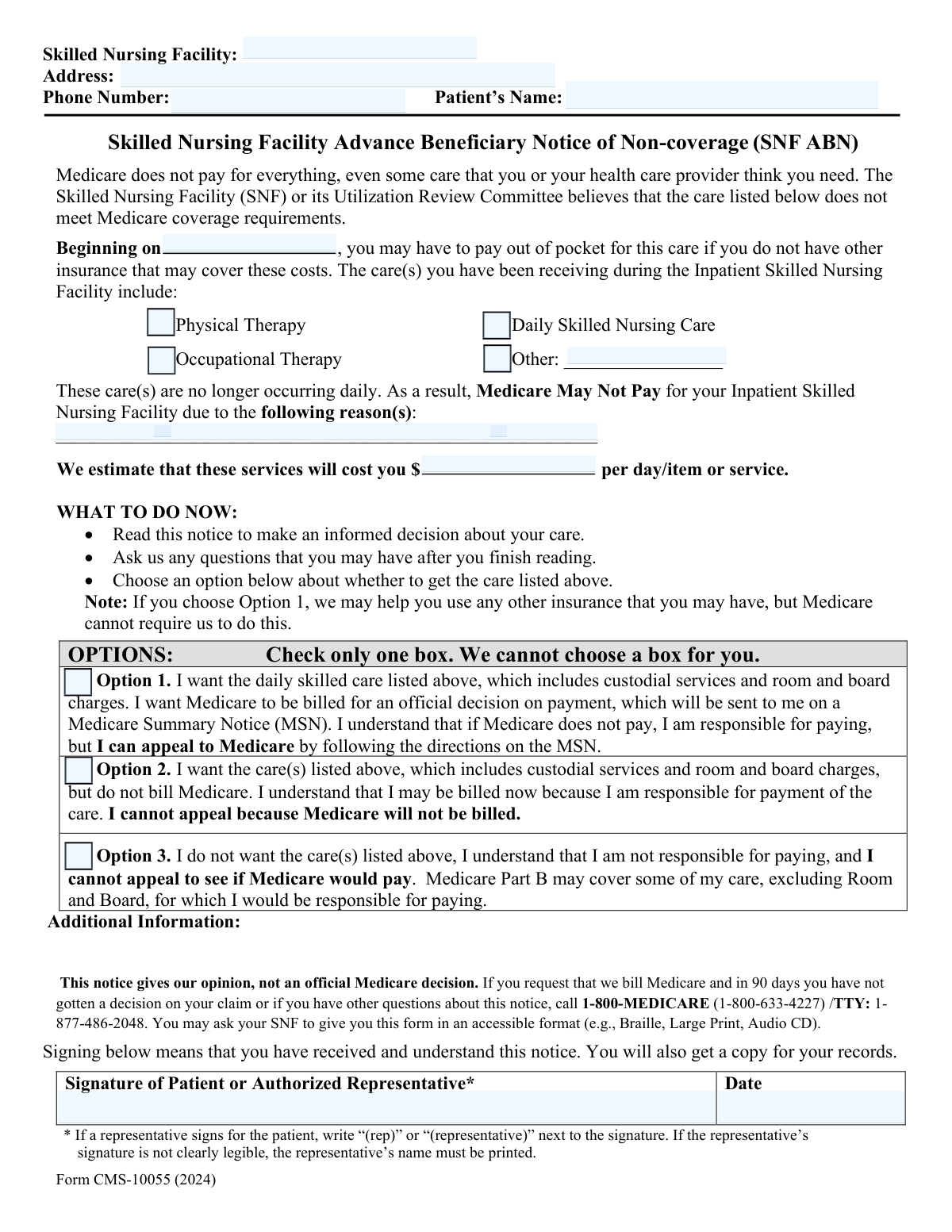
Yes! You can use AI to fill out Form CMS-10055, Skilled Nursing Facility Advance Beneficiary Notice of Noncoverage (SNFABN)

Form CMS-10055, also known as the Skilled Nursing Facility Advance Beneficiary Notice of Noncoverage (SNFABN), is a notice given to a Medicare beneficiary by a skilled nursing facility before providing services that are not expected to be covered by Medicare. This form is important because it allows the patient to make an informed choice about receiving the care and accepting financial responsibility. Today, this form can be filled out quickly and accurately using AI-powered services like Instafill.ai, which can also convert non-fillable PDF versions into interactive fillable forms.
Our AI automatically handles information lookup, data retrieval, formatting, and form filling.
It takes less than a minute to fill out CMS-10055 using our AI form filling.
Securely upload your data. Information is encrypted in transit and deleted immediately after the form is filled out.

Form specifications

Form name: Form CMS-10055, Skilled Nursing Facility Advance Beneficiary Notice of Noncoverage (SNFABN)
Number of fields: 19
Number of pages: 1
Language: English
Categories: beneficiary forms, CMS forms
main-image

Instafill Demo: How to fill out PDF forms in seconds with AI

How to Fill Out CMS-10055 Online for Free in 2026

Are you looking to fill out a CMS-10055 form online quickly and accurately? Instafill.ai offers the #1 AI-powered PDF filling software of 2026, allowing you to complete your CMS-10055 form in just 37 seconds or less.
Follow these steps to fill out your CMS-10055 form online using Instafill.ai:
  1. 1 Navigate to Instafill.ai and upload or select the Form CMS-10055 (SNFABN).
  2. 2 Enter the Skilled Nursing Facility's name, address, and phone number in the provider information section.
  3. 3 Input the patient's full name as it appears on their Medicare card.
  4. 4 Specify the services or care that may not be covered (e.g., Physical Therapy, Daily Skilled Nursing Care), the reason for non-coverage, and the estimated cost.
  5. 5 Select one of the three options to indicate whether you want to receive the care and how it should be billed.
  6. 6 Provide the signature of the patient or their authorized representative and enter the date of signature.
  7. 7 Review all the information for accuracy before downloading, printing, or securely submitting the completed form.

Our AI-powered system ensures each field is filled out correctly, reducing errors and saving you time.

Why Choose Instafill.ai for Your Fillable CMS-10055 Form?

Speed

Complete your CMS-10055 in as little as 37 seconds.

Up-to-Date

Always use the latest 2026 CMS-10055 form version.

Cost-effective

No need to hire expensive lawyers.

Accuracy

Our AI performs 10 compliance checks to ensure your form is error-free.

Security

Your personal information is protected with bank-level encryption.

Frequently Asked Questions About Form CMS-10055

This form is a notice from a Skilled Nursing Facility to inform you that Medicare is not expected to pay for certain services. It allows you to make an informed decision about whether to receive and pay for that care.

The Skilled Nursing Facility fills in the details about the non-covered services and estimated costs. You, the patient, or your authorized representative must then review the information, select an option, and sign the form.

Option 1 lets you get the care and bill Medicare; you must pay if denied but can appeal. Option 2 means you get the care and pay for it yourself without billing Medicare, waiving appeal rights. Option 3 means you decline to receive the specified services.

The facility must provide a specific medical reason why they believe Medicare will not pay for the services. This is often because the care is considered 'not medically necessary' or is custodial in nature.

The 'Estimated Cost' is the facility's best guess of what you will be charged if Medicare does not pay. The final bill may vary, but this estimate should be reasonably close to the actual cost.

If you choose Option 1 and Medicare denies payment, you will be financially responsible for the bill. However, you will receive a formal denial notice from Medicare which gives you the right to appeal the decision.

Yes, if you are unable to sign, your legally authorized representative can sign on your behalf. They should write '(rep)' or '(representative)' next to their signature to indicate their role.

You should discuss your concerns with the facility staff or your doctor before signing. You are not required to sign the form until you understand the information and your choices.

Physical Therapy focuses on improving movement, strength, and mobility after an injury or illness. Occupational Therapy helps you regain the ability to perform essential daily activities like dressing, eating, and bathing.

The facility will keep the original form and give you a copy for your records. Your care and billing will then proceed according to the option you selected on the form.

Yes, services like Instafill.ai use AI to help you fill out forms accurately and efficiently. These tools can auto-fill your information and guide you through the required fields, saving time and reducing errors.

Simply upload the form to the Instafill.ai platform. The AI will identify all the fields, allowing you to type your information, check the appropriate boxes for your decision, and add an electronic signature.

You can use a service like Instafill.ai to make it fillable. Upload the flat PDF, and the tool will automatically convert it into an interactive form that you can complete and sign on your computer or mobile device.

Compliance CMS-10055
Validation Checks by Instafill.ai

1
Exclusive Option Selection
Validates that the user has selected exactly one choice from 'Option 1', 'Option 2', or 'Option 3'. These options represent mutually exclusive decisions by the patient regarding their care and billing preferences. Selecting zero or more than one option creates ambiguity regarding the patient's intent, thus invalidating the form and preventing submission.
2
Logical Consistency of Signature and Start Dates
Performs a logical comparison to ensure the 'Signature Date' is on or before the 'Non-coverage Start Date'. This is a critical compliance check, as the purpose of the notice is to inform the patient before they receive potentially non-covered services. If the signature date is after the start date, it implies improper notification, and the form will be flagged as invalid.
3
Conditional Requirement for 'Other Care Type'
This check enforces that if the 'Other' care type checkbox is selected, the 'Other Care Type' text field must be filled out. This is crucial for clarity and to ensure the patient understands exactly what 'other' service may not be covered. If 'Other' is checked but the description is empty, the form will be rejected for being incomplete.
4
Care Type Selection Requirement
Ensures that at least one care type checkbox (e.g., Physical Therapy, Occupational Therapy, etc.) is selected. This notice is meant to inform the patient about specific services that may not be covered, so at least one service must be identified. If no care type is selected, the form is incomplete and cannot be submitted as its purpose is undefined.
5
Reason for Non-coverage Completeness
Validates that the 'Reason for Non-coverage' text field is not left blank. This field must clearly explain why Medicare is not expected to pay for the listed services, which is a core component of the notice. An empty reason field makes the notice legally insufficient and will prevent form submission.
6
Valid Estimated Cost Format
Validates that the 'Estimated Cost' field contains a valid, positive numerical value. The patient must be given a good-faith estimate of their potential financial liability to make an informed decision. Submitting text, a negative number, or zero would invalidate the notice, so the system will reject entries that are not a valid cost.
7
Signature Presence Verification
Verifies that the 'Signature of Patient or Authorized Representative' field has been completed. The signature is the patient's or representative's legal acknowledgment of the information provided in the notice. A missing signature renders the entire document invalid, as there is no proof of acknowledgment.
8
Patient's Name Completeness
Validates that the 'Patient's Name' field is not empty. This is a fundamental requirement for identifying the individual to whom the notice applies. A form without a patient name is invalid and cannot be processed or linked to the correct medical record.
9
Skilled Nursing Facility Information Completeness
Validates that both the 'Skilled Nursing Facility Name' and 'Skilled Nursing Facility Address' fields are completed. This information is essential for identifying the provider issuing the notice and for official record-keeping. Incomplete provider information can lead to processing delays or rejection of the form.
10
Valid Phone Number Format
Verifies that the 'Skilled Nursing Facility Phone Number' is entered in a standard, valid format (e.g., (XXX) XXX-XXXX or XXXXXXXXXX). Proper formatting ensures the number is legitimate and can be used for contact if necessary. An invalid format will trigger an error, requiring the user to correct the entry before submission.
11
Valid Date Format for Signature Date
Ensures the 'Signature Date' is entered in a valid and recognizable date format (e.g., MM/DD/YYYY). This check prevents data corruption and ensures the date can be correctly interpreted for legal and processing purposes. An incorrectly formatted date will cause a validation error.
12
Valid Date Format for Non-coverage Start Date
Ensures the 'Non-coverage Start Date' is a valid, correctly formatted date. It also checks that the date is not unreasonably far in the past, as the notice pertains to current or upcoming care. An invalid date format or an illogical date would prevent the user from proceeding, as it's a critical piece of information for both the patient and the payer.

Common Mistakes in Completing CMS-10055

Incomplete or Incorrect Skilled Nursing Facility Information

Users often enter an abbreviated facility name or an incomplete address, assuming the information is already known. This can lead to processing delays and confusion if the form is needed for future billing or appeal correspondence. To avoid this, always enter the full, official name and complete address of the facility as it appears on official documents.

Failing to Specify 'Other' Care Type

A frequent error is checking the 'Other' box for non-covered services but leaving the 'Other Care Type' description field blank. This happens due to oversight or rushing through the form. An incomplete notice is invalid because it doesn't clearly state which services are not covered, requiring the form to be re-issued and delaying the patient's decision-making process. Always provide a clear description of the service if you select the 'Other' checkbox.

Entering an Invalid or Incorrectly Formatted Date

People often enter dates in the wrong format (e.g., DD-MM-YYYY instead of MM/DD/YYYY) or enter an illogical date, such as dating the form after the non-coverage period has already begun. Incorrect dates can create significant billing and compliance issues, potentially invalidating the notice. Always use the MM/DD/YYYY format and ensure the signature date is on or before the non-coverage start date. AI-powered tools like Instafill.ai can automatically format and validate dates to prevent these errors.

Misunderstanding the Options and Waiving Appeal Rights

Patients frequently confuse Option 1 and Option 2, not realizing the significant difference in their appeal rights. Choosing Option 2 means you agree to pay privately and permanently waive your right to have Medicare review the decision, which can be a costly mistake. To avoid this, carefully read each option; choose Option 1 if you want to retain the right to appeal Medicare's decision.

Selecting Multiple or No Options

In a state of confusion or haste, individuals may check more than one option box or forget to select one entirely. This invalidates the form, as the facility has no clear instruction on how to proceed with care and billing. This requires follow-up and correction, delaying a time-sensitive process. Ensure you select only one of the three options that reflects your decision.

Ambiguous Estimated Cost Information

The form may be filled out with a vague or missing estimated cost, or it may lack a unit like 'per day' or 'per item'. This prevents the patient from understanding their potential financial liability, making an informed decision impossible. Before signing, ensure the estimated cost is a specific dollar amount and clearly states the billing unit (e.g., '$200 per day').

Representative Forgets to Indicate Their Status

When an authorized representative signs on behalf of the patient, they often forget to add '(rep)' or '(representative)' next to their signature as instructed. This oversight can call the signature's legal validity into question, creating administrative hurdles for billing and appeals. If signing for someone else, always indicate your representative capacity next to your signature to ensure the form is legally sound.

Using a Nickname Instead of a Full Legal Name

Patients sometimes write their preferred nickname or an incomplete version of their name instead of their full legal name. This can cause a mismatch with official Medicare records, leading to claim processing delays or denials. Always use the full name exactly as it appears on the patient's Medicare card to ensure accurate identification.

Accepting a Vague Reason for Non-Coverage

The 'Reason for Non-coverage' provided by the facility can be filled with jargon or lack specific details, leaving the patient confused. This makes it difficult to make an informed choice about continuing care or to build a case for an appeal. Patients should ask for clarification and a reason written in plain language before signing the form. If the form is a non-fillable PDF, a tool like Instafill.ai can convert it into an interactive version, making it easier to review and manage.
Saved over 80 hours a year

“I was never sure if my IRS forms like W-9 were filled correctly. Now, I can complete the forms accurately without any external help.”

Kevin Martin Green

Your data stays secure with advanced protection from Instafill and our subprocessors

Robust compliance program

Transparent business model

You’re not the product. You always know where your data is and what it is processed for.

ISO 27001, HIPAA, and GDPR

Our subprocesses adhere to multiple compliance standards, including but not limited to ISO 27001, HIPAA, and GDPR.

Security & privacy by design

We consider security and privacy from the initial design phase of any new service or functionality. It’s not an afterthought, it’s built-in, including support for two-factor authentication (2FA) to further protect your account.

Fill out CMS-10055 with Instafill.ai

Worried about filling PDFs wrong? Instafill securely fills form-cms-10055-skilled-nursing-facility-advance-beneficiary-notice-of-noncoverage-snfabn forms, ensuring each field is accurate.