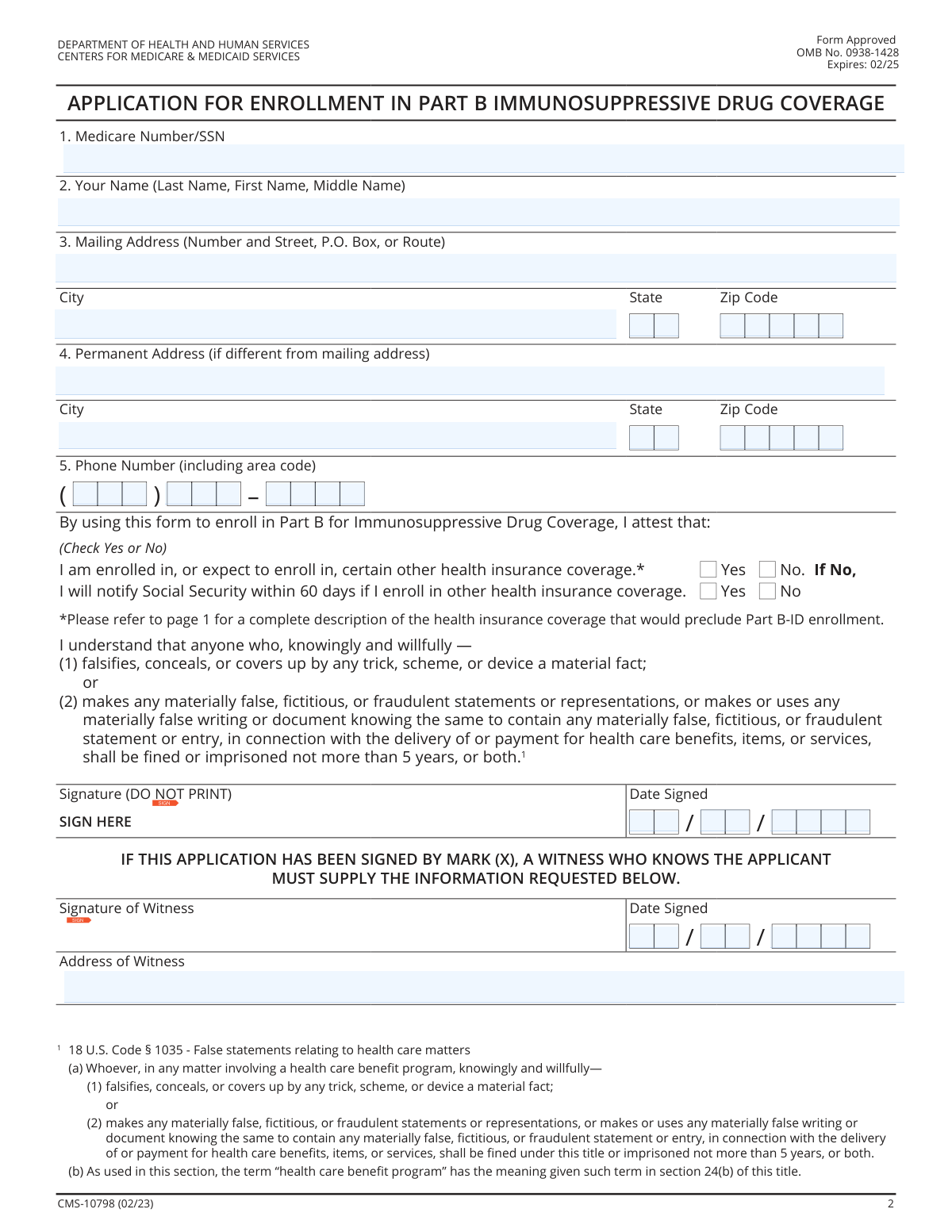
Yes! You can use AI to fill out Form CMS-10798, Application for Enrollment in Part B Immunosuppressive Drug Coverage

Form CMS-10798 is an application submitted to the Centers for Medicare & Medicaid Services (CMS) to enroll in the Part B Immunosuppressive Drug (Part B-ID) benefit. This benefit is crucial for individuals who are losing their Medicare entitlement 36 months after a kidney transplant, as it provides continued coverage solely for essential immunosuppressive drugs. Today, this form can be filled out quickly and accurately using AI-powered services like Instafill.ai, which can also convert non-fillable PDF versions into interactive fillable forms.
CMS-10798 is part of the CMS forms and employment forms categories on Instafill.
CMS-10798 has a basic Form Complexity Index of 40/100 — 26 fillable fields across 2 pages. Instafill’s AI completes it accurately in under a minute.

Form specifications

Form name: Form CMS-10798, Application for Enrollment in Part B Immunosuppressive Drug Coverage
Number of fields: 26
Number of pages: 3
FCI: Basic (40/100)
Language: English
Our AI automatically handles information lookup, data retrieval, formatting, and form filling.
It takes less than a minute to fill out CMS-10798 using our AI form filling.
Securely upload your data. Information is encrypted in transit and deleted immediately after the form is filled out.
Preview of Form CMS-10798, Application for Enrollment in Part B Immunosuppressive Drug Coverage

Instafill Demo: How to fill out PDF forms in seconds with AI

How to Fill Out CMS-10798 Online for Free in 2026

Are you looking to fill out a CMS-10798 form online quickly and accurately? Instafill.ai offers the #1 AI-powered PDF filling software of 2026, allowing you to complete your CMS-10798 form in just 37 seconds or less.
Follow these steps to fill out your CMS-10798 form online using Instafill.ai:
  1. 1 Navigate to Instafill.ai and upload your copy of Form CMS-10798, or select it from the platform's template library.
  2. 2 Provide your personal details, including your name, address, phone number, and Medicare or Social Security Number. The AI can assist by pre-filling information from your secure profile.
  3. 3 Answer the attestation questions regarding your enrollment status in other health insurance plans, checking 'Yes' or 'No' as applicable.
  4. 4 Carefully review all the information automatically populated by the AI to ensure it is accurate and complete.
  5. 5 Electronically sign and date the application in the designated signature field to certify your statements.
  6. 6 Download the completed, signed form and submit it to the Social Security Administration office listed in the form's instructions.

Our AI-powered system ensures each field is filled out correctly, reducing errors and saving you time.

Why Choose Instafill.ai for Your Fillable CMS-10798 Form?

Speed

Complete your CMS-10798 in as little as 37 seconds.

Up-to-Date

Always use the latest 2026 CMS-10798 form version.

Cost-effective

No need to hire expensive lawyers.

Accuracy

Our AI performs 10 compliance checks to ensure your form is error-free.

Security

Your personal information is protected with bank-level encryption.

Frequently Asked Questions About CMS-10798

CMS-10798 has a Form Complexity Index of 40 out of 100, placing it in the basic complexity tier. This score is calculated deterministically from the form’s own structure using Instafill’s published Form Complexity Index methodology, so it can be reproduced and independently verified — it is not a subjective estimate.

For CMS-10798 specifically, the score reflects 26 fillable fields across 2 pages, grouped into 10 sections, and 2 conditional fields that only apply depending on earlier answers, plus 1 page of printed instructions. The number of fields is the largest factor in the base score (weighted 36%), followed by how difficult those fields are to complete based on their type, where free-text and signature fields count for more than simple checkboxes (26%). The number of pages that actually contain fields (15%), the amount of conditional “fill-only-if” logic (16%), and how many sections the form is divided into (7%) account for the rest of the base. On top of that base, the index adds points for tables and repeating lists, bundled instruction pages, and dense page layouts — capturing difficulty the base alone can miss.

In practical terms, a basic score means the form is relatively light, but still needs careful, accurate entry. Instafill removes that effort entirely: our AI reads your information, maps each value to the correct field — including the conditional ones — and completes CMS-10798 accurately in under a minute, with every field available for you to review before you download. See exactly how the Form Complexity Index is calculated.

This form is an application to enroll in Medicare Part B Immunosuppressive Drug Coverage (Part B-ID). This benefit is specifically for covering the cost of immunosuppressive drugs after your regular Medicare coverage ends post-kidney transplant.

You are eligible if you had a kidney transplant, were entitled to Medicare based on End-Stage Renal Disease (ESRD), and are losing that Medicare entitlement 36 months after the transplant. You must not have other disqualifying health coverage.

You are not eligible if you have an Employer or Individual Health Plan, TRICARE for Life, VA benefits for these drugs, or a Medicaid/CHIP plan that already covers immunosuppressive drugs. You must report getting any of these coverages to Social Security within 60 days.

To fill out this form, you will need the applicant's Medicare Number or Social Security Number, their current mailing address, and a phone number.

You can apply as early as two months before your ESRD-based Medicare coverage terminates, or any time after it has ended. Your Part B-ID coverage will begin the month after your Medicare terminates or the month after you enroll, depending on when you apply.

You should mail the completed and signed form to the Social Security Administration Office of Central Operations, PO Box 32914, Baltimore, Maryland 21298. You can also apply over the phone by calling 1-877-465-0355.

You can only apply if your Medicaid or State Children’s Health Insurance Program (CHIP) plan does not cover immunosuppressive drugs. If your plan already provides this coverage, you are not eligible for the Part B-ID benefit.

You must notify the Social Security Administration (SSA) within 60 days of enrolling in other disqualifying health insurance. This new coverage will likely make you ineligible to continue receiving the Part B-ID benefit.

For assistance, you can call the Social Security Administration at 1-800-772-1213 (TTY users can call 1-800-325-0778) or contact your local Social Security field office.

Yes, services like Instafill.ai use AI to help you accurately auto-fill forms like this one from your saved information, which can save time and reduce errors.

You can use a service like Instafill.ai to complete the form online. Simply upload the PDF, and the platform will allow you to type your information directly into the fields before printing it for signature and submission.

If you have a non-fillable or 'flat' PDF, you can use a tool like Instafill.ai. It can convert the document into an interactive, fillable form, making it easy to complete on your computer.

The form does not specify an average processing time. For information on the status of your application, you should contact the Social Security Administration directly at the number provided on the form.

Compliance CMS-10798
Validation Checks by Instafill.ai

1
Medicare/SSN Format Validation
This check verifies that the value entered in the 'Medicare Number/SSN' field conforms to the standard format of either a 9-digit Social Security Number (XXX-XX-XXXX) or an 11-character Medicare Beneficiary Identifier. This is critical for accurately identifying the applicant within government systems. If the format is invalid, the system cannot look up the applicant's records, causing the application to be rejected at the initial stage.
2
Applicant Name Completeness
Ensures that the 'First Name' and 'Last Name' fields for the applicant are not empty. A full name is a fundamental requirement for legal identification and for matching the application to existing records or creating a new one. An application without a name is unusable and will be rejected for being incomplete.
3
Mailing Address Completeness
This validation confirms that all components of the mailing address, including 'Street', 'City', 'State', and 'Zip Code', are filled out. This address is essential for sending all official correspondence, such as approval notices, denial letters, or requests for more information. An incomplete address will halt processing and may lead to the application being returned.
4
Zip Code Format
Validates that the 'Mailing Zip Code' and 'Permanent Zip Code' (if provided) are in a valid 5-digit or 9-digit (ZIP+4) numeric format. This is crucial for ensuring the U.S. Postal Service can deliver mail to the applicant. An incorrect format can lead to returned mail, significant delays, and potential loss of benefits.
5
Conditional Permanent Address Validation
This check is triggered if any part of the 'Permanent Address' is filled out. It ensures that all fields in that section (Street, City, State, Zip Code) are completed. This rule prevents the submission of a partial, unusable address which could cause data entry errors or confusion. An incomplete permanent address will generate an error, requiring the user to either complete the section or clear it entirely.
6
Phone Number Format and Completeness
Verifies that the phone number is composed of a 3-digit area code, a 3-digit prefix, and a 4-digit line number, and that all parts are numeric. This contact information is important in case a representative needs to contact the applicant for additional information. An invalid or incomplete number hinders communication and can delay the application if questions arise.
7
Health Coverage Attestation Requirement
Confirms that the applicant has selected either 'Yes' or 'No' for the question 'I am enrolled in, or expect to enroll in, certain other health insurance coverage.' This is a mandatory, critical eligibility question. The application cannot be evaluated without a response, as having other coverage may disqualify the applicant.
8
Eligibility Logic for Other Health Coverage
This validation implements a critical business rule based on the applicant's attestation about other health coverage. If the applicant checks 'Yes', the application should be flagged for immediate review or potential rejection, as the form explicitly states this is an exclusion criterion. This check enforces the statutory eligibility requirements for the Part B-ID benefit and prevents ineligible applications from being processed further.
9
Conditional Notification Agreement Logic
This check ensures that if an applicant selects 'No' for having other health coverage, they must then select 'Yes' for the follow-up statement agreeing to notify Social Security of future coverage. This confirms the applicant understands and accepts their ongoing reporting responsibilities. Answering 'No' to the second part indicates a refusal to comply with program rules and should result in the application being rejected.
10
Signature Presence
Verifies that the applicant's signature field contains a signature. A signature legally attests that the information provided is true and that the applicant understands the penalties for fraud. An unsigned application is not legally binding and will be considered incomplete and returned to the applicant.
11
Valid Signature Date
Checks that the 'Date Signed' is a complete and valid calendar date that is not in the future. This date is legally significant as it establishes the official submission timeline and can impact the enrollment effective date. An invalid or future date will cause the application to be rejected for correction.
12
Witness Information Completeness
This validation is triggered if the applicant's signature is made by a mark ('X'). It ensures that the 'Signature of Witness', the witness's signature date, and the 'Address of Witness' fields are all filled out completely. This is a legal requirement to validate a signature by mark, and failure to provide this information will render the application invalid.
13
State Abbreviation Validation
Ensures the value entered in the 'State' fields for both mailing and permanent addresses is a valid two-letter U.S. state or territory abbreviation. This promotes data consistency and is essential for address verification systems. An invalid state code would cause address validation to fail and could result in undeliverable mail.
14
Form Expiration Check
This is a system-level check to verify that the application is being submitted before the form's expiration date (02/25 as printed on the form). Government forms are periodically updated, and submitting an outdated version may lead to rejection as requirements or data fields may have changed. This check ensures compliance with current agency procedures.

Common Mistakes in Completing CMS-10798

Applying While Ineligible Due to Other Health Coverage

Applicants mistakenly fill out this form despite having other health coverage that excludes them from the Part B-ID benefit, such as an employer plan, TRICARE, or VA benefits. This happens because they overlook the detailed exclusions on page 1. Submitting an application when ineligible wastes time and resources, and will result in a denial of the benefit. To avoid this, carefully review the 'ARE THERE STATUTORY EXCLUSIONS?' section before starting the application.

Incorrectly Attesting Health Insurance Status

A critical error is checking 'No' to having other health insurance when the applicant actually has a disqualifying plan. This may be an honest mistake due to misunderstanding the rules, but it is a false attestation with potential legal consequences, as highlighted by the fraud warning on the form. This can lead to application rejection or future termination of benefits. Always verify your current and expected insurance against the list of excluded coverage on page 1 before answering this question.

Skipping the Conditional Notification Agreement

The form has a two-part attestation. If an applicant correctly checks 'No' for having other health insurance, they must then answer the follow-up question agreeing to notify Social Security of future coverage changes. People often miss this second step, leaving the application incomplete. An incomplete attestation will halt the enrollment process, causing delays until the form is corrected and resubmitted. Ensure you answer both questions in the attestation section if you do not have other coverage.

Entering an Invalid or Incorrect Identifier

Applicants may accidentally transpose digits in their Medicare Number or Social Security Number (SSN), or leave the field blank entirely. This error prevents the Social Security Administration (SSA) from locating the applicant's record, leading to immediate processing delays or rejection. To prevent this, carefully transcribe the number from your official card. AI-powered form fillers like Instafill.ai can help by storing and accurately populating this information, reducing the risk of manual entry errors.

Reversing the Name Format

The form explicitly requests the name in 'Last Name, First Name, Middle Name' order, but it's common for people to default to a 'First, Middle, Last' format. This formatting error can cause data entry issues and potential mismatches in government systems, delaying the application. Always follow the specified format exactly as written in the field instructions to ensure your record is processed correctly.

Omitting the Permanent Address When Different

Applicants who use a P.O. Box or mailing address different from their physical residence often forget to fill out the 'Permanent Address' section. This missing information can be critical for residency verification and can cause important documents to be misdirected, delaying the application process. If your permanent home address is not the same as your mailing address, you must complete both sections 3 and 4.

Printing a Name in the Signature Field

The signature line explicitly states 'Signature (DO NOT PRINT),' yet many applicants print their name out of habit. A printed name is not a legal signature and will invalidate the application, requiring the applicant to be contacted to re-sign the form. This simple mistake can add weeks to the enrollment timeline. Always provide a cursive signature in the designated box.

Forgetting or Incorrectly Formatting the Signature Date

Submitting a signed application without a date is a frequent oversight. The signature date is essential as it establishes the official application date, which affects when coverage begins. An undated form is considered incomplete and will be returned or delayed. Ensure you enter the current month, day, and year at the time of signing. Using a tool like Instafill.ai can help by automatically inserting the current date in the correct format.

Illegible Handwriting on a Printed Form

When filling out a paper copy, poor or unclear handwriting can make names, addresses, and numbers unreadable to the processing agent. This leads to data entry errors, which can result in a rejected application, misdirected mail, or incorrect information being entered into the system. To avoid this, print clearly in block letters. Alternatively, AI tools like Instafill.ai can convert flat, non-fillable PDFs into interactive forms, allowing you to type your information for perfect legibility.

Improper Use of the Witness Section

The witness section is only required if the applicant is unable to sign their name and instead uses a mark (X). Common mistakes include having a witness sign unnecessarily, or, when required, the witness failing to provide their own signature, date, and full address. Either error can cause processing delays. Only use the witness section if the applicant signs with a mark, and ensure all witness information is complete.
Saved over 80 hours a year

“I was never sure if my IRS forms like W-9 were filled correctly. Now, I can complete the forms accurately without any external help.”

Kevin Martin Green

Your data stays secure with advanced protection from Instafill and our subprocessors

Robust compliance program

Transparent business model

You’re not the product. You always know where your data is and what it is processed for.

ISO 27001, HIPAA, and GDPR

Our subprocesses adhere to multiple compliance standards, including but not limited to ISO 27001, HIPAA, and GDPR.

Security & privacy by design

We consider security and privacy from the initial design phase of any new service or functionality. It’s not an afterthought, it’s built-in, including support for two-factor authentication (2FA) to further protect your account.

Fill out CMS-10798 with Instafill.ai

Worried about filling PDFs wrong? Instafill securely fills form-cms-10798-application-for-enrollment-in-part-b-immunosuppressive-drug-coverage forms, ensuring each field is accurate.

Related forms by category

CMS forms CMS-1500 (02-12), Health Insurance Claim Form (NUCC Approved) (OMB 0938-1197), Form CMS L564, Request for Employment Info, Form CMS-10114, NPI Application/Update, Form CMS-588, EFT Authorization Agreement, Form CMS-460, Medicare Participation Agreement, Form CMS-4040, Request for Enrollment in Medicare Part B, Form CMS-2567, Statement of Deficiencies, Form CMS-1763, Request for Termination of Medicare Coverage, Form CMS-116, CLIA Application, Form CMS-855O, Medicare Enrollment Application, Form CMS-40B, Application for Enrollment in Medicare Part B, Form CMS-1763, Request for Termination, Form CMS-588, Electronic Funds Transfer (EFT) Authorization Agreement, CMS-855I, Medicare Enrollment Application for Physicians and Non-Physician Practitioners, Form CMS-855R, Medicare Enrollment Application - Reassignment of Medicare Benefits, CMS-855R, Medicare Enrollment Application: Reassignment of Medicare Benefits, CMS-855R, Medicare Enrollment Application: Reassignment of Medicare Benefits, Form CMS-855O, Medicare Enrollment Application for Eligible Ordering, Certifying and Prescribing Physicians and Other Eligible Professionals, Medicare Enrollment Application for Durable Medical Equipment, Prosthetics, Orthotics, and Supplies (DMEPOS) Suppliers, CMS-855S, Form CMS-855I, Medicare Enrollment Application for Physicians and Non-Physician Practitioners · + 41 more →
employment forms Form I-765, Application for Employment Authorization, Form CMS L564, Request for Employment Info, Form OF-306, Declaration for Federal Employment, Form NYS DHR, Employment Complaint Form, Form AO 78, Application for Employment, Illinois State Board of Education (ISBE) Application for Employment (ISBE 61-08), Form SS-8 (Rev. December 2023), Determination of Worker Status for Purposes of Federal Employment Taxes and Income Tax Withholding, Prudential Group Disability Insurance – Education and Employment History Form (GL.2009.009, Ed. 06/2017), HR-Pol-Rec&Res-04 Employment Application Form (Recruitment of Permanent Employees), City of Carlinville Application for Employment (An Equal Opportunity Employer), U.S. Equal Employment Opportunity Commission (EEOC) Form 453, Recommendation for Recognition, The Prudential Insurance Company of America Group Disability Insurance – Education and Employment History Form (GL.2009.009, Ed. 06/2017), St. Paul’s Hospital Application for Employment (職位申請表) – SPHF-HRD-035, U.S. Equal Employment Opportunity Commission (EEOC) Form 453, Recommendation for Recognition, Prudential Group Disability Insurance – Education and Employment History Form (GL.2009.009, Ed. 06/2017), Claim for Special Employment Advance (SU514), New York State Employment Application: Part 1 – Pre-Interview (Form #S1000), New York State Employment Application Form, Sidney Sussex College Cambridge, Application for Employment, Z83, Application for Employment in the Republic of South Africa Government Department · + 35 more →