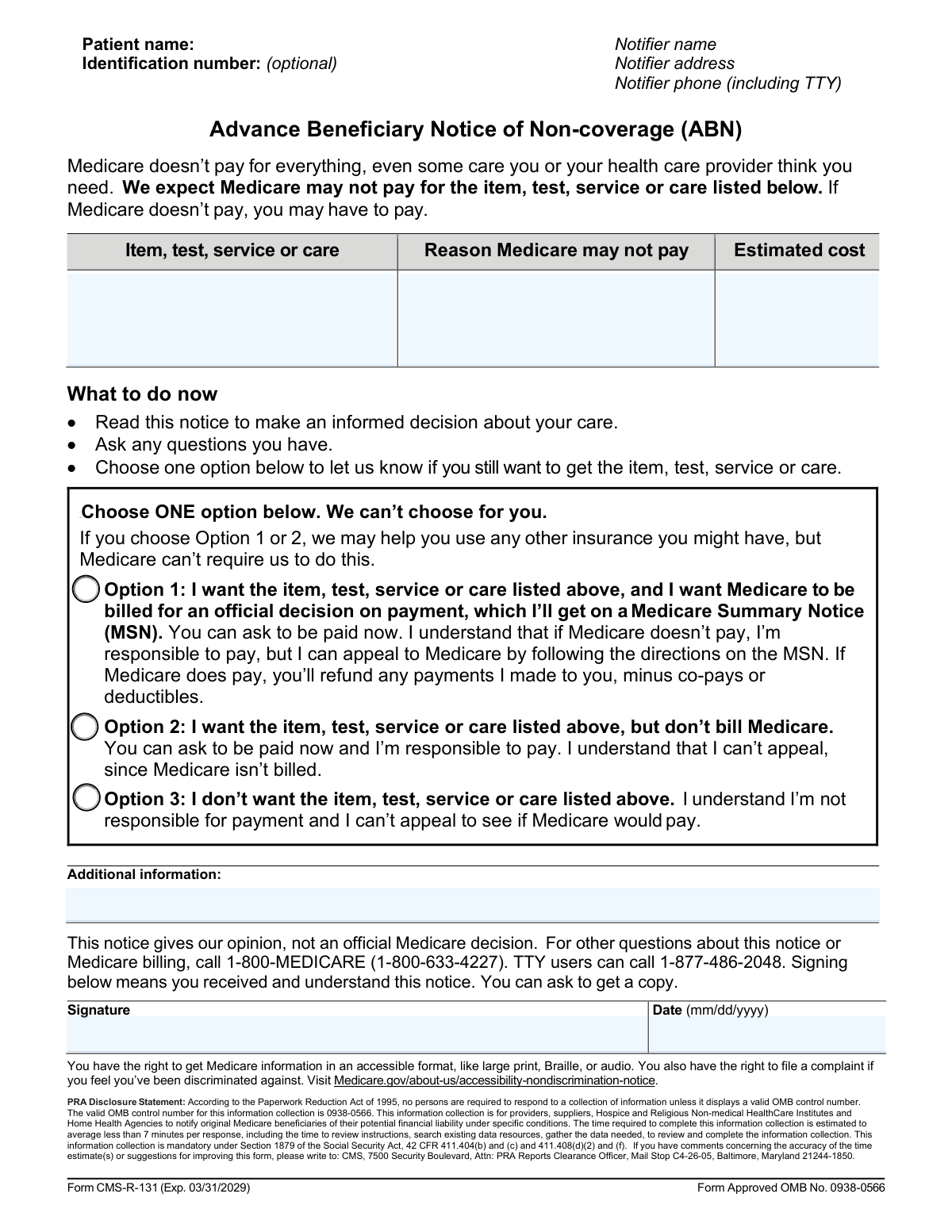
Yes! You can use AI to fill out Form CMS-R-131, Advance Beneficiary Notice of Noncoverage (ABN)

Form CMS-R-131, the Advance Beneficiary Notice of Noncoverage (ABN), is a critical document issued by providers to Original Medicare beneficiaries when they believe Medicare will not pay for a specific item or service. It allows the patient to make an informed decision about receiving the care and accepting financial responsibility, thereby protecting them from unexpected medical bills. Today, this form can be filled out quickly and accurately using AI-powered services like Instafill.ai, which can also convert non-fillable PDF versions into an interactive fillable form.
CMS-R-131 is part of the beneficiary forms and CMS forms categories on Instafill.
Our AI automatically handles information lookup, data retrieval, formatting, and form filling.
It takes less than a minute to fill out CMS-R-131 using our AI form filling.
Securely upload your data. Information is encrypted in transit and deleted immediately after the form is filled out.

Form specifications

Form name: Form CMS-R-131, Advance Beneficiary Notice of Noncoverage (ABN)
Number of fields: 9
Number of pages: 1
Filled form examples: Form CMS-R-131 Examples
Language: English
main-image

Instafill Demo: How to fill out PDF forms in seconds with AI

How to Fill Out CMS-R-131 Online for Free in 2026

Are you looking to fill out a CMS-R-131 form online quickly and accurately? Instafill.ai offers the #1 AI-powered PDF filling software of 2026, allowing you to complete your CMS-R-131 form in just 37 seconds or less.
Follow these steps to fill out your CMS-R-131 form online using Instafill.ai:
  1. 1 Navigate to Instafill.ai and upload or select the Advance Beneficiary Notice of Noncoverage (ABN) form.
  2. 2 Review the provider's information and the specific items, tests, or services listed that Medicare may not cover.
  3. 3 Carefully read the 'Reason Medicare May Not Pay' and the 'Estimated Cost' sections to understand your potential financial liability.
  4. 4 Choose one of the three options to indicate your decision: whether you want the services and want Medicare billed, want the services but don't want Medicare billed, or if you decline the services entirely.
  5. 5 Provide your digital signature and enter the current date to certify that you have received and understood the notice.
  6. 6 Review all the information for accuracy, then use the platform to finalize and securely save the completed ABN form for your records and for the provider.

Our AI-powered system ensures each field is filled out correctly, reducing errors and saving you time.

Why Choose Instafill.ai for Your Fillable CMS-R-131 Form?

Speed

Complete your CMS-R-131 in as little as 37 seconds.

Up-to-Date

Always use the latest 2026 CMS-R-131 form version.

Cost-effective

No need to hire expensive lawyers.

Accuracy

Our AI performs 10 compliance checks to ensure your form is error-free.

Security

Your personal information is protected with bank-level encryption.

Frequently Asked Questions About Form CMS-R-131

This is an Advance Beneficiary Notice (ABN). You received it because your healthcare provider believes Medicare is likely to deny payment for a specific item or service they are recommending for you.

Your provider fills out the top portion with the service details, the reason for potential denial, and the estimated cost. You, the patient, are responsible for choosing one of the three options, signing, and dating the form.

Option 1 means you want the service and want Medicare billed, so you can appeal if they deny it. Option 2 means you want the service but will pay for it yourself without billing Medicare. Option 3 means you decline the service entirely.

If you choose Option 1, you will receive the service and your provider will bill Medicare. If Medicare denies payment, you will be financially responsible for the estimated cost, but you will have the right to appeal Medicare's decision.

No, if you choose Option 2, you agree to pay for the service yourself and Medicare will not be billed. Because no claim is filed, you give up your right to appeal or seek reimbursement from Medicare for this specific service.

If you decide against receiving the item or service, you should check the box for Option 3. By doing so, you will not receive the service, you will not be responsible for any payment, and you will not have appeal rights since no service was provided.

The 'Estimated Cost' is the provider's best guess of what you will owe if Medicare does not pay. The final amount should be close to this estimate, but it is not guaranteed to be the exact final cost.

You must sign and choose an option for the provider to proceed. If you refuse to sign, your provider may decide not to provide the service, or they may require you to pay for it in full at the time of service.

After you sign the form, your provider will keep the original and give you a copy for your records. You do not need to send it anywhere; your provider handles the next steps based on the option you selected.

Medicare might not pay if they do not consider the service medically necessary, if it's an experimental treatment, or if you've exceeded your benefit limits for that type of care. The specific reason should be written on the form by your provider.

Yes, services like Instafill.ai use AI to help you manage and complete forms. You can use it to digitally check your option, sign, and date the form, making the process quicker and ensuring you have a digital copy.

Upload the ABN form to Instafill.ai, and the platform will make it interactive. You can then easily check your preferred option, type your name in the signature field, and add the date before saving or printing your completed copy.

If you have a non-fillable or 'flat' PDF, you can use a service like Instafill.ai. It can convert the non-fillable PDF into an interactive form that you can complete and sign digitally from your computer or phone.

Compliance CMS-R-131
Validation Checks by Instafill.ai

1
Single, Mandatory Option Selection
This validation ensures that the user has selected exactly one choice from the three available options (Option 1, 2, or 3). These options are mutually exclusive, and one must be chosen to document the beneficiary's decision. The form is considered invalid if zero or more than one option is checked, as this creates ambiguity about the patient's intent and prevents clear action.
2
Item Description Completeness
Checks that the 'Item, test, service or care' field is not empty. This field is crucial because the entire notice is about a specific service, and without its description, the form is meaningless for all parties involved. A failure would prevent submission and prompt the user to provide a description of the service being considered.
3
Reason for Non-Payment Completeness
Verifies that the 'Reason Medicare may not pay' field contains text explaining why coverage is in question. This explanation is a required component to ensure the beneficiary is making a fully informed decision. If this field is empty, the notice is incomplete and cannot be considered valid informed consent, blocking form submission.
4
Estimated Cost Format Validation
Ensures the 'Estimated cost' field contains a valid numeric or currency value, allowing for decimals. This is critical for the beneficiary to understand their potential financial liability and make an informed decision. An invalid entry, such as alphabetic text, would be rejected and the user would be prompted to enter a valid number.
5
Conditional Estimated Cost Presence
Checks that the 'Estimated cost' is provided if the beneficiary chooses either Option 1 (want service, bill Medicare) or Option 2 (want service, don't bill Medicare). The cost is a primary factor in these decisions, and its absence would mean the choice is not fully informed. If the cost is missing for these options, the form submission should be blocked until the cost is entered.
6
Signature Completeness
Validates that the 'Signature' field is not empty if one of the decision options has been selected. A signature is the legal attestation that the beneficiary has received, understood, and made a decision based on the notice. An unsigned form representing a decision is legally invalid and cannot be processed.
7
Signature Date Completeness
Ensures the 'Signature date' field is not empty when a decision is made and the form is signed. The date is essential for establishing when the beneficiary was notified, which is critical for billing cycles, appeals timelines, and auditing purposes. A missing date creates legal and administrative ambiguity and would halt submission.
8
Signature Date Format Validation
Checks that the value entered in the 'Signature date' field is a recognizable and valid date format (e.g., MM/DD/YYYY). This validation ensures data integrity and allows for proper record-keeping and chronological tracking in the system. An invalid format like 'yesterday' or '13/45/2023' would be rejected to maintain system accuracy.
9
Signature Date Chronology Check
Verifies that the 'Signature date' is not a date set in the future. A signature attests to an action that has already occurred, so a future date is logically impossible and indicates a user error or invalid entry. The submission must be rejected and the user prompted to enter a current or past date.
10
Positive Estimated Cost
Verifies that the 'Estimated cost' entered is a positive number greater than zero. A negative or zero cost is illogical in the context of potential patient liability and indicates a data entry error. This check maintains the financial integrity of the information presented to the beneficiary.
11
Item Description Minimum Length
Validates that the 'Item, test, service or care' field contains a reasonably descriptive entry, for example, more than 5 characters. This prevents vague or useless entries like 'a' or 'test,' ensuring the record is clear about what service was discussed. A failure would prompt the user for a more specific description.
12
Reason for Non-Payment Minimum Length
Ensures the 'Reason Medicare may not pay' field has a minimum character count to encourage a clear, sufficient explanation. A one-word reason may not be adequate for the beneficiary to understand the complex coverage issue. This check helps ensure the provider is fulfilling their duty to properly inform the patient.

Common Mistakes in Completing CMS-R-131

Failing to Select a Decision Option

Patients often sign the form but forget to check one of the three decision boxes (Option 1, 2, or 3). This makes the form incomplete, as the provider does not have a clear directive on how to proceed with the service and billing. This oversight will halt the process until the form is corrected, delaying care and creating administrative work.

Confusing Appeal Rights Between Option 1 and Option 2

A critical mistake is failing to understand the difference in appeal rights between Option 1 and Option 2. Choosing Option 2 ('don’t bill Medicare') means you accept full financial responsibility and permanently waive your right to appeal the cost. Option 1 preserves your right to an official Medicare decision and subsequent appeal, which is a crucial protection.

Missing Signature or Signature Date

Forgetting to sign or date the form is one of the most common errors, which renders the document legally invalid. An unsigned or undated notice means the provider cannot prove the patient was properly notified of their potential financial liability. This can cause significant billing and administrative delays until a properly executed form is obtained.

Overlooking Vague Service Descriptions

Patients may not scrutinize the 'Item, test, service or care' description provided by the healthcare staff, which can sometimes be vague. This can lead to confusion later about what exactly they agreed to receive and pay for if the description is not specific. Always ask for clarification if the service description is not crystal clear.

Selecting Multiple Conflicting Options

In a state of confusion or haste, a patient might check more than one box, such as both Option 1 and Option 2. This invalidates the form because the choices are mutually exclusive, leading to delays in care and billing confusion. The form requires a single, unambiguous decision to be legally binding.

Misinterpreting the 'Estimated Cost'

A common error is treating the 'Estimated cost' as a final, fixed bill instead of an approximation. This can lead to financial surprise if the actual cost varies. Patients should understand this is an estimate and use it to make an informed financial decision before choosing an option.

Entering an Invalid or Incorrect Date

Patients sometimes enter the date in a non-standard format, use a future date, or write a date that doesn't match the day of the appointment. The signature date must accurately reflect when the notice was received and signed to be valid for compliance purposes. AI-powered form filling tools like Instafill.ai can help prevent this by automatically inserting the current date in the correct format.

Not Understanding the Reason for Potential Non-Coverage

Patients often skim over the technical language in the 'Reason Medicare may not pay' section. Failing to understand this reason, such as 'service not medically necessary' or 'frequency limit exceeded,' prevents them from making a truly informed choice. It is important to ask the provider to explain this section in plain language.

Accidentally Declining Necessary Care

When feeling overwhelmed by the form, some patients might mistakenly check Option 3, declining the service altogether when they actually want it. This can result in not receiving a medically recommended test or treatment. It is vital to pause and carefully re-read the selected option before signing the form.

Illegible Handwriting on a Printed Form

When a form is only available as a non-fillable PDF, patients must print and fill it out by hand, which can lead to illegible entries. This can cause data entry errors by the provider's staff, leading to billing mistakes or incorrect service records. Advanced tools like Instafill.ai can convert non-fillable PDFs into easy-to-use fillable forms, preventing handwriting errors.

Failing to Keep a Copy of the Signed Form

After filling out the form, many patients forget to ask for or keep a copy for their personal records. This copy is essential proof of the decision made and the estimated costs discussed. It is crucial for reference in case of future billing disputes or questions about the service.
Saved over 80 hours a year

“I was never sure if my IRS forms like W-9 were filled correctly. Now, I can complete the forms accurately without any external help.”

Kevin Martin Green

Your data stays secure with advanced protection from Instafill and our subprocessors

Robust compliance program

Transparent business model

You’re not the product. You always know where your data is and what it is processed for.

ISO 27001, HIPAA, and GDPR

Our subprocesses adhere to multiple compliance standards, including but not limited to ISO 27001, HIPAA, and GDPR.

Security & privacy by design

We consider security and privacy from the initial design phase of any new service or functionality. It’s not an afterthought, it’s built-in, including support for two-factor authentication (2FA) to further protect your account.

Fill out CMS-R-131 with Instafill.ai

Worried about filling PDFs wrong? Instafill securely fills form-cms-r-131-advance-beneficiary-notice-of-noncoverage-abn forms, ensuring each field is accurate.