Yes! You can use AI to fill out Form TXR-1501, Buyer/Tenant Representation Agreement - Long Form

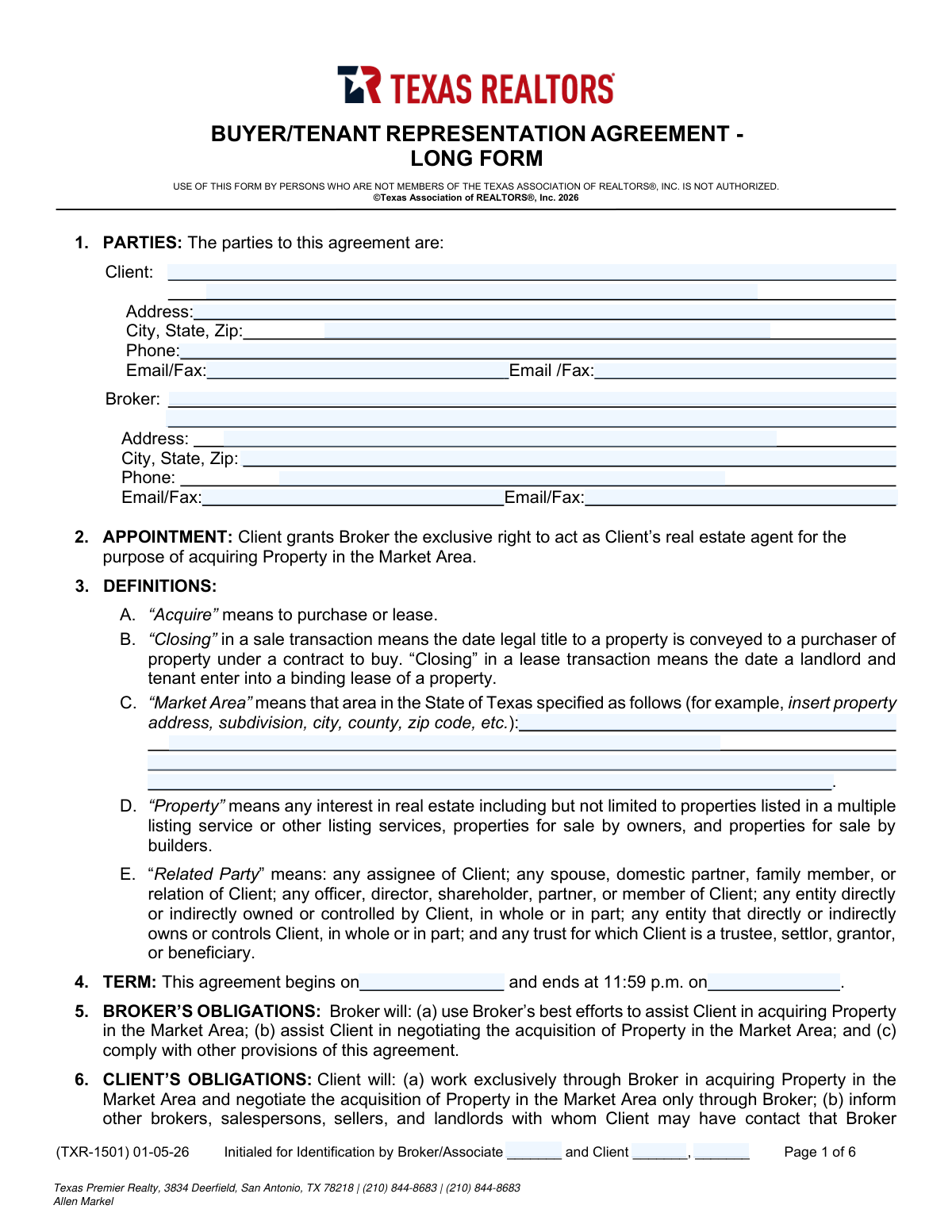
Form TXR-1501 is a legally binding agreement from the Texas Association of REALTORS® that grants a real estate broker the exclusive right to represent a client (a buyer or tenant) in acquiring property within a specified market area and time frame. It details the obligations of both the broker and the client, outlines the broker's compensation structure, and addresses important legal considerations like intermediary status and confidentiality. Today, this form can be filled out quickly and accurately using AI-powered services like Instafill.ai, which can also convert non-fillable PDF versions into interactive fillable forms.
TXR-1501 is part of the CMS forms and employment forms categories on Instafill.
TXR-1501 has a moderate Form Complexity Index of 49/100 — 83 fillable fields across 6 pages. Instafill’s AI completes it accurately in under a minute.

Form specifications

Form name: Form TXR-1501, Buyer/Tenant Representation Agreement - Long Form
Number of fields: 83
Number of pages: 6
FCI: Moderate (49/100)
Language: English
Our AI automatically handles information lookup, data retrieval, formatting, and form filling.
It takes less than a minute to fill out TXR-1501 using our AI form filling.
Securely upload your data. Information is encrypted in transit and deleted immediately after the form is filled out.
Preview of Form TXR-1501, Buyer/Tenant Representation Agreement - Long Form

Instafill Demo: How to fill out PDF forms in seconds with AI

How to Fill Out TXR-1501 Online for Free in 2026

Are you looking to fill out a TXR-1501 form online quickly and accurately? Instafill.ai offers the #1 AI-powered PDF filling software of 2026, allowing you to complete your TXR-1501 form in just 37 seconds or less.
Follow these steps to fill out your TXR-1501 form online using Instafill.ai:
  1. 1 Navigate to Instafill.ai and upload or select the TXR-1501 Buyer/Tenant Representation Agreement.
  2. 2 Use the AI assistant to accurately input the full details for both the Client and the Broker in Section 1, including names, addresses, and contact information.
  3. 3 Define the scope of the agreement by specifying the 'Market Area' in Section 3 and the 'Term' (start and end dates) in Section 4.
  4. 4 Complete Section 7 to detail the Broker's compensation, including the fee structure for purchases or leases, any retainer, and the protection period.
  5. 5 Indicate the client's preference for 'Intermediary Status' in Section 9 by checking the appropriate box.
  6. 6 Review all entered information, including any special provisions or addenda, with the help of the AI to ensure accuracy and completeness.
  7. 7 Electronically sign and date the agreement, along with the broker or broker's associate, to execute the contract.

Our AI-powered system ensures each field is filled out correctly, reducing errors and saving you time.

Why Choose Instafill.ai for Your Fillable TXR-1501 Form?

Speed

Complete your TXR-1501 in as little as 37 seconds.

Up-to-Date

Always use the latest 2026 TXR-1501 form version.

Cost-effective

No need to hire expensive lawyers.

Accuracy

Our AI performs 10 compliance checks to ensure your form is error-free.

Security

Your personal information is protected with bank-level encryption.

Frequently Asked Questions About TXR-1501

TXR-1501 has a Form Complexity Index of 49 out of 100, placing it in the moderate complexity tier. This score is calculated deterministically from the form’s own structure using Instafill’s published Form Complexity Index methodology, so it can be reproduced and independently verified — it is not a subjective estimate.

For TXR-1501 specifically, the score reflects 83 fillable fields across 6 pages. The number of fields is the largest factor in the base score (weighted 36%), followed by how difficult those fields are to complete based on their type, where free-text and signature fields count for more than simple checkboxes (26%). The number of pages that actually contain fields (15%), the amount of conditional “fill-only-if” logic (16%), and how many sections the form is divided into (7%) account for the rest of the base. On top of that base, the index adds points for tables and repeating lists, bundled instruction pages, and dense page layouts — capturing difficulty the base alone can miss.

In practical terms, a moderate score means the form takes real effort: there are enough fields, pages and rules that errors are easy to make by hand. Instafill removes that effort entirely: our AI reads your information, maps each value to the correct field — including the conditional ones — and completes TXR-1501 accurately in under a minute, with every field available for you to review before you download. See exactly how the Form Complexity Index is calculated.

This is a legally binding contract that establishes an exclusive working relationship between you (the Client) and a real estate broker for the purpose of purchasing or leasing property in a specified area.

It means you agree to work solely with this broker and their associates to find and negotiate for a property during the term of the agreement. You must refer any other agents or sellers you encounter to your broker.

The agreement's duration is defined in Section 4, which specifies the exact start date and end date of the contract.

As stated in Section 7C, the broker will first try to collect their fee from the seller or landlord. If the seller or landlord doesn't pay the full agreed-upon amount, you are responsible for paying the difference.

The 'Market Area' is the specific geographic region in Texas where your broker will assist you. You and your broker will define this area on the form by listing cities, counties, zip codes, or other boundaries.

The Protection Period is a specified number of days after the agreement ends where you may still owe the broker a commission if you acquire a property they introduced to you during the agreement term.

This is called an 'Intermediary' transaction, covered in Section 9. You can authorize your broker to represent both you and the seller, and the form outlines how communication and negotiations will be handled to ensure fairness.

According to Section 6, your primary obligations are to work exclusively through the broker, inform other agents or sellers that you are represented, and refer them to your broker.

Under this exclusive agreement, you are required to inform your broker about the property and allow them to represent you in the negotiations, as outlined in Section 6.

Yes, Section 7 clearly states that compensation paid to brokers is fully negotiable and not set by law or any real estate association. The fee is agreed upon between you and the broker.

As warned in Section 18F, you should never wire funds based on an email request without verifying it first. Always confirm instructions in person or by calling a known, trusted phone number, as your broker will not send such requests electronically.

Yes, services like Instafill.ai use AI to accurately auto-fill form fields with your personal information, which saves time and helps prevent errors.

You can use a platform like Instafill.ai to upload the PDF document. The service will make it an interactive, fillable form that you can complete, sign, and share digitally.

Services like Instafill.ai can convert flat, non-fillable PDFs into interactive forms. This allows you to easily type your information directly into the fields online instead of printing and filling it out by hand.

Compliance TXR-1501
Validation Checks by Instafill.ai

1
Term End Date After Start Date
Validates that the 'ends at' date in Section 4 occurs after the 'begins on' date. This check ensures the contract term is logically valid and represents a positive duration. An end date that is before or the same as the start date would render the agreement's term nonsensical and legally void.
2
Completeness of Party Information
Ensures all fields for both the Client and Broker in Section 1 (Name, Address, City/State/Zip, Phone, Email/Fax) are filled. Complete and accurate party information is legally required to properly identify the individuals or entities bound by the agreement. Missing information can lead to communication failures and challenges in enforcing the contract.
3
Exclusive Intermediary Status Selection
Verifies that exactly one checkbox in Section 9 ('Intermediary Status' or 'No Intermediary Status') is selected. The broker's ability to represent both sides of a transaction is a critical legal distinction that must be clearly defined. Selecting both or neither option creates ambiguity regarding the broker's duties and potential conflicts of interest.
4
Mutually Exclusive Purchase Fee Calculation
Checks that in Section 7.A(1), either the percentage field OR the flat fee field is filled for purchase compensation, but not both. This prevents ambiguity in how the broker's fee is calculated upon a purchase. If both were filled, it would be unclear which fee structure applies, leading to potential disputes.
5
Mutually Exclusive Lease Fee Calculation
Validates that in Section 7.A(2), only one of the three lease compensation options (percent of one month's rent, percent of all rents, or a flat fee) is specified. This ensures a single, clear method for calculating the broker's fee on a lease transaction. Multiple selections would create a conflicting and unenforceable compensation clause.
6
Protection Period Numeric Value
Ensures the value entered for the 'Protection Period' in Section 7.G is a positive integer. This period defines how long the broker is entitled to a commission after the agreement ends, so it must be a specific number of days. Non-numeric or negative values would make this critical clause invalid.
7
Market Area Definition Specificity
Validates that the 'Market Area' field in Section 3.C is not empty and contains specific geographical identifiers (e.g., city, county, zip code). The agreement's scope is defined by this area, so a vague or empty field would make it impossible to determine where the broker's representation applies. This is essential for the agreement's enforceability.
8
Retainer Application Decision
If a monetary value is entered into the 'Retainer' field in Section 7.B, this check ensures that one of the corresponding checkboxes ('will' or 'will not' apply this retainer) is selected. This decision is crucial for financial clarity, determining if the retainer is a credit against future fees or an additional, separate payment. Failure to select an option leaves the handling of the retainer ambiguous.
9
Prohibition of 'TBD' in Other Compensation
Scans the 'Other Compensation' field in Section 7.F(3) to ensure it does not contain prohibited placeholder text such as 'TBD' or 'to be determined'. The form explicitly requires that any compensation listed here be objectively ascertainable at the time of execution. This validation upholds that contractual requirement and prevents disputes over undefined future payments.
10
Signature Date Validity
Verifies that the signature dates on the final page are present and are on or before the agreement's start date specified in Section 4. A contract cannot be legally signed after its term has already begun. This check ensures the proper and timely execution of the agreement.
11
Broker License Number Presence and Format
Checks that the 'License No.' fields for the Broker and/or Broker's Associate on the signature page are filled with a valid, numeric-based license number. This is a regulatory requirement to ensure the agent is licensed and in good standing with the state. An invalid or missing license number could invalidate the entire agreement.
12
Payable County Specification
Ensures the 'County' field in Section 7.I is filled in. This field specifies the legal venue for any payment-related disputes or collections. Leaving it blank creates legal ambiguity about where proceedings should take place, potentially complicating and delaying the resolution of financial disagreements.

Common Mistakes in Completing TXR-1501

Defining the Market Area Too Broadly or Vaguely

In Section 3C, filers often enter vague terms like 'The Greater Houston Area' or leave it blank. This creates ambiguity regarding the geographic scope of the broker's exclusive representation, leading to potential disputes over which properties are covered by the agreement. To avoid this, specify the exact counties, cities, or zip codes that define the search area, ensuring the contract's terms are clear and enforceable.

Entering Ambiguous Broker Compensation Terms

Section 7A is frequently filled out incorrectly, with users entering both a percentage and a flat fee, or leaving the fields blank altogether. This creates significant confusion about how the broker will be paid, which can nullify the compensation clause. It is essential to clearly define the fee by filling in either the percentage or the flat fee amount, but not both, for the applicable transaction type.

Missing Initials on Each Page

The form requires the client and broker to initial the bottom of all six pages, but people often rush and miss one or more. This oversight can be used to argue that a party did not review or consent to the terms on an uninitialed page, weakening the contract's integrity. It is crucial to meticulously check that every page has been initialed by all parties before finalizing the agreement.

Confusing the Real Estate Agent with the Broker

In the 'Parties' section, filers commonly write the individual agent's name in the 'Broker' field instead of the legal name of the brokerage firm. This is a critical error, as the agreement is legally between the client and the brokerage, not the individual agent. This mistake can create enforceability issues, so it's vital to use the brokerage's official licensed name.

Failing to Select an Intermediary Status Option

Section 9 requires a mandatory choice between 'Intermediary Status' or 'No Intermediary Status,' but filers often forget to check a box. This decision dictates how the broker must act if the client becomes interested in a property also listed by the brokerage. Leaving this blank creates legal uncertainty about the broker's duties and can lead to conflicts of interest or voidable transactions.

Leaving Agreement Term Dates Blank

The start and end dates in Section 4 define the contract's effective period, but are sometimes left empty. An agreement without a clear term is legally problematic and may be considered invalid. To ensure enforceability, always enter specific, unambiguous start and end dates for the representation period.

Forgetting to Specify the Protection Period

In Section 7G, the blank for the number of days in the 'Protection Period' is often overlooked. This clause protects the broker's commission if the client acquires a property shown by the broker shortly after the agreement ends. Forgetting to fill in a number of days effectively waives this protection for the broker.

Providing Incomplete or Informal Client Names

Clients sometimes enter a nickname or only one person's name in Section 1, even when a spouse or partner will also be on the property title. Using anything other than the full legal names of all acquiring parties can lead to significant delays and complications during the title and closing process. All buyers' legal names must be listed accurately from the start.

Incorrectly Completing the Retainer Fee Section

In Section 7B, a user might specify a retainer amount but fail to check the box indicating if the fee 'will' or 'will not' be credited towards future commission. This omission creates ambiguity in how the non-refundable payment is treated, leading to potential financial disputes. Making a clear selection is necessary to define the terms of the retainer.

Missing Signatures or Dates on the Final Page

A contract is not legally binding until it is signed and dated by all required parties. It is a common and critical error to miss a signature or date on the final page, especially when multiple clients are involved. This simple oversight invalidates the agreement. AI-powered tools like Instafill.ai can help prevent this by highlighting required signature fields and ensuring all necessary information is complete before finalization.
Saved over 80 hours a year

“I was never sure if my IRS forms like W-9 were filled correctly. Now, I can complete the forms accurately without any external help.”

Kevin Martin Green

Your data stays secure with advanced protection from Instafill and our subprocessors

Robust compliance program

Transparent business model

You’re not the product. You always know where your data is and what it is processed for.

ISO 27001, HIPAA, and GDPR

Our subprocesses adhere to multiple compliance standards, including but not limited to ISO 27001, HIPAA, and GDPR.

Security & privacy by design

We consider security and privacy from the initial design phase of any new service or functionality. It’s not an afterthought, it’s built-in, including support for two-factor authentication (2FA) to further protect your account.

Fill out TXR-1501 with Instafill.ai

Worried about filling PDFs wrong? Instafill securely fills form-txr-1501-buyer-tenant-representation-agreement-long-form forms, ensuring each field is accurate.

Related forms by category

CMS forms CMS-1500 (02-12), Health Insurance Claim Form (NUCC Approved) (OMB 0938-1197), Form CMS L564, Request for Employment Info, Form CMS-10114, NPI Application/Update, Form CMS-588, EFT Authorization Agreement, Form CMS-460, Medicare Participation Agreement, Form CMS-4040, Request for Enrollment in Medicare Part B, Form CMS-2567, Statement of Deficiencies, Form CMS-1763, Request for Termination of Medicare Coverage, Form CMS-116, CLIA Application, Form CMS-855O, Medicare Enrollment Application, Form CMS-40B, Application for Enrollment in Medicare Part B, Form CMS-1763, Request for Termination, Form CMS-588, Electronic Funds Transfer (EFT) Authorization Agreement, CMS-855I, Medicare Enrollment Application for Physicians and Non-Physician Practitioners, Form CMS-855R, Medicare Enrollment Application - Reassignment of Medicare Benefits, CMS-855R, Medicare Enrollment Application: Reassignment of Medicare Benefits, CMS-855R, Medicare Enrollment Application: Reassignment of Medicare Benefits, Form CMS-855O, Medicare Enrollment Application for Eligible Ordering, Certifying and Prescribing Physicians and Other Eligible Professionals, Medicare Enrollment Application for Durable Medical Equipment, Prosthetics, Orthotics, and Supplies (DMEPOS) Suppliers, CMS-855S, Form CMS-855I, Medicare Enrollment Application for Physicians and Non-Physician Practitioners · + 41 more →
employment forms Form I-765, Application for Employment Authorization, Form CMS L564, Request for Employment Info, Form OF-306, Declaration for Federal Employment, Form NYS DHR, Employment Complaint Form, Form AO 78, Application for Employment, Illinois State Board of Education (ISBE) Application for Employment (ISBE 61-08), Form SS-8 (Rev. December 2023), Determination of Worker Status for Purposes of Federal Employment Taxes and Income Tax Withholding, Prudential Group Disability Insurance – Education and Employment History Form (GL.2009.009, Ed. 06/2017), HR-Pol-Rec&Res-04 Employment Application Form (Recruitment of Permanent Employees), City of Carlinville Application for Employment (An Equal Opportunity Employer), U.S. Equal Employment Opportunity Commission (EEOC) Form 453, Recommendation for Recognition, The Prudential Insurance Company of America Group Disability Insurance – Education and Employment History Form (GL.2009.009, Ed. 06/2017), St. Paul’s Hospital Application for Employment (職位申請表) – SPHF-HRD-035, U.S. Equal Employment Opportunity Commission (EEOC) Form 453, Recommendation for Recognition, Prudential Group Disability Insurance – Education and Employment History Form (GL.2009.009, Ed. 06/2017), Claim for Special Employment Advance (SU514), New York State Employment Application: Part 1 – Pre-Interview (Form #S1000), New York State Employment Application Form, Sidney Sussex College Cambridge, Application for Employment, Z83, Application for Employment in the Republic of South Africa Government Department · + 35 more →