Yes! You can use AI to fill out Form I-9, Employment Eligibility Verification

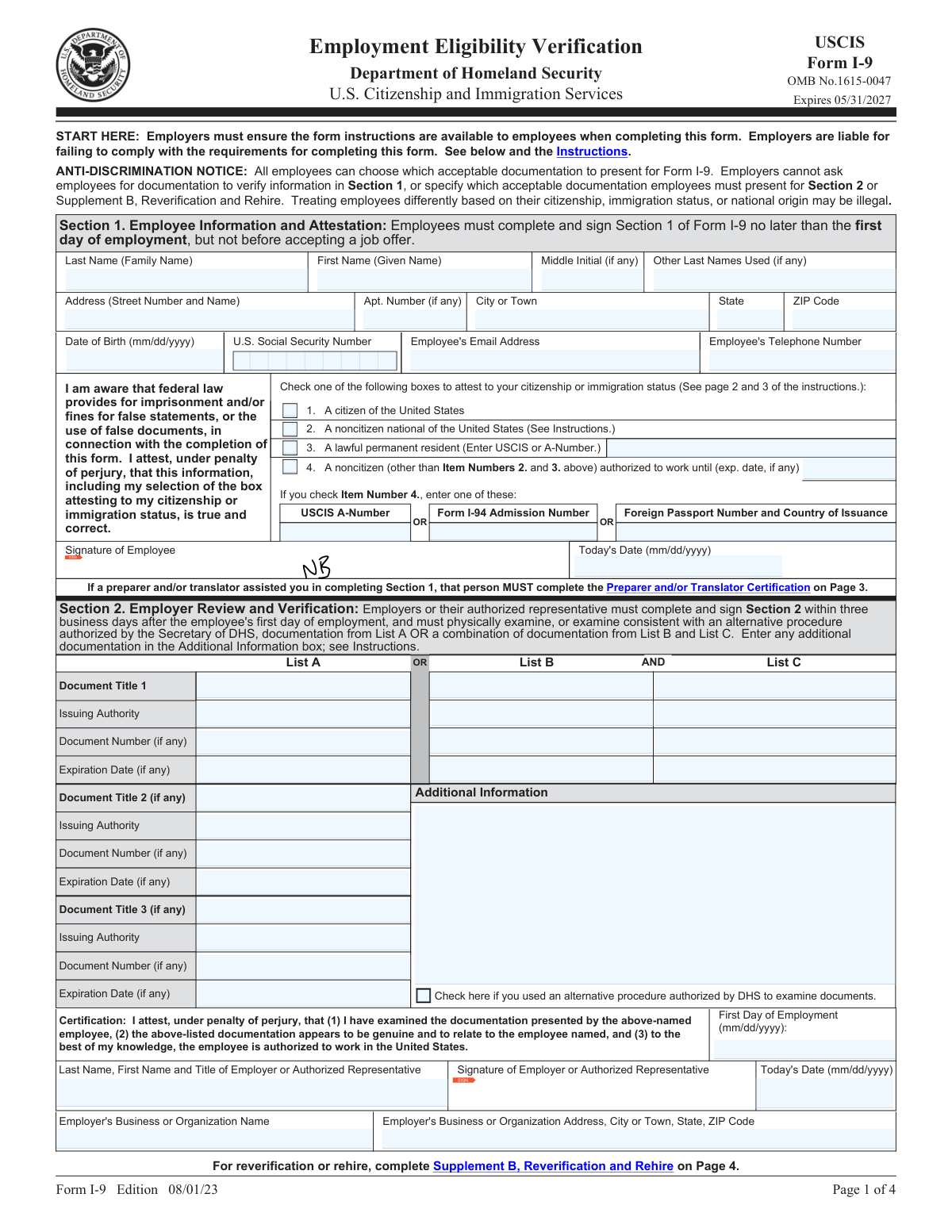
Form I-9 is a mandatory U.S. Citizenship and Immigration Services (USCIS) document used by all employers to verify the identity and employment authorization of every new employee hired after November 6, 1986. Both employees and employers must complete their respective sections to comply with federal law. Today, this form can be filled out quickly and accurately using AI-powered services like Instafill.ai, which can also convert non-fillable PDF versions into interactive fillable forms.
I-9 is part of the employment eligibility forms, employment forms and verification forms categories on Instafill.
Our AI automatically handles information lookup, data retrieval, formatting, and form filling.
It takes less than a minute to fill out I-9 using our AI form filling.
Securely upload your data. Information is encrypted in transit and deleted immediately after the form is filled out.

Form specifications

Form name: Form I-9, Employment Eligibility Verification
Number of fields: 128
Number of pages: 4
Language: English
main-image

Instafill Demo: How to fill out PDF forms in seconds with AI

How to Fill Out I-9 Online for Free in 2026

Are you looking to fill out a I-9 form online quickly and accurately? Instafill.ai offers the #1 AI-powered PDF filling software of 2026, allowing you to complete your I-9 form in just 37 seconds or less.
Follow these steps to fill out your I-9 form online using Instafill.ai:
  1. 1 Navigate to Instafill.ai and upload your Form I-9 or select it from the template library.
  2. 2 As the employee, use the AI assistant to accurately fill in your personal details in Section 1, including your name, address, date of birth, and Social Security Number.
  3. 3 Attest to your citizenship or immigration status by selecting the appropriate checkbox in Section 1 and providing any required document numbers.
  4. 4 Electronically sign and date Section 1 to certify the accuracy of the information provided.
  5. 5 As the employer, review the employee's information and examine their original identity and employment authorization documents.
  6. 6 Complete Section 2 by entering the details of the documents presented by the employee, your business information, and the employee's first day of employment.
  7. 7 The employer signs and dates Section 2, then downloads, prints, or securely stores the completed Form I-9 for compliance records.

Our AI-powered system ensures each field is filled out correctly, reducing errors and saving you time.

Why Choose Instafill.ai for Your Fillable I-9 Form?

Speed

Complete your I-9 in as little as 37 seconds.

Up-to-Date

Always use the latest 2026 I-9 form version.

Cost-effective

No need to hire expensive lawyers.

Accuracy

Our AI performs 10 compliance checks to ensure your form is error-free.

Security

Your personal information is protected with bank-level encryption.

Frequently Asked Questions About Form I-9

Form I-9, the Employment Eligibility Verification form, is used by employers to verify the identity and employment authorization of individuals hired for employment in the United States. All U.S. employers must properly complete Form I-9 for each person they hire.

The employee is responsible for completing and signing Section 1 no later than their first day of employment. The employer is responsible for completing Section 2 within three business days of the employee's first day of employment.

You must present either one unexpired document from List A, or a combination of one document from List B and one document from List C. Your employer cannot specify which documents you must use.

List A documents, like a U.S. Passport, establish both identity and employment authorization. List B documents establish only identity (e.g., Driver's License), and List C documents establish only employment authorization (e.g., Social Security card).

The employer or their authorized representative must complete and sign Section 2 within three business days after your first day of employment. They must physically examine your documents or use an authorized alternative procedure.

If you are a noncitizen authorized to work, you must check the fourth box and provide your work authorization expiration date. You will also need to provide your Alien Registration Number (A-Number)/USCIS Number, or your Form I-94 Admission Number, or your Foreign Passport information.

Employers use Supplement B to reverify employment authorization for an existing employee if their documentation expires. It is also used if an employee is rehired within three years of the date their original Form I-9 was completed or to document a legal name change.

Yes, but any person who assists the employee in completing Section 1 must fill out the Preparer and/or Translator Certification in Supplement A. They must provide their name, address, and sign and date the supplement.

Yes, you may be able to present a receipt for the application to replace a lost, stolen, or damaged document. This receipt is temporarily acceptable, and you must present the actual replacement document once you receive it.

Yes, services like Instafill.ai use AI to help you accurately auto-fill form fields, which can save time and help prevent common errors. This is especially useful for employers who process many I-9 forms.

You can upload the Form I-9 PDF to Instafill.ai, and its AI will identify the fields. You can then answer simple questions, and the service will populate your answers in the correct places on the form before you download the completed document.

If you have a non-fillable or 'flat' PDF, you can use a service like Instafill.ai. It can convert the flat PDF into an interactive, fillable form that you can complete easily online.

This refers to a process that allows employers to examine an employee's documents remotely (e.g., over a video call) instead of in person. Employers who use this option must check the corresponding box in Section 2.

Compliance I-9
Validation Checks by Instafill.ai

1
Section 1 Mandatory Fields Completion
This check verifies that all mandatory fields in Section 1 are completed by the employee. This includes Last Name, First Name, Address, Date of Birth, and the citizenship attestation. Incomplete forms are not legally compliant and can result in fines, so this check is critical for initial form acceptance. If validation fails, the form should be returned to the employee for completion before processing.
2
Exclusive Citizenship Status Attestation
Validates that the employee has selected exactly one of the four available citizenship or immigration status options. The form requires a single, unambiguous attestation of status. Selecting multiple boxes or none at all makes the attestation invalid and requires correction by the employee. This is a fundamental requirement for the form's legal validity.
3
Conditional Requirement for Lawful Permanent Resident
If the employee checks the box for 'A lawful permanent resident', this validation ensures that the corresponding 'USCIS or A-Number' field is populated. This number is the required evidence for this status on the I-9 form. Failure to provide this number when claiming this status results in an incomplete and invalid attestation, requiring the employee to provide the information.
4
Conditional Requirement for Noncitizen Authorized to Work
If the employee attests to being a 'noncitizen authorized to work' (Box 4), this check verifies that the work authorization expiration date is provided and at least one of the required document identifiers (USCIS A-Number, I-94 Admission Number, or Foreign Passport Number) is entered. This information is essential for determining the employee's work eligibility and any future reverification needs. An omission here makes the form incomplete.
5
Employee Signature Date Validity
This validation ensures the 'Today's Date' in Section 1 is completed and logical. The date must be no later than the employee's first day of employment, but not before they have accepted the job offer. This check prevents backdating or future-dating, which could invalidate the form. An invalid date requires correction to ensure the attestation is properly timed.
6
Section 2 Document Combination Logic
Verifies that the employer has correctly entered documentation from either List A OR a combination of List B and List C. The system should flag an error if documents from List A are combined with documents from List B or C, or if only a List B or only a List C document is provided. This ensures the 'OR'/'AND' logic of the document requirements is met for proving both identity and employment authorization.
7
Document Expiration Date Check
This check confirms that any document presented in Section 2 with an expiration date has not expired as of the date of employer verification. The form explicitly states that all documents must be unexpired. Presenting an expired document is a compliance failure, and the employer must reject it and request a different, valid document from the employee.
8
Employer Certification Timeline
Validates that the employer's certification date in Section 2 is within three business days of the employee's 'First Day of Employment'. This is a strict deadline set by USCIS. Failing to complete Section 2 within this window is a common and serious compliance violation that can lead to penalties during an audit.
9
Date Consistency Between Sections 1 and 2
This check performs a logical comparison between the employee's signature date (Section 1) and the first day of employment (Section 2). The employee's first day of employment must be on or after the date they signed the form. This ensures a logical sequence of events where the employee attests to their status before or on their first day of work.
10
Social Security Number Format
If a U.S. Social Security Number is provided, this validation ensures it follows the correct 9-digit format (XXXXXXXXX). While providing the SSN is optional for the employee on this form, if they choose to enter it, it must be structurally valid. This check helps prevent data entry errors for a key identifier.
11
Date of Birth Format and Plausibility
This validation ensures the employee's Date of Birth is entered in the correct mm/dd/yyyy format and represents a plausible age for employment. The check can flag dates that are in the future or that would make the employee too young to work legally. This helps catch obvious data entry errors and potential eligibility issues.
12
Employer Certification Completeness
Verifies that all fields in the employer certification block of Section 2 are filled out. This includes the employer representative's name and title, signature, date, the employer's business name, and the full business address. An incomplete certification block invalidates the employer's attestation and exposes the company to liability.
13
Preparer/Translator Section Consistency
If Supplement A for a preparer/translator is used, this check ensures the employee's name at the top of the supplement matches the name entered in Section 1. It also verifies that the preparer's own information, signature, and date are complete. This maintains a clear and legally sound link between the employee's form and the person who assisted them.

Common Mistakes in Completing I-9

Incomplete Citizenship or Immigration Status Attestation

Employees often check a box in the attestation section (e.g., 'A lawful permanent resident' or 'A noncitizen authorized to work') but fail to provide the required corresponding information, such as the USCIS A-Number, Form I-94 Admission Number, or work authorization expiration date. This omission makes Section 1 incomplete and can lead to processing delays and compliance issues. To avoid this, carefully read the instructions for the status you select and ensure all associated fields are filled correctly. AI-powered tools like Instafill.ai can help by prompting for required information based on the checkbox selected.

Incorrectly Recording Document Information in Section 2

Employers frequently make errors when transcribing document details into Section 2. Common mistakes include omitting the 'Issuing Authority,' leaving the 'Document Number' blank, or mis-entering the 'Expiration Date.' This happens due to haste or not knowing what to look for on the document. Inaccurate records can fail an audit and result in fines. To prevent this, employers must meticulously copy all required information exactly as it appears on the physical document presented by the employee.

Accepting an Invalid Combination of Documents

A critical error is when an employer accepts an incorrect combination of documents, such as two documents from List B. The rule is specific: one document from List A OR a combination of one from List B and one from List C. This mistake often stems from a misunderstanding of the requirements. Accepting the wrong documents invalidates the form and demonstrates non-compliance. Employers must be trained to recognize the A, B, and C lists and enforce the 'one from A or one from B+C' rule without exception.

Using Incorrect Date Formats

The Form I-9 explicitly requires all dates (Date of Birth, Signature Dates, Expiration Dates) to be entered in MM/DD/YYYY format. Many people, especially those accustomed to other international standards, might use DD/MM/YYYY or other variations. This seemingly small error can cause the form to be flagged as incorrect during an audit. Always double-check that all dates are written in the correct two-digit month, two-digit day, and four-digit year format. Form-filling tools can automatically format dates correctly to prevent this issue.

Missing Employee's First Day of Employment Date

In the employer certification section (Section 2), the 'First Day of Employment' field is often left blank. This date is crucial as it establishes the timeline for when the Form I-9 must be completed (within three business days). Forgetting this date makes it impossible for an auditor to verify timely completion, potentially leading to penalties. Employers must make it a standard practice to fill in this date as part of their verification process.

Failure to Complete Preparer and/or Translator Certification

If an employee receives help from anyone to fill out Section 1, that person is considered a preparer or translator and MUST complete and sign Supplement A. This requirement is frequently overlooked, especially in cases where a family member or friend provides assistance. Failure to complete this supplement when required is a compliance violation. To avoid this, always ask the employee if they received help and, if so, ensure the preparer/translator provides their information on the correct supplement page.

Accepting Expired Documents

Employers must verify that any document presented from List A or List B is unexpired at the time of verification. Accepting an expired driver's license or passport is a common mistake that invalidates the verification process. This can lead to significant fines during an I-9 audit. The best practice is to carefully examine the expiration date on every document presented and reject any that are not current. AI tools like Instafill.ai can help by flagging fields for expired dates.

Employee Signature and Date Errors

The employee must sign and date Section 1 no later than their first day of employment. Common errors include the employee forgetting to sign, dating the form before they have accepted the job offer, or dating it after their first day. These timing errors can call the validity of the entire form into question. Employers should instruct employees to complete Section 1 on or by their start date and to date it for the day they are actually signing.

Using Nicknames or Incomplete Legal Names

Employees sometimes enter a nickname or a shortened version of their first name, or forget to include their middle initial. The name entered in Section 1 must be the full legal name as it appears on the identity and employment authorization documents they will present. Discrepancies between the name on the form and the documents can create verification issues. Always use your full, official name and list any other last names used (like a maiden name) in the designated field.

Leaving Required Fields Blank

Both employees and employers often leave fields blank, assuming they are not applicable. Fields like 'Apt. Number,' 'Middle Initial,' or 'Other Last Names Used' should be marked with 'N/A' if they do not apply. Leaving them blank creates ambiguity and can be seen as an incomplete form during an audit. To ensure compliance, every field should contain an entry or 'N/A'. If the form is a non-fillable PDF, tools like Instafill.ai can convert it into a fillable version, making it easier to ensure all fields are addressed.
Saved over 80 hours a year

“I was never sure if my IRS forms like W-9 were filled correctly. Now, I can complete the forms accurately without any external help.”

Kevin Martin Green

Your data stays secure with advanced protection from Instafill and our subprocessors

Robust compliance program

Transparent business model

You’re not the product. You always know where your data is and what it is processed for.

ISO 27001, HIPAA, and GDPR

Our subprocesses adhere to multiple compliance standards, including but not limited to ISO 27001, HIPAA, and GDPR.

Security & privacy by design

We consider security and privacy from the initial design phase of any new service or functionality. It’s not an afterthought, it’s built-in, including support for two-factor authentication (2FA) to further protect your account.

Fill out I-9 with Instafill.ai

Worried about filling PDFs wrong? Instafill securely fills form-i-9-employment-eligibility-verification-2 forms, ensuring each field is accurate.