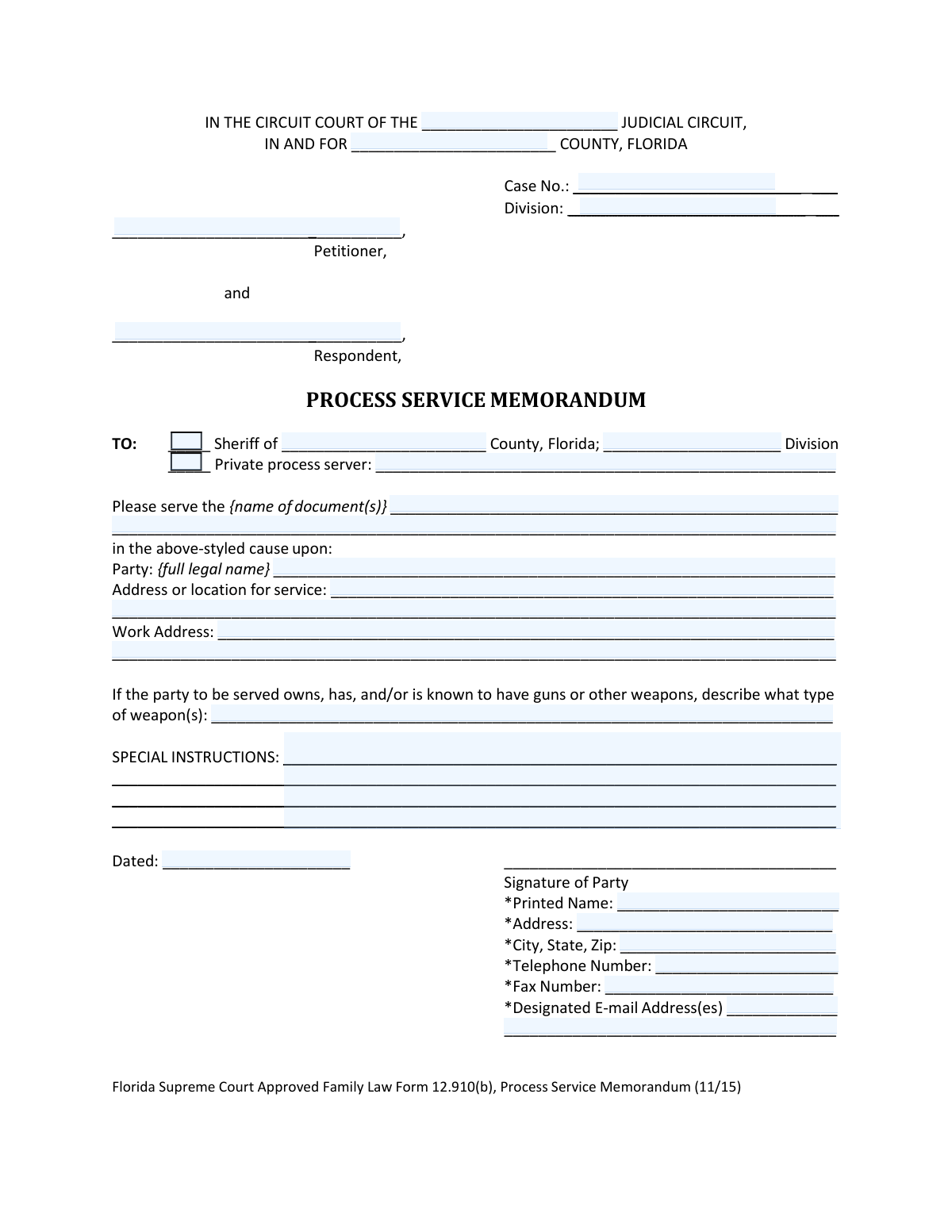
Yes! You can use AI to fill out Florida Supreme Court Approved Family Law Form 12.910(b), Process Service Memorandum
This form, officially known as the Process Service Memorandum, is used in Florida family law cases to give specific instructions to the person serving legal documents (a process server). It details who to serve, where and when to find them, and includes any special instructions, such as potential dangers, to ensure the summons and petition are delivered correctly. Today, this form can be filled out quickly and accurately using AI-powered services like Instafill.ai, which can also convert non-fillable PDF versions into interactive fillable forms.
Form 12.910(b) is part of the
family court forms, family law forms and florida court forms categories on Instafill.
Our AI automatically handles information lookup, data retrieval, formatting, and form filling.
It takes less than a minute to fill out Form 12.910(b) using our AI form filling.
Securely upload your data. Information is encrypted in transit and deleted immediately after the form is filled out.
Form specifications
| Form name: | Florida Supreme Court Approved Family Law Form 12.910(b), Process Service Memorandum |
| Number of fields: | 37 |
| Number of pages: | 1 |
| Language: | English |
Instafill Demo: How to fill out PDF forms in seconds with AI
How to Fill Out Form 12.910(b) Online for Free in 2026
Are you looking to fill out a FORM 12.910(B) form online quickly and accurately? Instafill.ai offers the #1 AI-powered PDF filling software of 2026, allowing you to complete your FORM 12.910(B) form in just 37 seconds or less.
Follow these steps to fill out your FORM 12.910(B) form online using Instafill.ai:
- 1 Navigate to Instafill.ai and upload the Process Service Memorandum or select it from their template library.
- 2 Use the AI assistant to input the court and case details, including the judicial circuit, county, case number, and division.
- 3 Provide the names of the Petitioner and Respondent as they appear in the case.
- 4 Indicate whether service will be performed by the Sheriff's department or a private process server and list the specific documents to be served.
- 5 Enter the full legal name, address for service, and work address for the party who needs to be served.
- 6 Add any special instructions, such as the best times to attempt service or warnings about potential weapons, to assist the process server.
- 7 Review all the information for accuracy, then digitally sign and date the form before downloading the completed document for filing with the court.
Our AI-powered system ensures each field is filled out correctly, reducing errors and saving you time.
Why Choose Instafill.ai for Your Fillable Form 12.910(b) Form?
Speed
Complete your Form 12.910(b) in as little as 37 seconds.
Up-to-Date
Always use the latest 2026 Form 12.910(b) form version.
Cost-effective
No need to hire expensive lawyers.
Accuracy
Our AI performs 10 compliance checks to ensure your form is error-free.
Security
Your personal information is protected with bank-level encryption.
Frequently Asked Questions About Form Form 12.910(b)
This form is used to give the sheriff or a private process server specific instructions for delivering legal documents to the other party in your Florida family law case.
You should fill out this form if you are initiating a family law case and need to have the other party formally served with the Summons and your petition.
You must provide the other party's full legal name, their home and work addresses, and any special instructions that will help the server find them, such as best times for service or a description of their vehicle.
File the original form with the clerk of the circuit court, attach a copy to the Summons (Form 12.910(a)) that will be given to the process server, and keep a copy for your own records.
Use this section to provide helpful details for the process server, like the best times to find the person at home or work, a physical description, or even a map to the location.
Yes, the form specifically asks you to describe any guns or other weapons the party to be served is known to own or have, which is important for the process server's safety.
If you fear for your safety, you can file a 'Request for Confidential Filing of Address' (Form 12.980(h)) with the court to keep your contact information private.
No, while e-filing is encouraged in Florida, self-represented litigants are not required to e-file their initial documents and can file the paper form with the clerk of court.
You must attach a copy of your initial petition and any other documents you want personally served on the other party to the Summons.
Yes, services like Instafill.ai use AI to accurately auto-fill form fields from your saved information, which can save you time and help prevent errors.
Simply upload the Process Service Memorandum to the Instafill.ai platform. Its AI will help you fill in the required fields like names, addresses, and case information quickly and accurately.
You can use a service like Instafill.ai, which has the capability to convert flat, non-fillable PDFs into interactive, fillable forms that you can complete easily on your computer.
Both are authorized to serve legal documents, and you can choose either. You indicate on the form whether you are directing it to the Sheriff of a specific county or to a named private process server.
Compliance Form 12.910(b)
Validation Checks by Instafill.ai
1
Case Information Completeness
This check ensures that the 'Circuit Court', 'County', 'Case No.', 'Petitioner', and 'Respondent' fields are all populated. This information is essential for correctly identifying and filing the document within the court system. A failure to provide this information would result in the form being rejected by the clerk as it cannot be associated with a specific case.
2
Process Server Selection Logic
Validates that either the 'Sheriff' or 'Private process server' option is selected, but not both. It also ensures that the corresponding detail field (County for Sheriff, Name for private server) is filled out. This is critical for directing the service request to the correct entity. If this validation fails, the service cannot be initiated as it's unclear who is responsible for carrying it out.
3
Documents to Serve Specified
This check verifies that the field listing the document(s) to be served is not empty. The process server must have a clear list of all legal papers they are required to deliver to the party. Without this information, the service is incomplete and legally insufficient, potentially delaying the case.
4
Party to be Served Identification
Ensures that the 'Party: {full legal name}' field is completed. The full legal name is required to correctly identify the individual for service of process, preventing service on the wrong person. Failure to provide a name makes the entire memorandum invalid as the target of the service is unknown.
5
Minimum Service Location Provided
This validation confirms that at least one address, either 'Address or location for service' or 'Work Address', has been provided for the party being served. A physical location is absolutely necessary for the process server to attempt delivery of the documents. If no address is given, the service cannot be attempted.
6
Signature Date Validity
Checks that the 'Dated' field contains a valid date that is not in the future. This date establishes when the instructions were formally signed and authorized. An invalid or future date can call the document's authenticity into question and may lead to its rejection by the court clerk.
7
Filing Party Contact Information
Verifies that the filing party's 'Printed Name', 'Address', 'City, State, Zip', and 'Telephone Number' are all filled out. This contact information is crucial for the court and other parties to communicate with the filer. This check should be bypassed only if a 'Request for Confidential Filing of Address' is on record for the case.
8
Email Address Format Validation
If a value is entered in the 'Designated E-mail Address(es)' field, this check ensures it conforms to a standard email format (e.g., [email protected]). Correct formatting is vital for successful electronic service (e-service) as required by court rules. An invalid email address would lead to failed delivery of important case documents.
9
US Phone Number Format
This check validates that the 'Telephone Number' and 'Fax Number' fields, if populated, follow a standard 10-digit US phone number format (e.g., XXX-XXX-XXXX). Proper formatting ensures the numbers are usable and helps maintain data consistency. Incorrectly formatted numbers can prevent successful communication with the filing party.
10
Zip Code Format Validation
Ensures that any entered zip code (for the filing party or a nonlawyer assistant) is a valid 5-digit or 9-digit (ZIP+4) format. A valid zip code is essential for ensuring mail deliverability and accurate location records. An invalid format could result in returned mail and communication delays.
11
Conditional Nonlawyer Section Completion
This validation is triggered if any field in the 'IF A NONLAWYER HELPED YOU' section is filled. It then checks that all required fields in that section ('name of individual', 'address', 'city', 'state', 'zip code', 'telephone number') are completed as mandated by the form's instructions. Incomplete information violates disclosure rules and can invalidate the form.
12
Case Number Format
Validates that the 'Case No.' field follows the expected format for Florida family law cases, which typically includes the year and a multi-digit number (e.g., YYYY-DR-######). A correctly formatted case number is critical for the clerk's office to electronically file and retrieve the document. An incorrect format will cause filing errors and delays.
13
County Consistency Check
This is a logical check that compares the 'County' listed in the case caption at the top of the form with the 'County' specified for the Sheriff, if the Sheriff option is selected. While service can occur in a different county, this check flags potential data entry errors for review. A mismatch could indicate the filer entered the wrong county in one of the fields.
Common Mistakes in Completing Form 12.910(b)
Users often provide an old address, a P.O. Box, or an incomplete address (e.g., missing an apartment number). This is the most common reason for failed service, as process servers cannot legally serve someone at a P.O. Box and cannot locate the individual with incorrect information. This leads to delays and additional fees for re-attempts. To avoid this, always verify the party's current physical residential or work address before filling out the form.
The form requires the 'full legal name' of the party to be served, but people frequently use nicknames, initials, or omit a middle name. This can give the respondent a basis to challenge the validity of the service, arguing they are not the person named in the document. This may force you to restart the service process, wasting time and money. Always use the person's full legal name as it appears on their government-issued ID or other legal documents.
In the rush to complete paperwork, it is very common for the filing party to forget to sign or date the memorandum. An unsigned form is not legally valid and will be rejected by the clerk of court, halting the entire service process. This simple oversight can cause unnecessary delays until a properly executed form is re-filed. Always do a final check for a signature and date before submitting any legal document.
Filers sometimes write generic terms like 'court papers' or 'divorce documents' in the space for the document names. This is insufficient, as the process server needs to know the exact legal titles of the documents they are delivering to create a valid Return of Service. To prevent issues, list the full, official title of each document, such as 'Summons: Personal Service on an Individual' and 'Petition for Dissolution of Marriage'.
Many people leave the 'SPECIAL INSTRUCTIONS' section blank, viewing it as optional. This is a missed opportunity that can lead to multiple failed service attempts and increased costs. Providing details like the party's work schedule, best times for service (e.g., 'after 6 PM'), vehicle description, or a gate code can significantly increase the chances of a successful first attempt. Always include any information that could help the process server locate the individual.
Users may check both the 'Sheriff' and 'Private process server' boxes, or check neither, creating confusion. If selecting a private server, they often forget to write in the server's name. This ambiguity prevents the clerk from knowing who is tasked with service, causing the form to be set aside until it is corrected. To avoid this, clearly select one option and provide all required details for that choice.
The form asks for the filer's address, and individuals with safety concerns (e.g., victims of domestic violence) may fill it in without realizing the risk. The instructions specifically mention using Form 12.980(h) to request confidentiality, but this is often missed. Disclosing the address makes it a public record, potentially endangering the filer. If you have safety concerns, you must file a 'Request for Confidential Filing of Address' and write 'confidential' in the address fields on this form.
People often forget to fill in the Case Number, Judicial Circuit, or Division, or they may enter them incorrectly. Without this information, the clerk of court cannot link the memorandum to the correct case file. This results in filing delays and requires correction, pausing the progress of your case. Always double-check these details against your initial petition or other court documents to ensure accuracy.
Filers often leave the field regarding weapons blank, either because they don't know or feel it's not relevant. This is a critical safety issue for the process server. A blank field is ambiguous, whereas writing 'Unknown' clearly communicates that the filer lacks this information. Failing to disclose known weapons puts the server in potential danger. Always complete this field by describing any known weapons or writing 'Unknown' if you have no information.
This memorandum is only an instruction sheet; it is not the documents to be served. A common mistake is submitting this form without attaching copies of the Summons, the initial Petition, and any other papers that need to be served. The process server cannot proceed without the actual documents. To avoid this, ensure a complete packet is assembled, with a copy of this memorandum attached to the Summons and the other required documents for service.
Saved over 80 hours a year
“I was never sure if my IRS forms like W-9 were filled correctly. Now, I can complete the forms accurately without any external help.”
Kevin Martin Green
Your data stays secure with advanced protection from Instafill and our subprocessors

Robust compliance program
Transparent business model
You’re not the product. You always know where your data is and what it is processed for.
ISO 27001, HIPAA, and GDPR
Our subprocesses adhere to multiple compliance standards, including but not limited to ISO 27001, HIPAA, and GDPR.
Security & privacy by design
We consider security and privacy from the initial design phase of any new service or functionality. It’s not an afterthought, it’s built-in, including support for two-factor authentication (2FA) to further protect your account.
Fill out Form 12.910(b) with Instafill.ai
Worried about filling PDFs wrong? Instafill securely fills florida-supreme-court-approved-family-law-form-12910b-process-service-memorandum forms, ensuring each field is accurate.