Yes! You can use AI to fill out Bolton Global Capital Journal Request (Form AS0020)
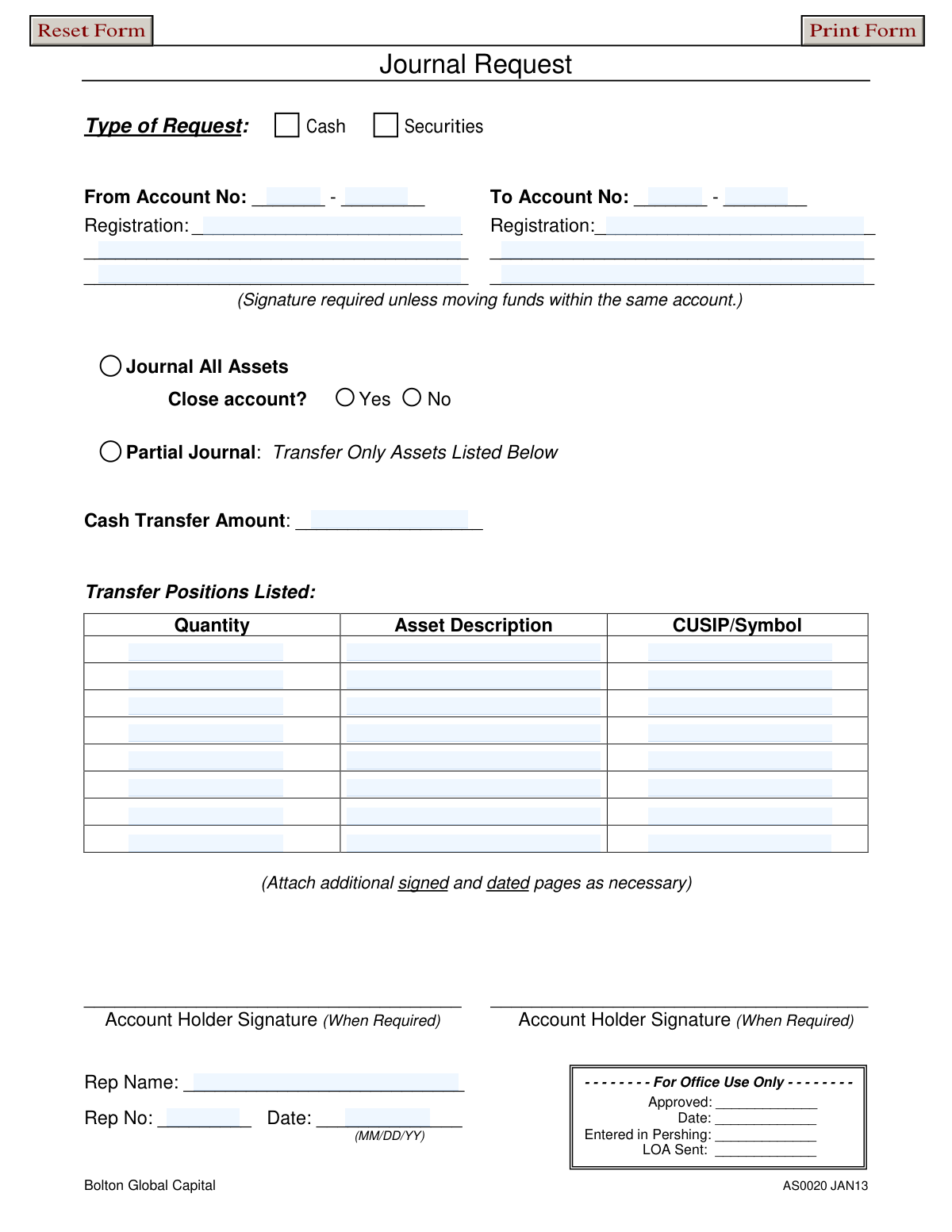
This form, officially known as the Journal Request (AS0020), is a document used by clients of Bolton Global Capital to instruct the firm to move assets from one brokerage account to another. This process, known as 'journaling,' can involve transferring cash, specific securities, or all assets to close an account. Today, this form can be filled out quickly and accurately using AI-powered services like Instafill.ai, which can also convert non-fillable PDF versions into interactive fillable forms.
AS0020 is part of the
financial forms, investment account forms, capital management forms and broker dealer forms categories on Instafill.
Rather not fill this in by hand? Instafill is an online form filler that completes PDF forms automatically — upload the blank form, answer a few questions, and the AI fills every field.
Form specifications
| Form name: | Bolton Global Capital Journal Request (Form AS0020) |
| Number of pages: | 1 |
| Language: | English |
Our AI automatically handles information lookup, data retrieval, formatting, and form filling.
It takes less than a minute to fill out AS0020 using our AI form filling.
Securely upload your data. Information is encrypted in transit and deleted immediately after the form is filled out.
Instafill Demo: How to fill out PDF forms in seconds with AI
How to Fill Out AS0020 Online for Free in 2026
Are you looking to fill out a AS0020 form online quickly and accurately? Instafill.ai offers the #1 AI-powered PDF filling software of 2026, allowing you to complete your AS0020 form in just 37 seconds or less.
Follow these steps to fill out your AS0020 form online using Instafill.ai:
- 1 Navigate to Instafill.ai and upload or select the Journal Request form.
- 2 Use the AI assistant to specify the type of request: either 'Cash' or 'Securities'.
- 3 Provide the 'From' and 'To' account numbers and their corresponding registration details. The AI can pre-fill this information from your saved profile.
- 4 Indicate whether you are journaling all assets and closing the account, or performing a partial transfer of specific assets.
- 5 If performing a partial journal, list the exact cash amount or specify the quantity, asset description, and CUSIP/Symbol for each security to be moved.
- 6 Review all the information auto-filled by the AI for accuracy, then have the account holder(s) and representative provide their signatures and date as required.
- 7 Download, print, or submit the completed and signed form as instructed by Bolton Global Capital.
Our AI-powered system ensures each field is filled out correctly, reducing errors and saving you time.
Why Choose Instafill.ai for Your Fillable AS0020 Form?
Speed
Complete your AS0020 in as little as 37 seconds.
Up-to-Date
Always use the latest 2026 AS0020 form version.
Cost-effective
No need to hire expensive lawyers.
Accuracy
Our AI performs 10 compliance checks to ensure your form is error-free.
Security
Your personal information is protected with bank-level encryption.
Frequently Asked Questions About AS0020
This form is used to authorize the transfer of cash and/or securities from one investment account to another at Bolton Global Capital. It allows you to move assets between accounts with different registrations or consolidate holdings.
The holder of the account from which assets are being moved must complete and sign this form. Your financial representative will also need to add their information before submitting it for processing.
A signature is required for any transfer of assets between accounts with different registrations or ownership. The form notes that a signature is not needed if you are simply moving funds within the same account.
Selecting 'Journal All Assets' will transfer all holdings from the source account, with an option to close it. A 'Partial Journal' is for transferring only specific assets, such as a fixed cash amount or a select list of securities.
To close an account, you must select the 'Journal All Assets' option to transfer all remaining holdings. You must also check 'Yes' next to the 'Close account?' question.
In the 'Partial Journal' section, you must list the quantity of shares, the asset's name or description, and its unique CUSIP or ticker symbol for each security you wish to transfer.
If you run out of space on the form, you can list the additional assets on a separate page. Be sure to sign and date any attached pages to authorize the transfers.
Registration refers to the legal name and title under which the account is held, such as 'John Smith' or 'John and Jane Smith, JTWROS'. This must match your account statements exactly.
After filling out and signing the form where required, you should give it to your financial representative. They will review it, complete their section, and submit it for internal approval and processing.
While processing times can vary, internal transfers are typically completed within 1-3 business days after the request is approved. Contact your representative for specific details about your request.
Yes, services like Instafill.ai use AI to help you accurately auto-fill form fields with your saved information, which saves time and reduces the chance of errors.
You can upload the Journal Request PDF to Instafill.ai, which will make it an interactive, fillable form. You can then easily type in your information, add an electronic signature, and download the completed document.
If you have a non-fillable PDF, you can use a tool like Instafill.ai to convert it into an interactive form. This allows you to type your information directly into the fields instead of printing and filling it out by hand.
Compliance AS0020
Validation Checks by Instafill.ai
1
Ensures Type of Request is Selected
This validation confirms that the user has selected either 'Cash' or 'Securities' for the 'Type of Request'. This selection is fundamental as it determines which subsequent fields and sections of the form are applicable and required. If no selection is made, the form cannot be processed correctly, and the user should be prompted to choose a request type.
2
Verifies 'From' and 'To' Account Numbers are Complete
This check ensures that both the 'From Account No' and 'To Account No' fields are fully populated. These numbers are critical for identifying the source and destination of the assets being transferred. A failure in this check indicates missing information, which would make the transaction impossible to execute and could lead to processing delays or errors.
3
Validates Selection of 'Journal All Assets' or 'Partial Journal'
This check enforces that the user provides instructions for either a full journal or a partial journal, but not both. The form has distinct sections for 'Journal All Assets' and 'Partial Journal,' which are mutually exclusive actions. If instructions are provided for both, the request is ambiguous and should be rejected, prompting the user to clarify their intent.
4
Conditional Signature Verification for Different Accounts
This validation checks for the presence of an account holder signature if the 'From Account No' and 'To Account No' are different. A signature is a critical authorization for moving assets between accounts with different registrations to prevent fraud or unauthorized transfers. If the accounts are different and no signature is detected, the submission must be halted and flagged for manual review or correction.
5
Validates Cash Transfer Amount for Partial Journals
When a 'Partial Journal' of 'Cash' is requested, this check verifies that the 'Cash Transfer Amount' field contains a valid, positive numerical value. This ensures that a clear and executable monetary amount is specified for the transfer. An invalid or empty field would make the cash transfer request ambiguous and unprocessable.
6
Ensures Asset Details are Provided for Partial Securities Journal
If a 'Partial Journal' of 'Securities' is selected, this validation ensures that at least one row in the 'Transfer Positions Listed' table is completely filled out with a Quantity, Asset Description, and CUSIP/Symbol. Without these specific details, the system cannot identify which securities to transfer from the account. A failure indicates an incomplete request that cannot be executed.
7
Validates CUSIP/Symbol Format
This check examines the 'CUSIP/Symbol' field for each listed asset to ensure it conforms to standard financial identifier formats, such as a 9-character alphanumeric CUSIP. Correct identifiers are essential for accurately locating and transferring the specific securities in the clearing system. An invalid format could lead to failed trades or the transfer of an incorrect asset.
8
Ensures Asset Quantity is a Positive Number
This validation confirms that the 'Quantity' specified for each asset in a partial journal is a positive numerical value. It is not possible to transfer zero or a negative number of shares or units. This check prevents data entry errors and ensures the transfer instruction is logical and executable.
9
Verifies Date Format and Plausibility
This check ensures the 'Date' field is entered in the specified MM/DD/YY format and represents a valid calendar date that is not in the future. This is important for record-keeping, audit trails, and ensuring the request is processed in a timely manner. An invalid or future date could cause compliance issues or processing errors.
10
Confirms Representative Name and Number are Provided
This validation verifies that both the 'Rep Name' and 'Rep No' fields have been completed. This information is crucial for internal tracking, accountability, and compliance, linking the request to a specific registered representative. Missing representative details would create an incomplete audit trail and should prevent submission.
11
Validates 'Close Account' Selection with 'Journal All Assets'
This check ensures that the 'Close account?' option is only selected when 'Journal All Assets' is also chosen. It is illogical to close an account after only a partial transfer, as assets would remain. This validation prevents contradictory instructions and ensures the user's intent is clear.
12
Verifies 'From' and 'To' Account Registrations are Filled
This check ensures the 'Registration' fields for both the 'From' and 'To' accounts are populated. The registration name is the legal title of the account and is used to verify ownership, which is a critical step in preventing unauthorized transfers. Incomplete registration information would require manual intervention and delay the request.
13
Verifies 'From' and 'To' Accounts Exist in System
This is a backend validation that queries the Pershing system to confirm that both the 'From Account No' and 'To Account No' are valid, active accounts. This check prevents errors caused by typos and rejects fraudulent attempts to move assets from or to non-existent accounts. A failure here indicates a critical data error that must be corrected before any transfer can be initiated.
14
Flags Redundant Transfers to the Same Account
This check identifies if the 'From Account No' and 'To Account No' are identical. While some internal movements within the same account are valid, a request to 'Journal All Assets' to the same account is redundant and likely an error. The system should flag this for user confirmation to prevent unnecessary processing.
Common Mistakes in Completing AS0020
Users often transpose digits or fail to enter the full account number, including both the alpha and numeric components in their respective fields. This happens due to haste or not having an account statement handy for verification. An incorrect or incomplete account number will cause the entire transaction to fail, leading to significant delays in moving assets.
The 'Registration' name must exactly match the legal title on the account (e.g., 'John D. Smith & Jane A. Smith JTWROS'). Users often use informal names, abbreviations, or forget to include all joint owners, causing a mismatch. A discrepancy will cause the request to be rejected for security and compliance reasons, requiring a new, corrected form to be submitted.
Users frequently create confusion by selecting conflicting options, such as checking 'Journal All Assets' but also filling out the 'Partial Journal' section with specific assets. This ambiguity forces the processing agent to either guess the user's intent or reject the form outright to avoid errors. To prevent this, clearly choose either a full or partial journal and only complete the corresponding section of the form.
The form explicitly requires an account holder signature unless funds are being moved within the exact same account registration, a detail that is commonly missed. Forgetting to sign when transferring assets between differently titled or numbered accounts is a primary reason for rejection. This security measure prevents unauthorized transfers, so any request lacking a required signature will be returned, delaying the transaction.
When listing securities for a partial transfer, users sometimes provide a vague asset description like 'Apple stock' without the CUSIP or ticker symbol. The CUSIP/Symbol is the unique identifier for a security, and without it, the transfer cannot be processed accurately, risking the wrong asset being moved or the request being rejected. Always include the precise CUSIP or symbol for each position listed, which can be found on an account statement.
When selecting 'Journal All Assets,' it is mandatory to also indicate whether the 'From' account should be closed by selecting 'Yes' or 'No.' People often overlook this secondary choice, leaving the firm unsure of how to handle the originating account. This omission will halt the process until clarification is received from the client or representative.
A user might select 'Cash' as the 'Type of Request' at the top of the form but then proceed to list securities in the 'Transfer Positions Listed' section, or vice-versa. This contradiction makes the request impossible to interpret and process. Ensure the initial request type (Cash or Securities) aligns with the specific assets you list for transfer.
The form specifies a date format of (MM/DD/YY), but users, especially those accustomed to international standards, may default to other formats like DD/MM/YY. This can lead to confusion and record-keeping errors, for example, misinterpreting May 6th as June 5th. Following the specified format is crucial for accurate processing and auditing.
Since this form is a non-fillable PDF, users often print it and fill it out by hand, leading to illegible entries for critical data like account numbers and CUSIPs. This can result in data entry errors, failed transactions, and processing delays. To prevent this, it's best to use a tool like Instafill.ai, which can convert the flat PDF into a fillable form, ensuring all entries are typed, clear, and perfectly aligned.
It is surprisingly common for users to accidentally reverse the 'From' and 'To' account numbers, especially when rushing. This mistake could lead to assets being moved in the exact opposite direction intended, a serious error that can be complicated to reverse. Always double-check that the source account is listed under 'From' and the destination account is listed under 'To' before signing.
Saved over 80 hours a year
“I was never sure if my IRS forms like W-9 were filled correctly. Now, I can complete the forms accurately without any external help.”
Kevin Martin Green
Your data stays secure with advanced protection from Instafill and our subprocessors




Robust compliance program
Transparent business model
You’re not the product. You always know where your data is and what it is processed for.
ISO 27001, HIPAA, and GDPR
Our subprocesses adhere to multiple compliance standards, including but not limited to ISO 27001, HIPAA, and GDPR.
Security & privacy by design
We consider security and privacy from the initial design phase of any new service or functionality. It’s not an afterthought, it’s built-in, including support for two-factor authentication (2FA) to further protect your account.
Fill out AS0020 with Instafill.ai
Worried about filling PDFs wrong? Instafill securely fills bolton-global-capital-journal-request-form-as0020 forms, ensuring each field is accurate.
