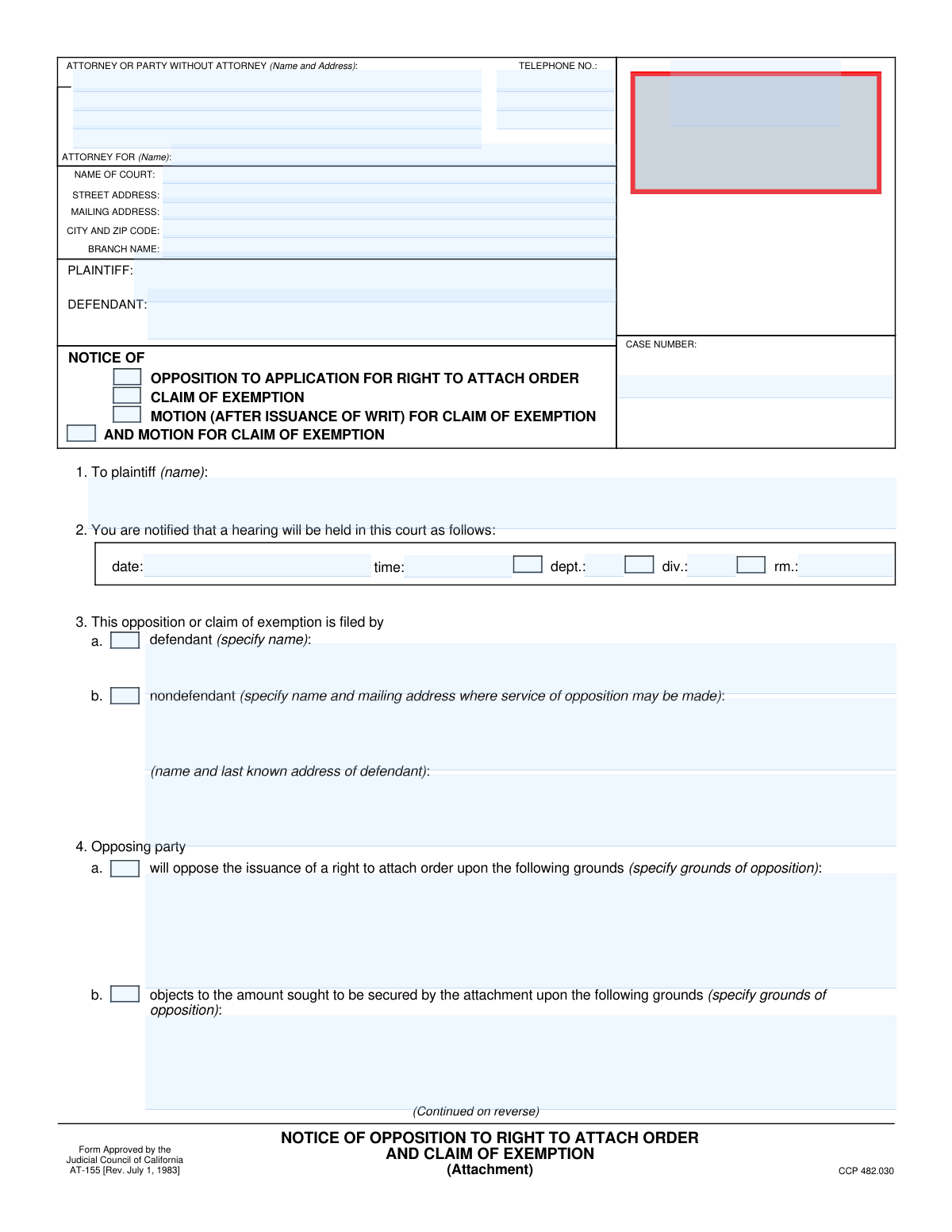
Yes! You can use AI to fill out Form AT-155, Notice of Opposition to Right to Attach Order and Claim of Exemption

Form AT-155, Notice of Opposition to Right to Attach Order and Claim of Exemption, is a crucial legal document used in California civil litigation. It allows a defendant to formally respond to a plaintiff's application for a pre-judgment attachment of property by stating grounds for opposition and/or claiming that specific assets are legally exempt from seizure. Today, this form can be filled out quickly and accurately using AI-powered services like Instafill.ai, which can also convert non-fillable PDF versions into interactive fillable forms.
Our AI automatically handles information lookup, data retrieval, formatting, and form filling.
It takes less than a minute to fill out AT-155 using our AI form filling.
Securely upload your data. Information is encrypted in transit and deleted immediately after the form is filled out.

Form specifications

Form name: Form AT-155, Notice of Opposition to Right to Attach Order and Claim of Exemption
Number of fields: 66
Number of pages: 2
Language: English
Categories: ACH forms, VA claim forms
main-image

Instafill Demo: How to fill out PDF forms in seconds with AI

How to Fill Out AT-155 Online for Free in 2026

Are you looking to fill out a AT-155 form online quickly and accurately? Instafill.ai offers the #1 AI-powered PDF filling software of 2026, allowing you to complete your AT-155 form in just 37 seconds or less.
Follow these steps to fill out your AT-155 form online using Instafill.ai:
  1. 1 Navigate to Instafill.ai and upload your Form AT-155 or select it from the template library.
  2. 2 Provide the court, plaintiff, defendant, and case number information in the designated fields.
  3. 3 Indicate your opposition by checking the appropriate boxes and providing detailed written grounds for opposing the attachment order or the amount sought.
  4. 4 If claiming an exemption, check the 'CLAIM OF EXEMPTION' box and specify the property you are claiming as exempt under the relevant California Code of Civil Procedure (CCP) sections.
  5. 5 Describe the exempt property in detail, providing any additional required information for specific exemptions like motor vehicles, tools of the trade, or property necessary for support.
  6. 6 Enter the date, your printed name, and title to certify the information provided.
  7. 7 Review the entire completed form for accuracy, then download the document to file with the court and serve on the plaintiff.

Our AI-powered system ensures each field is filled out correctly, reducing errors and saving you time.

Why Choose Instafill.ai for Your Fillable AT-155 Form?

Speed

Complete your AT-155 in as little as 37 seconds.

Up-to-Date

Always use the latest 2026 AT-155 form version.

Cost-effective

No need to hire expensive lawyers.

Accuracy

Our AI performs 10 compliance checks to ensure your form is error-free.

Security

Your personal information is protected with bank-level encryption.

Frequently Asked Questions About Form AT-155

This form is used to formally oppose a plaintiff's request for a 'right to attach order' and to claim that certain property is exempt from being seized. It notifies the court and the plaintiff of your opposition and the legal grounds for it before a scheduled hearing.

This form should be completed by a defendant in a lawsuit, or a non-defendant who has an interest in property that the plaintiff is trying to attach. You would use this form to protect your assets from being seized to satisfy a potential judgment.

Opposing the attachment challenges the plaintiff's legal right to seize any property at all. Claiming an exemption argues that even if an attachment is granted, specific pieces of your property, like your car or funds for support, are legally protected from seizure.

The court information and case number can be found on the legal documents you received from the plaintiff, such as the summons or the application for the right to attach order. This information must match the existing case file exactly.

The hearing details are critical and should be listed on the notice you received regarding the application for attachment. If you cannot find this information, contact the court clerk or the plaintiff's attorney immediately to confirm the hearing schedule.

Yes, the form includes a section for a 'Nondefendant' to file. You must check the appropriate box and provide the defendant's name and last known address along with your own information.

You must check the box to 'Claim Exemption' and then select the specific legal reason for the exemption, such as property necessary for support or items protected under a specific CCP section. You will need to describe the property in detail in the corresponding field.

'CCP' stands for the California Code of Civil Procedure, which contains the laws for these legal actions. The sections listed, like CCP 703.010 or 704.010, refer to specific statutes that define what property is legally exempt from seizure.

After completing and signing the form, you must file the original with the court clerk at the courthouse listed on the form. You also need to 'serve' a copy on the plaintiff or their attorney before the court hearing.

You may need to attach additional pages if your descriptions of property or grounds for opposition do not fit in the space provided. You might also attach supporting documents, like a financial statement or evidence proving the property's exempt status.

Yes, services like Instafill.ai use AI to help you accurately auto-fill form fields, which can save time and reduce errors. This is especially helpful for repetitive information like your name, address, and case details.

Simply upload the form to the Instafill.ai platform. The AI will identify the fields, and you can then provide your information once to have it automatically and accurately placed throughout the document.

If you have a flat, non-fillable PDF, you can use a service like Instafill.ai. It can convert the static form into an interactive, fillable one, allowing you to easily type your information into the correct fields online.

Compliance AT-155
Validation Checks by Instafill.ai

1
Filer Type Mutual Exclusivity
This check ensures that the user selects only one filer type. The form provides checkboxes for 'Defendant' and 'Nondefendant' under 'Filer Information', and a user cannot be both. This validation prevents contradictory data entry, ensuring the form's logic remains intact. If both are checked, an error should prompt the user to select only one.
2
Conditional Filer Name Requirement
This validation enforces a conditional requirement based on the filer type selected. If the 'Defendant' checkbox is checked, the corresponding 'Defendant Name' field within the 'Filer Information (Defendant)' section must be filled. This ensures that when the filer is identified as the defendant, their name is explicitly provided in the correct context. Failure to provide the name will block submission.
3
Conditional Non-Defendant Information Requirement
This check validates that if the 'Nondefendant' checkbox is checked, the 'Defendant Name and Last Known Address' field is properly filled out. This is crucial for identifying the relevant defendant when the form is filed by a third party. An empty field would make the filing ambiguous, so the system must prevent submission until this information is provided.
4
Telephone Number Structural Integrity
This validation ensures the telephone number is entered correctly across its three separate fields: Area Code, Prefix, and Line Number. It checks that the Area Code and Prefix fields each contain exactly 3 digits, and the Line Number field contains exactly 4 digits. This prevents incomplete or malformed phone numbers, ensuring the contact information is valid and usable.
5
Hearing Date is in the Future
This check validates that the 'Hearing Date' entered is a valid date that occurs in the future, not in the past. Court hearings cannot be scheduled for a past date, so this logic is essential for the form's purpose. If a user enters a past date, the system should display an error message and require them to enter a valid future date.
6
Case Number Presence and Format
This validation ensures the 'Case Number' field is not empty, as it is a critical identifier for the legal proceeding. The check confirms that a value has been entered. This prevents the submission of a form that cannot be correctly filed or associated with its corresponding case. An error will be shown if the field is left blank.
7
Conditional Grounds for Opposition
This check enforces that if the 'Oppose Issuance on Specified Grounds' checkbox is selected, the corresponding 'Grounds for Opposing Issuance' text area must not be empty. A user cannot indicate they have grounds for opposition without specifying what they are. This validation ensures the submission is complete and meaningful, preventing blank claims.
8
Conditional Grounds for Objecting to Amount
This validation ensures that if a user checks the 'Objects to Amount Sought' box, they must provide a reason in the 'Detailed Grounds for Objecting to Amount' field. Checking the box signifies an intent to object, which is meaningless without a justification. The system should block submission if the checkbox is selected but the details field is left empty.
9
Nested Exemption Claim Logic
This check validates the hierarchical relationship within the exemption claim section. If the 'Move Court for Exemption from Attachment' checkbox is selected, the user must then select at least one of the specific property exemption checkboxes listed below it (e.g., 'Property exempt from execution...', 'Property Necessary for Support', etc.). This ensures that a general motion to claim an exemption is supported by a specific claim type.
10
Conditional Exemption Description Requirement
This validation rule applies to all specific exemption types. For example, if the 'Property exempt from execution under CCP 703.010 et seq.' checkbox is checked, the corresponding 'Exempt Property Description' field must be filled. This pattern ensures that for any exemption claimed, a description of the property and the legal basis is provided, making the claim specific and actionable.
11
Signatory Date Validity
This check ensures the 'Date' provided in the 'Signatory Information' section is a valid date that is not in the future. A legal document cannot be signed on a future date. This validation maintains the integrity and legal validity of the document. If a future date is entered, the system should prompt the user to correct it.
12
Plaintiff Name Consistency Check
This validation compares the 'Plaintiff Name' field at the top of the form with the 'Plaintiff's Name (Addressed To Plaintiff)' field. These two fields should contain the same name to ensure consistency throughout the document. A mismatch could indicate a typo or incorrect data entry, leading to confusion. The system should flag any discrepancy.
13
Zip Code Format Validation
This check verifies that the 'Zip Code' entered in the 'Attorney or Party without Attorney Address' section follows a valid format. It should accept either a 5-digit format (e.g., 90210) or a 9-digit ZIP+4 format (e.g., 90210-1234). This ensures address data is standardized and deliverable. An invalid format would trigger an error.
14
Total Pages Attached Must Be Numeric
This validation ensures that the value entered into the 'Total Pages Attached' field is a non-negative integer. This field is used to account for all parts of the submission, and it cannot contain text or negative numbers. This check guarantees the page count is a valid, usable number for administrative processing.

Common Mistakes in Completing AT-155

Failing to Provide Details for Checked Boxes

This error occurs when a filer checks a box to oppose an order or claim an exemption but neglects to fill out the corresponding text field requiring a detailed explanation. This often happens due to simple oversight. The consequence is severe, as the opposition or exemption claim will be considered incomplete and likely disregarded by the court. To avoid this, carefully review the form and ensure every checked box, like 'Oppose Issuance on Specified Grounds', is accompanied by the required written details. AI-powered tools like Instafill.ai can help prevent this by highlighting required fields that are dependent on a checkbox being selected.

Providing Vague Descriptions for Exempt Property

When claiming property is exempt, filers often provide generic descriptions like 'my car' or 'personal items' instead of the required detailed description. This vagueness can lead a court to deny the exemption claim, allowing the plaintiff to seize the asset. To prevent this, list property with specifics, such as 'a 2018 Honda Civic, VIN...' or 'one Maytag refrigerator, model #...'. Being as descriptive as possible strengthens the legal validity of your claim.

Entering an Incorrect or Incomplete Case Number

The case number is the single most important identifier for a legal filing, and simple typos are common. Entering the wrong number can cause the document to be rejected by the court clerk, misfiled in another case, or lost entirely, leading to missed deadlines and negative rulings. Always double-check the case number against official court documents for accuracy. Using a form-filling tool like Instafill.ai can prevent this by saving and correctly auto-populating the case number across all related forms.

Incorrectly Identifying Plaintiff and Defendant

Individuals representing themselves can sometimes get confused and list their own name in the 'Defendant' field when they are the plaintiff, or vice-versa. This creates significant confusion and can lead to the form being immediately rejected by the court clerk for being improperly filled out. It is crucial to carefully read the labels and enter the correct full legal name for the party suing (Plaintiff) and the party being sued (Defendant).

Using Inaccurate or Incomplete Court Information

Filers, especially those without an attorney, may not know the precise branch name, department, or full street address of the court, leading them to enter incomplete information. This can cause the filing to be sent to the wrong location, resulting in significant delays or outright rejection. Before filling out the form, look up the exact court information on the court's official website, paying close attention to the specific branch and department handling the case.

Omitting Critical Hearing Details

When a hearing is scheduled, filers may forget to include the date, time, department, or room number on the notice. This is a critical failure that makes the notice legally deficient and can cause the other party to miss the hearing, potentially resulting in the hearing being postponed. Always verify all hearing details from the court's official notice and transcribe them accurately and completely onto the form.

Failing to Specify Exemption Code Sections

The form allows filers to claim exemptions under specific California Code of Civil Procedure (CCP) sections. A common mistake is to check the box for a general statute, like 'CCP 703.010 et seq.', but fail to provide the specific code section and a description of how it applies. This weakens the legal basis of the claim and may cause a judge to deny it. To properly make a claim, research the CCP to find the exact statute that protects your property and cite it in the provided space.

Incorrectly Filling the Filer Information Section

The section for a 'Non-Defendant' filer can be confusing, as it still requires the defendant's name and last known address. A third party, such as a bank holding the defendant's funds, might mistakenly enter their own information instead of the defendant's. This error can invalidate the filing, as the court needs to correctly identify all parties involved. Carefully read the field labels to ensure the correct person's information is entered in each box.

Incorrectly Formatting the Telephone Number

This form splits the telephone number into three separate fields: Area Code, Prefix, and Line Number. Users often try to enter the full 10-digit number into the first box or make data entry errors when tabbing between the small fields. An incorrect phone number prevents the court or opposing party from being able to make contact, so it's crucial to enter only the three-digit area code, three-digit prefix, and four-digit line number in their respective boxes. Smart tools like Instafill.ai can automatically parse and format phone numbers correctly.

Omitting the Signature and Date

Forgetting to sign and date a legal document is a simple but fatal error that invalidates the entire filing. An unsigned form will be rejected by the court, as the signature attests that the information provided is true and correct under penalty of perjury. Always perform a final review of the form before submission, specifically checking that the date is current and the signature line is properly signed. If the form is a non-fillable PDF, a tool like Instafill.ai can convert it to a fillable version where you can easily type and date before printing for signature.
Saved over 80 hours a year

“I was never sure if my IRS forms like W-9 were filled correctly. Now, I can complete the forms accurately without any external help.”

Kevin Martin Green

Your data stays secure with advanced protection from Instafill and our subprocessors

Robust compliance program

Transparent business model

You’re not the product. You always know where your data is and what it is processed for.

ISO 27001, HIPAA, and GDPR

Our subprocesses adhere to multiple compliance standards, including but not limited to ISO 27001, HIPAA, and GDPR.

Security & privacy by design

We consider security and privacy from the initial design phase of any new service or functionality. It’s not an afterthought, it’s built-in, including support for two-factor authentication (2FA) to further protect your account.

Fill out AT-155 with Instafill.ai

Worried about filling PDFs wrong? Instafill securely fills form-at-155-notice-of-opposition-to-right-to-attach-order-and-claim-of-exemption forms, ensuring each field is accurate.