Yes! You can use AI to fill out Form AT-170, Application and Notice of Hearing for Order to Terminate, Modify, or Vacate Temporary Protective Order (Attachment)
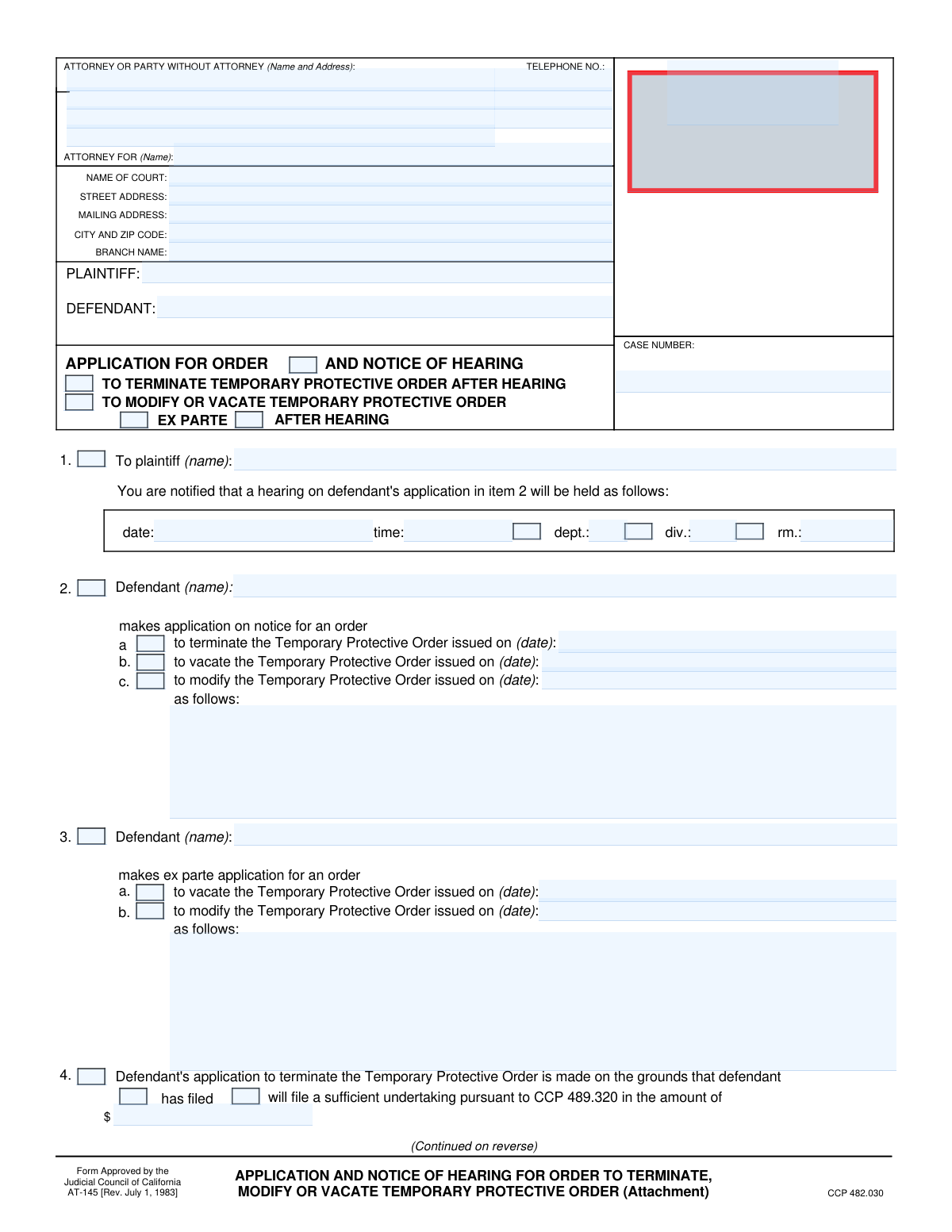
Form AT-170 is a legal document filed in a California court by a defendant in a civil case involving an attachment. It is used to formally apply for a court order to terminate, modify, or vacate a Temporary Protective Order (TPO) that has been placed on their assets, and it also serves as the official notice to the plaintiff about the scheduled court hearing for this matter. The complexity of legal forms like this can be simplified, as today this form can be filled out quickly and accurately using AI-powered services like Instafill.ai, which can also convert non-fillable PDF versions into interactive fillable forms.
Our AI automatically handles information lookup, data retrieval, formatting, and form filling.
It takes less than a minute to fill out AT-170 using our AI form filling.
Securely upload your data. Information is encrypted in transit and deleted immediately after the form is filled out.
Form specifications
| Form name: | Form AT-170, Application and Notice of Hearing for Order to Terminate, Modify, or Vacate Temporary Protective Order (Attachment) |
| Number of fields: | 74 |
| Number of pages: | 2 |
| Language: | English |
Instafill Demo: How to fill out PDF forms in seconds with AI
How to Fill Out AT-170 Online for Free in 2026
Are you looking to fill out a AT-170 form online quickly and accurately? Instafill.ai offers the #1 AI-powered PDF filling software of 2026, allowing you to complete your AT-170 form in just 37 seconds or less.
Follow these steps to fill out your AT-170 form online using Instafill.ai:
- 1 Navigate to Instafill.ai and upload your Form AT-170 or select it from the platform's template library.
- 2 Provide the attorney or self-represented party information, including name, address, and contact details in the top section.
- 3 Enter the court information, plaintiff and defendant names, and the case number in the designated fields.
- 4 Select the type of application you are making, such as terminating, modifying, or vacating the Temporary Protective Order, and specify if it is an ex parte application or one made on notice.
- 5 Detail the grounds for your application, referencing any undertakings filed, and indicate if you are attaching affidavits or points and authorities.
- 6 Use the AI-powered review feature on Instafill.ai to check all entered information for accuracy and completeness before finalizing.
- 7 Date and sign the application, then download the completed form for filing with the court and serving on the opposing party.
Our AI-powered system ensures each field is filled out correctly, reducing errors and saving you time.
Why Choose Instafill.ai for Your Fillable AT-170 Form?
Speed
Complete your AT-170 in as little as 37 seconds.
Up-to-Date
Always use the latest 2026 AT-170 form version.
Cost-effective
No need to hire expensive lawyers.
Accuracy
Our AI performs 10 compliance checks to ensure your form is error-free.
Security
Your personal information is protected with bank-level encryption.
Frequently Asked Questions About Form AT-170
This form is an 'Application for Order and Notice of Hearing' used by a defendant to ask the court to terminate, vacate, or modify an existing Temporary Protective Order (TPO).
This form should be completed by the defendant in a legal case, or their attorney, who wants to challenge a Temporary Protective Order that has been issued against them.
An 'ex parte' application is a request for an immediate court order without giving the other party advance formal notice. An application 'on notice' means the other party is formally notified of a scheduled hearing where the court will consider your request.
You will need your contact information, the court's name and address, the case number, the full names of the plaintiff and defendant, and the date the original Temporary Protective Order was issued.
In the 'Defendant's Application' section, you must check the box corresponding to your request—'Terminate,' 'Vacate,' or 'Modify'—and enter the date the original order was issued.
This section is where you state the legal basis for your request. For example, you can indicate that you are terminating the TPO because you have filed or will file a sufficient undertaking (a financial bond).
The form allows you to check boxes indicating that your application is based on an 'attached affidavit' or 'attached points and authorities.' You can attach separate pages with your detailed information and note the total number of pages attached.
This section notifies the plaintiff of the court date. You must enter the specific hearing date, time, and the department, division, or room number where the hearing will take place.
The defendant or their attorney must sign the form. You need to provide the signature date, the defendant's printed name, and the name and title of the person signing.
Yes, services like Instafill.ai use AI to accurately auto-fill form fields with your saved information, which can save you time and help prevent errors.
You can upload the form to the Instafill.ai platform, which will make the fields interactive. You can then type your information directly into the form, save your progress, and download the completed document.
If you have a non-fillable or 'flat' PDF, you can use a service like Instafill.ai. It can convert the document into an interactive, fillable form that you can easily complete on your computer.
An undertaking is a form of financial guarantee or bond that the defendant can file with the court. Providing a sufficient undertaking can be grounds for terminating a Temporary Protective Order.
The case number should be entered in the 'Case Number' field, which is typically located in the header or top section of the form, to link the document to your specific court case.
Compliance AT-170
Validation Checks by Instafill.ai
1
Attorney/Party Information Completeness
This check ensures that the Attorney/Party Name, Address Line 1, City, State, Zip, and Primary Telephone Number fields are all filled out. This information is crucial for identifying the filing party and for all official communication. A failure in this validation would mean the filing is incomplete and could be rejected by the court clerk, delaying the legal process.
2
Primary Telephone Number Format
This validation verifies that the 'Primary Telephone Number' is entered in a recognizable and valid format (e.g., (XXX) XXX-XXXX or XXX-XXX-XXXX). Correct formatting is important for ensuring the court and other parties can reliably contact the filer. An invalid format could lead to communication failures, missed deadlines, and negative impacts on the case.
3
Case Number Presence and Format
This check ensures the 'Case Number' field is not empty and, if possible, conforms to the expected format for the jurisdiction. The case number is the unique identifier for the entire legal proceeding. An absent or incorrect case number would prevent the document from being correctly associated with its case file, leading to rejection or significant processing delays.
4
Plaintiff and Defendant Name Completeness
This validation confirms that both the 'Plaintiff Name' and 'Defendant Name' fields in the 'Parties' section are provided. These names define the core parties to the legal action and are fundamental to the document's validity. Omitting either name would make the filing legally defective and would cause it to be rejected by the court.
5
Conditional Requirement for Hearing Details
This check verifies that if a hearing is indicated by checking 'Application for General Order', 'Terminate Temporary Protective Order', or 'After Hearing', then the 'Hearing Date', 'Hearing Time', and 'Department' fields are all filled. This information is essential for providing legally sufficient notice of a hearing. If the form indicates a hearing but omits these critical details, the notice is invalid and the application may be denied.
6
Hearing Date and Time Validity
This validation ensures the 'Hearing Date' is a valid, future date and the 'Hearing Time' is in a proper time format. This is critical to prevent scheduling impossible or past hearings and ensures the notice is legally sound and actionable. An invalid date or time would create confusion and cause the court to reject the notice.
7
Conditional Requirement for Modification Order Date and Details
This check ensures that if the 'Modify Protective Order' checkbox is selected, both the 'Modification Order Date' and 'Application Details' fields are completed. The court must know which specific order is being challenged and the details of the proposed modifications. Failure to provide this information makes the application vague and incomplete, likely resulting in its denial.
8
Conditional Requirement for Termination Order Date
This validation verifies that if the 'Terminate Protective Order' checkbox is selected, the corresponding 'Termination Order Date' field is filled with a valid date. This date is critical for identifying the specific order the defendant seeks to terminate. Without this date, the application is ambiguous and cannot be processed by the court.
9
Conditional Requirement for Undertaking Amount
This check confirms that if either 'Defendant Has Filed Undertaking' or 'Defendant Will File Undertaking' is checked, the 'Undertaking Amount' field is filled with a numerical value. The amount of the undertaking is a material fact for the court's consideration. An application referencing an undertaking without specifying the amount is incomplete and may be deemed insufficient by the court.
10
Defendant Name Consistency
This validation compares the 'Defendant Name' in the 'Parties' section with the 'Defendant's Name' in the application sections (e.g., 'Defendant's Application on Notice'). This ensures the applicant is correctly and consistently identified as the defendant in the case. Mismatched names could lead to confusion about who is making the application, potentially invalidating the filing.
11
Signature Date Validity
This check validates that the 'Signature Date' is a valid date and is not set in the future. The signature date attests to when the document was executed, which has legal significance. A future date is a logical impossibility and would invalidate the signature, likely causing the court to reject the entire document.
12
Conditional Content for Application Basis
This ensures that if 'Based on Following Facts' is checked, the 'Defendant's Application Facts' text area is not empty. Likewise, if 'Based on Following Points and Authorities' is checked, its corresponding text area must be filled. Checking these boxes creates an expectation of content; leaving the associated text area blank makes the application unsupported and incomplete.
13
Mandatory Details for Ex Parte Modification
This validation ensures that if 'Ex Parte Application to Modify TPO' is checked, the 'Application Details' field within that section is filled out. Ex parte requests are exceptional and require a strong justification for bypassing normal notice procedures. Failure to provide a detailed explanation will almost certainly result in the denial of the ex parte request.
14
Court Information Completeness
This check verifies that 'Court Name', 'Street Address', and 'City and Zip Code' are all provided in the 'Court Information' section. This information is essential for identifying the correct court and venue for the filing. Incomplete court information could lead to the document being misfiled in the wrong jurisdiction or rejected outright.
15
Mutually Exclusive Application Type
This check ensures that the user has not filled out fields for both a 'Defendant's Application on Notice' and a 'Defendant's Ex Parte Application'. These are two distinct legal procedures, and filing for both simultaneously creates a logical conflict. This ambiguity would require clarification from the filer, delaying the processing of the request.
Common Mistakes in Completing AT-170
Users who are self-represented (pro se) often get confused by fields intended for attorneys. They might incorrectly fill out the 'Attorney Represents' field with their own name or leave the entire 'Attorney/Party Information' section blank. This can cause confusion and processing delays. To avoid this, if you are representing yourself, enter your own name and contact details in the 'Attorney/Party' fields and leave the 'Attorney Represents' field blank.
This form has many fields that are conditional, meaning they only need to be filled if a specific checkbox is selected. For example, the 'Modification Order Date' is required only if 'Modify Protective Order' is checked. People frequently check the box but forget to provide the required follow-up information, rendering the application incomplete. This will almost certainly lead to rejection. AI-powered tools like Instafill.ai can prevent this by automatically highlighting or requiring fields based on your selections.
The form requires the user to select the type of application, such as 'On Notice' or 'Ex Parte'. Self-represented litigants often misunderstand the significant legal distinction between these options, potentially selecting 'Ex Parte' (a request without notifying the other party) when it's not appropriate. This can result in an immediate denial of the request. It is crucial to understand the legal definitions or consult with legal aid before selecting an application type.
Filers often provide a partial court name or address, omitting crucial details like the 'Branch Name', 'Division', or 'Department'. This happens when they are unfamiliar with the specific court's structure. An incomplete address can lead to the document being filed in the wrong location, causing significant delays or even dismissal of the application. Always double-check the court's official website for the full and correct address and branch/department information for your specific case type.
The case number is the primary identifier for the legal proceeding, yet it is one of the most commonly missed or mistyped fields. An incorrect or missing case number means the clerk cannot associate the document with the correct file, effectively making the submission invalid until corrected. To prevent this, carefully copy the exact case number from previous court documents. Using a tool like Instafill.ai can help by saving the case number and auto-populating it across all related forms to ensure consistency.
When applying to terminate, vacate, or modify a Temporary Protective Order (TPO), the form requires the date the original order was issued. Applicants often forget to include this critical piece of information. Without the date of the specific order being challenged, the court cannot process the request, as it's unclear which order the application refers to. Always have a copy of the original order on hand to reference the exact issuance date.
When checking the box to 'Modify Protective Order', the form requires a detailed explanation in the 'Application Details' field. Many users provide vague, one-sentence requests or leave it blank entirely. This fails to give the judge the necessary information to understand and rule on the request, making a denial highly likely. Be specific about what terms you want to change and provide a clear, factual reason for each requested modification.
The form requires the applicant to state the basis for their request by checking boxes like 'Based on Attached Affidavit' or 'Based on Following Facts'. People often state their request (e.g., 'To Vacate Temporary Protective Order') but forget to indicate the evidence or legal arguments supporting it. This weakens the application and may lead to rejection for being unsubstantiated. Ensure you check the appropriate box and attach or fill in the corresponding supporting information.
The 'Notice of Hearing' section is often intended to be filled out by the court clerk or the party who has already obtained a hearing date. A defendant filing an initial application may mistakenly fill this section with speculative information or leave it blank when it's not yet their turn to complete. This can create confusion and procedural errors. Unless you have already been assigned a hearing date and are formally notifying the plaintiff, you should typically leave this section blank.
The form includes multiple date fields near the signature lines, such as 'Signature Date' and 'Declaration Date'. Users may leave these blank, enter different dates without reason, or post-date them. An undated or improperly dated signature can invalidate the declaration or the entire filing. Always sign and date the form on the same day you complete it to ensure its validity. If the form is a non-fillable PDF, a tool like Instafill.ai can convert it to a fillable version, making it easy to type in dates and add a digital signature.
Saved over 80 hours a year
“I was never sure if my IRS forms like W-9 were filled correctly. Now, I can complete the forms accurately without any external help.”
Kevin Martin Green
Your data stays secure with advanced protection from Instafill and our subprocessors




Robust compliance program
Transparent business model
You’re not the product. You always know where your data is and what it is processed for.
ISO 27001, HIPAA, and GDPR
Our subprocesses adhere to multiple compliance standards, including but not limited to ISO 27001, HIPAA, and GDPR.
Security & privacy by design
We consider security and privacy from the initial design phase of any new service or functionality. It’s not an afterthought, it’s built-in, including support for two-factor authentication (2FA) to further protect your account.
Fill out AT-170 with Instafill.ai
Worried about filling PDFs wrong? Instafill securely fills form-at-170-application-and-notice-of-hearing-for-order-to-terminate-modify-or-vacate-temporary-protective-order forms, ensuring each field is accurate.
