
Instafill.ai
7 days free
AI form filling · 42 fields · 3 pages · done in seconds

Yes! You can use AI to fill out Form CH-109, Notice of Court Hearing (Civil Harassment Prevention)

Don't type 42 fields by hand. Tell our AI about yourself, or upload a document you already have, and it fills every field in seconds. You check it, then download, print or sign.
7 days free, then $19.99/month · Cancel anytime
AI fills it, no typingEncrypted, never used to train AICancel in two clicks
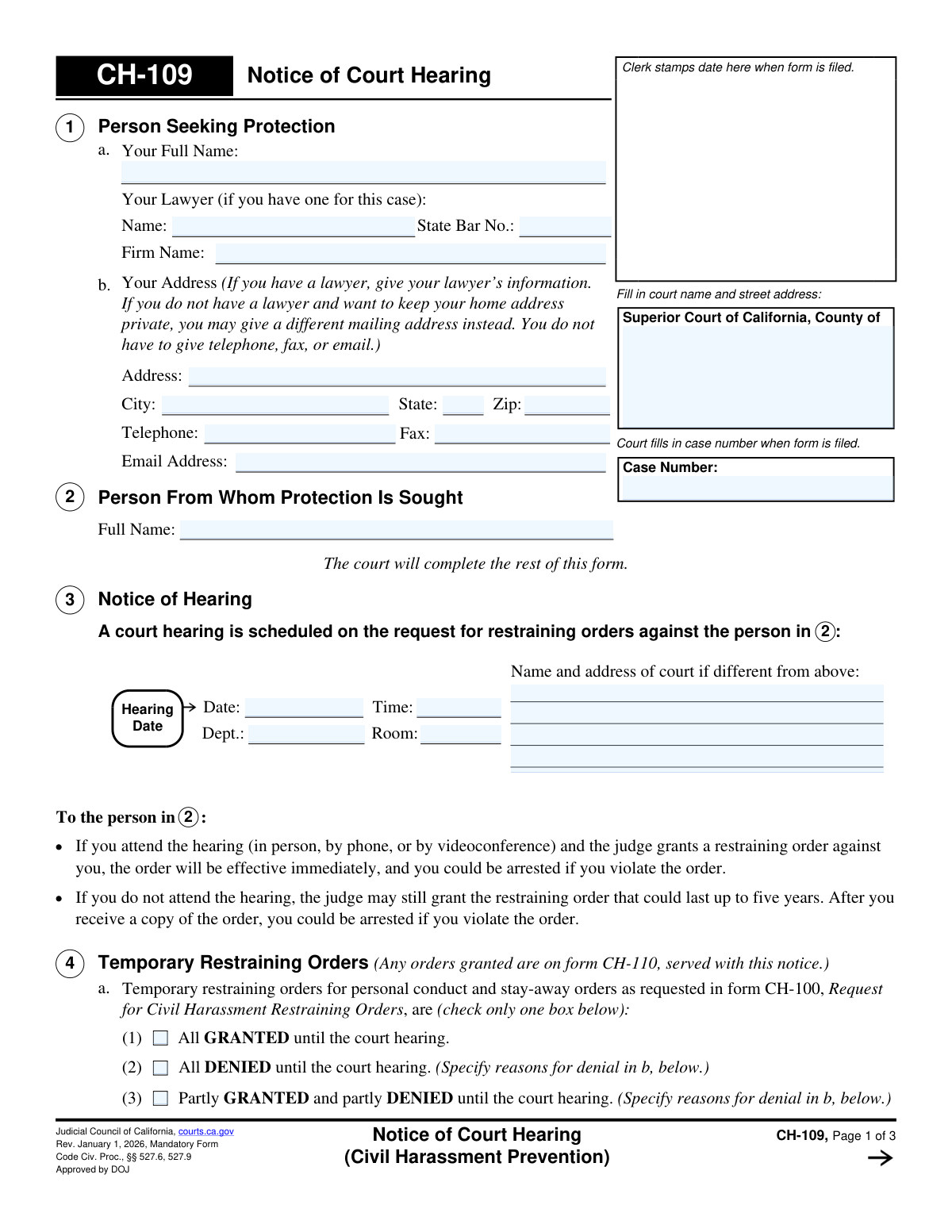
Form CH-109, Notice of Court Hearing (Civil Harassment Prevention), page 1
Basic · 36/100Form Complexity Index

The AI does the filling. You just check it.

No typing into boxes, nothing to install.

Tell the AI about youAnswer a few questions in plain words, or upload a document you already have. That is all the typing there is.
AI fills every field in secondsIt puts each answer in the right box on every page, checkboxes included.
Check it and downloadReview every field, change anything, then download, print or sign the PDF.

What this form asks for

The AI fills all of it, from your answers or your documents.

Form CH-109 is a crucial legal document used in California civil harassment cases to officially inform the involved parties of a scheduled court hearing. It is issued after a request for a restraining order is filed and specifies the date, time, and location of the hearing, as well as whether a temporary restraining order has been granted. Today, this form can be filled out quickly and accurately using AI-powered services like Instafill.ai, which can also convert non-fillable PDF versions into interactive fillable forms.
Fillable fields42
Pages3
Form Complexity IndexBasic, 36/100

The AI checks your answers before you download

12 checks built for this form, so a wrong date or a missing answer is caught before anyone else sees it.

Ensures Case Number Consistency Across Pages

This validation checks that the `caseNumber` field is identical on pages 1, 2, and 3 of the form. Maintaining consistency is critical for document integrity and ensures all pages are correctly associated with the same legal case. A mismatch could lead to filing errors, administrative delays, and legal complications.

Verifies Petitioner's Full Name is Provided

This check confirms that the 'Your Full Name' field (`petitionerName`) in Section 1 is not empty. This field is essential for identifying the person seeking protection and is a fundamental requirement for the legal notice to be valid. The form cannot be processed without this information, as it would render the notice legally insufficient.

Verifies Respondent's Full Name is Provided

This validation ensures that the 'Full Name' field (`restFullName`) for the person from whom protection is sought in Section 2 is not left blank. This information is crucial for properly identifying, serving, and notifying the respondent of the court hearing. An empty or incomplete name would make the legal notice invalid and unenforceable.

Validates Lawyer's State Bar Number Format

This check ensures that if a lawyer's State Bar Number (`protectedLawyerBar`) is entered in Section 1, it conforms to the expected format, which is typically numeric. This helps verify the lawyer's credentials with the State Bar and ensures the accuracy of the court's records. An invalid format could indicate a data entry error or an unlicensed representative.

Ensures Hearing Date is a Future Date

This validation verifies that the `hearingDate` entered by the court in Section 3 is a valid calendar date that occurs after the form's filing date. A court hearing cannot be scheduled for a past date. This check prevents logical impossibilities and ensures the notice provides valid, actionable information about a future court appearance.

Validates Hearing Time Format

This check ensures the `hearingTime` field in Section 3 is entered in a recognized time format, such as HH:MM AM/PM. This is important for clarity and to prevent the involved parties from missing the hearing due to a misinterpretation of the time. An invalid format would create ambiguity and could be grounds for rescheduling the hearing.

And 6 more checks
  • Ensures Exclusive Selection for TRO Disposition
  • Requires Reason for TRO Denial
  • Validates Service Requirement for Granted TRO
  • Validates Service Requirement for Confidentiality Order
  • Validates Service Days is a Positive Integer
  • Validates Judicial Officer Signature Date

Let AI fill out your CH-109

No typing. Every field filled in seconds, checked, ready to sign.

7 days free, then $19.99/month · Cancel anytime

How to Fill Out CH-109 Online for Free in 2026

What the AI walks you through.

  1. Navigate to Instafill.ai and upload your CH-109 form or select it from the template library.
  2. Use the AI assistant to accurately fill in your information as the person seeking protection in Section 1.
  3. Enter the full name of the person from whom protection is sought in Section 2.
  4. Review the information you've entered for accuracy before printing the form for filing. The court will complete the hearing details and case number.
  5. After the court files the form, upload the stamped copy to manage the case and prepare for serving the documents as instructed in Section 6.
  6. Use the platform to track deadlines and manage related forms, such as the Proof of Service (CH-200), which must be filed after the notice is served.

Common Mistakes in Completing CH-109

The ones the AI is built to catch.

Filling in Sections Reserved for the Court
This form contains many sections, such as the Case Number, hearing date and time (Section 3), and TRO status (Section 4), that are explicitly marked to be filled out by the court clerk or judge. People often fill in these blanks because they feel a form must be completed in its entirety, leading to confusion and rejection by the court clerk. To avoid this, carefully read all instructions and leave any field designated for court or clerk use completely blank.
Using an Unsafe Home Address
In Section 1b, a person without a lawyer can list a private mailing address instead of their home address for safety. A common and dangerous mistake is listing a home address out of habit, which is then served to the person they are seeking protection from, potentially revealing their location. Always use a secure P.O. Box or alternative safe address if you have privacy concerns; the form explicitly permits this.
Providing an Incomplete or Incorrect Respondent Name
In Section 2, providing the full, correct legal name of the 'Person From Whom Protection Is Sought' is critical. Users often enter a nickname, a partial name, or a misspelled name, which can make it impossible to legally serve the documents and enforce the order. This can cause the entire case to be delayed or dismissed. Always use the person's complete and accurate legal name.
Misunderstanding the Service of Process
Many people mistakenly believe that filing the forms with the court is the final step. However, the petitioner is responsible for ensuring the respondent is formally 'served' with the court documents by a third party, as explained in Section 6. Failing to properly serve the documents and file a Proof of Service (Form CH-200) with the court will prevent the case from moving forward and no permanent order can be issued.
Attempting to Personally Serve the Documents
The instructions clearly state that the petitioner ('the person in 1') cannot be the one to serve the court papers. Due to urgency or a misunderstanding, a petitioner might try to deliver the documents themselves. This invalidates the service, delays the hearing, and can create a dangerous confrontation with the respondent.
Failing to Serve the Complete Document Packet
Section 6 lists several other forms that must be served along with the CH-109, such as the initial request (CH-100) and a blank response form (CH-120). A frequent error is only serving the Notice of Hearing form and omitting the other required documents checked by the court. This constitutes improper service and can lead to the judge rescheduling or dismissing the case.
Using an Incomplete Name for the Petitioner
In Section 1a, the person seeking protection may use a nickname or initials instead of their full legal name. This can create issues with identity verification for law enforcement and the court system, potentially complicating the enforcement of any restraining orders that are granted. Always use your full legal name as it appears on your government-issued identification.
Submitting Illegible Handwritten Information
When a form is only available as a non-fillable PDF, people often print it and fill it out by hand. Illegible handwriting can lead to critical errors when the court clerk enters the information, such as misspelling names or addresses, which can delay the case or create enforcement problems. To prevent this, use clear block letters or utilize a tool like Instafill.ai, which can convert flat PDFs into fillable forms for clean, typed entries.
Ignoring Instructions on Page 3
The final page of the form contains critical instructions for both the petitioner and the respondent, including the need to bring evidence to the hearing and how to request a continuance. A common mistake is to treat this page as boilerplate and not read it carefully. This can result in a petitioner showing up to the hearing unprepared, without witnesses or evidence, weakening their case.
Failing to Request Accommodations in Advance
The form provides instructions for requesting accommodations like a sign language interpreter, but specifies that the request must be made at least five days before the hearing. People often overlook this or are unaware they must formally request it, and as a result, they may be unable to fully participate in the hearing. If you need an accommodation, you must contact the clerk's office and file the required form (MC-410) well before the deadline.

Frequently Asked Questions About CH-109


Is it really free for 7 days?
Yes. You pay $0 today. Cancel before Oct 31 and you are never charged. Keep it, and it is $19.99 a month for 5 fills of your CH-109.
Can I fill other forms too?
This plan is for your CH-109: your own AI agent fills it as often as 5 times a month. To fill other forms and upload your own, choose a Professional plan from your account.
How do I cancel?
From your account, in two clicks, any time. No email, no call.
How does the AI fill out CH-109?
You answer a few questions in plain words, or upload a document you already have. The AI reads what you give it and puts each answer into the right field of CH-109, on every page, in seconds. It checks the answers against the form's own rules, and you review and change anything before you download, print or sign.
What happens to my information?
It is encrypted in transit and at rest, and it is never used to train AI.
How complex is CH-109 to fill out?
CH-109 has a Form Complexity Index of 36 out of 100, in the basic tier: 42 fillable fields across 3 pages. Instafill.ai's AI fills it in under a minute, with every field there for you to review before you download.
What is the purpose of Form CH-109, Notice of Court Hearing?
This form officially notifies the parties involved of the date, time, and location for a court hearing regarding a request for a civil harassment restraining order. It is issued by the court after a person files a Request for Civil Harassment Restraining Orders (Form CH-100).
Who needs to fill out this form?
The person seeking protection fills out their personal information in Section 1. The court clerk and judge are responsible for completing the rest of the form, including the hearing details, case number, and any decisions on temporary orders.
I received this form. What does it mean and what should I do?
Receiving this form means someone has requested a restraining order against you and a court hearing is scheduled. You must read the form for the hearing date and time, and you have the right to attend the hearing and respond to the request using Form CH-120.
What is a Temporary Restraining Order (TRO) mentioned in Section 4?
A TRO is a short-term order granted by a judge before the full court hearing to provide immediate protection. Section 4 of this notice indicates whether the judge granted, denied, or partially granted a TRO against you, with the full details provided on Form CH-110.
What happens if I don't attend the court hearing?
If you are the person the order is against and you do not attend, the judge can grant a restraining order that lasts up to five years. If you are the person who requested the order and you do not attend, your request will likely be dismissed.
What does it mean to 'serve' the documents, as mentioned in Section 6?
Serving means having another adult (age 18 or older, not you) personally deliver copies of the court forms to the person you want restrained. This is a legal requirement to ensure the other party is officially notified of the hearing and the case against them.
What documents must be served along with this CH-109 Notice?
You must serve a copy of the filed CH-100 (Request), a blank CH-120 (Response form), CH-120-INFO, and if a temporary order was granted, the filed CH-110. The person who performs the service must then complete and file a Proof of Service form (CH-200).
What if I cannot make the scheduled hearing date?
You can ask the court to reschedule the hearing if you have a valid reason. You should read Form CH-115-INFO, 'How to Ask for a New Hearing Date,' for detailed instructions on how to file this request with the court.
How do I respond to the request for a restraining order against me?
You can respond in writing by filling out Form CH-120, 'Response to Request for Civil Harassment Restraining Orders.' You should file the completed form with the court and have a copy mailed to the person seeking the order before your hearing date.
Can I use an AI tool to help me fill out this form?
Yes, for the sections you are required to complete, services like Instafill.ai use AI to accurately auto-fill your information, saving time and helping to prevent errors. The majority of this form, however, is completed by the court.
My copy of the form is a non-fillable PDF. What can I do?
If you have a flat or non-fillable PDF, you can use a service like Instafill.ai. It can convert the document into an interactive, fillable form that you can complete on your computer and then print for filing.
How can I use Instafill.ai to complete my part of the form online?
Simply upload the CH-109 form to the Instafill.ai platform. The AI will identify the fields in Section 1, allowing you to easily type your information into the interactive form before printing it.
Encrypted in transit and at restNever used to train AIDelete your forms any time

Get your CH-109 filled out by AI

$0 today. Cancel before Oct 31 and you pay nothing.

Other forms like this one

California court forms: Judicial Council of California Form SC-105, Request for Court Order and Answer (Small Claims), Judicial Council of California Form SC-120, Defendant’s Claim and ORDER to Go to Small Claims Court (Small Claims), Judicial Council of California Form SER-001, Request for Sheriff to Serve Court Papers, Judicial Council of California Form SER-001, Request for Sheriff to Serve Court Papers, Affidavit for Collection of Personal Property California Probate Code Section 13100, Form POS-040, Proof of Service—Civil, Declaration of Facts of Death (California Superior Court), declaration-of-marriage-for-court-proceeding-california-family-law, ADOPT-200, Adoption Request, ADOPT-200, Stepparent Adoption Request, ADOPT-210, Adoption Agreement, ADOPT-310, Contact After Adoption Agreement, Judicial Council of California Form ADOPT-200, Adoption Request, Form ADR-107, Mediation Attendance Sheet, Form ADR-110, Order Appointing Referee, Form ADR-109, Stipulation or Motion for Order Appointing Referee, Form ADR-102, Request for Trial De Novo After Judicial Arbitration, Form ADR-108, Referee's Report (Code Civ. Proc., §§ 638, 639), Form ADR-106, Petition to Confirm, Correct, or Vacate Contractual Arbitration Award, Form ADR-104, Rejection of Award and Request for Trial After Attorney-Client Fee Arbitration

civil court forms: Petition for Leave to Proceed In Forma Pauperis (Court of Common Pleas of Lehigh County, Pennsylvania, Civil Division), Designation of Record on Appeal (Civil) (Maricopa County Justice Courts, Arizona) (Form APP 8150-702), Certificate of Service (Civil Court Claim), Pfändungs- und Überweisungsbeschluss (Garnishment and Transfer Order) – German Civil Enforcement Court Form, AOPC 308A, Civil Complaint, Form MC 03, Answer, Civil, Form POS-040, Proof of Service—Civil, ONTARIO Form 8: Application (General), Form ATJ 601.9, Application for Waiver of Court Fees (Civil), Nevada Justice / Municipal Civil Court Cover Sheet, Form MC 01, Summons, Form MC 10, Judgment, Civil, Form MC 99, Motion and Affidavit to Set Aside Default (Civil), Form MC 281a, Civil Mediator Application, Ex Parte Motion and Order to Renew Civil Judgment, AO 88B, Subpoena to Produce Documents, Information, or Objects or to Permit Inspection of Premises in a Civil Action, Form APP-031A, Application for Extension of Time to File Brief (Civil Case), Civil Appeal Case Information Statement, Form APP-014, Appellant's Proposed Statement on Appeal (Unlimited Civil Case), form-app-015-respondents-proposed-corrections-toadditions-to-appellants-proposed-settled-statement-unlimited-civil-case

7 days free, then $19.99/month · Cancel anytime