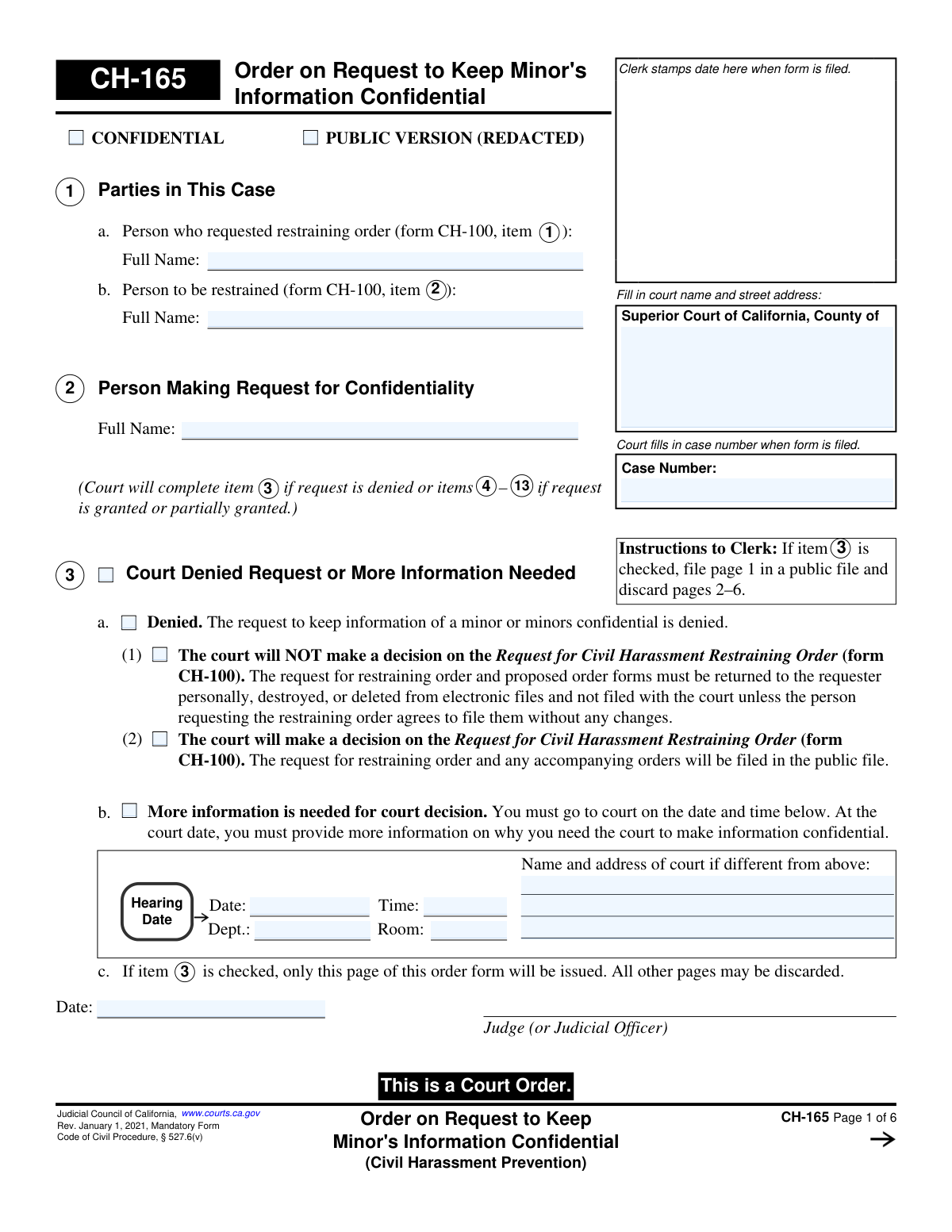
Yes! You can use AI to fill out Form CH-165, Order on Request to Keep Minor's Information Confidential (Civil Harassment Prevention)

Form CH-165, issued by the Judicial Council of California, is a court order that grants, denies, or modifies a request to protect a minor's personal information from public access in civil harassment prevention proceedings. This order is crucial for safeguarding a minor's privacy and safety by specifying what information must be redacted from public court files. Today, this form can be filled out quickly and accurately using AI-powered services like Instafill.ai, which can also convert non-fillable PDF versions into interactive fillable forms.
CH-165 is part of the California court forms and civil court forms categories on Instafill.
Our AI automatically handles information lookup, data retrieval, formatting, and form filling.
It takes less than a minute to fill out CH-165 using our AI form filling.
Securely upload your data. Information is encrypted in transit and deleted immediately after the form is filled out.

Form specifications

Form name: Form CH-165, Order on Request to Keep Minor's Information Confidential (Civil Harassment Prevention)
Number of fields: 98
Number of pages: 1
Language: English
main-image

Instafill Demo: How to fill out PDF forms in seconds with AI

How to Fill Out CH-165 Online for Free in 2026

Are you looking to fill out a CH-165 form online quickly and accurately? Instafill.ai offers the #1 AI-powered PDF filling software of 2026, allowing you to complete your CH-165 form in just 37 seconds or less.
Follow these steps to fill out your CH-165 form online using Instafill.ai:
  1. 1 Navigate to Instafill.ai and upload or select Form CH-165.
  2. 2 Enter the court name, county, case number, and the full names of the parties involved in the case.
  3. 3 Indicate the court's decision by checking whether the request for confidentiality is denied, granted in full, or partially granted.
  4. 4 If granted, specify the names of the minors being protected and detail the exact information to be kept confidential (e.g., name, address, specific details in other documents).
  5. 5 Define who, if anyone besides law enforcement, is permitted to access the unredacted, confidential information.
  6. 6 Provide instructions for redacting documents and serving the order on all relevant parties.
  7. 7 Review the completed form for accuracy before the judge or judicial officer dates and signs the order to make it official.

Our AI-powered system ensures each field is filled out correctly, reducing errors and saving you time.

Why Choose Instafill.ai for Your Fillable CH-165 Form?

Speed

Complete your CH-165 in as little as 37 seconds.

Up-to-Date

Always use the latest 2026 CH-165 form version.

Cost-effective

No need to hire expensive lawyers.

Accuracy

Our AI performs 10 compliance checks to ensure your form is error-free.

Security

Your personal information is protected with bank-level encryption.

Frequently Asked Questions About Form CH-165

Form CH-165 is the official court order that grants or denies a request to keep a minor's information confidential in a civil harassment case. This form is not filled out by you; it is completed and signed by a judge or judicial officer.

If the court denies your request, as indicated in Section 3, it may either refuse to hear your restraining order case or decide to proceed with the case, making all information public.

A 'partially granted' request means the court agrees to protect some, but not all, of the minor's information. The order will specify exactly which details, like an address or school name, must be kept confidential.

This order can protect a minor's name, address, and other specific details listed in court documents. Section 7 of the form will specify exactly what information must be redacted, or blacked out, from public view.

It depends on the judge's decision in Section 8. The court may allow the restrained person to see all information to prepare a response, or it may order that certain details, like the minor's address, also be kept confidential from them.

Section 9 of the order lists who can access the complete, unredacted documents. This typically includes law enforcement, and may also include the minor's school, childcare providers, or other individuals approved by the court.

Redacting is the process of removing or blacking out confidential information from documents before they are filed publicly. Section 10 of the order will specify whether the court, you, or another party is responsible for preparing these redacted copies.

Disclosing information protected by this order without court authorization is a serious violation. According to the form, the person responsible may be sanctioned up to $1,000 or face other court penalties.

You must follow the service instructions in Section 13, which require you to have a copy of this order and other related forms legally delivered ('served') to the restrained person and any other required parties.

Yes, this order is part of a civil harassment case initiated with Form CH-100. It specifically addresses the confidentiality of a minor's information mentioned within that case.

Yes, while a judge fills out this specific order, you can use AI for the forms you must prepare, like the initial request (CH-100) or the confidentiality request (CH-160). Services like Instafill.ai use AI to auto-fill form fields accurately and save you time.

You can upload your court forms, such as the CH-100 or CH-160, to the Instafill.ai platform. The service's AI will then help you accurately complete the required fields, making the process faster and more straightforward.

If you have a non-fillable or 'flat' PDF, you can use a service like Instafill.ai. It can convert the document into an interactive, fillable form that you can easily complete and save on your computer.

Compliance CH-165
Validation Checks by Instafill.ai

1
Case Number Consistency
Validates that the 'Case Number' entered on page 1 is propagated and consistent across all subsequent pages of the form (pages 2-6). This is crucial for ensuring all pages of the order are correctly associated with the same court case. A mismatch could lead to filing errors and parts of the order being misplaced or invalidated.
2
Mutually Exclusive Order Disposition
Ensures that a selection in Item 3 ('Court Denied Request or More Information Needed') and a selection in Item 4 ('Court Granted Request') are mutually exclusive. If a judge denies the request (Item 3), they cannot also grant it (Item 4). This check prevents logically impossible and contradictory orders from being generated.
3
Conditional Hearing Details Requirement
Verifies that if Item 3b ('More information is needed') is checked, the 'Hearing Date', 'Time', and 'Dept.' fields are mandatory and populated. This is critical because the purpose of this selection is to schedule a hearing. Failure to provide these details would make the order incomplete and non-actionable for the involved parties.
4
Required Minor Identification for Granted Request
Checks that if the request is granted or partially granted (Item 4a or 4b is checked), at least one minor's name is entered in Item 6. The entire purpose of a granted order is to protect a minor's information; without a minor being identified, the order is meaningless. The system should flag the form as incomplete if no minor is listed.
5
Required Specification of Confidential Information
Ensures that if the request is granted (Item 4 is checked), at least one checkbox in Item 7 ('Information to Be Kept Confidential') is selected. An order cannot be granted without specifying exactly what information is to be protected. This validation prevents the creation of a vague and unenforceable order.
6
Minor's Initials Format Validation
If Item 7a ('Name of minor') is checked to make the minor's name confidential, this validates that the 'Initials viewable by the public' field is filled and contains only 2-4 uppercase letters. This ensures the redacted version of documents uses a consistent and proper format for the minor's initials, as intended by the form. An invalid format could cause confusion or fail to properly anonymize the minor.
7
Restrained Person Name Consistency
Validates that the full name of the restrained person entered in Item 8 matches the name entered in Item 1b ('Person to be restrained'). This cross-reference ensures that the correct individual is specified as having limited or no access to the confidential information. A mismatch could lead to legal ambiguity and enforcement issues.
8
Conditional Redaction Exception Details
Verifies that if checkbox 8b ('All the information except for the following') is selected, the corresponding text area is not empty. This is a mandatory field when 8b is chosen, as it must specify exactly what information the restrained person cannot access. An empty field would make the order ambiguous and impossible to enforce correctly.
9
Conditional 'Other' Field Population
Checks multiple 'Other' checkboxes on the form (e.g., Item 9a(4), Item 10a(3), Item 13c(8)) and ensures their corresponding text fields are filled if the checkbox is selected. This prevents incomplete entries where a user indicates a custom option but fails to provide the necessary details. The form would be considered incomplete if the text field is left blank.
10
Redaction Responsibility Completeness
If the request is granted (Item 4 is checked), this validates that Item 10a is fully completed. This means both the deadline for redaction ('number of court days or date') must be filled, and one of the responsible parties ('Court', 'Person making the request', or 'Other') must be selected. This ensures there is a clear directive on who is responsible for redacting the documents and by when.
11
Service Form Redaction Logic
Ensures the 'Redacted' checkbox in Item 13c(5) or 13c(6) can only be selected if Item 8b ('All the information except for the following') has been checked. This enforces logical consistency, as redacted copies for the restrained person are only necessary if they are being denied access to specific information. This prevents incorrect versions of the forms from being served.
12
Signature Date Validity
Validates that the 'Date' field next to the Judge's signature is a valid, correctly formatted date and is not set in the future. This ensures the official date of the order is accurate and legally sound. An invalid or future date would call the authenticity and timing of the court order into question.

Common Mistakes in Completing CH-165

Confusing the Order (CH-165) with the Request (CH-160)

A person wanting to protect a minor's information might mistakenly fill out and file this form, CH-165, on its own. This form is an 'Order' for the judge to sign, not the initial 'Request' (which is form CH-160). Filing the wrong form will lead to immediate rejection by the court clerk, wasting critical time. To avoid this, ensure you are starting with the correct form, CH-160 'Request to Keep Minor's Information Confidential,' to initiate the process.

Filling Out Sections Reserved for the Court

Users mistakenly complete fields intended for the judge, such as Item 3 ('Court Denied Request') or Item 5 ('Findings'). This happens when a self-represented party doesn't realize they are preparing a 'proposed' order for the judge to complete and sign. This error will cause the filing to be rejected as improperly prepared, leading to significant delays. To avoid this, leave all judicial decision and finding sections blank for the court to fill in.

Omitting the Case Number on Subsequent Pages

The user correctly enters the case number on page 1 but forgets to repeat it in the header of pages 2 through 6. This is a common oversight with multi-page forms, especially non-fillable PDFs that require manual entry for each page. This can cause pages to be misfiled by the clerk, resulting in an incomplete or unenforceable order. AI-powered tools like Instafill.ai can prevent this by automatically populating recurring information across all pages and can convert flat PDFs into easy-to-use fillable forms.

Imprecisely Identifying Information for Redaction

In Item 7c(2), the user provides a vague location for confidential data, such as 'in the attached declaration,' instead of the required 'form #, page #, paragraph #, line #.' This occurs because precisely citing every piece of data is tedious. An imprecise request will likely be denied, as the court cannot guess what to redact. To avoid this, be meticulous in identifying the exact location of all information you want kept confidential.

Failing to Attach Circled Documents

The user checks the box in Item 7c(1), indicating that confidential information is circled on an attached document (like form CH-100), but then forgets to include that document with their filing. This simple oversight makes it impossible for the court to grant the request because the subject matter is missing. This will result in the request being denied as incomplete. Always create a checklist of all required attachments and verify they are included before submitting.

Mishandling the Minor's Name and Public Initials

In Item 7a, when requesting the minor's name be kept confidential, the user either leaves the 'Initials viewable by the public' field blank or enters the minor's full name again. This shows a misunderstanding of the redaction process, where a public-facing identifier is needed for court records. This can lead to the court denying the request or creating a confusing public record. To avoid this, provide the minor's full legal name in the first box and their initials (e.g., 'J.D.' for Jane Doe) in the second.

Serving an Incorrect Version of the Documents

Item 13c requires serving either a 'Redacted' or 'Unredacted' version of forms, depending on the court's final order. A user might serve the unredacted version when it should have been redacted, violating the confidentiality order and potentially endangering the minor. This error invalidates the service of process and can have serious legal consequences. Always read the final signed order (CH-165) carefully to determine which version must be served.

Forgetting to Attach a Continuation Sheet for Additional Minors

When more than three minors need protection, the user checks the 'additional minors' box in Item 6 but fails to attach the required separate sheet listing their full names. This is a common oversight when dealing with multiple attachments. This results in the additional minors not being covered by the court's order, leaving their information unprotected. If you check this box, ensure you create, label ('Attachment 6—Additional Minors'), and include the list with your filing.

Using Inconsistent Party or Minor Names

The names listed for the parties (Item 1) or the minors (Item 6) do not exactly match the full legal names used on other court documents, like the CH-100. This often occurs when using nicknames, initials, or slightly different spellings. Inconsistent names create legal ambiguity and can cause the filing to be rejected or the final order to be unenforceable. To prevent this, use AI form-filling tools like Instafill.ai that ensure consistency by auto-populating names across all related forms.

Forgetting the Confidential Information Cover Sheet (CH-175)

Item 12b requires that any future document filed containing confidential information must have form CH-175 attached as a cover sheet. Users often forget this procedural step for subsequent filings after the initial order is granted. This error can lead to the confidential document being inadvertently placed in the public court file, defeating the purpose of the order. Always remember to use form CH-175 as a cover sheet for any document containing protected information.
Saved over 80 hours a year

“I was never sure if my IRS forms like W-9 were filled correctly. Now, I can complete the forms accurately without any external help.”

Kevin Martin Green

Your data stays secure with advanced protection from Instafill and our subprocessors

Robust compliance program

Transparent business model

You’re not the product. You always know where your data is and what it is processed for.

ISO 27001, HIPAA, and GDPR

Our subprocesses adhere to multiple compliance standards, including but not limited to ISO 27001, HIPAA, and GDPR.

Security & privacy by design

We consider security and privacy from the initial design phase of any new service or functionality. It’s not an afterthought, it’s built-in, including support for two-factor authentication (2FA) to further protect your account.

Fill out CH-165 with Instafill.ai

Worried about filling PDFs wrong? Instafill securely fills form-ch-165-order-on-request-to-keep-minors-information-confidential-civil-harassment-prevention forms, ensuring each field is accurate.

Related forms by category

California court forms Judicial Council of California Form SC-105, Request for Court Order and Answer (Small Claims), Judicial Council of California Form SC-120, Defendant’s Claim and ORDER to Go to Small Claims Court (Small Claims), Judicial Council of California Form SER-001, Request for Sheriff to Serve Court Papers, Judicial Council of California Form SER-001, Request for Sheriff to Serve Court Papers, Affidavit for Collection of Personal Property California Probate Code Section 13100, Form POS-040, Proof of Service—Civil, Declaration of Facts of Death (California Superior Court), declaration-of-marriage-for-court-proceeding-california-family-law, ADOPT-200, Adoption Request, ADOPT-200, Stepparent Adoption Request, ADOPT-210, Adoption Agreement, ADOPT-310, Contact After Adoption Agreement, Judicial Council of California Form ADOPT-200, Adoption Request, Form ADR-107, Mediation Attendance Sheet, Form ADR-110, Order Appointing Referee, Form ADR-109, Stipulation or Motion for Order Appointing Referee, Form ADR-102, Request for Trial De Novo After Judicial Arbitration, Form ADR-108, Referee's Report (Code Civ. Proc., §§ 638, 639), Form ADR-106, Petition to Confirm, Correct, or Vacate Contractual Arbitration Award, Form ADR-104, Rejection of Award and Request for Trial After Attorney-Client Fee Arbitration · + 169 more →
civil court forms Petition for Leave to Proceed In Forma Pauperis (Court of Common Pleas of Lehigh County, Pennsylvania, Civil Division), Designation of Record on Appeal (Civil) (Maricopa County Justice Courts, Arizona) (Form APP 8150-702), Certificate of Service (Civil Court Claim), Pfändungs- und Überweisungsbeschluss (Garnishment and Transfer Order) – German Civil Enforcement Court Form, AOPC 308A, Civil Complaint, Form MC 03, Answer, Civil, Form POS-040, Proof of Service—Civil, ONTARIO Form 8: Application (General), Form ATJ 601.9, Application for Waiver of Court Fees (Civil), Nevada Justice / Municipal Civil Court Cover Sheet, Form MC 01, Summons, Form MC 10, Judgment, Civil, Form MC 99, Motion and Affidavit to Set Aside Default (Civil), Form MC 281a, Civil Mediator Application, Ex Parte Motion and Order to Renew Civil Judgment, AO 88B, Subpoena to Produce Documents, Information, or Objects or to Permit Inspection of Premises in a Civil Action, Form APP-031A, Application for Extension of Time to File Brief (Civil Case), Civil Appeal Case Information Statement, Form APP-014, Appellant's Proposed Statement on Appeal (Unlimited Civil Case), form-app-015-respondents-proposed-corrections-toadditions-to-appellants-proposed-settled-statement-unlimited-civil-case · + 34 more →