
Yes! You can use AI to fill out Form CH-179, Order on Request for Release of Minor's Confidential Information (Civil Harassment Prevention)
Don't type 84 fields by hand. Tell our AI about yourself, or upload the listing or an old lease, and it fills every field in seconds. You check it, then download, print or sign.
The AI does the filling. You just check it.
No typing into boxes, nothing to install.
What this form asks for
The AI fills all of it, from your answers or your documents.
The AI checks your answers before you download
12 checks built for this form, so a wrong date or a missing answer is caught before anyone else sees it.
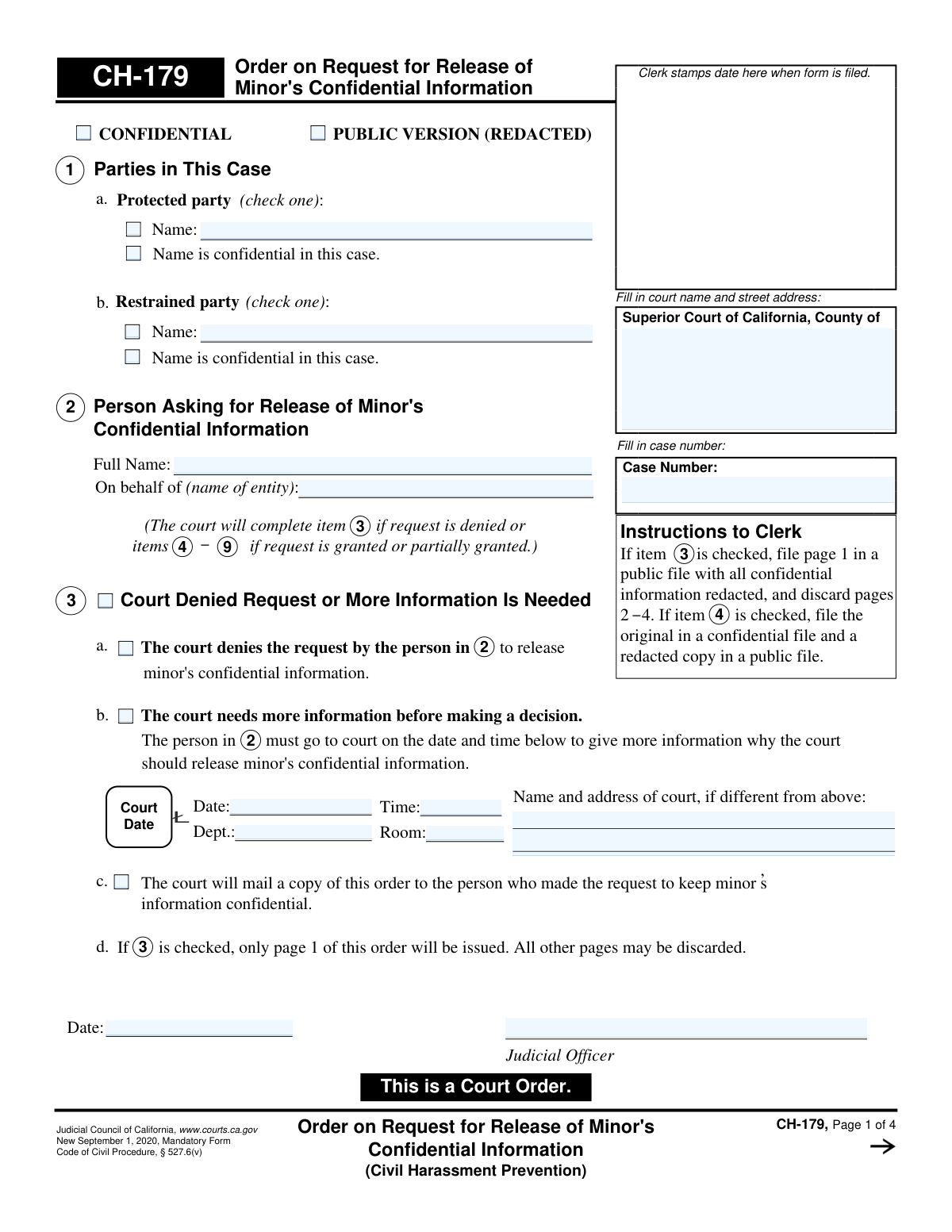
This validation verifies that the 'Case Number' field is populated and is identical on all four pages of the form (CH-179). The case number is the primary identifier linking the pages of this court order together. If the numbers are inconsistent, it could lead to filing errors and parts of the order being associated with the wrong case, compromising the document's legal integrity.
This check ensures that the court name and street address are filled in on page 1. This information is mandatory as it identifies the specific jurisdiction and location of the court issuing the order. A failure to provide this information would render the order invalid as its origin would be unknown.
This validation confirms that only one primary outcome is selected between Section 3 ('Denied' or 'More Information Is Needed') and Section 4 ('Completely granted' or 'Partially granted'). A request cannot be simultaneously denied and granted. This check prevents logical contradictions that would make the court's decision ambiguous and unenforceable.
This check ensures that if the box in Section 3b ('The court needs more information') is checked, then the corresponding date, time, department, and room for the hearing are all filled out. This is critical for ensuring due process, as the requesting party must be properly notified of the follow-up hearing. If this information is missing, the party would not know when or where to appear.
This validation verifies that if a request is granted (Section 4a or 4c), the court's findings in Section 5a are properly completed. This means the 'properly served' box must be checked, and at least one of the two subsequent boxes ('necessary to prevent harassment' or 'in the minor's best interest') must also be checked. These findings are a legal prerequisite for releasing a minor's confidential information.
This check ensures that if the 'Other' checkbox is selected in Section 6a (listing who may have access to information), the corresponding text field for the name of the person or entity is not empty. This prevents ambiguity and ensures that information is only released to a clearly identified party. An empty field would create an authorization for an unknown entity.
And 6 more checks
- Verifies Completeness of Granted Release Details
- Flags for Attachment Verification
- Validates Judicial Officer's Signature Date
- Ensures Exclusive Service Method Selection
- Validates Logical Clerk Certification Date
- Requires Name for Each Listed Minor
Let AI fill out your CH-179
No typing. Every field filled in seconds, checked, ready to sign.
How to Fill Out CH-179 Online for Free in 2026
What the AI walks you through.
- Navigate to Instafill.ai and upload or select the CH-179 form.
- Enter the Superior Court information and the specific case number at the top of the form.
- Identify the person who requested the release of information and the parties involved in the case (protected party and restrained party).
- Clearly mark the court's decision by checking the appropriate boxes to indicate if the request is denied, granted, partially granted, or if more information is needed.
- If the request is granted, detail the court's findings and specify exactly what confidential information is being released and to which persons or entities.
- Include any additional orders from the court and ensure the judicial officer's signature and date are properly recorded.
- Review the entire completed order for accuracy before downloading, printing, and filing it with the court clerk as instructed.
Common Mistakes in Completing CH-179
The ones the AI is built to catch.
Forgetting the Case Number on Subsequent Pages
Improperly Disclosing Confidential Names
Incomplete Court Address Information
Failing to Provide Legal Justification for Release
Vaguely Identifying Information Recipients
Ambiguous Description of Information to be Released
Ignoring Instructions for Attachments
Misunderstanding Service Responsibilities
Filling Out Sections Reserved for the Court
Submitting a Handwritten or Poorly Formatted Document
Frequently Asked Questions About CH-179
Is it really free for 7 days?
Can I fill other forms too?
How do I cancel?
How does the AI fill out CH-179?
What happens to my information?
How complex is CH-179 to fill out?
What is the purpose of Form CH-179?
Do I fill out this form myself?
What happens if the court denies the request to release information?
What does it mean if a request is 'partially granted'?
If the request is granted, who is allowed to receive the minor's information?
What kind of information can be released through this order?
What are the penalties for misusing information released by this order?
How do I get a copy of the completed order?
What should be done if information for more than three minors needs to be released?
What is the 'Court's Findings' section for?
Can an AI tool help me with Form CH-179?
How can I use Instafill.ai to fill out my court forms online?
The PDF form I have is not fillable. What can I do?
Get your CH-179 filled out by AI
$0 today. Cancel before Nov 2 and you pay nothing.
Other forms like this one
California court forms: Judicial Council of California Form SC-105, Request for Court Order and Answer (Small Claims), Judicial Council of California Form SC-120, Defendant’s Claim and ORDER to Go to Small Claims Court (Small Claims), Judicial Council of California Form SER-001, Request for Sheriff to Serve Court Papers, Judicial Council of California Form SER-001, Request for Sheriff to Serve Court Papers, Affidavit for Collection of Personal Property California Probate Code Section 13100, Form POS-040, Proof of Service—Civil, Declaration of Facts of Death (California Superior Court), declaration-of-marriage-for-court-proceeding-california-family-law, ADOPT-200, Adoption Request, ADOPT-200, Stepparent Adoption Request, ADOPT-210, Adoption Agreement, ADOPT-310, Contact After Adoption Agreement, Judicial Council of California Form ADOPT-200, Adoption Request, Form ADR-107, Mediation Attendance Sheet, Form ADR-110, Order Appointing Referee, Form ADR-109, Stipulation or Motion for Order Appointing Referee, Form ADR-102, Request for Trial De Novo After Judicial Arbitration, Form ADR-108, Referee's Report (Code Civ. Proc., §§ 638, 639), Form ADR-106, Petition to Confirm, Correct, or Vacate Contractual Arbitration Award, Form ADR-104, Rejection of Award and Request for Trial After Attorney-Client Fee Arbitration
civil court forms: Petition for Leave to Proceed In Forma Pauperis (Court of Common Pleas of Lehigh County, Pennsylvania, Civil Division), Designation of Record on Appeal (Civil) (Maricopa County Justice Courts, Arizona) (Form APP 8150-702), Certificate of Service (Civil Court Claim), Pfändungs- und Überweisungsbeschluss (Garnishment and Transfer Order) – German Civil Enforcement Court Form, AOPC 308A, Civil Complaint, Form MC 03, Answer, Civil, Form POS-040, Proof of Service—Civil, ONTARIO Form 8: Application (General), Form ATJ 601.9, Application for Waiver of Court Fees (Civil), Nevada Justice / Municipal Civil Court Cover Sheet, Form MC 01, Summons, Form MC 10, Judgment, Civil, Form MC 99, Motion and Affidavit to Set Aside Default (Civil), Form MC 281a, Civil Mediator Application, Ex Parte Motion and Order to Renew Civil Judgment, AO 88B, Subpoena to Produce Documents, Information, or Objects or to Permit Inspection of Premises in a Civil Action, Form APP-031A, Application for Extension of Time to File Brief (Civil Case), Civil Appeal Case Information Statement, Form APP-014, Appellant's Proposed Statement on Appeal (Unlimited Civil Case), form-app-015-respondents-proposed-corrections-toadditions-to-appellants-proposed-settled-statement-unlimited-civil-case
Let AI fill out your CH-179
Your trial starts once a card is added. You pay nothing before Nov 2.
Our AI already knows this form, all 84 fields of it. Skip the typing: tell it about yourself, or upload what you have, and it fills the whole form in seconds.
- AI fills every field on all 4 pages, checkboxes included
- No typing into boxes: answer a few questions, or upload the listing or an old lease, an old copy of this form, a photo of a document
- The AI checks the answers; you review and change anything before you download
- Download the finished PDF, print it, or sign it online
- Encrypted, and never used to train AI
Cancel before Nov 2 and you pay nothing.
A card is needed to start the trial. Cancel in two clicks from your account.
Terms · Privacy