
Instafill.ai
7 days free
AI form filling · 78 fields · 3 pages · done in seconds

Yes! You can use AI to fill out Form CIV-153, Order on Application to Be Relieved as Attorney on Completion of Limited Scope Representation

Don't type 78 fields by hand. Tell our AI about yourself, or upload a document you already have, and it fills every field in seconds. You check it, then download, print or sign.
7 days free, then $19.99/month · Cancel anytime
AI fills it, no typingEncrypted, never used to train AICancel in two clicks
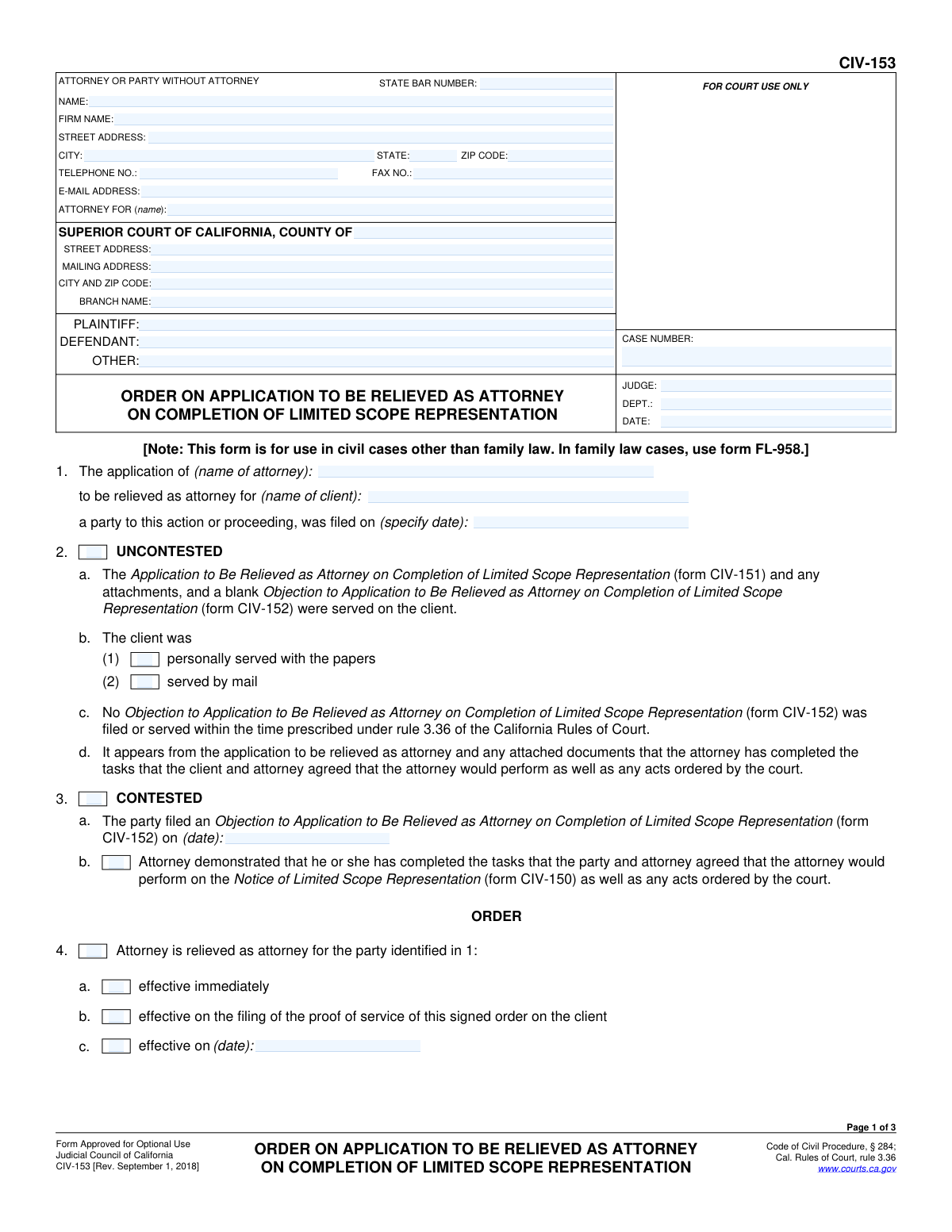
Form CIV-153, Order on Application to Be Relieved as Attorney on Completion of Limited Scope Representation, page 1
Basic · 43/100Form Complexity Index

The AI does the filling. You just check it.

No typing into boxes, nothing to install.

Tell the AI about youAnswer a few questions in plain words, or upload a document you already have. That is all the typing there is.
AI fills every field in secondsIt puts each answer in the right box on every page, checkboxes included.
Check it and downloadReview every field, change anything, then download, print or sign the PDF.

What this form asks for

The AI fills all of it, from your answers or your documents.

Form CIV-153 is a judicial order used in California civil courts to formalize a judge's decision regarding an attorney's application to withdraw from a case upon the completion of their duties under a limited scope representation agreement. This order is crucial as it officially ends the attorney's legal obligations to the client and notifies all parties of the change in representation status. Today, this form can be filled out quickly and accurately using AI-powered services like Instafill.ai, which can also convert non-fillable PDF versions into interactive fillable forms.
Fillable fields78
Pages3
Form Complexity IndexBasic, 43/100

The AI checks your answers before you download

12 checks built for this form, so a wrong date or a missing answer is caught before anyone else sees it.

Case Number Consistency Across Pages

This check ensures that the 'CASE NUMBER' field is populated and contains the exact same value on pages 1, 2, and 3. The case number is the primary identifier for the legal proceeding, and inconsistency can lead to misfiling and severe administrative errors. If the numbers do not match, the submission should be rejected until the discrepancy is corrected.

State Bar Number Format

Validates that the 'STATE BAR NUMBER' field contains only numeric digits. This is crucial for correctly identifying the attorney of record within the California State Bar's database. An invalid format could prevent proper record-keeping and attorney verification. The check should flag any non-numeric characters.

Attorney and Client Name Consistency

Verifies that the attorney name entered in the header ('ATTORNEY FOR') matches the attorney name in section 1, and that the client name listed under 'ATTORNEY FOR' also matches the client name in section 1. This cross-reference ensures the application correctly identifies the parties involved in the representation change. A mismatch could invalidate the order.

Mutually Exclusive Selection for Contested Status

Ensures that either the 'UNCONTESTED' checkbox (section 2) or the 'CONTESTED' checkbox (section 3) is selected, but not both. These sections represent two distinct procedural paths for the application. Selecting both or neither creates ambiguity and makes the form logically invalid, preventing the court from processing the order.

Conditional Requirement for Contested Date

If the 'CONTESTED' checkbox (section 3) is selected, this validation confirms that the date field within that section is filled out with a valid date. This date signifies when the objection was filed and is a required piece of information for the court to understand the case's procedural history. Failure to provide it will result in an incomplete submission.

Mutually Exclusive Selection for Order Outcome

This check verifies that either the order is granted (section 4, 'Attorney is relieved') or denied (section 5, 'Application...is denied'), but not both. The form can only have one outcome. Selecting both options is a logical contradiction that makes the order unenforceable and requires correction.

And 6 more checks
  • Conditional Requirement for Denial Reason
  • Conditional Logic for Order Effective Date
  • Client Address Requirement on Granted Application
  • Date Chronology for Mailing
  • Completeness of Proof of Service Declarant Information
  • Recipient Requirement for Proof of Service

Let AI fill out your CIV-153

No typing. Every field filled in seconds, checked, ready to sign.

7 days free, then $19.99/month · Cancel anytime

How to Fill Out CIV-153 Online for Free in 2026

What the AI walks you through.

  1. Navigate to Instafill.ai and upload or select Form CIV-153.
  2. Use the AI assistant to input the court and case information, including the county, case number, and names of the plaintiff and defendant.
  3. Enter the names of the attorney and client involved in the application, along with the date the application was filed.
  4. Indicate whether the application was contested or uncontested, and fill in the corresponding details regarding service and objections.
  5. Specify the court's decision by checking the appropriate boxes to either grant or deny the application, and provide the effective date or reasons for denial.
  6. Complete the Proof of Service section with the details of how and when the order was mailed to all parties.
  7. Review all entered information for accuracy before the judicial officer signs the order for filing and distribution.

Common Mistakes in Completing CIV-153

The ones the AI is built to catch.

Inconsistent Case Information Across Pages
Users often manually enter the Case Number, Plaintiff, and Defendant names on each page, leading to typos or inconsistencies. For example, the Case Number on page 1 might have a transposed digit compared to page 3. This can cause the document to be rejected by the court clerk, delaying the legal process. To avoid this, meticulously double-check that all repeating information is identical on every page. AI-powered tools like Instafill.ai can prevent this by auto-populating repeating fields across the entire document after a single entry, ensuring consistency.
Providing an Incorrect Client Address in Item 7
In Item 7, the attorney must provide the client's current mailing address. A common and serious mistake is entering an old or incorrect address. This is critical because once the attorney is relieved, all future court notices will be sent to this address. An incorrect address means the now self-represented party may not receive important updates, potentially leading to missed hearings or default judgments. Attorneys must verify the client's last known address before submitting the form.
Invalid Proof of Service Declarant
The Proof of Service on page 3 must be signed by a non-party to the lawsuit who is over 18. Attorneys or their staff sometimes mistakenly have the plaintiff or defendant sign this section. A proof of service signed by a party to the case is legally invalid and will nullify the service of the order. This can lead to sanctions or a requirement to re-serve the document, causing significant delays. Always ensure the person mailing the document and signing the declaration is not named as a party in the case caption.
Incomplete or Unsigned Proof of Service
The Proof of Service section is often filled out hastily, resulting in missing information such as the date of mailing, the city/state of mailing, or the declarant's signature. An unsigned or incomplete Proof of Service is invalid and fails to provide the court with the required evidence that all parties were notified of the order. This can invalidate any subsequent actions in the case. To prevent this, carefully review every field in the Proof of Service section before filing, paying special attention to the date and signature lines.
Using the Wrong Court Branch Address
Filers often list the main address for the Superior Court of the county instead of the specific street address of the branch or district where the case is actually being heard. This can cause filing errors and routing delays within the court system. Always verify the exact courthouse address from previous case documents or the court's website for that specific case. Using a tool like Instafill.ai can help by saving correct court profiles, reducing the chance of entering a generic or incorrect address.
Incorrectly Identifying the Application Date
Item 1 requires the date on which the initial 'Application to Be Relieved' (form CIV-151) was filed, not the date this 'Order' form is being prepared. Users frequently confuse these dates, which can disrupt the court's timeline for processing the request, especially when determining if an objection was filed in a timely manner. To avoid this, refer directly to the file-stamped copy of the original CIV-151 application to get the exact filing date.
Misrepresenting the Contested Status
The form has separate sections for 'UNCONTESTED' (Item 2) and 'CONTESTED' (Item 3) applications. A mistake is made when an attorney checks the 'UNCONTESTED' box even though the client has filed an 'Objection' (form CIV-152). This is a misrepresentation to the court and can lead to the order being vacated and potential sanctions against the attorney. It is crucial to accurately reflect the status of the application based on whether an objection was received.
Using the Form for a Family Law Case
The form explicitly states in a note under the title: '[This form is for use in civil cases other than family law. In family law cases, use form FL-958.]' Despite this clear warning, parties sometimes mistakenly use this civil form for a divorce or custody case. Using the wrong form for the case type will result in automatic rejection by the court, wasting time and filing fees. Always confirm you are using the correct form designated for your specific legal area.
Confusing the Attorney and Client Information in the Header
The top-left box is for the information of the 'ATTORNEY OR PARTY WITHOUT ATTORNEY' who is filing the document. In this context, it is the attorney seeking to be relieved who prepares and files this proposed order. A common error is for the attorney's information to be incomplete or for the client's information to be mistakenly placed here. This can cause confusion about who submitted the document and where court correspondence should be sent. The attorney's full name, firm, address, and State Bar number must be accurately entered.
Citing the Wrong Form Number in Proof of Service
The Proof of Service section on page 3 contains a typo, referencing service of 'form MC-958' instead of the correct form, CIV-153. While this is an error on the official form, users who don't notice or correct it may create a technically inaccurate record of service. This could potentially be used to challenge the validity of the service later. The best practice is to cross out the incorrect form number and write in 'CIV-153' to ensure the record is perfectly clear and accurate.

Frequently Asked Questions About CIV-153


Is it really free for 7 days?
Yes. You pay $0 today. Cancel before Oct 31 and you are never charged. Keep it, and it is $19.99 a month for 5 fills of your CIV-153.
Can I fill other forms too?
This plan is for your CIV-153: your own AI agent fills it as often as 5 times a month. To fill other forms and upload your own, choose a Professional plan from your account.
How do I cancel?
From your account, in two clicks, any time. No email, no call.
How does the AI fill out CIV-153?
You answer a few questions in plain words, or upload a document you already have. The AI reads what you give it and puts each answer into the right field of CIV-153, on every page, in seconds. It checks the answers against the form's own rules, and you review and change anything before you download, print or sign.
What happens to my information?
It is encrypted in transit and at rest, and it is never used to train AI.
How complex is CIV-153 to fill out?
CIV-153 has a Form Complexity Index of 43 out of 100, in the basic tier: 78 fillable fields across 3 pages. Instafill.ai's AI fills it in under a minute, with every field there for you to review before you download.
What is the purpose of Form CIV-153?
This form is the court's official order that either grants or denies an attorney's request to be removed from a case after they have completed the work agreed upon in a limited scope representation agreement.
Who fills out this form?
A judge or judicial officer completes and signs the order on pages 1 and 2. The attorney who filed the application is then responsible for completing the Proof of Service on page 3 after serving the order.
Is this the form I use to ask to be relieved as an attorney?
No, this is the court's final order. To make the request, an attorney must file Form CIV-151, 'Application to Be Relieved as Attorney on Completion of Limited Scope Representation'.
I am the client. What happens after this order is signed?
Once this order becomes effective, your attorney is no longer representing you, and you are responsible for handling all aspects of your case yourself. You must keep the court informed of your current mailing address using form MC-040.
What does it mean if the 'Uncontested' box is checked?
This means the client did not file an 'Objection' (Form CIV-152) to the attorney's application to be relieved within the time allowed. The court is granting the attorney's request without a dispute from the client.
What happens if the 'Contested' box is checked?
This indicates that the client filed an objection to the attorney's request. The judge has reviewed the objection and the attorney's response and has made a decision to either grant or deny the application.
Can I use this form for my divorce case?
No, this form is for general civil cases only. For family law cases, including divorce, you must use Form FL-958, 'Order on Application to Be Relieved as Counsel Upon Completion of Limited Scope Representation'.
As the attorney, what do I do after the judge signs this order?
You must serve a copy of the signed order on your former client and all other parties in the case. Afterwards, you must complete the 'Proof of Service' on page 3 and file it with the court.
What happens if the judge denies the application to be relieved?
If the application is denied, the attorney's representation of the client continues. The judge will state the reasons for the denial in section 5 of the form.
Why is the client's mailing address listed in item 7?
This section confirms the client's official address for the court record. Since the client will now be self-represented, the court and other parties will use this address to mail all future legal notices and documents.
Can AI tools help me fill out Form CIV-153?
Yes, services like Instafill.ai use AI to auto-fill form fields accurately and save time. It can populate repetitive information like case numbers, names, and addresses, reducing manual entry.
How can I fill out this form online?
You can upload the PDF to a platform like Instafill.ai. It will make the form interactive, allowing you to type information directly into the fields and use AI to auto-fill sections before downloading the completed document.
The PDF version of this form I found is not fillable. What should I do?
If you have a non-fillable or 'flat' PDF, you can use a service like Instafill.ai. It can convert the document into an interactive, fillable form online.
What is the 'Proof of Service' on page 3 for?
The 'Proof of Service' is a sworn declaration that must be completed and filed with the court. It proves that copies of the signed order were properly mailed to the client and all other parties involved in the lawsuit.
Encrypted in transit and at restNever used to train AIDelete your forms any time

Get your CIV-153 filled out by AI

$0 today. Cancel before Oct 31 and you pay nothing.

Other forms like this one

California court forms: Judicial Council of California Form SC-105, Request for Court Order and Answer (Small Claims), Judicial Council of California Form SC-120, Defendant’s Claim and ORDER to Go to Small Claims Court (Small Claims), Judicial Council of California Form SER-001, Request for Sheriff to Serve Court Papers, Judicial Council of California Form SER-001, Request for Sheriff to Serve Court Papers, Affidavit for Collection of Personal Property California Probate Code Section 13100, Form POS-040, Proof of Service—Civil, Declaration of Facts of Death (California Superior Court), declaration-of-marriage-for-court-proceeding-california-family-law, ADOPT-200, Adoption Request, ADOPT-200, Stepparent Adoption Request, ADOPT-210, Adoption Agreement, ADOPT-310, Contact After Adoption Agreement, Judicial Council of California Form ADOPT-200, Adoption Request, Form ADR-107, Mediation Attendance Sheet, Form ADR-110, Order Appointing Referee, Form ADR-109, Stipulation or Motion for Order Appointing Referee, Form ADR-102, Request for Trial De Novo After Judicial Arbitration, Form ADR-108, Referee's Report (Code Civ. Proc., §§ 638, 639), Form ADR-106, Petition to Confirm, Correct, or Vacate Contractual Arbitration Award, Form ADR-104, Rejection of Award and Request for Trial After Attorney-Client Fee Arbitration

civil court forms: Petition for Leave to Proceed In Forma Pauperis (Court of Common Pleas of Lehigh County, Pennsylvania, Civil Division), Designation of Record on Appeal (Civil) (Maricopa County Justice Courts, Arizona) (Form APP 8150-702), Certificate of Service (Civil Court Claim), Pfändungs- und Überweisungsbeschluss (Garnishment and Transfer Order) – German Civil Enforcement Court Form, AOPC 308A, Civil Complaint, Form MC 03, Answer, Civil, Form POS-040, Proof of Service—Civil, ONTARIO Form 8: Application (General), Form ATJ 601.9, Application for Waiver of Court Fees (Civil), Nevada Justice / Municipal Civil Court Cover Sheet, Form MC 01, Summons, Form MC 10, Judgment, Civil, Form MC 99, Motion and Affidavit to Set Aside Default (Civil), Form MC 281a, Civil Mediator Application, Ex Parte Motion and Order to Renew Civil Judgment, AO 88B, Subpoena to Produce Documents, Information, or Objects or to Permit Inspection of Premises in a Civil Action, Form APP-031A, Application for Extension of Time to File Brief (Civil Case), Civil Appeal Case Information Statement, Form APP-014, Appellant's Proposed Statement on Appeal (Unlimited Civil Case), form-app-015-respondents-proposed-corrections-toadditions-to-appellants-proposed-settled-statement-unlimited-civil-case

7 days free, then $19.99/month · Cancel anytime