Yes! You can use AI to fill out State of California Department of Corrections and Rehabilitation CCHCS Acquisitions Quote Worksheet
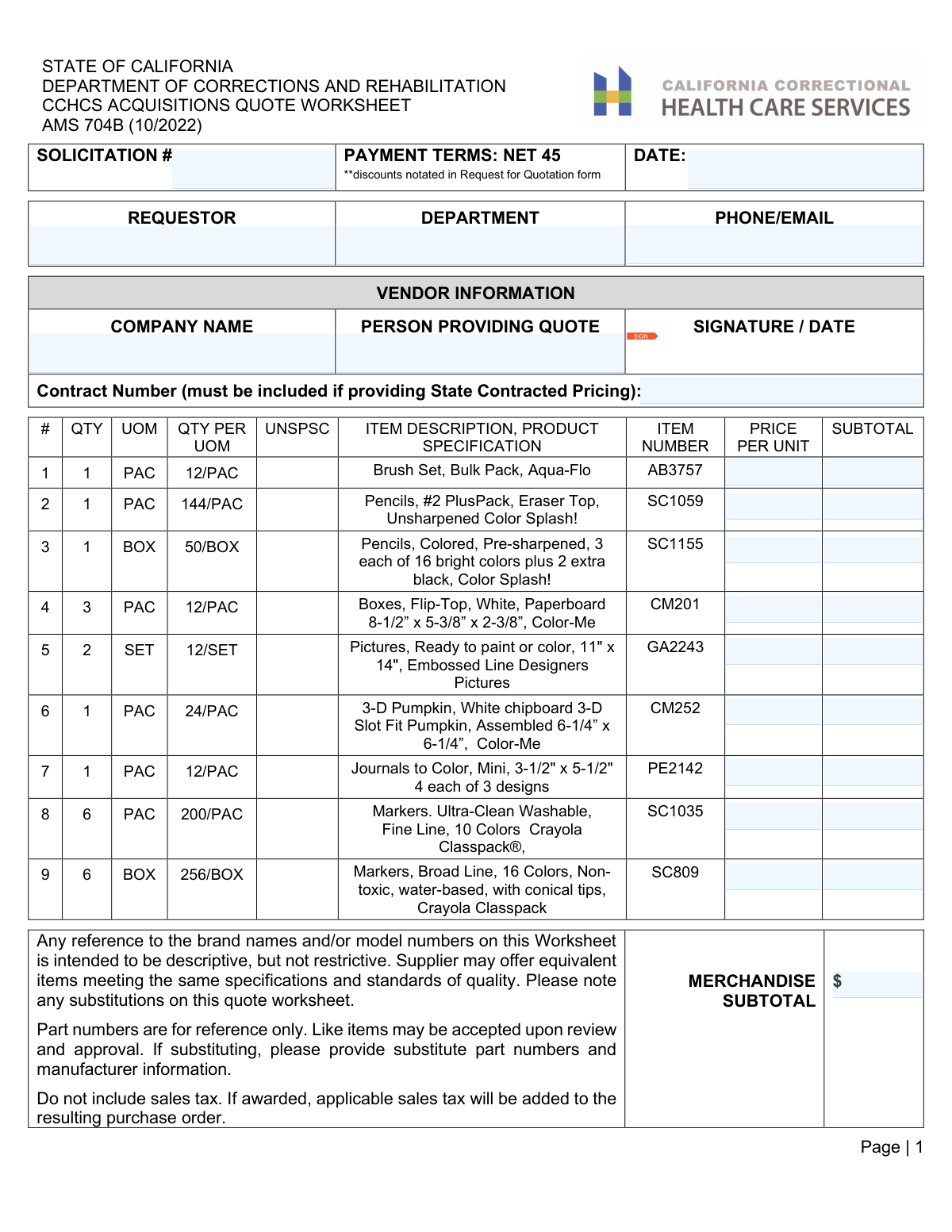
The AMS 704B, CCHCS Acquisitions Quote Worksheet, is a document used by the State of California Department of Corrections and Rehabilitation for soliciting price quotes from vendors for various goods. Vendors use this form to detail their company information, list prices for requested items, and provide a total cost for the merchandise. Today, this form can be filled out quickly and accurately using AI-powered services like Instafill.ai, which can also convert non-fillable PDF versions into interactive fillable forms.
AMS 704B is part of the
California state forms and Department of State forms categories on Instafill.
Our AI automatically handles information lookup, data retrieval, formatting, and form filling.
It takes less than a minute to fill out AMS 704B using our AI form filling.
Securely upload your data. Information is encrypted in transit and deleted immediately after the form is filled out.
Form specifications
| Form name: | State of California Department of Corrections and Rehabilitation CCHCS Acquisitions Quote Worksheet |
| Number of fields: | 101 |
| Number of pages: | 4 |
| Language: | English |
Instafill Demo: How to fill out PDF forms in seconds with AI
How to Fill Out AMS 704B Online for Free in 2026
Are you looking to fill out a AMS 704B form online quickly and accurately? Instafill.ai offers the #1 AI-powered PDF filling software of 2026, allowing you to complete your AMS 704B form in just 37 seconds or less.
Follow these steps to fill out your AMS 704B form online using Instafill.ai:
- 1 Navigate to Instafill.ai and upload or select the AMS 704B Quote Worksheet.
- 2 Use the AI tool to automatically populate header information such as the Solicitation #, Date, and Requestor details from the procurement documents.
- 3 Enter your company's information in the 'Vendor Information' section, including company name, contact person, and any state contract number.
- 4 Systematically input the 'PRICE PER UNIT' for each line item; the AI can assist in calculating the 'SUBTOTAL' for each row and the final 'MERCHANDISE SUBTOTAL'.
- 5 Carefully review all entered data, including item numbers, quantities, and pricing, to ensure accuracy and compliance with the solicitation.
- 6 Digitally sign and date the worksheet in the designated signature fields to certify the quote.
- 7 Download the completed and signed AMS 704B form, ready for submission to the CCHCS.
Our AI-powered system ensures each field is filled out correctly, reducing errors and saving you time.
Why Choose Instafill.ai for Your Fillable AMS 704B Form?
Speed
Complete your AMS 704B in as little as 37 seconds.
Up-to-Date
Always use the latest 2026 AMS 704B form version.
Cost-effective
No need to hire expensive lawyers.
Accuracy
Our AI performs 10 compliance checks to ensure your form is error-free.
Security
Your personal information is protected with bank-level encryption.
Frequently Asked Questions About Form AMS 704B
This form is used by vendors to provide a price quote to the California Department of Corrections and Rehabilitation (CDCR) for a list of requested goods, such as art and craft supplies.
Any vendor or company that wishes to submit a bid to supply the items listed on the worksheet to the CDCR must complete and submit this form.
You should provide a price for all items you are able to supply. If you cannot supply a particular item, consult the solicitation documents for instructions on how to indicate this, which may involve leaving the price blank or noting 'No Bid'.
Yes, the form states that brand names are descriptive, not restrictive, and you may offer equivalent items. If you substitute an item, you must note the substitute part number and manufacturer information on the worksheet.
No, do not include sales tax in your item prices or the merchandise subtotal. The form specifies that applicable sales tax will be added to the purchase order if you are awarded the contract.
This means that if your quote is accepted, payment from the state is due within 45 days after they receive a correct and complete invoice for the goods delivered.
Only enter a number in this field if you are providing prices under an existing State of California contract. If you do not have a state contract, you should leave this field blank.
For each item, multiply the 'QTY' by your 'PRICE PER UNIT' to get the 'Subtotal'. The 'MERCHANDISE SUBTOTAL' is the sum of all the individual item subtotals.
You must fill out the vendor information and sign each page to ensure every part of your quote is officially tied to your company. This prevents issues if pages become separated during processing.
Yes, services like Instafill.ai use AI to accurately auto-fill form fields, which can save you time and help prevent errors, especially on multi-page forms with many items.
You can upload the AMS 704B PDF to the Instafill.ai platform. The AI will make all the fields interactive, allowing you to type in your company details and pricing information before downloading the completed document.
If you have a non-fillable or 'flat' PDF, you can use a service like Instafill.ai to instantly convert it into an interactive, fillable form. This allows you to easily type your information directly into the fields online.
This information should be included in the official Request for Quotation (RFQ) package you received from the CDCR. You must copy these details accurately onto the worksheet.
Compliance AMS 704B
Validation Checks by Instafill.ai
1
Validates Date Format and Recency
This check ensures the 'DATE' field in the header is in a valid MM/DD/YYYY format and is not a future date. It is crucial for establishing a valid timeline for the quote's submission and expiration. A failure would prevent the form from being processed, as the submission date is a key piece of metadata for record-keeping and auditing.
2
Ensures Header Information is Complete
Verifies that the 'SOLICITATION #', 'DATE', and 'REQUESTOR' fields are all populated. This information is essential for correctly identifying, routing, and processing the quote within the acquisitions system. An incomplete header would result in the quote being rejected or delayed until the missing information is provided.
3
Verifies Vendor Information Completeness
This check confirms that the 'COMPANY NAME' and 'PERSON PROVIDING QUOTE' fields in the Vendor Information section are filled out. These details are mandatory for identifying the quoting entity and the responsible individual. Failure to provide this information makes the quote anonymous and therefore invalid, preventing any award or follow-up.
4
Confirms Presence of Vendor Signature and Date
Checks that the 'SIGNATURE / DATE' field contains both a signature and a corresponding date. A signature legally validates the offer being made, and the date confirms when the offer was certified. A missing signature or date renders the quote non-binding and will lead to its immediate rejection.
5
Validates Line Item Subtotal Calculation
For every line item, this validation verifies that the 'SUBTOTAL' is the correct product of 'QTY' multiplied by 'PRICE PER UNIT'. This is a fundamental arithmetic check to ensure the financial accuracy of the quote at the item level. If a subtotal is miscalculated, it can lead to incorrect payment amounts and requires manual correction.
6
Verifies Merchandise Subtotal Calculation
This check ensures that the 'MERCHANDISE SUBTOTAL' field is the correct sum of all individual 'SUBTOTAL' fields from every line item across all pages. This is a critical cross-field validation to confirm the total value of the quote is accurate. An incorrect grand total would cause significant issues with purchase order generation and payment processing.
7
Ensures Price and Subtotal Fields are Valid Currency
Validates that all 'PRICE PER UNIT' and 'SUBTOTAL' fields contain positive, numeric values in a standard currency format (e.g., 123.45). This prevents data entry errors, such as including text or negative numbers, which would break financial calculations. Invalid formats would cause processing to fail and require the vendor to resubmit a corrected quote.
8
Checks for Header Consistency Across Pages
Verifies that the values entered for 'SOLICITATION #' and 'DATE' are identical on every page of the multi-page document. This consistency check is important to ensure that all pages belong to the same quote and to prevent document assembly errors. Mismatched header information could indicate that pages from different quotes have been combined, invalidating the submission.
9
Checks for Vendor Name Consistency Across Pages
This validation ensures the 'COMPANY NAME' is identical on all pages of the quote worksheet. This confirms that the entire submission originates from a single vendor. Inconsistencies would raise flags about the document's integrity and could halt the review process until clarified.
10
Confirms All Line Items are Priced
This check verifies that for every line item listed on the form, a corresponding 'PRICE PER UNIT' has been entered. A quote is considered incomplete if the vendor fails to provide a price for a requested item. Missing prices would require clarification from the vendor, delaying the evaluation process.
11
Validates Contact Information Format
This check examines the 'PHONE/EMAIL' field to ensure the content matches a standard format for either a telephone number or an email address. Accurate contact information is vital for communicating with the requestor about the quote. If the format is invalid, it may be impossible to contact the relevant party for questions or award notification.
12
Logical Check for Unit of Measure
This validation checks for logical consistency between the 'UOM' (Unit of Measure) and 'QTY PER UOM' fields. For example, if the UOM is 'EA' (Each), the 'QTY PER UOM' field should be blank or '1'. This check helps catch data entry errors and ensures the quantity calculations are based on a correct understanding of the packaging.
Common Mistakes in Completing AMS 704B
The form repeats header fields (Solicitation #, Date, Vendor Name, etc.) on all four pages. A frequent error is filling this out on the first page but leaving it blank on subsequent pages, or entering conflicting information like different dates. This can lead to processing delays or rejection, as each page may be treated as a separate document. To avoid this, ensure all header information is filled out completely and consistently on every single page of the submission.
Each line item requires a manual calculation of SUBTOTAL (QTY x PRICE PER UNIT), and the Merchandise Subtotal requires summing all line items. These manual calculations are highly prone to arithmetic errors. A single miscalculation can misrepresent the total quote value, potentially leading to disqualification or disputes. Always double-check all calculations before submission. AI-powered tools like Instafill.ai can prevent this by performing calculations automatically, ensuring accuracy.
The form specifies a 'QTY', 'UOM' (e.g., PAC, BOX), and 'QTY PER UOM' (e.g., 12/PAC). A critical mistake is providing the price for a single item instead of the requested unit. For example, pricing one marker instead of the 'PAC' of 200 for Item #8. This results in a drastically incorrect and non-competitive quote that will likely be rejected. Carefully read the QTY, UOM, and QTY PER UOM columns for each item to ensure you are pricing the correct package size.
The form allows for 'equivalent items' but explicitly requires vendors to note any substitutions and provide the substitute's part number and manufacturer information. Vendors often substitute a product but forget to document the change or provide incomplete details. This can lead to the quote being rejected for not meeting specifications or the delivery of an incorrect product, causing disputes and costly returns. Always clearly mark substitutions on the worksheet with all required information.
The instructions clearly state, 'Do not include sales tax.' Many accounting systems automatically add tax, and vendors may overlook this specific instruction, including tax in their line-item pricing. Including tax makes the quote non-compliant and difficult to compare with others, which can lead to automatic disqualification. Ensure your pricing excludes all taxes, as they will be added later by the purchasing agency if the award is made.
The 'SIGNATURE / DATE' field appears on all four pages of the worksheet. A very common oversight is signing only the first or last page, assuming that is sufficient. Each page of a quote often needs to be individually certified, and missing signatures can render those pages invalid and lead to the entire submission being rejected for being incomplete. Remember to sign and date every single page before submitting.
The form has a dedicated field for a 'Contract Number' if the vendor is providing pricing under a pre-existing State Contract. Forgetting to include this number means the procurement officer cannot validate the special pricing. This will likely result in the quote being evaluated at higher, standard commercial rates (making it uncompetitive) or being rejected for non-compliance with contract terms.
This form is often distributed as a flat, non-fillable PDF, forcing vendors to print and fill it out by hand. This frequently leads to errors from illegible handwriting, especially with numbers in the pricing columns or complex item details. Information written in the wrong boxes or that cannot be read will cause the quote to be rejected. To avoid this, use an AI tool like Instafill.ai, which can convert non-fillable PDFs into interactive forms, allowing you to type information clearly and ensure legibility.
The 'MERCHANDISE SUBTOTAL' field on page one requires the vendor to manually sum all individual item subtotals from across all four pages. This multi-step manual addition is highly susceptible to error, especially with a large number of line items. An incorrect grand total misrepresents the final bid value and could lead to immediate disqualification. Using a spreadsheet or a form-filling tool to verify the sum is a crucial step to ensure accuracy.
The form includes a 'UNSPSC' column, which stands for the United Nations Standard Products and Services Code. Vendors may not be familiar with this code and either leave it blank or enter incorrect information. While not always a disqualifying factor, providing the correct UNSPSC code demonstrates diligence and helps the procurement department categorize the purchase correctly, speeding up processing. If unsure, it is better to leave it blank than to guess, but ideally, you should look up the correct codes for the products you are quoting.
Saved over 80 hours a year
“I was never sure if my IRS forms like W-9 were filled correctly. Now, I can complete the forms accurately without any external help.”
Kevin Martin Green
Your data stays secure with advanced protection from Instafill and our subprocessors

Robust compliance program
Transparent business model
You’re not the product. You always know where your data is and what it is processed for.
ISO 27001, HIPAA, and GDPR
Our subprocesses adhere to multiple compliance standards, including but not limited to ISO 27001, HIPAA, and GDPR.
Security & privacy by design
We consider security and privacy from the initial design phase of any new service or functionality. It’s not an afterthought, it’s built-in, including support for two-factor authentication (2FA) to further protect your account.
Fill out AMS 704B with Instafill.ai
Worried about filling PDFs wrong? Instafill securely fills state-of-california-department-of-corrections-and-rehabilitation-cchcs-acquisitions-quote-worksheet forms, ensuring each field is accurate.