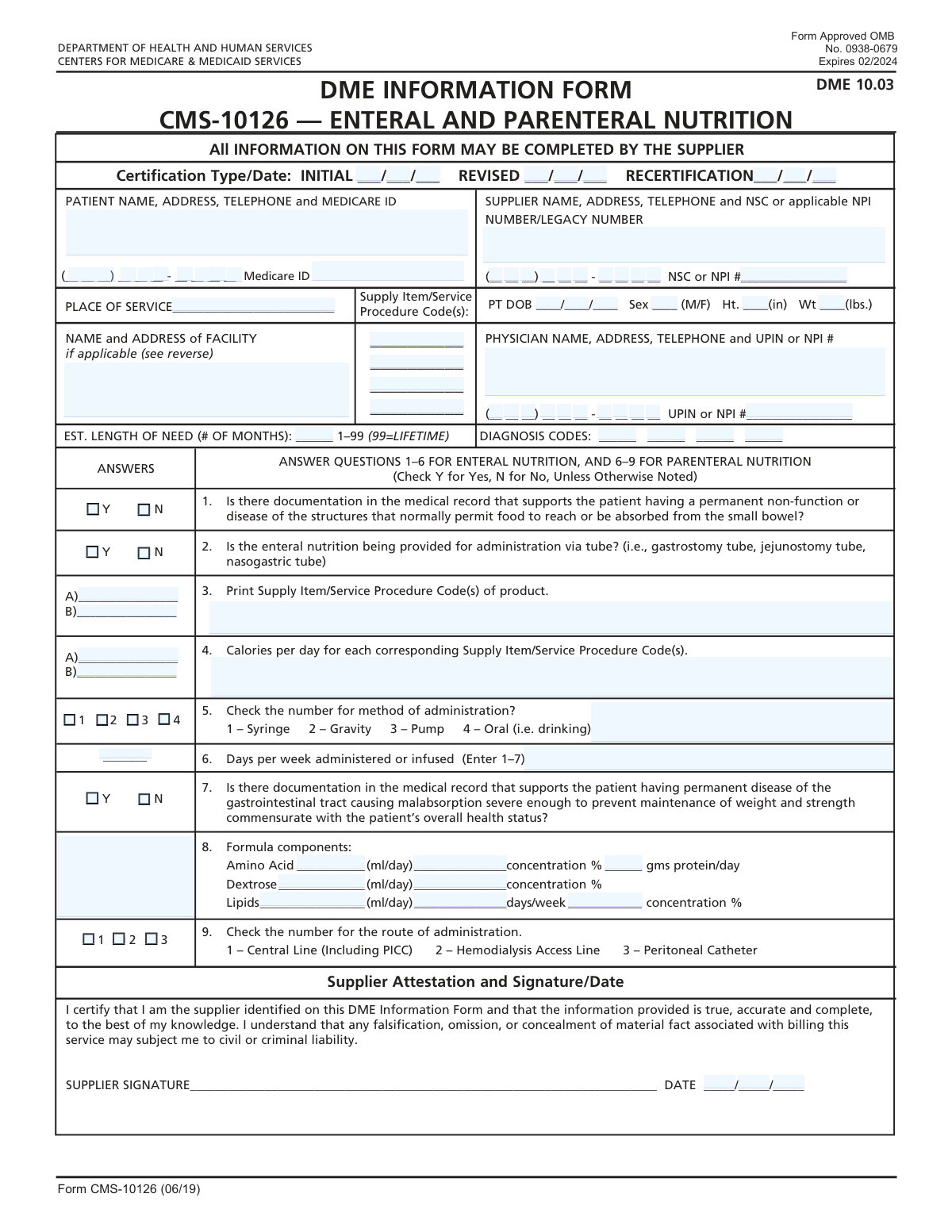
Yes! You can use AI to fill out Form CMS-10126, Certificate of Medical Necessity for Enteral and Parenteral Nutrition

Form CMS-10126, the Certificate of Medical Necessity for Enteral and Parenteral Nutrition, is a critical document required by Medicare to justify reimbursement for prescribed nutritional therapies. It is completed by the supplier and signed by the physician to certify that the patient's condition meets Medicare's coverage criteria for either enteral (tube feeding) or parenteral (intravenous) nutrition, ensuring the supplies are medically necessary. Today, this form can be filled out quickly and accurately using AI-powered services like Instafill.ai, which can also convert non-fillable PDF versions into interactive fillable forms.
Our AI automatically handles information lookup, data retrieval, formatting, and form filling.
It takes less than a minute to fill out CMS-10126 using our AI form filling.
Securely upload your data. Information is encrypted in transit and deleted immediately after the form is filled out.

Form specifications

Form name: Form CMS-10126, Certificate of Medical Necessity for Enteral and Parenteral Nutrition
Number of fields: 106
Number of pages: 2
Language: English
Categories: CMS forms, Medi-Cal forms, medical certificate forms, medical forms, VA medical forms
main-image

Instafill Demo: How to fill out PDF forms in seconds with AI

How to Fill Out CMS-10126 Online for Free in 2026

Are you looking to fill out a CMS-10126 form online quickly and accurately? Instafill.ai offers the #1 AI-powered PDF filling software of 2026, allowing you to complete your CMS-10126 form in just 37 seconds or less.
Follow these steps to fill out your CMS-10126 form online using Instafill.ai:
  1. 1 Navigate to Instafill.ai and upload your CMS-10126 form or select it from the template library.
  2. 2 Use the AI assistant to automatically populate patient information, including name, address, date of birth, and Medicare ID.
  3. 3 Enter the supplier and prescribing physician's details, such as NPI numbers and contact information, letting the AI guide you to the correct fields.
  4. 4 Accurately input the relevant diagnosis codes and specify the estimated length of need for the nutritional therapy.
  5. 5 Complete the specific section for either Enteral or Parenteral Nutrition, answering questions about medical necessity, administration methods, and formula components as prescribed.
  6. 6 Review all entered information for accuracy, then securely obtain the required physician's signature electronically or prepare the form for a physical signature.

Our AI-powered system ensures each field is filled out correctly, reducing errors and saving you time.

Why Choose Instafill.ai for Your Fillable CMS-10126 Form?

Speed

Complete your CMS-10126 in as little as 37 seconds.

Up-to-Date

Always use the latest 2026 CMS-10126 form version.

Cost-effective

No need to hire expensive lawyers.

Accuracy

Our AI performs 10 compliance checks to ensure your form is error-free.

Security

Your personal information is protected with bank-level encryption.

Frequently Asked Questions About Form CMS-10126

This form serves as a Certificate of Medical Necessity for Enteral and Parenteral Nutrition. It is used to document a patient's medical need for nutritional support, typically for Medicare or other insurance claims.

The form is typically filled out by the medical supplier or the physician's office staff. However, it must be signed and dated by the prescribing physician to certify the information is accurate and medically necessary.

Enter the 'Initial Certification Date' for a new prescription. Use 'Revised Certification Date' if you are updating an existing, active certification, and use 'Recertification Date' when renewing a certification that is expiring.

You will need the patient's full name, address, phone number, Medicare ID, date of birth, sex, height in inches, and weight in pounds.

The physician's National Provider Identifier (NPI) or Unique Physician Identification Number (UPIN) is a unique ID for healthcare providers. This number should be available from the prescribing physician's office or can be looked up in the national NPI registry.

In the 'Estimated Length of Need' field, enter the number '99'. This code signifies that the medical necessity is considered permanent or for the patient's lifetime.

No, you only need to complete the section that corresponds to the type of nutrition being prescribed. The form specifies which fields to fill based on the 'Supply Item/Service Procedure Codes' you enter for the patient.

You only need to complete the facility information if the 'Place of Service Code' you entered indicates that the service was rendered in a facility, such as a hospital or skilled nursing home.

A Place of Service (POS) code is a standard two-digit code used on medical claims to indicate the setting where a service was provided. For example, '12' typically indicates the patient's home.

If you have a non-fillable or 'flat' PDF, you can use a service like Instafill.ai. It can convert the document into an interactive, fillable form online.

Yes, services like Instafill.ai use AI to help you accurately auto-fill form fields from your saved profiles. This can save significant time and help reduce data entry errors.

To fill this form online, upload the PDF to the Instafill.ai platform. The service will make the form fillable, allowing you to type directly into the fields and use AI-powered tools to complete it quickly.

This is the supplier's unique National Supplier Clearinghouse (NSC) or National Provider Identifier (NPI) number. This identifier is required for billing and should be available from the supplier's administrative records.

For Parenteral Nutrition, you must provide details on the formula components, including the daily volume and concentration of Amino Acids and Dextrose, as well as lipid details and the route of administration (e.g., Central Line).

Compliance CMS-10126
Validation Checks by Instafill.ai

1
Medicare ID Number Format Validation
This check verifies that the 'Patient Medicare ID' follows the correct Medicare Beneficiary Identifier (MBI) format. The MBI format is 11 characters long and consists of numbers and uppercase letters (excluding S, L, O, I, B, Z). Invalid formats can lead to claim rejection, so this validation ensures the ID is structurally correct before submission.
2
Certification Date Chronology
This validation ensures the certification dates are in a logical chronological order. The 'Revised Certification Date' must be on or after the 'Initial Certification Date', and the 'Recertification Date' must be on or after both the initial and revised dates. This prevents illogical date entries that would invalidate the certification timeline and cause processing errors.
3
Patient Sex Code Restriction
This check ensures the 'Patient Sex' field contains only one of the two allowed values: 'M' for male or 'F' for female. Any other character or string would be considered invalid. This is crucial for maintaining data integrity and ensuring correct patient identification and demographic analysis.
4
Length of Need Numeric Range
This validation confirms that the 'Length of Need' field contains a numeric value between 1 and 99, inclusive. The value '99' has a special meaning (lifetime need), and any value outside this range is invalid. This check prevents data entry errors and ensures the estimated duration of need is recorded correctly for supply planning and authorization.
5
Physician Identifier Format Check
This check validates the format of the 'Physician Identifier' (UPIN or NPI). For an NPI, it specifically verifies that the number is 10 digits long. An incorrect physician identifier will lead to claim denials, making it critical to validate the format at the time of entry to ensure proper billing and provider verification.
6
Signature Date Logical Consistency
This validation ensures the 'Signature Date' (composed of month, day, and year fields) is a valid date that is not in the future. It also checks that the signature date is on or after the latest certification date provided on the form. An invalid or future-dated signature can render the entire form legally void.
7
Conditional Facility Address Requirement
This check enforces that the 'Facility Name and Address' field is filled out if the 'Place of Service Code' corresponds to a type of facility (e.g., hospital, skilled nursing facility). If the service was not rendered at a facility, this field should be blank. This ensures all necessary location information is captured based on the context of the service provided.
8
Conditional Enteral Nutrition Section Activation
This validation verifies that fields specific to enteral nutrition are only filled if one of the 'Supply Item/Service Procedure Codes' indicates an enteral nutrition service. If no such code is present, fields like 'Calories Per Day' or 'Method of Administration' should be empty. This prevents irrelevant or contradictory information from being submitted.
9
Conditional Parenteral Nutrition Section Activation
This check ensures that fields related to parenteral nutrition (e.g., 'Amino Acid Volume', 'Dextrose Concentration') are completed only when a 'Supply Item/Service Procedure Code' for parenteral nutrition is listed. If no parenteral code is present, these fields must be empty. This logic maintains form integrity by linking specific data sections to the services being claimed.
10
Mutually Exclusive Documentation Check
This validation ensures that for a given question, only one of two mutually exclusive checkboxes is selected. For example, a user cannot select both 'Medical Record Documentation Exists' and 'Medical Record Documentation Does Not Exist'. This prevents contradictory answers and ensures a clear response is provided for documentation status.
11
Assembled Patient Telephone Number Validation
This check combines the fragmented telephone number fields ('Area Code', 'Prefix', 'Suffix' parts) and validates the complete 10-digit number. It verifies that each part is numeric and has the correct length (3, 3, and 4 digits respectively). This ensures a complete and valid contact number is captured for the patient.
12
Primary Diagnosis Code Completeness
This validation ensures that the 'Diagnosis Code 1' field is not empty. A primary diagnosis is essential for establishing medical necessity and is a mandatory component for claim processing. Failure to provide at least one diagnosis code will result in immediate rejection of the claim.
13
Days Per Week Administered Range
This check validates that the 'Days Per Week Administered' field contains a whole number between 1 and 7. Any value outside this range is illogical for a weekly frequency. This ensures the administration schedule is recorded accurately for calculating supply needs and verifying treatment plans.
14
Patient Age Plausibility Check
This validation calculates the patient's age using the 'Patient Date of Birth' and the current date or certification date. It then checks if the resulting age is plausible (i.e., greater than zero and within a reasonable human lifespan). This helps catch significant data entry errors in the date of birth that could impact eligibility and medical necessity assessments.

Common Mistakes in Completing CMS-10126

Incorrectly Formatting Split Phone Numbers

The form splits the patient's phone number across five separate fields: area code, prefix, and three fields for the suffix. Users often try to enter the full number in the first box or misalign the digits across the subsequent boxes. This leads to invalid contact information, making it impossible to reach the patient for follow-up and causing data validation failures. To avoid this, carefully enter each segment of the number into its corresponding box, and use an AI-powered tool like Instafill.ai which can automatically parse and correctly distribute the number across the fields.

Misinterpreting the 'Length of Need' Field

This field requires a number of months, with the special instruction to use '99' for a lifetime need. A common error is to write descriptive text like 'Lifetime' or 'Permanent' instead of the required code '99'. This causes automated processing systems to reject the form, delaying the approval of necessary long-term supplies. Always use the specific numeric code as instructed to ensure the system correctly interprets the duration of need.

Ignoring Conditional Logic for Nutrition Sections

The form contains extensive sections for 'Enteral Nutrition' and 'Parenteral Nutrition' that should only be completed if specific procedure codes are entered. People often either miss these sections when they are required or fill them out unnecessarily, leading to confusion and processing delays. This mistake happens due to overlooking the fine print. To prevent this, carefully review the procedure codes entered and only complete the sections that are explicitly required based on those codes.

Entering Incorrect Units for Height and Weight

The form explicitly asks for the patient's height in inches and weight in pounds. A frequent mistake is entering height in a feet-and-inches format (e.g., '5 ft 10 in') instead of the total in inches (e.g., '70'). This data entry error can lead to incorrect clinical calculations, such as BMI or dosage, and cause claim rejections. Always convert measurements to the specified units before entering them into the form.

Providing Invalid or Incomplete Physician/Supplier Identifiers

Fields for NPI, UPIN, and NSC numbers are critical for billing and verification, but are prone to transcription errors. Furthermore, the 'Physician Identifier' is split across two lines, which can be confusing. Entering an incorrect or outdated number, or splitting it improperly, will result in immediate claim denials and require resubmission. To avoid this, double-check the identifier against a reliable source document and ensure it is entered exactly as required.

Using Text Descriptions Instead of Medical Codes

Fields such as 'Place of Service Code' and 'Diagnosis Codes' require specific alphanumeric codes (e.g., '11' for Office, or 'E11.9' for Type 2 diabetes). Many users mistakenly enter plain text descriptions like 'Doctor's Office' or 'Diabetes,' which are invalid for processing. This error guarantees rejection and requires the user to find the correct codes and resubmit the form. AI-powered form fillers like Instafill.ai can help by suggesting valid codes as you type.

Failing to Complete Facility Address When Required

The 'Facility Name and Address' field is conditional and must be filled only if the 'Place of Service Code' corresponds to a facility setting. Users often miss this dependency, either leaving the address blank when it's needed or filling it when it's not. An omission can halt claim processing, as the location of service cannot be verified. Always check if the entered Place of Service code requires a corresponding facility address.

Entering Incomplete Address Information

The fields for patient, supplier, and physician addresses are large, single text boxes, which can lead to incomplete entries. Users frequently forget to include essential details like a suite or apartment number, or the ZIP code. Incomplete addresses can cause returned mail, delayed shipments of supplies, and claim processing issues. It is crucial to provide the full, unabbreviated mailing address in these fields to ensure accuracy.

Mishandling Split Legacy ID Fields

The 'Legacy ID' for the supplier is broken into four separate fields for the area code, prefix, and two parts of the suffix. This non-standard format is a common source of data entry errors, as users may be unfamiliar with how to correctly segment the number. An incorrect Legacy ID can prevent proper supplier identification and lead to payment delays. If the form is a non-fillable PDF, a tool like Instafill.ai can convert it to a fillable version with validated fields to help prevent such formatting mistakes.

Making Contradictory Checkbox Selections

The form includes several pairs of mutually exclusive checkboxes, such as 'Medical Record Documentation Exists' and 'Medical Record Documentation Does Not Exist'. Users sometimes accidentally check both boxes or neglect to check either one, creating a logical contradiction. This ambiguity makes the form invalid and requires clarification, delaying the entire process. Always ensure that for any given question, only one, definitive option is selected.
Saved over 80 hours a year

“I was never sure if my IRS forms like W-9 were filled correctly. Now, I can complete the forms accurately without any external help.”

Kevin Martin Green

Your data stays secure with advanced protection from Instafill and our subprocessors

Robust compliance program

Transparent business model

You’re not the product. You always know where your data is and what it is processed for.

ISO 27001, HIPAA, and GDPR

Our subprocesses adhere to multiple compliance standards, including but not limited to ISO 27001, HIPAA, and GDPR.

Security & privacy by design

We consider security and privacy from the initial design phase of any new service or functionality. It’s not an afterthought, it’s built-in, including support for two-factor authentication (2FA) to further protect your account.

Fill out CMS-10126 with Instafill.ai

Worried about filling PDFs wrong? Instafill securely fills form-cms-10126-certificate-of-medical-necessity-for-enteral-and-parenteral-nutrition forms, ensuring each field is accurate.