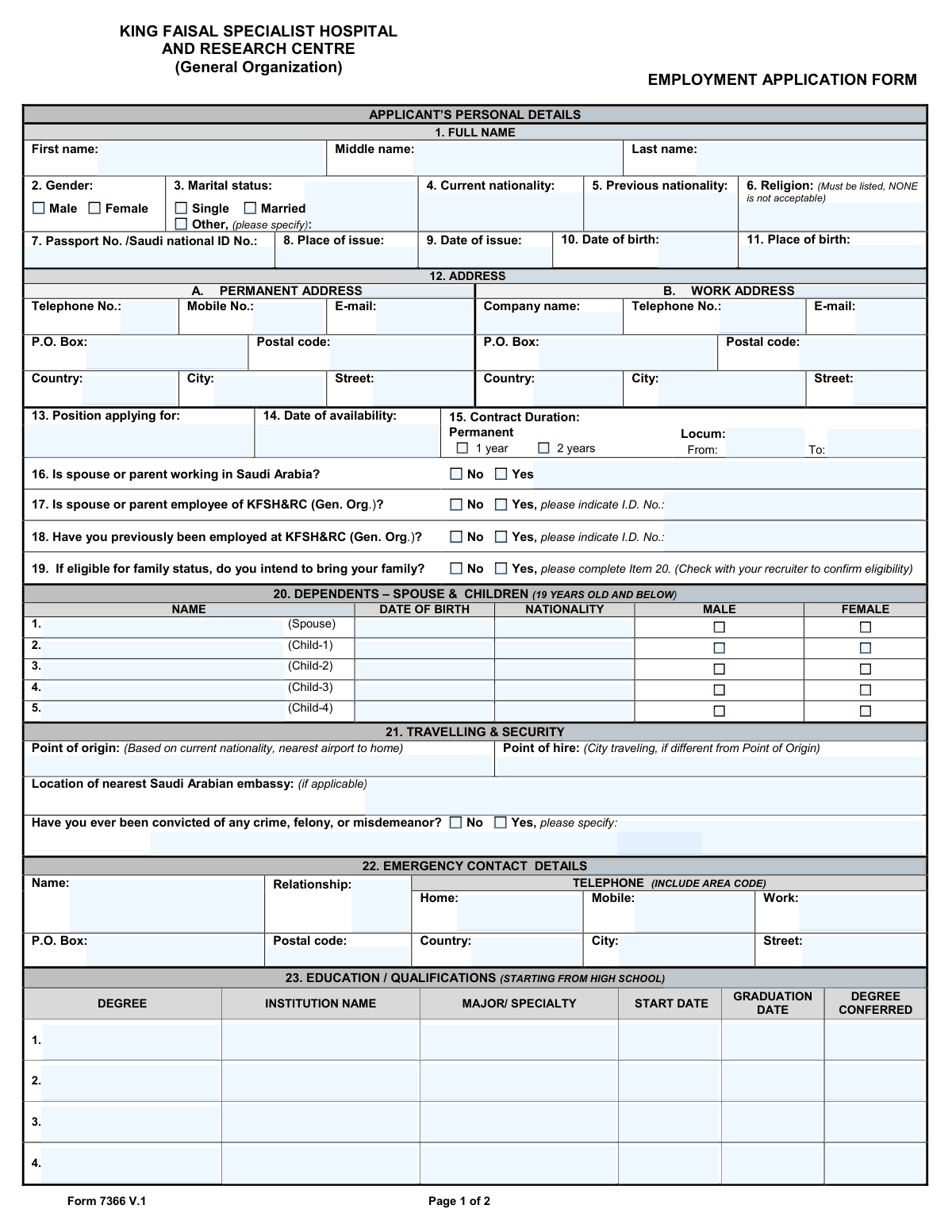
Yes! You can use AI to fill out King Faisal Specialist Hospital and Research Centre (General Organization) Employment Application Form
Form 7366 is the official employment application for the King Faisal Specialist Hospital and Research Centre (General Organization). It is a comprehensive document used to gather essential information from job applicants, including personal details, educational qualifications, professional licenses, and employment history. Completing this form accurately is a critical first step in the recruitment process for one of the leading medical institutions in the Middle East. Today, this form can be filled out quickly and accurately using AI-powered services like Instafill.ai, which can also convert non-fillable PDF versions into interactive fillable forms.
Our AI automatically handles information lookup, data retrieval, formatting, and form filling.
It takes less than a minute to fill out Form 7366 using our AI form filling.
Securely upload your data. Information is encrypted in transit and deleted immediately after the form is filled out.
Form specifications
| Form name: | King Faisal Specialist Hospital and Research Centre (General Organization) Employment Application Form |
| Number of pages: | 2 |
| Language: | English |
| Categories: | hospital forms, employment forms, employment application forms |
Instafill Demo: How to fill out PDF forms in seconds with AI
How to Fill Out Form 7366 Online for Free in 2026
Are you looking to fill out a FORM 7366 form online quickly and accurately? Instafill.ai offers the #1 AI-powered PDF filling software of 2026, allowing you to complete your FORM 7366 form in just 37 seconds or less.
Follow these steps to fill out your FORM 7366 form online using Instafill.ai:
- 1 Navigate to Instafill.ai and upload or select the KFSH&RC Employment Application Form.
- 2 Use the AI assistant to automatically populate your personal details, including your full name, contact information, nationality, and marital status.
- 3 Enter your educational qualifications, starting from high school, and list any professional registrations, licenses, or certifications you hold.
- 4 Detail your complete employment history, beginning with your most recent job, including company names, dates, and position titles.
- 5 Provide information about dependents, an emergency contact, and answer the required security questions.
- 6 Carefully review all the information entered by the AI for accuracy and completeness.
- 7 Electronically sign and date the application to affirm that all information is true and correct before submitting it.
Our AI-powered system ensures each field is filled out correctly, reducing errors and saving you time.
Why Choose Instafill.ai for Your Fillable Form 7366 Form?
Speed
Complete your Form 7366 in as little as 37 seconds.
Up-to-Date
Always use the latest 2026 Form 7366 form version.
Cost-effective
No need to hire expensive lawyers.
Accuracy
Our AI performs 10 compliance checks to ensure your form is error-free.
Security
Your personal information is protected with bank-level encryption.
Frequently Asked Questions About Form Form 7366
This form is used to collect essential personal, educational, and professional information from individuals applying for a position at King Faisal Specialist Hospital and Research Centre (KFSH&RC). It serves as the initial application for all potential employees.
Anyone seeking employment at KFSH&RC must complete this form. This includes applicants for permanent contracts, locum (temporary) positions, and other employment types.
You should have your passport or Saudi National ID, educational certificates, and professional licenses available. It is also helpful to have your detailed employment history, including dates, manager names, and company contact information.
The application requires you to list a religion as per institutional and regional requirements. You must enter a specific religion; if you have concerns about this, please discuss it with your recruiter.
You must list your educational qualifications starting with your high school diploma. After that, add any subsequent college degrees or professional qualifications in chronological order.
Please list your work experience beginning with your most recent or current job first. Continue by listing your previous jobs in reverse chronological order, ensuring all details for each employer are complete.
This section is for your spouse and children who are 19 years old or younger. You should only complete this if you are eligible for family status and intend to bring them; the form advises checking with your recruiter to confirm eligibility.
'Point of Origin' refers to the nearest international airport to your permanent home, based on your nationality. 'Point of Hire' is the city you will be traveling from to start your job, if it is different from your Point of Origin.
If you were previously employed at KFSH&RC, you must check 'Yes' for question 18. Be sure to provide your former employee I.D. number in the space indicated.
Submission instructions are typically provided by your recruiter or the HR department. After submission, your application will be reviewed, and you may be contacted for interviews and a mandatory physical examination.
Yes, services like Instafill.ai use AI to help you accurately auto-fill form fields from your saved profile. This can save you time and help prevent errors on your application.
To fill the form online, upload the PDF to the Instafill.ai platform. The AI will make the fields interactive, allowing you to fill them out manually or use the auto-fill feature to complete the application quickly.
If you have a non-fillable or 'flat' PDF, you can use a tool like Instafill.ai. It can convert the static document into an interactive, fillable form that you can complete and sign digitally.
Compliance Form 7366
Validation Checks by Instafill.ai
1
Religion Field Mandatory and Valid
This check ensures that the 'Religion' field is not empty and does not contain the word 'NONE', as explicitly stated on the form. It is important for completing the applicant's profile as required by the organization's data standards. If this validation fails, the form submission will be rejected with a message asking the user to provide a valid religious affiliation.
2
Applicant Minimum Age Verification
This validation calculates the applicant's age based on the 'Date of birth' provided and ensures they are of a minimum legal working age, typically 18 years or older. This is a crucial legal and compliance check to prevent the hiring of underage individuals. An application from an underage person will be flagged and rejected.
3
Passport/ID Date Consistency
This check verifies that the 'Date of issue' for the passport or national ID is logically sound. It must be after the applicant's 'Date of birth' and on or before the current date. This prevents data entry errors and ensures the provided identification was valid at the time of application. A failure would prompt the user to correct the dates.
4
Conditional Marital Status Specification
This validation rule ensures that if the applicant selects 'Other' for 'Marital status', the adjacent text field to specify the status is not left empty. This is important for HR to have complete and accurate demographic information for benefits and records. If the specification is missing, the user will be prompted to provide it before the form can be submitted.
5
Conditional Previous KFSH&RC Employment ID
This check is triggered if the applicant answers 'Yes' to question 18, 'Have you previously been employed at KFSH&RC?'. It validates that the corresponding 'I.D. No.' field is filled out. This is critical for retrieving the applicant's prior employment records and history with the organization. Failure to provide the ID number will result in a validation error.
6
Conditional Dependent Information Requirement
If an applicant answers 'Yes' to question 19, 'do you intend to bring your family?', this validation ensures that at least one dependent's details are entered in the 'DEPENDENTS' section (Item 20). This is necessary for processing visa applications, housing, and family status benefits. If no dependents are listed, the submission will be blocked until the information is provided or the answer to question 19 is changed to 'No'.
7
Dependent Child Age Limit
This validation checks the 'DATE OF BIRTH' for each dependent listed as a child to confirm they are 19 years old or younger, as specified in the section header. This is essential for determining eligibility for family status, benefits, and schooling allowances. If a child is found to be over the age limit, a warning will be displayed, and the user will need to correct the entry or remove the dependent.
8
Education Date Chronology
For each entry in the 'EDUCATION / QUALIFICATIONS' section, this check ensures the 'GRADUATION DATE' is after the 'START DATE'. This maintains logical consistency and data integrity in the applicant's academic history. If a graduation date precedes a start date, the system will flag the error and require the user to correct the dates.
9
Employment History Date Sequence
This validation rule verifies that for each job listed in the 'EMPLOYMENT HISTORY' section, the 'TO' date is not earlier than the 'FROM' date. This ensures the employment timeline is logical and accurate for background verification. An illogical date sequence will trigger an error, preventing submission until the dates are corrected.
10
Locum Contract Date Requirement
If the 'Locum' option is selected under 'Contract Duration', this check ensures that both the 'From' and 'To' date fields are filled. It also validates that the 'To' date is after the 'From' date. This is critical for defining the exact period of the temporary assignment. If the dates are missing or illogical, the form cannot be submitted.
11
Conditional Criminal Conviction Explanation
This check ensures that if an applicant answers 'Yes' to the question 'Have you ever been convicted of any crime...', the corresponding text field for specifying the details is not left blank. This is a mandatory security and background check requirement. Failure to provide details will halt the submission process and prompt the user for the required information.
12
Professional License Status and Date
For each entry in the 'PROFESSIONAL REGISTRATIONS/LICENSES' section, if the status is marked as 'Valid, Until:', this validation confirms that the adjacent date field is populated with a future date. This ensures that the applicant holds a currently valid license required for the position. An expired or missing date will trigger a validation error, requiring clarification from the applicant.
13
Email Format Validation
This check verifies that all entered email addresses (in the Permanent Address, Work Address, and Employment History sections) adhere to a standard format (e.g., '[email protected]'). This is crucial for ensuring that communication with the applicant and their previous employers can be successfully established. An invalid format will trigger an error message prompting the user to correct the entry.
14
Emergency Contact Completeness
This validation ensures that the 'EMERGENCY CONTACT DETAILS' section is filled out completely, requiring at least a name, relationship, and one valid phone number (Home, Mobile, or Work). This information is vital for the safety and well-being of the employee. If the required fields are empty, the form submission will be blocked until the information is provided.
Common Mistakes in Completing Form 7366
The form explicitly asks applicants to list work experience 'beginning with your most recent job' (reverse-chronological order). A common mistake is to list jobs chronologically, from oldest to newest. This makes it harder for recruiters to see the most relevant experience first, potentially causing them to overlook key qualifications and delaying the review process. To avoid this, always start with your current or last job and work backwards. AI-powered form fillers like Instafill.ai can help by structuring data from a resume and populating it in the correct reverse-chronological order as required by the form.
The form contains a unique and mandatory instruction for the 'Religion' field: '(Must be listed, NONE is not acceptable)'. Many applicants, either for privacy reasons or by habit, might leave this field blank or write 'None' or 'N/A'. This will result in an incomplete application that cannot be processed, as it directly violates a stated requirement. To avoid rejection, applicants must enter a valid religion as instructed.
The form requires numerous dates (birth, passport issue, education, employment). Applicants frequently use inconsistent formats (e.g., MM/DD/YY, DD-MM-YYYY) or ambiguous formats like '01/02/2023,' which could mean January 2nd or February 1st. This ambiguity can cause significant data entry errors and delays. It is crucial to use a clear, consistent format (e.g., DD-MMM-YYYY) throughout the form. AI tools like Instafill.ai can standardize all dates into a required format, preventing ambiguity and ensuring consistency.
Several questions (17, 18, 19) require additional information if the applicant answers 'Yes.' For example, if you have been previously employed at KFSH&RC (Q18), you must provide your old I.D. number. Applicants often check 'Yes' but forget to fill in the corresponding detail. This forces the recruitment team to follow up, delaying the application and appearing as a lack of attention to detail. Always double-check that you have provided the extra information required by your answers.
Sections for addresses, emergency contacts, and past employers require full details, including postal codes and telephone area codes. Applicants often forget to include international country codes for phone numbers or provide incomplete addresses. This is critical because the hospital needs this information for background checks and emergencies; missing details can halt the application process. AI tools like Instafill.ai can automatically format phone numbers and addresses correctly, ensuring all necessary components are included.
Section 21 asks for both 'Point of Origin' and 'Point of Hire', which have specific definitions. 'Point of Origin' is defined as the 'nearest airport to home' based on current nationality, not just the current city of residence. Applicants often mistake this and list their current location. This information is crucial for logistics, travel, and benefits calculations, and getting it wrong can lead to complications in the hiring and relocation process.
The instructions for the Education section (23) clearly state to begin 'STARTING FROM HIGH SCHOOL.' Many applicants, especially those with higher degrees, forget this and only list their university-level qualifications. Omitting this required information can render the application incomplete and may require follow-up, slowing down the verification process. Using a tool like Instafill.ai can help manage your complete educational profile and ensure all required entries are populated correctly.
In the Professional Registrations section (24), applicants must provide the status of their credentials. A common error is to list a valid license but omit the 'Valid, Until:' expiration date, or to list an expired license without checking the 'Expired' box. This information is vital for a healthcare organization to verify an applicant's eligibility to practice, and incomplete data will immediately halt the credentialing process. AI-powered tools can help manage your professional licenses and automatically populate the correct status and expiration dates.
The form asks for the full name as it appears on official documents. Applicants sometimes use a nickname, a shortened version of their name, or omit a middle name. This creates a mismatch during background checks and verification against official documents like passports and educational certificates, leading to significant delays. Always use your full, legal name exactly as it appears on your passport. AI form-filling tools like Instafill.ai can store your official name securely, ensuring it is entered consistently and accurately.
An unsigned or undated application is legally invalid. Applicants often focus on filling out all the fields and simply forget to sign and date the form at the end. This is a critical error because the signature confirms the truthfulness of the information and authorizes background checks. An unsigned form will be immediately returned or discarded. If the form is a non-fillable PDF, a tool like Instafill.ai can convert it, but you must remember to print, sign, and date it before submission.
Saved over 80 hours a year
“I was never sure if my IRS forms like W-9 were filled correctly. Now, I can complete the forms accurately without any external help.”
Kevin Martin Green
Your data stays secure with advanced protection from Instafill and our subprocessors

Robust compliance program
Transparent business model
You’re not the product. You always know where your data is and what it is processed for.
ISO 27001, HIPAA, and GDPR
Our subprocesses adhere to multiple compliance standards, including but not limited to ISO 27001, HIPAA, and GDPR.
Security & privacy by design
We consider security and privacy from the initial design phase of any new service or functionality. It’s not an afterthought, it’s built-in, including support for two-factor authentication (2FA) to further protect your account.
Fill out Form 7366 with Instafill.ai
Worried about filling PDFs wrong? Instafill securely fills king-faisal-specialist-hospital-and-research-centre-general-organization-employment-application-form-1 forms, ensuring each field is accurate.