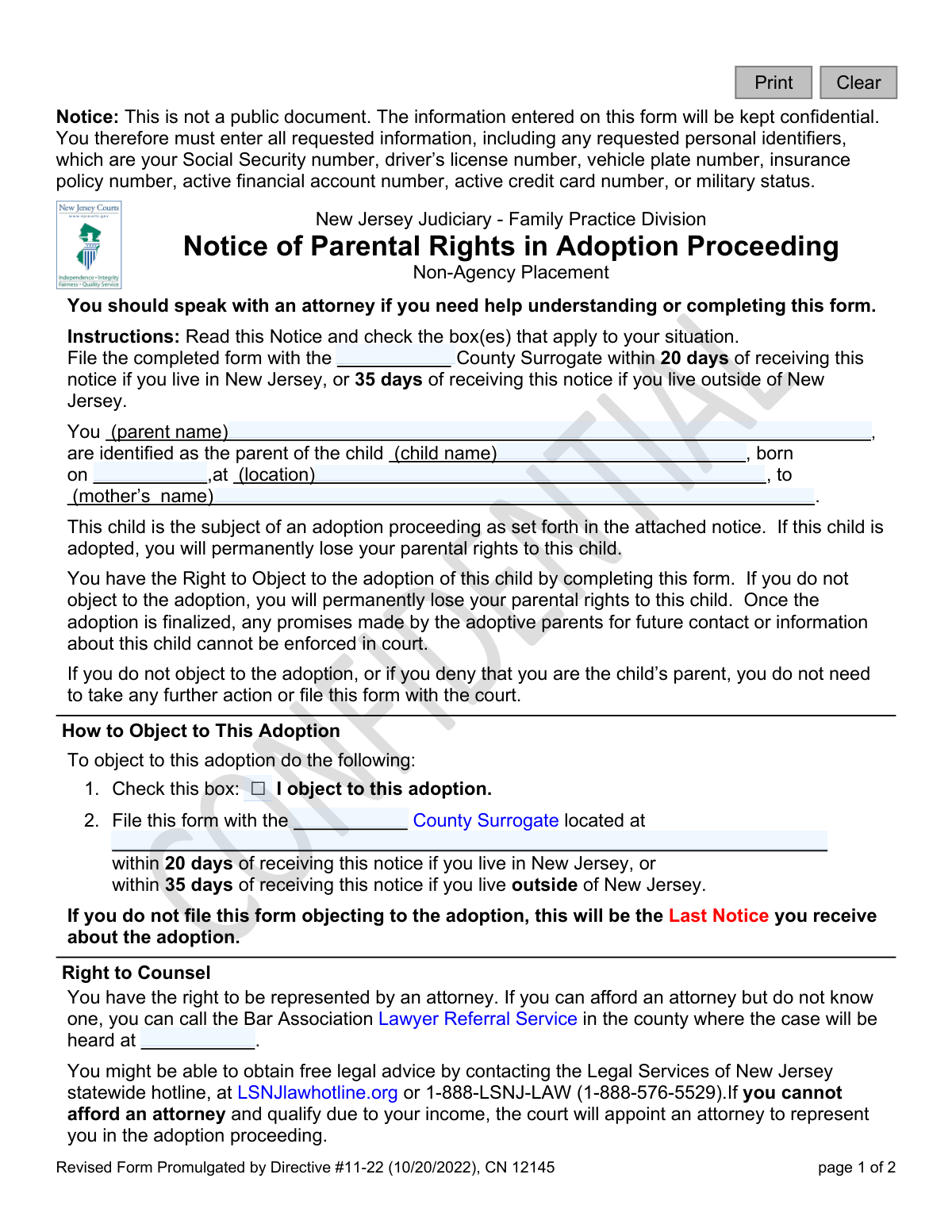
Yes! You can use AI to fill out New Jersey Judiciary - Family Practice Division Notice of Parental Rights in Adoption Proceeding - Non-Agency Placement
This form is a legal notice issued by the New Jersey Judiciary for parents involved in a non-agency (private) adoption. It formally notifies a parent of the adoption proceeding, explains that their parental rights will be permanently terminated if the adoption is finalized, and outlines the procedure for objecting to the adoption or applying for a court-appointed attorney. Today, this form can be filled out quickly and accurately using AI-powered services like Instafill.ai, which can also convert non-fillable PDF versions into interactive fillable forms.
Our AI automatically handles information lookup, data retrieval, formatting, and form filling.
It takes less than a minute to fill out CN 12145 using our AI form filling.
Securely upload your data. Information is encrypted in transit and deleted immediately after the form is filled out.
Form specifications
| Form name: | New Jersey Judiciary - Family Practice Division Notice of Parental Rights in Adoption Proceeding - Non-Agency Placement |
| Number of fields: | 18 |
| Number of pages: | 1 |
| Language: | English |
Instafill Demo: How to fill out PDF forms in seconds with AI
How to Fill Out CN 12145 Online for Free in 2026
Are you looking to fill out a CN 12145 form online quickly and accurately? Instafill.ai offers the #1 AI-powered PDF filling software of 2026, allowing you to complete your CN 12145 form in just 37 seconds or less.
Follow these steps to fill out your CN 12145 form online using Instafill.ai:
- 1 Navigate to Instafill.ai and upload or select the 'Notice of Rights in Adoption Proceeding - Non-Agency Placement' form.
- 2 Use the AI assistant to automatically populate your name, the child's name, and other identifying information from the attached notice.
- 3 Carefully read the sections on 'How to Object to This Adoption' and 'How to Apply for a Court-Appointed Attorney' to understand your options.
- 4 Instruct the AI to check the box(es) that correspond to your decision, such as objecting to the adoption or requesting legal counsel.
- 5 Enter the specific County Surrogate information where the form must be filed.
- 6 Review all the information for accuracy, then digitally sign and date the form in the designated fields.
- 7 Download the completed form to be filed with the County Surrogate within the legal deadline (20 days for NJ residents, 35 days for out-of-state residents).
Our AI-powered system ensures each field is filled out correctly, reducing errors and saving you time.
Why Choose Instafill.ai for Your Fillable CN 12145 Form?
Speed
Complete your CN 12145 in as little as 37 seconds.
Up-to-Date
Always use the latest 2026 CN 12145 form version.
Cost-effective
No need to hire expensive lawyers.
Accuracy
Our AI performs 10 compliance checks to ensure your form is error-free.
Security
Your personal information is protected with bank-level encryption.
Frequently Asked Questions About Form CN 12145
This form officially notifies you that your child is the subject of a non-agency adoption proceeding and explains how you can object to it. It is the legal document you must use to inform the court if you oppose the adoption.
This form is for a parent who has received notice of an adoption proceeding for their child and wishes to formally object to the adoption or apply for a court-appointed attorney. If you agree with the adoption, you do not need to file this form.
If you do not file this form to object within the specified time, you will permanently lose your parental rights to the child once the adoption is finalized. The court will consider your inaction as consent to the adoption.
To object, you must check the box next to 'I object to this adoption' and file the completed form with the correct County Surrogate's office within the deadline.
You must file the form within 20 days of receiving the notice if you live in New Jersey, or within 35 days if you live outside of New Jersey.
You can apply for a court-appointed attorney by checking the appropriate box on this form and completing the attached application. The court will appoint an attorney for you if you qualify based on your income.
While the form is not a public document, you are required to provide personal identifiers for official court identification purposes. This information will be kept confidential by the court.
No. The form clearly states that once the adoption is finalized, any promises made by the adoptive parents for future contact or information about the child cannot be enforced in court.
You must file the completed form with the County Surrogate's office listed on the notice you received. The specific address should be provided on the form.
A non-agency placement, or private adoption, is an adoption arranged directly between the birth parents and adoptive parents, often with attorneys, rather than through a public or private adoption agency.
Yes, services like Instafill.ai use AI to help you accurately auto-fill form fields, which can save time and help prevent errors.
You can upload a digital copy of the form to the Instafill.ai platform. Its AI will make the fields interactive so you can type your information directly, then download the completed form for submission.
You can use a service like Instafill.ai, which is designed to convert flat, non-fillable PDFs into interactive forms that you can easily complete on your computer.
Compliance CN 12145
Validation Checks by Instafill.ai
1
Parent Name Required
This check ensures the 'parentName' field is not empty. This field is critical for legally identifying the parent to whom the notice is addressed and whose parental rights are in question. A submission without this name would be legally void as it fails to identify the concerned party.
2
Child Name Required
This validation verifies that the 'childName' field has been completed. The child is the subject of the entire proceeding, and their full name is a primary identifier. Omitting the child's name creates ambiguity and could lead to legal challenges regarding the identity of the child being adopted.
3
Valid Child's Date of Birth
This check validates that the 'birthDt' field contains a complete and logical date in a standard format (e.g., MM/DD/YYYY). It also ensures the date is in the past and not a future date. An accurate birth date is essential for establishing the child's identity and age, which is a critical factor in legal adoption proceedings.
4
Mother's Name Required
This check ensures the 'motherName' field is not left blank. The mother's name is a crucial piece of information used to cross-reference birth records and legally confirm the child's parentage. Failure to provide this name can complicate the verification process and the legal standing of the adoption.
5
Surrogate County Specified
This validation confirms that the 'surrogateCnty' field, which specifies the county for filing, is filled in. This information is vital as it directs the parent to the correct legal jurisdiction for submitting the form. If this field is missing, the parent cannot know where to file their objection, potentially causing them to miss a critical legal deadline.
6
Surrogate Address Specified
This check ensures the 'surrogateAddr' field is completed with the full address of the Surrogate's court. This address is necessary for the parent to physically file the document or send it via mail. Without a complete address, the parent's ability to exercise their right to object is severely hindered.
7
Action Requires Signature
This validation ensures that if either the 'object' checkbox or the 'applyAtty' checkbox is checked, the form is also signed and dated. Checking these boxes signifies a legal declaration or request that must be authenticated by a signature to be considered valid. An unsigned form with these actions selected would be rejected as incomplete.
8
Valid Signature Date
This check verifies that the 'sigDt' field contains a valid date and is not a date in the future. The signature date establishes when the parent formally recorded their decision. An invalid or future date would undermine the authenticity and legal timing of the document, rendering it questionable.
9
Printed Name Required with Signature
This validation confirms that the 'printName' field is filled out whenever the form is signed. Since signatures can be illegible, the printed name is required to clearly identify the person who signed the document. This prevents any dispute over the identity of the signatory.
10
Signatory Name Matches Parent Name
This check compares the 'printName' of the signatory with the 'parentName' listed at the top of the form. This is a crucial integrity check to ensure the person signing the form is the same parent identified in the notice. A mismatch would indicate the form may have been completed by an unauthorized individual, invalidating the submission.
11
Actionable Intent for Filing
This validation ensures that if the form is being filed, at least one of the action checkboxes ('object' or 'applyAtty') is checked. The form's instructions state it should only be filed to take one of these actions. This check prevents the submission of non-actionable forms, which create unnecessary administrative processing for the court.
12
Signature Date After Child's Birth
This is a logical consistency check to ensure the 'sigDt' is a date that occurs after the child's 'birthDt'. It is logically impossible to sign a document regarding a child's adoption before the child is born. A failure here indicates a significant data entry error that must be corrected for the document to be chronologically valid.
Common Mistakes in Completing CN 12145
The form specifies a 20-day deadline for New Jersey residents and 35 days for non-residents, which is easy to miscalculate or ignore until it's too late. Missing this deadline is a critical error, as a late filing will likely be rejected by the court, resulting in the automatic and permanent termination of parental rights. To avoid this, the filing deadline should be calculated and marked on a calendar immediately upon receiving the notice, and the form should be filed well in advance.
The entire purpose of filing this form is to formally object to the adoption, which is done by checking a single box. In the stress of the situation, a person might fill out all their personal information but forget to check this crucial box, rendering the form legally ineffective. The court will interpret this as a failure to object, leading to the loss of parental rights. Always double-check that the objection box is marked before signing and filing.
The form must be filed with the specific County Surrogate handling the adoption case, but the user must fill in this information themselves. People often get confused about which county has jurisdiction, especially if they live in a different county from the child, and file the form in the wrong location. This mistake causes significant delays and can lead to missing the filing deadline, which invalidates the objection. This information should be on the attached notice and must be transcribed carefully.
Mistakes in fields like the parent's name, child's name, or date of birth can create legal ambiguities and processing delays. Users may enter nicknames instead of full legal names or make typos in dates, which can cause confusion and require clarification from the court, risking deadlines. It is critical to use full legal names as they appear on official documents like birth certificates to ensure all parties are correctly identified. AI-powered form fillers like Instafill.ai can help prevent these errors by auto-populating information and validating data formats.
Some individuals mistakenly believe that simply completing and signing the form is sufficient to register their objection. However, the form has no legal effect until it is properly filed with the correct County Surrogate's office and received by the court. This common misunderstanding leads to a default loss of parental rights because the court is never made aware of the parent's objection. Always obtain proof of filing, such as a time-stamped copy, to confirm the court has received your document.
The form explicitly states it is for objecting to an adoption and that no action is needed if you do not object. A parent who is confused or overwhelmed might fail to file it when they do intend to object, assuming their verbal disagreement is enough. This inaction is legally interpreted as consent to the adoption, resulting in the permanent loss of parental rights. It is vital to understand that this form is the only way to formally object and must be filed to protect your rights.
The form provides a clear path to apply for a court-appointed attorney if the parent cannot afford one, but many eligible individuals overlook this option. They may fail to check the 'applyAtty' box or not realize they must also submit a separate application. Proceeding without legal representation in an adoption case is extremely risky, as the parent may not understand the complex legal procedures, severely weakening their position. If you cannot afford an attorney, you must check the box and file the separate application form simultaneously.
When a parent checks the box to apply for a court-appointed attorney, they must also complete and file the separate 'Application for Assignment of Counsel' form. People often check the box on the main notice but forget to include the detailed financial application. This incomplete submission will prevent the court from processing the request for an attorney, leaving the parent unrepresented at a critical time. Ensure all required supplementary forms are completed and filed together with the main notice.
While a signature is required, the 'Print Name' field is just as important for clear identification by the court clerk. If this field is left blank, is unreadable, or does not match the legal name used in the case, it can cause processing delays or rejection of the form. This often happens when forms are filled out by hand in a hurry. To prevent this, legibly print your full legal name. Using a tool to type information directly onto the form ensures the printed name is perfectly clear.
Court forms are often distributed as flat, non-fillable PDFs, forcing users to print them and fill them out by hand. This process can lead to illegible handwriting, mistakes that are difficult to correct cleanly, and an unprofessional appearance that may frustrate court staff. Furthermore, it prevents the use of helpful digital tools for validation. AI-powered services like Instafill.ai can convert these non-fillable PDFs into interactive forms, making them easier to complete accurately and legibly.
Saved over 80 hours a year
“I was never sure if my IRS forms like W-9 were filled correctly. Now, I can complete the forms accurately without any external help.”
Kevin Martin Green
Your data stays secure with advanced protection from Instafill and our subprocessors

Robust compliance program
Transparent business model
You’re not the product. You always know where your data is and what it is processed for.
ISO 27001, HIPAA, and GDPR
Our subprocesses adhere to multiple compliance standards, including but not limited to ISO 27001, HIPAA, and GDPR.
Security & privacy by design
We consider security and privacy from the initial design phase of any new service or functionality. It’s not an afterthought, it’s built-in, including support for two-factor authentication (2FA) to further protect your account.
Fill out CN 12145 with Instafill.ai
Worried about filling PDFs wrong? Instafill securely fills new-jersey-judiciary-family-practice-division-notice-of-parental-rights-in-adoption-proceeding-non-agency-placement forms, ensuring each field is accurate.