Yes! You can use AI to fill out Americans with Disabilities Act (ADA) Accommodation Appeal Form for Court Users
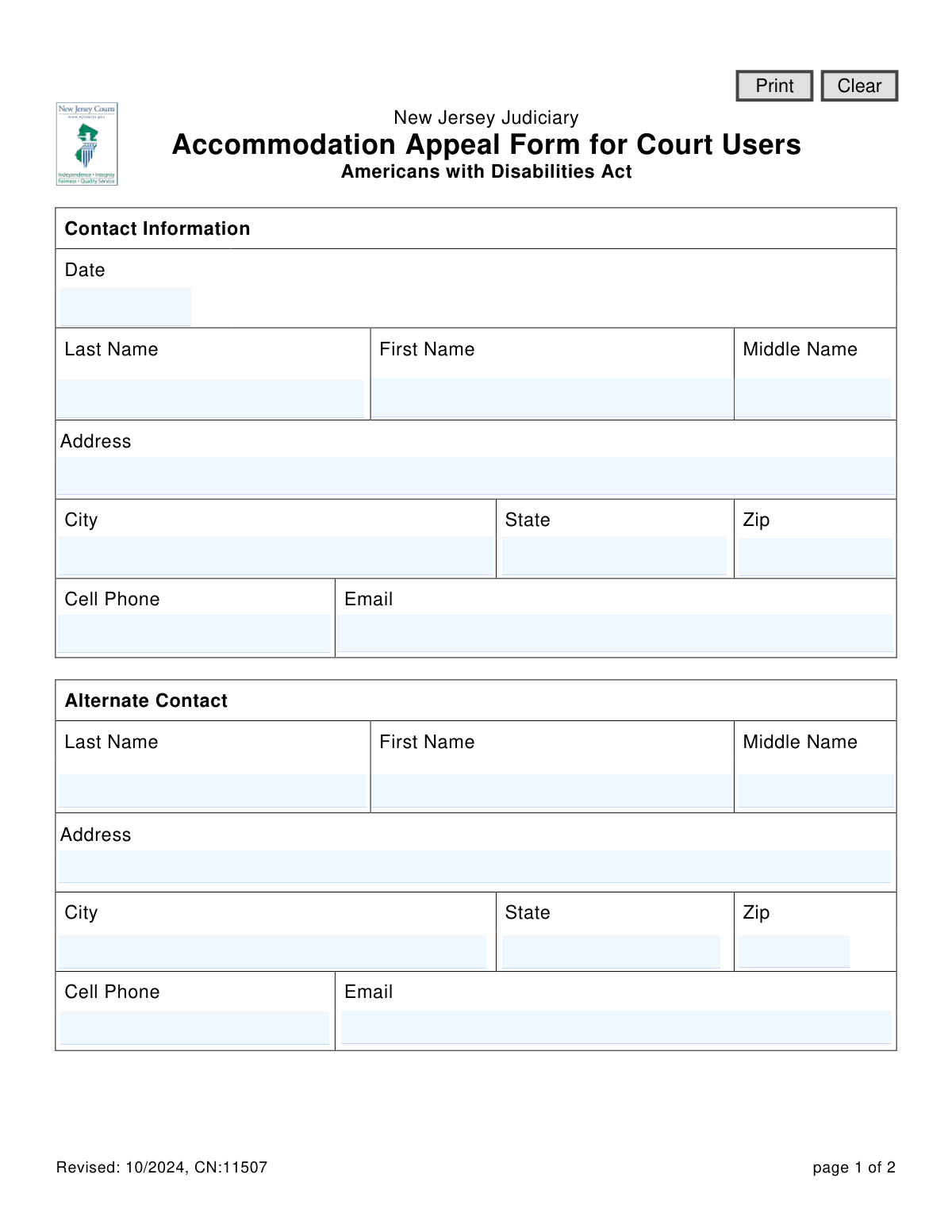
This form is an official document for court users within the New Jersey Judiciary system to formally appeal a decision regarding a requested accommodation under the Americans with Disabilities Act (ADA). It is crucial for individuals who believe they have been denied effective access to court proceedings, programs, or services due to a disability. Today, this form can be filled out quickly and accurately using AI-powered services like Instafill.ai, which can also convert non-fillable PDF versions into interactive fillable forms.
Our AI automatically handles information lookup, data retrieval, formatting, and form filling.
It takes less than a minute to fill out CN:11507 using our AI form filling.
Securely upload your data. Information is encrypted in transit and deleted immediately after the form is filled out.
Form specifications
| Form name: | Americans with Disabilities Act (ADA) Accommodation Appeal Form for Court Users |
| Number of fields: | 31 |
| Number of pages: | 1 |
| Language: | English |
Instafill Demo: How to fill out PDF forms in seconds with AI
How to Fill Out CN:11507 Online for Free in 2026
Are you looking to fill out a CN:11507 form online quickly and accurately? Instafill.ai offers the #1 AI-powered PDF filling software of 2026, allowing you to complete your CN:11507 form in just 37 seconds or less.
Follow these steps to fill out your CN:11507 form online using Instafill.ai:
- 1 Navigate to Instafill.ai and upload the ADA Accommodation Appeal Form or select it from their template library.
- 2 Provide your personal contact information, including your full name, address, phone number, and email.
- 3 Enter the contact details for an alternate contact person, if you have one.
- 4 Indicate the specific court or division where you were seeking the accommodation (e.g., Supreme Court, Superior Court).
- 5 Write a detailed description of your appeal, explaining your original request, why you believe the accommodation was denied, and providing dates, names, and any other relevant details.
- 6 Review all the information populated by the AI to ensure it is accurate and complete.
- 7 Electronically sign and date the form before downloading and submitting it to the local Title II ADA coordinator as instructed.
Our AI-powered system ensures each field is filled out correctly, reducing errors and saving you time.
Why Choose Instafill.ai for Your Fillable CN:11507 Form?
Speed
Complete your CN:11507 in as little as 37 seconds.
Up-to-Date
Always use the latest 2026 CN:11507 form version.
Cost-effective
No need to hire expensive lawyers.
Accuracy
Our AI performs 10 compliance checks to ensure your form is error-free.
Security
Your personal information is protected with bank-level encryption.
Frequently Asked Questions About Form CN:11507
This form is used to appeal a decision if you believe you were denied an effective ADA accommodation to access or participate in a New Jersey Judiciary court proceeding, program, or service.
Any court user with a disability who requested an accommodation and believes their request was not effectively granted by the New Jersey Judiciary should complete this form to file an appeal.
Return the completed and signed form to the local Title II ADA coordinator. You can find their contact information on the New Jersey Courts website (njcourts.gov) or in the Judiciary's ADA procedures brochure.
You must describe your accommodation request and why you believe it was denied or ineffective. Include specific details like dates, times, locations, names of judiciary employees involved, and contact information for any witnesses.
If you need more space than the form provides, you can attach additional pages. Be sure to sign and date each extra page you include with your submission.
If you need assistance completing the form, you should contact the local Title II ADA coordinator. Their contact information is available on the New Jersey Courts website.
Providing an alternate contact is optional. However, it is recommended to include someone who can be reached about your appeal, such as a family member or advocate, in case you are unavailable.
The form does not specify a standard processing time. For information on the expected timeline, you should inquire with the local Title II ADA coordinator when you submit your form.
No, you still have the right to pursue other remedies under state or federal law, such as filing a claim with the NJ Division on Civil Rights or the U.S. Department of Justice. Be aware that those agencies have their own filing deadlines.
Yes, services like Instafill.ai use AI to help you accurately auto-fill form fields like your name and address, which can save time and help prevent errors.
Simply upload the ADA Accommodation Appeal Form to the Instafill.ai platform. The AI will identify the fields, allowing you to provide your information once to have it automatically and accurately placed throughout the document.
If you have a non-fillable PDF, you can use a service like Instafill.ai. It can convert flat, non-interactive PDFs into fillable forms that you can easily complete and sign online.
Compliance CN:11507
Validation Checks by Instafill.ai
1
Validates the Form Submission Date
Checks that the 'Date' field at the top of the form is a valid calendar date and is not a date in the future. This ensures accurate record-keeping for when the appeal was officially initiated. A failed validation would prevent submission and prompt the user to enter a correct, current, or past date.
2
Ensures Appellant's Full Name is Provided
This validation confirms that both the 'First Name' and 'Last Name' fields under 'Contact Information' are filled out. The appellant's name is a fundamental identifier for the case and is essential for all official records and communication. The form cannot be processed without this information.
3
Verifies Completeness of Appellant's Mailing Address
This check ensures that the 'Address', 'City', 'State', and 'Zip' fields are all completed for the primary contact. A complete and valid mailing address is critical for sending official notices, decisions, and other correspondence related to the appeal. An incomplete address would halt submission until all parts are provided.
4
Requires At Least One Primary Contact Method
This validation ensures that the user has provided either a 'Cell Phone' number or an 'Email' address. Timely communication is vital for the appeals process, and having at least one direct contact method is necessary for court staff to reach the appellant. If neither is provided, the user will be prompted to add one.
5
Validates US Phone Number Format
This check verifies that the 'Cell Phone' fields for both the primary and alternate contacts follow a standard 10-digit US phone number format. Correct formatting prevents data entry errors and ensures the phone numbers are usable for communication. An invalid format would trigger an error message asking the user to correct the entry.
6
Validates Email Address Structure
This rule checks that any entry in the 'Email' fields contains a valid email address structure, including an '@' symbol and a domain (e.g., [email protected]). This is crucial for ensuring that electronic communications are deliverable. An invalid email format would prevent submission and require the user to fix the entry.
7
Validates US ZIP Code Format
This check ensures the 'Zip' code fields for both primary and alternate addresses contain a valid 5-digit or 9-digit (ZIP+4) numeric format. A valid ZIP code is essential for the mail service to correctly route and deliver important legal documents. An invalid entry would prompt the user for correction.
8
Ensures a Court Location is Selected
This validation confirms that the user has selected at least one checkbox indicating where the accommodation was sought (e.g., Supreme Court, Superior Court). This information is mandatory to route the appeal to the correct administrative body for review. The form cannot be submitted until a location is chosen.
9
Requires Description for 'Other' Court Location
This is a conditional check that activates if the 'Other' checkbox is selected in the 'Appeal Information' section. It ensures the corresponding text field is filled out to specify the court location. Without this description, the 'Other' selection is meaningless and prevents proper routing of the appeal.
10
Requires Court/Division/Unit Information
This validation ensures the 'Court/Division/Unit' field is filled out, providing specific details about the location of the incident. This level of detail is necessary to identify the specific courthouse or office involved in the appeal. A blank field would prevent submission, as it's needed for the investigation.
11
Verifies Appeal Description is Provided
This check confirms that the 'Description of Appeal' text area is not empty and contains a substantive entry. This description is the core of the appeal, explaining the user's grievance, and is absolutely essential for the judiciary to understand and investigate the claim. The form is unusable without this detailed information.
12
Validates Signature Date Presence and Logic
This check ensures the 'Date' field next to the signature is filled with a valid date. It also cross-references this date with the form date at the top, ensuring the signature date is not earlier than the form completion date. This is legally important to establish the timeline of the appeal submission.
13
Validates Two-Letter State Abbreviation
This check verifies that the 'State' field for both the primary and alternate addresses uses a valid two-letter US state abbreviation. Using a standardized format ensures data consistency and compatibility with mailing systems. An invalid entry would prompt the user to use the correct abbreviation.
14
Ensures Complete Alternate Contact Details
This validation checks that if an alternate contact's name is provided, then at least one method of contact ('altPhone' or 'altEmail') is also entered. Providing a name without a way to contact them is unhelpful. This rule ensures that any alternate contact information provided is actually usable.
Common Mistakes in Completing CN:11507
Filers often provide a general summary of their grievance without including the specific details requested, such as the exact accommodation requested, dates, times, places, and names of judiciary employees involved. This lack of detail makes it difficult for the reviewer to investigate the claim thoroughly, which can weaken the appeal and lead to a denial. To avoid this, carefully gather all relevant information and structure your description to answer every point mentioned in the form's instructions.
Overlooking the signature and date fields at the end of the form is a frequent and critical error. An unsigned or undated form is considered legally incomplete and will be rejected, halting the appeal process before it even begins. Always perform a final check of the entire document, paying special attention to the signature line on the last page before submitting.
People sometimes rush and forget to fill out their full address, phone number, or email. The court system relies on this information to provide updates, ask for clarification, and communicate the outcome of the appeal. Missing or incorrect contact details can cause significant delays or even the dismissal of the appeal if the court is unable to reach the filer.
A filer may be unsure of the exact court, division, or unit where the accommodation was denied and select the wrong option or leave the 'Court/Division/Unit' field blank. This error causes the appeal to be misrouted to the wrong office, leading to significant processing delays while it is rerouted. Before filling out the form, consult prior court documents or correspondence to confirm the precise location.
The form explicitly requires that any additional pages attached to the appeal description must also be signed and dated. Filers often attach extra sheets with detailed information but forget this crucial step. Unsigned pages may be disregarded as unverified, diminishing the strength of the evidence and the overall appeal. Remember to sign and date every single page you add to the official form.
When filling out a printed copy by hand, poor or messy handwriting can make critical information like names, dates, and contact details unreadable. If staff cannot decipher the information, they cannot process the appeal correctly, leading to delays or rejection. To prevent this, print clearly in block letters or use a tool like Instafill.ai, which can convert non-fillable PDFs into digital forms that you can type into for maximum clarity.
Many filers assume the 'Alternate Contact' section is optional and leave it blank to save time. However, if the court cannot reach you at your primary contact details, having an alternate ensures communication is not lost, preventing unnecessary delays. It is highly recommended to provide a trusted friend, family member, or legal representative as a backup contact.
In the appeal description, a filer might state that there were witnesses to an event but fail to provide their names, addresses, and telephone numbers as requested. This omission prevents the court from contacting these individuals to corroborate the filer's account. Failing to provide this information significantly weakens the appeal, as it relies solely on the filer's uncorroborated testimony.
If the incident occurred in a location not listed, such as a Municipal Court, filers may check the 'Other' box but forget to write the specific location in the corresponding text field. This leaves the reviewing body with no information on where the event took place, making it impossible to direct the appeal correctly. If you check 'Other,' you must fill in the description field with the specific court's name and location.
When entering the form date or dates of events, people may use ambiguous numerical formats like '2-3-24', which could be interpreted as either February 3rd or March 2nd. This ambiguity can create confusion about the timeline of events, potentially delaying the investigation. To avoid this, use a clear MM/DD/YYYY format or write out the month (e.g., 'February 3, 2024'). AI-powered tools like Instafill.ai can help prevent this by automatically formatting dates correctly.
Saved over 80 hours a year
“I was never sure if my IRS forms like W-9 were filled correctly. Now, I can complete the forms accurately without any external help.”
Kevin Martin Green
Your data stays secure with advanced protection from Instafill and our subprocessors

Robust compliance program
Transparent business model
You’re not the product. You always know where your data is and what it is processed for.
ISO 27001, HIPAA, and GDPR
Our subprocesses adhere to multiple compliance standards, including but not limited to ISO 27001, HIPAA, and GDPR.
Security & privacy by design
We consider security and privacy from the initial design phase of any new service or functionality. It’s not an afterthought, it’s built-in, including support for two-factor authentication (2FA) to further protect your account.
Fill out CN:11507 with Instafill.ai
Worried about filling PDFs wrong? Instafill securely fills americans-with-disabilities-act-ada-accommodation-appeal-form-for-court-users forms, ensuring each field is accurate.