
Yes! You can use AI to fill out Form DV-850, Permission to Have Firearm or Ammunition for Work (Domestic Violence Prevention)
Don't type 25 fields by hand. Tell our AI about yourself, or upload a document you already have, and it fills every field in seconds. You check it, then download, print or sign.
The AI does the filling. You just check it.
No typing into boxes, nothing to install.
What this form asks for
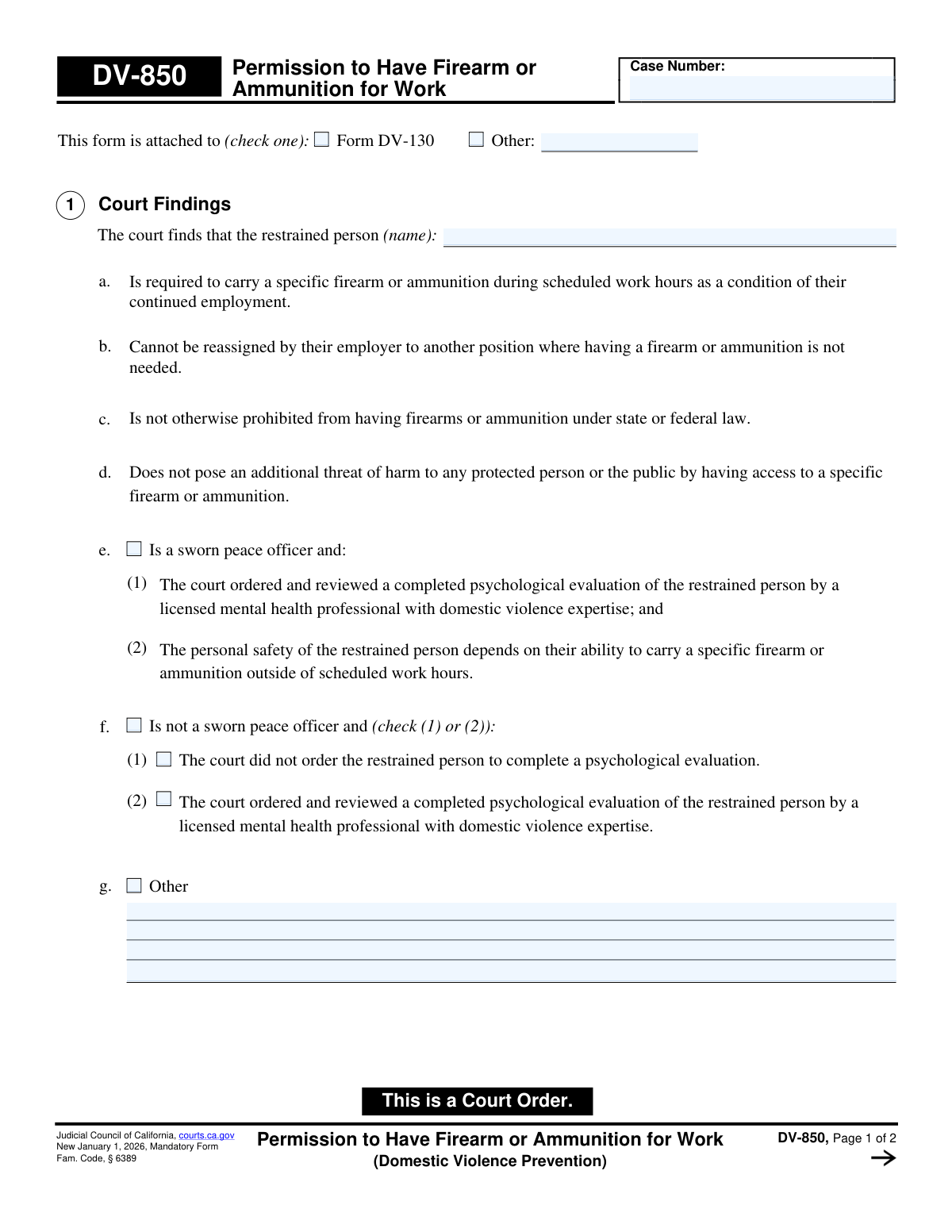
The AI fills all of it, from your answers or your documents.
The AI checks your answers before you download
14 checks built for this form, so a wrong date or a missing answer is caught before anyone else sees it.
This check ensures that the 'Case Number' entered on Page 1 is identical to the 'Case Number' on Page 2. It is critical for legal documents that all pages are correctly associated with the same case. If the numbers do not match, the form submission should be blocked, and the user prompted to correct the discrepancy to prevent filing errors.
Validates that the 'Case Number' field follows the standard format for the jurisdiction's case numbering system. This may involve checking for specific prefixes, character lengths, and the presence of numbers or hyphens in the correct positions. An invalid format could lead to the document being rejected by the court clerk or misfiled, so this check ensures data integrity from the start.
Ensures that the name of the restrained person in Section 1 is not left blank. This field is the primary identifier for the individual to whom the order applies. Failure to provide a name would render the entire court order ambiguous and unenforceable, so this field must be mandatory.
This validation checks the 'This form is attached to' section. It ensures that if the 'Other' checkbox is selected, the corresponding text field is filled out with a description of the other form. Conversely, if the text field is filled, the 'Other' checkbox must be selected. This prevents incomplete or ambiguous references to other legal documents.
Verifies that in Section 1, only one of the findings 'e. Is a sworn peace officer' or 'f. Is not a sworn peace officer' is selected. These two statuses are mutually exclusive. The system should prevent the user from checking both boxes, as this would create a logical contradiction in the court's findings.
If checkbox '1f. Is not a sworn peace officer' is selected, this validation ensures that one of the two sub-options, '(1) The court did not order...' or '(2) The court ordered...', is also selected. This choice is a required part of the finding for non-peace officers. An error should be shown if 1f is checked but neither sub-option is selected.
And 8 more checks
- Logical Consistency Between Findings and Order
- Mandatory Selection in Court Order Status
- Conditional Sub-selection for Peace Officer Order
- Firearm Details Completeness
- Ammunition Description Requirement
- At Least One Exemption Required in Section 2b
- Firearm Serial Number Format
- Conditional Requirement for 'Other' Finding
Let AI fill out your DV-850
No typing. Every field filled in seconds, checked, ready to sign.
How to Fill Out DV-850 Online for Free in 2026
What the AI walks you through.
- Navigate to Instafill.ai and upload or select the DV-850 form.
- Enter the case number and the name of the restrained person in the designated fields.
- Follow the AI prompts to check the appropriate boxes under 'Court Findings' that reflect the judge's determinations, such as the work requirement and psychological evaluation status.
- In the 'Court Order' section, specify the details of the permission granted, including whether the person is a peace officer and the conditions of possession (e.g., on-duty only).
- Provide the exact details of the permitted firearm (make, model, serial number) and any ammunition as ordered by the court.
- Carefully review the entire form to ensure all information entered by the AI is accurate and correctly reflects the court's order.
- Download, print, or securely share the completed DV-850 for the judge's signature and filing with the court clerk.
Common Mistakes in Completing DV-850
The ones the AI is built to catch.
Incomplete or Incorrect Firearm Serial Number
Forgetting the Case Number on the Second Page
Vague or Ambiguous Firearm Description
Contradictory Checkbox Selections
Misidentifying the Restrained Person's Name
Failing to Specify 'Other' Attached Form
Confusing 'Peace Officer' and 'Non-Peace Officer' Sections
Submitting an Incomplete Proposed Order
Neglecting to Clear Sensitive Data on Public Computers
Misunderstanding the Form's Purpose
Frequently Asked Questions About DV-850
Is it really free for 7 days?
Can I fill other forms too?
How do I cancel?
How does the AI fill out DV-850?
What happens to my information?
How complex is DV-850 to fill out?
What is the purpose of Form DV-850?
Who fills out this form?
Who is eligible to receive this firearm exemption?
Are the requirements different for a sworn peace officer?
What kind of information do I need to provide to the court?
Does this order allow me to possess any firearm?
If the court grants this permission, can I carry my work firearm at all times?
What if I have another court order that prohibits me from having firearms?
What is the psychological evaluation mentioned on the form?
Can AI tools help me with Form DV-850?
How can I use Instafill.ai to fill out my court forms online?
What should I do if the PDF of my court form is not fillable?
When does this form become a valid order?
Get your DV-850 filled out by AI
$0 today. Cancel before Nov 1 and you pay nothing.
Other forms like this one
California court forms: Judicial Council of California Form SC-105, Request for Court Order and Answer (Small Claims), Judicial Council of California Form SC-120, Defendant’s Claim and ORDER to Go to Small Claims Court (Small Claims), Judicial Council of California Form SER-001, Request for Sheriff to Serve Court Papers, Judicial Council of California Form SER-001, Request for Sheriff to Serve Court Papers, Affidavit for Collection of Personal Property California Probate Code Section 13100, Form POS-040, Proof of Service—Civil, Declaration of Facts of Death (California Superior Court), declaration-of-marriage-for-court-proceeding-california-family-law, ADOPT-200, Adoption Request, ADOPT-200, Stepparent Adoption Request, ADOPT-210, Adoption Agreement, ADOPT-310, Contact After Adoption Agreement, Judicial Council of California Form ADOPT-200, Adoption Request, Form ADR-107, Mediation Attendance Sheet, Form ADR-110, Order Appointing Referee, Form ADR-109, Stipulation or Motion for Order Appointing Referee, Form ADR-102, Request for Trial De Novo After Judicial Arbitration, Form ADR-108, Referee's Report (Code Civ. Proc., §§ 638, 639), Form ADR-106, Petition to Confirm, Correct, or Vacate Contractual Arbitration Award, Form ADR-104, Rejection of Award and Request for Trial After Attorney-Client Fee Arbitration
domestic violence forms: Form DV-100, Request for Domestic Violence Restraining Order, Dakota County CDA New Admissions Informal Review Request Form (Housing Choice Voucher Program) and HUD Form 5382, Certification of Domestic Violence, Dating Violence, Sexual Assault, or Stalking, and Alternate Documentation, DV-100, Request for Domestic Violence Restraining Order (Domestic Violence Prevention), Form DV-200, Proof of Personal Service (CLETS) (Domestic Violence Prevention), Judicial Council of California Form DV-110, Temporary Restraining Order (CLETS-TRO) (Domestic Violence Prevention), Form DV-109, Notice of Court Hearing (Domestic Violence Prevention), Form DV-101, Description of Abuse (Domestic Violence Prevention), Form DV-108, Request for Orders to Prevent Child Abduction (Domestic Violence Prevention), Form DV-116, Order on Request to Continue Court Hearing (Temporary Restraining Order) (CLETS-TRO) (Domestic Violence Prevention), Form DV-130, Restraining Order After Hearing (Order of Protection) (Domestic Violence Prevention), Form DV-105, Request for Child Custody and Visitation Orders (Domestic Violence Prevention), Form DV-140, Child Custody and Visitation Order (Domestic Violence Prevention), Form DV-145, Order to Prevent Child Abduction (Domestic Violence Prevention), State of Michigan Form MC 282, Domestic Violence Screening for Referral to Mediation, MC 282a, Domestic Violence Screening, Form CR-161, Criminal Protective Order—Other Than Domestic Violence (CLETS—CPO), Form CR-162, Order to Surrender Firearms, Firearm Parts, and Ammunition in Domestic Violence Case (CLETS—CPO), Form CR-102, Domestic Violence Plea Form With Waiver of Rights—Misdemeanor (Criminal), Form CR-160, Criminal Protective Order—Domestic Violence (CLETS—CPO), Form DV-120, Response to Request for Domestic Violence Restraining Order (Domestic Violence Prevention)
Let AI fill out your DV-850
Your trial starts once a card is added. You pay nothing before Nov 1.
Our AI already knows this form, all 25 fields of it. Skip the typing: tell it about yourself, or upload what you have, and it fills the whole form in seconds.
- AI fills every field on both pages, checkboxes included
- No typing into boxes: answer a few questions, or upload a document you already have, an old copy of this form, a photo of a document
- The AI checks the answers; you review and change anything before you download
- Download the finished PDF, print it, or sign it online
- Encrypted, and never used to train AI
Cancel before Nov 1 and you pay nothing.
A card is needed to start the trial. Cancel in two clicks from your account.
Terms · Privacy