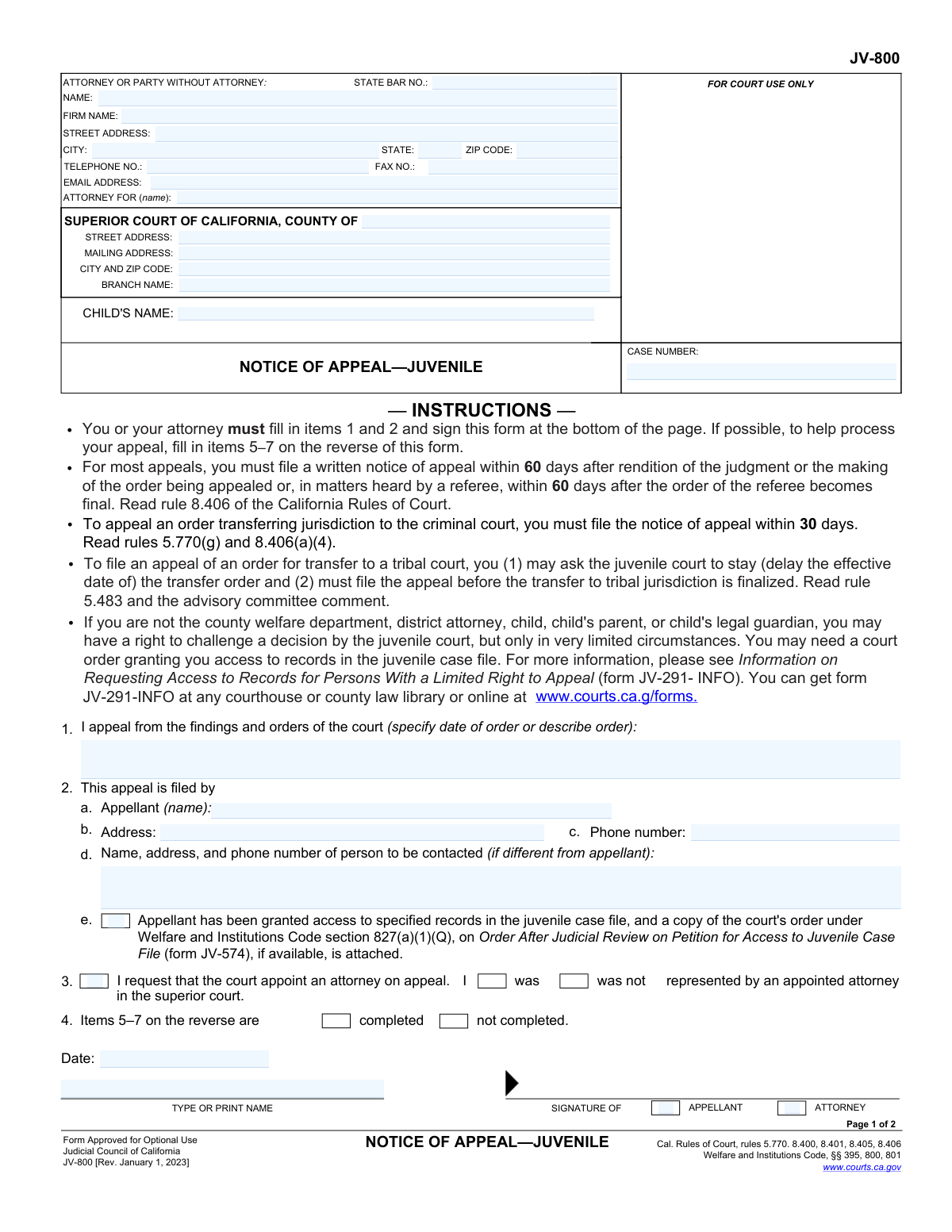
Yes! You can use AI to fill out Form JV-800, Notice of Appeal—Juvenile

Form JV-800, Notice of Appeal—Juvenile, is a legal document used in the state of California to initiate the appeals process for a juvenile court ruling. It is filed by an appellant (such as a parent, child, or guardian) to formally notify the court of their intent to challenge specific findings or orders related to dependency, wardship, or other juvenile justice matters. Today, this form can be filled out quickly and accurately using AI-powered services like Instafill.ai, which can also convert non-fillable PDF versions into interactive fillable forms.
JV-800 is part of the California court forms and court appeal forms categories on Instafill.
Our AI automatically handles information lookup, data retrieval, formatting, and form filling.
It takes less than a minute to fill out JV-800 using our AI form filling.
Securely upload your data. Information is encrypted in transit and deleted immediately after the form is filled out.

Form specifications

Form name: Form JV-800, Notice of Appeal—Juvenile
Number of fields: 90
Number of pages: 1
Language: English
main-image

Instafill Demo: How to fill out PDF forms in seconds with AI

How to Fill Out JV-800 Online for Free in 2026

Are you looking to fill out a JV-800 form online quickly and accurately? Instafill.ai offers the #1 AI-powered PDF filling software of 2026, allowing you to complete your JV-800 form in just 37 seconds or less.
Follow these steps to fill out your JV-800 form online using Instafill.ai:
  1. 1 Navigate to Instafill.ai and upload the JV-800 form or select it from their template library.
  2. 2 Provide the AI assistant with your personal details, including your name as the appellant, attorney information (if any), and the superior court details.
  3. 3 Enter the child's name and the case number as it appears on previous court documents.
  4. 4 Specify your relationship to the child by checking the appropriate box (e.g., mother, father, legal guardian).
  5. 5 Clearly identify the specific court order(s) you are appealing and the date(s) they were made.
  6. 6 Indicate the relevant sections of the Welfare and Institutions Code that apply to the order being appealed.
  7. 7 Review the completed form generated by the AI for accuracy, then sign, date, and file it with the superior court clerk within the legal deadline.

Our AI-powered system ensures each field is filled out correctly, reducing errors and saving you time.

Why Choose Instafill.ai for Your Fillable JV-800 Form?

Speed

Complete your JV-800 in as little as 37 seconds.

Up-to-Date

Always use the latest 2026 JV-800 form version.

Cost-effective

No need to hire expensive lawyers.

Accuracy

Our AI performs 10 compliance checks to ensure your form is error-free.

Security

Your personal information is protected with bank-level encryption.

Frequently Asked Questions About Form JV-800

This form is used to officially start the appeal process by notifying the court that you are challenging a specific order or judgment made by a juvenile court in California.

The form should be filled out by the appellant (the person or entity appealing the decision), who could be the child, mother, father, legal guardian, or another party with a legal interest in the case, or their attorney.

For most juvenile cases, you must file this notice within 60 days of the court's order. However, for an order transferring jurisdiction to a criminal court, the deadline is shorter at 30 days, so it is critical to check the specific rules for your case type.

You will need your personal and case information, the name of the child involved, and the specific date and description of the court order you are appealing. It is also helpful to know the hearing dates related to the order.

In item 1, you must write the date of the order or provide a clear description of it. On the second page, in item 6, you should check the box that corresponds to the type of order made under the Welfare and Institutions Code.

In item 3 of the form, you can check a box to request that the court appoint an attorney for you on appeal. This is an option if you were represented by an appointed attorney in the superior court.

Yes, but only in very limited circumstances. You may need a separate court order granting you access to the juvenile case file, and you should review Form JV-291-INFO for more information on your rights.

While filling out items 5-7 (child's information, type of order, and hearing dates) is optional, it is highly recommended. Providing this information helps the court process your appeal more quickly and efficiently.

You must file the completed and signed Notice of Appeal in the superior court where the original order you are appealing was made.

Filing this form is the first step in the appeals process. After it is filed, the court clerk will prepare the official record of the case for the appellate court, and the appeal will proceed from there.

Yes, services like Instafill.ai use AI to auto-fill form fields accurately and save time. This can help you complete the form more efficiently and reduce the chance of errors.

You can upload the form to a platform like Instafill.ai. It will make the document interactive, allowing you to type your information directly into the fields and sign it electronically from any device.

If you have a non-fillable PDF, you can use a service like Instafill.ai. It can convert flat PDFs into interactive, fillable forms so you can easily complete them on your computer or phone.

Compliance JV-800
Validation Checks by Instafill.ai

1
Ensures Appellant Name is Provided
Validates that Item 1, 'Appellant (name)', is not empty. This field is mandatory for identifying the person or entity filing the appeal. A failure to provide this information will prevent the court from processing the notice, as the primary party would be unknown.
2
Validates Selection of Appellant's Role
Verifies that exactly one checkbox is selected in Item 2 to identify the appellant's relationship to the child (e.g., mother, father, child). This is crucial for establishing the appellant's standing to file the appeal. If no role or multiple roles are selected, the form is considered incomplete and cannot be processed.
3
Requires Specification for 'Other' Appellant Role
Checks that if the 'other' checkbox is selected in Item 2, the corresponding text field specifying the relationship or interest is filled. This context is legally necessary to determine if the 'other' party has the right to appeal. A missing description will result in a rejection due to insufficient information.
4
Ensures Appealed Order is Identified
Validates that Item 3, 'I appeal from the findings and orders of the court', contains either a specific date or a description of the order being appealed. This is the core subject of the appeal and is non-negotiable for the notice to be valid. Without this information, the court of appeal cannot identify which lower court decision is being challenged.
5
Verifies Presence of Signature and Date
Confirms that the form has been signed and that the 'Date' field next to the signature is completed and contains a valid date. A signature legally attests to the information provided, and the date is critical for determining if the appeal was filed within the statutory deadline. An unsigned or undated form is legally invalid.
6
Validates Case Number Consistency Across Pages
Verifies that the 'CASE NUMBER' field is filled on Page 1 and that it matches the 'CASE NUMBER' field in the header of Page 2. Consistent and accurate case numbering is essential for correctly associating the appeal with the existing juvenile case file. A mismatch or missing number will lead to filing errors and delays.
7
Validates Child's Date of Birth
Checks that for each child listed in Item 6, the 'Child's date of birth' is a valid date and that the date is in the past. This ensures data integrity and confirms the subject of the case is a minor. An invalid or future date would be rejected as a data entry error.
8
Verifies Consistency Between Child Count and Child Details
Validates that the number entered in Item 5 ('specify number of children included') matches the actual number of child name/DOB entries provided in Item 6. This cross-reference ensures the form is internally consistent and complete. A discrepancy could lead to confusion about which children are included in the appeal.
9
Requires Hearing Dates for Selected Orders
Checks that if any checkbox for a specific order is selected in Items 6 or 7 (e.g., 'Section 366.26'), the corresponding 'Dates of hearing' field is filled. These dates help the court quickly locate the relevant transcripts and records for the appeal. Missing dates for a selected order will result in an incomplete submission.
10
Validates Attorney State Bar Number
If an attorney's name is provided in the 'ATTORNEY FOR' section, this check ensures the 'STATE BAR NO.' field is filled and contains a numeric value. This number is used to verify the attorney's credentials and good standing with the state bar. A missing or invalid bar number for a listed attorney will halt processing.
11
Validates Phone Number Format
Ensures that the 'TELEPHONE NO.' and 'Phone number' fields follow a standard U.S. phone number format, such as (XXX) XXX-XXXX or XXXXXXXXXX. Correctly formatted contact information is vital for the court to communicate with the appellant or their attorney. An invalid format could prevent essential communication.
12
Validates Email Address Format
Checks that the 'EMAIL ADDRESS' field, if filled, contains a valid email address structure, including an '@' symbol and a domain. As courts increasingly use electronic communication, a valid email is important for timely notices and updates. An invalid format would be flagged to the user for correction.
13
Ensures Attorney Representation Status is Selected
Verifies that one of the two options ('was' or 'was not') in Item 4, regarding representation by an appointed attorney, has been selected. This information is important for court administration, particularly for determining if a new attorney needs to be appointed for the appeal. The form is incomplete without this selection.

Common Mistakes in Completing JV-800

Forgetting to Sign and Date the Form

Appellants, especially those under stress, often overlook the signature and date fields in Section 4. An unsigned Notice of Appeal is invalid and will be rejected by the court clerk, which can cause the appellant to miss the strict, non-extendable filing deadline. To avoid this, always perform a final review of the entire form before filing, paying special attention to the signature block. Using a tool like Instafill.ai can highlight required fields, including signatures, to ensure nothing is missed.

Providing Vague or Incorrect Order Information in Section 1

In Section 1, filers must specify the exact date of the order being appealed or provide a clear description. Many people write vague statements like 'the judge's ruling' without a date, which is insufficient for the court to identify the specific order. This ambiguity can lead to the appeal being delayed or even dismissed for uncertainty. Always reference the written court order to get the exact date and title of the ruling you are appealing.

Failing to Repeat Case Information on Page 2

The form requires the 'CHILD'S NAME' and 'CASE NUMBER' to be entered again at the top of page 2. It is a very common mistake to leave these header fields blank, assuming the information from page 1 is sufficient. If the pages get separated during processing, the second page becomes unidentifiable, potentially leading to the loss of critical information about the grounds for the appeal. Double-check that all pages have the required case identifiers.

Omitting Hearing Dates in Sections 6 and 7

When checking a box for an order under a specific Welfare and Institutions Code section, the form also requires specifying the 'Dates of hearing.' Filers frequently check the box but forget to fill in the associated date field. This information is vital for the appellate court to locate the correct transcripts and records. Leaving it blank can significantly delay the processing of the appeal while the clerk seeks clarification.

Incorrectly Selecting the Appealed Order Code

Sections 6 and 7 list numerous complex legal codes for the grounds of appeal, such as 'Section 366.26' or 'Section 707.' Appellants without legal guidance may not understand the distinctions and check the wrong box, or check multiple boxes incorrectly. This can fundamentally weaken the appeal or address the wrong legal issue. It is crucial to review the court's final order, which will cite the specific code section under which the decision was made.

Failing to File Within the Statutory Deadline

The form's instructions clearly state strict filing deadlines, typically 60 days, but as short as 30 days for certain orders. The single most critical mistake is miscalculating or missing this deadline, as appellate jurisdiction is statutory and courts rarely grant extensions. This results in a complete loss of the right to appeal. To prevent this, calculate the deadline immediately upon receiving the order and file the notice well in advance.

Incomplete Attorney or Party Contact Information

The top section of the form requires detailed contact information, including a full address, phone number, and, for attorneys, a State Bar Number. Leaving any of this information blank or providing outdated details can prevent the court from sending crucial notices and updates. This can cause an appellant or their attorney to miss important deadlines or communications regarding their case. AI-powered tools like Instafill.ai can help by auto-populating and validating contact information to ensure accuracy.

Incorrectly Identifying the Appellant's Status in Section 2

Section 2 requires the filer to check a box identifying their relationship to the child (e.g., mother, father, legal guardian). Selecting the wrong status or failing to adequately explain it in the 'other' field can raise questions about the appellant's legal standing to file the appeal. This could lead to a motion to dismiss the appeal, causing significant delays and requiring further legal arguments. Carefully select the box that accurately reflects your legal relationship to the child as recognized by the court.

Overlooking the Request for Appointed Counsel

Section 3 contains a critical checkbox: 'I request that the court appoint an attorney on appeal.' Eligible appellants who are unrepresented may not realize they must affirmatively check this box to begin the process of getting a court-appointed lawyer. Overlooking this can leave them without legal representation during the initial, crucial stages of the appeal. If you cannot afford an attorney, it is vital to check this box.

Providing Incomplete Information for Multiple Children

When an appeal involves more than one child, Section 5 requires the name and date of birth for each one. A common error is to list only one child or to omit the dates of birth for some of the children. This creates ambiguity about the scope of the appeal and can require filing an amended notice, delaying the case for all children involved. Ensure every child affected by the appeal is listed with their complete and correct information. If the form is a non-fillable PDF, a tool like Instafill.ai can convert it to a fillable version, making it easier to enter all required details without error.
Saved over 80 hours a year

“I was never sure if my IRS forms like W-9 were filled correctly. Now, I can complete the forms accurately without any external help.”

Kevin Martin Green

Your data stays secure with advanced protection from Instafill and our subprocessors

Robust compliance program

Transparent business model

You’re not the product. You always know where your data is and what it is processed for.

ISO 27001, HIPAA, and GDPR

Our subprocesses adhere to multiple compliance standards, including but not limited to ISO 27001, HIPAA, and GDPR.

Security & privacy by design

We consider security and privacy from the initial design phase of any new service or functionality. It’s not an afterthought, it’s built-in, including support for two-factor authentication (2FA) to further protect your account.

Fill out JV-800 with Instafill.ai

Worried about filling PDFs wrong? Instafill securely fills form-jv-800-notice-of-appealjuvenile forms, ensuring each field is accurate.

Related forms by category

California court forms Judicial Council of California Form SC-105, Request for Court Order and Answer (Small Claims), Judicial Council of California Form SC-120, Defendant’s Claim and ORDER to Go to Small Claims Court (Small Claims), Judicial Council of California Form SER-001, Request for Sheriff to Serve Court Papers, Judicial Council of California Form SER-001, Request for Sheriff to Serve Court Papers, Affidavit for Collection of Personal Property California Probate Code Section 13100, Form POS-040, Proof of Service—Civil, Declaration of Facts of Death (California Superior Court), declaration-of-marriage-for-court-proceeding-california-family-law, ADOPT-200, Adoption Request, ADOPT-200, Stepparent Adoption Request, ADOPT-210, Adoption Agreement, ADOPT-310, Contact After Adoption Agreement, Judicial Council of California Form ADOPT-200, Adoption Request, Form ADR-107, Mediation Attendance Sheet, Form ADR-110, Order Appointing Referee, Form ADR-109, Stipulation or Motion for Order Appointing Referee, Form ADR-102, Request for Trial De Novo After Judicial Arbitration, Form ADR-108, Referee's Report (Code Civ. Proc., §§ 638, 639), Form ADR-106, Petition to Confirm, Correct, or Vacate Contractual Arbitration Award, Form ADR-104, Rejection of Award and Request for Trial After Attorney-Client Fee Arbitration · + 557 more →
court appeal forms Form N161, Appellant's Notice (All appeals except small claims track appeals and appeals to the Family Division of the High Court), Designation of Record on Appeal (Civil) (Maricopa County Justice Courts, Arizona) (Form APP 8150-702), Form N161, Appellant’s notice (All appeals except small claims track appeals and appeals to the Family Division of the High Court), Declaration for Court of Appeal Proceedings, Form MC 55, Claim of Appeal, Form MC 56, Bond on Appeal, Form MC 57, Certificate of Records Transmitted for Appeal and Notice to Parties, Form MC 60, Notice of Record Return from Circuit Court/Court of Appeals, Form MC 501, Reporter/Recorder Certificate of Ordering Transcript on Appeal, Form MC 503, Motion to Change Time for Filing Transcript on Appeal, Civil Appeal Case Information Statement, Form APP-014, Appellant's Proposed Statement on Appeal (Unlimited Civil Case), Form CR-125, Notice of Appeal—Commitment (Penal Code or Welfare and Institutions Code), Form APP-002, Notice of Appeal/Cross-Appeal (Unlimited Civil Case), Form CR-134, Notice Regarding Record on Appeal (Misdemeanor), Form CR-135, Proposed Statement on Appeal (Misdemeanor), Form CR-136, Order Concerning Appellant's Proposed Statement on Appeal (Misdemeanor), Form CR-137, Abandonment of Appeal (Misdemeanor), Form CR-142, Notice of Appeal and Record on Appeal (Infraction), Form CR-143, Proposed Statement on Appeal (Infraction) · + 8 more →