
Instafill.ai
7 days free
AI form filling · 102 fields · 2 pages · done in seconds

Yes! You can use AI to fill out New Jersey Judiciary Domestic Violence Economic Mediation Protected Party Post-Mediation Questionnaire

Don't type 102 fields by hand. Tell our AI about yourself, or upload a document you already have, and it fills every field in seconds. You check it, then download, print or sign.
7 days free, then $19.99/month · Cancel anytime
AI fills it, no typingEncrypted, never used to train AICancel in two clicks
New Jersey Judiciary Domestic Violence Economic Mediation Protected Party Post-Mediation Questionnaire, page 1
Basic · 44/100Form Complexity Index

The AI does the filling. You just check it.

No typing into boxes, nothing to install.

Tell the AI about youAnswer a few questions in plain words, or upload a document you already have. That is all the typing there is.
AI fills every field in secondsIt puts each answer in the right box on every page, checkboxes included.
Check it and downloadReview every field, change anything, then download, print or sign the PDF.

What this form asks for

The AI fills all of it, from your answers or your documents.

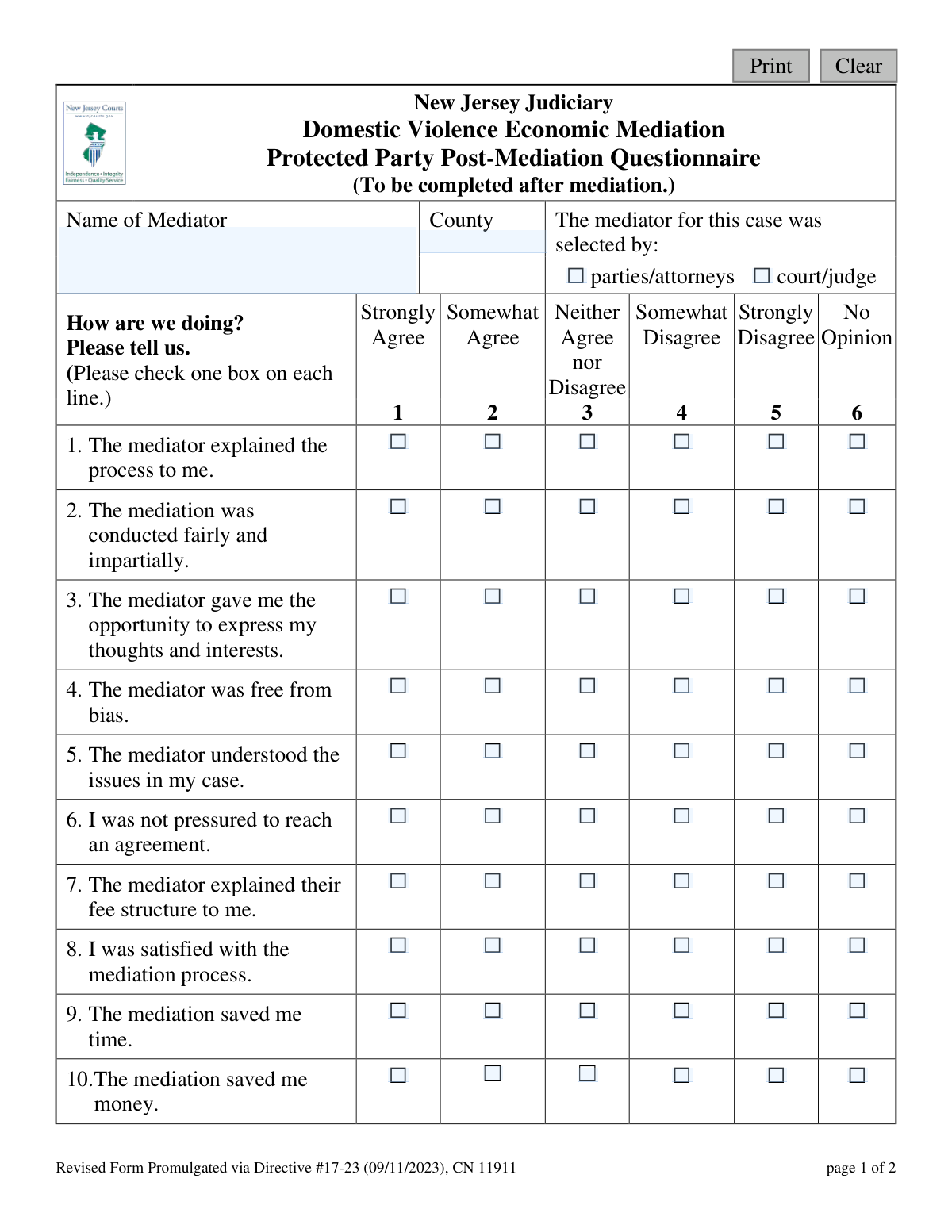
This form is a questionnaire provided by the New Jersey Judiciary for a protected party to complete after participating in Domestic Violence Economic Mediation. Its purpose is to collect feedback on the mediator's performance, the fairness of the process, and the litigant's overall experience to help improve the statewide program. Today, this form can be filled out quickly and accurately using AI-powered services like Instafill.ai, which can also convert non-fillable PDF versions into interactive fillable forms.
Fillable fields102
Pages2
Form Complexity IndexBasic, 44/100

The AI checks your answers before you download

12 checks built for this form, so a wrong date or a missing answer is caught before anyone else sees it.

Mediator Name Presence

This check ensures that the 'Name of Mediator' field is not left blank. This information is critical for associating the feedback with a specific mediator, which is essential for program evaluation and quality control. If this field is empty, the form submission will be rejected with a prompt for the user to provide the mediator's name.

County Selection Required

Validates that a county has been specified in the 'County' field. The county information is necessary for regional analysis, tracking program performance across different jurisdictions, and identifying geographical trends. A failure to provide the county will prevent form submission until a value is entered.

Mediator Selector Choice Required

Ensures that one of the two options ('parties/attorneys' or 'court/judge') for how the mediator was selected is checked. This data point helps the Judiciary understand the primary pathways for mediator assignment in domestic violence cases. The form cannot be submitted until a selection is made for this required question.

Likert Scale Questions Completeness

This validation verifies that for each of the 15 Likert-scale questions (from 'The mediator explained the process' to 'I knew that I was able to leave'), exactly one response has been selected. Incomplete surveys provide skewed or unusable data for program analysis. If any question is unanswered, the user will be notified to complete all feedback items before submission.

Safety Feedback Answer Required

Specifically confirms that question 11, 'I felt safe during the process,' has been answered. Given this is a questionnaire for a 'Protected Party' in a domestic violence case, this feedback is of paramount importance for assessing program safety. An omission here would trigger a validation error, highlighting the field as mandatory.

Repeat Mediation Choice Mandatory

This check ensures that question 16, 'If you had the choice to do this again would you do it?', is answered with either 'Yes' or 'No'. This question is a key indicator of overall user satisfaction and the perceived value of the mediation program. The submission will be blocked until this binary choice is made.

And 6 more checks
  • Case Settlement Status Required
  • Valid County Name Format
  • Experience Description Character Limit
  • Suggestions Field Character Limit
  • Input Sanitization for Text Fields
  • Single Selection per Question

Let AI fill out your DVEM - CN 11911

No typing. Every field filled in seconds, checked, ready to sign.

7 days free, then $19.99/month · Cancel anytime

How to Fill Out DVEM - CN 11911 Online for Free in 2026

What the AI walks you through.

  1. Navigate to Instafill.ai and upload or select the Protected Party Post-Mediation Questionnaire.
  2. Enter the name of the mediator and the county where the mediation took place.
  3. Indicate whether the mediator was selected by the parties/attorneys or by the court/judge.
  4. Carefully answer questions 1 through 15 by checking the box that best reflects your experience, ranging from 'Strongly Agree' to 'Strongly Disagree'.
  5. Answer the subsequent yes/no questions regarding your willingness to repeat the process and whether your case settled.
  6. Use the provided text boxes to add any further description of your experience or suggestions for improvement.
  7. Review all your responses for accuracy before submitting or downloading the completed questionnaire.

Common Mistakes in Completing DVEM - CN 11911

The ones the AI is built to catch.

Omitting Mediator Name and County
Users often leave the 'Name of Mediator' and 'County' fields blank, either from rushing or not having the information readily available. This is a critical error because it makes the feedback almost useless; the judiciary cannot link the questionnaire to the specific mediator or court jurisdiction being evaluated. To avoid this, keep all case-related documents handy when completing the form, as they will contain the correct names and county information.
Checking Multiple Options in a Single Row
A common data entry mistake is checking more than one box for a single numbered question (e.g., checking both 'Strongly Agree' and 'Somewhat Agree'). This usually happens on paper forms where there are no built-in constraints. This invalidates the response for that question, leading to incomplete data for analysis. To prevent this, carefully select only one box per line. Using a tool like Instafill.ai can help by converting flat PDFs into interactive forms with radio buttons that technically prevent multiple selections.
Confusing the Mediation Process with the Outcome
Many litigants rate the entire process based on whether they were happy with the final outcome or if the case settled. It's a natural bias, but this form is designed to evaluate the mediator's conduct and the fairness of the process itself, regardless of the result. This confusion can lead to an excellent mediator receiving a poor review simply because an agreement wasn't reached. To avoid this, try to answer questions about the process (e.g., fairness, impartiality, safety) by focusing only on the mediator's actions and the session's structure.
Providing Vague or No Written Feedback
When faced with open-ended questions like 'Is there anything else that you would like to add?', users often write 'N/A' or something generic like 'It was fine.' This happens due to fatigue or a feeling that checkboxes are sufficient. This is a missed opportunity, as specific, detailed comments provide crucial context that quantitative data cannot. To provide useful feedback, describe specific actions or moments, such as, 'The mediator did a great job of keeping the discussion focused when it started to get off track.'
Ignoring the 'No Opinion' Column
Some users feel compelled to select an 'Agree' or 'Disagree' option for every question, even when it doesn't apply to their situation. For example, if the court paid for the mediation, the question about the mediator's fee structure (Q7) is irrelevant. Choosing 'Disagree' in this case would be inaccurate. The 'No Opinion' option is the correct choice in such scenarios, and using it ensures data integrity by not forcing an inapplicable answer.
Inconsistent or Contradictory Responses
A user might state they were 'Strongly' satisfied with the process (Q8) but then answer 'No' to whether they would do it again (Q16). While this can reflect nuanced feelings, it can also signal confusion or misinterpretation of the questions. Such contradictions can cause reviewers to question the validity of the entire submission. To avoid this, read through all your answers before submitting and use the open-ended comment sections to explain any seemingly contradictory feelings.
Skipping Questions in the Main Survey
It is easy to accidentally miss a row when filling out a long list of checkbox questions. Each question, from 'The mediator explained the process' to 'I felt safe,' is a distinct data point for the judiciary to evaluate the program's effectiveness. Skipping a question means that valuable piece of feedback is lost. The best way to avoid this is to move methodically down the list, ensuring one box in each numbered row is checked before moving to the next.
Misspelling the Mediator's Name
Providing an incorrect or incomplete spelling of the mediator's name is a frequent error, often because the user is guessing based on memory. This has the same negative consequence as leaving the field blank: the feedback cannot be tied to the correct individual. This prevents the judiciary from identifying patterns of excellence or areas for improvement with specific mediators. Always refer to official court documents to verify the correct spelling.
Failing to Answer from the 'Protected Party' Perspective
This form is specifically for the 'Protected Party' in a Domestic Violence case, and questions about safety, fear, and pressure are paramount. Some individuals may answer from a general perspective of dissatisfaction rather than focusing on how the process addressed the inherent power imbalance and safety concerns. This dilutes the purpose of the form. Before answering, it's helpful to re-read the form's title and consciously evaluate the experience through the specific lens of safety and freedom from coercion.
Incorrectly Indicating Who Selected the Mediator
The question of whether the mediator was selected by the 'parties/attorneys' or the 'court/judge' is often overlooked or answered incorrectly. Users may not recall or may have been uninvolved in this part of the process. This data is important for the judiciary to track referral sources and their success rates. If you are unsure, it is better to ask your attorney or check the case file rather than guess. AI-powered tools like Instafill.ai can help by pre-filling this information if it's available in the digital case file, ensuring accuracy.

Frequently Asked Questions About DVEM - CN 11911


Is it really free for 7 days?
Yes. You pay $0 today. Cancel before Nov 6 and you are never charged. Keep it, and it is $19.99 a month for 5 fills of your DVEM - CN 11911.
Can I fill other forms too?
This plan is for your DVEM - CN 11911: your own AI agent fills it as often as 5 times a month. To fill other forms and upload your own, choose a Professional plan from your account.
How do I cancel?
From your account, in two clicks, any time. No email, no call.
How does the AI fill out DVEM - CN 11911?
You answer a few questions in plain words, or upload a document you already have. The AI reads what you give it and puts each answer into the right field of DVEM - CN 11911, on every page, in seconds. It checks the answers against the form's own rules, and you review and change anything before you download, print or sign.
What happens to my information?
It is encrypted in transit and at rest, and it is never used to train AI.
How complex is DVEM - CN 11911 to fill out?
DVEM - CN 11911 has a Form Complexity Index of 44 out of 100, in the basic tier: 102 fillable fields across 2 pages. Instafill.ai's AI fills it in under a minute, with every field there for you to review before you download.
What is the purpose of the DVEM - Statewide Mediation Litigant Questionnaire?
This form is used by the New Jersey Judiciary to collect feedback from the 'Protected Party' after a Domestic Violence Economic Mediation session. Your responses help evaluate the mediator's performance and the overall effectiveness of the program.
Who is supposed to fill out this form?
This questionnaire should be completed by the individual identified as the 'Protected Party' in a domestic violence case who has just participated in economic mediation. It should be filled out after the mediation has concluded.
What information do I need to have ready to complete this form?
You will need the name of your mediator and the county where the mediation took place. The rest of the form consists of questions about your personal experience during the mediation process.
What does it mean to be the 'Protected Party'?
In a domestic violence case, the 'Protected Party' is the person who has been granted a restraining order for their protection. This form is specifically designed to capture your unique perspective and safety concerns during mediation.
How do I answer the questions with the checkboxes?
For questions 1 through 15, review the statement and check the box that best reflects your opinion, ranging from 'Strongly Agree' to 'Strongly Disagree'. If a question is not applicable or you are unsure, you can select 'No Opinion'.
Do I have to answer the open-ended questions like 'Is there anything else you would like to add'?
While not mandatory, providing written feedback in questions 17 and 19 is highly encouraged. This is your opportunity to share specific details or suggestions that can help improve the mediation program for others.
Will my answers on this questionnaire affect the outcome of my case?
No, this form is for program evaluation and quality control purposes only. Your confidential feedback is used to assess the mediation process and will not impact the legal decisions in your case.
When and where do I submit this form?
The form should be completed and submitted after your mediation session ends. The mediator or court staff will provide you with specific instructions on how and where to turn it in.
What happens if I provide negative feedback about the mediator?
Honest feedback, whether positive or negative, is essential for the Judiciary to maintain a high-quality mediation program. Your responses are used to monitor performance and ensure mediators are fair, impartial, and follow proper procedures.
Can I use an AI tool to help fill out this form?
Yes, services like Instafill.ai use AI to help you accurately fill out forms. It can help populate basic information and ensure the document is completed neatly and efficiently.
How can I fill out this form online if I only have a PDF?
You can use a service like Instafill.ai to complete the form on your computer or phone. Simply upload the PDF, and the platform will allow you to type your answers directly into the fields before printing.
My PDF form is not fillable. What should I do?
If you have a non-fillable or 'flat' PDF, you can use Instafill.ai to convert it into an interactive, fillable form. This makes it easy to type your responses instead of having to print the form and fill it out by hand.
What is the difference between 'The mediation saved me time' and 'The mediation saved me money'?
These questions address two different potential benefits of mediation. 'Saved me time' refers to avoiding lengthy court proceedings, while 'saved me money' refers to reducing legal fees and other costs associated with litigation.
Encrypted in transit and at restNever used to train AIDelete your forms any time

Get your DVEM - CN 11911 filled out by AI

$0 today. Cancel before Nov 6 and you pay nothing.

Other forms like this one

domestic violence forms: Form DV-100, Request for Domestic Violence Restraining Order, Dakota County CDA New Admissions Informal Review Request Form (Housing Choice Voucher Program) and HUD Form 5382, Certification of Domestic Violence, Dating Violence, Sexual Assault, or Stalking, and Alternate Documentation, DV-100, Request for Domestic Violence Restraining Order (Domestic Violence Prevention), Form DV-200, Proof of Personal Service (CLETS) (Domestic Violence Prevention), Judicial Council of California Form DV-110, Temporary Restraining Order (CLETS-TRO) (Domestic Violence Prevention), Form DV-109, Notice of Court Hearing (Domestic Violence Prevention), Form DV-101, Description of Abuse (Domestic Violence Prevention), Form DV-108, Request for Orders to Prevent Child Abduction (Domestic Violence Prevention), Form DV-116, Order on Request to Continue Court Hearing (Temporary Restraining Order) (CLETS-TRO) (Domestic Violence Prevention), Form DV-130, Restraining Order After Hearing (Order of Protection) (Domestic Violence Prevention), Form DV-105, Request for Child Custody and Visitation Orders (Domestic Violence Prevention), Form DV-140, Child Custody and Visitation Order (Domestic Violence Prevention), Form DV-145, Order to Prevent Child Abduction (Domestic Violence Prevention), State of Michigan Form MC 282, Domestic Violence Screening for Referral to Mediation, MC 282a, Domestic Violence Screening, Form CR-161, Criminal Protective Order—Other Than Domestic Violence (CLETS—CPO), Form CR-162, Order to Surrender Firearms, Firearm Parts, and Ammunition in Domestic Violence Case (CLETS—CPO), Form CR-102, Domestic Violence Plea Form With Waiver of Rights—Misdemeanor (Criminal), Form CR-160, Criminal Protective Order—Domestic Violence (CLETS—CPO), Form DV-120, Response to Request for Domestic Violence Restraining Order (Domestic Violence Prevention)

New Jersey forms: State of New Jersey Alternate Benefit Program Withdrawal Request Acknowledgement Receipt, Horizon Blue Cross Blue Shield of New Jersey Applied Behavior Analysis Supplemental Information Form, State of New Jersey Application for Employment (Form DPF-663), New Jersey Judiciary Plea Form (Plea 01), Supplemental Plea Form for Certain Sexual Offenses: Megan’s Law/Parole Supervision for Life/Community Supervision for Life (Plea 05), Financial Questionnaire to Establish Indigency, New Jersey Judiciary Resource Family Information Form, Foreclosure Case Information Statement (FCIS) - Appendix XII-B2, New Jersey Judiciary Records Request Form, Superior Court of New Jersey, Application for Appeal and Order, FL Certification of Requested Background Checks for Kinship Legal Guardianship, Certification of Caregiver as to Knowledge of Identity and/or Location of Parents, FL Order Judgment for Kinship Legal Guardianship, New Jersey Judiciary Certification of Repair and Plea of Guilty, Uniform Summary Support Order (USSO), New Jersey Judiciary Volunteer Application (CN 10293), Application to Take the New Jersey Court Interpreter Oral Examination, New Jersey Judiciary Attorney Fee Arbitration Request, Order to Show Cause with Temporary Restraints Pursuant to Rule 4:52, Tax Court of New Jersey, State Tax Complaint

7 days free, then $19.99/month · Cancel anytime