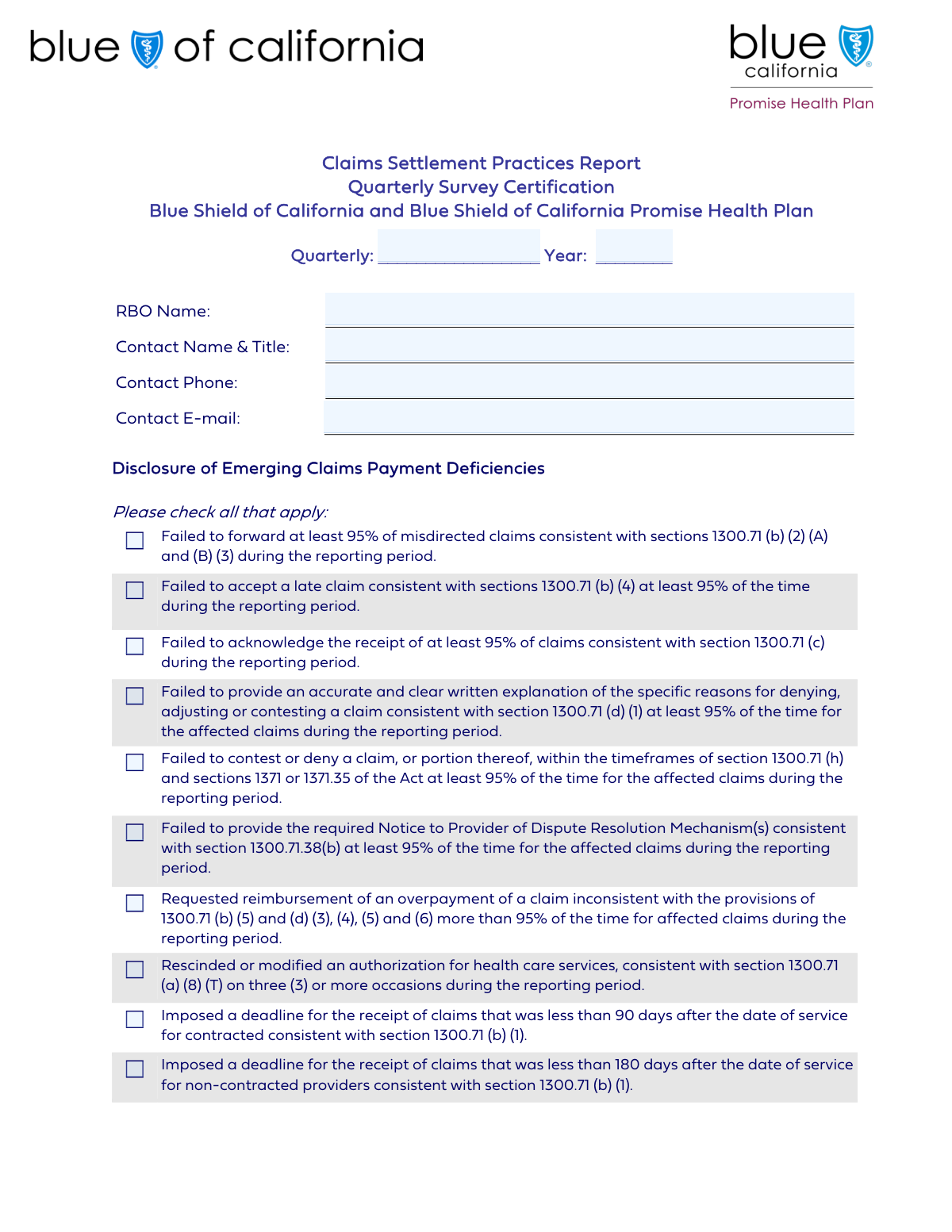
Yes! You can use AI to fill out Quarterly Claims Payment and Dispute Resolution Mechanism Report

The Quarterly Claims Payment and Dispute Resolution Mechanism Report is a regulatory document required by California's Department of Managed Health Care (DMHC). Health care service plans must use this form to report on their performance in processing and paying claims, disclosing any deficiencies or failures to comply with specific state regulations. This reporting is crucial for regulatory oversight, ensuring that health plans handle provider and member claims fairly and promptly. Today this form can be filled out quickly and accurately using AI-powered services like Instafill.ai, which can also convert non-fillable PDF versions into interactive fillable forms.
Our AI automatically handles information lookup, data retrieval, formatting, and form filling.
It takes less than a minute to fill out Quarterly Claims Payment Report using our AI form filling.
Securely upload your data. Information is encrypted in transit and deleted immediately after the form is filled out.

Form specifications

Form name: Quarterly Claims Payment and Dispute Resolution Mechanism Report
Number of fields: 25
Number of pages: 2
Language: English
Categories: payment forms, VA claim forms
main-image

Instafill Demo: How to fill out PDF forms in seconds with AI

How to Fill Out Quarterly Claims Payment Report Online for Free in 2026

Are you looking to fill out a QUARTERLY CLAIMS PAYMENT REPORT form online quickly and accurately? Instafill.ai offers the #1 AI-powered PDF filling software of 2026, allowing you to complete your QUARTERLY CLAIMS PAYMENT REPORT form in just 37 seconds or less.
Follow these steps to fill out your QUARTERLY CLAIMS PAYMENT REPORT form online using Instafill.ai:
  1. 1 Navigate to Instafill.ai and upload or select the Quarterly Claims Payment and Dispute Resolution Mechanism Report.
  2. 2 Use the AI assistant to automatically fill in the Reporting Period and your organization's contact information.
  3. 3 Review the 'Disclosure of Emerging Claims Payment Deficiencies' section, checking the boxes for any deficiencies that occurred during the reporting period.
  4. 4 Complete the 'Deficiency Identification' section, indicating if any specific failures or Medi-Cal deficiencies were identified.
  5. 5 If deficiencies were reported, provide a detailed 'Remediation/Corrective Action Plan,' explaining the root cause and the steps taken to correct the issues.
  6. 6 Enter the certifier's name and title, then digitally sign and date the form in the Certification section to attest to the accuracy of the information.
  7. 7 Download the completed report for your records and submit it to the California Department of Managed Health Care (DMHC).

Our AI-powered system ensures each field is filled out correctly, reducing errors and saving you time.

Why Choose Instafill.ai for Your Fillable Quarterly Claims Payment Report Form?

Speed

Complete your Quarterly Claims Payment Report in as little as 37 seconds.

Up-to-Date

Always use the latest 2026 Quarterly Claims Payment Report form version.

Cost-effective

No need to hire expensive lawyers.

Accuracy

Our AI performs 10 compliance checks to ensure your form is error-free.

Security

Your personal information is protected with bank-level encryption.

Frequently Asked Questions About Form Quarterly Claims Payment Report

This form is used by Responsible Business Organizations (RBOs) to self-report specific deficiencies in their claims payment and processing operations for a given reporting quarter.

This form must be completed by a designated principal officer of a Responsible Business Organization (RBO) that handles healthcare claims.

You must provide the name of your organization (RBO), the full name and title of a contact person, and their direct phone number and email address.

If no deficiencies were identified during the reporting period, you should check the 'No deficiencies identified' box in the 'Deficiency Identification' section and leave the other deficiency checkboxes blank.

This section must be filled out if you check any boxes under the 'Deficiency Identification' section. You need to describe the root cause of the deficiency and the corrective actions being taken.

This means your organization's performance for that specific task fell below the 95% compliance rate during the reporting period. If your compliance was 94.9% or lower, you must check the corresponding box.

The form must be certified and signed by a designated principal officer of the organization. You must include their full name, official title, and the date of certification.

The form references specific regulatory sections for each item. You should review these sections or consult with your compliance or legal department to make an accurate determination.

Submission instructions and processing times are typically provided by the governing regulatory body. Please refer to their official guidelines for details on where to send the completed form.

Yes, services like Instafill.ai use AI to accurately auto-fill form fields with your information, which can save time and reduce errors. However, you are ultimately responsible for the accuracy of the information provided.

Simply upload the form to the Instafill.ai platform. The AI will make the form interactive, allowing you to type your information directly into the fields online before downloading the completed document.

You can use a service like Instafill.ai, which can convert non-fillable or 'flat' PDFs into interactive, fillable forms. This allows you to easily type your information into the fields instead of printing and filling by hand.

The 'Disclosure of Emerging Claims Payment Deficiencies' section covers specific, percentage-based processing failures. The 'Deficiency Identification' section addresses broader issues like failing to establish payor liability or identified Medi-Cal deficiencies.

Compliance Quarterly Claims Payment Report
Validation Checks by Instafill.ai

1
Reporting Quarter Validity
This check verifies that the 'Reporting Quarter' field contains a valid numerical value (1, 2, 3, or 4). This is a required field essential for correctly categorizing the report for regulatory and internal tracking. A submission with an invalid quarter would be rejected, requiring the user to correct the entry before resubmission.
2
Reporting Year Format and Range
This validation ensures the 'Reporting Year' is a four-digit number and is not a future year. It prevents typographical errors and ensures the report pertains to a valid, historical time period. If the year is invalid, the form cannot be submitted, preventing the creation of nonsensical or anachronistic records.
3
RBO Name Completeness
This check verifies that the 'RBO Name' field is not left blank. The name of the Responsible Business Organization is a mandatory identifier for the entity submitting the report. Failure to provide this information would make the submission anonymous and therefore invalid, so the form will not be accepted until the field is completed.
4
Contact Phone Number Format
This validation ensures the 'Contact Phone' field contains a properly formatted 10-digit phone number, allowing for common separators like parentheses, spaces, or hyphens. Accurate contact information is crucial for regulators or internal auditors who may need to speak directly with the contact person. The system will reject invalid formats to ensure data quality and reachability.
5
Contact E-mail Address Format
This check confirms that the value entered in the 'Contact E-mail' field follows the standard '[email protected]' format. A valid email is critical for sending submission confirmations and for any necessary follow-up communication regarding the report's contents. An invalid format will trigger an error message, prompting the user to correct the email address.
6
Logical Consistency for 'No Deficiencies Identified' Checkbox
This check ensures that if the 'No deficiencies identified' box is checked, no other checkboxes indicating a specific deficiency are also checked. This prevents logically contradictory submissions where an organization claims both to have deficiencies and to have no deficiencies. If a conflict is detected, the user will be prompted to resolve the contradiction before the form can be submitted.
7
Conditional Requirement for Remediation Plan Details
This validation enforces that the 'Remediation/Corrective Action Plan Details' field must contain text if any of the specified deficiency checkboxes are checked ('Failed to establish payor liability for medical records', 'Failed to establish payor liability for emergency room medical records', or 'Medi-Cal deficiencies identified'). It is critical that any reported deficiency is accompanied by a corrective plan. If a relevant deficiency is checked but the plan is empty, the submission will be blocked until the details are provided.
8
Prevents Remediation Plan for No-Deficiency Reports
This check ensures that the 'Remediation/Corrective Action Plan Details' field is empty if the 'No deficiencies identified' box is checked. Providing a corrective action plan when no deficiencies are reported is illogical and can create confusion during review. The system will flag this inconsistency and require the user to clear the remediation details before submission.
9
Certifier Name Completeness
This validation confirms that the 'Certifier Name' field is not left blank. The name of the certifying individual provides accountability and legal attestation for the accuracy of the report. A submission without a certifier name is incomplete and legally unsound, so the form will be rejected until this required information is entered.
10
Designated Principal Officer Title Completeness
This check ensures the 'Designated Principal Officer Title' field is not empty. This information is required to verify the authority and role of the person certifying the report's contents. An empty field would prevent submission, ensuring the certifier's position within the organization is clearly documented.
11
Certification Date Logic and Format
This check ensures the 'Certification Date' is a valid date, is not in the future, and logically occurs on or after the end of the specified reporting period. This confirms that the certification was made after the relevant period concluded, attesting to the full quarter's activities. An invalid or future date would render the certification void, so the system will require a valid date for submission.
12
Signature Presence Verification
This validation verifies that the 'Signature' field has been completed, either through a digital signature action or an uploaded image. The signature is the final legal attestation that the information provided is true and accurate to the best of the certifier's knowledge. The form cannot be submitted without a signature, as it would lack legal standing.

Common Mistakes in Completing Quarterly Claims Payment Report

Misinterpreting Negatively Phrased Deficiency Questions

The form asks users to check a box if they 'Failed to...' meet a standard. Users often misread this and check the box to indicate compliance, when in fact, checking the box is an admission of a deficiency. This leads to inaccurate reporting and can trigger unnecessary regulatory scrutiny. To avoid this, carefully read each statement and remember that a checked box signifies a failure; leave it unchecked if your organization was compliant.

Contradictory Deficiency Selections

A frequent error is checking one or more specific deficiency boxes (e.g., 'Failed to forward at least 95% of misdirected claims...') and also checking the 'No deficiencies identified' box. This creates a logical contradiction that invalidates the submission and requires clarification, delaying the review process. To prevent this, ensure that if any deficiency box is checked, the 'No deficiencies identified' box is left unchecked.

Incomplete or Missing Corrective Action Plan

The form requires a detailed 'Remediation/Corrective Action Plan' if certain deficiency boxes are checked, but filers often forget to complete this section after admitting a failure. Providing a vague plan or leaving it blank results in an incomplete filing and guaranteed follow-up from the regulatory body. Always double-check that if you've reported a deficiency, you have also provided a thorough explanation of the root cause and the specific corrective actions being taken.

Using an Unauthorized or Incorrect Certifier

The certification section requires a 'Designated Principal Officer.' A common mistake is having a lower-level employee or someone not officially designated in this role complete the certification. This can invalidate the entire submission, as the certification attests to the accuracy of the report on behalf of the organization's leadership. Ensure the person signing is the correct, authorized officer and that their name and title are entered exactly as they appear in official records.

Omitting the Contact Person's Title

The 'Contact Name & Title' field explicitly asks for both pieces of information, but people frequently provide only their name. Omitting the title can make it difficult for regulators to direct their inquiries to the appropriate level or department within the organization. This can slow down communication if issues arise with the submission, so always include the full job title alongside the full name as requested.

Using Acronyms for the Organization Name

Filers often use internal acronyms or abbreviations for their 'Responsible Business Organization (RBO) Name' instead of the full, legally registered name. This can create ambiguity and lead to misidentification of the entity, especially in large regulatory databases. To avoid processing delays or rejection, always enter the complete and official name of the organization.

Providing Inconsistent or Invalid Contact Information

Typos in the 'Contact E-mail' or incorrect formatting in the 'Contact Phone' field are frequent data entry errors that can prevent the regulatory body from making crucial follow-ups. This can lead to compliance issues if the agency cannot reach you for clarification. Using an AI-powered form filler like Instafill.ai can help prevent this by validating email and phone number formats before submission. If the form is a non-fillable PDF, Instafill.ai can also make it interactive and apply these validations.

Lack of Data to Support Deficiency Reporting

The deficiency questions are based on specific performance thresholds (e.g., 'at least 95% of the time'). A mistake is to answer these questions based on assumptions rather than a thorough analysis of claims data for the reporting period. This can lead to either under-reporting serious issues or over-reporting minor ones, both of which have significant compliance implications. Before filling out this section, ensure you have conducted a proper audit and have the data to justify each checked or unchecked box.

Using Ambiguous Certification Date Formats

For the 'Certification Date,' users may enter formats like '04-05-2024,' which can be interpreted as either April 5th or May 4th depending on regional conventions. This ambiguity can be problematic for legal and compliance deadlines. To prevent confusion, use a clear, unambiguous format such as 'MM/DD/YYYY' (e.g., 04/05/2024) or spell out the month (e.g., 'April 5, 2024'). AI form-filling tools like Instafill.ai can help by standardizing date formats automatically.

Incorrect Reporting Period Specification

For the 'Reporting Quarter' and 'Reporting Year' fields, users may enter inconsistent formats, such as 'Q1' instead of '1', or use a two-digit year. This can cause data processing errors and misfiling by the receiving agency. Always use the specified format, typically a single digit for the quarter (e.g., '1', '2', '3', '4') and a four-digit year (e.g., '2024'), to ensure clarity and proper record-keeping.
Saved over 80 hours a year

“I was never sure if my IRS forms like W-9 were filled correctly. Now, I can complete the forms accurately without any external help.”

Kevin Martin Green

Your data stays secure with advanced protection from Instafill and our subprocessors

Robust compliance program

Transparent business model

You’re not the product. You always know where your data is and what it is processed for.

ISO 27001, HIPAA, and GDPR

Our subprocesses adhere to multiple compliance standards, including but not limited to ISO 27001, HIPAA, and GDPR.

Security & privacy by design

We consider security and privacy from the initial design phase of any new service or functionality. It’s not an afterthought, it’s built-in, including support for two-factor authentication (2FA) to further protect your account.

Fill out Quarterly Claims Payment Report with Instafill.ai

Worried about filling PDFs wrong? Instafill securely fills quarterly-claims-payment-and-dispute-resolution-mechanism-report forms, ensuring each field is accurate.