
Instafill.ai
7 days free
AI form filling · 47 fields · 1 page · done in seconds

Yes! You can use AI to fill out Form CR-150, Certificate of Identity Theft: Judicial Finding of Factual Innocence

Don't type 47 fields by hand. Tell our AI about yourself, or upload a document you already have, and it fills every field in seconds. You check it, then download, print or sign.
7 days free, then $19.99/month · Cancel anytime
AI fills it, no typingEncrypted, never used to train AICancel in two clicks
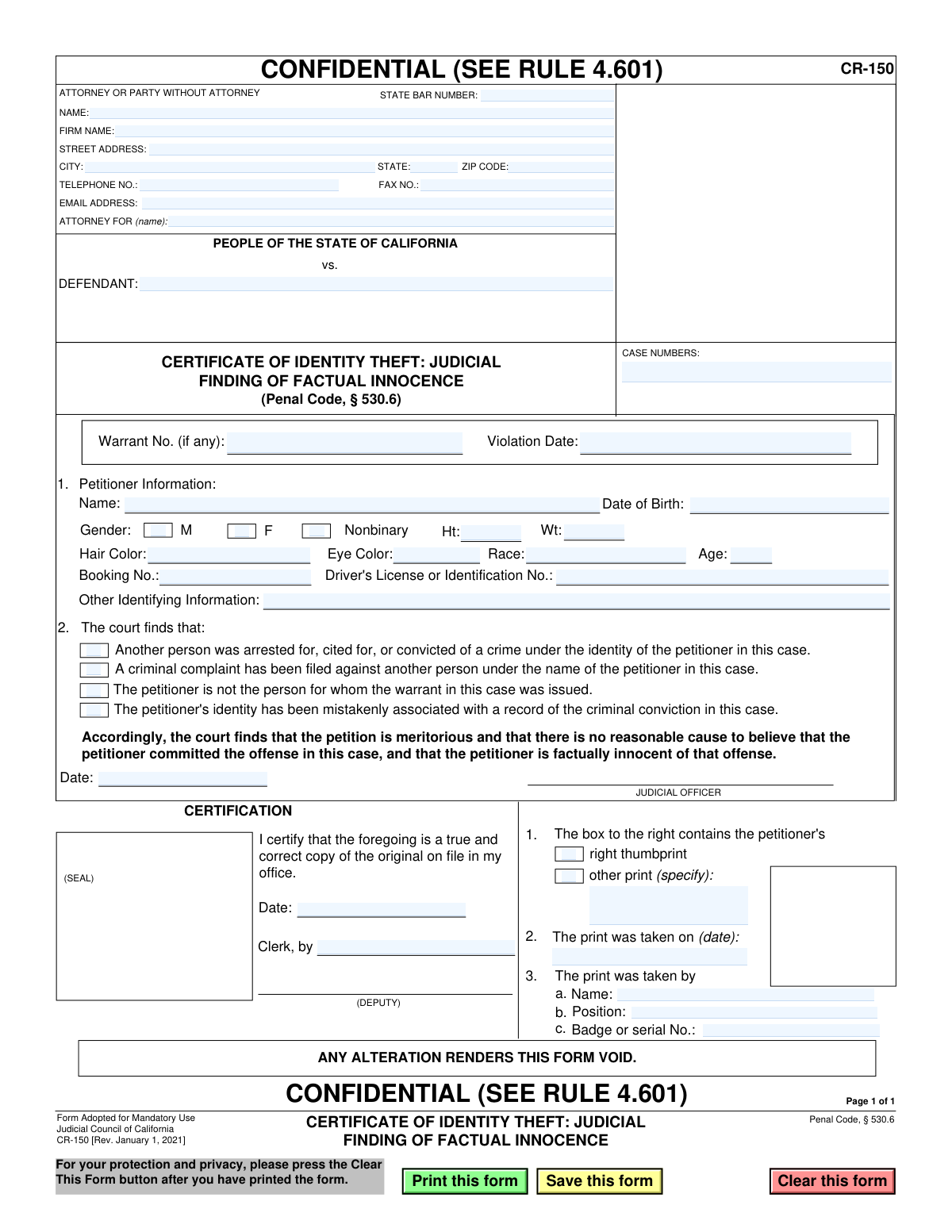
Form CR-150, Certificate of Identity Theft: Judicial Finding of Factual Innocence, page 1
Basic · 42/100Form Complexity Index

The AI does the filling. You just check it.

No typing into boxes, nothing to install.

Tell the AI about youAnswer a few questions in plain words, or upload a document you already have. That is all the typing there is.
AI fills every field in secondsIt puts each answer in the right box on every page, checkboxes included.
Check it and downloadReview every field, change anything, then download, print or sign the PDF.

What this form asks for

The AI fills all of it, from your answers or your documents.

This form, officially titled 'Certificate of Identity Theft: Judicial Finding of Factual Innocence,' is a legal document issued by California courts. It serves as official proof that a court has determined an individual (the petitioner) was a victim of identity theft and is not the person who committed a specific crime. This certificate helps clear the victim's name and correct public records. Today, this form can be filled out quickly and accurately using AI-powered services like Instafill.ai, which can also convert non-fillable PDF versions into interactive fillable forms.
Fillable fields47
Pages1
Form Complexity IndexBasic, 42/100

The AI checks your answers before you download

14 checks built for this form, so a wrong date or a missing answer is caught before anyone else sees it.

Case Number Presence and Format

This check ensures the 'CASE NUMBERS' field is not empty and, if possible, conforms to a standard court case number format. The case number is a critical identifier linking the certificate to a specific court proceeding. Failure to provide a valid case number would render the document useless for official record-clearing purposes and prevent it from being filed correctly.

Violation Date Logic and Format

Validates that the 'Violation Date' is a valid calendar date and occurs in the past. It also checks that this date is on or before the 'Judicial Officer Signature Date'. This ensures a logical timeline of events, as the offense must have occurred before the court could issue a finding on it.

Petitioner Name Requirement

Ensures the petitioner's 'Name' field in Section 1 is filled out. The entire purpose of the form is to clear the name of a specific individual who has been a victim of identity theft. A missing petitioner name makes the form fundamentally incomplete and meaningless.

Petitioner DOB and Age Consistency

This check validates that the 'Date of Birth' is a valid date and that the provided 'Age' is a number that logically corresponds to the birth date. This cross-reference helps prevent data entry errors and confirms the identity of the petitioner. A mismatch would flag the submission for manual review.

Mandatory Court Finding Selection

Ensures that at least one of the four checkboxes under section 2, 'The court finds that:', is selected. These findings are the legal basis for issuing the certificate of factual innocence. A form submitted without a selected finding is incomplete and legally invalid.

Judicial Officer Signature Date Presence

This validation confirms that the date field next to the 'JUDICIAL OFFICER' signature line is filled with a valid date. This date establishes when the court's finding was officially made and is essential for the document's legal validity. A missing date would invalidate the order.

And 8 more checks
  • Clerk Certification Date Logic
  • State Bar Number Format
  • Conditional 'Other Print' Specification
  • Thumbprint Official's Information Completeness
  • Defendant Name Requirement
  • ZIP Code Format Validation
  • Email Address Format Validation
  • Gender Selection Requirement

Let AI fill out your CR-150

No typing. Every field filled in seconds, checked, ready to sign.

7 days free, then $19.99/month · Cancel anytime

How to Fill Out CR-150 Online for Free in 2026

What the AI walks you through.

  1. Navigate to Instafill.ai and upload or select Form CR-150.
  2. Enter the case number and the details for the attorney or the party filing without an attorney.
  3. Input the petitioner's personal information, such as name, date of birth, and physical descriptors.
  4. Use the AI assistant to accurately mark the checkboxes corresponding to the court's specific findings regarding the identity theft.
  5. Prepare the document for the judicial officer's signature and date, which finalizes the court's finding.
  6. Follow the instructions for the in-person steps, such as obtaining the petitioner's thumbprint and the court clerk's certification seal.
  7. Review all entered information for accuracy before downloading the completed form for official filing with the court.

Common Mistakes in Completing CR-150

The ones the AI is built to catch.

Completing Court-Reserved Sections
Petitioners or their attorneys sometimes mistakenly fill out sections reserved for court personnel. The checkboxes under 'The court finds that:', the 'JUDICIAL OFFICER' signature line, and the 'CERTIFICATION' block are to be completed exclusively by the judge and court clerk. Submitting a form with these sections pre-filled can lead to rejection, as it appears to presume the court's decision and overstep procedural boundaries.
Mishandling the Thumbprint Requirement
The thumbprint section is a critical part of the identity verification process and must be completed by an authorized official. Common mistakes include leaving it blank, attempting to take the print at home, or failing to have the official fill in their name, position, and badge number. An incomplete or improperly executed thumbprint section will render the certificate invalid for official use by law enforcement and other agencies.
Incorrectly Identifying the Defendant
A frequent error is entering the petitioner's (the identity theft victim's) name in the 'DEFENDANT' field. This field should contain the name under which the criminal complaint was filed, which may be the petitioner's name but represents the identity used by the perpetrator. This mistake creates significant confusion in the court record, potentially linking the victim to the crime they are trying to disassociate from, and will require amendment and cause delays.
Entering Inaccurate Case or Warrant Numbers
The 'CASE NUMBERS' and 'Warrant No.' fields require absolute precision, as they link the certificate to a specific legal action. Individuals may enter incorrect numbers from memory, use a related but incorrect case number, or make a simple typo. Such errors can cause the certificate to be misfiled or rejected, failing to clear the petitioner's name from the intended criminal record.
Ambiguous 'Attorney For' Information
Self-represented petitioners often get confused by the 'ATTORNEY FOR (name):' field. They might leave it blank, write 'Self', or 'N/A'. The correct practice is to enter their own full name, clarifying they are acting as their own legal representative ('In Pro Per'). Ambiguity in this field can cause administrative delays in processing the legal document.
Submitting an Illegible Handwritten Form
This form is often available as a non-fillable PDF, forcing individuals to print and complete it by hand. Illegible handwriting is a major source of errors, leading to court clerks misspelling names, transposing numbers, or misinterpreting information. This can result in a flawed certificate that fails to properly clear the petitioner's record. AI-powered tools like Instafill.ai can convert such documents into fillable forms, ensuring all entries are typed and legible.
Making Unauthorized Physical Alterations
The form explicitly warns, 'ANY ALTERATION RENDERS THIS FORM VOID.' A common mistake is using correction fluid, tape, or striking through information to correct an error on the printed document. Any visible alteration can lead a court clerk or judge to reject the form outright, forcing the petitioner to restart the process from scratch with a clean copy.
Omitting Critical Petitioner Identifiers
While some fields are optional, omitting key data in the 'Petitioner Information' section is a missed opportunity to strengthen the certificate. Leaving 'Booking No.', 'Driver's License No.', or other identifiers blank when the information is available can make it harder for agencies to differentiate the petitioner from the identity thief. It is crucial to provide as much accurate, verifiable data as possible to ensure the certificate is effective.
Using Inconsistent Names or Personal Data
The petitioner's name, date of birth, and other personal details must be consistent across the form and match official government IDs exactly. Using a nickname, a shortened first name, or a different version of a last name can create doubt and undermine the legal authority of the certificate. This mistake can lead to the document being questioned by agencies like the DMV or law enforcement. AI form-fillers like Instafill.ai can help by storing and auto-filling consistent, validated information.
Incorrect Date Formatting and Entry
Dates are crucial legal data points, and errors are common. People may use an ambiguous format (e.g., 1/2/24), transpose the month and day, or enter an incorrect 'Violation Date' from memory. For legal documents, it is essential to use a clear, unambiguous format like MM/DD/YYYY and to verify the date against official records to prevent rejection or the need for later correction.

Frequently Asked Questions About CR-150


Is it really free for 7 days?
Yes. You pay $0 today. Cancel before Oct 31 and you are never charged. Keep it, and it is $19.99 a month for 5 fills of your CR-150.
Can I fill other forms too?
This plan is for your CR-150: your own AI agent fills it as often as 5 times a month. To fill other forms and upload your own, choose a Professional plan from your account.
How do I cancel?
From your account, in two clicks, any time. No email, no call.
How does the AI fill out CR-150?
You answer a few questions in plain words, or upload a document you already have. The AI reads what you give it and puts each answer into the right field of CR-150, on every page, in seconds. It checks the answers against the form's own rules, and you review and change anything before you download, print or sign.
What happens to my information?
It is encrypted in transit and at rest, and it is never used to train AI.
How complex is CR-150 to fill out?
CR-150 has a Form Complexity Index of 42 out of 100, in the basic tier: 47 fillable fields across 1 page. Instafill.ai's AI fills it in under a minute, with every field there for you to review before you download.
What is the purpose of Form CR-150, the Certificate of Identity Theft?
This form is a court order that officially certifies you are the victim of identity theft in a criminal case and are factually innocent of the related charges. It is a legal document used to clear your name with law enforcement, credit agencies, and other entities.
Who needs to get this certificate?
You should obtain this certificate if your identity was stolen and used by another person in a criminal matter, causing a warrant, charge, or conviction to be wrongly associated with your name. This form is the final step after a court grants your petition to declare you factually innocent.
Do I fill out this form myself?
While you or your attorney will provide the necessary personal and case information, the form is ultimately completed and signed by a judicial officer (a judge) and certified by the court clerk. It is a court-issued document, not one you simply fill out and submit on your own.
What information is required to complete the petitioner section?
You will need to provide your full name, date of birth, physical descriptors (height, weight, hair/eye color), driver's license or ID number, and the case number(s) associated with the identity theft.
Who is the 'Petitioner' versus the 'Defendant' on this form?
The 'Petitioner' is you, the victim of identity theft who is asking the court to clear your name. The 'Defendant' is the name listed on the original criminal case, which may be your name but legally refers to the person who actually committed the crime.
Why is my thumbprint required on Form CR-150?
A thumbprint is required to positively link the certificate to you, the true, innocent person. This security measure prevents the actual criminal from trying to use the certificate to impersonate you and clear their own record.
How do I get a judge to sign this certificate?
This certificate is issued only after you successfully petition the court for a finding of factual innocence under Penal Code § 530.6. If the judge agrees with your petition after a hearing, they will then sign this CR-150 certificate to make it official.
What should I do with the Certificate of Identity Theft after it's issued?
You should provide certified copies of this certificate to law enforcement agencies, the DMV, credit reporting agencies, and any other organization that has incorrect information linking you to the crime. This document is your proof to repair your records and credit history.
Why is this form marked as 'Confidential'?
The form is confidential to protect your privacy, as it contains sensitive personal identifying information like your date of birth and driver's license number. California Rule of Court 4.601 governs how these confidential records are handled by the court.
What happens if I make a mistake or alter a signed copy of the form?
You must not make any changes to the form after it has been certified by the court clerk. The form clearly states, 'ANY ALTERATION RENDERS THIS FORM VOID,' which means it will become legally invalid.
Can I use an AI tool to help prepare the information for this form?
Yes, services like Instafill.ai can use AI to accurately auto-fill your personal information, your attorney's details, and case numbers onto a draft of the form. This can save time and reduce errors before it is presented to the court.
How can I use Instafill.ai to fill out Form CR-150?
Simply upload the CR-150 PDF to Instafill.ai, and its AI will identify all the fillable fields. You can then review and confirm your information, which the tool will populate into the correct locations on the form, ready for printing.
What can I do if my copy of the CR-150 PDF is not fillable?
If you have a 'flat' or non-fillable PDF, you can use a service like Instafill.ai to automatically convert it into an interactive, fillable form. This allows you to easily type your information into the fields instead of writing by hand.
Encrypted in transit and at restNever used to train AIDelete your forms any time

Get your CR-150 filled out by AI

$0 today. Cancel before Oct 31 and you pay nothing.

Other forms like this one

California court forms: Judicial Council of California Form SC-105, Request for Court Order and Answer (Small Claims), Judicial Council of California Form SC-120, Defendant’s Claim and ORDER to Go to Small Claims Court (Small Claims), Judicial Council of California Form SER-001, Request for Sheriff to Serve Court Papers, Judicial Council of California Form SER-001, Request for Sheriff to Serve Court Papers, Affidavit for Collection of Personal Property California Probate Code Section 13100, Form POS-040, Proof of Service—Civil, Declaration of Facts of Death (California Superior Court), declaration-of-marriage-for-court-proceeding-california-family-law, ADOPT-200, Adoption Request, ADOPT-200, Stepparent Adoption Request, ADOPT-210, Adoption Agreement, ADOPT-310, Contact After Adoption Agreement, Judicial Council of California Form ADOPT-200, Adoption Request, Form ADR-107, Mediation Attendance Sheet, Form ADR-110, Order Appointing Referee, Form ADR-109, Stipulation or Motion for Order Appointing Referee, Form ADR-102, Request for Trial De Novo After Judicial Arbitration, Form ADR-108, Referee's Report (Code Civ. Proc., §§ 638, 639), Form ADR-106, Petition to Confirm, Correct, or Vacate Contractual Arbitration Award, Form ADR-104, Rejection of Award and Request for Trial After Attorney-Client Fee Arbitration

California judicial forms: Judicial Council of California Form FL-300, Request for Order, Judicial Council of California Form FL-150, Income and Expense Declaration, Judicial Council of California Form SC-104, Proof of Service (Small Claims), Judicial Council of California Form SC-105, Request for Court Order and Answer (Small Claims), Judicial Council of California Form DE-111, Petition for Probate (Probate—Decedents Estates), Judicial Council of California Form SC-104, Proof of Service (Small Claims), Judicial Council of California Form SC-108, Request to Correct or Cancel Judgment and Answer (Small Claims), Judicial Council of California Form SC-120, Defendant’s Claim and ORDER to Go to Small Claims Court (Small Claims), Civil Case Cover Sheet (Judicial Council of California Form CM-010), Civil Case Cover Sheet (Judicial Council of California Form CM-010), Judicial Council of California Form TR-205, Request for Trial by Written Declaration (Trial by Written Declaration—Traffic), Judicial Council of California Form DE-120, Notice of Hearing—Decedent's Estate or Trust, Inventory and Appraisal Attachment (Judicial Council of California Form DE-161, GC-041), CLETS-001, Confidential Information for Law Enforcement (Judicial Council of California), Judicial Council of California Form SER-001, Request for Sheriff to Serve Court Papers, Judicial Council of California Form UD-105, Answer—Unlawful Detainer, CLETS-001, Confidential Information for Law Enforcement (Judicial Council of California), Judicial Council of California Form ADOPT-210, Adoption Agreement, Judicial Council of California Form DE-120, Notice of Hearing—Decedent's Estate or Trust, Inventory and Appraisal (Judicial Council of California) (Form DE-160/GC-040)

7 days free, then $19.99/month · Cancel anytime