
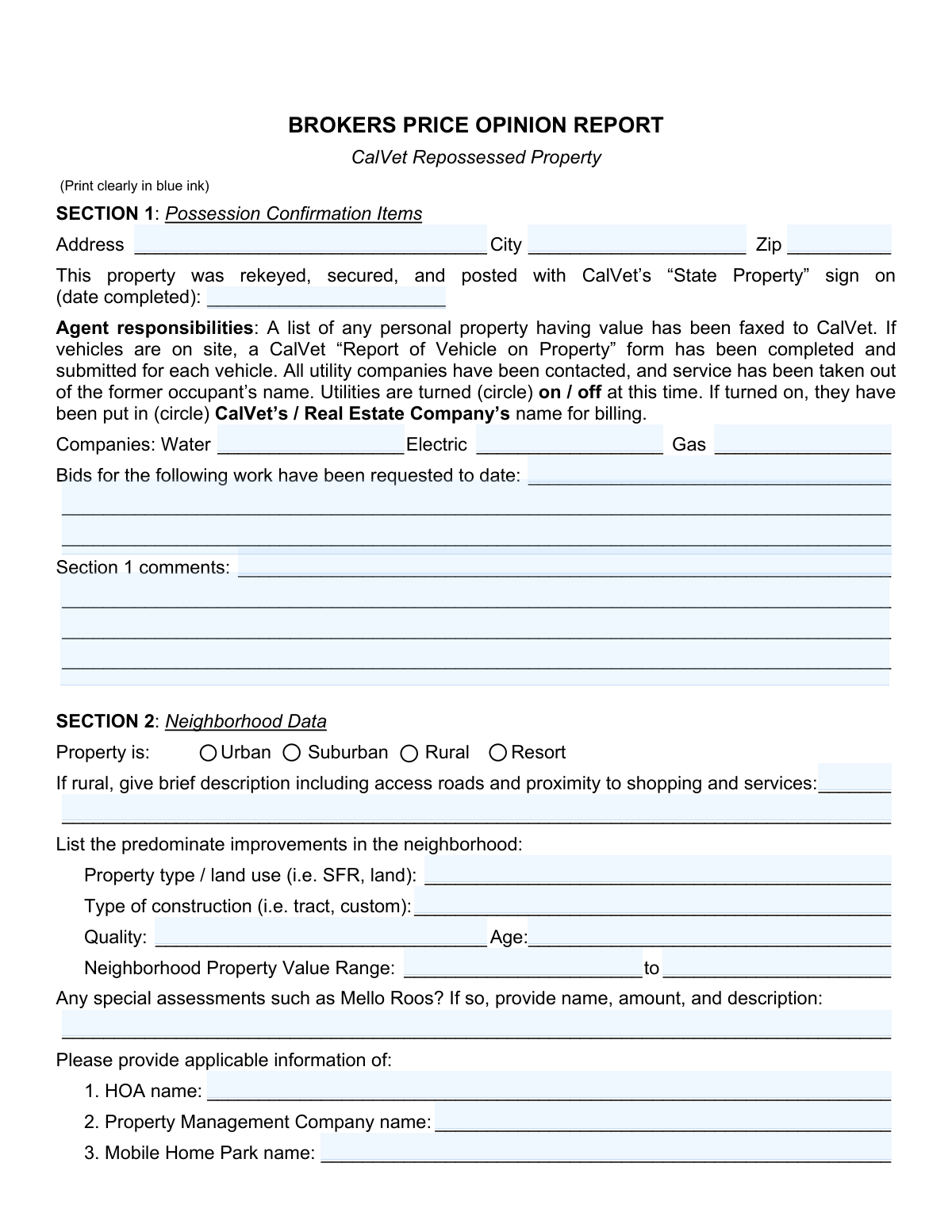
Yes! You can use AI to fill out Form FO-3323, Brokers Price Opinion Report, CalVet Repossessed Property
Don't type 382 fields by hand. Tell our AI about yourself, or upload a document you already have, and it fills every field in seconds. You check it, then download, print or sign.
The AI does the filling. You just check it.
No typing into boxes, nothing to install.
What this form asks for
The AI fills all of it, from your answers or your documents.
The AI checks your answers before you download
15 checks built for this form, so a wrong date or a missing answer is caught before anyone else sees it.
This check ensures the 'Date Completed' in Section 1 is a validly formatted date and is not a future date. This is important for confirming that the possession tasks were completed historically. If the date is invalid or in the future, the form submission should be rejected as it indicates a data entry error or an impossible scenario.
This validation verifies that if 'Utilities are turned on' is selected in Section 1, then a selection must be made for who the utilities were put in the name of ('CalVet’s' or 'Real Estate Company’s'). This ensures complete information is captured for active utility accounts, which is critical for billing and liability. A failure would prompt the user to complete the required information before proceeding.
This check ensures that the 'If rural, give brief description' field in Section 2 is populated if, and only if, the 'Rural' property type checkbox is selected. This prevents unnecessary data entry for non-rural properties and ensures essential context is provided for rural ones. If 'Rural' is checked and the description is empty, the submission will be flagged as incomplete.
This validation confirms that the 'Maximum Neighborhood Property Value' entered in Section 2 is greater than or equal to the 'Minimum Neighborhood Property Value'. This is a logical check to prevent data entry errors that would make the value range nonsensical. An error would require the user to correct the values to reflect a valid range.
This check creates a logical link between Section 3 and Section 8. If the 'Overall property condition' in Section 3 is marked as 'Fair' or 'Poor', this validation ensures that Section 8 ('Subject Property Damage and Repairs') contains at least one item with an estimated cost. This is crucial for justifying the condition rating and ensuring repair costs are considered in the valuation.
This validation checks that the 'COE Date' (Close of Escrow) for each comparable sale in Section 5 is within the last 12 months of the report's 'Date Signed' (Section 7). This enforces the form's instructions to use recent sales data, ensuring the market analysis is timely and relevant. Sales older than 12 months would be flagged as potentially stale.
And 9 more checks
- Past Listing Information Conditional Requirement
- Market Value Range Coherency
- Repair Cost Cross-Section Summation
- Repaired vs. As-Is Value Logic
- Agent Contact Information Completeness
- Total Repair Cost Calculation Accuracy
- Estimate Authority Selection
- Comparable Data Completeness
- Agent Email Format Validation
Let AI fill out your FO-3323
No typing. Every field filled in seconds, checked, ready to sign.
How to Fill Out FO-3323 Online for Free in 2026
What the AI walks you through.
- Navigate to Instafill.ai and upload or select the FO-3323 Brokers Price Opinion Report.
- Use the AI assistant to populate initial details such as property address, agent information, and possession confirmation items in Section 1 and Section 7.
- Complete Section 2 and 3 by providing detailed neighborhood data, property type, condition, and utility information.
- Enter marketability factors in Section 4 and detailed information on comparable closed sales and current listings in Section 5.
- Formulate and input your market value conclusions, suggested list price, and repair estimates in Section 6.
- Itemize all property damage and provide estimated repair costs in Section 8, and attach a floor plan sketch as required in Section 9.
- Carefully review all sections for accuracy and completeness before electronically signing and submitting the report to CalVet.
Common Mistakes in Completing FO-3323
The ones the AI is built to catch.
Incomplete or Inconsistent Comparable Data
Neglecting Required Justification Comments
Mismatch Between Property Condition and Repair List
Omitting HOA or Special Assessment Details
Failing to Indicate Utility Status and Responsibility
Improperly Formatted Monetary and Numeric Values
Leaving Checkboxes and Circled Options Blank
Providing Vague or Unsubstantiated Market Analysis
Missing Agent Signature or Date
Forgetting to Attach Required Supporting Documents
Frequently Asked Questions About FO-3323
Is it really free for 7 days?
Can I fill other forms too?
How do I cancel?
How does the AI fill out FO-3323?
What happens to my information?
How complex is FO-3323 to fill out?
What is the purpose of the Brokers Price Opinion Report?
Who is responsible for filling out this form?
What are my responsibilities regarding utilities as listed in Section 1?
What documents do I need to submit along with this report?
What are the requirements for the comparable properties in Section 5?
Who should provide the repair cost estimates in Section 8?
What is the difference between 'As-Is Market Value' and 'Fully Repaired Market Value' in Section 6?
What should I do if I can't find information for the HOA or Mobile Home Park in Section 2?
Is the floor plan sketch in Section 9 required?
What should I do if the property has significant damage?
Can I use AI tools to help me fill out this BPO report?
How can I fill out this form online using Instafill.ai?
The PDF version of this form I have is not fillable. What can I do?
Get your FO-3323 filled out by AI
$0 today. Cancel before Oct 30 and you pay nothing.
Other forms like this one
property forms: Form GST524, GST/HST New Residential Rental Property Rebate, Form GST524, GST/HST New Residential Rental Property Rebate, Form GST524, GST/HST New Residential Rental Property Rebate, Form GST524, GST/HST New Residential Rental Property Rebate, Form GST524, GST/HST New Residential Rental Property Rebate, Form 4562, Depreciation and Amortization (Including Information on Listed Property), New licence application – Form 1–1 (IND), Application for an individual’s licence (Real estate agent, property auctioneer, resident letting agent, motor dealer, chattel auctioneer, field agent), Form 4562 (2025), Depreciation and Amortization (Including Information on Listed Property), ACORD 140 (2014/12), Property Section (Attach to ACORD 125), Florida Supreme Court Approved Family Law Form 12.901(b)(3), Petition for Dissolution of Marriage with No Dependent or Minor Child(ren) or Property (02/18), New York State Department of State (Division of Licensing Services) Property Condition Disclosure Statement (DOS-1614-f), Martial Arts Studio General Liability and Property Application (Fitness and Wellness Insurance / Philadelphia Insurance Companies) (03/2011), Washington Single-Family Property Term Lease & Security Deposit Receipt (WA Single-Family Lease) | Revised 10/08/2025, TC201, Income and Expense Schedule for Rent-Producing Property, Form L-4260, Property Transfer Affidavit, Affidavit for Collection of Personal Property California Probate Code Section 13100, FARM LIABILITY / LIMITED PROPERTY - APPLICATION, DCMA Guidebook for Government Contract Property Administration, Official Form 106D, Schedule D: Creditors Who Have Claims Secured by Property, Official Form 206A/B, Schedule A/B: Assets — Real and Personal Property
broker forms: Letter of Authorization to Broker, Form 1099-B, Proceeds From Broker Transactions, 41, Fannie Mae Residential Broker Price Opinion (BPO) (Revised 03/99), Fidelity Change of Account Registration: Changing to an Individual, Joint, or Custodial Brokerage Account, Fidelity Change of Account Registration — Changing to a Trust, Estate, Guardian, or Conservator Brokerage Account, Move Assets from My Schwab Brokerage Account, Open a Schwab One® Brokerage Account, Charles Schwab PCRA Self-Directed Brokerage Account, Schwab Health Savings Brokerage Account (HSBA) to HSA Invest Choice Account Transfer Form, Intra-Brokerage Securities Transfer, Moving your Vanguard funds to a Vanguard Brokerage Account Disclosure statement, Vanguard Brokerage Account CREST Transfer Form, Moving your Vanguard funds to a Vanguard Brokerage Account Disclosure statement, TIAA Brokerage Incoming Account Transfer Form, TIAA Brokerage Joint Transfer on Death Account Agreement, TIAA Brokerage IRA Distribution Request (Form F11025), Request for a Qualified Charitable Distribution (QCD) from a Brokerage Individual Retirement Account (IRA), Form OL 75, Auto Broker Log, TIAA Brokerage Authorization To Gift Securities
Let AI fill out your FO-3323
Your trial starts once a card is added. You pay nothing before Oct 30.
Our AI already knows this form, all 382 fields of it. Skip the typing: tell it about yourself, or upload what you have, and it fills the whole form in seconds.
- AI fills every field on all 9 pages, tables and checkboxes included
- No typing into boxes: answer a few questions, or upload a document you already have, an old copy of this form, a photo of a document
- The AI checks the answers; you review and change anything before you download
- Download the finished PDF, print it, or sign it online
- Encrypted, and never used to train AI
Cancel before Oct 30 and you pay nothing.
A card is needed to start the trial. Cancel in two clicks from your account.
Terms · Privacy