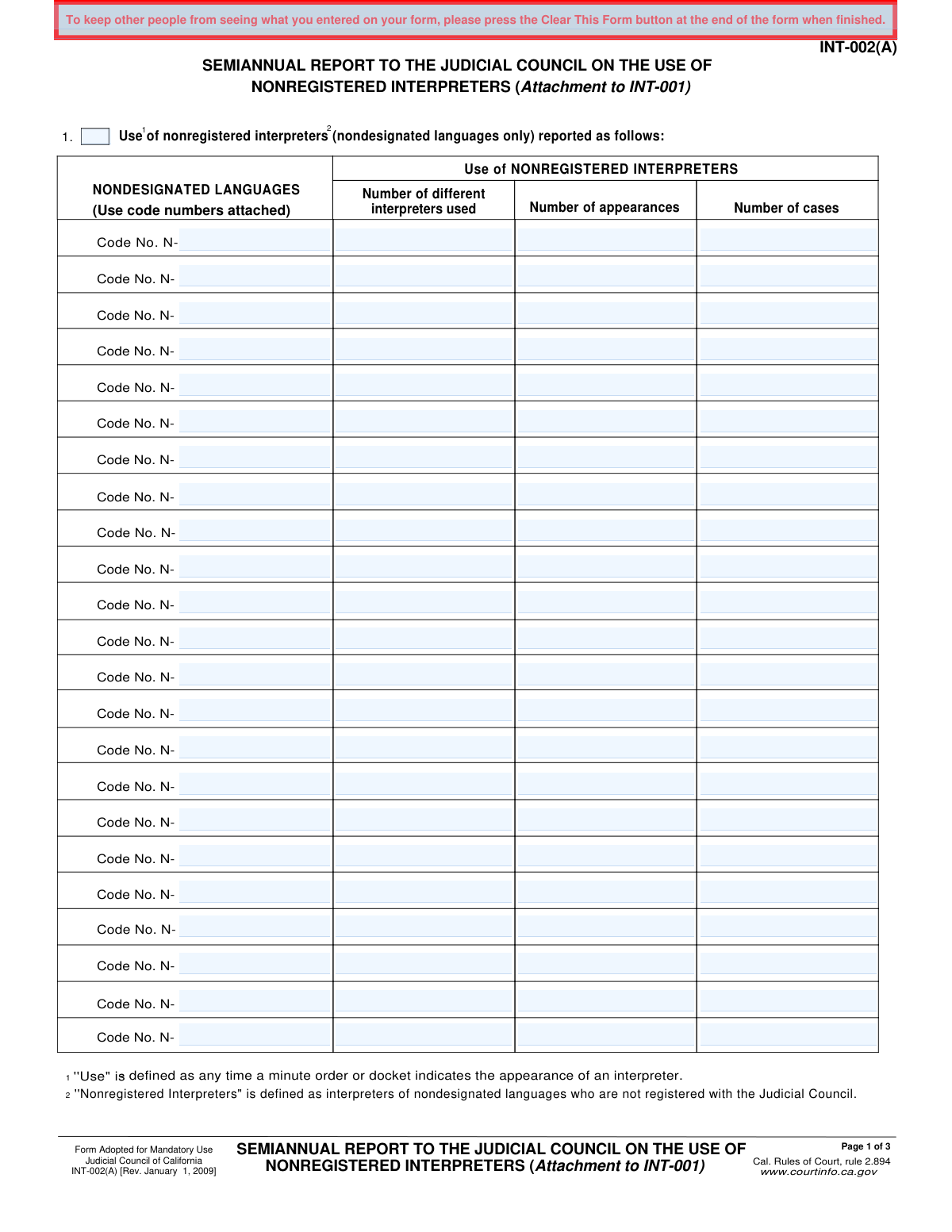
Yes! You can use AI to fill out Form INT-002(A), Semiannual Report to the Judicial Council on the Use of Nonregistered Interpreters (Attachment to INT-001)

Form INT-002(A) is a mandatory report for the Judicial Council of California, serving as an attachment to Form INT-001. It is used to systematically track the usage of interpreters for languages that are not officially designated by the council, detailing the number of interpreters, appearances, and cases for each language over a six-month period. This data is vital for oversight and resource planning for language access in the California court system. Today, this form can be filled out quickly and accurately using AI-powered services like Instafill.ai, which can also convert non-fillable PDF versions into interactive fillable forms.
INT-002(A) is part of the California court forms, California judicial forms and Judicial Council forms categories on Instafill.
Our AI automatically handles information lookup, data retrieval, formatting, and form filling.
It takes less than a minute to fill out INT-002(A) using our AI form filling.
Securely upload your data. Information is encrypted in transit and deleted immediately after the form is filled out.

Form specifications

Form name: Form INT-002(A), Semiannual Report to the Judicial Council on the Use of Nonregistered Interpreters (Attachment to INT-001)
Number of fields: 230
Number of pages: 1
Language: English
main-image

Instafill Demo: How to fill out PDF forms in seconds with AI

How to Fill Out INT-002(A) Online for Free in 2026

Are you looking to fill out a INT-002(A) form online quickly and accurately? Instafill.ai offers the #1 AI-powered PDF filling software of 2026, allowing you to complete your INT-002(A) form in just 37 seconds or less.
Follow these steps to fill out your INT-002(A) form online using Instafill.ai:
  1. 1 Navigate to Instafill.ai and upload your PDF of Form INT-002(A) or select it from the platform's template library.
  2. 2 Allow the AI to scan the document and make all the fields interactive for data entry.
  3. 3 Using the provided language codes (N-001 to N-999), locate the rows corresponding to the languages for which nonregistered interpreters were used.
  4. 4 In the appropriate columns for each language, enter the total number of different interpreters used, the number of court appearances, and the number of cases.
  5. 5 If a language is not listed, use code N-999 and specify the language in the 'Other' section, along with its corresponding usage data.
  6. 6 Carefully review all entered statistics on the form to ensure accuracy and completeness of the semiannual report.
  7. 7 Download the completed form to attach to your INT-001 submission or submit it electronically as required by the court.

Our AI-powered system ensures each field is filled out correctly, reducing errors and saving you time.

Why Choose Instafill.ai for Your Fillable INT-002(A) Form?

Speed

Complete your INT-002(A) in as little as 37 seconds.

Up-to-Date

Always use the latest 2026 INT-002(A) form version.

Cost-effective

No need to hire expensive lawyers.

Accuracy

Our AI performs 10 compliance checks to ensure your form is error-free.

Security

Your personal information is protected with bank-level encryption.

Frequently Asked Questions About Form INT-002(A)

This form is a mandatory semiannual report used by California courts to provide the Judicial Council with data on the use of nonregistered interpreters for nondesignated languages. It serves as an attachment to the main report, Form INT-001.

Court administrative staff or personnel responsible for tracking and reporting interpreter services are required to complete and submit this form.

According to the form, a nonregistered interpreter is an individual who provides interpretation for a nondesignated language and is not officially registered with the Judicial Council.

A nondesignated language is any spoken language for which the Judicial Council does not currently offer a certification exam. A list of these languages and their codes is provided on page 3 of the form.

This is a semiannual report, which means it must be completed and submitted to the Judicial Council twice per year.

Refer to page 3 of the form, which lists nondesignated languages alphabetically along with their corresponding 'N-' code number.

If a language is not listed, use the code 'N-999' and write the name of the language in the 'Other (specify)' field.

'Number of appearances' refers to the total count of times an interpreter appeared in court, while 'Number of cases' refers to the number of unique cases that required the interpreter. A single case may have multiple interpreter appearances.

For each language, count the number of unique individuals who served as an interpreter during the reporting period. If one person interpreted for the same language multiple times, they are only counted once.

No, Form INT-002(A) is specifically designated as an attachment to Form INT-001 and should be submitted together with it.

Yes, services like Instafill.ai use AI to accurately auto-fill form fields from your data sources, which can save time and help ensure the report's accuracy.

You can use a service like Instafill.ai to upload the PDF and fill it out in your web browser. The platform allows you to easily type information into the fields and then save or print the completed document.

If you have a non-fillable or 'flat' PDF, you can upload it to a service like Instafill.ai. Their technology can convert the document into an interactive, fillable form for you to complete online.

Compliance INT-002(A)
Validation Checks by Instafill.ai

1
Validates Language Code Format
This check ensures that any value entered in the 'Code No. N-' column follows the required 'N-XXX' format, where 'XXX' are three digits. This maintains data consistency and prevents malformed codes from being submitted. If the format is incorrect, the user will be prompted to correct the entry before proceeding.
2
Ensures Language Code Exists in Master List
This validation cross-references the entered language code against the official list of codes (N-001 through N-084 and N-999). This is crucial for accurate data aggregation and reporting, as it prevents the use of invalid or fabricated codes. A failed validation will result in an error message listing valid codes or directing the user to the code list on page 3.
3
Requires Specification for 'Other' Language Code
If the language code 'N-999' (Other) is used in a row, this check verifies that the corresponding 'Other (specify)' field is filled with the name of the language. This is essential for capturing data on languages not explicitly listed. Failure to specify the language will block submission and prompt the user to provide the required text.
4
Ensures 'Other (specify)' Field Corresponds to N-999 Code
This validation ensures that if a language name is typed into the 'Other (specify)' field, the associated language code for that row must be 'N-999'. Using a specific code like 'N-022' (Farsi/Persian) while also filling the 'Other' field is contradictory. This check prevents ambiguous data entries and enforces correct form usage.
5
Prevents Duplicate Language Code Entries
This check scans all entered rows to ensure that each language code is used only once on the form. Submitting multiple rows for the same language would lead to incorrect totals and reporting errors. If a duplicate code is detected, the system will highlight the redundant entries and require the user to consolidate the data into a single row.
6
Validates Data Type for Count Fields
This validation confirms that the values entered into the 'Number of different interpreters used', 'Number of appearances', and 'Number of cases' columns are exclusively non-negative integers. Text, decimals, or special characters are not permitted. This is fundamental for performing calculations and ensuring the integrity of the statistical data being reported.
7
Ensures Complete Data for Active Rows
This check verifies that if any of the three numeric count fields in a row contains a value, the corresponding 'Code No. N-' field must also be filled. A row with usage statistics but no associated language is meaningless. The validation prevents the submission of incomplete or orphaned data points.
8
Validates Logical Relationship Between Appearances and Interpreters
This check ensures that for any given language, the 'Number of appearances' is greater than or equal to the 'Number of different interpreters used'. It is logically impossible to have more unique interpreters than the total number of appearances they made. This validation catches potential data entry errors and ensures the report is plausible.
9
Validates Logical Relationship Between Appearances and Cases
This validation confirms that the 'Number of appearances' is greater than or equal to the 'Number of cases' for each reported language. A single case can involve multiple interpreter appearances, but a single appearance cannot be for multiple distinct cases in this context. This rule prevents illogical reporting and improves data quality.
10
Requires At Least One Non-Zero Count for Entered Languages
This check ensures that if a language code is entered in a row, at least one of the corresponding count fields ('interpreters', 'appearances', or 'cases') must be greater than zero. Entering a language with all zero counts is redundant and adds no information to the report. This prevents clutter and ensures that every row represents actual usage.
11
Warns on Submission of a Blank Report
This validation checks if the user is attempting to submit a form with no data entered in any row. While it may be valid to report zero usage, this check provides a confirmation prompt (e.g., 'You are about to submit a report with no usage data. Is this correct?'). This helps prevent accidental submission of an empty form and ensures the user's intent is correctly captured.
12
Enforces Whole Numbers for All Count Fields
This validation specifically prohibits decimal values in the 'Number of different interpreters used', 'Number of appearances', and 'Number of cases' fields. These counts represent discrete events or individuals and must be whole numbers. The system should automatically reject or round fractional inputs to maintain data accuracy.

Common Mistakes in Completing INT-002(A)

Incorrect Language Code Entry

Users often write the full name of a language instead of using the required code from the attached list (e.g., writing 'French' instead of 'N-024'). This happens when filers overlook the instruction '(Use code numbers attached)' and work from memory. This mistake requires manual correction by the Judicial Council, delaying data processing and potentially leading to incorrect categorization. To avoid this, always refer to the language code list on page 3 and enter the exact 'N-' code for each language.

Reporting Data for Designated Languages

The form is explicitly for 'nondesignated languages only,' but filers may mistakenly include data for designated languages like Spanish, Cantonese, or Vietnamese. This error stems from a misunderstanding of the report's specific purpose, which is to track the usage of interpreters for less common languages. Including data for designated languages skews the report's findings and makes the submission inaccurate. Before filling, confirm that the languages being reported are not on the Judicial Council's official list of designated languages.

Misinterpreting 'Appearances,' 'Cases,' and 'Interpreters'

A frequent error is confusing the definitions of the three data columns: 'Number of different interpreters used,' 'Number of appearances,' and 'Number of cases.' For example, a user might enter the same number in all three columns, assuming they are interchangeable. This leads to highly inaccurate statistical data, as one case can involve multiple appearances, and one interpreter can handle multiple cases. It is crucial to track each metric separately based on court records to ensure the report is valid.

Improper Use of the 'Other (specify)' Code

The form provides code 'N-999' for languages not on the list, but it is often used incorrectly. Filers may use N-999 for a language that already has a specific code, or they use the code but forget to write in the name of the language they are reporting. This results in ambiguous or incomplete data that cannot be properly analyzed. Always double-check the list before using N-999, and if it is necessary, be sure to specify the language name clearly in the corresponding field.

Submitting the Attachment Without the Main Form

The form's title clearly identifies it as 'Attachment to INT-001.' A significant procedural error is submitting this INT-002(A) form by itself, without the primary INT-001 report it is designed to supplement. This oversight results in an incomplete filing that will be rejected or returned for correction, causing delays. Always ensure that this attachment is compiled and submitted together with the main INT-001 form as a single package.

Incorrect Data Aggregation Period

As a 'Semiannual Report,' the form must contain data aggregated over a six-month period. A common mistake is to report data for only the most recent month, a full year, or an otherwise incorrect time frame. This invalidates the report for its intended purpose of periodic tracking and comparison. To prevent this, filers must carefully compile all data from the correct six-month reporting window before beginning data entry.

Manual Calculation and Tallying Errors

The process of manually summing up the number of interpreters, appearances, and cases from dockets and minute orders over six months is highly susceptible to human error. Simple arithmetic mistakes can easily occur, leading to inaccurate totals for one or more languages. These small errors can compromise the integrity of the entire report. Using a spreadsheet to tally figures before transferring them to the form can help, as can double-checking all calculations before submission.

Leaving Fields Blank Instead of Entering '0'

When no interpreters were used for a listed language, users may leave the row blank rather than entering a number. This creates ambiguity for the data processor, who cannot be sure if the value is zero or if the data is missing. This requires follow-up to clarify the information and slows down the process. The correct procedure is to explicitly enter '0' in each column for a language with no activity to provide clear and unambiguous data.

Illegible Handwriting on Non-Fillable Versions

Filers sometimes only have access to a flat, non-fillable PDF, which they must print and complete by hand. This often leads to illegible handwriting, especially in the dense numerical data tables. Poor legibility can cause significant data entry errors on the receiving end and may necessitate clarification calls. To avoid this, it is best to use the official fillable version of the form. If only a flat PDF is available, a tool like Instafill.ai can convert it into a fillable format, ensuring all entries are clear and legible.
Saved over 80 hours a year

“I was never sure if my IRS forms like W-9 were filled correctly. Now, I can complete the forms accurately without any external help.”

Kevin Martin Green

Your data stays secure with advanced protection from Instafill and our subprocessors

Robust compliance program

Transparent business model

You’re not the product. You always know where your data is and what it is processed for.

ISO 27001, HIPAA, and GDPR

Our subprocesses adhere to multiple compliance standards, including but not limited to ISO 27001, HIPAA, and GDPR.

Security & privacy by design

We consider security and privacy from the initial design phase of any new service or functionality. It’s not an afterthought, it’s built-in, including support for two-factor authentication (2FA) to further protect your account.

Fill out INT-002(A) with Instafill.ai

Worried about filling PDFs wrong? Instafill securely fills form-int-002a-semiannual-report-to-the-judicial-council-on-the-use-of-nonregistered-interpreters-attachment-to-int-001 forms, ensuring each field is accurate.

Related forms by category

California court forms Judicial Council of California Form SC-105, Request for Court Order and Answer (Small Claims), Judicial Council of California Form SC-120, Defendant’s Claim and ORDER to Go to Small Claims Court (Small Claims), Judicial Council of California Form SER-001, Request for Sheriff to Serve Court Papers, Judicial Council of California Form SER-001, Request for Sheriff to Serve Court Papers, Affidavit for Collection of Personal Property California Probate Code Section 13100, Form POS-040, Proof of Service—Civil, Declaration of Facts of Death (California Superior Court), declaration-of-marriage-for-court-proceeding-california-family-law, ADOPT-200, Adoption Request, ADOPT-200, Stepparent Adoption Request, ADOPT-210, Adoption Agreement, ADOPT-310, Contact After Adoption Agreement, Judicial Council of California Form ADOPT-200, Adoption Request, Form ADR-107, Mediation Attendance Sheet, Form ADR-110, Order Appointing Referee, Form ADR-109, Stipulation or Motion for Order Appointing Referee, Form ADR-102, Request for Trial De Novo After Judicial Arbitration, Form ADR-108, Referee's Report (Code Civ. Proc., §§ 638, 639), Form ADR-106, Petition to Confirm, Correct, or Vacate Contractual Arbitration Award, Form ADR-104, Rejection of Award and Request for Trial After Attorney-Client Fee Arbitration · + 434 more →
California judicial forms Judicial Council of California Form FL-300, Request for Order, Judicial Council of California Form FL-150, Income and Expense Declaration, Judicial Council of California Form DE-111, Petition for Probate (Probate—Decedents Estates), Judicial Council of California Form SC-104, Proof of Service (Small Claims), Judicial Council of California Form SC-105, Request for Court Order and Answer (Small Claims), Judicial Council of California Form DE-111, Petition for Probate (Probate—Decedents Estates), Judicial Council of California Form SC-104, Proof of Service (Small Claims), Judicial Council of California Form SC-108, Request to Correct or Cancel Judgment and Answer (Small Claims), Judicial Council of California Form SC-120, Defendant’s Claim and ORDER to Go to Small Claims Court (Small Claims), Civil Case Cover Sheet (Judicial Council of California Form CM-010), Civil Case Cover Sheet (Judicial Council of California Form CM-010), Judicial Council of California Form TR-205, Request for Trial by Written Declaration (Trial by Written Declaration—Traffic), Judicial Council of California Form DE-120, Notice of Hearing—Decedent's Estate or Trust, Inventory and Appraisal Attachment (Judicial Council of California Form DE-161, GC-041), CLETS-001, Confidential Information for Law Enforcement (Judicial Council of California), Judicial Council of California Form SER-001, Request for Sheriff to Serve Court Papers, Judicial Council of California Form UD-105, Answer—Unlawful Detainer, CLETS-001, Confidential Information for Law Enforcement (Judicial Council of California), Judicial Council of California Form ADOPT-210, Adoption Agreement, Judicial Council of California Form DE-120, Notice of Hearing—Decedent's Estate or Trust · + 50 more →
Judicial Council forms Judicial Council of California Form FL-300, Request for Order, Judicial Council of California Form FL-150, Income and Expense Declaration, Judicial Council of California Form DE-111, Petition for Probate (Probate—Decedents Estates), Judicial Council of California Form SC-104, Proof of Service (Small Claims), Judicial Council of California Form SC-105, Request for Court Order and Answer (Small Claims), Judicial Council of California Form DE-111, Petition for Probate (Probate—Decedents Estates), Judicial Council of California Form SC-104, Proof of Service (Small Claims), Judicial Council of California Form SC-108, Request to Correct or Cancel Judgment and Answer (Small Claims), Judicial Council of California Form SC-120, Defendant’s Claim and ORDER to Go to Small Claims Court (Small Claims), Civil Case Cover Sheet (Judicial Council of California Form CM-010), Civil Case Cover Sheet (Judicial Council of California Form CM-010), Judicial Council of California Form TR-205, Request for Trial by Written Declaration (Trial by Written Declaration—Traffic), Judicial Council of California Form DE-120, Notice of Hearing—Decedent's Estate or Trust, Inventory and Appraisal Attachment (Judicial Council of California Form DE-161, GC-041), CLETS-001, Confidential Information for Law Enforcement (Judicial Council of California), Judicial Council of California Form SER-001, Request for Sheriff to Serve Court Papers, Judicial Council of California Form UD-105, Answer—Unlawful Detainer, CLETS-001, Confidential Information for Law Enforcement (Judicial Council of California), Judicial Council of California Form ADOPT-210, Adoption Agreement, Judicial Council of California Form DE-120, Notice of Hearing—Decedent's Estate or Trust · + 52 more →