Yes! You can use AI to fill out Form SSA-44, Medicare Income-Related Monthly Adjustment Amount - Life-Changing Event
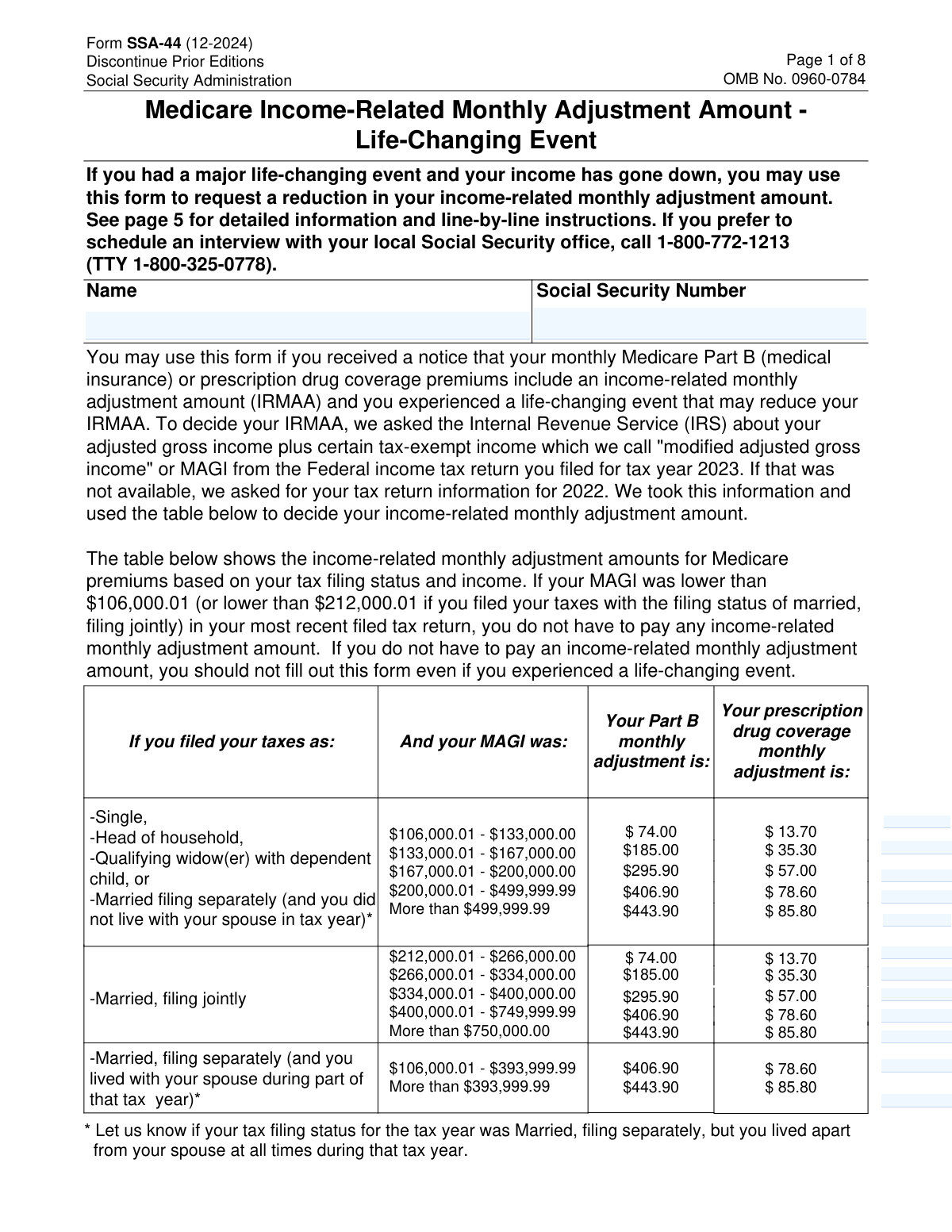
Form SSA-44, Medicare Income-Related Monthly Adjustment Amount - Life-Changing Event, is a Social Security Administration document used by Medicare beneficiaries to report a significant life event that has caused their income to decrease. This allows them to request a recalculation of their Medicare Part B and prescription drug plan premiums, potentially lowering their monthly costs. Filing this form is crucial for ensuring your premiums are based on your current financial situation rather than older, higher-income tax data. Today, this form can be filled out quickly and accurately using AI-powered services like Instafill.ai, which can also convert non-fillable PDF versions into interactive fillable forms.
SSA-44 is part of the
CAR forms, income forms, Medicare forms, SSA forms and L.A. Care forms categories on Instafill.
Our AI automatically handles information lookup, data retrieval, formatting, and form filling.
It takes less than a minute to fill out SSA-44 using our AI form filling.
Securely upload your data. Information is encrypted in transit and deleted immediately after the form is filled out.
Form specifications
| Form name: | Form SSA-44, Medicare Income-Related Monthly Adjustment Amount - Life-Changing Event |
| Number of fields: | 54 |
| Number of pages: | 8 |
| Filled form examples: | Form SSA-44 Examples |
| Language: | English |
More forms in CAR forms
Instafill Demo: How to fill out PDF forms in seconds with AI
How to Fill Out SSA-44 Online for Free in 2026
Are you looking to fill out a SSA-44 form online quickly and accurately? Instafill.ai offers the #1 AI-powered PDF filling software of 2026, allowing you to complete your SSA-44 form in just 37 seconds or less.
Follow these steps to fill out your SSA-44 form online using Instafill.ai:
- 1 Navigate to Instafill.ai and upload or select Form SSA-44 to begin.
- 2 Provide your personal information, including your full name and Social Security Number, for the AI to populate the initial fields.
- 3 In Step 1, specify the type of life-changing event (e.g., Work Stoppage, Death of Spouse) and enter the date it occurred.
- 4 Complete Step 2 by providing your reduced income details for a more recent tax year, including your Adjusted Gross Income (AGI) and tax-exempt interest.
- 5 If you anticipate your income will be even lower next year, complete Step 3 with your estimated income figures.
- 6 Gather the required documentation as outlined in Step 4, such as a signed tax return or proof of the life-changing event, to submit with your form.
- 7 Review all the AI-populated information for accuracy, then sign and date the form in Step 5 before submitting it to the Social Security Administration.
Our AI-powered system ensures each field is filled out correctly, reducing errors and saving you time.
Why Choose Instafill.ai for Your Fillable SSA-44 Form?
Speed
Complete your SSA-44 in as little as 37 seconds.
Up-to-Date
Always use the latest 2026 SSA-44 form version.
Cost-effective
No need to hire expensive lawyers.
Accuracy
Our AI performs 10 compliance checks to ensure your form is error-free.
Security
Your personal information is protected with bank-level encryption.
Frequently Asked Questions About Form SSA-44
Form SSA-44 is for Medicare beneficiaries who have experienced a specific life-changing event that caused their income to decrease. You should fill it out if you want to request a reduction in your Income-Related Monthly Adjustment Amount (IRMAA) for your Medicare Part B and prescription drug premiums.
You should only file this form if your income has gone down enough to potentially move you into a lower IRMAA bracket. The form states that if your Modified Adjusted Gross Income (MAGI) is already below the first IRMAA threshold, you do not need to file this form.
The form lists specific events such as marriage, divorce, death of a spouse, work stoppage or reduction, loss of pension income, and loss of income-producing property. You must select one of these events and provide the date it occurred to be eligible for a review.
You must provide evidence of the life-changing event (like a death certificate or employer letter) and evidence of your reduced income (like a signed copy of your most recent tax return). Page 8 of the form lists the specific evidence required for each type of event.
Step 2 is for reporting a reduction in income that has already occurred in a recent tax year. Step 3 is for reporting an anticipated income reduction for the next tax year, if you expect your income to be even lower.
Yes, you can provide an estimate of your Adjusted Gross Income (AGI) and tax-exempt interest for the year your income was reduced. However, the SSA will later verify this with the IRS, and you will be required to provide a copy of your tax return once it is filed.
You can mail or bring the completed form, along with your supporting documents, to your local Social Security office. Alternatively, you can call the SSA at 1-800-772-1213 to schedule an appointment to discuss your situation.
The form instructions specifically state not to use this form for this situation. Instead, you should contact the Social Security Administration directly at 1-800-772-1213 to explain your situation, as a different rule may apply to your IRMAA calculation.
For the purposes of this form, your MAGI is your Adjusted Gross Income (AGI) from line 11 of your IRS Form 1040, plus any tax-exempt interest income from line 2a of your Form 1040. You will need to provide these two figures in Step 2.
Yes, Step 5 requires you to physically sign the form, declaring under penalty of perjury that the information is true and correct. After filling out the form, you must print it, sign it, and then submit it with your documentation.
Yes, AI-powered services like Instafill.ai can help you fill out this form quickly and accurately. These tools use AI to identify and auto-fill form fields, which can save you time and reduce the chance of errors.
You can use a service like Instafill.ai to upload the form and fill it out on your computer. The platform makes the form interactive, allowing you to type your information directly into the fields before printing it for signature and submission.
If you have a non-fillable or 'flat' PDF, you can use a service like Instafill.ai to convert it into an interactive, fillable form. This allows you to easily type your answers instead of having to print the form and fill it out by hand.
Compliance SSA-44
Validation Checks by Instafill.ai
1
Social Security Number Format
This check verifies that the Social Security Number (SSN) field contains a valid nine-digit number. It can accept formats like XXXXXXXXX or XXX-XX-XXXX but must contain exactly nine numerals. This validation is critical for correctly identifying the applicant in the Social Security Administration's system. A failed validation will prevent form submission and prompt the user to correct the entry, as an invalid SSN makes the application impossible to process.
2
Life-Changing Event Selection
This validation ensures that at least one checkbox for a life-changing event is selected in Step 1. The entire purpose of this form is to report a life-changing event, so this selection is mandatory. If no event is checked, the form is incomplete and cannot be processed, and the user will be prompted to select an event before proceeding.
3
Event Date Chronology
This check validates that the 'Date(s) of life-changing event' in Step 1 is in the correct MM/YYYY format and is not a future date. The event must have already occurred or be occurring in the current month and year for the request to be valid. Submitting a future date would be illogical and would cause the form to be rejected, so this check prevents such errors upfront.
4
Event and Tax Year Consistency
This is a logical check to ensure the year of the life-changing event (from Step 1) is less than or equal to the tax year for which a new income level is being reported (in Step 2). The income reduction must be a result of the life-changing event. An event occurring after the reported tax year would not be the cause of that year's income reduction, so a failure would indicate a logical error and require user correction.
5
Step 2 Tax Year Recency
This validation confirms that the tax year entered in Step 2 is more recent than the tax year SSA originally used to calculate the IRMAA (as stated in the applicant's notice). The form's purpose is to use more recent income data. If the user enters a year that is not more recent, the request is invalid, and the validation will fail, instructing the user to enter a correct, more recent tax year.
6
Step 3 Conditional Requirement
This check enforces the conditional logic of Step 3. If the user answers 'Yes' to the question about income being lower next year, all fields within Step 3 (Tax Year, Estimated AGI, Estimated Tax-Exempt Interest, Filing Status) become mandatory. If 'No' is selected, these fields must be left empty. This prevents incomplete or extraneous data entry and ensures the form accurately reflects the user's situation.
7
Step 3 Tax Year Sequence
This validation ensures the tax year entered in Step 3 is exactly one year after the tax year entered in Step 2. The form's instructions specify this sequential relationship for anticipating the following year's income. A mismatch indicates a data entry error, and the validation will fail, prompting the user to correct the year in Step 3 to maintain logical consistency.
8
Step 3 Income Reduction Logic
This check compares the sum of estimated income in Step 3 (AGI + Tax-Exempt Interest) to the income reported in Step 2. According to the form's instructions, Step 3 should only be completed if income is expected to be even lower. If the estimated income in Step 3 is not lower than Step 2, a warning should be displayed to the user, as this may be an error and could impact their future IRMAA calculation.
9
Filing Status Exclusivity
This validation ensures that for each section where a tax filing status is requested (Step 2 and Step 3), exactly one option is selected. Selecting multiple statuses or no status makes the income evaluation impossible. This check prevents submission of an ambiguous form, forcing the user to make a single, valid selection for each section.
10
Income and Interest Field Format
This check verifies that all fields for Adjusted Gross Income and Tax-Exempt Interest in Step 2 and Step 3 contain only valid, non-negative numeric currency values. Alphabetic or special characters in these fields would cause calculation errors and invalidate the submission. A failed validation will require the user to correct the entry to a proper numerical format before the form can be accepted.
11
Contact Information Completeness
This validation ensures that the applicant's full mailing address (Address, City, State, ZIP Code) and a phone number are provided in Step 5. This information is critical for the SSA to contact the applicant with questions or to mail back original documents. If these fields are empty, the submission will be blocked until the required contact information is provided.
12
Signature Requirement
This check confirms that the signature field in Step 5 has been completed. The signature is a declaration under penalty of perjury that the information provided is true and correct. An unsigned form is legally invalid and cannot be processed, so this validation is a final, mandatory gate before submission is allowed.
Common Mistakes in Completing SSA-44
Applicants often overlook the income thresholds on page 1 and submit the form even when their income is already below the level requiring an Income-Related Monthly Adjustment Amount (IRMAA). This happens because they experience a life-changing event and assume they must report it, without first checking if their IRMAA is actually affected. Submitting an unnecessary form wastes the applicant's time and creates needless processing work for the SSA. Before filling, always check the income tables on page 1 to confirm you are currently paying an IRMAA.
A frequent error is incorrectly transcribing income data in Step 2. Applicants may mistakenly enter their total income, net income, or pull figures from the wrong lines of their IRS Form 1040. The SSA-44 specifically requires the Adjusted Gross Income (AGI) from line 11 and Tax-Exempt Interest from line 2a. Using incorrect figures will lead to a miscalculation of the Modified Adjusted Gross Income (MAGI), causing processing delays, rejection, or an incorrect adjustment determination that will need to be corrected later.
The instructions for selecting the correct tax year are complex, leading many to choose the wrong one. Applicants must use a tax year that is more recent than the one SSA used for the initial IRMAA determination and that reflects the income reduction. For example, for a 2025 premium adjustment, one might need to use 2024 data or an estimate for 2025, depending on when the income reduction occurred. Choosing an incorrect year will result in the application being rejected, forcing the applicant to start over.
The form requires specific, often original or certified, evidence for both the life-changing event and the new income level (Step 4). A common mistake is forgetting to attach any documents, sending standard photocopies instead of certified copies, or providing evidence that doesn't meet the requirements listed on page 8 (e.g., a non-certified death certificate). This is a primary cause for rejection, as the SSA cannot process the request without valid proof, leading to significant delays. Applicants must carefully review page 8 and gather all required original or certified documents before submission.
Applicants often get confused about whether to fill out Step 2, Step 3, or both. Step 2 is for an income reduction that has already occurred, while Step 3 is for an anticipated reduction in the *following* year. Some people fill out Step 3 with the current year's estimated income, which should actually go in Step 2. This error can lead the SSA to apply the income change to the wrong premium year, resulting in an incorrect IRMAA calculation and requiring future corrections.
Forgetting to sign the form in Step 5 is a simple but critical error that renders the entire submission invalid, as the signature is a declaration under penalty of perjury. Similarly, omitting or providing an outdated phone number or mailing address prevents the SSA from contacting the applicant to resolve questions or request missing information. This inevitably leads to significant processing delays or outright rejection of the form. AI-powered form fillers like Instafill.ai can highlight required fields like signatures and contact details to ensure they are not missed before submission.
Applicants frequently misinterpret what qualifies as a 'Loss of Income-Producing Property'. They may mistakenly believe that the voluntary sale of a rental property or investment qualifies. However, the instructions clarify this event must be involuntary and not at the applicant's direction, such as destruction in a disaster or loss due to theft. Claiming an ineligible event will cause the request to be denied after review, wasting time and effort.
Applicants sometimes enter their Medicare Number (which can be different) or a spouse's Social Security Number (SSN) instead of their own. The form explicitly requests the applicant's own SSN as it appears on their Social Security card. An incorrect SSN will cause a record mismatch in the SSA system, making it impossible to process the form and leading to an immediate rejection or a lengthy delay while the SSA attempts to identify the correct person.
In Step 1, the form requires the date of the life-changing event to be in a specific 'mm/yyyy' format. People often make mistakes by writing the full date (mm/dd/yyyy), reversing the month and year, or just writing the year. While seemingly minor, incorrect formatting can cause data entry errors on the SSA's end or trigger a request for clarification, slowing down the review process. Using a tool like Instafill.ai can help by auto-formatting dates correctly as they are entered, preventing these simple errors.
When an applicant provides an *estimate* of their income in Step 2 (because the tax return for that year has not yet been filed), they often forget the subsequent requirement. The instructions state that they must provide a signed copy of that tax return to the SSA once it is filed. Failure to follow up with the filed return can lead the SSA to revert the IRMAA determination back to the original, higher amount, potentially resulting in having to pay back the temporary reduction.
Saved over 80 hours a year
“I was never sure if my IRS forms like W-9 were filled correctly. Now, I can complete the forms accurately without any external help.”
Kevin Martin Green
Your data stays secure with advanced protection from Instafill and our subprocessors

Robust compliance program
Transparent business model
You’re not the product. You always know where your data is and what it is processed for.
ISO 27001, HIPAA, and GDPR
Our subprocesses adhere to multiple compliance standards, including but not limited to ISO 27001, HIPAA, and GDPR.
Security & privacy by design
We consider security and privacy from the initial design phase of any new service or functionality. It’s not an afterthought, it’s built-in, including support for two-factor authentication (2FA) to further protect your account.
Fill out SSA-44 with Instafill.ai
Worried about filling PDFs wrong? Instafill securely fills form-ssa-44-medicare-income-related-monthly-adjustment-amount-life-changing-event-1 forms, ensuring each field is accurate.



