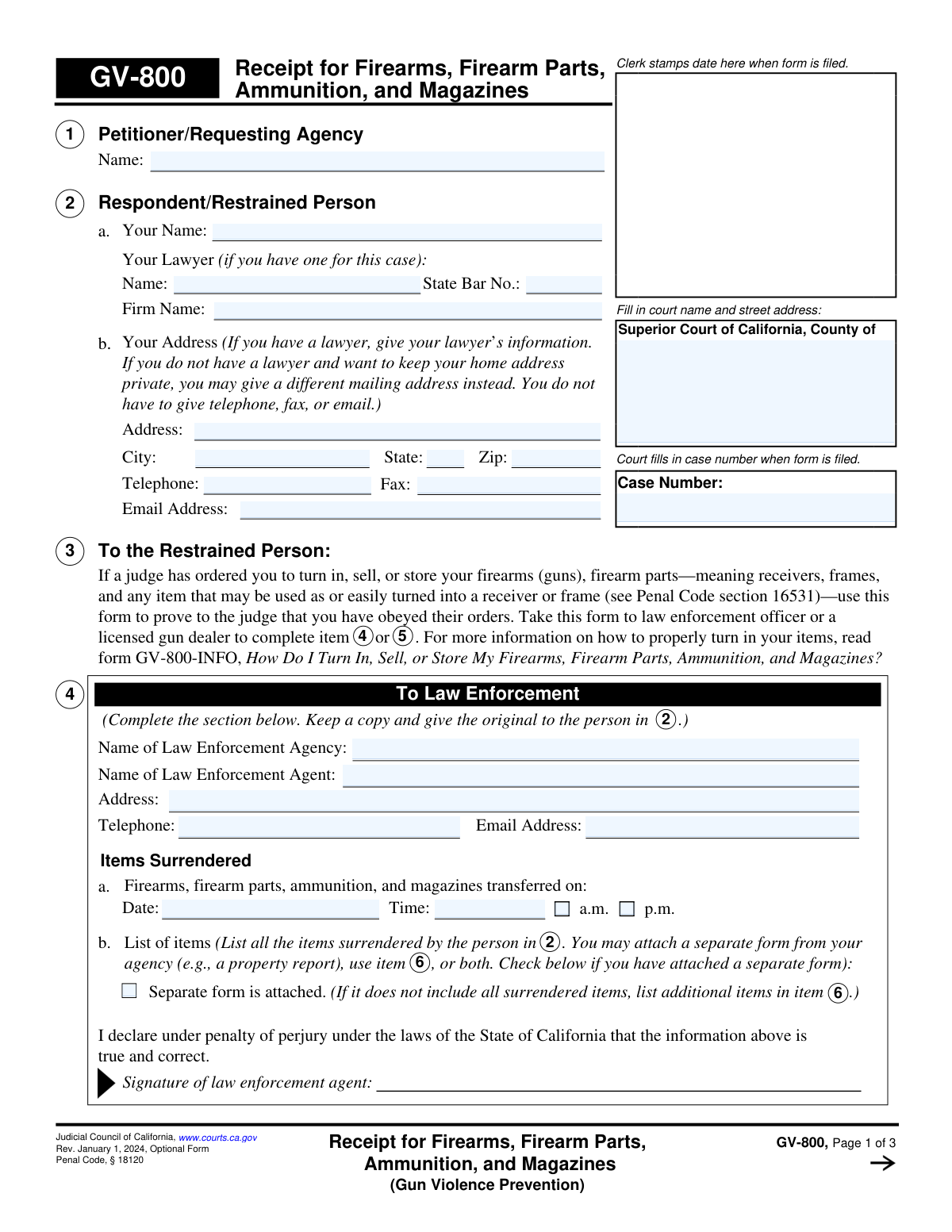
Yes! You can use AI to fill out Judicial Council of California Form GV-800, Receipt for Firearms, Firearm Parts, Ammunition, and Magazines (Gun Violence Prevention)
The GV-800, Receipt for Firearms, Firearm Parts, Ammunition, and Magazines, is a legal document used in California to prove compliance with a court order related to gun violence prevention. A person ordered by a judge to surrender their firearms must have this form completed by the law enforcement officer or licensed gun dealer who takes possession of the items. This receipt is then filed with the court as official proof of compliance. Today, this form can be filled out quickly and accurately using AI-powered services like Instafill.ai, which can also convert non-fillable PDF versions into interactive fillable forms.
GV-800 is part of the
California court forms, California judicial forms and Judicial Council forms categories on Instafill.
Our AI automatically handles information lookup, data retrieval, formatting, and form filling.
It takes less than a minute to fill out GV-800 using our AI form filling.
Securely upload your data. Information is encrypted in transit and deleted immediately after the form is filled out.
Form specifications
| Form name: | Judicial Council of California Form GV-800, Receipt for Firearms, Firearm Parts, Ammunition, and Magazines (Gun Violence Prevention) |
| Number of fields: | 124 |
| Number of pages: | 1 |
| Language: | English |
Instafill Demo: How to fill out PDF forms in seconds with AI
How to Fill Out GV-800 Online for Free in 2026
Are you looking to fill out a GV-800 form online quickly and accurately? Instafill.ai offers the #1 AI-powered PDF filling software of 2026, allowing you to complete your GV-800 form in just 37 seconds or less.
Follow these steps to fill out your GV-800 form online using Instafill.ai:
- 1 Navigate to Instafill.ai and upload your GV-800 form or select it from their template library.
- 2 Use the AI assistant to accurately fill in your personal information and the court case details in the initial sections.
- 3 Take the partially completed form to the designated law enforcement agency or a licensed gun dealer to surrender your items.
- 4 The law enforcement agent or gun dealer will complete their respective section (Section 4 or 5), listing all surrendered items and signing the form.
- 5 Complete your section (Section 7) on the form, declaring whether you possess any other firearms, and provide your signature.
- 6 Review the entire form for accuracy and completeness, then download the final document.
- 7 File the original completed GV-800 form with the court clerk and distribute copies as required by the court order.
Our AI-powered system ensures each field is filled out correctly, reducing errors and saving you time.
Why Choose Instafill.ai for Your Fillable GV-800 Form?
Speed
Complete your GV-800 in as little as 37 seconds.
Up-to-Date
Always use the latest 2026 GV-800 form version.
Cost-effective
No need to hire expensive lawyers.
Accuracy
Our AI performs 10 compliance checks to ensure your form is error-free.
Security
Your personal information is protected with bank-level encryption.
Frequently Asked Questions About Form GV-800
Form GV-800 is a receipt used to prove to a California court that you have complied with a judge's order to turn in, sell, or store your firearms, firearm parts, ammunition, and magazines as part of a gun violence prevention case.
This form must be used by a person who has been ordered by a court to relinquish their firearms (the 'Respondent' or 'Restrained Person'). It serves as their proof of compliance with the court's order.
The restrained person fills out their information in Section 2. A law enforcement agent fills out Section 4, OR a licensed gun dealer fills out Section 5. The restrained person then completes and signs Section 7 before filing.
You must take your firearms and other listed items to either a law enforcement agency or a licensed gun dealer. They are the only ones authorized to complete and sign the receipt portion of this form.
Section 4 is for when you surrender your items to a law enforcement agency. Section 5 is for when you sell or store your items with a licensed gun dealer. Only one of these sections should be completed.
You must list the make, model, and serial number for each firearm or firearm part. For ammunition and magazines, you need to list the type, brand, and amount surrendered.
If you run out of space in Section 6, you can attach a separate sheet of paper. Make sure to write 'GV-800, item 6' and your case number at the top of the additional page.
After the receipt is completed, you must sign Section 7, make two copies, and file the original with the court clerk. You must also give a copy to the law enforcement agency that served you the restraining order and keep a copy for yourself.
Failure to file this receipt with the court and provide a copy to the law enforcement agency is a violation of the court's order and can result in serious legal consequences.
This form is specifically a receipt for items that have been turned in. If you do not own or possess any firearms, you should consult form GV-800-INFO or seek legal advice on how to declare that to the court.
Yes, you can use services like Instafill.ai to accurately auto-fill your personal information and case details. However, the official receipt in Section 4 or 5 must be physically completed and signed by the law enforcement agent or licensed gun dealer.
You can use a service like Instafill.ai to upload and fill out your portions of the form on a computer. You will then need to print the partially completed form and take it with you to the law enforcement agency or gun dealer for their section to be completed.
If you have a non-fillable or 'flat' PDF, you can use a tool like Instafill.ai to convert it into an interactive, fillable form. This allows you to type your information directly onto the form before printing it.
Compliance GV-800
Validation Checks by Instafill.ai
1
Ensures Case Number Consistency Across All Pages
This check verifies that the Case Number entered on page 1 is correctly populated and matches the Case Number fields on pages 2 and 3. This is critical for ensuring all pages of the document are correctly associated with the same legal case when filed. A mismatch could lead to incomplete or incorrect filing, causing legal complications.
2
Validates Completion of at Least One Receipt Section
This validation ensures that either the 'To Law Enforcement' section (Item 4) or the 'To Licensed Gun Dealer' section (Item 5) is fully completed with all required information, including a signature. The form serves as a receipt, so it must be authenticated by one of these two authorities to be valid proof of transfer. If neither section is complete, the form fails its primary purpose.
3
Ensures Surrendered Items are Documented
This check verifies that if a transfer is being recorded, the items are properly documented. Either the table in Item 6 must contain at least one entry, or the 'Separate form is attached' checkbox in Item 4b or 5b must be selected. This prevents the submission of a receipt that claims a transfer occurred but provides no details of the items transferred.
4
Requires Disposition for Each Listed Item
For every row in the Item 6 table that describes a firearm or ammunition, this validation confirms that at least one of the disposition checkboxes ('Stored,' 'To be destroyed,' or 'Sold') is marked. This is crucial for tracking the legal status and location of each surrendered item. An entry without a disposition is incomplete and creates ambiguity in the chain of custody.
5
Verifies Mutually Exclusive Selection in Item 7
This check ensures that the restrained person has selected exactly one of the three options (7a, 7b, or 7c) regarding the filing of proof. These options are mutually exclusive and describe the status of the proof submission. Failure to select one, or selecting multiple, makes the declaration unclear and legally insufficient.
6
Requires Explanation if Proof Filing is Delayed (Item 7c)
If the user selects checkbox 7c, indicating they have not yet filed the proof for other items, this validation ensures the corresponding explanation text box is not empty. The court requires a reason for any delay in complying with its order. An empty explanation field would render the declaration incomplete and likely unacceptable.
7
Ensures 'Other Firearms' Question is Answered
This validation confirms that the restrained person has answered the mandatory 'Yes' or 'No' question at the end of Item 7 regarding possession of any other firearms. This declaration is a critical part of the compliance process under penalty of perjury. An unanswered question makes the form incomplete and invalidates the declaration.
8
Validates Logical Date Sequence
This check compares the transfer date from Item 4 or 5 with the restrained person's signature date on page 3. The date of surrender must be on or before the date the restrained person signs the form declaring the surrender has occurred. A signature date that is earlier than the transfer date is logically impossible and would invalidate the document.
9
Validates Attorney's State Bar Number Format
If an attorney's name is provided in Item 2a, this validation checks that the 'State Bar No.' field contains only numeric characters. The State Bar number is a unique numerical identifier, and ensuring its correct format is important for accurately identifying the legal counsel of record. Incorrect formats could lead to clerical errors or difficulty in verifying the attorney's credentials.
10
Ensures Ammunition 'Amount' is a Number
For any ammunition or magazines listed in the Item 6 table, this check verifies that the value entered in the 'Amount' column is numeric. This field is intended to quantify the items surrendered, which is essential for accurate record-keeping and property tracking. Non-numeric entries would make the inventory list ambiguous and difficult to process.
11
Requires Date if Prior Filing is Declared (Item 7a)
If the restrained person checks box 7a, declaring that they previously filed a receipt with the court, this validation ensures the corresponding date field is filled. The date provides a specific reference to the prior filing, which is necessary for the court clerk to locate and verify the document. Without a date, the declaration is unactionable and incomplete.
12
Verifies Restrained Person's Signature and Date
This check ensures that the restrained person has provided their printed name and a signature date on page 3. The signature, under penalty of perjury, legally attests to the truthfulness of the form's contents, and the date establishes when this attestation was made. A missing signature or date renders the entire declaration by the restrained person invalid.
13
Validates Exclusive 'a.m.' or 'p.m.' Selection
In both the Law Enforcement (Item 4) and Gun Dealer (Item 5) sections, this check ensures that for the time of transfer, either 'a.m.' or 'p.m.' is selected, but not both. This prevents ambiguity in the official time of the transaction, which is a critical detail for the legal record. Selecting neither or both would make the time entry invalid.
14
Ensures Petitioner and Respondent Names are Provided
This validation confirms that the 'Petitioner/Requesting Agency' name (Item 1) and the 'Respondent/Restrained Person' name (Item 2a) are both filled in. These fields are fundamental to identifying the parties involved in the court order. A form missing this core information cannot be correctly filed or associated with the proper individuals.
Common Mistakes in Completing GV-800
The restrained person, who is the one surrendering items, may mistakenly enter their name in the 'Petitioner/Requesting Agency' field (Section 1) instead of the 'Respondent/Restrained Person' field (Section 2). This happens due to rushing or misunderstanding legal terminology. This error can cause significant processing delays or rejection of the form, as it misidentifies the parties involved in the court case. To avoid this, carefully read each field's label and remember that as the person subject to the court order, you are the 'Respondent'.
In Section 6, users often provide vague descriptions like 'pistol' or 'rifle' instead of the required Make, Model, and Serial Number. This lack of detail makes it impossible for the court to verify that the specific firearms under the court order have been surrendered. Always record the full, exact details from the firearm itself; if a serial number is not present, note that. An incomplete list can lead to a finding of non-compliance with the court order.
The restrained person may attempt to fill out Section 4 ('To Law Enforcement') or Section 5 ('To Licensed Gun Dealer') themselves. These sections are explicitly designed to be completed and signed by the official receiving the items. This mistake invalidates the receipt, as it lacks third-party verification. You must present the form to the law enforcement agent or licensed dealer at the time of surrender and ensure they complete and sign their respective section.
The 'Case Number' field appears at the top of all three pages, but filers often neglect to enter it on pages 2 and 3. If the pages become separated during court processing, they cannot be re-associated with your case file, rendering the proof of surrender incomplete. This can result in penalties for non-compliance. To prevent this, fill in the case number on every page before submitting the form.
A common and critical error is leaving the surrender location without getting the required signature from the law enforcement agent (Section 4) or licensed gun dealer (Section 5). A form without this signature is merely a list of items and not a valid legal receipt, meaning it will be rejected by the court as proof of compliance. Before you leave, double-check that the official has signed, dated, and completed their entire section.
In the itemization table in Section 6, each firearm and ammunition entry has checkboxes for 'Stored', 'To be destroyed', or 'Sold'. People frequently list an item but forget to check one of these boxes to indicate its final disposition. This ambiguity can cause the court to question whether the surrender is permanent and compliant with the order. Ensure that one, and only one, box is checked for every single item listed on the form.
On page 3, a person might check 'Yes' to owning other firearms but then fail to check one of the sub-boxes explaining the status of the proof for those items. Alternatively, they might check box 7c ('I have not yet filed the proof') but leave the explanation field blank. These omissions or contradictions create legal jeopardy and suggest an attempt to conceal information, which can lead to severe penalties. Answer every question in this section completely and honestly.
Sections 4, 5, and 6 provide a checkbox for when a 'Separate form is attached' to list additional items. A frequent mistake is checking this box but failing to actually attach the supplemental page, or vice-versa. This makes the inventory incomplete and the filing defective. If you use an attachment, ensure it is clearly labeled 'GV-800, item 6' and physically attached to the main form, and be sure to check the corresponding box.
Many people believe their obligation ends once the law enforcement agent or gun dealer signs the form. However, the form is not effective as proof until it is officially filed with the court clerk, as stated in the 'Your Next Steps' section. Failure to file is a direct violation of the court's order. After obtaining the necessary signatures, you must make copies and file the original with the correct court clerk's office by the deadline.
This form is marked 'Rev. January 1, 2024'. Individuals may inadvertently download and use an older version from an unofficial website. Courts require the most current version of forms to ensure all legal requirements are met, and they will often reject submissions on outdated paperwork. Always obtain forms directly from the official Judicial Council of California website to ensure you are using the correct, current version.
Saved over 80 hours a year
“I was never sure if my IRS forms like W-9 were filled correctly. Now, I can complete the forms accurately without any external help.”
Kevin Martin Green
Your data stays secure with advanced protection from Instafill and our subprocessors

Robust compliance program
Transparent business model
You’re not the product. You always know where your data is and what it is processed for.
ISO 27001, HIPAA, and GDPR
Our subprocesses adhere to multiple compliance standards, including but not limited to ISO 27001, HIPAA, and GDPR.
Security & privacy by design
We consider security and privacy from the initial design phase of any new service or functionality. It’s not an afterthought, it’s built-in, including support for two-factor authentication (2FA) to further protect your account.
Fill out GV-800 with Instafill.ai
Worried about filling PDFs wrong? Instafill securely fills judicial-council-of-california-form-gv-800-receipt-for-firearms-firearm-parts-ammunition-and-magazines-gun-violence forms, ensuring each field is accurate.