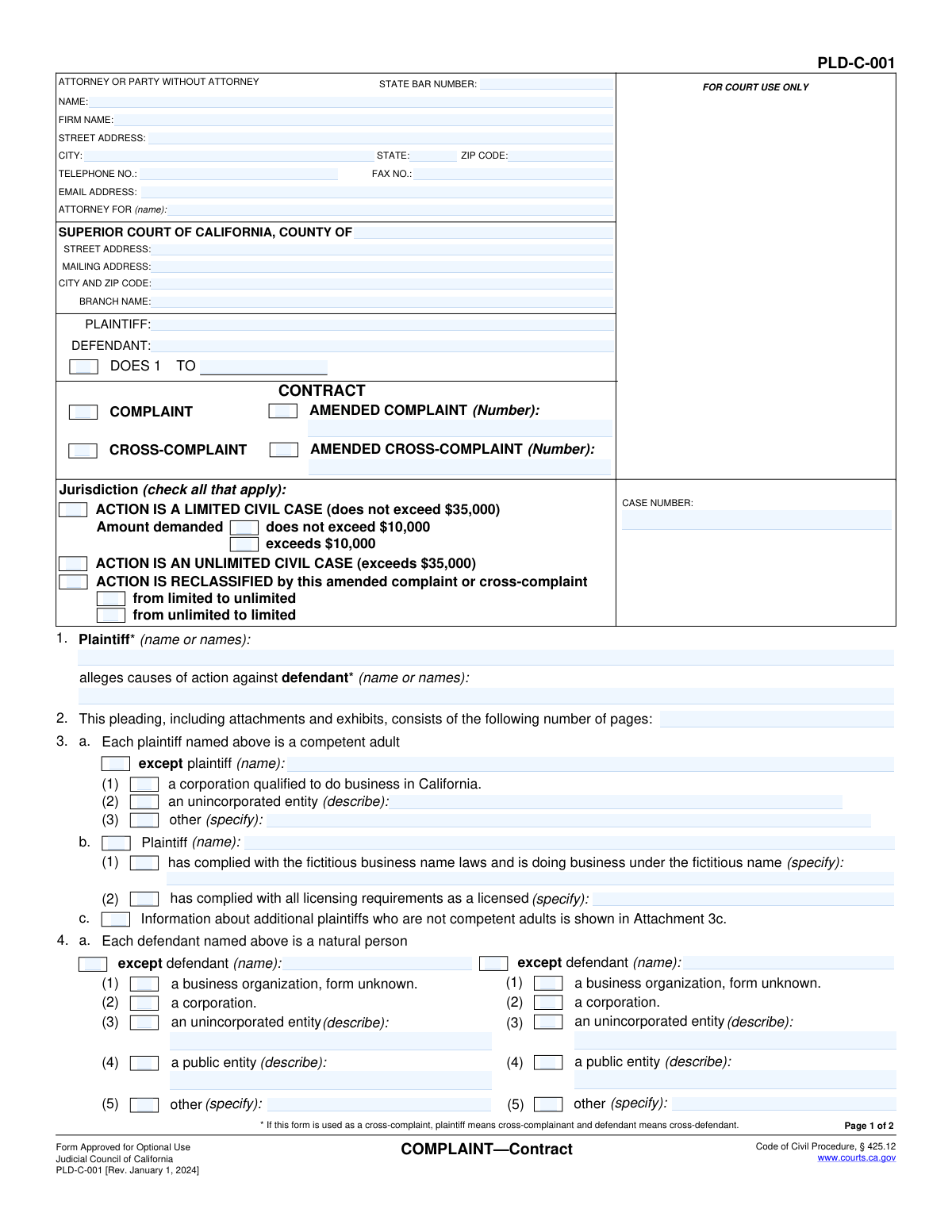
Yes! You can use AI to fill out Judicial Council of California Form PLD-C-001, COMPLAINT—Contract

California Form PLD-C-001, also known as COMPLAINT—Contract, is a pleading used to begin a civil lawsuit related to a contract dispute in the Superior Court of California. This document formally outlines the plaintiff's allegations against the defendant, specifies the legal grounds for the lawsuit, and details the relief sought, such as monetary damages. Today, this form can be filled out quickly and accurately using AI-powered services like Instafill.ai, which can also convert non-fillable PDF versions into interactive fillable forms.
PLD-C-001 is part of the California court forms, California judicial forms and Judicial Council forms categories on Instafill.
Our AI automatically handles information lookup, data retrieval, formatting, and form filling.
It takes less than a minute to fill out PLD-C-001 using our AI form filling.
Securely upload your data. Information is encrypted in transit and deleted immediately after the form is filled out.

Form specifications

Form name: Judicial Council of California Form PLD-C-001, COMPLAINT—Contract
Number of fields: 122
Number of pages: 1
Language: English
main-image

Instafill Demo: How to fill out PDF forms in seconds with AI

How to Fill Out PLD-C-001 Online for Free in 2026

Are you looking to fill out a PLD-C-001 form online quickly and accurately? Instafill.ai offers the #1 AI-powered PDF filling software of 2026, allowing you to complete your PLD-C-001 form in just 37 seconds or less.
Follow these steps to fill out your PLD-C-001 form online using Instafill.ai:
  1. 1 Navigate to Instafill.ai and upload or select Form PLD-C-001, COMPLAINT—Contract.
  2. 2 Provide the court and case information, including the names of the plaintiff(s) and defendant(s).
  3. 3 Enter the information for the attorney or the party representing themselves, including name, address, and State Bar number if applicable.
  4. 4 Specify the jurisdiction (limited or unlimited civil case) and provide details about each plaintiff and defendant.
  5. 5 Indicate the proper court venue and attach the required causes of action, such as Breach of Contract or Common Counts.
  6. 6 State the relief requested, including the amount of damages, interest, and any attorney's fees.
  7. 7 Review all AI-populated fields for accuracy, make any necessary corrections, then date and sign the complaint before filing with the court.

Our AI-powered system ensures each field is filled out correctly, reducing errors and saving you time.

Why Choose Instafill.ai for Your Fillable PLD-C-001 Form?

Speed

Complete your PLD-C-001 in as little as 37 seconds.

Up-to-Date

Always use the latest 2026 PLD-C-001 form version.

Cost-effective

No need to hire expensive lawyers.

Accuracy

Our AI performs 10 compliance checks to ensure your form is error-free.

Security

Your personal information is protected with bank-level encryption.

Frequently Asked Questions About Form PLD-C-001

This form is used in California to initiate a lawsuit against a person or business for a breach of contract. It acts as a cover sheet for the legal complaint, outlining the parties involved and the basis of the lawsuit.

The person or entity starting the lawsuit, known as the plaintiff, is responsible for filling out this form. It is used to formally state their claims against the defendant, who is the party being sued.

A Limited Civil Case is for disputes where the total amount demanded is $35,000 or less. An Unlimited Civil Case is for claims exceeding $35,000. You must select the correct jurisdiction on the first page.

This form is only a cover sheet. You must attach additional forms that detail your specific legal claims, such as 'Breach of Contract' (Form PLD-C-001(1)). Your complaint is incomplete without at least one cause of action form attached.

‘Doe’ defendants are placeholders for individuals or entities who may be responsible for the breach but whose identities are unknown at the time of filing. This allows you to add them to the lawsuit later once you discover who they are.

Section 7 helps you establish the proper court location, or 'venue.' Generally, you should file in the county where the defendant lives, where the contract was entered into, or where the contract was supposed to be performed.

You will need the full legal names and addresses of all plaintiffs and defendants, details about the contract, the specific amount of money you are seeking in damages, and which cause of action forms you will be attaching.

After you fill out this form and all required attachments, you must file the complete package with the appropriate Superior Court. Following that, you must arrange for a copy of the filed documents to be legally served on each defendant.

Yes, services like Instafill.ai use AI to help you accurately auto-fill form fields. This can save you time and help reduce errors when completing complex forms like this one.

To use Instafill.ai, you upload the PLD-C-001 PDF to their platform. The service makes the document interactive, allowing you to answer simple questions to automatically and accurately populate the information into the correct fields on the form.

If you have a non-fillable or 'flat' PDF, you can use a service like Instafill.ai. It can convert the non-fillable PDF into an interactive, fillable form that you can easily complete and download.

In Section 10, you must state the specific dollar amount you are seeking as 'damages.' You can also request interest on that amount and, if your contract allows for it or it's permitted by law, reimbursement for your attorney's fees.

A 'Complaint' is the initial document filed by the plaintiff to start the lawsuit. If the defendant wishes to sue the plaintiff back in the same case, they would file a 'Cross-Complaint.'

Compliance PLD-C-001
Validation Checks by Instafill.ai

1
State Bar Number Format
This check ensures that the State Bar Number entered in the 'ATTORNEY OR PARTY WITHOUT ATTORNEY' section consists only of numerical digits. This is important for correctly identifying and verifying the attorney of record with the state bar association. A failed validation would prevent submission until a valid, numeric-only bar number is provided.
2
Jurisdiction Selection Exclusivity
Validates that only one primary jurisdiction type ('LIMITED CIVIL CASE' or 'UNLIMITED CIVIL CASE') is selected, unless the action is being reclassified. Selecting both simultaneously is a logical contradiction that makes the filing ambiguous. If this check fails, the user must be prompted to choose only one of these options to clarify the nature of the case.
3
Limited Jurisdiction Amount Specificity
Ensures that if 'ACTION IS A LIMITED CIVIL CASE' is checked, one of the two sub-options ('does not exceed $10,000' or 'exceeds $10,000') is also selected. This information is required to properly categorize the case within the limited jurisdiction framework. Failure to provide this detail would result in an incomplete and potentially misrouted filing.
4
Amended Complaint Number Requirement
This check verifies that if the 'AMENDED COMPLAINT' or 'AMENDED CROSS-COMPLAINT' checkbox is selected, the corresponding number field is filled in. This number indicates which version of the amended complaint it is, which is critical for the court's record-keeping. An error would be flagged if the box is checked but the number is missing.
5
Plaintiff and Defendant Name Completeness
Verifies that the Plaintiff and Defendant name fields in the case caption are not empty. These are the primary parties to the lawsuit and are fundamental to the document's validity. A submission with missing party names is invalid and cannot be processed by the court.
6
Total Page Count Validity
This validation ensures that the field in item 2, 'This pleading...consists of the following number of pages', contains a positive integer. This count is used by the court clerk to verify that the entire document has been received. The check prevents non-numeric or zero/negative values, which would indicate a corrupted or incomplete submission.
7
Conditional 'Other' Field for Defendant Type
In section 4a, if the 'other' checkbox is selected to describe a defendant's entity type, this validation ensures the adjacent text field is filled with a description. This prevents the selection of an ambiguous category without the required clarification. A failure would prompt the user to either specify the entity type or choose a different option.
8
Venue Justification Requirement
This check ensures that at least one of the checkboxes in section 7 is selected. This section establishes the legal reason (venue) why the case is being filed in this specific court. Filing without a valid venue justification makes the complaint defective, so the system must require at least one option to be chosen before submission.
9
Mandatory Cause of Action
Validates that at least one cause of action checkbox ('Breach of Contract', 'Common Counts', or 'Other') is selected in section 8. A complaint is legally insufficient without at least one stated cause of action. This check prevents the submission of an empty or incomplete complaint that would be immediately rejected by the court.
10
Conditional 'Other' Cause of Action Specification
If the 'Other' checkbox is selected in section 8 for the cause of action, this check confirms that the corresponding text field specifying the cause of action is not empty. This is crucial for informing the defendant and the court about the nature of the claim. A failure would require the user to provide the specific cause of action.
11
Interest Rate and Date Requirement
In section 10b, if the option for a specific interest rate is chosen, this validation ensures both the 'rate' field and the 'from (date)' field are filled out. Requesting interest at a specific rate is meaningless without providing the rate and its start date. The check prevents incomplete relief requests.
12
Signature Date Format and Presence
This check verifies that the 'Date' field in the signature block is filled and contains a value in a valid date format, such as MM/DD/YYYY. The signature date is legally significant as it marks when the document was attested to by the filer. An invalid or missing date would render the attestation incomplete.
13
Jurisdiction and Damages Amount Consistency
This is a logical check that compares the jurisdiction selected with the damages amount requested in section 10a. If 'UNLIMITED CIVIL CASE' is checked, the damages should exceed $35,000. If 'LIMITED CIVIL CASE' is checked, the damages should be $35,000 or less. This prevents logical inconsistencies that could lead to the case being misclassified or requiring amendment.
14
Email Address Format Validation
Ensures that the value entered into the 'EMAIL ADDRESS' field follows the standard format for an email address (e.g., [email protected]). This is important for ensuring that court communications and electronic service can be successfully delivered to the attorney or party. An invalid format would trigger an error to prompt correction.

Common Mistakes in Completing PLD-C-001

Forgetting to Attach Required Causes of Action

Section 8 requires the filer to attach one or more 'causes of action' forms, such as 'Breach of Contract' or 'Common Counts'. Many filers check the boxes but forget to physically include these separate, mandatory forms with their submission. An incomplete filing without the attached causes of action will be rejected by the court clerk, as it fails to state a legal claim, causing significant delays.

Incorrectly Selecting Case Jurisdiction

Filers often get confused between a 'Limited Civil Case' (under $35,000) and an 'Unlimited Civil Case' (over $35,000). Choosing the wrong jurisdiction has major consequences, affecting filing fees, discovery rules, and potential damage awards. To avoid this, carefully calculate the total amount of damages claimed before selecting the appropriate jurisdiction box. An error here can lead to reclassification motions or dismissal.

Inaccurate Legal Status of Parties

In sections 3 and 4, filers must correctly identify the legal status of each plaintiff and defendant (e.g., natural person, corporation, unincorporated entity). A common mistake is incorrectly classifying a business, such as listing a sole proprietorship as a corporation. This error can lead to challenges in serving the party or enforcing a judgment, potentially requiring the complaint to be amended and re-filed.

Omitting Information on Subsequent Pages

The top of page 2 requires the 'SHORT TITLE' and 'CASE NUMBER' to be re-entered. It is a very common oversight to leave these fields blank, especially on longer documents with many attachments. If pages become separated during processing, the court clerk may have difficulty associating them with the correct case, leading to filing delays or rejection.

Failing to Provide a Total Page Count

Section 2 asks for the total number of pages in the entire pleading, including all attachments and exhibits. Filers often forget to fill this in or miscount after adding their causes of action and other exhibits. An incorrect or missing page count can result in the court clerk rejecting the document for being incomplete, halting the filing process until it is corrected.

Incomplete or Unsigned Signature Block

An unsigned or undated complaint is invalid and will not be accepted by the court. People frequently forget to sign the form or print their name below the signature line on page 2. To be valid, the form must have a proper signature and the date of signing. Using an AI-powered tool like Instafill.ai can help by flagging empty required fields like the signature date before finalization.

Ambiguous Request for Damages

In Section 10, 'Plaintiff prays for judgment,' filers must be specific about the relief sought. Common errors include checking the box for damages but not entering a specific dollar amount, or requesting interest but failing to specify the rate and start date. This ambiguity can weaken the legal position and may require clarification later in the proceedings. It is crucial to clearly state all monetary demands.

Misunderstanding the Use of 'Doe' Defendants

Section 4 allows for the inclusion of 'Doe' defendants whose true names are unknown at the time of filing. Self-represented litigants often misunderstand this concept, either failing to include them when necessary or incorrectly identifying which Does were agents of named defendants. Properly including Doe defendants is crucial for preserving the right to add parties to the lawsuit after the statute of limitations has expired.

Inconsistent Naming of Plaintiffs and Defendants

The form requires plaintiff and defendant names to be listed in the top caption and again in Section 1. A frequent error is introducing inconsistencies, such as using a slightly different name, a nickname, or an abbreviation in one section but not the other. All names must be listed completely and consistently throughout the document and any attachments to avoid confusion and potential legal challenges regarding the identity of the parties.

Failing to State the Basis for Venue

Section 7 requires the filer to check a box indicating why the chosen court is the proper location (venue) for the lawsuit. Filers sometimes neglect to select any option or choose one that doesn't apply to their case. This mistake can result in the defendant filing a motion to transfer the case to a different court, causing unnecessary delays and legal expenses. Always review the options and select the one that most accurately reflects the connection between the case and the court's location.
Saved over 80 hours a year

“I was never sure if my IRS forms like W-9 were filled correctly. Now, I can complete the forms accurately without any external help.”

Kevin Martin Green

Your data stays secure with advanced protection from Instafill and our subprocessors

Robust compliance program

Transparent business model

You’re not the product. You always know where your data is and what it is processed for.

ISO 27001, HIPAA, and GDPR

Our subprocesses adhere to multiple compliance standards, including but not limited to ISO 27001, HIPAA, and GDPR.

Security & privacy by design

We consider security and privacy from the initial design phase of any new service or functionality. It’s not an afterthought, it’s built-in, including support for two-factor authentication (2FA) to further protect your account.

Fill out PLD-C-001 with Instafill.ai

Worried about filling PDFs wrong? Instafill securely fills judicial-council-of-california-form-pld-c-001-complaintcontract forms, ensuring each field is accurate.

Related forms by category

California court forms Judicial Council of California Form SC-105, Request for Court Order and Answer (Small Claims), Judicial Council of California Form SC-120, Defendant’s Claim and ORDER to Go to Small Claims Court (Small Claims), Judicial Council of California Form SER-001, Request for Sheriff to Serve Court Papers, Judicial Council of California Form SER-001, Request for Sheriff to Serve Court Papers, Affidavit for Collection of Personal Property California Probate Code Section 13100, Form POS-040, Proof of Service—Civil, Declaration of Facts of Death (California Superior Court), declaration-of-marriage-for-court-proceeding-california-family-law, ADOPT-200, Adoption Request, ADOPT-200, Stepparent Adoption Request, ADOPT-210, Adoption Agreement, ADOPT-310, Contact After Adoption Agreement, Judicial Council of California Form ADOPT-200, Adoption Request, Form ADR-107, Mediation Attendance Sheet, Form ADR-110, Order Appointing Referee, Form ADR-109, Stipulation or Motion for Order Appointing Referee, Form ADR-102, Request for Trial De Novo After Judicial Arbitration, Form ADR-108, Referee's Report (Code Civ. Proc., §§ 638, 639), Form ADR-106, Petition to Confirm, Correct, or Vacate Contractual Arbitration Award, Form ADR-104, Rejection of Award and Request for Trial After Attorney-Client Fee Arbitration · + 557 more →
California judicial forms Judicial Council of California Form FL-300, Request for Order, Judicial Council of California Form FL-150, Income and Expense Declaration, Judicial Council of California Form DE-111, Petition for Probate (Probate—Decedents Estates), Judicial Council of California Form SC-104, Proof of Service (Small Claims), Judicial Council of California Form SC-105, Request for Court Order and Answer (Small Claims), Judicial Council of California Form DE-111, Petition for Probate (Probate—Decedents Estates), Judicial Council of California Form SC-104, Proof of Service (Small Claims), Judicial Council of California Form SC-108, Request to Correct or Cancel Judgment and Answer (Small Claims), Judicial Council of California Form SC-120, Defendant’s Claim and ORDER to Go to Small Claims Court (Small Claims), Civil Case Cover Sheet (Judicial Council of California Form CM-010), Civil Case Cover Sheet (Judicial Council of California Form CM-010), Judicial Council of California Form TR-205, Request for Trial by Written Declaration (Trial by Written Declaration—Traffic), Judicial Council of California Form DE-120, Notice of Hearing—Decedent's Estate or Trust, Inventory and Appraisal Attachment (Judicial Council of California Form DE-161, GC-041), CLETS-001, Confidential Information for Law Enforcement (Judicial Council of California), Judicial Council of California Form SER-001, Request for Sheriff to Serve Court Papers, Judicial Council of California Form UD-105, Answer—Unlawful Detainer, CLETS-001, Confidential Information for Law Enforcement (Judicial Council of California), Judicial Council of California Form ADOPT-210, Adoption Agreement, Judicial Council of California Form DE-120, Notice of Hearing—Decedent's Estate or Trust · + 63 more →
Judicial Council forms Judicial Council of California Form FL-300, Request for Order, Judicial Council of California Form FL-150, Income and Expense Declaration, Judicial Council of California Form DE-111, Petition for Probate (Probate—Decedents Estates), Judicial Council of California Form SC-104, Proof of Service (Small Claims), Judicial Council of California Form SC-105, Request for Court Order and Answer (Small Claims), Judicial Council of California Form DE-111, Petition for Probate (Probate—Decedents Estates), Judicial Council of California Form SC-104, Proof of Service (Small Claims), Judicial Council of California Form SC-108, Request to Correct or Cancel Judgment and Answer (Small Claims), Judicial Council of California Form SC-120, Defendant’s Claim and ORDER to Go to Small Claims Court (Small Claims), Civil Case Cover Sheet (Judicial Council of California Form CM-010), Civil Case Cover Sheet (Judicial Council of California Form CM-010), Judicial Council of California Form TR-205, Request for Trial by Written Declaration (Trial by Written Declaration—Traffic), Judicial Council of California Form DE-120, Notice of Hearing—Decedent's Estate or Trust, Inventory and Appraisal Attachment (Judicial Council of California Form DE-161, GC-041), CLETS-001, Confidential Information for Law Enforcement (Judicial Council of California), Judicial Council of California Form SER-001, Request for Sheriff to Serve Court Papers, Judicial Council of California Form UD-105, Answer—Unlawful Detainer, CLETS-001, Confidential Information for Law Enforcement (Judicial Council of California), Judicial Council of California Form ADOPT-210, Adoption Agreement, Judicial Council of California Form DE-120, Notice of Hearing—Decedent's Estate or Trust · + 64 more →