Yes! You can use AI to fill out Judicial Council of California Form PLD-PI-001(2), Cause of Action—General Negligence

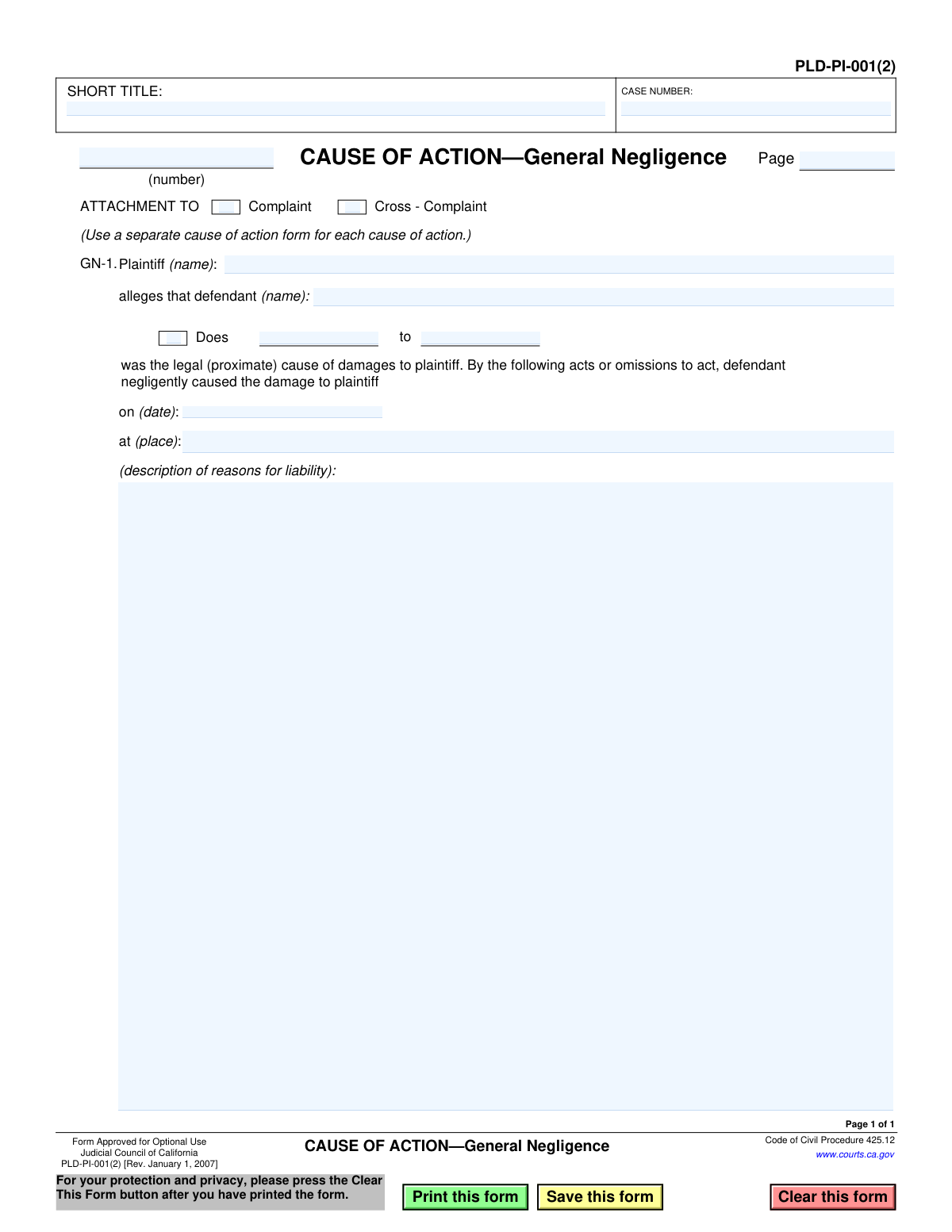
This form, officially titled Cause of Action—General Negligence, is a mandatory attachment for complaints or cross-complaints in California civil cases where a party is alleging damages due to another's negligence. It provides a structured format for the plaintiff to state the essential facts of their claim, including the defendant's actions, the date, and the location of the incident. Today, this form can be filled out quickly and accurately using AI-powered services like Instafill.ai, which can also convert non-fillable PDF versions into interactive fillable forms.
PLD-PI-001(2) is part of the California court forms, California judicial forms and Judicial Council forms categories on Instafill.
Our AI automatically handles information lookup, data retrieval, formatting, and form filling.
It takes less than a minute to fill out PLD-PI-001(2) using our AI form filling.
Securely upload your data. Information is encrypted in transit and deleted immediately after the form is filled out.

Form specifications

Form name: Judicial Council of California Form PLD-PI-001(2), Cause of Action—General Negligence
Number of fields: 18
Number of pages: 1
Language: English
main-image

Instafill Demo: How to fill out PDF forms in seconds with AI

How to Fill Out PLD-PI-001(2) Online for Free in 2026

Are you looking to fill out a PLD-PI-001(2) form online quickly and accurately? Instafill.ai offers the #1 AI-powered PDF filling software of 2026, allowing you to complete your PLD-PI-001(2) form in just 37 seconds or less.
Follow these steps to fill out your PLD-PI-001(2) form online using Instafill.ai:
  1. 1 Navigate to Instafill.ai and upload or select the PLD-PI-001(2) form.
  2. 2 Enter the case number and short title in the header section.
  3. 3 Identify the plaintiff and the defendant(s) being accused of negligence.
  4. 4 Indicate whether this form is an attachment to a Complaint or a Cross-Complaint.
  5. 5 Provide a detailed description of the negligent acts or omissions, including the date and location of the incident.
  6. 6 Review all the information populated by the AI for accuracy and make any necessary corrections.
  7. 7 Download, print, or e-file the completed form as required for your legal proceedings.

Our AI-powered system ensures each field is filled out correctly, reducing errors and saving you time.

Why Choose Instafill.ai for Your Fillable PLD-PI-001(2) Form?

Speed

Complete your PLD-PI-001(2) in as little as 37 seconds.

Up-to-Date

Always use the latest 2026 PLD-PI-001(2) form version.

Cost-effective

No need to hire expensive lawyers.

Accuracy

Our AI performs 10 compliance checks to ensure your form is error-free.

Security

Your personal information is protected with bank-level encryption.

Frequently Asked Questions About Form PLD-PI-001(2)

This form, 'Cause of Action—General Negligence,' is used in California courts to formally state the details of a negligence claim against a defendant. It is an attachment to a primary legal document like a Complaint or Cross-Complaint.

The plaintiff (the person filing the lawsuit) or their attorney fills out this form. It is used to specify the grounds for a negligence claim against one or more defendants.

This form is not a standalone document; it must be attached to a main pleading, either a Complaint (to start a lawsuit) or a Cross-Complaint (to file a claim against another party in an existing lawsuit). It provides the specific details for one of the legal claims being made.

In this section, you must clearly and concisely describe the specific actions or failures to act by the defendant that you believe were negligent and caused your damages. Focus on the facts of what happened, where, and when.

The term 'Does' refers to unknown defendants you believe are responsible but whose names you do not yet know. This allows you to add them to the lawsuit later once their identity is discovered through the legal process.

A 'cause of action' is a specific legal claim, like negligence or breach of contract. If your lawsuit involves multiple distinct legal claims, even against the same defendant, you must use a separate, appropriate 'Cause of Action' form for each one.

While you can use this general negligence form, the Judicial Council also provides a more specific form, PLD-PI-001(1) 'Cause of Action—Motor Vehicle,' which is tailored for car accidents. It is often better to use the most specific form available for your situation.

You will need the case number and short title, the full names of the plaintiff and defendant(s), the date and location of the incident, and a clear description of the defendant's negligent acts.

You can list multiple defendants on a single 'Cause of Action—General Negligence' form if they are all allegedly responsible for the same negligent act described in the form.

This form is approved for 'Optional Use,' meaning you are not required to use this exact format. However, it is highly recommended as it ensures you include all the necessary elements for a general negligence claim in a format the court prefers.

Yes, services like Instafill.ai use AI to help you accurately auto-fill form fields from your saved information, which saves time and reduces errors. This is especially useful for repetitive information like names, addresses, and case numbers.

You can use a service like Instafill.ai to fill out this form online. Simply upload the PDF, and the platform will make it an interactive, fillable form that you can complete, save, and download from any device.

If you have a non-fillable or 'flat' PDF, you can upload it to Instafill.ai. The service can convert it into an interactive, fillable form, allowing you to easily type in your information.

Compliance PLD-PI-001(2)
Validation Checks by Instafill.ai

1
Ensures Plaintiff Name is Provided
This check verifies that the 'Plaintiff (name)' field is not empty. A plaintiff must be identified for the cause of action to be valid and for the filing to be legally sufficient. If this field is left blank, the form submission will be rejected with an error message prompting the user to enter the plaintiff's full name.
2
Ensures at Least One Defendant is Named
Validates that at least one defendant is identified in the 'defendant (name)' fields. A legal action requires a defendant against whom the claim is made. Failure to name a defendant makes the filing incomplete and legally insufficient, so the submission will be blocked until a name is provided.
3
Requires Incident Date
This validation ensures that the 'on (date)' field is filled out. The date of the alleged negligence is a critical piece of information for legal proceedings, affecting statutes of limitations and case facts. An empty date field will result in a validation error, preventing form submission.
4
Validates Incident Date Format and Chronology
This check confirms that the value entered in the 'on (date)' field is a valid calendar date (e.g., MM/DD/YYYY) and that the date is not in the future. An invalid format or a future date would be nonsensical for a past event. If the date is invalid or in the future, the system will display an error and require the user to correct it.
5
Requires Incident Location
Verifies that the 'at (place)' field contains a description of the location where the alleged negligence occurred. Jurisdiction and venue often depend on the location of the incident, making this a required field. A submission with an empty location field will be flagged as incomplete.
6
Ensures Liability Description is Sufficiently Detailed
This check validates that the 'description of reasons for liability' text area is not empty and meets a minimum character count. A blank or overly brief description fails to properly state a cause of action under legal standards. If the description is insufficient, the user will be prompted to provide more detail before the form can be submitted.
7
Validates Attachment Type Selection
Ensures that exactly one of the 'Complaint' or 'Cross-Complaint' checkboxes is selected. The form must be attached to one specific type of pleading to be correctly interpreted by the court. The system will return an error if neither is checked or if both are checked, as this would create ambiguity in the legal filing.
8
Ensures Case Number is Provided
This check verifies that the 'CASE NUMBER' field is not left blank. The case number is the primary identifier for a court case and is essential for correctly filing and associating documents. A missing case number will prevent the form from being processed and filed correctly.
9
Ensures Short Title is Provided
Validates that the 'SHORT TITLE' field is filled in. The short title provides a quick reference to the case (e.g., 'Smith v. Jones') and is used on all subsequent documents for easy identification. An empty short title will cause a validation failure to ensure proper case identification.
10
Validates Cause of Action Number Format
This check ensures the 'CAUSE OF ACTION (number)' field contains a positive integer. This number is used to sequentially identify different causes of action within the same complaint. Non-numeric or negative values will be rejected to maintain clear document structure and prevent filing errors.
11
Ensures Doe Defendant Range is Provided When 'Does' is Checked
This validation checks that if the 'Does' checkbox is selected, the corresponding text field for the defendant numbers (e.g., '1 to 10') is also filled. Checking the box indicates the intent to name unknown defendants, which requires specifying their numerical range. A failure will prompt the user to either uncheck the box or provide the range.
12
Ensures 'Does' is Checked When Doe Defendant Range is Provided
This is the reverse of the previous check, ensuring that if a range of Doe defendant numbers is entered, the 'Does' checkbox is also selected. This maintains logical consistency on the form and prevents accidental inclusion of Doe defendants. If the range is filled but the box is not checked, the system will prompt the user to check the box or clear the range.
13
Validates Page Number Format
This check verifies that the 'Page' number field contains a positive integer. Page numbers are crucial for ensuring the document is complete and in the correct order when filed with the court. Any non-numeric or invalid entry will trigger an error to enforce proper document formatting.
14
Verifies Plaintiff and Defendant are Not the Same
This validation compares the names entered for the plaintiff and the primary defendant to ensure they are not identical. A person cannot legally sue themselves in this context, so a match indicates a likely data entry error. If the names match, the system will flag it as an error and require correction before submission.

Common Mistakes in Completing PLD-PI-001(2)

Incorrect or Incomplete Case Information

Users often enter the 'CASE NUMBER' or 'SHORT TITLE' incorrectly, or leave them blank. This happens due to typos, transposing numbers, or not having the primary court filing available for reference. An incorrect case identifier can lead to the document being rejected by the court clerk, misfiled in the wrong case, or significant delays in processing the legal action.

Selecting the Wrong Attachment Type

Filers frequently check the wrong box for 'ATTACHMENT TO Complaint' versus 'Cross-Complaint', or neglect to check either. This mistake stems from a misunderstanding of their procedural role in the lawsuit. This error fundamentally misrepresents the nature of the pleading, which can cause the court to reject the filing and require the party to file a corrected version, wasting time and resources.

Using Informal or Incorrect Party Names

A common error is listing incomplete or informal names for the 'Plaintiff' or 'Defendant' (e.g., 'Mike Smith' instead of 'Michael J. Smith'). This can also happen with business names, where the legal entity name is not used. Such inaccuracies create legal ambiguity, potentially leading to difficulties in serving the defendant or enforcing a future judgment, and may require an amendment to the complaint.

Misunderstanding the 'Does' Defendant Field

Many non-lawyers are unfamiliar with the concept of 'Doe' defendants (unknown parties) and either leave the field blank when it should be used or fill it out incorrectly. This is a strategic legal device to include unknown responsible parties in the lawsuit. Failing to properly name 'Doe' defendants can prevent the plaintiff from adding newly discovered parties after the statute of limitations has expired, potentially barring recovery from them.

Providing a Vague or Ambiguous Incident Location

In the 'at (place)' field, users often provide a vague description like 'on the freeway' instead of a specific, identifiable location. This lack of precision makes it difficult for the defendant to investigate the claim and formulate a defense. A court may find the pleading insufficient if the location is not described with enough particularity to establish jurisdiction and venue.

Entering an Inaccurate or Improperly Formatted Date

The 'on (date)' field is often filled with an incorrect date due to memory lapse or a typo, or is formatted in a non-standard way. The date of the incident is critical for legal purposes, particularly for determining if the lawsuit was filed within the statute of limitations. An incorrect date can jeopardize the entire case and be used by the opposing party to challenge the validity of the claim.

Writing an Ineffective Description of Liability

The most critical error is failing to provide a clear and concise 'description of reasons for liability'. Users often write a long, emotional story instead of stating the specific facts that constitute negligence (Duty, Breach, Causation, Damages). A legally insufficient description can lead to the cause of action being dismissed by the court upon a challenge from the defendant, requiring costly and time-consuming amendments.

Combining Multiple Causes of Action on One Form

Despite the instruction '(Use a separate cause of action form for each cause of action),' people attempt to describe multiple distinct incidents or legal theories on a single form. This may be done to save time or due to overlooking the instruction. This procedural error will almost certainly lead to the filing being rejected by the court clerk for being improperly pleaded.

Omitting Page and Cause of Action Numbers

The small fields for numbering the cause of action and the page are easily missed. In a complex legal filing with multiple attachments, these numbers are essential for keeping the document organized and coherent for the court and all parties. Omitting them can lead to confusion and potential rejection of the filing for not conforming to court rules of format.

Submitting an Illegible Handwritten Form

When a fillable version of the form isn't readily available, users may print it and fill it out by hand. Illegible handwriting can make names, dates, and facts impossible to decipher, leading to processing errors or outright rejection by the court clerk. To avoid this, it's best to type the information, which can be done using AI-powered tools like Instafill.ai that can convert non-fillable PDFs into interactive, fillable forms.
Saved over 80 hours a year

“I was never sure if my IRS forms like W-9 were filled correctly. Now, I can complete the forms accurately without any external help.”

Kevin Martin Green

Your data stays secure with advanced protection from Instafill and our subprocessors

Robust compliance program

Transparent business model

You’re not the product. You always know where your data is and what it is processed for.

ISO 27001, HIPAA, and GDPR

Our subprocesses adhere to multiple compliance standards, including but not limited to ISO 27001, HIPAA, and GDPR.

Security & privacy by design

We consider security and privacy from the initial design phase of any new service or functionality. It’s not an afterthought, it’s built-in, including support for two-factor authentication (2FA) to further protect your account.

Fill out PLD-PI-001(2) with Instafill.ai

Worried about filling PDFs wrong? Instafill securely fills judicial-council-of-california-form-pld-pi-0012-cause-of-actiongeneral-negligence forms, ensuring each field is accurate.

Related forms by category

California court forms Judicial Council of California Form SC-105, Request for Court Order and Answer (Small Claims), Judicial Council of California Form SC-120, Defendant’s Claim and ORDER to Go to Small Claims Court (Small Claims), Judicial Council of California Form SER-001, Request for Sheriff to Serve Court Papers, Judicial Council of California Form SER-001, Request for Sheriff to Serve Court Papers, Affidavit for Collection of Personal Property California Probate Code Section 13100, Form POS-040, Proof of Service—Civil, Declaration of Facts of Death (California Superior Court), declaration-of-marriage-for-court-proceeding-california-family-law, ADOPT-200, Adoption Request, ADOPT-200, Stepparent Adoption Request, ADOPT-210, Adoption Agreement, ADOPT-310, Contact After Adoption Agreement, Judicial Council of California Form ADOPT-200, Adoption Request, Form ADR-107, Mediation Attendance Sheet, Form ADR-110, Order Appointing Referee, Form ADR-109, Stipulation or Motion for Order Appointing Referee, Form ADR-102, Request for Trial De Novo After Judicial Arbitration, Form ADR-108, Referee's Report (Code Civ. Proc., §§ 638, 639), Form ADR-106, Petition to Confirm, Correct, or Vacate Contractual Arbitration Award, Form ADR-104, Rejection of Award and Request for Trial After Attorney-Client Fee Arbitration · + 557 more →
California judicial forms Judicial Council of California Form FL-300, Request for Order, Judicial Council of California Form FL-150, Income and Expense Declaration, Judicial Council of California Form DE-111, Petition for Probate (Probate—Decedents Estates), Judicial Council of California Form SC-104, Proof of Service (Small Claims), Judicial Council of California Form SC-105, Request for Court Order and Answer (Small Claims), Judicial Council of California Form DE-111, Petition for Probate (Probate—Decedents Estates), Judicial Council of California Form SC-104, Proof of Service (Small Claims), Judicial Council of California Form SC-108, Request to Correct or Cancel Judgment and Answer (Small Claims), Judicial Council of California Form SC-120, Defendant’s Claim and ORDER to Go to Small Claims Court (Small Claims), Civil Case Cover Sheet (Judicial Council of California Form CM-010), Civil Case Cover Sheet (Judicial Council of California Form CM-010), Judicial Council of California Form TR-205, Request for Trial by Written Declaration (Trial by Written Declaration—Traffic), Judicial Council of California Form DE-120, Notice of Hearing—Decedent's Estate or Trust, Inventory and Appraisal Attachment (Judicial Council of California Form DE-161, GC-041), CLETS-001, Confidential Information for Law Enforcement (Judicial Council of California), Judicial Council of California Form SER-001, Request for Sheriff to Serve Court Papers, Judicial Council of California Form UD-105, Answer—Unlawful Detainer, CLETS-001, Confidential Information for Law Enforcement (Judicial Council of California), Judicial Council of California Form ADOPT-210, Adoption Agreement, Judicial Council of California Form DE-120, Notice of Hearing—Decedent's Estate or Trust · + 63 more →
Judicial Council forms Judicial Council of California Form FL-300, Request for Order, Judicial Council of California Form FL-150, Income and Expense Declaration, Judicial Council of California Form DE-111, Petition for Probate (Probate—Decedents Estates), Judicial Council of California Form SC-104, Proof of Service (Small Claims), Judicial Council of California Form SC-105, Request for Court Order and Answer (Small Claims), Judicial Council of California Form DE-111, Petition for Probate (Probate—Decedents Estates), Judicial Council of California Form SC-104, Proof of Service (Small Claims), Judicial Council of California Form SC-108, Request to Correct or Cancel Judgment and Answer (Small Claims), Judicial Council of California Form SC-120, Defendant’s Claim and ORDER to Go to Small Claims Court (Small Claims), Civil Case Cover Sheet (Judicial Council of California Form CM-010), Civil Case Cover Sheet (Judicial Council of California Form CM-010), Judicial Council of California Form TR-205, Request for Trial by Written Declaration (Trial by Written Declaration—Traffic), Judicial Council of California Form DE-120, Notice of Hearing—Decedent's Estate or Trust, Inventory and Appraisal Attachment (Judicial Council of California Form DE-161, GC-041), CLETS-001, Confidential Information for Law Enforcement (Judicial Council of California), Judicial Council of California Form SER-001, Request for Sheriff to Serve Court Papers, Judicial Council of California Form UD-105, Answer—Unlawful Detainer, CLETS-001, Confidential Information for Law Enforcement (Judicial Council of California), Judicial Council of California Form ADOPT-210, Adoption Agreement, Judicial Council of California Form DE-120, Notice of Hearing—Decedent's Estate or Trust · + 64 more →