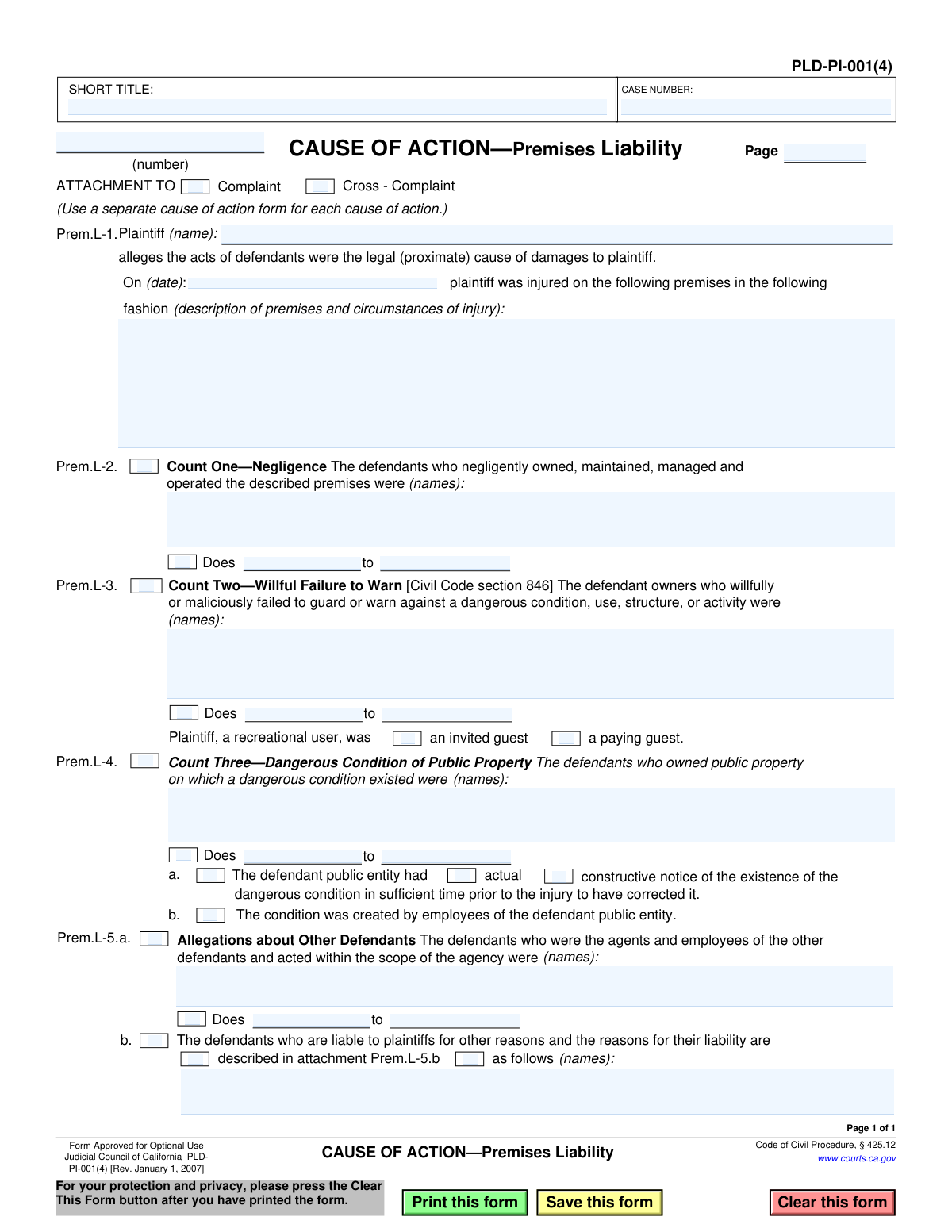
Yes! You can use AI to fill out Judicial Council of California Form PLD-PI-001(4), Cause of Action—Premises Liability
Form PLD-PI-001(4) is a legal document used in California courts to formally state a cause of action for premises liability as part of a personal injury lawsuit. It allows a plaintiff to allege that their injuries were caused by the negligence of a property owner, a willful failure to warn of danger, or a dangerous condition on public property. Today, this form can be filled out quickly and accurately using AI-powered services like Instafill.ai, which can also convert non-fillable PDF versions into interactive fillable forms.
PLD-PI-001(4) is part of the
California court forms, California judicial forms and Judicial Council forms categories on Instafill.
Our AI automatically handles information lookup, data retrieval, formatting, and form filling.
It takes less than a minute to fill out PLD-PI-001(4) using our AI form filling.
Securely upload your data. Information is encrypted in transit and deleted immediately after the form is filled out.
Form specifications
| Form name: | Judicial Council of California Form PLD-PI-001(4), Cause of Action—Premises Liability |
| Number of fields: | 44 |
| Number of pages: | 1 |
| Language: | English |
Instafill Demo: How to fill out PDF forms in seconds with AI
How to Fill Out PLD-PI-001(4) Online for Free in 2026
Are you looking to fill out a PLD-PI-001(4) form online quickly and accurately? Instafill.ai offers the #1 AI-powered PDF filling software of 2026, allowing you to complete your PLD-PI-001(4) form in just 37 seconds or less.
Follow these steps to fill out your PLD-PI-001(4) form online using Instafill.ai:
- 1 Navigate to Instafill.ai and upload or select the Form PLD-PI-001(4), Cause of Action—Premises Liability.
- 2 Enter the case number, short title, and plaintiff's name in the header section.
- 3 Indicate whether this form is an attachment to a Complaint or a Cross-Complaint.
- 4 In section Prem.L-1, provide the date of the incident and a detailed description of the premises and the circumstances of the injury.
- 5 Select the relevant cause(s) of action (Count One, Two, or Three) and identify the names of the defendants for each count.
- 6 Complete the allegations about other defendants in section Prem.L-5 if applicable.
- 7 Use the AI assistant to review all entered information for accuracy and completeness before finalizing the document for court submission.
Our AI-powered system ensures each field is filled out correctly, reducing errors and saving you time.
Why Choose Instafill.ai for Your Fillable PLD-PI-001(4) Form?
Speed
Complete your PLD-PI-001(4) in as little as 37 seconds.
Up-to-Date
Always use the latest 2026 PLD-PI-001(4) form version.
Cost-effective
No need to hire expensive lawyers.
Accuracy
Our AI performs 10 compliance checks to ensure your form is error-free.
Security
Your personal information is protected with bank-level encryption.
Frequently Asked Questions About Form PLD-PI-001(4)
This form is used in California to add a specific legal claim (a cause of action) for premises liability to a personal injury lawsuit. It details how and why a property owner or manager is allegedly responsible for an injury that occurred on their property.
The plaintiff (the person who was injured) or their attorney fills out this form. It is an attachment to a Complaint or Cross-Complaint being filed with the court.
No, this is an attachment form. It must be attached to a primary legal document, such as a Complaint (Form PLD-PI-001) or Cross-Complaint, to be a valid part of a lawsuit.
In this section, you must provide the name of the plaintiff, the exact date the injury occurred, and a clear description of the premises and the circumstances of the injury.
Count One is for general negligence in maintaining the property. Count Two is a specific claim for when an owner willfully fails to warn a recreational user of danger. Count Three applies only when the injury occurred due to a dangerous condition on public, government-owned property.
No, you only need to complete the 'Counts' that are relevant to your specific legal claims. You can select one, two, or all three, depending on the facts of your case.
The form includes fields for 'Does,' which are placeholders for unknown defendants. You can name the parties you know and use 'Does' for others, such as unknown employees or management companies, whom you may identify later in the lawsuit.
'Actual notice' means the public entity knew about the dangerous condition. 'Constructive notice' means the condition existed for long enough that the entity should have discovered it through reasonable diligence.
This form must be filed with the court along with your main Complaint or Cross-Complaint. After filing, it must be formally served (delivered) to all named defendants according to legal procedures.
There is no separate fee or processing time for this attachment. It is considered part of your initial lawsuit filing, and the overall case will proceed according to the court's schedule.
Yes, services like Instafill.ai use AI to help you accurately auto-fill form fields, which can save time and reduce errors. This is especially useful for repetitive information like case numbers and party names.
You can use a service like Instafill.ai to complete the form online. Simply upload the PDF, and the platform will allow you to type directly into the fields and save or print your completed document.
If you have a non-fillable or 'flat' PDF, you can use a tool like Instafill.ai. It can convert the static document into an interactive, fillable form that you can complete on your computer.
Be specific but concise. For example, instead of 'fell at a store,' write 'slipped and fell on a wet, unmarked spill in the produce aisle of XYZ Supermarket located at 123 Main St.'
Compliance PLD-PI-001(4)
Validation Checks by Instafill.ai
1
Case Number Presence
This check ensures that the 'CASE NUMBER' field is not empty. The case number is a unique identifier assigned by the court and is essential for filing and tracking the document. A submission without a case number would be rejected by the court clerk, causing delays and potential procedural issues.
2
Date of Injury Validity
Validates that the date entered in the 'On (date)' field is a real, correctly formatted date (e.g., MM/DD/YYYY). It also checks that the date is not in the future, as an injury cannot have occurred on a future date. An invalid or future date would undermine the credibility of the claim and lead to its immediate dismissal.
3
Injury Circumstances Description Requirement
Ensures the text field for 'description of premises and circumstances of injury' is not left blank. This narrative is the core of the premises liability claim, explaining what happened, where it happened, and how the injury occurred. Failure to provide this essential information makes the cause of action incomplete and legally insufficient.
4
Plaintiff Name Completeness
This validation confirms that the 'Plaintiff (name)' field has been filled out. The plaintiff is the injured party bringing the lawsuit, and their identity must be clearly stated for the legal action to be valid. A form submitted without a named plaintiff is fundamentally defective.
5
Attachment Context Selection
Verifies that either the 'Complaint' or 'Cross - Complaint' checkbox is selected. This form is an attachment that adds a specific cause of action to a primary legal document. Failing to specify which document it attaches to creates ambiguity and can result in incorrect filing.
6
At Least One Count of Action Required
This is a logical check to ensure that at least one of the three counts (Count One - Negligence, Count Two - Willful Failure to Warn, or Count Three - Dangerous Condition of Public Property) is selected. A 'Cause of Action' form that does not allege any specific cause of action is meaningless and will be rejected. The filer must specify the legal basis for their claim.
7
Conditional Defendant Name for Negligence Claim
If 'Count One—Negligence' is checked, this validation ensures that the corresponding field for defendant names is not empty. A negligence claim must name the party or parties alleged to have been negligent. An empty defendant field makes the count legally deficient as it fails to identify the target of the allegation.
8
Conditional Defendant Name for Willful Failure to Warn Claim
If 'Count Two—Willful Failure to Warn' is checked, this validation requires the defendant names field for that count to be filled. Similar to other counts, an allegation of willful failure to warn is not valid unless it specifies who is being accused. Failure to name a defendant renders the claim unenforceable.
9
Conditional Plaintiff Status for Recreational Use Claim
When 'Count Two—Willful Failure to Warn' is selected, this check ensures that one of the plaintiff's statuses ('an invited guest' or 'a paying guest') is also selected. This status is a critical element for claims under Civil Code section 846, as the duty of care owed by the property owner depends on it. Omitting this information weakens the legal argument.
10
Conditional Defendant Name for Public Property Claim
If 'Count Three—Dangerous Condition of Public Property' is checked, this validation ensures the names of the defendant public entities are provided. Claims against public entities have specific requirements, and identifying the correct entity is the first step. Failure to do so will result in the claim being dismissed.
11
Conditional Sub-Allegation for Public Property Claim
When 'Count Three' is selected, this check verifies that at least one of the sub-conditions (either 'a. The defendant public entity had actual or constructive notice' or 'b. The condition was created by employees') is also checked. These sub-conditions are required elements to establish liability for a dangerous condition of public property. The claim is incomplete without specifying one of these bases.
12
Conditional Notice Type Selection
If sub-option 'a' under 'Count Three' is checked, this validation ensures that either 'actual' or 'constructive' notice is selected. The type of notice the public entity had is a key legal distinction that affects the burden of proof. Failing to specify the type of notice leaves the allegation vague and legally insufficient.
13
Logical Range for 'Does' Defendants
This check validates the numeric ranges used for 'Does' (unnamed) defendants. It ensures that the 'from' and 'to' values are integers and that the 'to' value is greater than or equal to the 'from' value. An illogical range (e.g., from 10 to 5) is a clerical error that needs correction for the document to be clear and professional.
14
Page Number Format
Validates that the 'Page' number field contains a positive integer. This ensures proper document assembly and referencing, which is critical for court filings that may contain multiple attachments and pages. An invalid or missing page number can cause confusion and filing errors.
Common Mistakes in Completing PLD-PI-001(4)
In section Prem.L-1, users often provide a description of the premises and injury that is too brief or lacks specific details. This happens when filers are unsure what information is legally relevant or try to be too concise. A vague description weakens the complaint, making it difficult for the court and defendants to understand the claim's basis, which can lead to legal challenges or dismissal. To avoid this, clearly state the exact location (e.g., 'aisle 5 of the grocery store at 123 Main St.') and provide a clear account of how the injury occurred.
A frequent error is listing a business's common name (e.g., 'The Corner Store') instead of its official legal entity name (e.g., 'Corner Store Holdings, LLC') in sections Prem.L-2, L-3, or L-4. This mistake can render the complaint legally ineffective against the intended party, causing significant delays and potentially statute of limitations issues. Always verify the full, correct legal name of the property owner or managing entity through public records before filling out the form.
The form provides fields for 'Does' to include unknown defendants who may later be identified as responsible. Filers often overlook these fields, which can prevent them from adding newly discovered defendants after the statute of limitations has expired. This is a critical procedural safeguard in California litigation. To avoid this, always include a range of 'Doe' defendants (e.g., 'Does 1 to 25') in the relevant counts to preserve the right to amend the complaint later.
In section Prem.L-3, filers must check a box indicating if the plaintiff was a 'recreational user,' 'an invited guest,' or 'a paying guest.' This status is a crucial element for claims under Civil Code section 846, as the landowner's duty of care varies for each category. Failing to select a status, or selecting the wrong one, can lead to the entire count being dismissed. Carefully determine the plaintiff's legal status on the property and check the corresponding box.
When alleging a 'Dangerous Condition of Public Property' in Prem.L-4, filers must also check a box indicating the public entity had notice (Prem.L-4.a) or that its employees created the condition (Prem.L-4.b). Many people name a public entity but forget to check one of these boxes, which is a required element of the claim. This omission can result in the immediate dismissal of the claim against the public entity, so ensure you can allege one of these conditions and check the appropriate box.
The 'CASE NUMBER' and 'SHORT TITLE' fields at the top of the form are essential for court filing and document management. Filers, especially those preparing an initial complaint, may leave the case number blank or use an inconsistent short title. This can lead to filing rejection by the court clerk or confusion in the case file. Always fill in the short title, and if the case number has been assigned, ensure it is entered accurately on every page.
Near the top, the form requires the user to check a box specifying if it is an attachment to a 'Complaint' or a 'Cross - Complaint.' This distinction is legally significant, defining whether the filer is initiating the lawsuit or a defendant is filing a claim back. Forgetting to check a box can cause procedural delays and confusion. Always select the correct option to clarify the nature of your pleading.
The date of injury in section Prem.L-1 is a critical fact for statute of limitations calculations. Users may enter the date incorrectly, use an ambiguous format (e.g., 01/02/03), or enter a date that is inconsistent with other documents. An incorrect date can jeopardize the entire claim. Double-check the exact date of the incident and write it out clearly (e.g., 'January 2, 2023') to avoid ambiguity. AI-powered tools like Instafill.ai can help by standardizing date formats automatically.
Section Prem.L-5.b allows for complex allegations to be described in an attachment. A common error is to write 'see attachment' but then forget to draft and include the actual attachment with the filing. This leaves the allegation incomplete and unsupported, likely causing it to be disregarded by the court. If you reference an attachment, ensure it is properly labeled (e.g., 'Attachment Prem.L-5.b') and filed along with the form.
This form is often found as a flat, non-fillable PDF, leading people to print and fill it out by hand. Illegible handwriting can make critical information like names and dates unreadable, leading to filing rejections or misinterpretation of facts. To avoid this, use a tool like Instafill.ai, which can convert non-fillable PDFs into fillable versions, allowing you to type information clearly and professionally for a clean, error-free submission.
Saved over 80 hours a year
“I was never sure if my IRS forms like W-9 were filled correctly. Now, I can complete the forms accurately without any external help.”
Kevin Martin Green
Your data stays secure with advanced protection from Instafill and our subprocessors

Robust compliance program
Transparent business model
You’re not the product. You always know where your data is and what it is processed for.
ISO 27001, HIPAA, and GDPR
Our subprocesses adhere to multiple compliance standards, including but not limited to ISO 27001, HIPAA, and GDPR.
Security & privacy by design
We consider security and privacy from the initial design phase of any new service or functionality. It’s not an afterthought, it’s built-in, including support for two-factor authentication (2FA) to further protect your account.
Fill out PLD-PI-001(4) with Instafill.ai
Worried about filling PDFs wrong? Instafill securely fills judicial-council-of-california-form-pld-pi-0014-cause-of-actionpremises-liability forms, ensuring each field is accurate.