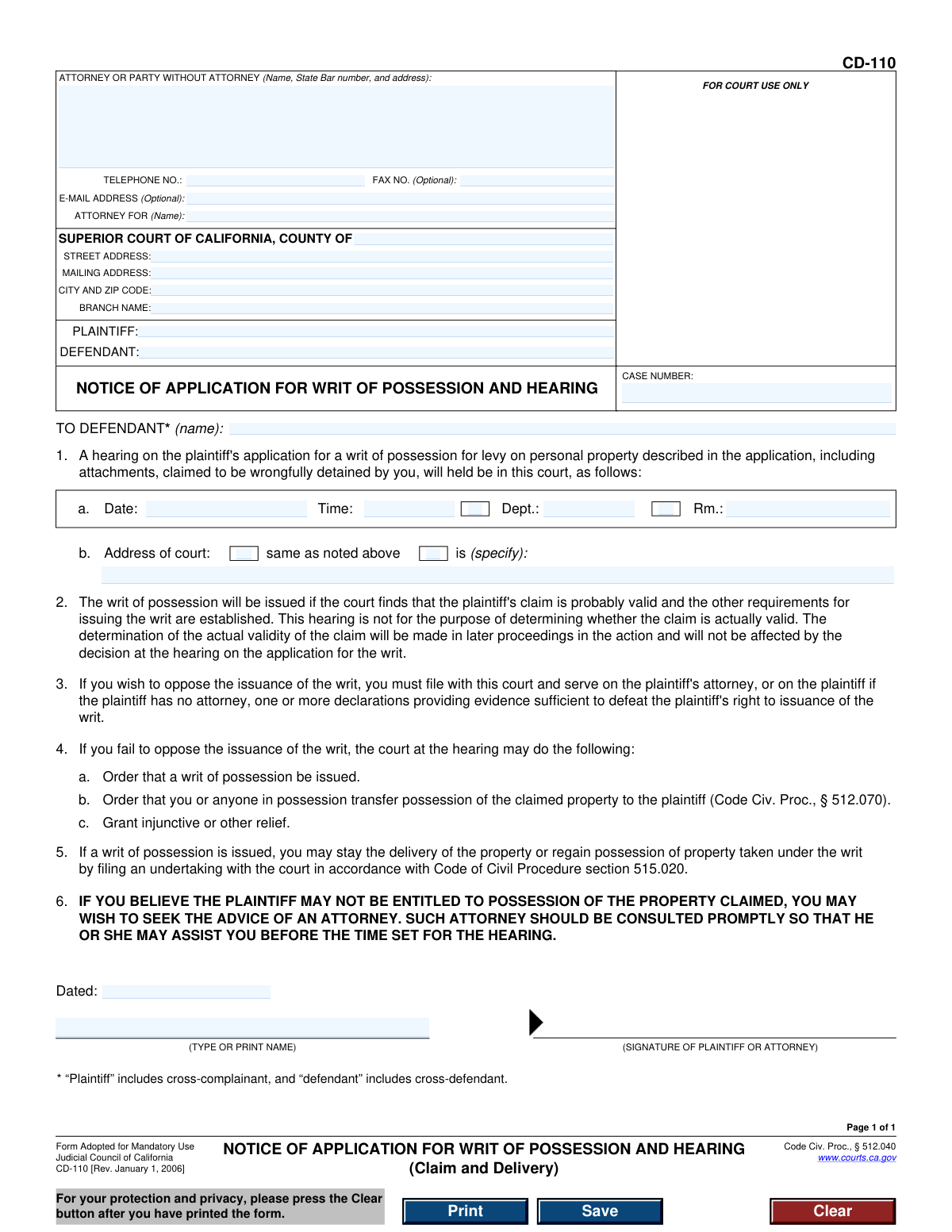
Yes! You can use AI to fill out Form CD-110, Notice of Application for Writ of Possession and Hearing (Claim and Delivery)

This is the official California Form CD-110, the Notice of Application for Writ of Possession and Hearing. It is used in a 'Claim and Delivery' action to inform a defendant that a plaintiff has applied for a court order to take possession of personal property and to provide the date and time of the court hearing. This notice is a critical step in the legal process, ensuring the defendant has an opportunity to oppose the writ. Today, this form can be filled out quickly and accurately using AI-powered services like Instafill.ai, which can also convert non-fillable PDF versions into interactive fillable forms.
CD-110 is part of the California court forms and court claim forms categories on Instafill.
Our AI automatically handles information lookup, data retrieval, formatting, and form filling.
It takes less than a minute to fill out CD-110 using our AI form filling.
Securely upload your data. Information is encrypted in transit and deleted immediately after the form is filled out.

Form specifications

Form name: Form CD-110, Notice of Application for Writ of Possession and Hearing (Claim and Delivery)
Number of fields: 28
Number of pages: 1
Language: English
main-image

Instafill Demo: How to fill out PDF forms in seconds with AI

How to Fill Out CD-110 Online for Free in 2026

Are you looking to fill out a CD-110 form online quickly and accurately? Instafill.ai offers the #1 AI-powered PDF filling software of 2026, allowing you to complete your CD-110 form in just 37 seconds or less.
Follow these steps to fill out your CD-110 form online using Instafill.ai:
  1. 1 Navigate to an AI-powered form filler like Instafill.ai and upload or select the CD-110 form.
  2. 2 Enter the court and case information, including the county, court address, and the specific case number.
  3. 3 Provide the full names of the plaintiff and defendant as listed in the legal action.
  4. 4 Fill in the information for the attorney or party filing the form, including their name, address, and contact details.
  5. 5 Input the specific details for the court hearing: date, time, department, room, and the court's address.
  6. 6 Review all entered information for accuracy, then date and provide the name of the signatory.
  7. 7 Download the completed form for printing, signing, and filing with the court and serving on the defendant.

Our AI-powered system ensures each field is filled out correctly, reducing errors and saving you time.

Why Choose Instafill.ai for Your Fillable CD-110 Form?

Speed

Complete your CD-110 in as little as 37 seconds.

Up-to-Date

Always use the latest 2026 CD-110 form version.

Cost-effective

No need to hire expensive lawyers.

Accuracy

Our AI performs 10 compliance checks to ensure your form is error-free.

Security

Your personal information is protected with bank-level encryption.

Frequently Asked Questions About Form CD-110

This form is a legal notice informing you that a plaintiff has asked the court for permission to take personal property they claim you are wrongfully holding. It also specifies the date, time, and location of the court hearing where a judge will consider this request.

The plaintiff (the person or entity trying to recover the property) or their attorney is responsible for filling out and serving this form on the defendant. If you have received this form, you are the defendant in this legal action.

You must decide if you want to oppose the plaintiff's request. If you do, you need to file your own legal documents (declarations) with the court and serve them on the plaintiff before the hearing. It is strongly recommended that you consult an attorney immediately.

If you fail to oppose the application or appear at the hearing, the court is likely to grant the plaintiff's request. This can result in an order for a writ of possession to be issued, forcing you to turn over the property.

A writ of possession is an order from the court that allows a law enforcement officer to seize specific property from the person who currently possesses it and deliver it to the plaintiff.

No, this hearing is only to determine if the plaintiff's claim is 'probably valid' enough to issue the writ. The final determination of who has the right to the property will be decided in later proceedings in the main lawsuit.

To oppose the writ, you must file one or more declarations with the court providing evidence and arguments that defeat the plaintiff's right to possession. You must also serve a copy of these documents on the plaintiff or their attorney before the hearing.

Even if the writ is issued, you may be able to stop the seizure or regain possession of the property by filing an 'undertaking' with the court. An undertaking is a form of financial bond, and you should consult an attorney about this process.

The form itself strongly advises seeking the advice of an attorney promptly. These are complex legal proceedings, and a lawyer can help protect your rights and represent you effectively in court.

Yes, if you are the plaintiff, services like Instafill.ai can use AI to accurately auto-fill form fields like party and court information, saving time. If you are the defendant, AI tools can help fill out response forms, but they cannot provide legal advice.

You can use a service like Instafill.ai to complete this form digitally. Simply upload the document, and the platform will allow you to type directly into the fields, save your progress, and print the completed form for filing.

If you have a non-fillable or 'flat' PDF, you can upload it to a platform like Instafill.ai. Its technology can convert the static document into an interactive, fillable form that you can easily complete on your computer.

The top section requires the plaintiff or their attorney to provide their contact information, the specific California Superior Court details, the names of the plaintiff and defendant, and the case number.

Compliance CD-110
Validation Checks by Instafill.ai

1
Case Number Format Validation
This check ensures that the Case Number entered follows the standard format required by the California Superior Court. A valid case number is critical for the court clerk to correctly file the document and associate it with the proper case file. If the format is incorrect, the document may be rejected, causing delays in the legal process.
2
Attorney or Party Information Completeness
Validates that the 'ATTORNEY OR PARTY WITHOUT ATTORNEY' section, including name and address, is fully completed. This information is mandatory for identifying the filing party and providing a valid address for service of subsequent legal documents. An incomplete submission will be rejected as the court cannot process a filing from an unidentified party.
3
Plaintiff and Defendant Name Requirement
Ensures that both the 'PLAINTIFF' and 'DEFENDANT' fields are filled in. These fields identify the primary parties involved in the legal action. A form lacking the names of either party is fundamentally incomplete and cannot be processed, as it fails to specify who is suing whom.
4
Defendant Name Consistency Check
This validation compares the defendant's name in the header ('DEFENDANT:') with the name in the notice section ('TO DEFENDANT (name):'). The names must match exactly to ensure the notice is being served to the correct, officially named party in the lawsuit. A mismatch could invalidate the notice of hearing.
5
Future Hearing Date Requirement
Verifies that the 'Date' of the hearing in section 1.a is a valid date set in the future. Scheduling a hearing for a past or current date is impossible and would render the notice invalid. This check ensures that the defendant is given proper and legal advance notice of the court date.
6
Hearing Time Format
Checks that the 'Time' of the hearing in section 1.a is entered in a valid time format (e.g., HH:MM AM/PM). An ambiguous or incorrectly formatted time can cause parties to miss the hearing, potentially resulting in a default judgment. This validation prevents confusion and ensures all parties know the exact time to appear.
7
Hearing Location Completeness
Ensures that the 'Dept.' and/or 'Rm.' fields for the hearing are filled out. This information is critical for locating the specific courtroom where the hearing will take place within the courthouse. Without it, the parties and their attorneys would not know where to go, leading to missed appearances.
8
Court Address Selection Logic
Validates that exactly one of the two checkboxes in section 1.b regarding the court's address is selected. The user must specify whether the address is the 'same as noted above' or a different one. Failing to select one, or selecting both, creates ambiguity about the hearing location and will cause the form to be rejected.
9
Conditional Court Address Specification
If the checkbox 'is (specify):' for the court address is selected, this check ensures the corresponding text field is filled with a complete address. This rule prevents a situation where the form indicates a specific address will be provided but then leaves it blank. An empty field would make it impossible to determine the hearing location.
10
Signatory Name Requirement
Verifies that the 'TYPE OR PRINT NAME' field accompanying the signature line is completed. This printed name clearly identifies the individual who signed the form, whether it is the plaintiff or their attorney. A signature without a corresponding printed name can be considered invalid for official court records.
11
Signature Date Validity
This check ensures the 'Dated' field is a valid date that is on or before the current date of submission. A future date is illogical as one cannot attest to signing a document on a day that has not yet occurred. An invalid date can call the authenticity and timing of the entire document into question.
12
Telephone Number Format
Validates that the 'TELEPHONE NO.' field contains a number in a recognizable format (e.g., (XXX) XXX-XXXX or XXXXXXXXXX). This is the primary contact number for the court and opposing parties to reach the filer. An invalid number hinders communication and can delay proceedings.

Common Mistakes in Completing CD-110

Entering an Incorrect or Incomplete Case Number

Filers often mistype the case number or leave it blank, especially when dealing with multiple legal matters. An incorrect case number will cause the court clerk to reject the filing or, worse, file the notice in the wrong case, leading to significant delays and procedural complications. To avoid this, always double-check the case number against the original complaint or other official court documents. AI-powered tools like Instafill.ai can help by saving and auto-populating correct case information across related documents.

Incomplete 'Attorney or Party' Information

Parties, especially those representing themselves (pro se), may forget to fill out their full name, address, and phone number. Attorneys might omit their State Bar number, which is mandatory. Incomplete contact information can lead to the form's rejection and makes it impossible for the court and opposing party to communicate, potentially causing missed deadlines or hearings. Always fill this section completely; if you are an attorney, ensure your State Bar number is included.

Using Inconsistent Plaintiff/Defendant Names

The plaintiff and defendant names on this notice must exactly match the names listed on the original complaint and other official case documents. People often use abbreviations, nicknames, or slightly different spellings, which can create legal ambiguity about who the parties are. This can lead to challenges in enforcement and may require filing amended documents, causing delays. Carefully transcribe the names exactly as they appear in the official case caption.

Omitting the Specific Defendant's Name in the Notice

The line 'TO DEFENDANT (name):' is critical for directing the notice to the correct individual or entity. Filers sometimes leave this blank, assuming the caption at the top is sufficient. This invalidates the notice for that specific defendant, as it fails to properly inform them of the hearing. You must explicitly name each defendant being served on a separate notice form to ensure proper legal service.

Incorrect or Prematurely Entered Hearing Information

The hearing date, time, and department are assigned by the court clerk upon filing the application. A common error is to guess this information, leave it blank when it's required, or fill it out before the hearing has been officially scheduled. This can result in the notice being defective, causing all parties to miss the actual hearing. Always obtain the correct hearing details from the court clerk before completing and serving this notice.

Confusing the Court Address with the Hearing Location

The form provides a checkbox to indicate the hearing is at the same address listed at the top, or a space to write a different one. Filers may incorrectly assume the hearing is at the main courthouse when it's actually in a different branch or building. This error can cause the defendant to go to the wrong location and miss the hearing. Always verify the exact hearing location (street address, department, and room number) and mark the form accordingly.

Forgetting to Sign or Date the Form

An unsigned legal document is invalid and has no legal effect. Filers, in their haste, often print the form and forget to provide a signature or date it. The court will not process an unsigned or undated notice, leading to immediate rejection and requiring the entire filing and service process to be restarted. Always perform a final check to ensure the form is dated and signed by the plaintiff or their attorney.

Submitting Illegible Handwritten Information

This form is often available as a non-fillable PDF, tempting users to print and fill it out by hand. Poor handwriting can make names, dates, and case numbers unreadable to the court clerk and the opposing party, leading to rejection or data entry errors in the court's system. To prevent this, use a fillable version of the form whenever possible. Tools like Instafill.ai can convert flat PDFs into fillable forms, ensuring all entries are clear, legible, and properly formatted.

Failure to Specify 'Attorney For'

The field 'ATTORNEY FOR (Name):' is frequently overlooked, especially when an attorney is representing a plaintiff with a common name or one of several plaintiffs. This omission creates ambiguity about which party the attorney represents. This can cause confusion for the court and opposing counsel and may lead to rejection of the filing. The attorney should always clearly state the full name of the plaintiff they are representing in this field.

Incorrectly Identifying the Court County or Branch

California has numerous Superior Courts, each with multiple branches. A filer might mistakenly enter the county where they live instead of the county where the case was filed, or select the wrong branch name. This error will cause the document to be sent to the wrong courthouse, resulting in rejection and significant delays as the filer must then refile in the correct jurisdiction. Always verify the proper county and branch name from the initial case filing documents.
Saved over 80 hours a year

“I was never sure if my IRS forms like W-9 were filled correctly. Now, I can complete the forms accurately without any external help.”

Kevin Martin Green

Your data stays secure with advanced protection from Instafill and our subprocessors

Robust compliance program

Transparent business model

You’re not the product. You always know where your data is and what it is processed for.

ISO 27001, HIPAA, and GDPR

Our subprocesses adhere to multiple compliance standards, including but not limited to ISO 27001, HIPAA, and GDPR.

Security & privacy by design

We consider security and privacy from the initial design phase of any new service or functionality. It’s not an afterthought, it’s built-in, including support for two-factor authentication (2FA) to further protect your account.

Fill out CD-110 with Instafill.ai

Worried about filling PDFs wrong? Instafill securely fills form-cd-110-notice-of-application-for-writ-of-possession-and-hearing-claim-and-delivery forms, ensuring each field is accurate.

Related forms by category

California court forms Judicial Council of California Form SC-105, Request for Court Order and Answer (Small Claims), Judicial Council of California Form SC-120, Defendant’s Claim and ORDER to Go to Small Claims Court (Small Claims), Judicial Council of California Form SER-001, Request for Sheriff to Serve Court Papers, Judicial Council of California Form SER-001, Request for Sheriff to Serve Court Papers, Affidavit for Collection of Personal Property California Probate Code Section 13100, Form POS-040, Proof of Service—Civil, Declaration of Facts of Death (California Superior Court), declaration-of-marriage-for-court-proceeding-california-family-law, ADOPT-200, Adoption Request, ADOPT-200, Stepparent Adoption Request, ADOPT-210, Adoption Agreement, ADOPT-310, Contact After Adoption Agreement, Judicial Council of California Form ADOPT-200, Adoption Request, Form ADR-107, Mediation Attendance Sheet, Form ADR-110, Order Appointing Referee, Form ADR-109, Stipulation or Motion for Order Appointing Referee, Form ADR-102, Request for Trial De Novo After Judicial Arbitration, Form ADR-108, Referee's Report (Code Civ. Proc., §§ 638, 639), Form ADR-106, Petition to Confirm, Correct, or Vacate Contractual Arbitration Award, Form ADR-104, Rejection of Award and Request for Trial After Attorney-Client Fee Arbitration · + 169 more →
court claim forms Form SC-100, Plaintiff's Claim and ORDER to Go to Small Claims Court, Judicial Council of California Form SC-105, Request for Court Order and Answer (Small Claims), SC-120, Defendant’s Claim and ORDER to Go to Small Claims Court (Small Claims), SC-105, Request for Court Order and Answer (Small Claims), Judicial Council of California Form SC-120, Defendant’s Claim and ORDER to Go to Small Claims Court (Small Claims), Form SC-100, Plaintiff’s Claim and ORDER to Go to Small Claims Court, Certificate of Service (Civil Court Claim), Form N161, Appellant’s notice (All appeals except small claims track appeals and appeals to the Family Division of the High Court), Plaintiff's Claim and ORDER to Go to Small Claims Court (SC-100), Form N161, Appellant's Notice (All appeals except small claims track appeals and appeals to the Family Division of the High Court), Form SC-100A, Other Plaintiffs or Defendants (Attachment to Plaintiff's Claim and ORDER to Go to Small Claims Court), Form N461: Claim for judicial review, Statement of Small Claim and Notice, Trial Court of Massachusetts, State of Michigan, Form MC 25, Notice of Intent to Escheat Unclaimed Personal Property, Form MC 35, Complaint, Claim and Delivery, Form MC 36, Motion for Possession Pending Judgment, Claim and Delivery, Order of Possession Pending Judgment, Claim and Delivery, Form MC 38, Bond, Claim and Delivery, Form MC 39, Judgment, Claim and Delivery, Form MC 55, Claim of Appeal · + 12 more →