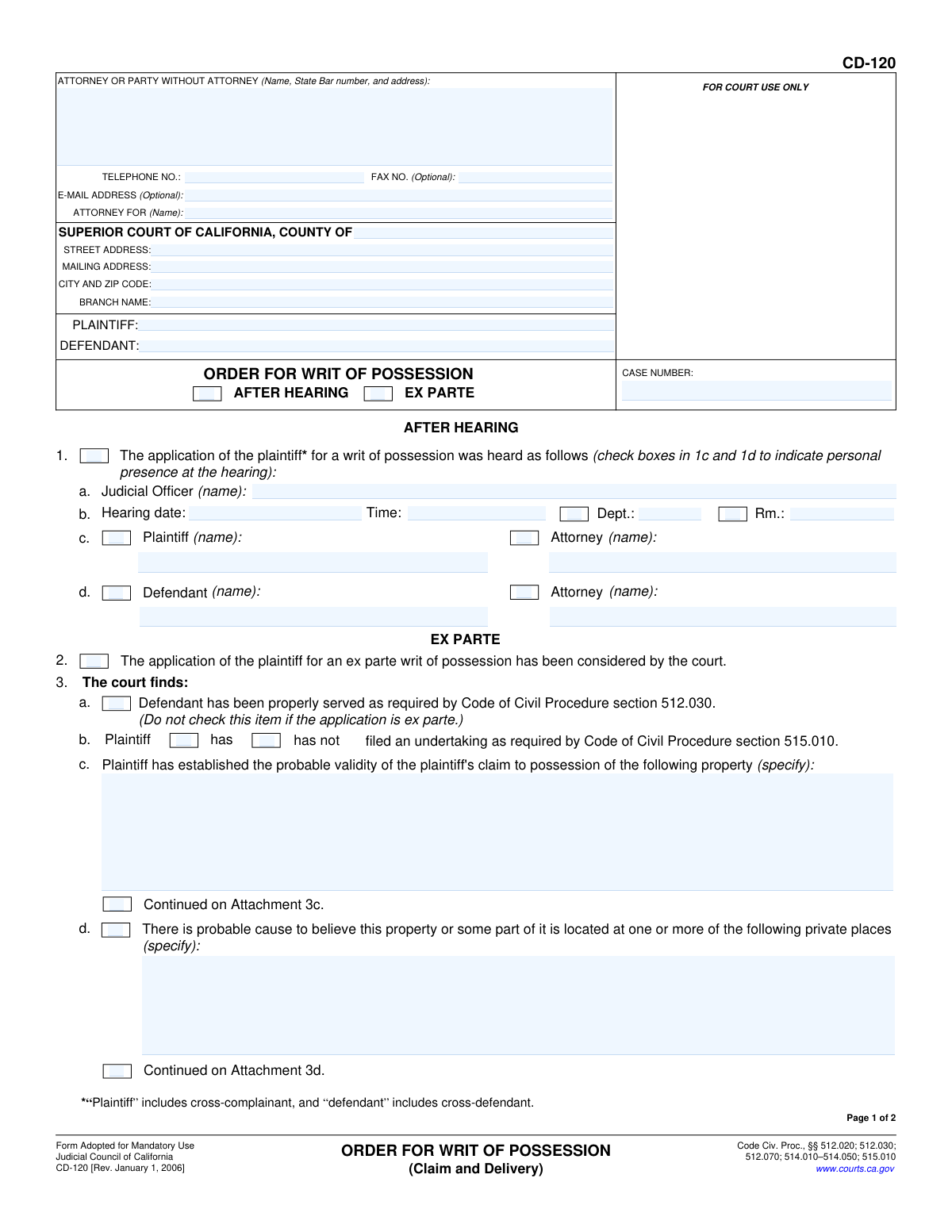
Yes! You can use AI to fill out Form CD-120, Order for Writ of Possession (Claim and Delivery)

Form CD-120, the Order for Writ of Possession, is a legal document issued by a California Superior Court judge. It officially orders a sheriff or marshal to seize specific personal property from a defendant and deliver it to the plaintiff, pending the final outcome of a lawsuit. This order is a critical enforcement tool in 'Claim and Delivery' actions, ensuring the property in dispute can be secured. Today, this form can be filled out quickly and accurately using AI-powered services like Instafill.ai, which can also convert non-fillable PDF versions into interactive fillable forms.
CD-120 is part of the California court forms and court claim forms categories on Instafill.
Our AI automatically handles information lookup, data retrieval, formatting, and form filling.
It takes less than a minute to fill out CD-120 using our AI form filling.
Securely upload your data. Information is encrypted in transit and deleted immediately after the form is filled out.

Form specifications

Form name: Form CD-120, Order for Writ of Possession (Claim and Delivery)
Number of fields: 63
Number of pages: 1
Language: English
main-image

Instafill Demo: How to fill out PDF forms in seconds with AI

How to Fill Out CD-120 Online for Free in 2026

Are you looking to fill out a CD-120 form online quickly and accurately? Instafill.ai offers the #1 AI-powered PDF filling software of 2026, allowing you to complete your CD-120 form in just 37 seconds or less.
Follow these steps to fill out your CD-120 form online using Instafill.ai:
  1. 1 Navigate to Instafill.ai and upload Form CD-120 or select it from the platform's template library.
  2. 2 Allow the AI to scan and process the form, identifying all fields for case information, parties, and court details.
  3. 3 Enter the case number, court information, and details for the plaintiff and defendant in the designated fields.
  4. 4 Indicate whether the order is after a hearing or ex parte, and check the appropriate boxes for the court's findings regarding the property and undertaking.
  5. 5 Clearly describe the property to be seized and specify the private place(s) where it is believed to be located, as found by the court.
  6. 6 Review the specific orders being issued, such as the undertaking amount and any directives for the defendant, ensuring all information is accurate.
  7. 7 Once the form is complete and reviewed, download the final document, ready for the judicial officer's signature and filing with the court.

Our AI-powered system ensures each field is filled out correctly, reducing errors and saving you time.

Why Choose Instafill.ai for Your Fillable CD-120 Form?

Speed

Complete your CD-120 in as little as 37 seconds.

Up-to-Date

Always use the latest 2026 CD-120 form version.

Cost-effective

No need to hire expensive lawyers.

Accuracy

Our AI performs 10 compliance checks to ensure your form is error-free.

Security

Your personal information is protected with bank-level encryption.

Frequently Asked Questions About Form CD-120

This is a court order signed by a judge that directs law enforcement to seize specific property from a defendant. It is used in 'Claim and Delivery' cases where a plaintiff is seeking the return of their property before the case is fully resolved.

While a plaintiff's attorney typically prepares the form, it is the judicial officer (the judge) who reviews, completes, and signs it. This form represents the court's official decision to grant the plaintiff's request to seize property.

An 'After Hearing' order is issued after a scheduled court date where both parties could be present. An 'Ex Parte' order is granted on an emergency basis without the defendant being present, which is only allowed under very specific and urgent circumstances.

An undertaking is a financial bond that the plaintiff must purchase and file with the court. It acts as a security deposit to cover any damages the defendant might suffer if the property is wrongfully taken and the plaintiff ultimately loses the lawsuit.

The court requires a specific description of the property to be seized, the probable location(s) of that property, and sufficient evidence that the plaintiff's claim to possession is likely valid.

The order directs the county sheriff or marshal to seize the property described in the form. The order may also grant them permission to enter a specific private location to retrieve the property.

The form contains a legal notice warning the defendant that failing to comply with the court's order to turn over possession can lead to being held in contempt of court, which may result in fines or jail time.

Yes, the defendant typically has the right to file their own undertaking (bond) to have the property returned to them while the case is ongoing. The required amount for the defendant's undertaking is specified by the judge in item 5d of the order.

The court will only issue an ex parte writ in limited situations, such as when the property was stolen, is a credit card, or is commercial property in immediate danger of being transferred, hidden, or destroyed.

Yes, services like Instafill.ai use AI to accurately auto-fill form fields, which can save time and reduce errors. It can help populate the case caption, including court, party, and attorney information, before you submit the proposed order to the court.

You can upload the CD-120 PDF to the Instafill.ai platform. The AI will identify the fields, allowing you to automatically populate case details or fill them in manually before printing the completed form.

If you have a non-fillable or 'flat' PDF, you can use a service like Instafill.ai. It can convert the document into an interactive, fillable form so you can easily type information into the correct fields on your computer.

Compliance CD-120
Validation Checks by Instafill.ai

1
Case Number Presence and Consistency
Ensures the 'CASE NUMBER' field is populated on both page 1 and page 2. It also verifies that the case number entered on page 1 is identical to the one on page 2. This is critical for document integrity and correct filing, as a mismatch could lead to the order being associated with the wrong case file.
2
Exclusive Hearing Type Selection
Validates that either the 'AFTER HEARING' checkbox or the 'EX PARTE' checkbox is selected at the top of the form, but not both. These options are mutually exclusive and dictate which sections of the order are applicable. Failure to select one, or selecting both, makes the basis of the order ambiguous and legally invalid.
3
Conditional Requirement for Hearing Details
If the 'AFTER HEARING' checkbox (item 1) is selected, this check ensures that the 'Hearing date' (1b), 'Time' (1b), and 'Judicial Officer' (1a) fields are all populated. These details are essential to document the official proceeding that justifies the order. If this information is missing, the order lacks a verifiable basis.
4
Conditional Requirement for Ex Parte Findings
If the 'EX PARTE' checkbox (item 2) is selected, this check verifies that at least one of the specific finding checkboxes in item 4 (4a, 4b, or 4c) is also checked. An ex parte order requires specific, heightened justifications, and failing to select one of these findings means the legal standard for the order has not been met.
5
Ex Parte Findings Count Accuracy
Verifies that the number entered in the 'Total number of boxes checked in item 4' field (4d) correctly matches the actual count of checkboxes selected in items 4a, 4b, and 4c. This serves as a clerical check to ensure accuracy and prevent misinterpretation of the court's findings. An incorrect count could cause confusion or legal challenges.
6
Conditional Undertaking Amount
Checks that if the order directs the clerk to issue the writ upon the plaintiff's filing of an undertaking (item 5c is checked), then a valid, positive dollar amount is entered in the corresponding amount field. The undertaking amount is a critical financial safeguard for the defendant, and the order is incomplete without it if required.
7
Attorney Name Presence When Indicated
If the 'Attorney' checkbox is checked for either the plaintiff (1c) or defendant (1d), this validation ensures the corresponding attorney name field is not empty. This is important for proper record-keeping and ensuring all parties of record are correctly identified. An empty field would create an incomplete and inaccurate record of who was present at the hearing.
8
Attachment Page Count Logic
Ensures that if any 'Continued on Attachment' checkbox is checked (items 3c, 3d, or 5f), the 'Number of pages attached' field (item 6) contains a positive integer (e.g., > 0). This prevents a situation where the order references an attachment that doesn't exist. If no attachments are indicated, this field should be 0 or empty.
9
Property Description Completeness
Validates that the text field in item 3c, which specifies the property to be seized, is not empty. The entire purpose of the writ is to recover specific property, so a clear and complete description is mandatory. An empty or vague description would render the writ unenforceable.
10
Valid Date Format
Checks that the 'Hearing date' (1b) and the final 'Dated' field near the signature line are entered in a valid date format (e.g., MM/DD/YYYY). This ensures the legal document is properly dated for enforceability and record-keeping. An invalid format would be rejected by the court clerk.
11
Undertaking Status Selection
In item 3b, this check ensures that one and only one of the 'has' or 'has not' checkboxes regarding the plaintiff's undertaking is selected. This finding is a required element of the order, and its status must be clearly and unambiguously stated. Selecting neither or both would make the finding invalid.
12
Currency Field Format
Validates that the monetary amounts entered for the plaintiff's undertaking (5c) and defendant's undertaking (5d) are valid numerical currency values. The system should reject non-numeric characters (except for a decimal point) and negative values. This ensures financial figures are accurate and machine-readable.
13
Party Identification
Ensures that the 'PLAINTIFF' and 'DEFENDANT' name fields in the header are populated. These are the primary parties to the action, and their identification is fundamental to the order. An order without named parties is legally meaningless and cannot be executed.
14
Judicial Officer Signature Date Presence
Verifies that the 'Dated' field next to the Judicial Officer's signature line is filled out. The date of the judge's signature is what makes the order official and effective. An undated order is not legally binding and would be considered a clerical error requiring correction.

Common Mistakes in Completing CD-120

Inconsistent Case and Party Information

Users often forget to fill in the Case Number, Plaintiff, and Defendant names on the top of page 2, or they enter information that doesn't exactly match page 1. This happens due to oversight when dealing with multi-page documents. An inconsistency can lead to the clerk rejecting the form or confusion when the pages are separated, potentially delaying the issuance of the writ. To avoid this, carefully review both pages to ensure all header information is present and identical. AI-powered tools like Instafill.ai can automatically populate recurring information across all pages of a form, ensuring perfect consistency.

Providing a Vague or Incomplete Property Description

In section 3c, parties describe the property to be seized with insufficient detail, for example, writing 'a vehicle' instead of 'a 2021 Honda Civic, blue, VIN: [specific VIN]'. This ambiguity makes the order unenforceable, as the sheriff cannot be certain which property to legally seize. An order with a vague description will be rejected by the court or prove useless in practice. Always provide the most specific description possible, including make, model, color, serial numbers, VINs, or any other unique identifiers.

Confusing 'After Hearing' vs. 'Ex Parte' Applications

Parties may misunderstand the legal distinction and check the wrong box at the top of the form, or even check both. An 'After Hearing' order is issued after both parties have had a chance to be heard, while an 'Ex Parte' order is granted without notice to the defendant under urgent circumstances. Selecting the wrong option misrepresents the procedural posture of the case, which will cause the judge to reject the proposed order and require resubmission, delaying the entire process. Ensure you select the one box that accurately reflects the court proceeding that occurred.

Incomplete Property Location Details

In sections 3d and 5f, users must specify the private place(s) where the property is believed to be located, which authorizes the sheriff to enter. Often, this is left blank, filled with a partial address, or the information from 3d is not repeated in 5f. An incomplete order prevents law enforcement from acting, rendering the writ ineffective. Always provide the full street address, including city, state, zip code, and any apartment or unit number, in both sections 3d and 5f.

Omitting Required Undertaking (Bond) Amounts

Sections 5c and 5d require the dollar amounts for the plaintiff's undertaking (a bond to protect the defendant) and the defendant's redelivery undertaking. Parties submitting a proposed order sometimes leave these fields blank, expecting the judge to fill them in. An order without these amounts is incomplete and cannot be processed by the clerk, resulting in the order being returned for completion and causing significant delays. You should calculate and include a reasonable proposed amount in these fields for the judge's approval.

Incorrectly Completing the 'Ex Parte' Findings Section

When an order is granted 'After Hearing,' parties sometimes mistakenly check boxes in Section 4, which is reserved exclusively for 'Ex Parte' findings. Conversely, on a valid ex parte application, they may forget to check the relevant boxes or fail to fill in the total count in item 4d. These errors show a misunderstanding of the form's requirements and will lead to rejection. Section 4 should only be completed if the court is issuing an ex parte writ, and all applicable findings must be checked and tallied correctly.

Failing to Indicate Who Was Present at the Hearing

In section 1, which applies to orders made 'After Hearing,' there are checkboxes in 1c and 1d to indicate the personal presence of the plaintiff, defendant, and their attorneys. Fillers often write in the names but forget to check the corresponding boxes. This information creates a formal record of who appeared at the hearing. Omitting these checks can lead to the form being returned by the clerk for correction, delaying the finalization of the order. Always check the appropriate boxes next to the names of all individuals who were present.

Forgetting to List the Number of Attached Pages

Item 6 on page 2 asks for the 'Number of pages attached,' which is crucial for ensuring the complete order is filed and served. People often forget to fill this in, especially when attachments are used for property descriptions (3c) or locations (3d, 5f). An incorrect or missing page count can lead to an incomplete court record, creating legal vulnerabilities if a party later claims they did not receive the full order. Always count all attachment pages and enter the total in item 6 before submitting the form for the judge's signature.

Omitting the Defendant's Name in the Turnover Order

Section 5g is a direct order to a specific defendant to 'transfer possession of the property.' In cases with multiple defendants, it is common to forget to fill in the name of the specific defendant who has possession. Leaving this blank makes the order ambiguous and potentially unenforceable against any particular individual. This can lead to challenges and non-compliance. Always specify the full name of the defendant being ordered to turn over the property to ensure the order is clear and legally binding.

Incorrectly Identifying the 'Attorney For'

In the top header, the 'ATTORNEY FOR (Name):' field is frequently filled out incorrectly. An attorney might mistakenly write their own name again instead of their client's (the Plaintiff's) name, or a self-represented litigant might leave it blank. The correct entry is the name of the plaintiff. This error can cause confusion in the clerk's office and in the case file. To avoid this, attorneys should enter their client's name, and self-represented parties should enter their own name as they are the plaintiff.
Saved over 80 hours a year

“I was never sure if my IRS forms like W-9 were filled correctly. Now, I can complete the forms accurately without any external help.”

Kevin Martin Green

Your data stays secure with advanced protection from Instafill and our subprocessors

Robust compliance program

Transparent business model

You’re not the product. You always know where your data is and what it is processed for.

ISO 27001, HIPAA, and GDPR

Our subprocesses adhere to multiple compliance standards, including but not limited to ISO 27001, HIPAA, and GDPR.

Security & privacy by design

We consider security and privacy from the initial design phase of any new service or functionality. It’s not an afterthought, it’s built-in, including support for two-factor authentication (2FA) to further protect your account.

Fill out CD-120 with Instafill.ai

Worried about filling PDFs wrong? Instafill securely fills form-cd-120-order-for-writ-of-possession-claim-and-delivery forms, ensuring each field is accurate.

Related forms by category

California court forms Judicial Council of California Form SC-105, Request for Court Order and Answer (Small Claims), Judicial Council of California Form SC-120, Defendant’s Claim and ORDER to Go to Small Claims Court (Small Claims), Judicial Council of California Form SER-001, Request for Sheriff to Serve Court Papers, Judicial Council of California Form SER-001, Request for Sheriff to Serve Court Papers, Affidavit for Collection of Personal Property California Probate Code Section 13100, Form POS-040, Proof of Service—Civil, Declaration of Facts of Death (California Superior Court), Declaration of Marriage for Court Proceeding (California Family Law), ADOPT-200, Adoption Request, ADOPT-200, Stepparent Adoption Request, ADOPT-210, Adoption Agreement, ADOPT-310, Contact After Adoption Agreement, Judicial Council of California Form ADOPT-200, Adoption Request, Form ADR-107, Mediation Attendance Sheet, Form ADR-110, Order Appointing Referee, Form ADR-109, Stipulation or Motion for Order Appointing Referee, Form ADR-102, Request for Trial De Novo After Judicial Arbitration, Form ADR-108, Referee's Report (Code Civ. Proc., §§ 638, 639), Form ADR-106, Petition to Confirm, Correct, or Vacate Contractual Arbitration Award, Form ADR-104, Rejection of Award and Request for Trial After Attorney-Client Fee Arbitration · + 30 more →
court claim forms Form SC-100, Plaintiff's Claim and ORDER to Go to Small Claims Court, Judicial Council of California Form SC-105, Request for Court Order and Answer (Small Claims), SC-120, Defendant’s Claim and ORDER to Go to Small Claims Court (Small Claims), SC-105, Request for Court Order and Answer (Small Claims), Judicial Council of California Form SC-120, Defendant’s Claim and ORDER to Go to Small Claims Court (Small Claims), Form SC-100, Plaintiff’s Claim and ORDER to Go to Small Claims Court, Certificate of Service (Civil Court Claim), Form N161, Appellant’s notice (All appeals except small claims track appeals and appeals to the Family Division of the High Court), Plaintiff's Claim and ORDER to Go to Small Claims Court (SC-100), Form N161, Appellant's Notice (All appeals except small claims track appeals and appeals to the Family Division of the High Court), Form SC-100A, Other Plaintiffs or Defendants (Attachment to Plaintiff's Claim and ORDER to Go to Small Claims Court), Form N461: Claim for judicial review, Statement of Small Claim and Notice, Trial Court of Massachusetts, State of Michigan, Form MC 25, Notice of Intent to Escheat Unclaimed Personal Property, Form MC 35, Complaint, Claim and Delivery, Form MC 36, Motion for Possession Pending Judgment, Claim and Delivery, Order of Possession Pending Judgment, Claim and Delivery, Form MC 38, Bond, Claim and Delivery, Form MC 39, Judgment, Claim and Delivery, Form MC 55, Claim of Appeal · + 4 more →