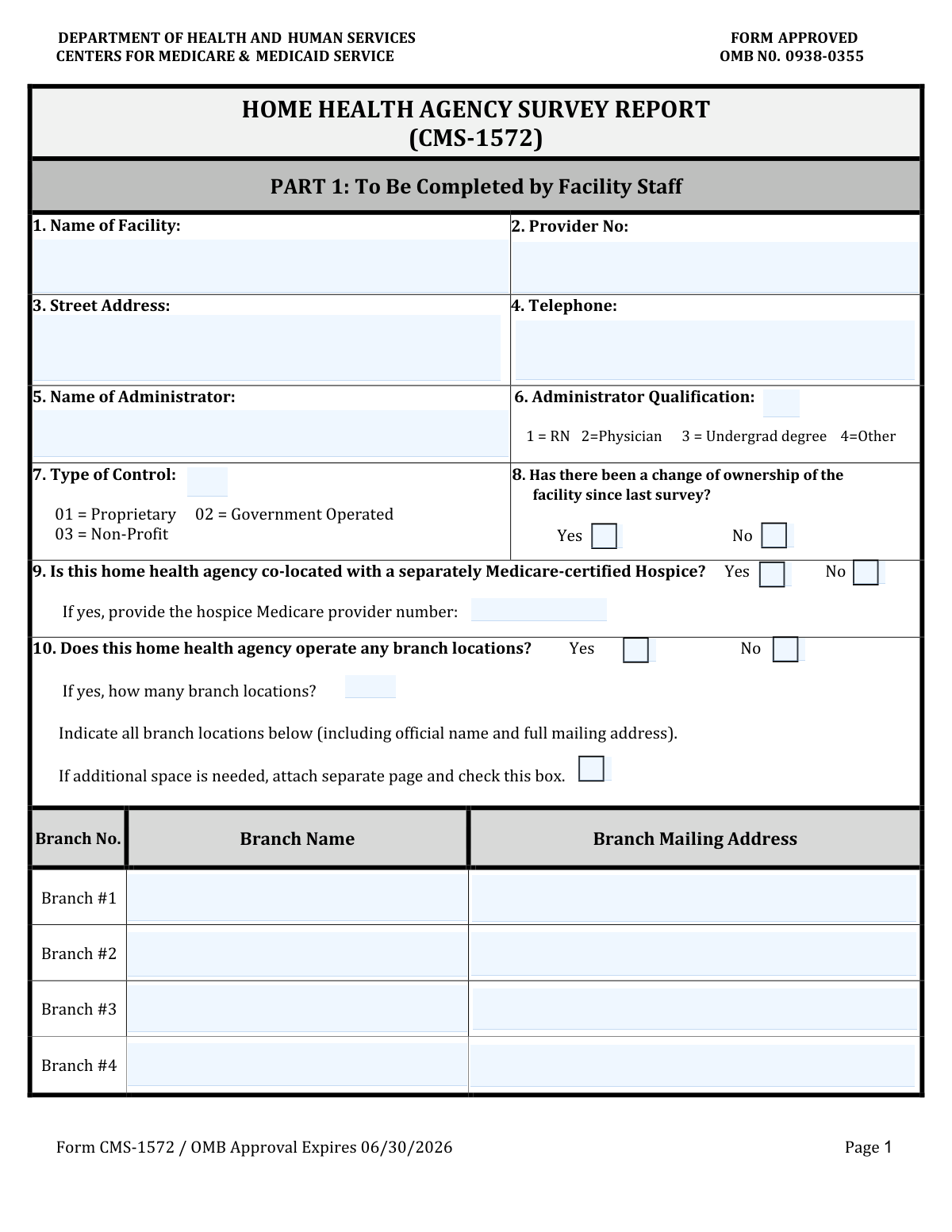
Yes! You can use AI to fill out Form CMS-1572, Home Health Agency Survey and Certification Report
Form CMS-1572, the Home Health Agency Survey and Certification Report, is a critical document used by the Centers for Medicare & Medicaid Services (CMS) to gather detailed information from home health agencies. This form is essential for the initial certification and subsequent recertification processes, as it provides a comprehensive overview of the agency's facility, administration, staffing, and the types of services offered, ensuring compliance with federal regulations. Today, this form can be filled out quickly and accurately using AI-powered services like Instafill.ai, which can also convert non-fillable PDF versions into interactive fillable forms.
Our AI automatically handles information lookup, data retrieval, formatting, and form filling.
It takes less than a minute to fill out CMS-1572 using our AI form filling.
Securely upload your data. Information is encrypted in transit and deleted immediately after the form is filled out.
Form specifications
| Form name: | Form CMS-1572, Home Health Agency Survey and Certification Report |
| Number of fields: | 61 |
| Number of pages: | 3 |
| Language: | English |
| Categories: | CMS forms, certification forms, health forms, EU agency forms |
Instafill Demo: How to fill out PDF forms in seconds with AI
How to Fill Out CMS-1572 Online for Free in 2026
Are you looking to fill out a CMS-1572 form online quickly and accurately? Instafill.ai offers the #1 AI-powered PDF filling software of 2026, allowing you to complete your CMS-1572 form in just 37 seconds or less.
Follow these steps to fill out your CMS-1572 form online using Instafill.ai:
- 1 Navigate to Instafill.ai and upload your Form CMS-1572 or select it from the template library.
- 2 Allow the AI to scan the document and identify all data fields, including facility identification, staffing tables, and service codes.
- 3 Answer the AI's straightforward questions to provide information for facility contact details, administrator qualifications, and type of control.
- 4 Detail the services your agency provides and input the Full-Time Equivalent (FTE) numbers for direct hire and arranged staff across all roles, such as nurses, therapists, and aides.
- 5 The AI will intelligently handle conditional logic, only asking for branch location or co-located hospice information if you indicate they apply.
- 6 Review all the auto-populated information for accuracy, then provide the name, title, and completion date of the person filling out the form.
- 7 Download your completed, professionally formatted CMS-1572, ready for submission to the appropriate state survey agency or CMS regional office.
Our AI-powered system ensures each field is filled out correctly, reducing errors and saving you time.
Why Choose Instafill.ai for Your Fillable CMS-1572 Form?
Speed
Complete your CMS-1572 in as little as 37 seconds.
Up-to-Date
Always use the latest 2026 CMS-1572 form version.
Cost-effective
No need to hire expensive lawyers.
Accuracy
Our AI performs 10 compliance checks to ensure your form is error-free.
Security
Your personal information is protected with bank-level encryption.
Frequently Asked Questions About Form CMS-1572
This form is designed to collect identification, operational, and staffing data for a home health agency. It should be completed by the facility's administrator or another authorized representative.
The Provider Number is a unique ID assigned to your facility for certification and billing, often by Medicare or a state agency. You can usually find this number on previous certification documents or official correspondence.
The 'Type of Control' code identifies your facility's ownership structure. Common codes include '01' for proprietary (for-profit), '02' for government-operated, and '03' for non-profit organizations.
You only need to provide details for branch locations if you check 'Yes' for the 'Operates Branch Locations' field. If your agency does not have any branches, you can skip these sections.
The form has space for four branches. If you have more, list the first four, check the 'Additional Branch Locations Page Attached' box, and attach a separate page with the remaining branch information.
'Direct Hire' refers to staff who are employees of your home health agency. 'Staff Under Arrangement' refers to personnel provided through a contract with another organization or as independent contractors.
FTE measures a worker's hours relative to a full-time workload. For example, if a full-time week is 40 hours, an employee working 20 hours is 0.5 FTE, and two such employees would equal 1.0 FTE.
You should only enter the Hospice Medicare Provider Number if your home health agency is co-located with a separately Medicare-certified Hospice and you have checked 'Yes' for that option.
The FTE fields you fill depend on the service response code you select (1, 2, or 3). For example, if you select '1' (HHA staff), you only fill the 'Direct Hire' FTE field; if you select '3' (Combination), you can fill both.
This field is for surveys conducted by reviewing patient records without any actual home visits. If home visits were part of the survey, you would fill out 'Total Home Visits' and leave this field blank.
Yes, services like Instafill.ai use AI to accurately auto-fill form fields from your saved information. This can save you significant time and help reduce errors, especially for recurring forms.
Simply upload the form to the Instafill.ai platform. The AI will make the document interactive, allowing you to fill it out online, save your progress, and securely store your information for future use.
You can use a service like Instafill.ai, which can convert flat, non-fillable PDFs into interactive, fillable forms. This allows you to type your answers directly into the fields online.
Compliance CMS-1572
Validation Checks by Instafill.ai
1
Ensures Required Facility Identification Fields are Complete
This check verifies that the 'Facility Name' and 'Provider Number' fields are not empty. These fields are primary identifiers essential for uniquely identifying the facility in the system. A submission without this information would be unclassifiable and could not be processed correctly, leading to rejection.
2
Validates Telephone Number Format
This validation ensures the 'Telephone Number' field adheres to a standard format, such as (XXX) XXX-XXXX or XXX-XXX-XXXX. Correct formatting is crucial for ensuring the contact information is machine-readable and usable for communication. An invalid format could prevent automated systems from parsing the number and hinder attempts to contact the facility.
3
Validates 'Date Form Completed' is a Valid and Logical Date
This check confirms that the 'Date Form Completed' field contains a valid date in a recognized format (e.g., MM/DD/YYYY) and is not a future date. This date is critical for auditing purposes and establishing the timeliness of the submission. An invalid or future date would compromise the integrity of the record and cause processing errors.
4
Ensures Mutually Exclusive Selection for 'Change of Ownership'
This validation confirms that only one of the 'Change of Ownership - Yes' or 'Change of Ownership - No' options is selected. These options are mutually exclusive, and selecting both creates a logical contradiction. If both are selected, the form is ambiguous and cannot be processed accurately, requiring user correction.
5
Conditional Requirement for Hospice Medicare Provider Number
This check enforces that if 'Co-located with Medicare-certified Hospice - Yes' is selected, the 'Hospice Medicare Provider Number' field must be filled. This ensures that when a facility declares a co-location, the corresponding identifier for the hospice is also provided for verification. A missing provider number would render the co-location information incomplete and unverifiable.
6
Conditional Requirement for Branch Location Details
This validation ensures that if 'Operates Branch Locations - Yes' is selected, the 'Number of Branch Locations' field must contain a numeric value greater than zero. It is a logical inconsistency to state that branches are operated without specifying how many. If this rule fails, the user should be prompted to provide a count for the number of branches.
7
Ensures Branch Count Matches Provided Branch Details
This check cross-references the 'Number of Branch Locations' with the number of filled-in branch name/address sections. For example, if the number is '2', the system expects details for the first and second branches, but not the third or fourth. This prevents discrepancies between the stated total and the itemized list, ensuring data consistency.
8
Validates Service Provision Response Codes
This check ensures that all 'Services Provided' response fields (e.g., 'Skilled Nursing Response', 'Physical Therapy Response') contain only one of the valid codes: 1, 2, or 3. Any other value is invalid and would disrupt the conditional logic for the FTE staffing section. This validation is crucial for maintaining data integrity for service and staffing reporting.
9
Validates Skilled Nursing FTE Entry Based on Service Response
This check ensures FTE values for Skilled Nursing are entered correctly based on the 'Skilled Nursing Response' code. If the code is '1' (HHA staff), 'Direct Hire Registered Nurses FTEs' should have a value, while 'Arrangement Registered Nurses FTEs' should be zero or empty. This logic prevents data entry errors and ensures staffing data accurately reflects the service provision model.
10
Ensures All FTE Staffing Fields are Numeric
This validation verifies that all Full-Time Equivalent (FTE) fields for all staff types contain only valid numeric values, which can include decimals. Non-numeric entries would prevent the accurate calculation of total staffing levels and lead to data corruption. The system should reject submissions with text or special characters in these fields.
11
Validates 'Type of Control' Code
This check verifies that the value entered in the 'Type of Control' field is one of the predefined valid codes (e.g., 01, 02, 03). Using a non-standard code would lead to misclassification of the facility's ownership structure and cause reporting errors. The system should reject invalid codes and ideally provide a dropdown list of valid options to the user.
12
Validates Logic Between 'Total Home Visits' and 'Records Reviewed No Home Visits'
This validation ensures that if 'Total Home Visits' has a value greater than 0, the 'Records Reviewed No Home Visits' field must be empty or 0. Conversely, if 'Records Reviewed No Home Visits' has a value, 'Total Home Visits' must be 0 or empty. This enforces the rule that these two fields are mutually exclusive, preventing contradictory survey data.
Common Mistakes in Completing CMS-1572
This form has many fields that should only be filled out if a specific condition is met, such as providing branch details only if 'Operates Branch Locations - Yes' is checked. People often miss these instructions, either leaving required fields blank or filling in unnecessary ones, leading to incomplete or confusing submissions. To avoid this, carefully read the 'Fill only if...' instructions for each field. AI-powered tools like Instafill.ai can automatically show or hide these conditional fields based on your answers, preventing such errors.
A common error is providing conflicting information about branch locations. For example, a user might check 'Operates Branch Locations - Yes' but enter '0' in the 'Number of Branch Locations' field, or list three branches but enter '2' as the total number. This inconsistency requires manual follow-up and delays processing. Always ensure the number of branches listed matches the total count provided, and check the 'Additional Branch Locations Page Attached' box if you list more branches than the form allows.
The 'Services Provided' section requires a numeric code (1, 2, or 3) to indicate how a service is offered, but users often mistakenly write out the description like 'HHA staff' or 'Combination'. This causes data entry failure as the system expects a number, not text. Always use the specified numeric codes. If the form is a non-fillable PDF, a tool like Instafill.ai can convert it to a fillable version with dropdowns for these codes to prevent errors.
The staffing FTE fields are dependent on the service provision codes. For instance, 'Direct Hire Registered Nurses FTEs' should only be filled if the 'Skilled Nursing Response' is '1' (HHA staff) or '3' (Combination). Users frequently enter FTE numbers in the wrong columns (e.g., Direct Hire vs. Arrangement) or fill them out even when the corresponding service code doesn't apply. This leads to inaccurate staffing reports and requires correction. Double-check that each FTE entry aligns with the service provision code you selected for that category.
Fields like 'Facility Name' and 'Administrator Name' explicitly request the 'full legal name' or 'full name.' People often use common abbreviations, acronyms, or informal names out of habit, which can cause mismatches with official records and legal documents. This can lead to rejection of the form or delays in processing. Always write out the complete, official name as it appears on legal or registration documents.
The form contains several pairs of Yes/No checkboxes, such as for 'Change of Ownership' and 'Co-located with Medicare-certified Hospice.' A frequent mistake is checking both 'Yes' and 'No' for the same question, or leaving both unchecked. This creates ambiguity and requires clarification, delaying the form's acceptance. Ensure you select only one option for each pair to provide a clear answer.
If a user checks 'Yes' for 'Co-located with Medicare-certified Hospice,' they must also provide the 'Hospice Medicare Provider Number.' It is common for filers to check the box but forget to fill in the corresponding provider number, rendering the section incomplete. This requires follow-up to obtain the missing information. To prevent this, treat these fields as a pair; if you answer 'Yes,' immediately locate and enter the required provider number.
The fields 'Total Home Visits' and 'Records Reviewed No Home Visits' have a specific relationship that is often misunderstood. The 'Records Reviewed' field should only be filled if the 'Total Home Visits' is zero or blank. Users sometimes enter values in both fields, creating a logical contradiction that flags the submission for review. Carefully follow the instructions to ensure you are only reporting one of these metrics as applicable.
The form consistently asks for Full-Time Equivalent (FTE) numbers for staffing, not a simple headcount of employees. Users may not understand the distinction or may not have the calculated FTE figures readily available, leading them to enter the total number of people instead. This results in significantly skewed staffing data. Ensure you are calculating and entering the correct FTE value, which represents the hours worked by part-time employees in terms of full-time positions.
Fields like 'Type of Control' and 'Administrator Qualification Code' require specific numeric codes that correspond to predefined categories. Users may guess the code, enter a description instead, or leave it blank if they don't have the reference list handy. This leads to invalid data that cannot be processed automatically. Always refer to the official code list for the form and enter the exact numeric code required. AI form-fillers like Instafill.ai can often pre-populate these fields or provide dropdown menus to ensure accuracy.
Saved over 80 hours a year
“I was never sure if my IRS forms like W-9 were filled correctly. Now, I can complete the forms accurately without any external help.”
Kevin Martin Green
Your data stays secure with advanced protection from Instafill and our subprocessors

Robust compliance program
Transparent business model
You’re not the product. You always know where your data is and what it is processed for.
ISO 27001, HIPAA, and GDPR
Our subprocesses adhere to multiple compliance standards, including but not limited to ISO 27001, HIPAA, and GDPR.
Security & privacy by design
We consider security and privacy from the initial design phase of any new service or functionality. It’s not an afterthought, it’s built-in, including support for two-factor authentication (2FA) to further protect your account.
Fill out CMS-1572 with Instafill.ai
Worried about filling PDFs wrong? Instafill securely fills form-cms-1572-home-health-agency-survey-and-certification-report forms, ensuring each field is accurate.