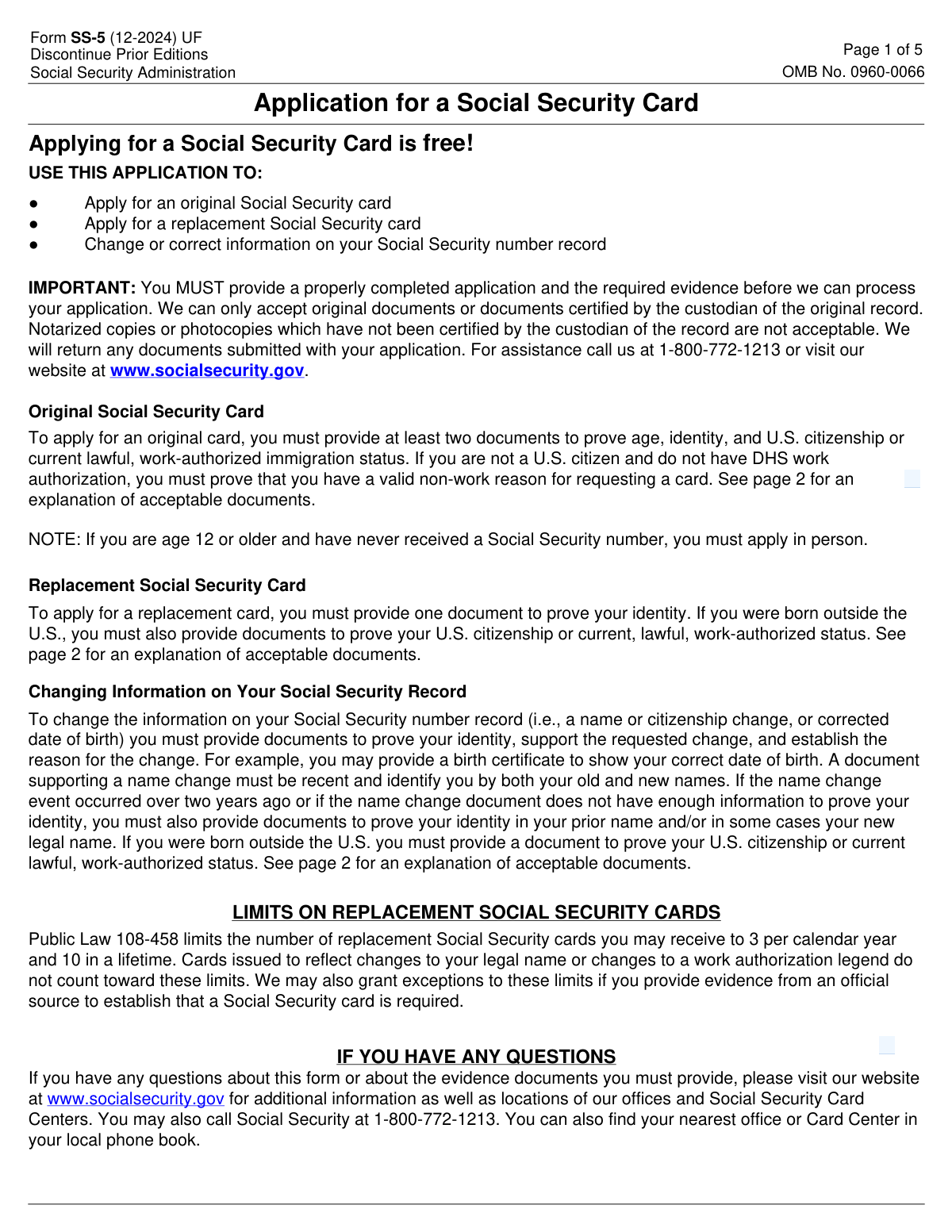
Yes! You can use AI to fill out Form SS-5, Application for a Social Security Card
Form SS-5 is the official application used by the Social Security Administration (SSA) to apply for an original Social Security card, request a replacement, or change information on your record. Completing this form is a crucial step for anyone needing a Social Security number for employment, tax purposes, or to receive certain government benefits. Today, this form can be filled out quickly and accurately using AI-powered services like Instafill.ai, which can also convert non-fillable PDF versions into interactive fillable forms.
SS-5 is part of the
CAR forms, SEC forms, SOC forms and social security forms categories on Instafill.
Our AI automatically handles information lookup, data retrieval, formatting, and form filling.
It takes less than a minute to fill out SS-5 using our AI form filling.
Securely upload your data. Information is encrypted in transit and deleted immediately after the form is filled out.
Form specifications
| Form name: | Form SS-5, Application for a Social Security Card |
| Number of fields: | 70 |
| Number of pages: | 5 |
| Language: | English |
More forms in CAR forms
Instafill Demo: How to fill out PDF forms in seconds with AI
How to Fill Out SS-5 Online for Free in 2026
Are you looking to fill out a SS-5 form online quickly and accurately? Instafill.ai offers the #1 AI-powered PDF filling software of 2026, allowing you to complete your SS-5 form in just 37 seconds or less.
Follow these steps to fill out your SS-5 form online using Instafill.ai:
- 1 Navigate to Instafill.ai and upload your Form SS-5, or select it from their library of official documents.
- 2 Allow the AI to scan and identify all the required fields on the application, including personal information, citizenship status, and parental details.
- 3 Answer simple questions in a conversational chat, and the AI will populate your answers into the correct sections of the form.
- 4 Review the auto-filled Form SS-5 to ensure all your personal details, such as your name, date of birth, and parents' information, are accurate.
- 5 Use the form's instructions to gather the necessary original or certified documents required for submission, such as proof of age, identity, and citizenship.
- 6 Download the completed form, print it, and sign it by hand. Submit the signed application along with your supporting documents to your local Social Security office as instructed.
Our AI-powered system ensures each field is filled out correctly, reducing errors and saving you time.
Why Choose Instafill.ai for Your Fillable SS-5 Form?
Speed
Complete your SS-5 in as little as 37 seconds.
Up-to-Date
Always use the latest 2026 SS-5 form version.
Cost-effective
No need to hire expensive lawyers.
Accuracy
Our AI performs 10 compliance checks to ensure your form is error-free.
Security
Your personal information is protected with bank-level encryption.
Frequently Asked Questions About Form SS-5
Form SS-5 is the official application used to apply for an original Social Security card, request a replacement card, or to change or correct information on your Social Security record.
No, applying for an original, replacement, or corrected Social Security card using Form SS-5 is completely free.
You must provide original documents or certified copies to prove your age, identity, and U.S. citizenship or lawful immigration status. Photocopies and notarized copies are not acceptable.
No, if you are age 12 or older and applying for an original Social Security number, you are required to apply in person at a Social Security office.
You are limited to three replacement cards per calendar year and ten in your lifetime. Cards issued for legal name changes or updates to work authorization do not count toward these limits.
You must provide the parents' Social Security numbers in items 9B and 10B. If a parent's number is not known and cannot be obtained, you should check the 'unknown' box for that parent.
If you are 18 or older and capable, you must sign the form yourself. For applicants under 18, a parent or legal guardian may sign, and for an adult who cannot sign, a legal guardian or close relative may generally sign.
You can take or mail your signed application and original documents to any Social Security office or Social Security Card Center. Your documents will be returned to you after processing.
After your application is processed, you should receive your card at the mailing address you provided within 7 to 14 days.
No, providing your race and ethnicity information is voluntary. This information is used for statistical purposes and does not affect the decision on your application.
No, a birth certificate cannot be used as evidence of identity. You must provide a current, unexpired document like a U.S. driver's license, state-issued ID card, or passport to prove your identity.
Yes, services like Instafill.ai use AI to accurately auto-fill form fields, which can save you time and help prevent common errors on your application.
You can use a service like Instafill.ai to fill out the form online. Simply upload the SS-5 PDF, and the platform will make it interactive so you can type your information directly into the fields before printing.
If you have a non-fillable or 'flat' PDF, you can use a tool like Instafill.ai to instantly convert it into an interactive, fillable form. This allows you to easily type your answers instead of filling it out by hand.
Compliance SS-5
Validation Checks by Instafill.ai
1
Applicant Name Completeness
This check ensures that the 'First Name' and 'Last Name' fields in Item 1 ('NAME TO BE SHOWN ON CARD') are both completed. A full legal name is required to issue a Social Security card and establish a proper record. If these fields are missing, the application is incomplete and cannot be processed, leading to rejection and delays.
2
Date of Birth Format and Validity
This validation verifies that the 'DATE OF BIRTH' in Item 4 is entered in the correct MM/DD/YYYY format and represents a valid, logical date that is not in the future. This is critical for establishing identity and eligibility, and an incorrect or improperly formatted date will cause the application to fail processing. The system must reject impossible dates like '02/30/2023' or future dates.
3
SSN Format Validation
This check confirms that any Social Security Number entered on the form (in Items 2, 9B, or 10B) follows the standard 9-digit format, often represented as XXX-XX-XXXX. This ensures data integrity for linking records or identifying parents. An incorrectly formatted SSN would prevent database lookups and cause processing errors, requiring manual correction.
4
Conditional Previous Filer Information
This is a logical check that triggers if the applicant answers 'Yes' to Item 11 ('Has the person... ever filed for or received a Social Security number card before?'). If 'Yes' is selected, the system must verify that Item 12 ('Name shown on the most recent Social Security card') is completed. This information is essential for locating the existing record to perform a replacement or correction, and its absence would halt the process.
5
Date of Birth Correction Logic
This validation ensures that if a date is entered in Item 13 ('Enter any different date of birth if used on an earlier application'), it is not identical to the date entered in Item 4 ('DATE OF BIRTH'). This field is specifically for correcting a previously recorded error. If the dates are the same, it indicates a user error in filling out the form, which could cause confusion and requires clarification before processing.
6
Parental SSN Requirement for Minors
This check applies when an original card is requested (Item 11 is 'No') for an applicant under age 18 (calculated from Item 4). It verifies that the parent's SSN fields (Items 9B and 10B) are either filled in or the 'Unknown' box is checked, as required by the instructions. Failing to provide this information can delay the application, as it is a required data point for original applications for minors.
7
Citizenship Status Selection
This validation ensures that exactly one of the four citizenship options in Item 5 is selected. The applicant's citizenship status is a fundamental piece of information that determines eligibility and the type of card issued. If no option or multiple options are selected, the status is ambiguous and the application must be rejected for correction.
8
Mailing Address Completeness
This check verifies that the core components of the mailing address in Item 16 (Street Address, City, State, and ZIP Code) are all populated. The mailing address is critical for delivering the physical Social Security card to the applicant. An incomplete address will result in the card being returned as undeliverable, requiring the applicant to re-apply or contact the SSA to correct the issue.
9
Phone Number Format
This validation ensures the 'DAYTIME PHONE NUMBER' in Item 15 is a valid 10-digit number (3-digit Area Code and 7-digit Number). A valid phone number is necessary for the SSA to contact the applicant if there are questions or issues with the application. An invalid or incomplete number hinders communication and can delay processing if clarification is needed.
10
Signature Presence
This check verifies that a signature is present in the signature block of Item 17. The signature legally certifies that the information provided is true and correct under penalty of perjury. An unsigned application is legally invalid and will be immediately rejected without further processing.
11
Relationship Specification for 'Other'
This is a conditional validation on Item 18 ('YOUR RELATIONSHIP TO THE PERSON IN ITEM 1'). If the 'Other' checkbox is selected, this check ensures the adjacent text field is filled out to specify the relationship. This information is required to verify that the person signing the form has the authority to do so, and failure to specify the relationship will result in the application being flagged for review or rejection.
12
Age-Based In-Person Application Flag
This logical check calculates the applicant's age using the Date of Birth in Item 4 and Today's Date in Item 14. If the application is for an original card (Item 11 is 'No') and the applicant is age 12 or older, the system should flag the submission because an in-person application is mandatory. This prevents the mail-in application from being processed incorrectly and informs the user of the required next step.
Common Mistakes in Completing SS-5
Applicants frequently submit photocopies, notarized copies, or expired documents instead of the required originals or certified copies from the issuing agency. The Social Security Administration (SSA) explicitly states these are not acceptable and that identity documents must be unexpired. This error is a primary cause of application rejection and delays. To avoid this, carefully review the 'Evidence Documents' section and gather the correct original documents before submission.
In Item 1, applicants often enter nicknames, initials instead of a full middle name, or shortened versions of their legal name. The form requires the full legal name as it appears on supporting documents to ensure consistency and prevent fraud. Any discrepancy between the name on the form and the proof of identity will cause the application to be flagged for review or rejected, delaying the issuance of a card.
Item 9A specifically asks for the 'MOTHER'S NAME AT HER BIRTH,' which is her maiden name, a key security data point. Many applicants mistakenly enter their mother's current married name out of habit. This mismatch with official records can lead to processing delays while the SSA seeks clarification. Always confirm and enter the mother's full name before she was married.
When applying for an original card for a child under 18, the form requires the parents' SSNs in Items 9B and 10B. Applicants often leave these fields blank if they don't know the numbers. The instructions state that if the number cannot be obtained, the 'Unknown' box must be checked; leaving the fields empty makes the application incomplete and will cause processing delays.
The signature in Item 17 has strict rules: an applicant age 18 or older must sign for themselves, while a parent or legal guardian signs for a minor. An incorrect person signing, or forgetting to physically sign the printed form with ink, will invalidate the application. Since the form is a non-fillable PDF, tools like Instafill.ai can convert it to a fillable version to ensure all fields are typed legibly before you print it for the crucial final signature.
While a birth certificate is required as proof of age, the form explicitly states in all caps: 'WE CANNOT ACCEPT A BIRTH CERTIFICATE... as evidence of identity.' Many people intuitively see a birth certificate as a primary ID and submit it for the wrong purpose. This common misunderstanding will result in the SSA requesting proper identity documents like a driver's license or passport, significantly delaying the application.
Item 16 for the mailing address specifically instructs applicants 'Do Not Abbreviate.' However, people often use abbreviations for street types (St, Ave) or states (CA, NY) out of habit. This can cause automated mail sorting systems to fail, resulting in the new Social Security card being lost or returned to the SSA. Always write out the full street address, city, and state name to ensure successful delivery.
The fields for 'FULL NAME AT BIRTH IF OTHER THAN ABOVE' and 'OTHER NAMES USED' are critical but often overlooked or left blank. Applicants who have had a legal name change (e.g., through marriage or court order) must list their prior names. Forgetting to do so prevents the SSA from linking the application to existing records, causing major delays or rejection, especially for replacement or corrected cards.
The form requires the MM/DD/YYYY format for the date of birth, but a common error is using a two-digit year (e.g., '98' instead of '1998'). This ambiguity can cause data entry errors or require clarification, delaying the process. AI-powered form-filling tools like Instafill.ai can help prevent this by automatically validating and formatting dates correctly as you type.
The SS-5 is often distributed as a non-fillable PDF, leading to handwritten entries that are illegible and cause data entry errors. Some users try to use basic PDF editors that misalign text within the fields. To avoid this, services like Instafill.ai can convert the flat PDF into an interactive, fillable form, ensuring all entries are typed, legible, and correctly placed before printing for the required wet signature.
Saved over 80 hours a year
“I was never sure if my IRS forms like W-9 were filled correctly. Now, I can complete the forms accurately without any external help.”
Kevin Martin Green
Your data stays secure with advanced protection from Instafill and our subprocessors

Robust compliance program
Transparent business model
You’re not the product. You always know where your data is and what it is processed for.
ISO 27001, HIPAA, and GDPR
Our subprocesses adhere to multiple compliance standards, including but not limited to ISO 27001, HIPAA, and GDPR.
Security & privacy by design
We consider security and privacy from the initial design phase of any new service or functionality. It’s not an afterthought, it’s built-in, including support for two-factor authentication (2FA) to further protect your account.
Fill out SS-5 with Instafill.ai
Worried about filling PDFs wrong? Instafill securely fills form-ss-5-application-for-a-social-security-card forms, ensuring each field is accurate.