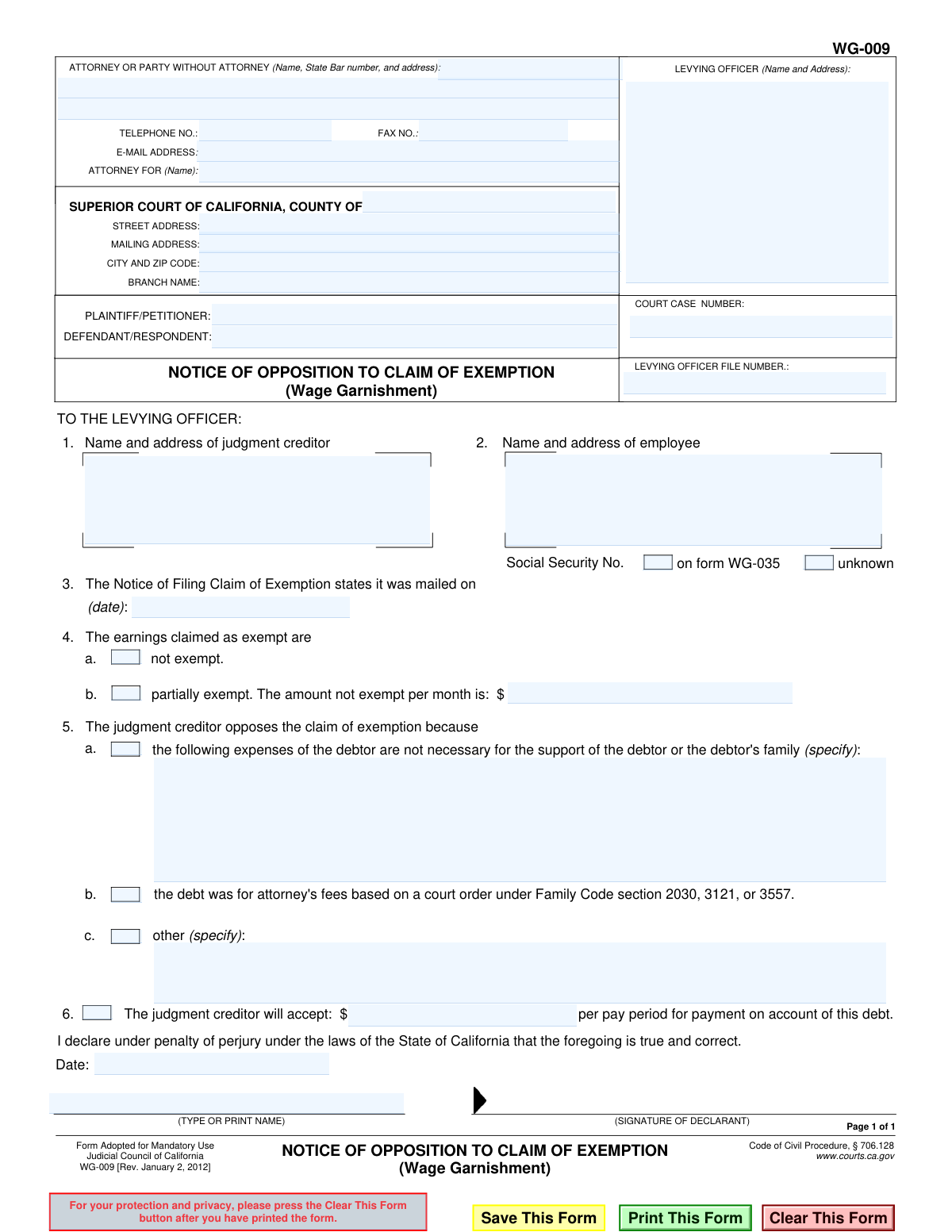
Yes! You can use AI to fill out Form WG-009, Notice of Opposition to Claim of Exemption (Wage Garnishment)

The Notice of Opposition to Claim of Exemption (Wage Garnishment), or Form WG-009, is a legal document filed in a California Superior Court by a creditor (plaintiff) to challenge a debtor's (defendant's) assertion that their earnings should be protected from wage garnishment. By filing this form, the creditor argues that the debtor's claimed exemptions are invalid or excessive, and requests the court to allow the garnishment to proceed. Today, this form can be filled out quickly and accurately using AI-powered services like Instafill.ai, which can also convert non-fillable PDF versions into interactive fillable forms.
WG-009 is part of the California court forms and court claim forms categories on Instafill.
Our AI automatically handles information lookup, data retrieval, formatting, and form filling.
It takes less than a minute to fill out WG-009 using our AI form filling.
Securely upload your data. Information is encrypted in transit and deleted immediately after the form is filled out.

Form specifications

Form name: Form WG-009, Notice of Opposition to Claim of Exemption (Wage Garnishment)
Number of fields: 38
Number of pages: 1
Language: English
main-image

Instafill Demo: How to fill out PDF forms in seconds with AI

How to Fill Out WG-009 Online for Free in 2026

Are you looking to fill out a WG-009 form online quickly and accurately? Instafill.ai offers the #1 AI-powered PDF filling software of 2026, allowing you to complete your WG-009 form in just 37 seconds or less.
Follow these steps to fill out your WG-009 form online using Instafill.ai:
  1. 1 Navigate to Instafill.ai and upload or select the Form WG-009, Notice of Opposition to Claim of Exemption.
  2. 2 Use the AI assistant to input the court information, including the county, branch, and case number, as well as the plaintiff and defendant names.
  3. 3 Provide the levying officer's details and the name and address of the employee (debtor).
  4. 4 Indicate the date on which the debtor's Notice of Filing Claim of Exemption was mailed.
  5. 5 Specify the grounds for your opposition by checking the appropriate boxes and providing detailed explanations as to why the earnings are not exempt or only partially exempt.
  6. 6 If applicable, state the payment amount you would be willing to accept per pay period from the debtor.
  7. 7 Review all the information populated by the AI for accuracy, then e-sign and date the declaration under penalty of perjury before filing with the levying officer and the court.

Our AI-powered system ensures each field is filled out correctly, reducing errors and saving you time.

Why Choose Instafill.ai for Your Fillable WG-009 Form?

Speed

Complete your WG-009 in as little as 37 seconds.

Up-to-Date

Always use the latest 2026 WG-009 form version.

Cost-effective

No need to hire expensive lawyers.

Accuracy

Our AI performs 10 compliance checks to ensure your form is error-free.

Security

Your personal information is protected with bank-level encryption.

Frequently Asked Questions About Form WG-009

This form is used by a judgment creditor to formally object to a debtor's claim that their wages should be exempt from garnishment. It informs the levying officer and the court why you believe the debtor's wages are not exempt as they claimed.

The judgment creditor (the person or entity owed money) or their attorney must fill out this form. You would only file this if the debtor has already filed a Claim of Exemption and you disagree with it.

After you file the Notice of Opposition with the levying officer, the officer files it with the court. The court will then set a hearing date for a judge to decide whether the debtor's wages are exempt.

You must state your reason for opposing the exemption. This could be by listing debtor expenses you believe are not necessary for basic support, noting the debt is for specific family law attorney's fees, or providing other specific reasons.

This section allows you to propose a settlement by stating a specific dollar amount you would be willing to accept per pay period. This can potentially resolve the dispute without requiring a court hearing.

You must file the completed form with the levying officer (e.g., the Sheriff's Department) whose name and address are on the notice you received. Do not send it directly to the debtor or the court.

You will need the court case number, the levying officer's file number, and the names and addresses of all parties. You also need the date from the 'Notice of Filing Claim of Exemption' to complete section 3.

This option is for cases where the debt owed is for court-ordered attorney's fees in a family law matter. Certain wage exemption claims may not apply to these specific types of debts.

The form provides a checkbox for 'unknown' next to the Social Security Number field. You can check this box if you do not have this information.

Yes, services like Instafill.ai use AI to auto-fill form fields accurately with your case and party information, which saves time and helps prevent errors.

Simply upload the WG-009 PDF to the Instafill.ai platform. The AI will make the form interactive, allowing you to easily type in your information or use saved data to populate the fields before downloading the completed document.

You can use a service like Instafill.ai, which can convert flat, non-fillable PDFs into interactive, fillable forms. This allows you to type your information directly into the fields for a clean and professional result.

Compliance WG-009
Validation Checks by Instafill.ai

1
Validates Court Case Number Format
Checks that the 'CaseNumber' field is not empty and conforms to the expected format for California Superior Court case numbers. This is critical for correctly filing the document and associating it with the proper legal proceedings. An invalid or missing case number will result in the document being rejected by the court clerk.
2
Ensures Essential Case Identification Fields are Complete
Verifies that the 'Court.County', 'Petitioner.plaintiff', and 'Respondent.Defendant' fields are all populated. These fields are the minimum necessary information to identify the specific court and case this opposition belongs to. Failure to provide this information will prevent the form from being filed or processed correctly.
3
Validates Format of Exemption Mailing Date
This check ensures that the date provided in section 3, for when the Notice of Filing Claim of Exemption was mailed, is a valid calendar date (e.g., MM/DD/YYYY). This date is legally significant as it establishes the timeline for filing an opposition. An invalid format would make the timeliness of the opposition impossible to determine, potentially invalidating it.
4
Ensures Signature Date is Logically Valid
This validation compares the signature date at the bottom of the form with the mailing date specified in section 3. The signature date must be on or after the mailing date. It is logically impossible to declare opposition to a claim that, according to the form itself, has not yet been mailed, and this error could lead to the form's rejection.
5
Validates Mutually Exclusive Selection in Section 4
Verifies that in section 4, either checkbox 'a' ('not exempt') or 'b' ('partially exempt') is selected, but not both. These options are mutually exclusive and define the creditor's position on the exemption. Selecting both or neither makes the opposition ambiguous and legally deficient.
6
Ensures Amount is Provided for Partial Exemption
If checkbox 'b' ('partially exempt') in section 4 is selected, this check ensures that the corresponding dollar amount field is filled with a valid, positive number. Without this amount, the claim of partial exemption is incomplete and cannot be processed by the levying officer. The form would be returned for correction.
7
Ensures a Reason for Opposition is Selected
This validation confirms that at least one of the checkboxes ('a', 'b', or 'c') in section 5 is selected. The law requires the judgment creditor to state the reason for their opposition to the claim of exemption. A form submitted without a selected reason is incomplete and will be rejected.
8
Validates Required Explanation for Opposition Reasons
If checkbox 'a' ('expenses not necessary') or 'b' ('other') is selected in section 5, this check ensures the corresponding 'specify' text field is not empty. These options require a specific explanation to be legally valid. Failure to provide the required details makes the opposition baseless and subject to rejection.
9
Validates Format of All Monetary Amount Fields
This check scans all fields intended for currency values (in sections 4b and 6) to ensure they contain only valid numerical data, optionally with a decimal point and two decimal places. This prevents data entry errors and ensures the financial figures are unambiguous for the court and levying officer. Non-numeric entries would cause processing failures.
10
Ensures Declarant's Printed Name is Provided
Verifies that the 'TYPE OR PRINT NAME' field accompanying the signature line is filled out. The printed name clearly identifies the individual making the declaration under penalty of perjury. A missing name can invalidate the declaration and the entire form.
11
Validates Completeness of Filer's Contact Information
This check ensures that the name and address of the 'ATTORNEY OR PARTY WITHOUT ATTORNEY' are fully provided. This information is essential for the court and other parties to serve notices and communicate with the filer. Incomplete contact information can delay the legal process and lead to missed deadlines.
12
Ensures Levying Officer Information is Complete
This validation confirms that the name and address of the Levying Officer are filled in the 'TO THE LEVYING OFFICER' section. The form is a direct notice to this specific officer, who is responsible for executing the wage garnishment. Without this information, the form cannot be delivered or acted upon.
13
Validates Presence of Judgment Creditor Information
This check ensures that the name and address of the judgment creditor are provided in section 2. This field is critical for identifying who is filing the opposition and confirming they are a party to the judgment. An omission here would make it unclear who is opposing the exemption claim.
14
Validates Presence of Employee (Debtor) Information
This check verifies that the name and address of the employee (judgment debtor) are provided in section 1. This information is fundamental to the entire action, as it identifies the person whose earnings are subject to garnishment. A missing employee name would render the form useless as it wouldn't be clear whose exemption is being opposed.
15
Validates Signature Date is Present and Correctly Formatted
This check ensures the 'Date' field in the declaration section is not empty and contains a valid calendar date. The signature date is a critical legal element that attests to when the declaration was made. A missing or malformed date can call the validity of the entire document into question.

Common Mistakes in Completing WG-009

Confusing Court Case and Levying Officer File Numbers

People often mistakenly enter the Court Case Number into the Levying Officer File Number field, or vice versa. These are two distinct identifiers; the court assigns one, and the levying officer (e.g., the Sheriff) assigns another for their internal tracking. This error can cause the opposition to be misfiled or rejected by the levying officer, leading to significant delays and potentially causing the creditor to miss the deadline to oppose the exemption.

Providing Vague or Insufficient Justification in Section 5

In Section 5, simply stating 'debtor can afford payments' or 'expenses are too high' is not enough. The form requires specific, factual reasons for opposing the exemption, such as itemizing expenses you believe are not necessary for support (5a) or providing a clear legal or factual basis under 'other' (5b). A vague justification will likely be dismissed by the court, causing the opposition to fail.

Incorrect Calculation or Omission in Section 4b

When claiming earnings are 'partially exempt' in Section 4b, filers must calculate and specify the exact dollar amount they believe is *not* exempt per month. This calculation can be complex, and mistakes are common, often leading to disputes or rejection of the form. Leaving this field blank while checking the box invalidates the selection, so it is crucial to ensure the amount is accurate.

Omitting or Using an Incorrect Date in Section 3

Section 3 requires the date the debtor's 'Notice of Filing Claim of Exemption' was mailed. This date is critical because it starts the clock on a strict deadline for the creditor to file this opposition. Entering the wrong date or leaving it blank can lead to the opposition being deemed untimely and therefore invalid, automatically granting the debtor's exemption claim. Always refer to the postmark or proof of service for the debtor's claim to get the correct date.

Failure to Sign or Date the Declaration

An unsigned or undated declaration under penalty of perjury is legally invalid. Filers, especially those in a hurry, sometimes forget to sign or date the form at the bottom. This simple oversight will cause the court clerk or levying officer to reject the entire filing, forcing you to refile and potentially miss your strict filing deadline. Always perform a final review of the form, paying special attention to the signature and date fields.

Incomplete Attorney or Party Information

The top section requires complete contact information, including name, address, phone number, and for attorneys, a State Bar number. Leaving any of this information blank or providing illegible details can make it impossible for the court or other parties to communicate with you. This can result in missed notices or hearings, jeopardizing your case. AI-powered tools like Instafill.ai can help by saving your information and auto-populating these fields accurately every time.

Incorrectly Identifying the Court and Branch Name

Filers often list the wrong county court or, more commonly, omit the specific branch name where the case is being heard. Large counties have multiple court branches, and filing at the wrong one will result in rejection and delays. This can be fatal for a time-sensitive document like an opposition. Always verify the exact court name and branch from the original case documents before filling out the form.

Improperly Checking the Attorney's Fees Box (Section 5c)

The checkbox in Section 5c, regarding attorney's fees under specific Family Code sections, is frequently misunderstood. Filers may check it for any case involving attorney's fees, but it only applies if there is a court order under the listed Family Code sections (2030, 3121, or 3557). Incorrectly checking this box is a misrepresentation to the court and will not support your opposition if the underlying order doesn't exist.

Leaving the Proposed Payment Amount Blank in Section 6

Section 6 asks for a specific dollar amount the creditor will accept per pay period. Some filers leave this blank, thinking it's optional. However, providing a reasonable figure demonstrates a willingness to resolve the matter and gives the court a starting point for an order. Leaving it blank can be interpreted as an all-or-nothing demand, potentially weakening your position and leading the court to deny the opposition.

Submitting an Illegible or Poorly Formatted Form

Many court forms are only available online as non-fillable PDFs, leading people to fill them out by hand. This often results in illegible handwriting, which can cause critical data to be misread by court staff, leading to filing errors and delays. If a form is not fillable, AI tools like Instafill.ai can convert the flat PDF into an interactive, fillable version, ensuring all entries are clear, professional, and correctly formatted.
Saved over 80 hours a year

“I was never sure if my IRS forms like W-9 were filled correctly. Now, I can complete the forms accurately without any external help.”

Kevin Martin Green

Your data stays secure with advanced protection from Instafill and our subprocessors

Robust compliance program

Transparent business model

You’re not the product. You always know where your data is and what it is processed for.

ISO 27001, HIPAA, and GDPR

Our subprocesses adhere to multiple compliance standards, including but not limited to ISO 27001, HIPAA, and GDPR.

Security & privacy by design

We consider security and privacy from the initial design phase of any new service or functionality. It’s not an afterthought, it’s built-in, including support for two-factor authentication (2FA) to further protect your account.

Fill out WG-009 with Instafill.ai

Worried about filling PDFs wrong? Instafill securely fills form-wg-009-notice-of-opposition-to-claim-of-exemption-wage-garnishment forms, ensuring each field is accurate.

Related forms by category

California court forms Judicial Council of California Form SC-105, Request for Court Order and Answer (Small Claims), Judicial Council of California Form SC-120, Defendant’s Claim and ORDER to Go to Small Claims Court (Small Claims), Judicial Council of California Form SER-001, Request for Sheriff to Serve Court Papers, Judicial Council of California Form SER-001, Request for Sheriff to Serve Court Papers, Affidavit for Collection of Personal Property California Probate Code Section 13100, Form POS-040, Proof of Service—Civil, Declaration of Facts of Death (California Superior Court), declaration-of-marriage-for-court-proceeding-california-family-law, ADOPT-200, Adoption Request, ADOPT-200, Stepparent Adoption Request, ADOPT-210, Adoption Agreement, ADOPT-310, Contact After Adoption Agreement, Judicial Council of California Form ADOPT-200, Adoption Request, Form ADR-107, Mediation Attendance Sheet, Form ADR-110, Order Appointing Referee, Form ADR-109, Stipulation or Motion for Order Appointing Referee, Form ADR-102, Request for Trial De Novo After Judicial Arbitration, Form ADR-108, Referee's Report (Code Civ. Proc., §§ 638, 639), Form ADR-106, Petition to Confirm, Correct, or Vacate Contractual Arbitration Award, Form ADR-104, Rejection of Award and Request for Trial After Attorney-Client Fee Arbitration · + 557 more →
court claim forms Form SC-100, Plaintiff's Claim and ORDER to Go to Small Claims Court, Judicial Council of California Form SC-105, Request for Court Order and Answer (Small Claims), SC-120, Defendant’s Claim and ORDER to Go to Small Claims Court (Small Claims), SC-105, Request for Court Order and Answer (Small Claims), Judicial Council of California Form SC-120, Defendant’s Claim and ORDER to Go to Small Claims Court (Small Claims), Form SC-100, Plaintiff’s Claim and ORDER to Go to Small Claims Court, Certificate of Service (Civil Court Claim), Form N161, Appellant’s notice (All appeals except small claims track appeals and appeals to the Family Division of the High Court), Plaintiff's Claim and ORDER to Go to Small Claims Court (SC-100), Form N161, Appellant's Notice (All appeals except small claims track appeals and appeals to the Family Division of the High Court), Form SC-100A, Other Plaintiffs or Defendants (Attachment to Plaintiff's Claim and ORDER to Go to Small Claims Court), Form N461: Claim for judicial review, Statement of Small Claim and Notice, Trial Court of Massachusetts, State of Michigan, Form MC 25, Notice of Intent to Escheat Unclaimed Personal Property, Form MC 35, Complaint, Claim and Delivery, Form MC 36, Motion for Possession Pending Judgment, Claim and Delivery, Order of Possession Pending Judgment, Claim and Delivery, Form MC 38, Bond, Claim and Delivery, Form MC 39, Judgment, Claim and Delivery, Form MC 55, Claim of Appeal · + 53 more →