Yes! You can use AI to fill out New Jersey Lawyers' Fund for Client Protection Statement of Claim
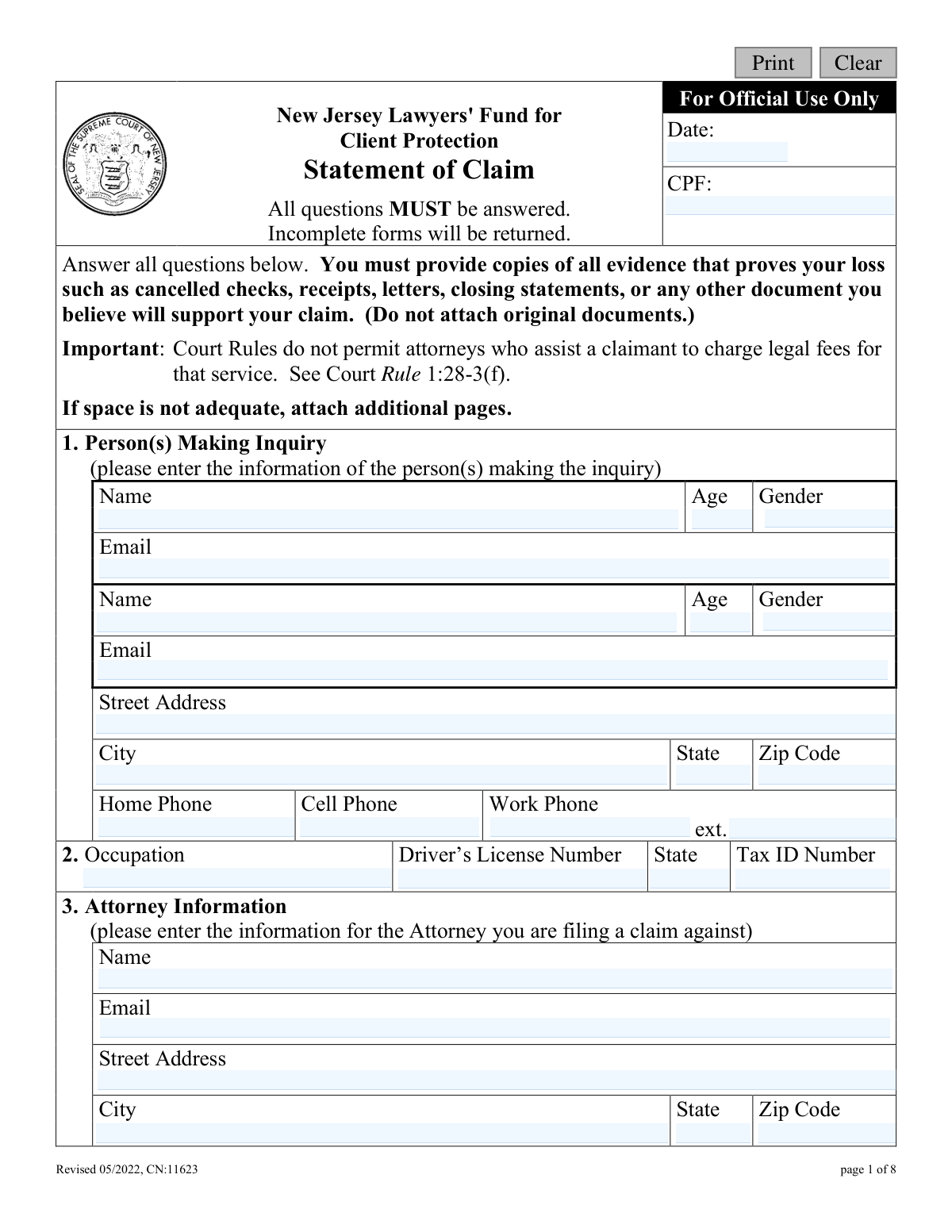
The New Jersey Lawyers' Fund for Client Protection Statement of Claim is a crucial document for individuals who have suffered a financial loss due to the dishonest conduct of a lawyer in New Jersey. By submitting this form, a claimant initiates a formal process to seek reimbursement from a special fund established to protect clients from attorney theft. Today, this form can be filled out quickly and accurately using AI-powered services like Instafill.ai, which can also convert non-fillable PDF versions into interactive fillable forms.
CPF Statement of Claim is part of the
court claim forms and New Jersey forms categories on Instafill.
Our AI automatically handles information lookup, data retrieval, formatting, and form filling.
It takes less than a minute to fill out CPF Statement of Claim using our AI form filling.
Securely upload your data. Information is encrypted in transit and deleted immediately after the form is filled out.
Form specifications
| Form name: | New Jersey Lawyers' Fund for Client Protection Statement of Claim |
| Number of fields: | 92 |
| Number of pages: | 1 |
| Language: | English |
Instafill Demo: How to fill out PDF forms in seconds with AI
How to Fill Out CPF Statement of Claim Online for Free in 2026
Are you looking to fill out a CPF STATEMENT OF CLAIM form online quickly and accurately? Instafill.ai offers the #1 AI-powered PDF filling software of 2026, allowing you to complete your CPF STATEMENT OF CLAIM form in just 37 seconds or less.
Follow these steps to fill out your CPF STATEMENT OF CLAIM form online using Instafill.ai:
- 1 Navigate to Instafill.ai and upload the New Jersey Statement of Claim form or select it from the available templates.
- 2 Allow the AI to process the document and identify all required fields for the claimant, the attorney, and the details of the claim.
- 3 Enter your personal information as the claimant and provide the details of the attorney you are filing the claim against.
- 4 Carefully answer all questions regarding the nature of your relationship with the attorney, the amount of financial loss, and the specific dishonest conduct that occurred.
- 5 Securely upload digital copies of all supporting evidence, such as cancelled checks, receipts, letters, or closing statements, to substantiate your claim.
- 6 Review the entire completed form, including the Supplemental Statement, for accuracy and completeness before electronically signing the Certification in Lieu of Oath.
- 7 Download the final document package and mail the completed forms and supporting documents to the New Jersey Lawyers’ Fund for Client Protection.
Our AI-powered system ensures each field is filled out correctly, reducing errors and saving you time.
Why Choose Instafill.ai for Your Fillable CPF Statement of Claim Form?
Speed
Complete your CPF Statement of Claim in as little as 37 seconds.
Up-to-Date
Always use the latest 2026 CPF Statement of Claim form version.
Cost-effective
No need to hire expensive lawyers.
Accuracy
Our AI performs 10 compliance checks to ensure your form is error-free.
Security
Your personal information is protected with bank-level encryption.
Frequently Asked Questions About Form CPF Statement of Claim
This form is used to file a claim with the New Jersey Lawyers' Fund for Client Protection if you have suffered a financial loss due to the dishonest conduct of a New Jersey attorney. The Fund's purpose is to provide a potential source of reimbursement for clients who have been wronged.
You should fill out this form if you believe you lost money or property because a New Jersey lawyer acted dishonestly while representing you or serving in a fiduciary capacity (like a trustee or executor).
You must provide copies of all evidence proving your loss, such as cancelled checks, receipts, closing statements, letters, or other relevant documents. Do not send original documents, as they will not be returned.
You must answer all questions on the form; if a question doesn't apply to your situation, write 'N/A'. The form states that incomplete applications will be returned, which will delay the review of your claim.
No, there is no fee to file a claim with the Fund. Furthermore, New Jersey Court Rules prohibit any attorney who assists you with this claim from charging you a legal fee for that specific service.
Mail the completed and signed form, along with all supporting document copies, to the New Jersey Lawyers’ Fund for Client Protection, P.O. Box 961, Trenton, NJ 08625-0961.
The Supplemental Statement asks for more detailed information about your relationship with the attorney and the specifics of the financial transaction. Answering these questions in detail is mandatory and helps the Fund to fully investigate your claim.
By signing this section, you are legally certifying that your statements are true and that you have also reported the basis of your claim in writing to the appropriate county prosecutor's office and the office of attorney ethics. Making a willfully false statement is subject to punishment.
Provide a clear, detailed narrative of the events. Explain how you hired the attorney, list the specific amounts and dates of payments you made, and describe the exact actions the attorney took that you believe were dishonest and caused your financial loss.
Yes, services like Instafill.ai use AI to help you accurately auto-fill your personal information and other standard fields on the form. This can save time and help prevent errors, but you will still need to provide the specific details and narrative of your case yourself.
You can use a service like Instafill.ai to fill out the form online. Simply upload the PDF, and the platform will make it an interactive, fillable form where you can type your answers directly before downloading the completed document for printing and mailing.
If you have a flat, non-fillable PDF, you can use a tool like Instafill.ai to convert it into an interactive, fillable form. This allows you to easily type your information into the fields instead of filling it out by hand.
The form asks if you have made any effort to recover the loss from the attorney directly. You should describe any attempts you have made, as this provides important context for the Fund's investigation of your claim.
By signing the Authorization page, you give the Fund permission to investigate your claim thoroughly. This allows them to contact people and access documents necessary to verify the facts you have presented.
Compliance CPF Statement of Claim
Validation Checks by Instafill.ai
1
Ensures Primary Claimant Name is Provided
This check verifies that the 'Name' field in Section 1 for the primary claimant (q1Name1) is not empty. The claimant's name is a fundamental piece of information required to identify the individual filing the claim and to process the case. A form submitted without a primary claimant name is incomplete and cannot be processed, so it would be returned to the sender.
2
Validates Attorney Name is Provided
This validation ensures that the 'Name' field in Section 3 (q3Name), identifying the attorney the claim is against, is completed. This information is critical as the entire claim is predicated on the actions of a specific attorney. Without this name, the Fund cannot begin an investigation or verify the attorney's status, rendering the claim invalid.
3
Verifies Claim Amount is a Positive Number
This check ensures that the 'How much loss are you claiming?' field (q6) contains a valid, positive numerical value. The amount of loss is a core component of the claim and must be greater than zero for the claim to be considered. Submitting non-numeric text or a zero/negative value would halt processing until a valid loss amount is provided.
4
Standard Email Address Format
This validation checks that all email fields (q1Email1, q1Email2, q3Email, q15Email) adhere to a standard format, such as '[email protected]'. This is important for ensuring reliable communication with the claimant, the attorney in question, and any assisting parties. An invalid email format could lead to missed notifications and delays in processing the claim.
5
US Phone Number Format Validation
This check verifies that all phone number fields (q1PhoneHome, q1PhoneCell, q1PhoneWork, q15Phone) conform to a standard 10-digit format, allowing for common separators. Correctly formatted phone numbers are essential for direct communication with the claimant if clarification or additional information is needed quickly. Failure to provide a valid number can impede the investigation process.
6
Validates 5 or 9-Digit ZIP Code Format
This validation ensures that all ZIP Code fields (q1AddrZip, q3AddrZip, q15AddrZip) contain either a 5-digit or 9-digit (ZIP+4) numeric value. Accurate ZIP codes are necessary for mailing official correspondence and legal documents to the correct address. An incorrect format could result in returned mail and significant delays.
7
Ensures Single Selection for Claim Basis
This check confirms that exactly one option is selected in Section 7, 'What is your claim based on?' (q7). This selection is critical as it determines the legal context of the claim and directs the subsequent investigation path. Submitting the form with zero or multiple selections would create ambiguity and require clarification before proceeding.
8
Conditional Requirement for 'Yes' Answer Details
This validation rule checks that if 'Yes' is selected for questions 11, 12, 13, or 14, the corresponding text box for details (e.g., q11Detail, q12Detail) is not left empty. These questions pertain to other reimbursement sources, attorney assets, and recovery efforts, all of which require explanation if affirmed. Missing details for a 'Yes' answer makes the response incomplete and prevents a full assessment of the claim's circumstances.
9
Verifies Presence of Dishonest Conduct Description
This check ensures that the narrative field in Section 8c, 'Describe the dishonest conduct that caused your loss,' (q8) is not empty. This description is the core of the entire claim, providing the fundamental allegations that the Fund will investigate. A claim submitted without this crucial narrative is unsubstantiated and cannot be evaluated.
10
Requires Claimant Signature and Date
This validation confirms that the 'Signature of claimant' (sigClaim) and 'Date' (sigClaimDt) fields under the 'Certification In Lieu Of Oath' are both completed. The signature legally certifies the truthfulness of the statements, and the date establishes when the certification was made. A missing signature or date invalidates the certification, making the entire submission legally insufficient.
11
Ensures Signature Date is Not in the Future
This check validates that all date fields, particularly the signature dates (sigClaimDt, sigCoClaimDt, authDt), are not set to a future date. A valid signature date must be on or before the date of submission to be legally sound. A future date is a logical impossibility and would indicate a data entry error that must be corrected before the form can be accepted.
12
Co-Claimant Signature Consistency Check
This rule verifies that if a second claimant's name is entered in Section 1 (q1Name2), then the 'Signature of co-claimant' (sigCoClaim) and corresponding 'Date' (sigCoClaimDt) fields are also filled out. This ensures that all parties to the claim have legally certified the statements made within the form. An omission would mean the co-claimant has not formally joined the claim, creating legal ambiguity.
13
Validates Age is a Positive Integer
This check ensures that the 'Age' fields in Section 1 (q1Age1, q1Age2) contain a positive whole number within a reasonable human lifespan, for example, between 1 and 120. This prevents the entry of text, symbols, or nonsensical numbers, ensuring data quality for demographic purposes. While not always critical to the claim's substance, it maintains the integrity of the collected data.
14
Validates State Field is a Two-Letter Abbreviation
This validation ensures that all 'State' fields (q1AddrSt, q3AddrSt, q15AddrSt, q2DlSt) contain a valid, two-letter US state or territory abbreviation. Using standardized abbreviations is crucial for address validation, mail delivery, and proper data categorization. An invalid entry like 'New Jersey' instead of 'NJ' could cause failures in automated processing and mail systems.
Common Mistakes in Completing CPF Statement of Claim
Claimants often forget to include copies of crucial evidence like cancelled checks, receipts, or correspondence. This happens because gathering documentation can be difficult, or claimants may assume their written statement is sufficient. Without proof, the Fund cannot validate the financial loss, leading to significant delays or outright denial of the claim. To avoid this, carefully gather and make copies of all documents that prove your payments and the attorney's misconduct before submitting the form.
The form explicitly warns against sending original documents, yet claimants sometimes do so out of a desire to provide the 'best' evidence. This is a critical error because the Fund does not return submitted documents, meaning the claimant permanently loses their original proof. Always make clear, legible copies of all your evidence to submit with the form and keep your originals in a safe place for your own records.
In Section 8, claimants may provide a disorganized account that omits key details requested, such as specific dates of payment or a clear description of the dishonest act. This weakens the claim by making it difficult for reviewers to understand the sequence of events and the basis for the loss. To prevent this, structure your narrative to separately address each part of the question: how you hired the attorney, a list of all payments with dates, and a factual description of the conduct that caused your loss.
This form requires multiple signatures on different pages, including the main certification (page 4), the Authorization (page 5), and the Supplemental Statement certification (page 8). It's easy to overlook one of these sections. An unsigned or undated form is invalid and will be immediately returned, halting the entire process. Carefully review every page before mailing, ensuring that you and any co-claimant have signed and dated in all required locations.
The instructions state that 'All questions MUST be answered,' but people often leave fields blank if the question doesn't seem to apply. This leads to the form being considered incomplete and returned to the sender, causing delays. If a question is not applicable to your situation, you must write 'N/A' in the space provided. Using a tool like Instafill.ai can help by flagging mandatory fields to ensure none are accidentally skipped.
In Section 6, claimants are asked for the specific dollar amount of their loss, but they may enter a vague estimate or a number that doesn't match the sum of the evidence provided. This discrepancy creates confusion and requires the Fund to request clarification, delaying the claim's review. Before filling out this field, carefully add up all the payments documented in your evidence to arrive at a precise, verifiable total loss amount.
Several questions (e.g., 11-14 and in the supplement) are formatted as 'Yes/No' checkboxes followed by a space for a detailed explanation. Claimants frequently check a box but fail to provide the mandatory corresponding details in the space below. This is considered an incomplete answer and will cause the form to be sent back for correction. Always re-read the question after checking 'Yes' to see if a written explanation is required, and if so, provide a thorough response.
The certification on page 4 requires the claimant to affirm they have already informed the appropriate county prosecutor's office and office of attorney ethics. Some claimants may sign this without having completed these required steps, not realizing it's a prerequisite. Making a willfully false statement on this certification is a serious matter that can lead to punishment and jeopardizes the entire claim. You must complete these external notifications before signing and submitting this form.
Since this form is often a non-fillable PDF, claimants must print and complete it by hand, which can result in illegible handwriting. If reviewers cannot read names, dates, or narrative details, they cannot process the claim, leading to rejection or significant delays. To avoid this, print clearly in block letters or use a tool like Instafill.ai, which can convert flat PDFs into fillable forms, allowing you to type your answers for maximum clarity.
In Section 3, claimants must provide the full name and address of the attorney the claim is against. People may only know a partial name or an old office address, especially if the attorney has become unresponsive. Incomplete or inaccurate information makes it difficult for the Fund to identify the correct attorney and proceed with the investigation. Use online resources like the state bar association directory to verify the attorney's full name and most recent official address before filling out the form.
Saved over 80 hours a year
“I was never sure if my IRS forms like W-9 were filled correctly. Now, I can complete the forms accurately without any external help.”
Kevin Martin Green
Your data stays secure with advanced protection from Instafill and our subprocessors

Robust compliance program
Transparent business model
You’re not the product. You always know where your data is and what it is processed for.
ISO 27001, HIPAA, and GDPR
Our subprocesses adhere to multiple compliance standards, including but not limited to ISO 27001, HIPAA, and GDPR.
Security & privacy by design
We consider security and privacy from the initial design phase of any new service or functionality. It’s not an afterthought, it’s built-in, including support for two-factor authentication (2FA) to further protect your account.
Fill out CPF Statement of Claim with Instafill.ai
Worried about filling PDFs wrong? Instafill securely fills new-jersey-lawyers-fund-for-client-protection-statement-of-claim forms, ensuring each field is accurate.