Yes! You can use AI to fill out Application for Public Defender (5A) - for Contempt of Domestic Violence Restraining Orders
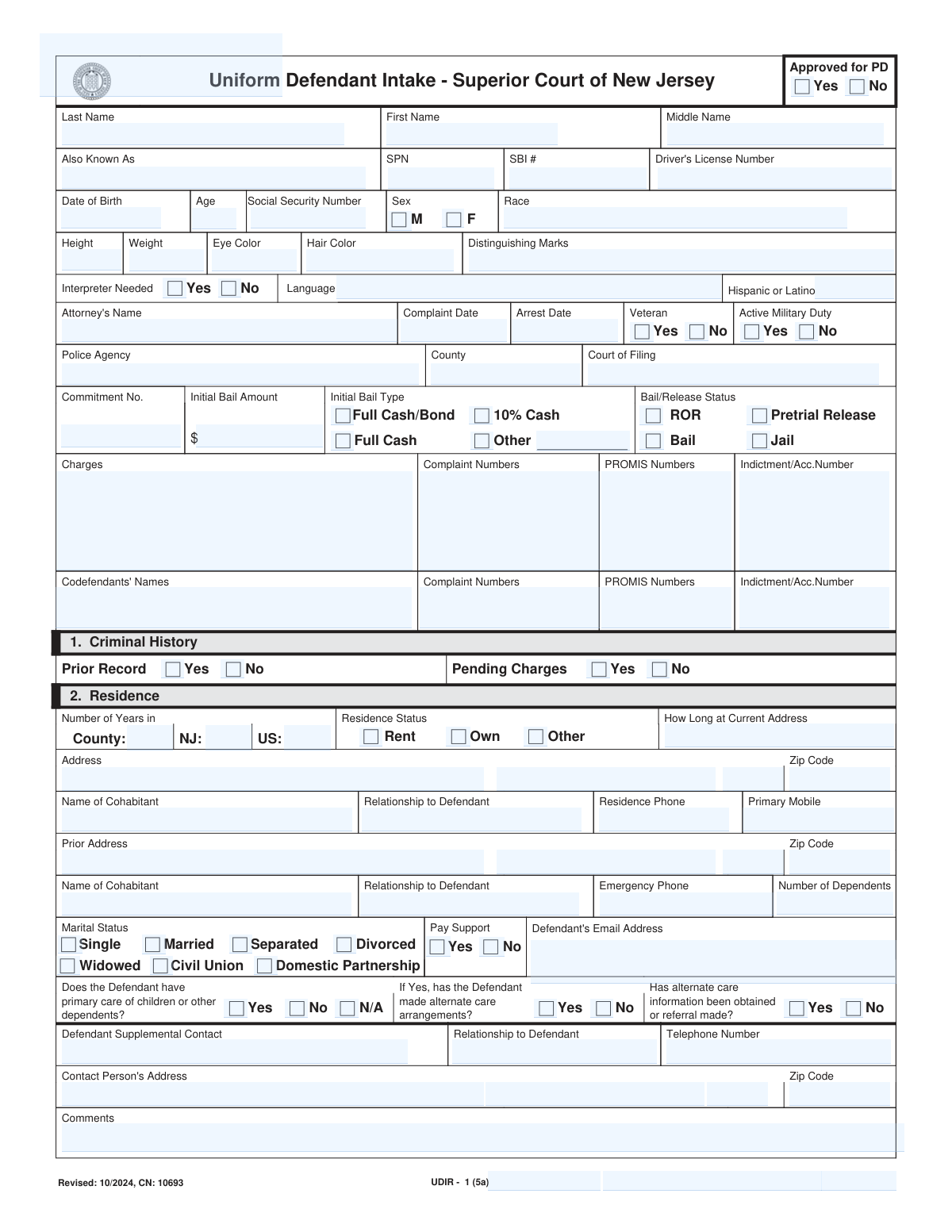
This New Jersey Judiciary form, also known as the Uniform Defendant Intake (UDIR), is an application for individuals charged with violating a domestic violence restraining order to request a court-appointed pro bono attorney. It is used to demonstrate financial hardship to the court, which will evaluate the applicant's income, assets, expenses, and debts to determine eligibility for free legal representation. Today, this form can be filled out quickly and accurately using AI-powered services like Instafill.ai, which can also convert non-fillable PDF versions into interactive fillable forms.
Form 5A / UDIR - 1 is part of the
domestic violence forms, New Jersey forms and restraining order forms categories on Instafill.
Our AI automatically handles information lookup, data retrieval, formatting, and form filling.
It takes less than a minute to fill out Form 5A / UDIR - 1 using our AI form filling.
Securely upload your data. Information is encrypted in transit and deleted immediately after the form is filled out.
Form specifications
| Form name: | Application for Public Defender (5A) - for Contempt of Domestic Violence Restraining Orders |
| Number of fields: | 189 |
| Number of pages: | 1 |
| Language: | English |
Instafill Demo: How to fill out PDF forms in seconds with AI
How to Fill Out Form 5A / UDIR - 1 Online for Free in 2026
Are you looking to fill out a FORM 5A / UDIR - 1 form online quickly and accurately? Instafill.ai offers the #1 AI-powered PDF filling software of 2026, allowing you to complete your FORM 5A / UDIR - 1 form in just 37 seconds or less.
Follow these steps to fill out your FORM 5A / UDIR - 1 form online using Instafill.ai:
- 1 Navigate to Instafill.ai and upload or select the 'Application for Public Defender (5A)'.
- 2 Use the AI assistant to automatically populate personal details such as your full name, address, date of birth, and contact information.
- 3 Provide information about your residence, criminal history, and any dependents as prompted by the interactive fields.
- 4 Detail your current and previous employment history, including employer information, occupation, and salary.
- 5 Enter your complete financial status by listing all sources of income, assets (like vehicles or bank accounts), and all monthly debts and expenses.
- 6 Carefully review all the information you've entered for accuracy, then electronically sign and date the certification section to attest to the truthfulness of your statements.
- 7 Download the completed form and submit it to the New Jersey Judiciary through their Judiciary Electronic Documentation Submission (JEDS) system as instructed on the form.
Our AI-powered system ensures each field is filled out correctly, reducing errors and saving you time.
Why Choose Instafill.ai for Your Fillable Form 5A / UDIR - 1 Form?
Speed
Complete your Form 5A / UDIR - 1 in as little as 37 seconds.
Up-to-Date
Always use the latest 2026 Form 5A / UDIR - 1 form version.
Cost-effective
No need to hire expensive lawyers.
Accuracy
Our AI performs 10 compliance checks to ensure your form is error-free.
Security
Your personal information is protected with bank-level encryption.
Frequently Asked Questions About Form Form 5A / UDIR - 1
This form is used to apply for a free, pro bono attorney if you have been charged with violating a domestic violence restraining order in New Jersey and cannot afford to hire your own lawyer.
You should complete this form if you are charged with contempt for violating a domestic violence restraining order in New Jersey and believe you cannot afford legal representation. The court will use this application to determine if you qualify for a court-appointed attorney.
You must provide detailed personal information, including your residence and criminal history, as well as a complete financial statement covering your income, assets, debts, and monthly expenses.
You must submit the completed form through the New Jersey Judiciary Electronic Documentation Submission (JEDS) system. Instructions and a video tutorial are available on the njcourts.gov Self Help Center page.
The court will evaluate your application to determine if you qualify for a pro bono attorney based on your financial status. If you are approved, the court will notify you and an attorney will be assigned to your case.
If the court determines you do not meet the financial standards for a pro bono attorney, you will be responsible for hiring your own private counsel for your case.
The form includes a warning that the financial statement page may be produced to a grand jury and a prosecutor under specific circumstances with a judge's approval. It is primarily used by the court to determine your eligibility for a public defender.
The court requires a complete picture of your financial situation to determine if you are 'indigent,' meaning you cannot afford to hire an attorney. This detailed information is necessary for the court to make a fair and accurate assessment of your eligibility.
By signing the certification, you are legally swearing that all the financial information you have provided is true and accurate. Knowingly providing false information can result in punishment by the court.
Yes, services like Instafill.ai use AI to help you accurately auto-fill form fields, which can save you time and reduce errors. This is especially helpful for forms with many detailed sections like this one.
Simply upload the Application for Public Defender (5A) form to the Instafill.ai platform. The AI will identify the fields, allowing you to provide your information and have the form filled out automatically and prepared for submission.
If you have a non-fillable or 'flat' PDF, you can use a service like Instafill.ai. It can convert the document into an interactive, fillable form, allowing you to easily type your information into the correct fields.
The form does not specify a processing time, but it states that court staff will contact you by phone or email if they have questions. If you qualify, the court will let you know and an attorney will be assigned.
Compliance Form 5A / UDIR - 1
Validation Checks by Instafill.ai
1
Validate Social Security Number Format
Checks if the Social Security Number in the 'fldSSN' field is entered in the standard XXX-XX-XXXX format. This validation ensures data consistency and is crucial for accurate identification and cross-referencing with other systems. A failure would prevent the form from being submitted until the format is corrected to match the required pattern.
2
Ensure Age and Date of Birth Consistency
Validates that the applicant's stated age in 'fldAge' is consistent with the 'fldBirthDate' provided. The system should calculate the age from the date of birth and flag any discrepancy. This check prevents data entry errors and ensures the applicant's age is accurately recorded for legal and statistical purposes.
3
Conditional Requirement for Interpreter Language
This check ensures that if the applicant indicates 'Yes' for 'fldInterpreterNeeded', the 'fldLanguage' field is not left blank. This is critical for ensuring the court can arrange for appropriate language services for the defendant. If the language is not specified, the application should be flagged for correction to avoid delays in court proceedings.
4
Logical Chronology of Complaint and Arrest Dates
Verifies that the 'fldArrestDate' is not earlier than the 'fldDateComplaint'. An arrest cannot logically precede the complaint it is based on. This check prevents clerical errors that could confuse the case timeline and impact legal proceedings.
5
Verify Total Monthly Income Calculation
This validation automatically sums all individual income fields (e.g., 'fldFinNM', 'fldFinSNM', 'fldFinUnEmpDis') and compares the result to the value entered in 'fldTotalMonthly'. This is a crucial check to ensure the financial assessment is based on accurate calculations. A mismatch would require the user to review and correct the financial entries before submission, as this total is fundamental to determining indigency.
6
Verify Total Assets Calculation
This check confirms that the value in 'fldTotalAssets' is the correct sum of all individual asset fields (e.g., 'fldFinLMV', 'fldFinVMV', 'fldFinCash'). Accurate asset reporting is essential for the court to make a fair determination of the applicant's ability to afford an attorney. If the calculated total does not match the entered total, the form will prompt for a review of the asset section.
7
Verify Total Debts Calculation
Ensures the value entered in 'fldTotalDebits' is the correct sum of all individual debt fields (e.g., 'fldFinMortgageBal', 'fldFinCCBal', 'fldFinFinesOwed'). An accurate summary of total debts is as important as income and assets for evaluating financial hardship. This validation prevents miscalculations that could lead to an incorrect assessment of the applicant's financial situation.
8
Validate All Financial Fields are Numeric
This rule checks that all fields in the 'Financial Status' section (income, assets, payments, debts) contain only valid, non-negative numeric currency values. This prevents text or special characters from being entered, which would break calculations. This ensures data integrity for the financial evaluation, which is the core purpose of the form.
9
Mandatory Defendant Signature
Confirms that the 'fldDefCertSign' field is completed, indicating the defendant has signed and certified the application. The signature legally attests that the provided information is true, and the application is invalid without it. A failure would block submission until the certification is signed.
10
Logical Residence Duration
This check validates the logical consistency of the applicant's residence history, ensuring that the number of years in the county ('fldNumYearsInCounty') is less than or equal to the years in New Jersey ('fldNumYearsInNJ'), which must be less than or equal to the years in the US ('fldNumYearsInUS'). This prevents illogical data entry errors. An inconsistency would prompt the user to correct the residence duration fields.
11
Conditional Dependent Care Arrangement
If the applicant answers 'Yes' to having primary care of dependents ('fldChildCare'), this validation ensures that the subsequent question, 'has the Defendant made alternate care arrangements?' ('fldAltCare'), is answered. This information is critical for the court to understand the defendant's responsibilities and potential logistical issues. Failure to answer the follow-up question would halt submission until it is completed.
12
Validate Email Address Format
Checks that the entry in the 'fldEmail' field conforms to a standard email address format, such as containing an '@' symbol and a domain. This is important because the court may use email to contact the applicant with questions about their application. An invalid format would prevent submission to ensure a valid contact method is on file.
13
Completeness of Applicant's Full Name
This validation ensures that both the 'fldFirstName' and 'fldLastName' fields are filled out. A full name is the most basic and essential piece of identifying information for any legal application. The form cannot be processed without this information, so submission would be blocked if either field is empty.
14
Validate Phone Number Format
This check ensures that all phone number fields, such as 'fldPrimaryMobile' and 'fldEmrgPhone', adhere to a standard 10-digit format. Consistent and valid phone numbers are crucial for court staff to contact the applicant or their emergency contact. An invalid format would trigger an error message requesting correction.
Common Mistakes in Completing Form 5A / UDIR - 1
Applicants often list their monthly payment amount in fields intended for the total outstanding balance. For example, they might write '$300' for 'Credit Card Balances' instead of the total '$5,000' they owe. This happens because they are thinking about their monthly budget rather than their overall financial picture. This drastically under-reports their debt, which can paradoxically make them appear more financially stable than they are and lead to a denial of their application for a pro bono attorney. To avoid this, carefully read each field label; 'Balances,' 'Arrearage,' or 'Owed' refer to the total amount, while 'Payments' or 'Expenses' refer to the monthly amount.
The form asks for 'Net Monthly Income,' but applicants frequently provide their gross (pre-tax) salary or miscalculate the net amount. A second common error is omitting non-wage income sources like spousal contributions, food stamps, or disability payments, all of which are explicitly listed. This provides an inaccurate financial snapshot, which can delay the application or lead to an incorrect eligibility determination. To prevent this, use a recent pay stub to find the exact take-home pay and then carefully add the value of all other income sources listed on the form.
In an effort to prove indigency, applicants may fail to disclose all assets, such as a second vehicle, a small savings account, or the value of a 401k or IRA. They may also significantly underestimate the market value of their home or car. This is a critical error because the certification at the end attests that the information is true, and willfully false statements can lead to punishment. An incomplete application can be rejected, and any perceived dishonesty will damage the applicant's credibility with the court. It is crucial to list all assets with realistic, good-faith valuations.
The form requires specific identifiers like 'Complaint Numbers,' 'PROMIS Numbers,' and 'Indictment/Acc. Number.' Applicants often do not have this information readily available and leave these critical fields blank. Without these numbers, the court staff cannot link the application to the correct case file, bringing the entire process to a halt. This results in significant delays in appointing an attorney. To avoid this, applicants must refer to the legal documents they received from the court or police, as these numbers are printed on the complaint, summons, or other notices.
Forgetting to sign and date the certification on the final page is a simple but fatal error. An unsigned application is legally invalid and will be rejected immediately, forcing the applicant to start the process over. This often happens when an applicant is focused on completing the complex financial sections and overlooks the final step. Before submission, it is essential to perform a final review of the entire document, paying special attention to the signature and date fields.
Applicants often provide partial information for their employment, such as an employer's name without a full address and phone number, or a vague job title like 'General Labor.' When unemployed, they may fail to specify how long they have been out of work or how they are being supported financially. This prevents the court from verifying the applicant's employment status, which is a key factor in determining indigency. To avoid this, provide the complete, verifiable name, address, and phone number for current and previous employers, and be specific about your financial support system if unemployed.
The form asks about 'Prior Record' and 'Pending Charges,' which applicants can misinterpret. They might believe that sealed/expunged records, out-of-state convictions, or minor pending municipal court matters do not need to be disclosed. This is incorrect; providing incomplete information, even if unintentional, can be viewed as a willful falsehood under the certification, leading to a denial and loss of credibility. The best practice is to be completely transparent and disclose all past convictions and any current, unresolved charges at any level of the court system.
The form explicitly instructs applicants to submit the completed application via the Judiciary Electronic Documentation Submission (JEDS) system. A common mistake is to ignore this and attempt to mail a physical copy or file it in person at the courthouse. This results in the application never reaching the correct processing office, causing it to be lost or severely delayed. To ensure the application is received, applicants must follow the instructions and use the provided URL to access the JEDS portal. AI-powered tools like Instafill.ai can help by converting the flat PDF into a fillable form, making it easier to complete and prepare for digital submission.
An applicant may write a nickname like 'Jim' in the 'First Name' field instead of their legal name 'James,' or fail to list all prior names in the 'Also Known As' field. They may also transpose digits in their Driver's License or Social Security Number. These inconsistencies make it difficult for court staff to match the application to official records, creating delays while they seek clarification. To prevent this, use your full legal name as it appears on government ID, list all aliases or former names, and carefully double-check all identification numbers for accuracy.
The form contains several nuanced questions about dependents and childcare that are often answered incorrectly. Applicants may miscalculate the number of dependents or get confused by the complex, three-part question about being a primary caregiver and arranging alternate care. Answering these incorrectly gives a misleading view of the applicant's household responsibilities and expenses. This can negatively impact the court's assessment of their financial need. It is important to read these questions carefully and answer each part separately and accurately.
Saved over 80 hours a year
“I was never sure if my IRS forms like W-9 were filled correctly. Now, I can complete the forms accurately without any external help.”
Kevin Martin Green
Your data stays secure with advanced protection from Instafill and our subprocessors

Robust compliance program
Transparent business model
You’re not the product. You always know where your data is and what it is processed for.
ISO 27001, HIPAA, and GDPR
Our subprocesses adhere to multiple compliance standards, including but not limited to ISO 27001, HIPAA, and GDPR.
Security & privacy by design
We consider security and privacy from the initial design phase of any new service or functionality. It’s not an afterthought, it’s built-in, including support for two-factor authentication (2FA) to further protect your account.
Fill out Form 5A / UDIR - 1 with Instafill.ai
Worried about filling PDFs wrong? Instafill securely fills application-for-public-defender-5a-for-contempt-of-domestic-violence-restraining-orders forms, ensuring each field is accurate.