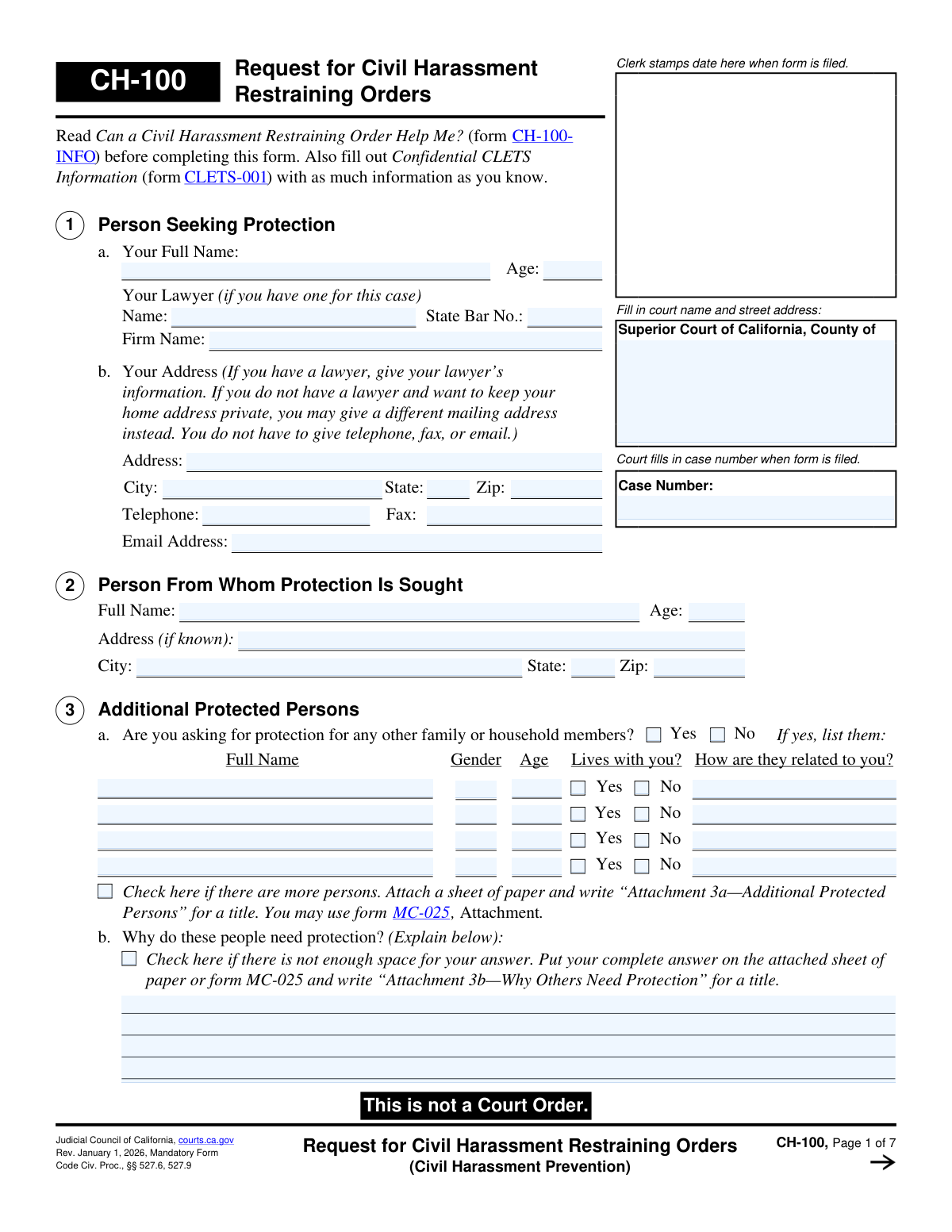
Yes! You can use AI to fill out Form CH-100, Request for Civil Harassment Restraining Orders (Civil Harassment Prevention)
Form CH-100, Request for Civil Harassment Restraining Orders, is a legal document used in California to petition the court for a protective order against an individual who is not a close family member or partner. It is crucial for individuals seeking legal protection from stalking, violence, threats, or other forms of serious harassment. Filing this form initiates the legal process to obtain a temporary and then a permanent restraining order. Today, this form can be filled out quickly and accurately using AI-powered services like Instafill.ai, which can also convert non-fillable PDF versions into interactive fillable forms.
CH-100 is part of the
California court forms, civil court forms and restraining order forms categories on Instafill.
Our AI automatically handles information lookup, data retrieval, formatting, and form filling.
It takes less than a minute to fill out CH-100 using our AI form filling.
Securely upload your data. Information is encrypted in transit and deleted immediately after the form is filled out.
Form specifications
| Form name: | Form CH-100, Request for Civil Harassment Restraining Orders (Civil Harassment Prevention) |
| Number of fields: | 227 |
| Number of pages: | 1 |
| Language: | English |
Instafill Demo: How to fill out PDF forms in seconds with AI
How to Fill Out CH-100 Online for Free in 2026
Are you looking to fill out a CH-100 form online quickly and accurately? Instafill.ai offers the #1 AI-powered PDF filling software of 2026, allowing you to complete your CH-100 form in just 37 seconds or less.
Follow these steps to fill out your CH-100 form online using Instafill.ai:
- 1 Navigate to Instafill.ai and upload or select the Form CH-100, Request for Civil Harassment Restraining Orders.
- 2 Provide your personal information (Person Seeking Protection) and the details of the person you need protection from (Person From Whom Protection Is Sought).
- 3 If applicable, list any additional family or household members who also need protection and explain why.
- 4 Thoroughly describe the harassment incidents, including the most recent event and any prior occurrences, providing dates and details of what happened.
- 5 Clearly check the boxes for the specific orders you are requesting, such as personal conduct orders (no contact) and stay-away orders (specifying distance and locations).
- 6 Complete the sections regarding other court cases, firearms possession, and any requests for a temporary order or fee waivers.
- 7 Review all entered information for accuracy, then electronically sign and date the declaration under penalty of perjury before downloading the completed form for filing with the court.
Our AI-powered system ensures each field is filled out correctly, reducing errors and saving you time.
Why Choose Instafill.ai for Your Fillable CH-100 Form?
Speed
Complete your CH-100 in as little as 37 seconds.
Up-to-Date
Always use the latest 2026 CH-100 form version.
Cost-effective
No need to hire expensive lawyers.
Accuracy
Our AI performs 10 compliance checks to ensure your form is error-free.
Security
Your personal information is protected with bank-level encryption.
Frequently Asked Questions About Form CH-100
Form CH-100, Request for Civil Harassment Restraining Orders, is used to ask a California court for protection from someone who is harassing, stalking, threatening, or being violent towards you, and with whom you do not have a close family or dating relationship.
You should use this form if you need protection from someone like a neighbor, a roommate, a coworker, or a stranger. If you need protection from a spouse, partner, or close relative, you would typically use a Domestic Violence Restraining Order form instead.
Yes, Section 3 allows you to list other family or household members who also need protection. You must explain why each person listed needs protection from the individual named in the request.
In Section 1, the form states you may provide a different mailing address, such as a P.O. Box, instead of your home address to keep it confidential. If you have a lawyer, their address will be used.
You must describe the most recent incident of harassment in detail, including the date, who was present, and what happened. It is also important to describe any previous incidents to show a pattern of behavior, known as a 'course of conduct'.
Personal Conduct Orders (Section 8) command the person not to do certain things, like contact or harass you. Stay-Away Orders (Section 9) require the person to keep a specific physical distance away from you, your home, your workplace, and other protected locations.
A TRO, requested in Section 11, is a short-term order a judge can grant to protect you immediately until the full court hearing. You must explain why you need protection before the hearing date.
Section 10 asks if the person has firearms, firearm parts, or ammunition. You must provide any information you have, as a restraining order, if granted, will legally prohibit them from possessing firearms and require them to be turned in or sold.
According to Section 13, there should be no filing fee if your request is based on stalking, violence, or a credible threat of violence. You can also apply for a general fee waiver by filing form FW-001.
The form instructions state you must also complete a 'Confidential CLETS Information' form (CLETS-001). If you are requesting a TRO, you will also need to prepare form CH-110, Temporary Restraining Order.
Many sections on the form have a checkbox for when you need more space. If you run out of room, check the box and attach a separate sheet of paper, making sure to title it as instructed (e.g., 'Attachment 7b—Previous Harassment').
Yes, services like Instafill.ai use AI to help you accurately auto-fill form fields with your information. This can save time and reduce the chance of errors, especially when filling out multiple related court documents.
Simply upload the CH-100 PDF to the Instafill.ai platform. The service will convert it into a fillable format, and its AI can assist you in entering your information quickly and accurately before you print the completed form for filing.
If you have a flat, non-fillable PDF, you can use a service like Instafill.ai. It is designed to convert such documents into interactive, fillable forms that you can easily complete on your computer.
Compliance CH-100
Validation Checks by Instafill.ai
1
Ensures Petitioner and Respondent are Identified
Checks that the full name fields for the 'Person Seeking Protection' (Section 1a, ProtectedFullName) and the 'Person From Whom Protection Is Sought' (Section 2, RestrainedFullName) are not empty. These names are fundamental to the legal action, as they identify the parties involved in the restraining order. A failure to provide these names would make the form legally invalid and unenforceable.
2
Validates Jurisdictional Venue Selection
This validation ensures that at least one reason for filing in the specified county is selected in Section 5 ('Venue'). This is a critical jurisdictional requirement to prove the court has the authority to hear the case. If no venue option is selected, the filing may be rejected for being filed in the wrong court.
3
Requires Date of Most Recent Harassment
Verifies that the date field in Section 7a(1), 'When did it happen?', is filled with a valid, non-future date. This date establishes the timeline of events and is crucial for the court to assess the immediacy of the threat. An invalid or missing date prevents the court from understanding the recency of the harassment.
4
Mandatory Harassment Description
Confirms that the primary narrative field in Section 7a(3), 'How did the person in 2 harass you?', contains text. This description is the core evidence for the request, explaining the specific actions that constitute harassment. Without this detailed account, the court has no basis on which to grant a restraining order.
5
Conditional 'Course of Conduct' Explanation
This check is triggered if the user answers 'Yes' to Section 7b, 'Has the person in 2 harassed you at other times?'. It ensures the corresponding description field is filled out, which is necessary to establish a 'course of conduct' under the law. Failure to describe prior incidents weakens the legal argument for harassment, which often requires more than a single act.
6
Ensures Details for Additional Protected Persons
If the user checks 'Yes' in Section 3a to request protection for others, this validation ensures at least one person's details are entered in the table and that the reason they need protection is explained in Section 3b. This is important for the court to understand the scope of the requested order and the justification for protecting each individual. An incomplete entry may result in those individuals not being covered by the order.
7
Validates Stay-Away Order Distance
If any location is checked in Section 9a ('Stay-Away Orders'), this validation confirms that the 'yards' field contains a valid, positive number. The distance is a key parameter of the order, defining the prohibited zone around the protected persons and places. An empty or invalid distance makes the stay-away request ambiguous and unenforceable.
8
Requires Justification for No TRO Notice
This validation ensures that if the user answers 'No' to the question in Section 11 about notifying the respondent of the TRO request, they must provide an explanation. Courts require a compelling reason, such as risk of immediate harm, to issue an order without prior notice to the other party. Failure to provide this justification will likely result in the denial of the temporary order.
9
Conditional Details for Other Court Cases
If the user answers 'Yes' to having other court cases with the respondent in Section 6a, this check verifies that at least one case type is checked and that its corresponding 'Filed in (County/State)' and 'Year Filed' fields are completed. This information is vital for the court to understand the full legal history between the parties and to avoid conflicting orders. Missing details can delay the case or lead to incomplete judicial review.
10
Requires Explanation for Weapon Use
If the user answers 'Yes' to Section 7a(4) regarding the respondent's use or threat to use a weapon, this validation makes the corresponding explanation field mandatory. The presence of a weapon significantly elevates the level of threat and is a critical factor for the judge's decision-making, especially regarding firearm restrictions. A missing explanation fails to provide the court with necessary details about this serious allegation.
11
Age Field Numeric Validation
This check ensures that any 'Age' field that is filled in (for the petitioner, respondent, or other protected persons) contains only numeric characters and is a reasonable number (e.g., 0-120). This maintains data integrity and ensures the information is in a usable format for court records. Non-numeric or illogical entries would be rejected, and the user would be prompted to correct the data.
12
Verifies Signature Date
This validation confirms that the signature date in the final section of the form is present and is not a future date. The date of signature is legally significant as it attests to the truthfulness of the information at that specific time. A missing or future date would render the declaration invalid and lead to the form's rejection.
13
Fee Waiver Application Cross-Reference
If the user checks box 13c, indicating they are entitled to a fee waiver, this validation triggers a notification that they must also complete and file form FW-001. This is a procedural check to prevent the filing from being rejected due to an incomplete fee waiver request. It ensures the user understands the full set of requirements for their request to be processed without payment.
14
Requires Specification for 'Other' Venue
This check ensures that if the 'Other' checkbox is selected in Section 5d ('Venue'), the corresponding text field specifying the reason is filled out. This is necessary to provide the court with a clear and valid justification for jurisdiction if the standard reasons do not apply. An empty specification field would leave the jurisdictional basis unclear and could lead to the case being dismissed or transferred.
Common Mistakes in Completing CH-100
In Section 7, filers often use subjective language (e.g., 'he was being a jerk') instead of providing specific, factual details. This happens because the situation is emotionally charged, but it fails to give the judge the concrete facts needed to grant the order. To avoid this, describe events chronologically with dates, times, locations, and direct quotes if possible, focusing on actions and words rather than your interpretation of them.
The legal standard for civil harassment requires a 'course of conduct,' meaning more than one act. Filers frequently focus only on the most recent incident in Section 7a, which may be insufficient for the court. This can lead to the request being denied. Always detail the most recent incident in 7a and then use 7b to describe previous incidents to establish a clear pattern of behavior.
In Section 2, filers may not know the full name or address of the person they are seeking protection from, leading to blank fields. This can cause significant delays or make it impossible for law enforcement to serve the papers and enforce the order. To avoid this, gather as much information as possible before filing and use the Confidential CLETS form for additional details. AI-powered tools like Instafill.ai can help by validating address formats and ensuring all required fields are considered.
When requesting protection for family members in Section 3, people often list their names but forget to explain *why* those individuals also need protection. The court cannot assume they are at risk simply because of their relationship to you. This omission can result in the order only protecting the primary filer, leaving others vulnerable. You must provide specific examples of how the restrained person has harassed or threatened the additional people.
The form allows for attachments, but filers often fail to label them correctly as instructed (e.g., 'Attachment 7a(3)') or forget to include them. This can lead to the court disregarding crucial information and weakening the case. If the form is a non-fillable PDF, tools like Instafill.ai can convert it into a fillable version where you can type directly into expandable text fields, potentially reducing the need for messy attachments.
In distress, filers may automatically write their home address in Section 1b, which the restrained person will see on the served papers, compromising their safety. The form explicitly allows using a safe mailing address (like a P.O. Box) to keep your home location private. Always use this option if you have any safety concerns. Smart form-filling tools can be programmed to flag sensitive fields and remind users of privacy options.
Filers often write detailed narratives but forget to check the specific boxes in Sections 8 and 9 for the 'Personal Conduct' or 'Stay-Away' orders they want. The judge issues orders based on what is explicitly requested, so an unchecked box means a desired protection may not be granted. To avoid this, carefully review every checkbox to ensure your requests are clear. AI-powered tools like Instafill.ai can help by highlighting all selectable options and ensuring you haven't overlooked a critical request.
In Section 11, when requesting a Temporary Restraining Order (TRO) without first notifying the other person, the court requires a strong reason why giving notice would be dangerous. Many filers simply state they are scared, which is often insufficient. This can result in the judge denying the immediate TRO, leaving the filer without protection until the full hearing. A better reason would be a credible fear that giving notice would provoke immediate violence.
People often focus on the main CH-100 form and forget required companion documents like the 'Confidential CLETS Information' (CLETS-001) or the 'Fee Waiver' (FW-001). This can cause the filing to be rejected or hinder enforcement. To avoid this, read the instructions carefully to identify all required forms. Some advanced form-filling platforms can bundle related legal forms together, ensuring you complete the entire necessary package at once.
Forgetting to sign and date the form on the final page is a simple but surprisingly common mistake. An unsigned form is not a valid legal declaration and will be immediately rejected by the court clerk, forcing you to correct and refile it. This delays the process and the potential for protection. Always perform a final review of the entire document, paying special attention to the signature line before submitting.
Saved over 80 hours a year
“I was never sure if my IRS forms like W-9 were filled correctly. Now, I can complete the forms accurately without any external help.”
Kevin Martin Green
Your data stays secure with advanced protection from Instafill and our subprocessors

Robust compliance program
Transparent business model
You’re not the product. You always know where your data is and what it is processed for.
ISO 27001, HIPAA, and GDPR
Our subprocesses adhere to multiple compliance standards, including but not limited to ISO 27001, HIPAA, and GDPR.
Security & privacy by design
We consider security and privacy from the initial design phase of any new service or functionality. It’s not an afterthought, it’s built-in, including support for two-factor authentication (2FA) to further protect your account.
Fill out CH-100 with Instafill.ai
Worried about filling PDFs wrong? Instafill securely fills form-ch-100-request-for-civil-harassment-restraining-orders-civil-harassment-prevention forms, ensuring each field is accurate.