Yes! You can use AI to fill out Form CM-110, Case Management Statement

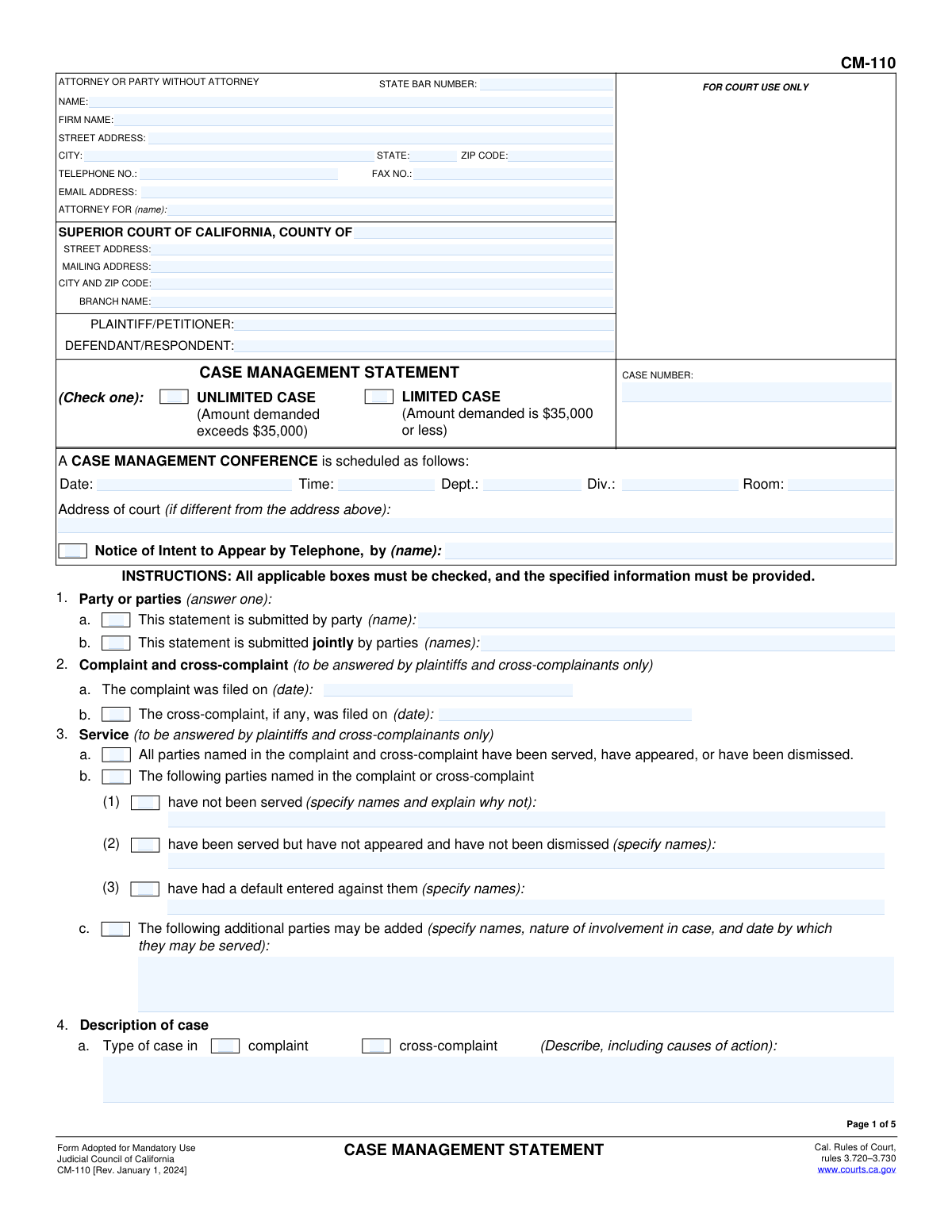
Form CM-110, the Case Management Statement, is a crucial document filed in California Superior Courts by parties involved in a civil case. It provides the judge with a comprehensive update on the case's progress, including service of process, discovery status, trial readiness, and alternative dispute resolution efforts, ensuring an efficient case management conference. Today, this form can be filled out quickly and accurately using AI-powered services like Instafill.ai, which can also convert non-fillable PDF versions into interactive fillable forms.
CM-110 is part of the California court forms and California state forms categories on Instafill.
Our AI automatically handles information lookup, data retrieval, formatting, and form filling.
It takes less than a minute to fill out CM-110 using our AI form filling.
Securely upload your data. Information is encrypted in transit and deleted immediately after the form is filled out.

Form specifications

Form name: Form CM-110, Case Management Statement
Number of fields: 204
Number of pages: 1
Language: English
main-image

Instafill Demo: How to fill out PDF forms in seconds with AI

How to Fill Out CM-110 Online for Free in 2026

Are you looking to fill out a CM-110 form online quickly and accurately? Instafill.ai offers the #1 AI-powered PDF filling software of 2026, allowing you to complete your CM-110 form in just 37 seconds or less.
Follow these steps to fill out your CM-110 form online using Instafill.ai:
  1. 1 Navigate to Instafill.ai and upload or select the CM-110 Case Management Statement form.
  2. 2 Allow the AI to process the document and identify all the required fields for case information, party details, and procedural status.
  3. 3 Provide your case details, such as the case number, party names, and court information, by answering simple questions.
  4. 4 Complete the sections on service of process, case description, trial readiness, and alternative dispute resolution (ADR) with guidance from the tool.
  5. 5 Carefully review all the information entered for accuracy and completeness.
  6. 6 Electronically sign and date the statement where required.
  7. 7 Download the completed CM-110 form, ready for filing with the appropriate California Superior Court.

Our AI-powered system ensures each field is filled out correctly, reducing errors and saving you time.

Why Choose Instafill.ai for Your Fillable CM-110 Form?

Speed

Complete your CM-110 in as little as 37 seconds.

Up-to-Date

Always use the latest 2026 CM-110 form version.

Cost-effective

No need to hire expensive lawyers.

Accuracy

Our AI performs 10 compliance checks to ensure your form is error-free.

Security

Your personal information is protected with bank-level encryption.

Frequently Asked Questions About Form CM-110

This form is used to update the court on the status of a civil case before a scheduled Case Management Conference. It helps the judge understand the case's progress, key issues, and timeline for resolution.

All parties involved in a California civil lawsuit, whether they are represented by an attorney or are self-represented, must file this statement. It can be filed by one party or jointly by multiple parties.

You must file this form with the court and serve it on all other parties at least 15 calendar days before your scheduled Case Management Conference.

A 'Limited' case is a lawsuit where the amount in dispute is $35,000 or less. An 'Unlimited' case is for disputes exceeding $35,000 and typically involves more complex legal procedures.

In section 4, you should provide a brief summary of the case, including the main legal claims (causes of action). If you are seeking damages, you must specify the type and amount, such as medical expenses or lost earnings.

ADR refers to methods of resolving disputes without a trial, such as mediation or arbitration. This section asks you to confirm you have reviewed ADR options and to indicate which processes you are willing to use.

This is a legal requirement for parties to communicate with each other before the conference to discuss case issues, explore settlement, and agree on a case plan. You must report whether this meeting occurred.

In section 3, you must list any parties who have not been served and explain the reason. This informs the court about the status of bringing all necessary parties into the case.

This is common early in a case. Simply check box 6b, 'No trial date has been set,' and indicate if you believe the case will be ready for trial within 12 months of its filing.

Yes, section 1b allows for a joint statement. Filing jointly is often efficient as it presents a unified summary of the case status to the court.

Yes, services like Instafill.ai use AI to help you accurately auto-fill form fields with your case information. This can save you significant time and help avoid common errors.

To use Instafill.ai, you upload the CM-110 PDF to the platform. The AI makes the document interactive and assists you in filling out the required information for each section before you print and file it.

If you have a non-fillable or 'flat' PDF, you can use a service like Instafill.ai. It can convert the document into an interactive, fillable form, allowing you to type your answers directly into the fields.

Compliance CM-110
Validation Checks by Instafill.ai

1
Mutually Exclusive Case Type Selection
Checks that only one of 'UNLIMITED CASE' or 'LIMITED CASE' is selected at the top of the form. This is a fundamental classification that dictates subsequent rules and procedures, so it must be clear and unambiguous. A failure would require the user to select exactly one option.
2
Party Submission Type Exclusivity
Validates that in Section 1, the form is not submitted both individually (1a) and jointly (1b) simultaneously. These options are mutually exclusive and selecting both creates an ambiguity. An error would be flagged if both checkboxes are ticked, forcing the filer to clarify the nature of the submission.
3
Complaint Filing Date Validity
Ensures the complaint filing date entered in Section 2a is a valid date format and occurs in the past. This date is the starting point for many legal deadlines and must be historically accurate. An invalid or future date would be rejected to prevent logical errors in the case timeline.
4
Cross-Complaint Date Chronology
Verifies that if a cross-complaint date is entered in Section 2b, it is on or after the complaint filing date from Section 2a. A cross-complaint cannot logically be filed before the original complaint. This check prevents chronological impossibilities in the case timeline.
5
Conditional Service Explanation Requirement
This check ensures that if box 3b(1) is checked, indicating some parties have not been served, the corresponding text field explaining why is not left empty. This is crucial for the court to understand the status of service and any potential delays. Failure to explain would prompt the user for the required information.
6
Trial Date Status Exclusivity
Validates that checkboxes for 'The trial has been set' (6a) and 'No trial date has been set' (6b) are mutually exclusive. A case cannot have a trial date and not have one at the same time. This check prevents contradictory information from being submitted to the court.
7
Future Trial Date Requirement
If 'The trial has been set' (6a) is checked, this validation ensures the provided date is a valid date in the future. Scheduling a trial for a past date is a logical error. The system should flag any past dates to ensure correct scheduling information is provided.
8
ADR Exemption Justification
Ensures that if the box in 10b(3) is checked, claiming the case is exempt from judicial arbitration, the corresponding text field specifying the exemption is filled. The court needs the specific statutory or rule-based reason for the exemption to process the case correctly. A blank explanation would result in a validation failure.
9
ADR Status and Date Coherence
In the ADR table (Section 10c), this check confirms that if a status checkbox (e.g., 'Mediation session scheduled for') is selected, its corresponding date field is also filled. This prevents incomplete status updates and ensures that scheduled events have an associated date. The validation would fail if a status is checked but the date is missing.
10
Related Cases Detail Requirement
Validates that if checkbox 13a, 'There are companion, underlying, or related cases,' is checked, then the required details (Case Name, Court, Case Number, and Status) are provided. This information is critical for the court to consider consolidation or coordination. The submission would be considered incomplete without these details.
11
Discovery Status Exclusivity
This check ensures that the options in Section 16 for 'completed all discovery' (16a) and 'following discovery will be completed' (16b) are not selected at the same time. A party cannot have both finished discovery and still have discovery pending. This prevents contradictory reporting on the case's progress.
12
Anticipated Discovery Details
If Section 16b is checked, indicating future discovery is planned, this validation ensures at least one row in the discovery table is filled out. Each entry must include a description of the discovery and a future completion date. This provides the court with a clear and actionable discovery plan.
13
Limited Case Economic Litigation Check
Verifies that if the case is marked as a 'LIMITED CASE' on page 1, then a selection is made in Section 17 regarding economic litigation procedures. This section is mandatory for limited cases, and failing to answer it leaves the court without necessary procedural information. The validation ensures the question is not skipped for applicable cases.
14
Signature and Date Presence
Confirms that the form has a signature date and a typed name in the signature block on the final page. The signature and date attest to the truthfulness of the statement and the authority of the signer. A missing date or name would render the document invalid for submission.

Common Mistakes in Completing CM-110

Incomplete or Inconsistent Caption Information

Users often leave critical information in the top caption blank, such as the case number, the correct court branch name, or their full contact details. A frequent error is filling out the case number on the first page but forgetting to repeat it in the header of subsequent pages, which can cause pages to be misfiled. These omissions can lead to court rejection of the filing, delays in processing, and returned mail. To avoid this, double-check that every field in the caption on page 1 is complete and that the case number and party names are correctly entered on all five pages.

Failing to Accurately Report Service Status

Section 3, regarding the status of service on all parties, is frequently filled out incorrectly. Litigants may mistakenly check box 3a, claiming all parties have been served, when some have not. Alternatively, when using section 3b, they fail to provide the required specific names and detailed explanations for why service has not been completed. An inaccurate or incomplete service status prevents the case from moving forward, as the court cannot proceed until it confirms all parties have been properly notified.

Providing a Vague Case Description and Damage Calculation

In Section 4b, parties are required to provide a 'brief statement of the case' and, if applicable, specific details about damages. A common mistake is to provide a long, unfocused narrative instead of a concise summary, or to vaguely state 'damages to be proven at trial' without itemizing medical expenses, lost earnings, or the nature of equitable relief sought. This prevents the judge from properly assessing the case's complexity and value, potentially leading to an inefficient case management plan. Be specific and provide the exact figures and details requested in the instructions.

Mismanaging the Alternative Dispute Resolution (ADR) Section

Section 10 is complex and a common source of errors. Attorneys may forget to check the box in 10a(1) confirming they have reviewed ADR options with their client, a mandatory step. Furthermore, in the table under 10c, parties often check boxes indicating they are 'willing to participate' but then fail to fill out the corresponding status on the right-hand side, leaving the court uncertain about what has actually been agreed upon or scheduled. To prevent this, carefully review each part of Section 10 and ensure all selections accurately reflect the current status of ADR discussions and agreements.

Omitting Related Cases

Parties sometimes fail to disclose companion, underlying, or related cases in Section 13, either through oversight or a misunderstanding of what constitutes a 'related' case. This is a serious error that can disrupt the court's ability to manage its docket, prevent conflicting rulings, and ensure judicial efficiency. Failure to disclose can result in sanctions or consolidation orders after the fact. Always carefully consider if any other legal matters involve the same parties, property, or core set of facts, and disclose them fully.

Submitting an Unrealistic or Vague Discovery Plan

In Section 16b, parties are asked to describe all anticipated discovery and provide completion dates. A frequent mistake is to be overly general, with entries like 'All written discovery' and a distant, single date. This is unhelpful for the court. A proper response breaks down discovery into specific types (e.g., 'Deposition of Plaintiff,' 'Expert witness discovery') and assigns realistic, individual deadlines for each. A vague plan can result in the judge imposing a more rigid schedule that may not be favorable.

Improperly Certifying the 'Meet and Confer' Requirement

Parties often check the box in Section 19a, stating they have 'met and conferred' on all required subjects, without having had a substantive discussion as mandated by court rules. A brief email exchange is not sufficient. This can lead to an unproductive case management conference and judicial frustration. To avoid this, engage in a genuine, good-faith discussion with the opposing side about all topics listed in rule 3.724 and accurately report any agreements in section 19b.

Forgetting to Attach Referenced Documents

Throughout the form, there are options to attach additional pages for longer explanations, such as in sections 4b, 8, and 13a. A common mistake is to check the box indicating an attachment will be used but then forget to physically include the document with the filing. It is also common to forget to update the 'Total number of pages attached' in Section 20. This results in an incomplete filing and requires follow-up with the court clerk to correct the record, causing delays.

Missing or Invalid Signatures

An unsigned or undated form is invalid and will be rejected by the court. People often complete the entire five-page document and simply forget to sign and date the final page. If the statement is being submitted jointly, all required parties or their attorneys must sign. This oversight can cause you to miss a filing deadline, potentially leading to sanctions or a delay in your case management conference. Always perform a final check for a valid signature and date before submission.

Incorrectly Identifying the Case Type (Limited vs. Unlimited)

On the first page, the filer must check whether the case is 'UNLIMITED' (over $35,000) or 'LIMITED' ($35,000 or less). Choosing the wrong category is a significant error with major procedural consequences, affecting everything from discovery limits to the availability of certain types of relief. This mistake often happens when the amount of damages is not carefully calculated before filing. This classification should match the complaint and be carefully considered, as changing it later requires a formal motion.
Saved over 80 hours a year

“I was never sure if my IRS forms like W-9 were filled correctly. Now, I can complete the forms accurately without any external help.”

Kevin Martin Green

Your data stays secure with advanced protection from Instafill and our subprocessors

Robust compliance program

Transparent business model

You’re not the product. You always know where your data is and what it is processed for.

ISO 27001, HIPAA, and GDPR

Our subprocesses adhere to multiple compliance standards, including but not limited to ISO 27001, HIPAA, and GDPR.

Security & privacy by design

We consider security and privacy from the initial design phase of any new service or functionality. It’s not an afterthought, it’s built-in, including support for two-factor authentication (2FA) to further protect your account.

Fill out CM-110 with Instafill.ai

Worried about filling PDFs wrong? Instafill securely fills form-cm-110-case-management-statement forms, ensuring each field is accurate.

Related forms by category

California court forms Judicial Council of California Form SC-105, Request for Court Order and Answer (Small Claims), Judicial Council of California Form SC-120, Defendant’s Claim and ORDER to Go to Small Claims Court (Small Claims), Judicial Council of California Form SER-001, Request for Sheriff to Serve Court Papers, Judicial Council of California Form SER-001, Request for Sheriff to Serve Court Papers, Affidavit for Collection of Personal Property California Probate Code Section 13100, Form POS-040, Proof of Service—Civil, Declaration of Facts of Death (California Superior Court), declaration-of-marriage-for-court-proceeding-california-family-law, ADOPT-200, Adoption Request, ADOPT-200, Stepparent Adoption Request, ADOPT-210, Adoption Agreement, ADOPT-310, Contact After Adoption Agreement, Judicial Council of California Form ADOPT-200, Adoption Request, Form ADR-107, Mediation Attendance Sheet, Form ADR-110, Order Appointing Referee, Form ADR-109, Stipulation or Motion for Order Appointing Referee, Form ADR-102, Request for Trial De Novo After Judicial Arbitration, Form ADR-108, Referee's Report (Code Civ. Proc., §§ 638, 639), Form ADR-106, Petition to Confirm, Correct, or Vacate Contractual Arbitration Award, Form ADR-104, Rejection of Award and Request for Trial After Attorney-Client Fee Arbitration · + 125 more →
California state forms Judicial Council of California Form DE-111, Petition for Probate (Probate—Decedents Estates), Judicial Council of California Form DE-111, Petition for Probate (Probate—Decedents Estates), DS 1891, Applicant/Vendor Disclosure Statement (State of California Department of Developmental Services), DL 142, Request for Cancellation or Surrender of a Driver License or Identification Card (State of California Department of Motor Vehicles), Judicial Council of California Form DE-120, Notice of Hearing—Decedent's Estate or Trust, Judicial Council of California Form DE-120, Notice of Hearing—Decedent's Estate or Trust, Murrieta Police Department Citizen Complaint Form (California Penal Code § 148.6 Advisory Statement), California Department of Social Services, Sworn Statement, State of California Department of Transportation California Civil Rights Laws Certification, State of California Department of Transportation Darfur Contracting Act Certification, Form DOT ADM-0077, State of California Department of Transportation, Contract Requirements, State of California Department of Transportation Subcontractor List, State of California Department of Transportation, Certified DVBE Summary, Bidder Declaration GSPD-05-105, State of California Level of Care Rate Determination Protocol Matrix, State of California Accessible Form, State of California Form SOC 321, Request for Order and Consent - Paramedical Services, State of California Darfur Contracting Act Certification, State of California Department of Veterans Affairs COMMERCIALLY USEFUL FUNCTION (CUF) CERTIFICATION FORM, Form ADR-100, Statement of Agreement or Nonagreement · + 15 more →