
Yes! You can use AI to fill out Form CR-115, Defendant's Statement of Assets
Don't type 92 fields by hand. Tell our AI about yourself, or upload a document you already have, and it fills every field in seconds. You check it, then download, print or sign.
The AI does the filling. You just check it.
No typing into boxes, nothing to install.
What this form asks for
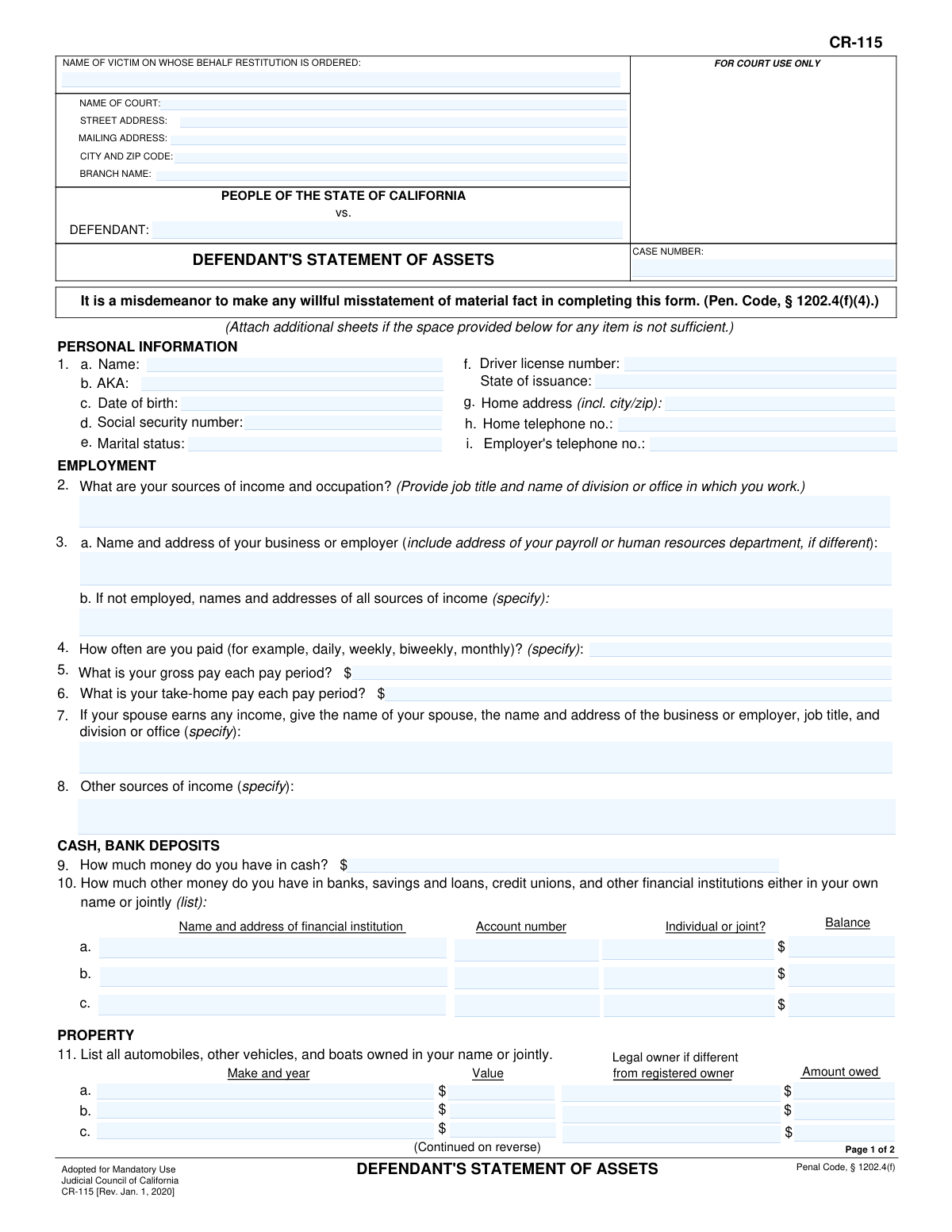
The AI fills all of it, from your answers or your documents.
The AI checks your answers before you download
14 checks built for this form, so a wrong date or a missing answer is caught before anyone else sees it.
This check ensures the Social Security Number entered in section 1c follows the standard XXX-XX-XXXX format. Correctly formatted SSNs are critical for accurate identification and cross-referencing with other legal and financial systems. If the format is incorrect, the system should reject the entry and prompt the user to enter a valid 9-digit number in the specified format.
This validation verifies that the Date of Birth in section 1b is a real calendar date, is in the past, and represents a plausible age for a defendant (e.g., older than 14 and younger than 120). This prevents typographical errors and ensures the integrity of the defendant's personal information. An invalid or illogical date would trigger an error, requiring correction before submission.
This is a logical consistency check between question 3 (gross pay) and question 4 (take-home pay). The system will verify that the take-home pay amount is less than or equal to the gross pay amount. This check is important for catching data entry errors and ensuring the financial information provided is logical and accurate for restitution assessment. A failure would flag both fields for user review and correction.
This check enforces a conditional requirement for question 16. If the defendant checks 'Yes' to indicate they have transferred assets since their arrest, the corresponding text field must be filled out with details of the transfer. This is crucial for ensuring full disclosure and preventing the hiding of assets. If 'Yes' is selected and the details are left blank, the form submission will be blocked with a message requiring the information.
For vehicles (section 11) and real estate (section 12), this check compares the 'Value' against the 'Amount owed'. While negative equity is possible, a significant discrepancy where the amount owed is much larger than the stated value can indicate a data entry error. The system should flag such entries with a warning, asking the user to confirm the amounts are correct before proceeding.
This validation confirms that the defendant's signature field and the corresponding date field on page 2 are not empty. The signature and date are legally required to certify the truthfulness of the statement under penalty of perjury. The form cannot be considered legally complete or valid without this information, so submission must be blocked until they are provided.
And 8 more checks
- Validates Home and Employer Telephone Number Format
- Verifies Case Number is Not Empty
- Requires Details if 'Other Sources of Income' are Mentioned
- Ensures All Monetary Fields Contain Numeric Values
- Requires Asset Holder Details if 'Yes' is Selected
- Validates Driver's License State of Issuance
- Requires Interpreter Details if Language is Specified
- Ensures Defendant Name is Present
Let AI fill out your CR-115
No typing. Every field filled in seconds, checked, ready to sign.
How to Fill Out CR-115 Online for Free in 2026
What the AI walks you through.
- Navigate to Instafill.ai and upload your CR-115 form, or select it from the library of official documents.
- Enter your personal information in Section 1, including your name, date of birth, social security number, and contact details.
- Complete the 'Employment' section by providing details about your job, employer, pay rate, and any other sources of income.
- Disclose your financial assets in the 'Cash, Bank Deposits' section, listing all cash on hand and balances in bank, savings, and credit union accounts.
- List all real estate, vehicles, boats, and other valuable personal property in the 'Property' section, specifying their value and any outstanding debts against them.
- Detail all your liabilities, such as loans, taxes, and credit card debts, in the 'Debts' section.
- Carefully review all entered information for accuracy, then sign and date the form to certify its truthfulness before submission.
Common Mistakes in Completing CR-115
The ones the AI is built to catch.
Confusing Gross Pay with Take-Home Pay
Providing Incomplete Employer Address Information
Omitting Non-Traditional Income Sources
Incorrectly Valuing Vehicles and Real Estate
Failing to Disclose All Financial Accounts
Failure to Disclose Assets Transferred Since Arrest
Missing or Incorrect Case Number
Providing Vague or Incomplete Debt Information
Forgetting to Sign and Date the Form
Misunderstanding 'Other Personal Property'
Frequently Asked Questions About CR-115
Is it really free for 7 days?
Can I fill other forms too?
How do I cancel?
How does the AI fill out CR-115?
What happens to my information?
How complex is CR-115 to fill out?
What is the purpose of Form CR-115, the Defendant's Statement of Assets?
Who needs to fill out this form?
What happens if I provide false information on this form?
Do I need to include my spouse's income?
What is the difference between 'gross pay' and 'take-home pay'?
Do I have to list my household furniture and clothing on this form?
What should I do if I run out of space for an answer?
What does it mean to have 'disposed of or transferred any assets' since my arrest?
What if I am unemployed and have no assets to declare?
Where do I submit the completed Form CR-115?
Can AI tools help me fill out this form?
How can I fill out Form CR-115 online?
The PDF version of this form I have is not fillable. What can I do?
Get your CR-115 filled out by AI
$0 today. Cancel before Nov 1 and you pay nothing.
Other forms like this one
California state forms: Judicial Council of California Form DE-111, Petition for Probate (Probate—Decedents Estates), DS 1891, Applicant/Vendor Disclosure Statement (State of California Department of Developmental Services), Judicial Council of California Form DE-120, Notice of Hearing—Decedent's Estate or Trust, Judicial Council of California Form DE-120, Notice of Hearing—Decedent's Estate or Trust, Murrieta Police Department Citizen Complaint Form (California Penal Code § 148.6 Advisory Statement), California Department of Social Services, Sworn Statement, State of California Department of Transportation California Civil Rights Laws Certification, State of California Department of Transportation Darfur Contracting Act Certification, Form DOT ADM-0077, State of California Department of Transportation, Contract Requirements, State of California Department of Transportation Subcontractor List, State of California Department of Transportation, Certified DVBE Summary, Bidder Declaration GSPD-05-105, State of California Level of Care Rate Determination Protocol Matrix, State of California Accessible Form, State of California Form SOC 321, Request for Order and Consent - Paramedical Services, State of California Darfur Contracting Act Certification, State of California Department of Veterans Affairs COMMERCIALLY USEFUL FUNCTION (CUF) CERTIFICATION FORM, Form ADR-100, Statement of Agreement or Nonagreement, Civil Appeal Case Information Statement, Form APP-014, Appellant's Proposed Statement on Appeal (Unlimited Civil Case)
California court forms: Judicial Council of California Form SC-105, Request for Court Order and Answer (Small Claims), Judicial Council of California Form SC-120, Defendant’s Claim and ORDER to Go to Small Claims Court (Small Claims), Judicial Council of California Form SER-001, Request for Sheriff to Serve Court Papers, Judicial Council of California Form SER-001, Request for Sheriff to Serve Court Papers, Affidavit for Collection of Personal Property California Probate Code Section 13100, Form POS-040, Proof of Service—Civil, Declaration of Facts of Death (California Superior Court), declaration-of-marriage-for-court-proceeding-california-family-law, ADOPT-200, Adoption Request, ADOPT-200, Stepparent Adoption Request, ADOPT-210, Adoption Agreement, ADOPT-310, Contact After Adoption Agreement, Judicial Council of California Form ADOPT-200, Adoption Request, Form ADR-107, Mediation Attendance Sheet, Form ADR-110, Order Appointing Referee, Form ADR-109, Stipulation or Motion for Order Appointing Referee, Form ADR-102, Request for Trial De Novo After Judicial Arbitration, Form ADR-108, Referee's Report (Code Civ. Proc., §§ 638, 639), Form ADR-106, Petition to Confirm, Correct, or Vacate Contractual Arbitration Award, Form ADR-104, Rejection of Award and Request for Trial After Attorney-Client Fee Arbitration
Let AI fill out your CR-115
Your trial starts once a card is added. You pay nothing before Nov 1.
Our AI already knows this form, all 92 fields of it. Skip the typing: tell it about yourself, or upload what you have, and it fills the whole form in seconds.
- AI fills every field on both pages, checkboxes included
- No typing into boxes: answer a few questions, or upload a document you already have, an old copy of this form, a photo of a document
- The AI checks the answers; you review and change anything before you download
- Download the finished PDF, print it, or sign it online
- Encrypted, and never used to train AI
Cancel before Nov 1 and you pay nothing.
A card is needed to start the trial. Cancel in two clicks from your account.
Terms · Privacy