Yes! You can use AI to fill out Form DV-330, Order on Request to Change or End Restraining Order (CLETS-OAH) (Domestic Violence Prevention)
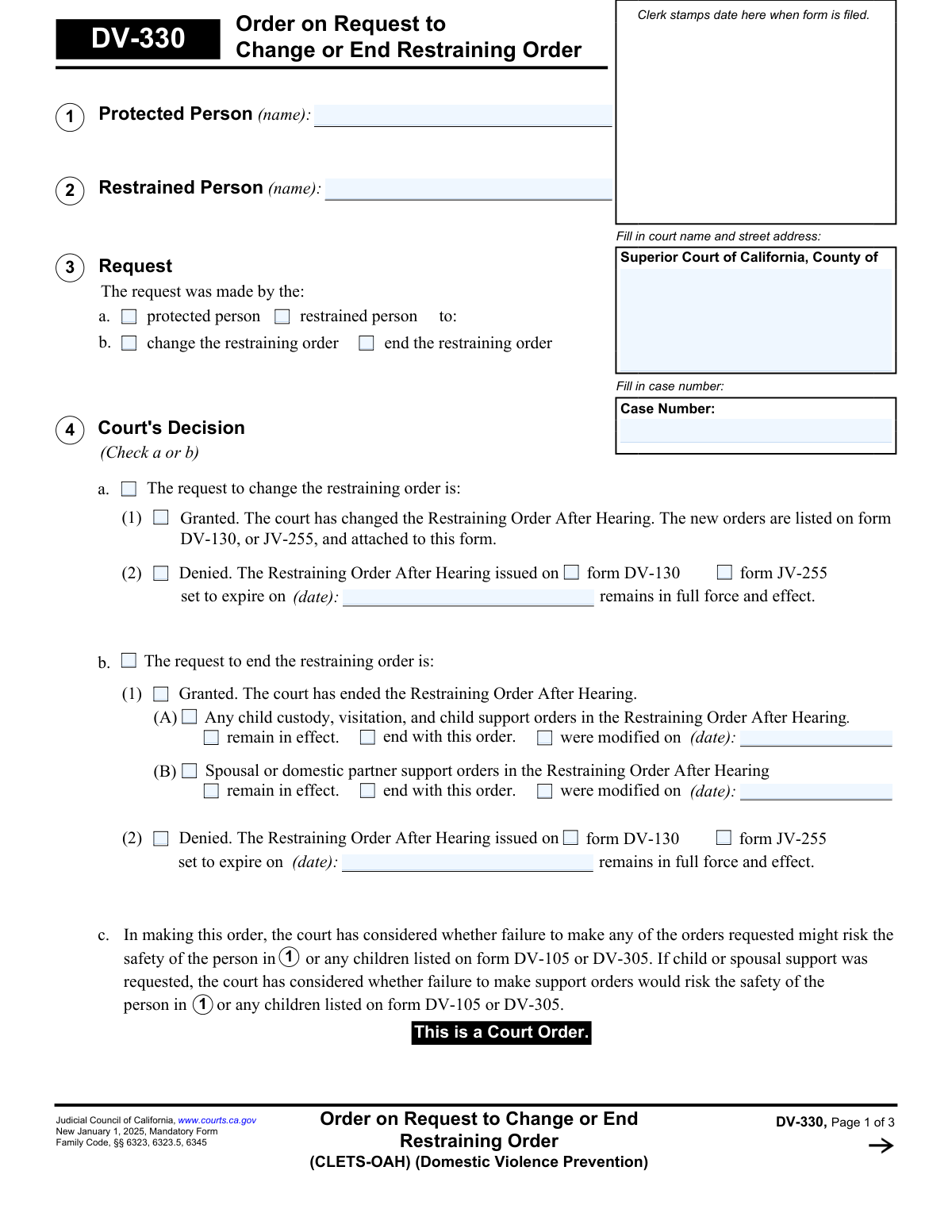
Form DV-330 is a mandatory California Judicial Council form that documents a court's ruling after a hearing on a request to change or end a domestic violence restraining order. It specifies whether the request was granted or denied and details any modifications to the original order, including custody, visitation, or support arrangements. This legally binding order is entered into the California Law Enforcement Telecommunications System (CLETS) to ensure law enforcement is aware of the current status of the restraining order. Today, this form can be filled out quickly and accurately using AI-powered services like Instafill.ai, which can also convert non-fillable PDF versions into interactive fillable forms.
DV-330 is part of the
California court forms, domestic violence forms and restraining order forms categories on Instafill.
Our AI automatically handles information lookup, data retrieval, formatting, and form filling.
It takes less than a minute to fill out DV-330 using our AI form filling.
Securely upload your data. Information is encrypted in transit and deleted immediately after the form is filled out.
Form specifications
| Form name: | Form DV-330, Order on Request to Change or End Restraining Order (CLETS-OAH) (Domestic Violence Prevention) |
| Number of fields: | 96 |
| Number of pages: | 1 |
| Language: | English |
Instafill Demo: How to fill out PDF forms in seconds with AI
How to Fill Out DV-330 Online for Free in 2026
Are you looking to fill out a DV-330 form online quickly and accurately? Instafill.ai offers the #1 AI-powered PDF filling software of 2026, allowing you to complete your DV-330 form in just 37 seconds or less.
Follow these steps to fill out your DV-330 form online using Instafill.ai:
- 1 Navigate to Instafill.ai and upload your Form DV-330, or select it from their library of official documents.
- 2 Use the AI assistant to automatically populate the court information, case number, and the names of the protected and restrained persons from your case files.
- 3 Clearly indicate who made the request (protected or restrained person) and the nature of the request (to change or end the order) in Section 3.
- 4 Document the court's decision in Section 4 by checking the appropriate boxes for whether the request was granted or denied, and specify any changes to related orders like custody or support.
- 5 Detail the hearing information in Section 5, including the date, judicial officer, and attendees.
- 6 Specify the service requirements in Section 6, indicating how the other party will be officially notified of the court's order.
- 7 Review the entire form for accuracy, then download the completed document to be signed by the judicial officer and filed with the court clerk.
Our AI-powered system ensures each field is filled out correctly, reducing errors and saving you time.
Why Choose Instafill.ai for Your Fillable DV-330 Form?
Speed
Complete your DV-330 in as little as 37 seconds.
Up-to-Date
Always use the latest 2026 DV-330 form version.
Cost-effective
No need to hire expensive lawyers.
Accuracy
Our AI performs 10 compliance checks to ensure your form is error-free.
Security
Your personal information is protected with bank-level encryption.
Frequently Asked Questions About Form DV-330
Form DV-330 is a court order completed by a judge. It states the court's final decision on a request to either modify (change) or terminate (end) an existing Domestic Violence Restraining Order.
This form is filled out by the judicial officer (judge) or court clerk after a hearing. The protected and restrained persons do not fill out Form DV-330 themselves; they receive a copy of the completed order.
Look at Section 4, 'Court's Decision'. The judge will check a box indicating whether the request to change or end the order was 'Granted' or 'Denied'.
If the request was granted, the restraining order is terminated. Section 4 will also specify what happens to any related child custody, visitation, or support orders, indicating if they also end or if they remain in effect.
If the request was denied, the original Restraining Order After Hearing (Form DV-130 or JV-255) remains unchanged and in full effect until its original expiration date.
This section provides instructions for formally notifying the other person of the judge's decision. The court will specify if you must have the other party served, how it should be done (e.g., by mail or in person), and by what date.
No. Section 7 states that the sheriff or marshal will serve this order for free. You will likely need to complete a 'Request for Sheriff to Serve Court Papers' form and give it to the sheriff's office.
CLETS stands for the California Law Enforcement Telecommunications System. It means this order is entered into a statewide database, ensuring that all law enforcement officers have access to the most current information about the status of the restraining order.
If the other party was not present, the court will require them to be formally served with a copy of this order. The specific method and deadline for service will be detailed in Section 6.
The judge's decision on this is in Section 4b(1). The court will specify whether the child custody, visitation, and child support orders from the original restraining order will end, remain in effect, or be modified.
Since Form DV-330 is completed by the court, you do not fill it out. However, AI services like Instafill.ai can help you accurately complete the initial request form that leads to this court order, saving you time and reducing errors.
You can upload a court form to Instafill.ai, and its AI technology will help you auto-fill the required fields. This simplifies the process of completing complex legal documents you are responsible for.
Tools like Instafill.ai can convert flat, non-fillable PDFs into interactive forms. This allows you to easily type your information into the fields on your computer before printing the completed document.
Compliance DV-330
Validation Checks by Instafill.ai
1
Case Number Consistency Across Pages
This check verifies that the 'Case Number' entered on page 1, page 2, and page 3 are identical. Maintaining a consistent case number is critical for ensuring all pages of the order are correctly associated with the same legal case file. A mismatch could lead to filing errors, incorrect record-keeping, and potential legal invalidity of parts of the order.
2
Completeness of Party Information
Ensures that the full names for both the 'Protected Person' (Section 1) and the 'Restrained Person' (Section 2) are provided. These fields are fundamental to the order's validity as they legally identify the individuals involved. Failure to provide these names would make the order unenforceable and legally void.
3
Exclusive Selection for Court's Decision
Validates that in Section 4, 'Court's Decision', either checkbox 'a' (for a request to change) or checkbox 'b' (for a request to end) is selected, but not both. The court can only rule on one type of request per order. An invalid selection would create ambiguity about the court's actual ruling, making the order impossible to process.
4
Logical Consistency Between Request and Decision
This check ensures the court's decision in Section 4 aligns with the initial request in Section 3. If the request was to 'change the restraining order' (3b), then a decision must be recorded in Section 4a. If the request was to 'end the restraining order', a decision must be in 4b. This prevents logical contradictions that would invalidate the court's order.
5
Conditional Date Entry for Denied Requests
Verifies that if a request is 'Denied' (checkbox 4a(2) or 4b(2) is checked), the expiration date of the existing restraining order is filled in. This date is crucial for confirming the duration of the original, unchanged order. Missing this date would create uncertainty about when the restraining order expires, impacting law enforcement and the involved parties.
6
Conditional Date Entry for Modified Orders
Checks that if the court grants an end to the restraining order (4b(1)) but indicates that child or spousal support orders 'were modified', the corresponding date of modification is entered. This date is essential for establishing the legal effective date of the new support terms. Without it, there is no clear record of when the modification took effect.
7
Hearing Date and Judicial Officer Presence
Ensures that the 'Hearing was on (date)' and the 'name of judicial officer' in Section 5 are both completed. This information is required to create an official record of the court proceeding, including when it occurred and under whose authority the order was made. Missing this information could challenge the order's authenticity.
8
Hearing Date Chronology
Validates that the hearing date entered in Section 5 is a valid date that is not in the future. A court hearing must have already occurred for an order to be issued based on it. An invalid or future date would indicate a data entry error and compromise the integrity of the court record.
9
Service Deadline Requirement
This check ensures that if a service method requiring a deadline is selected in Section 6 (e.g., personal service by a party, service by mail), the corresponding date field is populated with a valid future date. This deadline is a legal requirement that gives the serving party a clear timeframe to complete service. Failure to provide a date makes the service instruction incomplete and unenforceable.
10
Conditional Text for 'Other' Selections
Verifies that if an 'Other' checkbox is selected in Section 6 (Serving Order) or Section 9 (Attached Pages), the adjacent text field providing details is not empty. The 'Other' option is meaningless without a description of what it entails. This validation ensures that the order is complete and free of ambiguous, undefined selections.
11
Attachment Consistency for Granted Change
If the court grants the request to change the order (Section 4a(1)), this validation confirms that either 'DV-130' or 'JV-255' is checked in the attachments list (Section 9b). The form text explicitly states the new orders are listed on one of these attached forms. This check ensures the order is complete and includes the legally required documentation detailing the changes.
12
Attachment Page Count Logic
Validates that if the 'Number of pages attached' in Section 9a is greater than zero, at least one attachment form checkbox in 9b is selected. Conversely, if any attachment checkboxes are selected, the page count must be greater than zero. This ensures consistency and prevents a situation where attachments are claimed but not specified, or vice-versa.
13
Date Sequence Validation
This check verifies the logical chronological order of dates on the form: the Judge's Signature Date must be on or after the Hearing Date (Section 5), and the Clerk's Certificate Date must be on or after the Judge's Signature Date. This sequence reflects the proper legal process. An incorrect sequence would indicate a procedural or data entry error, potentially invalidating the document.
14
Lawyer's Fees Row Completeness
Ensures that if any field within a lawyer's fees row in Section 8 is filled (e.g., Amount), then all other fields in that same row ('Pay to', 'For', 'Due date') must also be completed. This prevents incomplete or ambiguous financial orders. An incomplete entry would be unenforceable and require clarification from the court.
Common Mistakes in Completing DV-330
The case number is required at the top of all three pages, but filers often forget to add it to pages 2 and 3. This oversight happens when rushing and can lead to the pages being separated and misfiled by the court clerk. An incomplete order is difficult to process and enforce, causing significant administrative delays. To avoid this, meticulously check that the correct case number is entered on every single page before submission.
A critical error is transposing the names of the parties in Box 1 and Box 2. This can happen due to haste or confusion, but it completely reverses the intent of the court order. Such a mistake can lead to the order being unenforceable, incorrectly entered into law enforcement systems (CLETS), or creating severe legal complications for both parties. Always double-check that the names in Box 1 (Protected Person) and Box 2 (Restrained Person) match the original court filings.
In Section 4, filers may inadvertently check conflicting boxes, such as selecting both 'Granted' and 'Denied,' or checking options under both 'change the order' and 'end the order.' This ambiguity makes the court's decision unclear and renders the order invalid and unenforceable. It is essential to make one clear choice (e.g., 4a or 4b) and then fill out only the sub-options that apply to that choice. AI-powered tools like Instafill.ai can prevent this by using conditional logic to guide users and gray out irrelevant options.
If the court grants a request to change the restraining order (Section 4a(1)), the new terms must be detailed on a separate form (e.g., DV-130) which is then attached. A common mistake is failing to physically attach the new form or neglecting to check the corresponding box in Section 9 ('Attached Pages'). This results in an incomplete filing where the 'changes' are not legally documented, making the modification ineffective and leaving the old order in place.
Section 6, which details how the order must be served, is a frequent source of error. Filers often get confused about who is responsible for serving the order, whether personal service or mail is required, and the deadline for completion. An error in service can mean the other party is not legally notified, making the order's changes unenforceable and potentially violating due process. It is crucial to carefully read the options and accurately reflect the court's specific instructions from the hearing.
When a restraining order is ended (Section 4b(1)), the form requires a specific decision on whether related child custody, visitation, and support orders also end or remain in effect. Filers often overlook these sub-selections (4b(1)(A) and 4b(1)(B)), creating legal ambiguity about financial obligations and parenting arrangements. This can lead to future disputes and require another court hearing to clarify the status of these related orders.
This form is often available as a non-fillable PDF, leading people to print and complete it by hand. Illegible handwriting can make names, dates, and case numbers unreadable, leading to data entry errors by court staff or outright rejection of the form. To ensure clarity and prevent processing delays, it is best to use a fillable version. Smart form-filling tools like Instafill.ai can convert flat PDFs into fillable versions, ensuring all entries are legible and correctly formatted.
If the court denies the request to change or end the order (Sections 4a(2) or 4b(2)), the form requires stating the expiration date of the original Restraining Order After Hearing. Filers may forget this date, leave it blank, or guess. An incorrect date creates confusion for the parties and law enforcement about when the protections actually expire. This date must be copied exactly from the original DV-130 or JV-255 form for the order to remain clear and effective.
Section 5 requires the hearing date, the name of the judicial officer, and a record of who attended. People sometimes leave this section blank, assuming it is for the clerk to fill out. However, this information is a critical part of the official record, verifying when the order was made and who was present to contest or agree to it. Leaving it blank can cause issues with verifying the order's authenticity and the circumstances of its issuance.
Saved over 80 hours a year
“I was never sure if my IRS forms like W-9 were filled correctly. Now, I can complete the forms accurately without any external help.”
Kevin Martin Green
Your data stays secure with advanced protection from Instafill and our subprocessors

Robust compliance program
Transparent business model
You’re not the product. You always know where your data is and what it is processed for.
ISO 27001, HIPAA, and GDPR
Our subprocesses adhere to multiple compliance standards, including but not limited to ISO 27001, HIPAA, and GDPR.
Security & privacy by design
We consider security and privacy from the initial design phase of any new service or functionality. It’s not an afterthought, it’s built-in, including support for two-factor authentication (2FA) to further protect your account.
Fill out DV-330 with Instafill.ai
Worried about filling PDFs wrong? Instafill securely fills form-dv-330-order-on-request-to-change-or-end-restraining-order-clets-oah-domestic-violence-prevention forms, ensuring each field is accurate.