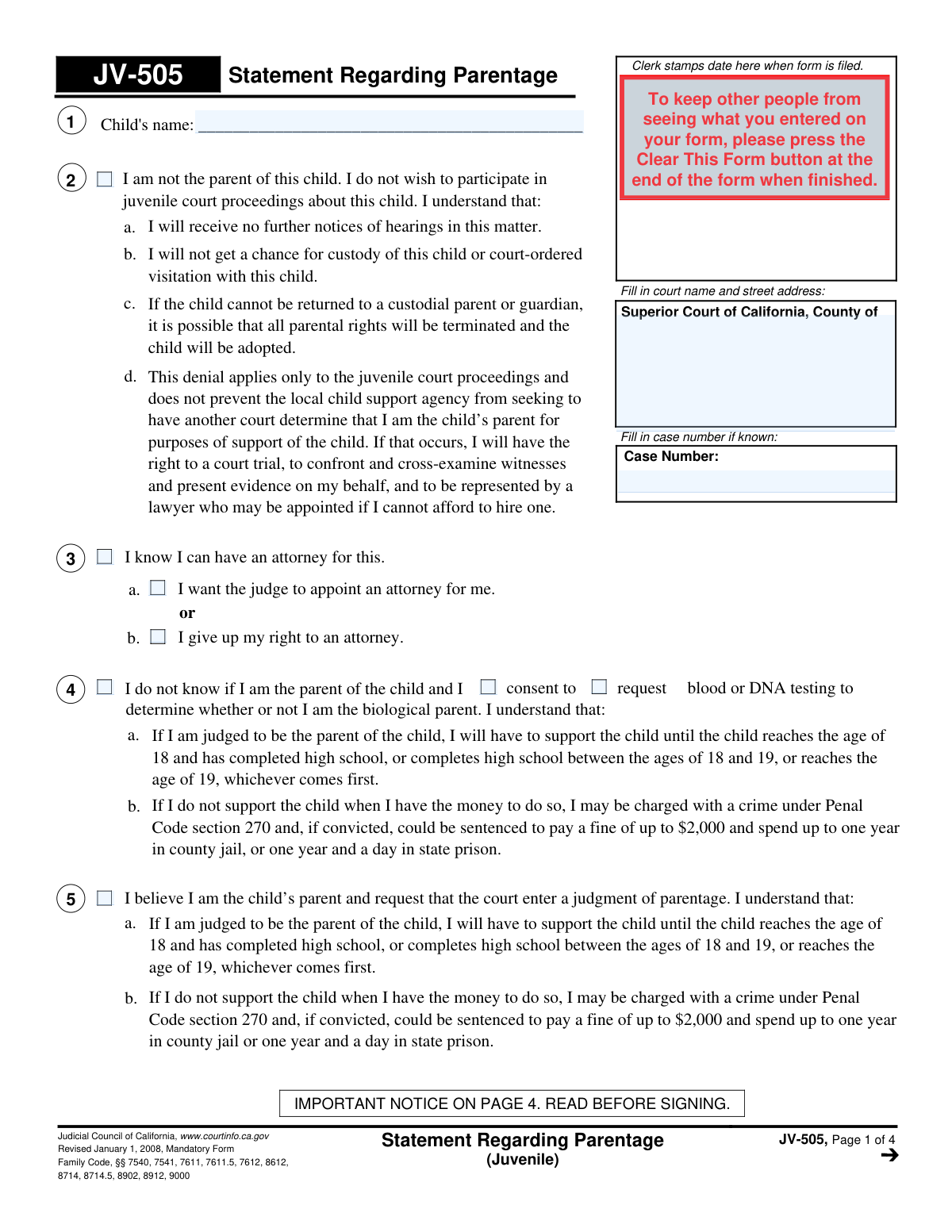
Yes! You can use AI to fill out Form JV-505, Statement Regarding Parentage (Juvenile)

Form JV-505, Statement Regarding Parentage (Juvenile), is a mandatory California Judicial Council form used in juvenile dependency cases. It allows an individual to formally state their position on being the parent of a child involved in the case, whether by acknowledging parentage, denying it, or requesting genetic testing to determine it. Today, this form can be filled out quickly and accurately using AI-powered services like Instafill.ai, which can also convert non-fillable PDF versions into interactive fillable forms.
JV-505 is part of the California court forms and California state forms categories on Instafill.
Our AI automatically handles information lookup, data retrieval, formatting, and form filling.
It takes less than a minute to fill out JV-505 using our AI form filling.
Securely upload your data. Information is encrypted in transit and deleted immediately after the form is filled out.

Form specifications

Form name: Form JV-505, Statement Regarding Parentage (Juvenile)
Number of fields: 62
Number of pages: 1
Language: English
main-image

Instafill Demo: How to fill out PDF forms in seconds with AI

How to Fill Out JV-505 Online for Free in 2026

Are you looking to fill out a JV-505 form online quickly and accurately? Instafill.ai offers the #1 AI-powered PDF filling software of 2026, allowing you to complete your JV-505 form in just 37 seconds or less.
Follow these steps to fill out your JV-505 form online using Instafill.ai:
  1. 1 Navigate to Instafill.ai and upload your JV-505 form or select it from the template library.
  2. 2 Provide the court information, including the county and case number, in the designated fields at the top of the form.
  3. 3 Enter the child's name and your personal information.
  4. 4 Carefully read and select one of the primary options: denying parentage, requesting genetic testing, or affirming your belief that you are the parent.
  5. 5 If applicable, provide further details, such as how parentage was previously established or information supporting a presumed parent claim.
  6. 6 Review all the information you've entered with the help of the AI assistant to ensure accuracy and completeness.
  7. 7 Sign and date the form, then file it with the appropriate Superior Court of California as instructed.

Our AI-powered system ensures each field is filled out correctly, reducing errors and saving you time.

Why Choose Instafill.ai for Your Fillable JV-505 Form?

Speed

Complete your JV-505 in as little as 37 seconds.

Up-to-Date

Always use the latest 2026 JV-505 form version.

Cost-effective

No need to hire expensive lawyers.

Accuracy

Our AI performs 10 compliance checks to ensure your form is error-free.

Security

Your personal information is protected with bank-level encryption.

Frequently Asked Questions About Form JV-505

The JV-505, Statement Regarding Parentage, is a California court form used in juvenile cases for an individual to officially state their relationship to a child. You can use it to declare you are the parent, deny you are the parent, or state you are unsure and request DNA testing.

You should fill out this form if you have been identified as a possible parent of a child involved in a juvenile court proceeding. It is your opportunity to inform the court about your legal position regarding parentage.

If you deny parentage using Section 3, you will not receive further notices about the case and may lose the chance for custody or visitation. However, a child support agency could still start a separate case to establish you as the parent for financial support.

If you are uncertain about your parentage, you should complete Section 4 of the form. This section allows you to request or consent to blood or DNA testing to determine if you are the biological parent.

If you are judged to be the parent, you will have a legal obligation to financially support the child until they are an adult. Failure to provide support can lead to serious penalties, including fines and jail time.

A presumed parent is someone the law may recognize as a parent based on their actions, such as living with the child and holding them out as their own. Section 8 allows you to provide details about this relationship for the court to consider.

While not required, it is highly recommended to consult with an attorney as this form affects significant legal rights. The form itself provides an option to request a court-appointed attorney if you cannot afford one.

If you claim parentage has already been established (Section 6), you should attach a copy of the court judgment or voluntary declaration. You may also need to attach extra pages if you run out of space in sections like 8b or 8c.

You must file the completed and signed form with the clerk of the Superior Court whose name and address are listed at the top of the form. Make sure the case number is filled in correctly.

After you file the form, the court will consider your statement as part of the juvenile case. Depending on your declaration, the court may order DNA testing, schedule further hearings, or issue a judgment on parentage.

Yes, services like Instafill.ai use AI to accurately auto-fill form fields, which saves time and helps prevent errors. This is useful for entering your name, case number, and other details consistently across all pages.

Simply upload the JV-505 form to the Instafill.ai platform. The AI will make the form fillable, and you can answer simple questions to have your information automatically and accurately placed into the correct fields.

If you have a non-fillable or 'flat' PDF, you can upload it to a service like Instafill.ai. The platform can convert the non-fillable PDF into an interactive, fillable form that you can easily complete and sign online.

Compliance JV-505
Validation Checks by Instafill.ai

1
Mutually Exclusive Parentage Statement Selection
This validation ensures that the user selects only one of the primary parentage statements in items 2, 3, or 4. A user cannot simultaneously claim they are not the parent, do not know if they are the parent, and believe they are the parent. If more than one option is selected, the form should display an error and require the user to choose only one, as these statements are logically contradictory and critical to the form's purpose.
2
Mandatory Filer and Child Identification
This check verifies that the 'Your name' and 'Child's name' fields are not empty. These fields are essential for identifying the primary parties in the legal proceeding. Failure to provide this information would make the form invalid and unprocessable by the court.
3
Case Number Format and Consistency
This check validates that if a 'Case Number' is entered, it conforms to the expected format for the jurisdiction. It also ensures the same case number is used consistently on all pages of the form. This prevents filing errors and ensures the document is correctly associated with the existing court case.
4
Court Information Completeness
This validation ensures the 'Fill in court name and street address' field is completed. This information is mandatory for identifying the specific court and county where the case is being heard. A submission without this information cannot be filed and would be rejected by the clerk.
5
Conditional Date for Voluntary Declaration (Item 6a)
If the checkbox for 'A voluntary declaration signed by me' in Item 6a is selected, this validation confirms that the corresponding date field is filled. The date provided must be a valid date and cannot be in the future. This is crucial for establishing the timeline of a key piece of evidence for parentage.
6
Conditional Fields for Court Judgment (Item 6b)
When the checkbox for 'A court judgment of parentage' in Item 6b is checked, this validation ensures that both the 'date' and 'county' fields are completed. The date must be a valid past date, and the county must be specified. Missing this information makes the claim of a prior judgment unverifiable and incomplete.
7
Conditional Date of Marriage (Item 7)
If the user checks the box for 'I am married to the child's parent' in Item 7, this validation requires the 'Date of marriage' field to be filled. The date must be a valid, non-future date. This information is a key factor in determining presumed parentage under the law.
8
Logical Date Range for Cohabitation (Item 8a)
For any cohabitation period entered in Item 8a, this check ensures the 'from' date is chronologically before the 'to' date. Both dates must be valid calendar dates. This prevents illogical data entry and ensures the information provided as evidence is coherent and plausible.
9
Attachment Page Count Validation
This validation applies to items 8b, 8c, 8d, and 8f. If a user checks a box indicating 'more space is needed', the corresponding 'Number of pages attached' field must contain a positive integer. This ensures that the court clerk is aware of and can account for all attached documents, preventing loss of evidence.
10
Signature Date and Printed Name Requirement
This check confirms that the 'Date' field next to the signature and the 'Type or print your name' field are both completed. The date authenticates when the declaration was made, and the printed name ensures the signer's identity is legible. An unsigned or undated form is legally invalid.
11
Logical Contradiction of Claims
This validation prevents a user from submitting a form with contradictory information, such as selecting Item 2 ('I am not the parent') while also providing evidence to establish parentage in Items 6, 7, or 8. If a contradiction is detected, the system should prompt the user to correct the conflicting statements before submission.
12
Attorney Information Completeness
If the attorney's signature field is completed, this validation ensures that the 'Type or print your attorney’s name' and the attorney's signature 'Date' fields are also filled. This is necessary to properly identify the legal representative and the date of their signature. Incomplete attorney information can cause processing delays or questions about representation.
13
Evidence Requirement for Presumed Parent Claim (Item 8)
If the user checks the box for Item 8 to be considered a 'presumed parent', this validation checks that at least one of the supporting evidence subsections (8a through 8f) is filled out. A claim of presumed parentage requires supporting facts. The system should issue a warning if the claim is made without any accompanying evidence, as it may weaken the filer's position.

Common Mistakes in Completing JV-505

Incomplete or Inconsistent Header Information

A frequent error is failing to fill in the case number and personal name on every page of the form (pages 1, 2, 3, and 4). People often complete the first page and forget the subsequent ones, which can lead to pages being misplaced or filing delays. To prevent this, meticulously review each page to ensure the header information is complete and consistent throughout the document.

Selecting Mutually Exclusive Parentage Claims

Users often check boxes that legally contradict each other, such as selecting both Section 3 ('I am not the parent') and Section 5 ('I believe I am the parent'). This critical error signals a fundamental misunderstanding of the form and forces the court to halt proceedings to seek clarification. You must carefully read and choose only one primary statement that accurately reflects your position on parentage.

Failing to Attach Required Supporting Documents

In Section 6, when claiming parentage has been established by a prior declaration or court judgment, people often forget to attach a copy of the specified document. The form explicitly states 'A copy is attached,' and without this evidence, the claim is unsubstantiated and will be disregarded by the court. Always gather and securely attach all necessary paperwork before submitting the form.

Forgetting to Sign or Date the Form

An unsigned or undated form is legally invalid and will be rejected by the court clerk, causing significant and unnecessary delays. This mistake typically happens due to simple oversight when rushing to complete the paperwork. Before filing, always perform a final review, paying close attention to the signature and date blocks on page 3.

Contradictory Selections Regarding Legal Counsel

In Section 2, individuals sometimes check conflicting options, such as both 'I give up my right to an attorney' and 'I want the judge to appoint an attorney for me.' This creates confusion about your intentions and can delay your case while the court attempts to determine your actual request. Carefully read each option and select only the single box that reflects your decision.

Misunderstanding the Consequences of Denying Parentage

A serious mistake is checking the box in Section 3 ('I am not the parent') without fully comprehending the severe, listed consequences, such as waiving all rights to future notices, custody, or visitation in the juvenile case. This is a binding decision within these proceedings and should only be made after careful consideration, ideally with legal advice. The repercussions are significant and can be permanent for the juvenile matter.

Providing Vague or Incomplete Details in Section 8

When trying to establish presumed parentage in Section 8, users often provide vague information, such as unclear date ranges for cohabitation or non-specific descriptions of activities with the child. This weakens the claim, as the court requires specific, detailed evidence to make a finding. Ensure all dates, names, and descriptions are as precise and complete as possible to build a strong case.

Not Using or Improperly Labeling Attachments

The form instructs users to attach separate sheets for lengthy explanations in Section 8, but many people either try to cram illegible text into the small space or forget to label the attachments as directed. This can lead to the court overlooking crucial information or becoming confused. If you need more space, check the box and use a separate page clearly labeled with the corresponding item number (e.g., 'JV-505, Item 8c—Child’s Activities').

Illegible Handwritten Entries

When this form is available only as a non-fillable PDF, individuals print and complete it by hand, often with poor handwriting. Illegible names, dates, or statements can lead to data entry errors by court staff or cause a judge to misinterpret key facts, harming the case. To avoid this, it is best to find a fillable version or use a tool like Instafill.ai, which can convert flat PDFs into fillable forms to ensure all entries are typed and perfectly clear.

Ambiguous Request for DNA Testing

In Section 4, for those uncertain of their parentage, the form requires a choice between 'consent to' or 'request' DNA testing. A common error is checking the main box for Section 4 but failing to select one of these two crucial sub-options. This ambiguity forces the court to seek clarification, delaying the process of determining parentage.
Saved over 80 hours a year

“I was never sure if my IRS forms like W-9 were filled correctly. Now, I can complete the forms accurately without any external help.”

Kevin Martin Green

Your data stays secure with advanced protection from Instafill and our subprocessors

Robust compliance program

Transparent business model

You’re not the product. You always know where your data is and what it is processed for.

ISO 27001, HIPAA, and GDPR

Our subprocesses adhere to multiple compliance standards, including but not limited to ISO 27001, HIPAA, and GDPR.

Security & privacy by design

We consider security and privacy from the initial design phase of any new service or functionality. It’s not an afterthought, it’s built-in, including support for two-factor authentication (2FA) to further protect your account.

Fill out JV-505 with Instafill.ai

Worried about filling PDFs wrong? Instafill securely fills form-jv-505-statement-regarding-parentage-juvenile forms, ensuring each field is accurate.

Related forms by category

California court forms Judicial Council of California Form SC-105, Request for Court Order and Answer (Small Claims), Judicial Council of California Form SC-120, Defendant’s Claim and ORDER to Go to Small Claims Court (Small Claims), Judicial Council of California Form SER-001, Request for Sheriff to Serve Court Papers, Judicial Council of California Form SER-001, Request for Sheriff to Serve Court Papers, Affidavit for Collection of Personal Property California Probate Code Section 13100, Form POS-040, Proof of Service—Civil, Declaration of Facts of Death (California Superior Court), declaration-of-marriage-for-court-proceeding-california-family-law, ADOPT-200, Adoption Request, ADOPT-200, Stepparent Adoption Request, ADOPT-210, Adoption Agreement, ADOPT-310, Contact After Adoption Agreement, Judicial Council of California Form ADOPT-200, Adoption Request, Form ADR-107, Mediation Attendance Sheet, Form ADR-110, Order Appointing Referee, Form ADR-109, Stipulation or Motion for Order Appointing Referee, Form ADR-102, Request for Trial De Novo After Judicial Arbitration, Form ADR-108, Referee's Report (Code Civ. Proc., §§ 638, 639), Form ADR-106, Petition to Confirm, Correct, or Vacate Contractual Arbitration Award, Form ADR-104, Rejection of Award and Request for Trial After Attorney-Client Fee Arbitration · + 557 more →
California state forms Judicial Council of California Form DE-111, Petition for Probate (Probate—Decedents Estates), Judicial Council of California Form DE-111, Petition for Probate (Probate—Decedents Estates), DS 1891, Applicant/Vendor Disclosure Statement (State of California Department of Developmental Services), DL 142, Request for Cancellation or Surrender of a Driver License or Identification Card (State of California Department of Motor Vehicles), Judicial Council of California Form DE-120, Notice of Hearing—Decedent's Estate or Trust, Judicial Council of California Form DE-120, Notice of Hearing—Decedent's Estate or Trust, Murrieta Police Department Citizen Complaint Form (California Penal Code § 148.6 Advisory Statement), California Department of Social Services, Sworn Statement, State of California Department of Transportation California Civil Rights Laws Certification, State of California Department of Transportation Darfur Contracting Act Certification, Form DOT ADM-0077, State of California Department of Transportation, Contract Requirements, State of California Department of Transportation Subcontractor List, State of California Department of Transportation, Certified DVBE Summary, Bidder Declaration GSPD-05-105, State of California Level of Care Rate Determination Protocol Matrix, State of California Accessible Form, State of California Form SOC 321, Request for Order and Consent - Paramedical Services, State of California Darfur Contracting Act Certification, State of California Department of Veterans Affairs COMMERCIALLY USEFUL FUNCTION (CUF) CERTIFICATION FORM, Form ADR-100, Statement of Agreement or Nonagreement · + 47 more →