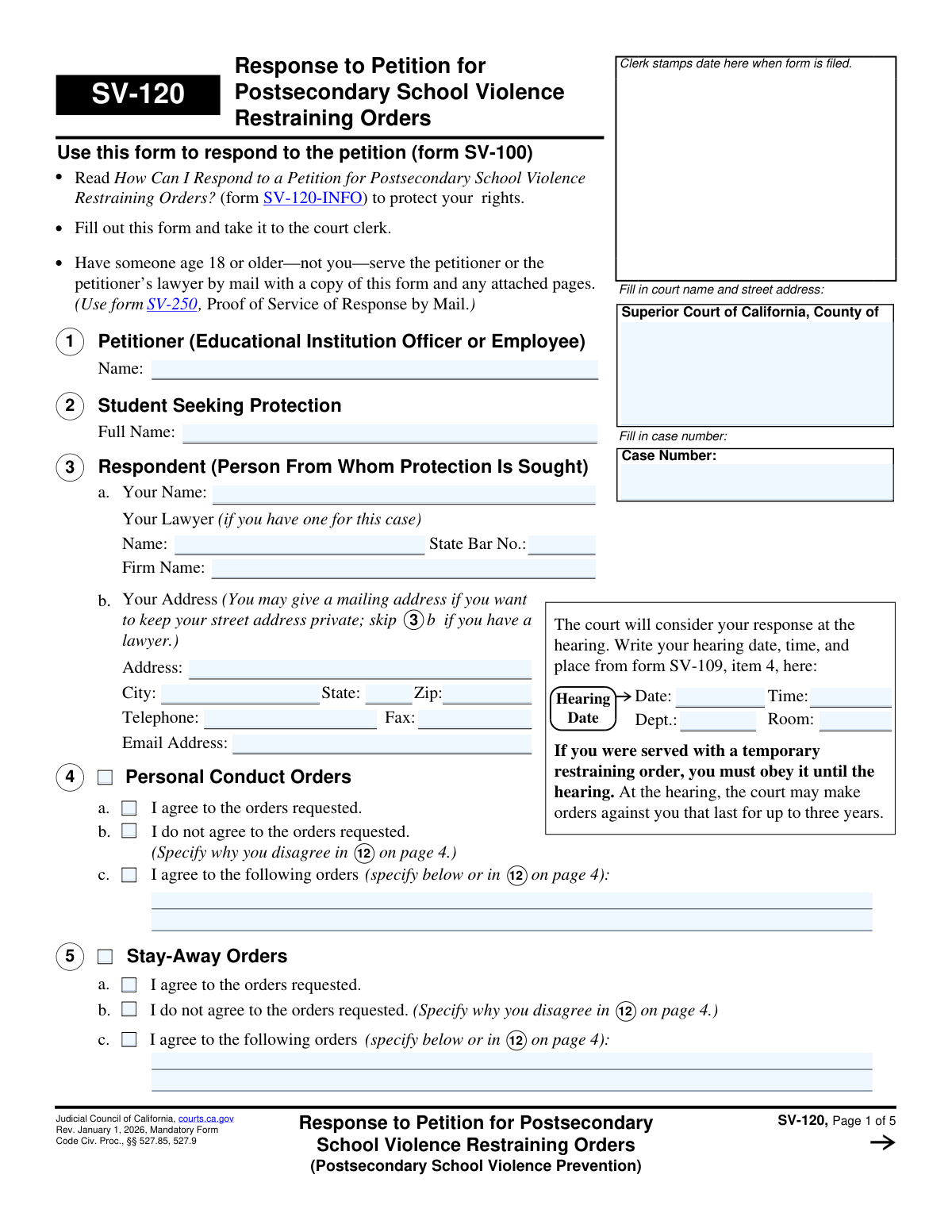
Yes! You can use AI to fill out Form SV-120, Response to Petition for Postsecondary School Violence Restraining Orders
Form SV-120 is a legal document filed in the Superior Court of California by an individual (the respondent) who has been served with a Petition for Postsecondary School Violence Restraining Orders (Form SV-100). It allows the respondent to formally agree or disagree with the requested orders, explain their side of the story, and address issues like firearms and court costs before a hearing. Today, this form can be filled out quickly and accurately using AI-powered services like Instafill.ai, which can also convert non-fillable PDF versions into interactive fillable forms.
SV-120 is part of the
California court forms, court response forms and restraining order forms categories on Instafill.
Our AI automatically handles information lookup, data retrieval, formatting, and form filling.
It takes less than a minute to fill out SV-120 using our AI form filling.
Securely upload your data. Information is encrypted in transit and deleted immediately after the form is filled out.
Form specifications
| Form name: | Form SV-120, Response to Petition for Postsecondary School Violence Restraining Orders |
| Number of fields: | 94 |
| Number of pages: | 1 |
| Language: | English |
Instafill Demo: How to fill out PDF forms in seconds with AI
How to Fill Out SV-120 Online for Free in 2026
Are you looking to fill out a SV-120 form online quickly and accurately? Instafill.ai offers the #1 AI-powered PDF filling software of 2026, allowing you to complete your SV-120 form in just 37 seconds or less.
Follow these steps to fill out your SV-120 form online using Instafill.ai:
- 1 Navigate to Instafill.ai and upload or select the SV-120 form.
- 2 Provide the court and case information, including the case number and the hearing date and time from form SV-109.
- 3 Enter your personal information as the respondent, including your name, address, and lawyer's details if applicable.
- 4 Indicate your response to the requested Personal Conduct Orders and Stay-Away Orders by checking whether you agree, disagree, or agree to specific modified orders.
- 5 Complete the sections regarding firearms, firearm parts, ammunition, and body armor, detailing your compliance with any temporary orders.
- 6 Use the provided sections to write detailed explanations for why you disagree with certain orders or to provide justification for your actions.
- 7 Review the entire form for accuracy, sign and date the declaration under penalty of perjury, and then download the completed document to file with the court.
Our AI-powered system ensures each field is filled out correctly, reducing errors and saving you time.
Why Choose Instafill.ai for Your Fillable SV-120 Form?
Speed
Complete your SV-120 in as little as 37 seconds.
Up-to-Date
Always use the latest 2026 SV-120 form version.
Cost-effective
No need to hire expensive lawyers.
Accuracy
Our AI performs 10 compliance checks to ensure your form is error-free.
Security
Your personal information is protected with bank-level encryption.
Frequently Asked Questions About Form SV-120
Form SV-120 is used to respond to a Petition for Postsecondary School Violence Restraining Orders (Form SV-100). It is your opportunity to tell the court whether you agree or disagree with the restraining orders being requested against you.
You must fill out this form if you are the person named as the 'Respondent' in a petition for a school violence restraining order and you wish to respond to the allegations before your court hearing.
Your court hearing date, time, and location are on the Notice of Court Hearing (Form SV-109) that you were served. You need to copy this information onto the first page of Form SV-120.
If you do not file a response or attend the hearing, the court can grant the restraining orders against you for up to three years without hearing your side. It is very important to respond to protect your rights.
After filling out the form, you must file it with the court clerk. Then, you must have someone else who is 18 or older mail a copy to the petitioner and complete a Proof of Service of Response by Mail (Form SV-250).
In sections 4, 5, and 9, you can check the box to 'agree to the following orders' and specify the terms you accept. For any orders you disagree with, you must explain your reasons in item 12.
If a temporary order was issued, you are legally required to turn in any firearms, firearm parts, and ammunition to law enforcement or sell them to a licensed dealer within 24 hours. You must then file a receipt with the court.
In item 7 for firearms and item 8 for body armor, you can simply check the box indicating that you do not own or possess any of these items. This is your official declaration to the court.
Use 'Denial' if you state that you did not do what the petitioner claims. Use 'Justification or Excuse' if you did perform some of the actions but believe you had a legally valid reason for doing so.
No, you can request that you not be required to pay a filing fee. You can either note that the petitioner was entitled to free filing (item 13a) or file a separate Request to Waive Court Fees.
Yes, in item 14, you can ask the court to order the petitioner to pay your court costs. You can also ask the court to deny the petitioner's request that you pay their lawyer's fees.
Yes, services like Instafill.ai use AI to auto-fill form fields accurately and save time. This can help you complete the form more efficiently and reduce the chance of errors.
You can use a service like Instafill.ai to complete the form on your computer. Simply upload the form, and the platform will make the fields interactive so you can type in your answers and then print the completed document.
If you have a non-fillable or 'flat' PDF, you can use a tool like Instafill.ai. It can convert the document into an interactive, fillable form that you can easily complete online.
Compliance SV-120
Validation Checks by Instafill.ai
1
Case Number Consistency and Format
This check ensures the Case Number is entered on the first page and is identical on all subsequent pages where it appears. It validates that the number is not empty and potentially matches a standard court case number format. This is critical for ensuring all pages of the response are correctly associated with the proper legal case upon filing.
2
Hearing Date and Time Validity
Validates that the Hearing Date and Time entered in the header are in a correct format (e.g., MM/DD/YYYY and HH:MM AM/PM). The date should also be a plausible future date, not one in the past. This ensures the respondent has correctly recorded the hearing information from form SV-109, which is essential for their appearance in court.
3
Respondent Address Completeness
This check verifies that if the respondent has not listed a lawyer in section 3, then their personal address information (Street, City, State, Zip) must be provided. A valid mailing address is required for the court and other parties to send official notices. Failure to provide this information when no lawyer is present can lead to missed communications and procedural defaults.
4
Lawyer Information Integrity
Ensures that if any of the lawyer information fields in section 3 (Name, State Bar No., Firm Name) are filled out, then all of them must be completed. This prevents partial or incomplete attorney information from being submitted. Complete information is necessary for the court and petitioner to properly identify and communicate with the respondent's legal counsel.
5
State Bar Number Format
This validation checks that the 'State Bar No.' field, if provided, contains a valid number format, typically consisting of digits. This helps verify the identity and credentials of the representing attorney. An invalid number could indicate a data entry error or an issue with the lawyer's status.
6
Mutually Exclusive Response Selection
For sections 4 (Personal Conduct Orders), 5 (Stay-Away Orders), and 9 (Other Orders), this check ensures that only one of the three response options (a: agree, b: do not agree, c: agree to specific orders) is selected. These options are mutually exclusive, and selecting more than one creates an ambiguous and invalid response. The form must be returned to the user for correction if multiple options are chosen.
7
Conditional Explanation for Disagreement
This validation confirms that if the respondent selects option 'b' (I do not agree) or 'c' (I agree to the following orders) in sections 4, 5, or 9, they must provide a written explanation in section 12. The court requires a basis for any disagreement or modification to the requested orders. An empty explanation for a disagreement will result in an incomplete response.
8
Firearms Receipt Selection Logic
In section 7, if the respondent checks option 'b' (indicating they have turned in firearms), this check ensures one of the two sub-options ('receipt is attached' or 'receipt has already been filed') is also selected. This is a mandatory clarification to inform the court of the status of the required firearm receipt. Failure to select a sub-option leaves the response incomplete.
9
Firearms Exception Request Completeness
If the respondent checks option 7c to request a firearm exception for work, this validation ensures all sub-questions (7c(1), 7c(2), and 7c(3)) are answered. The court requires this specific information to evaluate the merits of the exception request. An incomplete request cannot be considered by the judge.
10
Body Armor Response Exclusivity
This check validates that in section 8, options 'a' (I do not own body armor) and 'b' (I have relinquished all body armor) are not selected simultaneously. These two statements are mutually exclusive. Selecting both creates a logical contradiction that must be corrected before the form can be processed.
11
Attachment Page Count
Verifies that if any 'Check here if there is not enough space' box is checked (e.g., in sections 11, 12, or 14), the 'Number of pages attached' field in section 15 is filled with a number greater than zero. This ensures that the court clerk is aware of and looks for the additional pages mentioned in the form. A mismatch could lead to attachments being lost or overlooked.
12
Cost Request Itemization
In section 14, if the respondent checks box 'a' to ask the petitioner to pay their court costs, this check ensures at least one item description and a corresponding monetary amount are entered. A request for costs must be substantiated with specific items and amounts. An empty request is not actionable by the court.
13
Signature Date and Printed Name Requirement
This validation ensures that the date field and the 'Type or print your name' field are both completed in the signature area on page 5. A signature is not legally valid without a date and a clear indication of the signatory's name. The form is considered unsigned and cannot be filed without this information.
14
Zip Code Format Validation
This check ensures that the 'Zip' code field in the respondent's address (section 3b) contains a valid 5-digit or 9-digit (ZIP+4) format. A valid postal code is essential for ensuring mail from the court and other parties is deliverable. An invalid format will be flagged for correction to prevent communication failures.
Common Mistakes in Completing SV-120
Respondents often rush and fail to correctly copy the Court Name, Case Number, and Hearing Date from the petition documents (Form SV-109) onto the top of page 1. This can lead to the response being rejected by the clerk or misfiled, potentially causing the respondent to miss the hearing and have a default judgment entered against them. To avoid this, carefully double-check all information against the documents you were served with. AI-powered tools like Instafill.ai can help prevent this by automatically populating consistent case information across all related forms.
A frequent error is checking the box for 'I do not agree' in sections 4, 5, 6, or 9 without providing a corresponding detailed explanation in section 12. The form explicitly requires a justification for any disagreement. Without this explanation, the judge has no factual basis to deny the petitioner's requests, rendering the respondent's opposition legally ineffective. Always use section 12 to clearly and factually state why you disagree with each specific order requested.
Section 7 regarding firearms is critical and often filled out incorrectly due to its complexity and serious implications. Common mistakes include failing to disclose all firearms, not turning them in within the 24-hour deadline if a TRO is active, or forgetting to attach the required receipt (Form SV-800) as proof. An error in this section can lead to severe consequences, including criminal charges for perjury or violating the temporary restraining order. It is crucial to read this section carefully and comply with all requirements precisely.
Forgetting to sign and date the declaration on page 5 is a simple but surprisingly common mistake. An unsigned form is legally invalid and will be rejected by the court clerk upon filing. This can cause you to miss the filing deadline, meaning your response will not be considered by the judge at the hearing. Always perform a final review of the entire form before submission, paying special attention to the signature block on the last page.
The instructions clearly state that someone else over the age of 18 must serve a copy of the response on the petitioner, but respondents often attempt to do it themselves. This invalidates the service of the document. If service is improper, the court may not review or consider the response at the hearing, leaving the judge with only the petitioner's side of the story. To avoid this, have a friend, family member, or professional process server mail the form and complete the Proof of Service form (SV-250).
When filling out section 12 ('Reasons I Do Not Agree'), many respondents provide emotional, angry, or overly general statements rather than a clear, factual rebuttal to the specific allegations made in the petition (Form SV-100). A judge is looking for facts, evidence, and a point-by-point response, not a personal rant. A vague or emotional response weakens your credibility and makes it more likely the restraining order will be granted. Focus on responding to each claim with specific details, dates, and witness information if available.
The Case Number field appears in the header of every page of the form, but people often only fill it out on the first page. If the pages of the document become separated during court processing, the unnumbered pages can be lost or misfiled, making your response incomplete. To prevent this, methodically enter the case number on every single page before filing. Smart form-filling tools like Instafill.ai can prevent this error by automatically populating repeating fields across all pages of a document.
In section 3b, the form explicitly allows the respondent to provide a mailing address (like a P.O. Box) to keep their home address private. Many people overlook this and enter their physical residence address out of habit. This action places their confidential address into the public court record and provides it directly to the opposing party, which can create significant safety and privacy risks. If you have any concerns for your privacy or safety, always use an alternative mailing address.
The form requires attaching other documents in several situations, such as providing a firearm receipt (SV-800), using an attachment sheet (MC-025) for lengthy explanations, or providing proof for a body armor exception. A common mistake is to mention these items in the response but forget to physically attach them or to update the page count in item 15. This means the court cannot consider the evidence or full explanation, significantly weakening the respondent's case. Always use a paperclip to secure all attachments and verify the page count before filing.
Saved over 80 hours a year
“I was never sure if my IRS forms like W-9 were filled correctly. Now, I can complete the forms accurately without any external help.”
Kevin Martin Green
Your data stays secure with advanced protection from Instafill and our subprocessors

Robust compliance program
Transparent business model
You’re not the product. You always know where your data is and what it is processed for.
ISO 27001, HIPAA, and GDPR
Our subprocesses adhere to multiple compliance standards, including but not limited to ISO 27001, HIPAA, and GDPR.
Security & privacy by design
We consider security and privacy from the initial design phase of any new service or functionality. It’s not an afterthought, it’s built-in, including support for two-factor authentication (2FA) to further protect your account.
Fill out SV-120 with Instafill.ai
Worried about filling PDFs wrong? Instafill securely fills form-sv-120-response-to-petition-for-postsecondary-school-violence-restraining-orders forms, ensuring each field is accurate.