Yes! You can use AI to fill out Superior Court of New Jersey Bail Program Registration Form

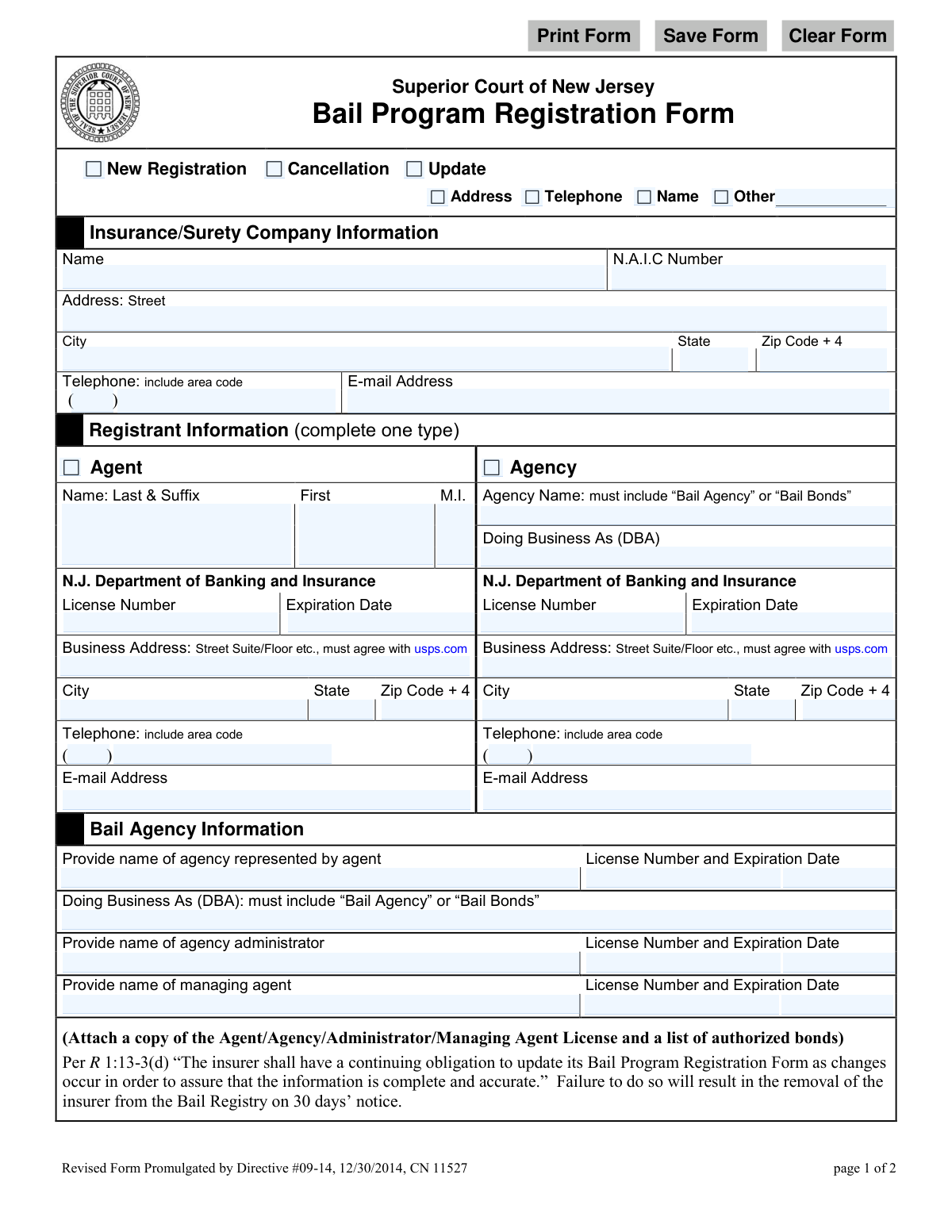
The Superior Court of New Jersey Bail Program Registration Form is a mandatory document for insurance companies, surety agents, and bail agencies to participate in the New Jersey bail system. This form registers the entity with the court, certifies their licensing status, and identifies a guarantor for potential bail forfeiture judgments, ensuring compliance with state regulations. Today, this form can be filled out quickly and accurately using AI-powered services like Instafill.ai, which can also convert non-fillable PDF versions into interactive fillable forms.
NJ Bail Program Registration Form is part of the New Jersey forms and superior court forms categories on Instafill.
Our AI automatically handles information lookup, data retrieval, formatting, and form filling.
It takes less than a minute to fill out NJ Bail Program Registration Form using our AI form filling.
Securely upload your data. Information is encrypted in transit and deleted immediately after the form is filled out.

Form specifications

Form name: Superior Court of New Jersey Bail Program Registration Form
Number of fields: 85
Number of pages: 1
Language: English
main-image

Instafill Demo: How to fill out PDF forms in seconds with AI

How to Fill Out NJ Bail Program Registration Form Online for Free in 2026

Are you looking to fill out a NJ BAIL PROGRAM REGISTRATION FORM form online quickly and accurately? Instafill.ai offers the #1 AI-powered PDF filling software of 2026, allowing you to complete your NJ BAIL PROGRAM REGISTRATION FORM form in just 37 seconds or less.
Follow these steps to fill out your NJ BAIL PROGRAM REGISTRATION FORM form online using Instafill.ai:
  1. 1 Navigate to Instafill.ai and upload the Bail Program Registration Form or select it from the template library.
  2. 2 Indicate whether this is a new registration, cancellation, or update, and provide the Insurance/Surety Company's information, including name and NAIC number.
  3. 3 Complete the Registrant Information section for either an individual agent or an agency, including license numbers, expiration dates, and business addresses.
  4. 4 If applicable, fill out the Bail Agency Information section, detailing the agency represented, administrator, and managing agent.
  5. 5 Provide the details for the Guarantor who will satisfy bail forfeiture judgments, including their name, license information, and signature.
  6. 6 Carefully review all auto-filled information for accuracy, then proceed to the Certification section to be signed by a corporate officer.
  7. 7 Download the completed form and email it to the Office of the Superior Court Clerk at the address provided on the form.

Our AI-powered system ensures each field is filled out correctly, reducing errors and saving you time.

Why Choose Instafill.ai for Your Fillable NJ Bail Program Registration Form Form?

Speed

Complete your NJ Bail Program Registration Form in as little as 37 seconds.

Up-to-Date

Always use the latest 2026 NJ Bail Program Registration Form form version.

Cost-effective

No need to hire expensive lawyers.

Accuracy

Our AI performs 10 compliance checks to ensure your form is error-free.

Security

Your personal information is protected with bank-level encryption.

Frequently Asked Questions About Form NJ Bail Program Registration Form

This form is used to register insurance companies, surety companies, and their agents or agencies with the Superior Court of New Jersey's Bail Program, authorizing them to write bail bonds in the state.

An authorized corporate officer of an insurance or surety company must complete and certify this form to register the company and its associated agents or agencies to participate in the New Jersey Bail Program.

Select 'New Registration' for first-time submissions. Select 'Cancellation' to remove an agent or agency from the registry. Select 'Update' to submit changes to previously registered information, such as an address or name change.

You must attach a copy of the license for the Agent, Agency, Administrator, and Managing Agent, a copy of the Guarantor’s license, and a list of authorized bonds.

You have a continuing obligation to update your registration by submitting a new form with the 'Update' box checked. Failure to keep information complete and accurate can result in removal from the Bail Registry.

The completed form and all required attachments should be emailed to the Office of the Superior Court Clerk at [email protected].

A Guarantor is a person or entity that has provided a guarantee to pay bail forfeiture judgments for the registered agent or agency. Their information and signature are required to confirm this financial responsibility to the court.

The form requires the Agency Name or 'Doing Business As' (DBA) name to include 'Bail Agency' or 'Bail Bonds'. You may need to register a DBA name that complies with this requirement to complete the form correctly.

This section must be signed by a corporate officer of the insurance or surety company. This person certifies that the company is authorized in New Jersey and that the named agent or agency is licensed and authorized to write bonds on its behalf.

Yes, services like Instafill.ai use AI to accurately auto-fill form fields from your saved profile, which helps save time and reduce the chance of errors.

To fill this form online, you can upload it to a platform like Instafill.ai. The service makes the form interactive, allowing you to type your information, add signatures, and download the completed document for submission.

You can use a service like Instafill.ai, which can convert flat, non-fillable PDFs into interactive forms that you can easily fill out and sign on your computer.

N.A.I.C. stands for the National Association of Insurance Commissioners. It is a unique identifying number assigned to each insurance company for regulatory purposes.

Compliance NJ Bail Program Registration Form
Validation Checks by Instafill.ai

1
Registration Type Selection
This check ensures that one of the primary registration types ('New Registration', 'Cancellation', or 'Update') has been selected. This is the most fundamental piece of information, as it dictates the purpose of the submission and how it will be processed. If this field is left blank, the form cannot be processed, and the user will be prompted to make a selection before proceeding.
2
Conditional Update Reason
If the registration type 'Update' is selected, this validation ensures that at least one of the specific update reasons ('Address', 'Telephone', 'Name', 'Other') is also checked. This provides necessary context for the update request, allowing processors to quickly identify what information has changed. A failure to specify the reason for the update would result in an ambiguous submission and a rejection, requiring the user to clarify.
3
Registrant Type Exclusivity
This validation verifies that the user has selected either 'Agent' or 'Agency' in the 'Registrant Information' section, but not both. It then checks that all required fields for the selected type are filled out, while the fields for the unselected type are empty. This prevents data conflicts and ensures a clean, logical data structure for the registrant. If validation fails, the user is notified to complete the required section for their chosen type.
4
Agency Name Suffix Requirement
This check validates that any field for an agency's name (e.g., 'Agency Name' or 'Doing Business As') contains the required text 'Bail Agency' or 'Bail Bonds' as specified on the form. This is a legal or regulatory requirement for identifying the business type correctly on the registry. Submissions lacking this specific phrasing will be rejected and returned for correction.
5
License Expiration Date is in the Future
This validation confirms that all license expiration dates entered on the form are valid dates and are set in the future. Registering with an expired or soon-to-expire license is not permissible, as it indicates the entity is not currently authorized to operate. The check prevents invalid registrations and ensures compliance with Department of Banking and Insurance regulations.
6
N.A.I.C. Number Format
This check ensures the National Association of Insurance Commissioners (N.A.I.C) number is present and follows the correct format, which is typically a numeric code up to 5 digits. This number is a unique identifier for the insurance company and is critical for regulatory tracking and verification. An invalid or missing NAIC number would prevent the system from identifying the parent surety company, leading to immediate rejection.
7
Phone Number Structure
This validation verifies that all telephone number fields are filled with a valid 10-digit number (3-digit area code and 7-digit number). This ensures that the contact information is complete and usable for communication purposes. Incomplete or improperly formatted phone numbers will trigger an error, prompting the user to correct the entry to ensure the court can contact the registrant.
8
Email Address Format
This check validates that all email address fields contain a string that conforms to the standard email format (e.g., '[email protected]'). Correct email addresses are essential for official communication, sending notifications, and distributing updates regarding the bail program. An invalid email format would cause communication to fail and result in a validation error.
9
Business Address Agrees with USPS
As the form specifies that the business address 'must agree with usps.com', this validation checks the entered street, city, state, and ZIP code against a USPS address validation service. This ensures the address is a real, mailable location, which is crucial for official correspondence and legal notices. An unverified address would cause the submission to be flagged for manual review or rejected.
10
Agent's Bail Agency Information Completeness
If the registrant is an 'Agent', this check ensures that the entire 'Bail Agency Information' section is completed. This includes the name of the agency they represent, the agency administrator, and the managing agent, along with their respective license numbers and expiration dates. This information is critical for establishing the agent's authority and relationship to the supervising agency.
11
Guarantor Information Completeness
This validation ensures that the 'Guarantor' section is fully completed, including the selection of 'Agent' or 'Agency' and all corresponding name, license, and address information. The guarantor is financially responsible for bail forfeiture judgments, making their correct and complete identification a critical risk management requirement. An incomplete guarantor section would render the registration invalid.
12
Certification Section Completeness
This check verifies that the 'Certification by Insurance/Surety Company' section is fully completed, including the signature date, printed name, and title of the corporate officer. This certification is a legally binding statement attesting to the accuracy of the form and the authority of the registrant. A missing signature or any other part of this section would make the entire submission legally void.

Common Mistakes in Completing NJ Bail Program Registration Form

Incorrectly Formatted DBA Name

The form explicitly requires that the 'Doing Business As' (DBA) name must include the phrase 'Bail Agency' or 'Bail Bonds'. Applicants frequently enter their standard registered DBA without this required suffix, leading to an immediate compliance failure. This oversight will cause the form to be rejected and returned for correction, delaying the registration process until the naming convention is met.

Using a Non-Standardized Business Address

A common error is entering a business address that does not strictly match the format on usps.com, including the full 'Zip Code + 4'. The form mandates this for data accuracy and mail deliverability. An incorrect address can lead to returned mail and a failed registration, as the court cannot verify the physical location. Using an address validation tool before submission is crucial to prevent this.

Failure to Include All Required Attachments

Applicants often focus solely on filling out the form and forget to include the mandatory attachments. The form requires copies of all relevant licenses (Agent, Agency, Administrator, Managing Agent, Guarantor) and a list of authorized bonds. Submitting the form without these documents makes the application incomplete and guarantees a delay while the clerk's office waits for the missing paperwork.

Filling Out Both 'Agent' and 'Agency' Sections

The form instructs the user to 'complete one type' under 'Registrant Information', offering separate columns for an individual 'Agent' or an 'Agency'. Registrants who are both an individual and part of an agency sometimes fill out both columns, causing confusion for the processing clerk. This ambiguity can lead to the form being sent back for clarification, so it's vital to choose and complete only the one section that applies to the registration type.

Incomplete or Incorrect Registration Purpose

At the top of the form, users must select 'New Registration', 'Cancellation', or 'Update'. A frequent mistake is failing to check any box or, when selecting 'Update', forgetting to specify what is being updated (Address, Telephone, Name, Other). This omission leaves the clerk's office unsure of how to process the form, resulting in processing delays or outright rejection.

Omitting License Numbers or Expiration Dates

The form requires license numbers and expiration dates for every party listed, including the primary registrant, agency administrator, and managing agent. It is easy to overlook these details, especially for secondary individuals listed in the 'Bail Agency Information' section. Since this information is critical for verification by the Department of Banking and Insurance, any missing license data will render the application incomplete.

Incomplete Corporate Officer Certification

The final certification section requires four distinct pieces of information from a corporate officer: a signature, printed name, title, and the date. Often, one of these elements is missed, which legally invalidates the entire certification. An incomplete certification requires the form to be returned for proper completion, restarting the submission process.

Providing Inconsistent Information Across Sections

An agent or agency's name and license number may be required in multiple sections, such as the registrant, agency, and guarantor areas. Data entry errors can lead to discrepancies in this information between sections, raising red flags for reviewers and causing delays. AI-powered form filling tools like Instafill.ai can prevent this by using stored data to auto-populate fields, ensuring perfect consistency throughout the document.

Submitting an Illegible or Poorly Filled PDF

This form is often distributed as a non-fillable PDF, leading to submissions with illegible handwriting or misaligned text typed over the fields. This can make critical data like license numbers unreadable, causing the form to be rejected. To ensure clarity, it is best to use a tool like Instafill.ai, which can convert flat PDFs into easily fillable forms, guaranteeing a clean, professional, and legible submission.
Saved over 80 hours a year

“I was never sure if my IRS forms like W-9 were filled correctly. Now, I can complete the forms accurately without any external help.”

Kevin Martin Green

Your data stays secure with advanced protection from Instafill and our subprocessors

Robust compliance program

Transparent business model

You’re not the product. You always know where your data is and what it is processed for.

ISO 27001, HIPAA, and GDPR

Our subprocesses adhere to multiple compliance standards, including but not limited to ISO 27001, HIPAA, and GDPR.

Security & privacy by design

We consider security and privacy from the initial design phase of any new service or functionality. It’s not an afterthought, it’s built-in, including support for two-factor authentication (2FA) to further protect your account.

Fill out NJ Bail Program Registration Form with Instafill.ai

Worried about filling PDFs wrong? Instafill securely fills superior-court-of-new-jersey-bail-program-registration-form forms, ensuring each field is accurate.

Related forms by category

New Jersey forms State of New Jersey Alternate Benefit Program Withdrawal Request Acknowledgement Receipt, Horizon Blue Cross Blue Shield of New Jersey Applied Behavior Analysis Supplemental Information Form, State of New Jersey Application for Employment (Form DPF-663), New Jersey Judiciary Plea Form (Plea 01), Supplemental Plea Form for Certain Sexual Offenses: Megan’s Law/Parole Supervision for Life/Community Supervision for Life (Plea 05), Financial Questionnaire to Establish Indigency, New Jersey Judiciary Resource Family Information Form, Foreclosure Case Information Statement (FCIS) - Appendix XII-B2, New Jersey Judiciary Records Request Form, Superior Court of New Jersey, Application for Appeal and Order, FL Certification of Requested Background Checks for Kinship Legal Guardianship, Certification of Caregiver as to Knowledge of Identity and/or Location of Parents, FL Order Judgment for Kinship Legal Guardianship, New Jersey Judiciary Certification of Repair and Plea of Guilty, Uniform Summary Support Order (USSO), New Jersey Judiciary Volunteer Application (CN 10293), Application to Take the New Jersey Court Interpreter Oral Examination, New Jersey Judiciary Attorney Fee Arbitration Request, Order to Show Cause with Temporary Restraints Pursuant to Rule 4:52, Tax Court of New Jersey, State Tax Complaint · + 225 more →
superior court forms FW-003, Order on Court Fee Waiver (Superior Court), FW-003, Order on Court Fee Waiver (Superior Court), Form FW-003, Order on Court Fee Waiver (Superior Court), Declaration of Facts of Death (California Superior Court), Form FW-003-GC, Order on Court Fee Waiver (Superior Court) (Ward or Conservatee), Superior Court of Chatham County, Georgia, Hearing Request Form, Form FW-006, Request for Hearing About Court Fee Waiver Order (Superior Court), Form FW-002, Request to Waive Additional Court Fees (Superior Court), Form FW-008, Order on Court Fee Waiver After Hearing (Superior Court), Form FW-002-GC, Request to Waive Additional Court Fees (Superior Court) (Ward or Conservatee), Form REC-001(N), Notice of Intent to Destroy Superior Court Records; Offer to Transfer Possession, Form REC-001(R), Request for Transfer or Extension of Time for Retention of Superior Court Records, Notice of Hearing on Request for Transfer or Extension of Time for Retention of Superior Court Records; Court Order; Release and Receipt of Superior Court Records, Form REC-002(R), Release and Receipt of Superior Court Records, Superior Court of New Jersey, Application for Appeal and Order, Superior Court of New Jersey Dissolution (FM) Case Management Order, New Jersey Judiciary – Superior Court, Appellate Division Application for Permission to File Emergent Motion, New Jersey Judiciary Superior Court - Appellate Division Civil Case Information Statement, New Jersey Judiciary Superior Court - Appellate Division Criminal Case Information Statement, New Jersey Judiciary Superior Court - Appellate Division Notice of Appeal (CN: 10502) · + 34 more →