Yes! You can use AI to fill out Superior Court of New Jersey, Certification in Support of Establishing Paternity
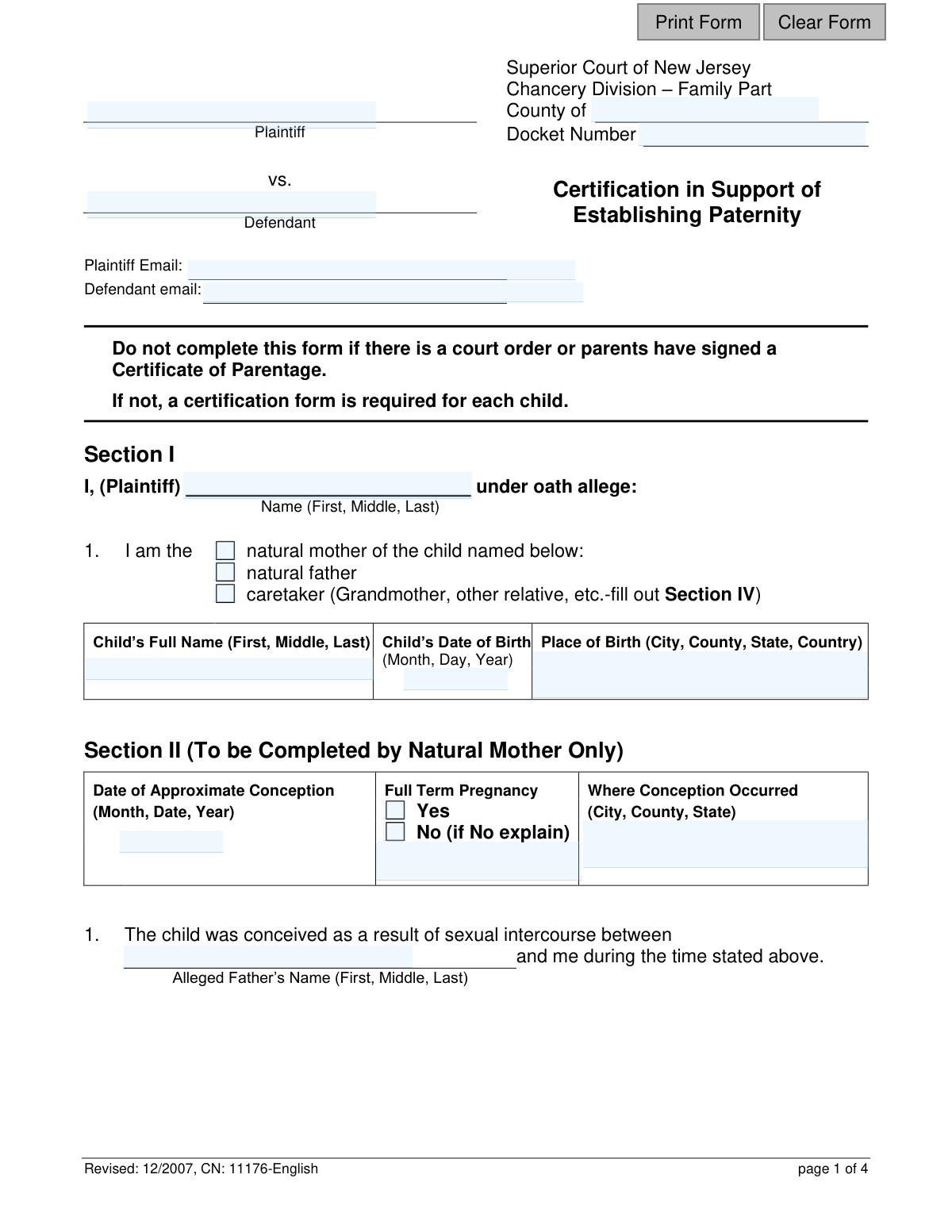
The Certification in Support of Establishing Paternity is a legal document for the Superior Court of New Jersey used to formally declare the facts supporting a claim of fatherhood. It is completed under oath by the mother, alleged father, or a caretaker to provide evidence for a paternity case, which is vital for matters like child support and custody. This form is required when there is no existing court order or signed Certificate of Parentage. Today, this form can be filled out quickly and accurately using AI-powered services like Instafill.ai, which can also convert non-fillable PDF versions into interactive fillable forms.
Our AI automatically handles information lookup, data retrieval, formatting, and form filling.
It takes less than a minute to fill out CN 11176 using our AI form filling.
Securely upload your data. Information is encrypted in transit and deleted immediately after the form is filled out.
Form specifications
| Form name: | Superior Court of New Jersey, Certification in Support of Establishing Paternity |
| Number of fields: | 137 |
| Number of pages: | 1 |
| Language: | English |
Instafill Demo: How to fill out PDF forms in seconds with AI
How to Fill Out CN 11176 Online for Free in 2026
Are you looking to fill out a CN 11176 form online quickly and accurately? Instafill.ai offers the #1 AI-powered PDF filling software of 2026, allowing you to complete your CN 11176 form in just 37 seconds or less.
Follow these steps to fill out your CN 11176 form online using Instafill.ai:
- 1 Navigate to Instafill.ai and upload the 'Certification in Support of Establishing Paternity' form or select it from their template library.
- 2 Provide your personal details as the plaintiff/filer and specify your relationship to the child (natural mother, natural father, or caretaker).
- 3 Enter the child's full name, date of birth, and place of birth in the designated fields.
- 4 Follow the AI assistant's prompts to complete the section that applies to you (Section II for mothers, III for fathers, or IV for caretakers), answering questions about conception, other potential partners, and evidence of paternity.
- 5 Carefully review the entire completed form, ensuring all statements and details are accurate and truthful.
- 6 Electronically sign and date the certification, affirming that the statements are true under penalty of punishment.
Our AI-powered system ensures each field is filled out correctly, reducing errors and saving you time.
Why Choose Instafill.ai for Your Fillable CN 11176 Form?
Speed
Complete your CN 11176 in as little as 37 seconds.
Up-to-Date
Always use the latest 2026 CN 11176 form version.
Cost-effective
No need to hire expensive lawyers.
Accuracy
Our AI performs 10 compliance checks to ensure your form is error-free.
Security
Your personal information is protected with bank-level encryption.
Frequently Asked Questions About Form CN 11176
This form is used in the New Jersey Superior Court to provide sworn statements and evidence to help legally establish who a child's father is. It is filed by the plaintiff as part of a court case to determine paternity.
The person filing the court case to establish paternity, known as the Plaintiff, must complete this form. The Plaintiff can be the child's natural mother, natural father, or a legal caretaker.
Yes, do not complete this form if a court has already issued an order establishing paternity for the child, or if both parents have already signed a formal Certificate of Parentage.
As the natural mother filing the case, you must complete Section I with your and your child's information, and then provide the detailed information requested in Section II.
If you are a caretaker (e.g., grandparent, other relative) filing the case, you should complete Section I and Section IV, providing all information to the best of your knowledge.
If you are the plaintiff and the alleged natural father, you need to complete Section I with basic information and Section III with facts that support your belief that you are the father.
You must disclose this in Section II. You will need to provide your husband's name and explain why he is not the father, attaching documents like a divorce decree if available.
Yes, you are completing this form under oath and must answer all questions truthfully. Providing willfully false statements can subject you to punishment.
You may need to attach copies of the child's birth certificate, a divorce decree, prior genetic test results, or a death certificate, as indicated in the relevant sections of the form.
No, the form instructions state that a separate certification form is required for each child. You must fill out a complete form for each child individually.
This form is a legal document that must be filed with the Superior Court of New Jersey, Chancery Division – Family Part, in the county where your case is being heard.
Yes, services like Instafill.ai use AI to accurately auto-fill form fields with your information, which can save time and help prevent errors.
You can use a service like Instafill.ai to upload the PDF and fill it out on your computer or mobile device. This allows you to easily type information and sign the document digitally.
If you have a non-fillable PDF, you can upload it to Instafill.ai. The platform can convert flat PDFs into interactive, fillable forms that you can complete online.
Compliance CN 11176
Validation Checks by Instafill.ai
1
Conditional Section Completion Based on Plaintiff Role
This check ensures that the correct detailed section is completed based on the plaintiff's stated relationship to the child in Section I. If 'natural mother' is selected, Section II must be completed. If 'natural father', Section III must be completed. If 'caretaker', Section IV must be completed. This prevents incomplete or irrelevant submissions and ensures the correct legal attestations are made.
2
Logical Consistency of Conception and Birth Dates
Validates that the 'Child’s Date of Birth' (childDob) is after the 'Date of Approximate Conception' (childConcepDt). The system should also check if the time between the two dates falls within a plausible human gestation period (e.g., 240-300 days). This check prevents data entry errors and supports the biological claims being made.
3
Email Address Format Validation
Verifies that the values entered into the 'Plaintiff Email' (plaEmail) and 'Defendant email' (defEmail) fields follow the standard email address format (e.g., '[email protected]'). This is important for ensuring that court communications and notifications can be successfully delivered to the parties involved. An invalid format would cause communication failures.
4
Child's Date of Birth is in the Past
Ensures the 'Child’s Date of Birth' (childDob) is a valid date that occurs before the current submission date. A future date is not logically possible for a child who has already been born. This validation prevents simple data entry mistakes that would invalidate the entire form.
5
Conditional Requirement for Pregnancy Term Explanation
This validation checks if the 'Full Term Pregnancy' (childPreg) field in Section II is marked as 'No'. If it is, the system must verify that the corresponding explanation field (childPregDesc) is not empty. This information is medically relevant to establishing the conception timeline and is crucial for the case.
6
Conditional Disclosure of Other Sexual Partners
In Section II, if the plaintiff indicates she 'did' have sexual intercourse with another man (plaPartner), the system must validate that the fields for the other man's name (plaPartnerName) and the reason he is not believed to be the father (plaPartnerDesc) are filled out. Failure to provide this information would represent an incomplete and legally insufficient declaration.
7
Conditional Requirement for Husband's Information
This check is triggered in Section II if the plaintiff indicates she was 'married' at the time of the child's birth (plaMaritalStatus). It validates that the husband's name and address (husbandInfoFull) and the explanation of why he is not the father (husbandPatrntyDeny) are both provided. This is critical for overcoming the legal presumption that the husband is the father.
8
Plaintiff Name Consistency Across Form
Verifies that the plaintiff's name entered at the top of the form ('Plaintiff', plaNameFull) is identical to the name entered in the certification statement in Section I ('I, (Plaintiff)', sigPlaName). This ensures the individual initiating the legal action is the same person making the sworn statements. A mismatch could invalidate the certification.
9
Core Case Information Completeness
Ensures that fundamental fields required to identify the case and parties are not empty. This includes 'County' (TypeCounty), 'Docket Number' (caseDocket), 'Plaintiff' (plaNameFull), 'Defendant' (defNameFull), 'Child’s Full Name' (childNameFull), and the plaintiff's relationship to the child (plaRelation). Missing any of this information would make the form impossible to file or process correctly.
10
Caretaker's Knowledge of Mother's Address
In Section IV, if the caretaker indicates the biological mother 'is not deceased and lives at' a known location (crtkrMotherLoc), this validation ensures the address fields (crtkrMotherAddr1, crtkrMotherAddr2) are not empty. Providing the mother's address is essential for the court to potentially contact or serve her. Failure to provide a known address would be an omission of critical information.
11
Signature Date Validity
Validates that the 'Date' of signature (sigDt) is a valid calendar date and is not set in the future. The signature date must be on or before the date the form is submitted to the court. This confirms the certification was made on a specific, valid day and prevents post-dating or other errors.
12
Defendant and Alleged Father Name Consistency
When the plaintiff is the natural mother (Section II), this check verifies that the 'Alleged Father’s Name' (allegedNameFull) is consistent with the 'Defendant' name (defNameFull) at the top of the form. The person being sued (Defendant) should be the same person the mother is alleging to be the father. A discrepancy suggests a fundamental error in the filing.
13
Living Together Date Sequence Logic
In Section II, if the plaintiff answers 'Yes' to 'We lived together' (allegedDomesticStatus), this validation ensures the 'To' date (allegedDomesticDtto) is not earlier than the 'From' date (allegedDomesticDtfrom). This maintains logical consistency in the timeline of the relationship provided as evidence. An inverted date range is a clear data entry error.
14
Required Relationship for Caretaker Plaintiff
If the plaintiff identifies as a 'caretaker' in Section I (plaRelation), this check ensures that the 'My relationship to this child is' field (crtkrRelation) in Section IV is completed. The court needs to know the caretaker's legal standing or relationship (e.g., Grandmother, Aunt) to understand their basis for filing the paternity action. Leaving this blank would omit essential information about the plaintiff's standing.
Common Mistakes in Completing CN 11176
The form is divided into specific sections for the natural mother (II), natural father (III), and a non-parent caretaker (IV). A common error is for a filer to fill out parts of a section that does not apply to them, causing confusion and potential rejection. For example, a mother might mistakenly answer questions in Section III. This can invalidate the submission, as it creates conflicting information. To avoid this, carefully read the heading for each section and only complete the one that corresponds to your role as the plaintiff (filer).
The form requires the full legal name (First, Middle, Last) for the child, plaintiff, defendant, and any other individuals mentioned. People often use nicknames, initials, or spell names inconsistently across the document. This can lead to significant legal complications, including difficulty enforcing orders or linking the document to the correct individuals in court systems. Always use the full name as it appears on official documents like a birth certificate or driver's license.
In Section II, if the mother indicates she was married at the time of birth or had intercourse with another man near conception, she must provide detailed follow-up information. Filers often check 'Yes' but then fail to complete the required narrative explanations or provide names and addresses. This omission makes the certification incomplete and legally insufficient, causing delays as the court will require the information to proceed. Be prepared to provide these sensitive but necessary details if your answer requires it.
Several sections explicitly state that documents must be attached, such as a divorce decree, death certificate, birth certificate, or prior genetic test results. Forgetting to include these attachments is a frequent mistake that brings the process to a halt. The court cannot verify the claims made in the certification without this supporting evidence. Before submitting, create a checklist of all documents mentioned in the sections you completed and ensure every one is included.
The form's first instruction clearly states: 'Do not complete this form if there is a court order or parents have signed a Certificate of Parentage.' Many people miss this and file the form unnecessarily, which wastes time and court resources. This form is for *establishing* paternity for the first time, not for modifying or enforcing an existing order. If a Certificate of Parentage (COP) was signed, that is a legally binding document, and this form is the wrong legal tool.
The top of the form requires crucial administrative data like the County and Docket Number. Filers may not know the Docket Number if they are initiating the case, but they often forget to fill in the County, which is essential for routing the form to the correct courthouse. An incomplete header can lead to the document being rejected, misfiled, or returned, delaying the start of the legal process. Always fill in the County where you are filing the case.
Fields such as Section II.3.b ('Explain why the husband is not the father...') or Section IV.k ('State the reasons why you believe...') require clear, factual statements. A common error is to provide emotional, speculative, or vague answers that are not useful to the court. The explanation should be a concise summary of facts, dates, and circumstances. A vague answer weakens the certification and may require a follow-up hearing to clarify.
The final section of the form is a certification under penalty of punishment, which requires a signature and date to be legally valid. Forgetting to sign or date the form is a simple but critical error that completely invalidates the submission. An unsigned form is just a collection of statements; a signed form is a sworn legal document. The court will immediately reject any unsigned certification.
Section II asks for the 'Date of Approximate Conception.' This can be a source of anxiety and error, as the exact date is often unknown. Some people leave it blank out of uncertainty, while others provide a wide date range, which the form field is not designed for. Leaving it blank makes the form incomplete, especially since it's used to determine the relevance of other sexual partners. The key is the word 'Approximate'; your best, good-faith estimate is what is required.
This form, revised in 2007, is often distributed as a non-fillable PDF, meaning it must be printed and completed by hand. This leads to illegible handwriting, which can cause data entry errors by court clerks and misinterpretation of critical information like names and dates. Furthermore, manual completion increases the likelihood of making many of the other mistakes on this list. This creates unnecessary hurdles and potential for error in a crucial legal process.
Saved over 80 hours a year
“I was never sure if my IRS forms like W-9 were filled correctly. Now, I can complete the forms accurately without any external help.”
Kevin Martin Green
Your data stays secure with advanced protection from Instafill and our subprocessors

Robust compliance program
Transparent business model
You’re not the product. You always know where your data is and what it is processed for.
ISO 27001, HIPAA, and GDPR
Our subprocesses adhere to multiple compliance standards, including but not limited to ISO 27001, HIPAA, and GDPR.
Security & privacy by design
We consider security and privacy from the initial design phase of any new service or functionality. It’s not an afterthought, it’s built-in, including support for two-factor authentication (2FA) to further protect your account.
Fill out CN 11176 with Instafill.ai
Worried about filling PDFs wrong? Instafill securely fills superior-court-of-new-jersey-certification-in-support-of-establishing-paternity forms, ensuring each field is accurate.