Yes! You can use AI to fill out Superior Court of New Jersey, Chancery Division - Probate Part, Certification of Assets

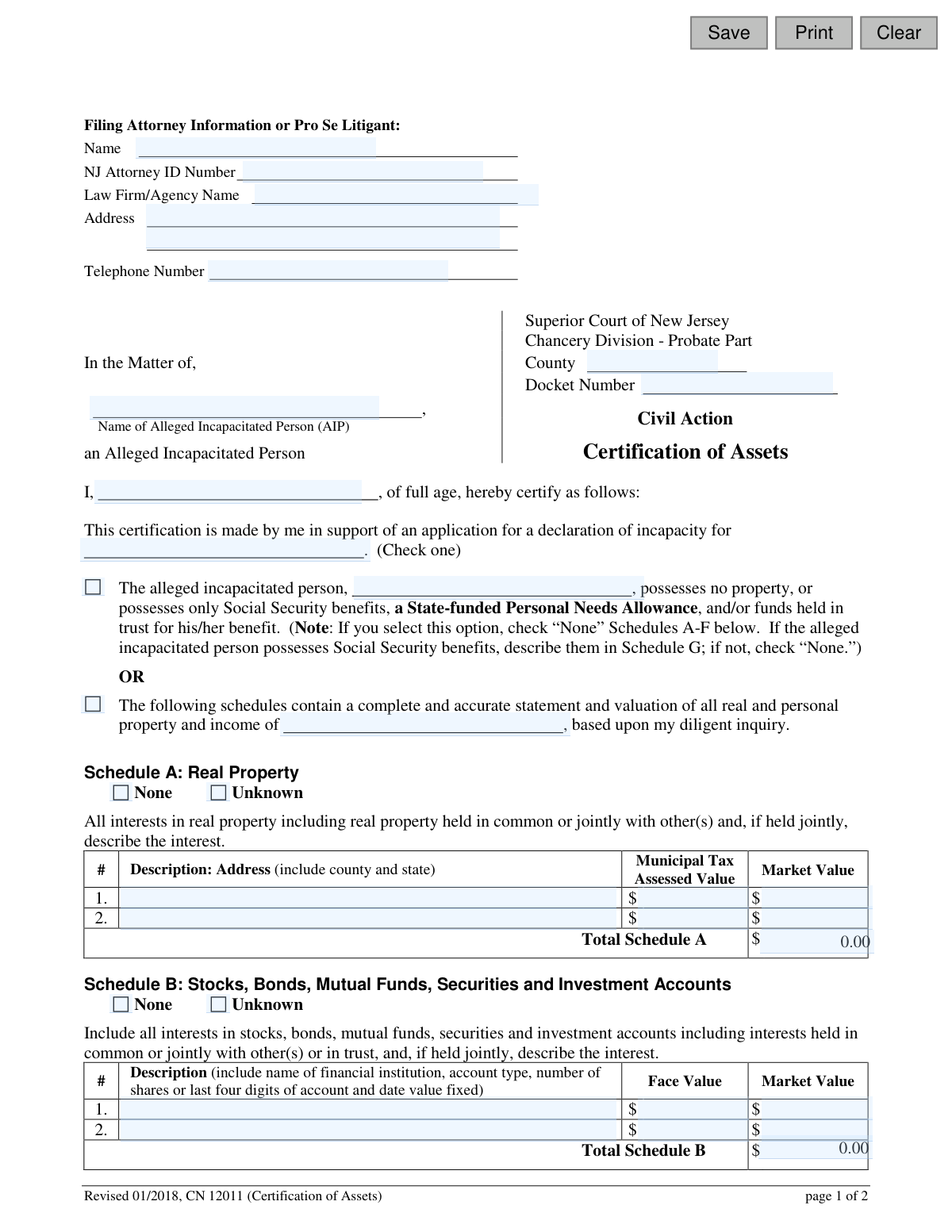
This form, officially titled Certification of Assets (CN 12011), is a legal document for the Superior Court of New Jersey's Chancery Division, Probate Part. It is used in adult guardianship proceedings to provide a detailed, certified inventory of all assets, liabilities, and income belonging to an individual alleged to be incapacitated. This financial disclosure is crucial for the court to determine the extent of the person's estate and the necessity of appointing a guardian. Today, this form can be filled out quickly and accurately using AI-powered services like Instafill.ai, which can also convert non-fillable PDF versions into interactive fillable forms.
CN 12011 is part of the New Jersey forms and superior court forms categories on Instafill.
Our AI automatically handles information lookup, data retrieval, formatting, and form filling.
It takes less than a minute to fill out CN 12011 using our AI form filling.
Securely upload your data. Information is encrypted in transit and deleted immediately after the form is filled out.

Form specifications

Form name: Superior Court of New Jersey, Chancery Division - Probate Part, Certification of Assets
Number of fields: 72
Number of pages: 1
Language: English
main-image

Instafill Demo: How to fill out PDF forms in seconds with AI

How to Fill Out CN 12011 Online for Free in 2026

Are you looking to fill out a CN 12011 form online quickly and accurately? Instafill.ai offers the #1 AI-powered PDF filling software of 2026, allowing you to complete your CN 12011 form in just 37 seconds or less.
Follow these steps to fill out your CN 12011 form online using Instafill.ai:
  1. 1 Navigate to Instafill.ai and upload or select the New Jersey Certification of Assets (CN 12011) form.
  2. 2 Enter the filing attorney's information or your own if you are a pro se litigant, along with the county and docket number for the case.
  3. 3 Identify the alleged incapacitated person and check the appropriate box to either declare they have no assets or to proceed with detailing their property.
  4. 4 Use the AI assistant to systematically complete Schedules A through G, providing detailed information on real estate, stocks, bank accounts, pensions, personal property, liabilities, and sources of income.
  5. 5 Carefully review all the financial data entered across all schedules to ensure it is complete and accurate based on your diligent inquiry.
  6. 6 Electronically or manually sign and date the form to certify that the statements are true to the best of your knowledge.
  7. 7 Download, save, and print the completed form for filing with the appropriate New Jersey Superior Court as part of the guardianship action.

Our AI-powered system ensures each field is filled out correctly, reducing errors and saving you time.

Why Choose Instafill.ai for Your Fillable CN 12011 Form?

Speed

Complete your CN 12011 in as little as 37 seconds.

Up-to-Date

Always use the latest 2026 CN 12011 form version.

Cost-effective

No need to hire expensive lawyers.

Accuracy

Our AI performs 10 compliance checks to ensure your form is error-free.

Security

Your personal information is protected with bank-level encryption.

Frequently Asked Questions About Form CN 12011

This form is used to provide the New Jersey Superior Court with a detailed, confidential inventory of all assets, debts, and income belonging to a person alleged to be incapacitated. It is a required part of the legal process for appointing a guardian.

The person applying for guardianship (the petitioner or "pro se litigant") or their attorney must complete and sign this form. The certification must be based on a diligent inquiry into the financial affairs of the alleged incapacitated person.

No, the form explicitly states that it is not a public document and the information provided, including personal identifiers like account numbers, will be kept confidential by the court.

If the person has no property or only possesses Social Security benefits and/or a Personal Needs Allowance, check the first box on page one. You would then check "None" for Schedules A-F and only complete Schedule G to list the income.

The 'Assessed Value' is the value placed on real property by the local municipality for tax purposes. The 'Market Value' is the estimated price the property would sell for on the open market.

Schedule B is for reporting all stocks, bonds, mutual funds, securities, and investment accounts. You must include the financial institution's name, account type, last four digits of the account number, and the market value.

All debts should be listed in Schedule F: Liabilities/Encumbrances. This includes secured debts like mortgages or car loans, as well as any other outstanding debts owed by the alleged incapacitated person.

Each schedule (A through G) has an 'Unknown' checkbox. If you have made a diligent effort to find the information but cannot, you should check this box for the relevant asset category.

By signing the form, you are certifying under penalty of punishment that the statements are true to the best of your knowledge. You also agree to supplement the form if you discover additional information later.

No, for security and privacy, the form only requires you to list the last four digits of any account numbers for bank accounts, investment accounts, and retirement plans.

Yes, services like Instafill.ai use AI to help you accurately auto-fill form fields with your saved information. This can save significant time and help prevent common errors.

You can use a service like Instafill.ai to complete the form digitally. Simply upload the PDF to the platform, and it will become an interactive form that you can type into, save, and print.

If you have a non-fillable or 'flat' PDF, you can use a tool like Instafill.ai to help. It can convert the static document into an interactive, fillable form that you can easily complete on your computer.

In Schedule G, you must list all sources of regular monthly income for the person. This includes Social Security benefits, pensions, wages, or any other recurring payments they receive.

Compliance CN 12011
Validation Checks by Instafill.ai

1
Requires Selection of Asset Declaration Type
This validation ensures the user selects one of the two primary options declaring the AIP's asset status: either possessing no property or possessing property detailed in the schedules. This choice is fundamental to the entire certification, and failing to select one makes the form's purpose ambiguous. The submission should be blocked until a choice is made.
2
Validates Consistency of Asset Declaration
If the user selects the option that the AIP 'possesses no property,' this check verifies that 'None' is checked for asset Schedules A through F. This prevents contradictory information where the filer declares no assets but then lists some. This logical consistency is critical for the court to make an accurate assessment.
3
Prevents Data Entry When 'None' is Checked
This validation ensures that if a user checks the 'None' box for any schedule (A through G), all other data entry fields within that same schedule are disabled and cleared. This prevents conflicting data where a schedule is declared empty but also contains asset information. Enforcing this logic maintains the integrity and clarity of the submitted financial data.
4
Verifies Accuracy of Schedule Totals
This validation automatically calculates the sum of all value fields within a given schedule and compares it to the user-entered value in the corresponding 'Total' field. This is a crucial integrity check to prevent mathematical errors that could misrepresent the AIP's financial status. If the calculated total does not match the entered total, the system should flag the discrepancy for correction.
5
Enforces Numeric-Only Input for Financial Value Fields
This rule applies to all fields intended to capture monetary values, such as 'Market Value,' 'Assessed Value,' and 'Total' fields. The check ensures that only numeric digits and a decimal point are entered. This prevents data entry errors, like including text in a value field, which would make calculations impossible and invalidate the financial reporting.
6
Ensures Filer Information is Complete
This check verifies that the essential fields for the filing attorney or pro se litigant, including Name, Address, and Telephone Number, are not left blank. This information is fundamental for identifying the party responsible for the certification and is required for all official court communications. The form cannot be submitted without this basic contact information.
7
Validates NJ Attorney ID Format
This check ensures the 'NJ Attorney ID Number' field, if filled, conforms to the expected format for a New Jersey attorney. This is crucial for verifying the attorney's credentials with the state bar and ensuring the filing is legitimate. An incorrectly formatted ID could lead to rejection by the court or delays in processing.
8
Requires Docket Number and County
This check ensures that the 'Docket Number' and 'County' fields are not empty. The docket number and county are the primary identifiers for a case within the court system, and their absence would make it impossible to associate this certification with the correct legal action and jurisdiction. The form submission should be blocked until these are entered.
9
Verifies Consistency of Alleged Incapacitated Person's Name
The form requires the name of the Alleged Incapacitated Person (AIP) to be entered in multiple locations. This validation confirms that the text entered in all instances is identical. This is important to prevent typographical errors and ensure the legal document consistently and accurately refers to the correct individual throughout.
10
Validates Signature Date
This check ensures the 'Date' field in the signature block contains a valid date in a recognized format (e.g., MM/DD/YYYY). It also verifies that the entered date is not in the future, as a document cannot be certified as of a future date. This is a standard requirement for legal documents to ensure the certification is timely and accurately reflects when it was signed.
11
Requires Printed Name at Signature
This check ensures that the 'Print Name' field accompanying the signature is not left empty. A signature can be illegible, so the printed name is crucial for unambiguously identifying the person who is certifying the document's contents. This is a standard requirement for legal attestations to ensure accountability.
12
Validates Account Number Format in Financial Schedules
For Schedules B, C, and D, the instructions specify including the 'last four digits of account.' This validation checks the description field to ensure a four-digit number is present when an account is described. This detail is important for uniquely identifying assets without disclosing the full account number, balancing security with clarity for the court.

Common Mistakes in Completing CN 12011

Contradictory Asset Declaration

Users mistakenly check the box indicating the person has 'no property' and then proceed to list assets in Schedules A-G. These two actions are mutually exclusive and create a logical contradiction in the filing. This error guarantees the form will be rejected by the court, causing significant delays in the guardianship process. To avoid this, carefully choose only one option; if any assets exist beyond Social Security or a Personal Needs Allowance, you must select the second option and detail them in the schedules.

Improper Use of 'None' or 'Unknown' Checkboxes

When an entire category of assets (e.g., Schedule A: Real Property) does not apply, filers often leave the section blank instead of checking the 'None' box. This ambiguity forces the court to question whether the information was missed or is truly non-existent. An incomplete-looking form can be returned with a request for clarification, delaying proceedings. Always check the 'None' box for each schedule that does not contain any assets to affirm that it has been reviewed and is not applicable.

Confusing Market Value with Assessed or Face Value

On Schedules A and B, the form requests distinct values: 'Assessed Value' vs. 'Market Value' for real estate, and 'Face Value' vs. 'Market Value' for securities. People often enter the same figure for both or use an incorrect value, such as the original purchase price. This leads to an inaccurate valuation of the estate, which can impact court decisions. To prevent this, use a current tax bill for the assessed value and a recent market appraisal or estimate for market value.

Omitting Required Partial Account Numbers

Schedules B, C, and D specifically ask for the 'last four digits of account' for identification. Filers may omit this information due to privacy concerns or simply overlook the instruction, providing only the institution name. This makes it impossible for the court to uniquely identify and verify the asset. A filing with incomplete identifiers will likely be rejected and require an amendment, so always include the last four digits as requested.

Incomplete Listing of Liabilities and Debts

Filers often focus on listing assets and fail to completely fill out Schedule F (Liabilities/Encumbrances). They may list a mortgage but forget to include other significant debts like credit card balances, car loans, or outstanding medical bills. This presents an incomplete and overly optimistic financial picture to the court. To avoid this, gather all recent bills and credit reports to ensure every single debt is accounted for, providing a true net worth.

Mathematical Errors in Schedule Totals

Each schedule requires a 'Total' to be calculated at the bottom, and manual addition is prone to error. A simple arithmetic mistake can lead to an incorrect overall asset valuation, undermining the credibility of the entire document. Such errors may cause the court to reject the filing and demand a corrected version. To prevent this, double-check all calculations or use a tool that can sum the columns automatically. AI-powered form fillers like Instafill.ai can eliminate these errors by performing calculations as you enter data.

Using Vague or Incomplete Asset Descriptions

In the 'Description' fields, users often provide generic entries like 'Bank Account,' 'Stocks,' or 'Car.' The court requires specific details for identification, such as the financial institution's name, account type, or vehicle identification number (VIN). Vague descriptions make the assets impossible to verify, leading to requests for more information and delaying the case. Always provide as much detail as possible to create a clear and verifiable record.

Incorrectly Valuing Jointly Owned Assets

When an asset is held jointly, filers frequently report the total value of the asset instead of just the incapacitated person's share (e.g., listing 100% of a home's value when it's 50% owned). The form specifically asks you to describe the interest if held jointly. This mistake significantly overstates the person's estate, which can have serious legal and financial consequences. Always identify the ownership share (e.g., 50%) and report only the value of that portion.

Providing Stale or Outdated Asset Valuations

The value of assets like real estate and stocks changes over time. Using an old appraisal, the original purchase price, or a year-old account statement provides an inaccurate financial snapshot. The court needs current values to make informed decisions. This can lead to the filing being questioned or rejected. To avoid this, obtain asset values that are as current as possible, ideally from statements or appraisals dated within 30-60 days of filing.

Missing Signature, Date, or Printed Name

After meticulously filling out two pages of complex financial data, it is surprisingly common to forget the final step: signing, dating, and printing your name on the certification line. An unsigned form is legally invalid and will be rejected immediately by the court clerk, halting the entire process. Before submitting, always perform a final check specifically for the signature block. Since this form is a non-fillable PDF, tools like Instafill.ai can convert it into a fillable version where you can easily type your name and date before printing to sign.
Saved over 80 hours a year

“I was never sure if my IRS forms like W-9 were filled correctly. Now, I can complete the forms accurately without any external help.”

Kevin Martin Green

Your data stays secure with advanced protection from Instafill and our subprocessors

Robust compliance program

Transparent business model

You’re not the product. You always know where your data is and what it is processed for.

ISO 27001, HIPAA, and GDPR

Our subprocesses adhere to multiple compliance standards, including but not limited to ISO 27001, HIPAA, and GDPR.

Security & privacy by design

We consider security and privacy from the initial design phase of any new service or functionality. It’s not an afterthought, it’s built-in, including support for two-factor authentication (2FA) to further protect your account.

Fill out CN 12011 with Instafill.ai

Worried about filling PDFs wrong? Instafill securely fills superior-court-of-new-jersey-chancery-division-probate-part-certification-of-assets forms, ensuring each field is accurate.

Related forms by category

New Jersey forms State of New Jersey Alternate Benefit Program Withdrawal Request Acknowledgement Receipt, Horizon Blue Cross Blue Shield of New Jersey Applied Behavior Analysis Supplemental Information Form, State of New Jersey Application for Employment (Form DPF-663), New Jersey Judiciary Plea Form (Plea 01), Supplemental Plea Form for Certain Sexual Offenses: Megan’s Law/Parole Supervision for Life/Community Supervision for Life (Plea 05), Financial Questionnaire to Establish Indigency, New Jersey Judiciary Resource Family Information Form, Foreclosure Case Information Statement (FCIS) - Appendix XII-B2, New Jersey Judiciary Records Request Form, Superior Court of New Jersey, Application for Appeal and Order, FL Certification of Requested Background Checks for Kinship Legal Guardianship, Certification of Caregiver as to Knowledge of Identity and/or Location of Parents, FL Order Judgment for Kinship Legal Guardianship, New Jersey Judiciary Certification of Repair and Plea of Guilty, Uniform Summary Support Order (USSO), New Jersey Judiciary Volunteer Application (CN 10293), Application to Take the New Jersey Court Interpreter Oral Examination, New Jersey Judiciary Attorney Fee Arbitration Request, Order to Show Cause with Temporary Restraints Pursuant to Rule 4:52, Tax Court of New Jersey, State Tax Complaint · + 271 more →
superior court forms FW-003, Order on Court Fee Waiver (Superior Court), FW-003, Order on Court Fee Waiver (Superior Court), Form FW-003, Order on Court Fee Waiver (Superior Court), Declaration of Facts of Death (California Superior Court), Form FW-003-GC, Order on Court Fee Waiver (Superior Court) (Ward or Conservatee), Superior Court of Chatham County, Georgia, Hearing Request Form, Form FW-006, Request for Hearing About Court Fee Waiver Order (Superior Court), Form FW-002, Request to Waive Additional Court Fees (Superior Court), Form FW-008, Order on Court Fee Waiver After Hearing (Superior Court), Form FW-002-GC, Request to Waive Additional Court Fees (Superior Court) (Ward or Conservatee), Form REC-001(N), Notice of Intent to Destroy Superior Court Records; Offer to Transfer Possession, Form REC-001(R), Request for Transfer or Extension of Time for Retention of Superior Court Records, Notice of Hearing on Request for Transfer or Extension of Time for Retention of Superior Court Records; Court Order; Release and Receipt of Superior Court Records, Form REC-002(R), Release and Receipt of Superior Court Records, Superior Court of New Jersey, Application for Appeal and Order, Superior Court of New Jersey Dissolution (FM) Case Management Order, New Jersey Judiciary – Superior Court, Appellate Division Application for Permission to File Emergent Motion, New Jersey Judiciary Superior Court - Appellate Division Civil Case Information Statement, New Jersey Judiciary Superior Court - Appellate Division Criminal Case Information Statement, New Jersey Judiciary Superior Court - Appellate Division Notice of Appeal (CN: 10502) · + 41 more →