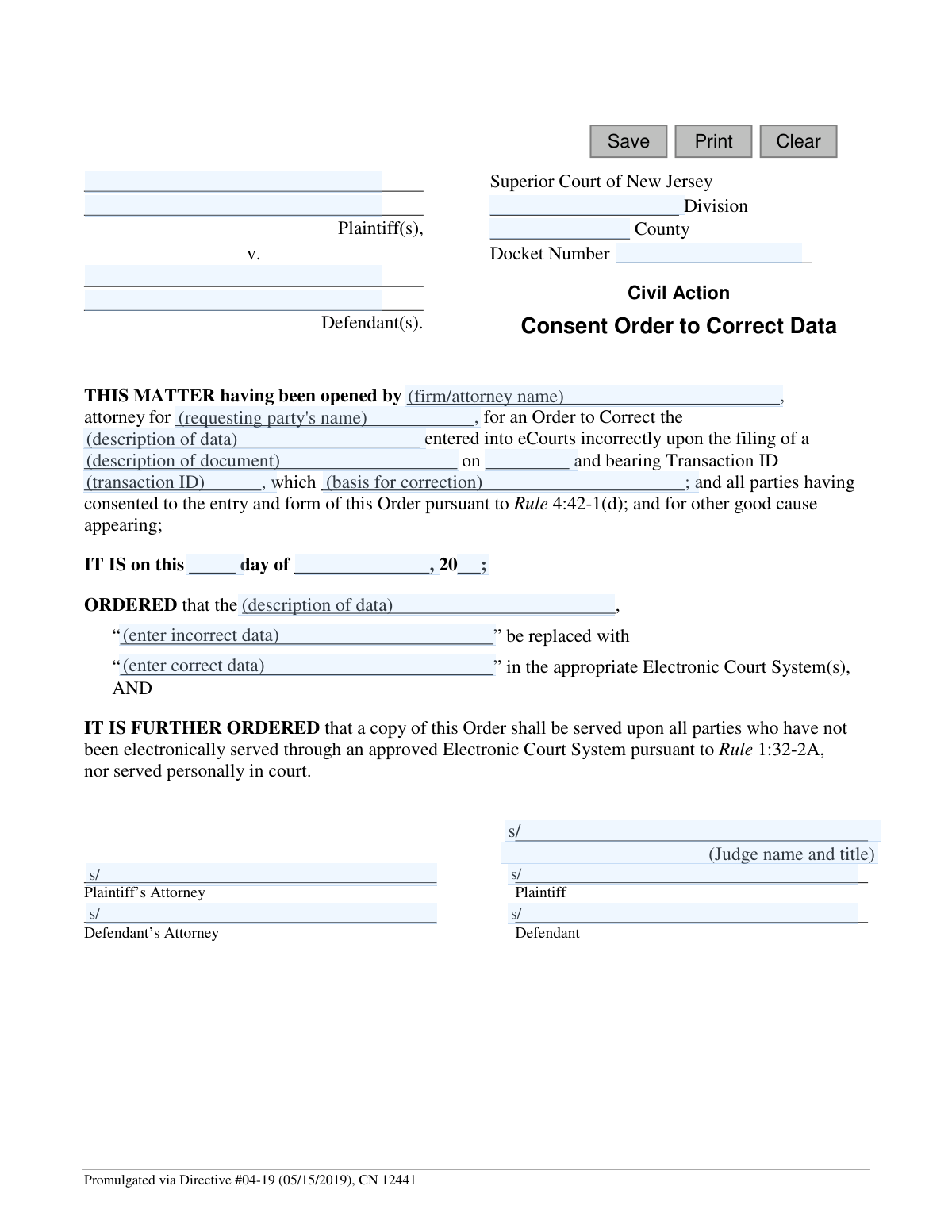
Yes! You can use AI to fill out Superior Court of New Jersey, Consent Order to Correct Data - eCourts

This form, CN 12441, is a legal document filed in the Superior Court of New Jersey to rectify incorrect information that has been entered into the eCourts electronic filing system. It requires the consent of all parties involved in the case to authorize the court to make the specified correction. Today, this form can be filled out quickly and accurately using AI-powered services like Instafill.ai, which can also convert non-fillable PDF versions into interactive fillable forms.
CN 12441 is part of the New Jersey forms and superior court forms categories on Instafill.
Our AI automatically handles information lookup, data retrieval, formatting, and form filling.
It takes less than a minute to fill out CN 12441 using our AI form filling.
Securely upload your data. Information is encrypted in transit and deleted immediately after the form is filled out.

Form specifications

Form name: Superior Court of New Jersey, Consent Order to Correct Data - eCourts
Number of fields: 29
Number of pages: 1
Language: English
main-image

Instafill Demo: How to fill out PDF forms in seconds with AI

How to Fill Out CN 12441 Online for Free in 2026

Are you looking to fill out a CN 12441 form online quickly and accurately? Instafill.ai offers the #1 AI-powered PDF filling software of 2026, allowing you to complete your CN 12441 form in just 37 seconds or less.
Follow these steps to fill out your CN 12441 form online using Instafill.ai:
  1. 1 Navigate to Instafill.ai and upload the 'Consent Order to Correct Data' form or select it from their template library.
  2. 2 Use the AI assistant to automatically populate case information, including Plaintiff and Defendant names, Division, County, and Docket Number.
  3. 3 Specify the attorney and party filing the request, the type of document containing the error, its filing date, and the associated Transaction ID.
  4. 4 Clearly state the exact data that was entered incorrectly into the eCourts system in the designated field.
  5. 5 Provide the correct data that should replace the erroneous information as it should appear in the court's electronic system.
  6. 6 Digitally sign the document in the appropriate fields for the Plaintiff's Attorney, Plaintiff, Defendant's Attorney, and Defendant to signify consent.
  7. 7 Review the entire completed form for accuracy, then download the final document to be filed with the court.

Our AI-powered system ensures each field is filled out correctly, reducing errors and saving you time.

Why Choose Instafill.ai for Your Fillable CN 12441 Form?

Speed

Complete your CN 12441 in as little as 37 seconds.

Up-to-Date

Always use the latest 2026 CN 12441 form version.

Cost-effective

No need to hire expensive lawyers.

Accuracy

Our AI performs 10 compliance checks to ensure your form is error-free.

Security

Your personal information is protected with bank-level encryption.

Frequently Asked Questions About Form CN 12441

This form is used to request a correction of data that was entered incorrectly into the New Jersey Superior Court's electronic filing system (eCourts). It is a 'consent' order, meaning all parties involved in the case must agree to the correction.

An attorney or a party in a civil action case who has identified an error in an electronic court filing should prepare this form. It must be signed by all consenting parties or their attorneys before being submitted to the court.

You will need the case docket number, the name of the document with the error, the date it was filed, and its Transaction ID. You must also clearly state the exact incorrect data and provide the correct data to replace it.

The Transaction ID is provided in the confirmation notice you received from the eCourts system when the original, incorrect document was filed. You can typically find this in your email or by checking your filing history within the eCourts portal.

Consent means that all parties in the case (plaintiffs and defendants) agree that the data was entered incorrectly and approve the proposed correction. The form requires signatures from all parties or their attorneys to prove this agreement to the judge.

This form cannot be used if you do not have the consent of all parties. In that situation, you would need to file a formal motion with the court to request the data correction, which does not require the other party's agreement.

You must be very specific. In the first blank space, quote the exact incorrect text as it appears in the court system. In the second blank space, provide the exact correct text that should replace it.

After all parties have signed, the Consent Order should be filed electronically through the New Jersey eCourts system. It will then be reviewed and, if approved, signed by a judge and entered into the case record.

Yes, the form specifies that a copy of the final, judge-signed order must be served upon all parties. This ensures everyone has a record that the correction has been officially made by the court.

Yes, services like Instafill.ai use AI to accurately auto-fill form fields from your case information, which can save time and reduce errors. This is especially helpful for repetitive information like party names, docket numbers, and attorney details.

Simply upload the Consent Order PDF to the Instafill.ai platform. Its AI will identify all the fields, allowing you to quickly type in your information, which the tool will place correctly on the form for you to review, sign, and download.

If you have a non-fillable or 'flat' PDF, you can use a service like Instafill.ai. It can convert the non-fillable PDF into an interactive, fillable form online, allowing you to type your information directly into the proper fields.

This form is intended for correcting clerical or data entry errors made during electronic filing. This includes misspelled names, incorrect dates, wrong document titles, or similar mistakes, but not for changing the substance of a legal argument.

Compliance CN 12441
Validation Checks by Instafill.ai

1
Docket Number Format Validation
Ensures the Docket Number field follows the standard New Jersey court format (e.g., 'CNTY-L-######-##'). The docket number is the primary identifier for a case within the court system. An incorrectly formatted number will prevent the order from being electronically matched to the correct case file, causing rejection or misfiling.
2
Required Case Identifiers
Verifies that essential case identifiers including Plaintiff Name, Defendant Name, County, and Division are not empty. These fields are fundamental for identifying the case to which this order applies. A submission lacking this information is legally ambiguous, un-fileable, and would be rejected by the court clerk.
3
Original Filing Date Validity
Checks that the 'fileDt' field contains a valid, properly formatted date that is not in the future. This date is crucial for locating the specific transaction that contains the error. An invalid or future date would make it impossible for court staff to find the original filing that needs correction.
4
Consent Order Date Validity
Validates that the 'orderDay', 'orderMo', and 'orderYr' fields combine to form a complete and logical date that is not in the future. The order date establishes when the correction is officially mandated. An invalid or future date makes the order's effective date ambiguous and could lead to its rejection.
5
Logical Date Sequence
Compares the Consent Order date with the original filing date ('fileDt'). This check ensures the order date is on or after the filing date of the document it intends to correct. An order dated before the error it purports to fix is logically impossible and would be immediately questioned or rejected.
6
eCourts Transaction ID Requirement
Ensures the 'transId' field is populated. The Transaction ID is a unique identifier for a specific filing in the eCourts system, making it the most direct way for court staff to locate the incorrect entry. Without this ID, finding the record to correct becomes a difficult manual search, delaying the process and increasing the risk of further error.
7
Correction Data Completeness
Verifies that both the 'dataIncorrect' and 'dataCorrect' fields are filled out. The entire purpose of the order is to replace a specific incorrect value with a correct one. If either field is empty, the order is incomplete and provides no actionable instruction for the court clerk to execute.
8
Meaningful Correction Check
Compares the values in the 'dataIncorrect' and 'dataCorrect' fields to ensure they are not identical. Submitting an order to 'correct' data with the exact same data serves no purpose and wastes judicial and administrative resources. This validation prevents the submission of logically flawed orders.
9
Party Consent Verification
Checks that signature fields for both the plaintiff's side (attorney or party) and defendant's side are populated. This is a 'Consent Order' pursuant to Rule 4:42-1(d), meaning all parties must agree to it. The absence of consent from any party invalidates the order's basis and would require a formal, contested motion instead.
10
Attorney and Party Association
Ensures that if an attorney's firm name ('firmName') is entered, the party they represent ('partyName') is also specified. This clarifies who is bringing the motion and confirms their standing to request changes to the court record. An unassociated attorney lacks the authority to act on behalf of an unspecified party.
11
Error Context Requirement
Validates that the fields describing the incorrect document ('docDesc') and the nature of the error ('basisDesc') are not empty. This narrative context is essential for the judge and court staff to understand what was filed, what went wrong, and why the correction is necessary. Omitting this information makes the order unclear and could delay its approval.
12
Specific Correction Instruction
Verifies that the 'dataDesc' field, which specifies the exact data element being corrected (e.g., 'Defendant's Middle Initial'), is filled in. This field provides the specific instruction on *what* to change in the court's electronic system. Without this, the clerk would not know where to apply the correction, rendering the 'dataIncorrect' and 'dataCorrect' fields useless.

Common Mistakes in Completing CN 12441

Entering an Incorrect or Incomplete Docket Number

Users often transpose digits, use an incorrect format, or omit the prefix for the docket number. This is a critical error as it links the order to a specific case file. An incorrect docket number can lead to the order being rejected by the clerk or, worse, applied to the wrong case, causing significant legal and administrative complications. To avoid this, meticulously double-check the docket number against the official case file before submission. AI-powered tools like Instafill.ai can help prevent this by validating the format and auto-filling correct case information.

Omitting or Misstating the eCourts Transaction ID

The Transaction ID is a unique identifier for the specific electronic filing that contains the error. Filers may forget to include it or copy it incorrectly from their eCourts filing confirmation. Without the correct Transaction ID, the court clerk cannot locate the exact electronic entry that needs to be corrected, rendering the order ineffective and leading to its rejection. Always copy the full, exact Transaction ID from the eCourts filing confirmation to ensure the correction is applied properly.

Using Vague Language for the Data Correction

This form requires filers to specify exactly what was entered incorrectly ('dataIncorrect') and what the correction should be ('dataCorrect'). A common mistake is being too general, for example, writing 'wrong party name' instead of quoting the exact incorrect name as it appears in the system. This ambiguity can lead to the court clerk making the wrong correction or rejecting the order for lack of clarity. To prevent this, be precise and quote the exact incorrect data and the exact correct data in the respective fields.

Failing to Obtain All Necessary Signatures

This is a 'Consent Order,' meaning all relevant parties must agree to the correction by signing. Attorneys sometimes submit the form with only their own signature, forgetting that consent from the opposing counsel is required per Rule 4:42-1(d). An order submitted without the consent of all parties is invalid and will be immediately rejected by the court, wasting time and filing fees. Always circulate the proposed order to all parties for their signature before submitting it to the court.

Inconsistent Information Within the Form

The form asks for a description of the incorrect document in two places: once in the main paragraph ('docDesc') and again in the 'ORDERED' clause ('dataDesc'). Users sometimes provide slightly different descriptions, which creates ambiguity. This inconsistency can cause the court to question the order and may lead to rejection, delaying the correction. Ensure the description of the document or data point is identical in all relevant fields of the form for clarity and consistency.

Incorrectly Identifying Parties

In cases with multiple plaintiffs or defendants, it's easy to misspell a name, omit a party, or transpose the plaintiff and defendant roles. Such errors can invalidate the order or cause confusion, as the names must exactly match the official court docket. This mistake often happens due to manual data entry. Using a tool like Instafill.ai can prevent this by auto-populating party information accurately from a case management system, ensuring consistency with the court record.

Providing an Unclear Basis for the Correction

The field 'basisDesc' requires a brief explanation of why the original filing was incorrect (e.g., 'which inadvertently named the wrong defendant due to a clerical error'). Simply stating 'it was incorrect' is insufficient, as the court needs a clear reason ('good cause') to grant the order. A weak or missing explanation can lead to the judge denying the order, requiring a more formal and time-consuming motion. Clearly and concisely state the nature of the error to justify the requested correction.

Prematurely Dating the Order

The date in the 'IT IS on this day of...' clause is the date the judge signs the order, not the date it is prepared or submitted. Attorneys often mistakenly fill in the submission date. This requires the clerk to manually correct the date, and in some instances, could lead to the order being returned for correction. It is best practice to leave the signature date fields ('orderDay', 'orderMo', 'orderYr') blank for the court to fill in upon signing.

Specifying the Wrong County or Court Division

The form requires specifying the correct Superior Court Division (e.g., Law, Chancery, Family) and County. A simple oversight can lead to entering the wrong information, causing the filing to be misrouted or rejected by the clerk. This delays the entire process as the form must be corrected and resubmitted to the proper venue. Always verify the correct County and Division from the original complaint or docket before filling out the form.

Attempting to Manually Fill a Flat PDF

Court forms are often distributed as non-fillable PDFs, leading filers to create messy, handwritten submissions or use basic PDF editors that misalign text. This can result in illegible entries and an unprofessional appearance, increasing the chances of rejection by the clerk's office. To avoid this, use a service like Instafill.ai, which can instantly convert any flat PDF into an intelligent, fillable form, ensuring a clean, accurate, and professional submission every time.
Saved over 80 hours a year

“I was never sure if my IRS forms like W-9 were filled correctly. Now, I can complete the forms accurately without any external help.”

Kevin Martin Green

Your data stays secure with advanced protection from Instafill and our subprocessors

Robust compliance program

Transparent business model

You’re not the product. You always know where your data is and what it is processed for.

ISO 27001, HIPAA, and GDPR

Our subprocesses adhere to multiple compliance standards, including but not limited to ISO 27001, HIPAA, and GDPR.

Security & privacy by design

We consider security and privacy from the initial design phase of any new service or functionality. It’s not an afterthought, it’s built-in, including support for two-factor authentication (2FA) to further protect your account.

Fill out CN 12441 with Instafill.ai

Worried about filling PDFs wrong? Instafill securely fills superior-court-of-new-jersey-consent-order-to-correct-data-ecourts forms, ensuring each field is accurate.

Related forms by category

New Jersey forms State of New Jersey Alternate Benefit Program Withdrawal Request Acknowledgement Receipt, Horizon Blue Cross Blue Shield of New Jersey Applied Behavior Analysis Supplemental Information Form, State of New Jersey Application for Employment (Form DPF-663), New Jersey Judiciary Plea Form (Plea 01), Supplemental Plea Form for Certain Sexual Offenses: Megan’s Law/Parole Supervision for Life/Community Supervision for Life (Plea 05), Financial Questionnaire to Establish Indigency, New Jersey Judiciary Resource Family Information Form, Foreclosure Case Information Statement (FCIS) - Appendix XII-B2, New Jersey Judiciary Records Request Form, Superior Court of New Jersey, Application for Appeal and Order, FL Certification of Requested Background Checks for Kinship Legal Guardianship, Certification of Caregiver as to Knowledge of Identity and/or Location of Parents, FL Order Judgment for Kinship Legal Guardianship, New Jersey Judiciary Certification of Repair and Plea of Guilty, Uniform Summary Support Order (USSO), New Jersey Judiciary Volunteer Application (CN 10293), Application to Take the New Jersey Court Interpreter Oral Examination, New Jersey Judiciary Attorney Fee Arbitration Request, Order to Show Cause with Temporary Restraints Pursuant to Rule 4:52, Tax Court of New Jersey, State Tax Complaint · + 271 more →
superior court forms FW-003, Order on Court Fee Waiver (Superior Court), FW-003, Order on Court Fee Waiver (Superior Court), Form FW-003, Order on Court Fee Waiver (Superior Court), Declaration of Facts of Death (California Superior Court), Form FW-003-GC, Order on Court Fee Waiver (Superior Court) (Ward or Conservatee), Superior Court of Chatham County, Georgia, Hearing Request Form, Form FW-006, Request for Hearing About Court Fee Waiver Order (Superior Court), Form FW-002, Request to Waive Additional Court Fees (Superior Court), Form FW-008, Order on Court Fee Waiver After Hearing (Superior Court), Form FW-002-GC, Request to Waive Additional Court Fees (Superior Court) (Ward or Conservatee), Form REC-001(N), Notice of Intent to Destroy Superior Court Records; Offer to Transfer Possession, Form REC-001(R), Request for Transfer or Extension of Time for Retention of Superior Court Records, Notice of Hearing on Request for Transfer or Extension of Time for Retention of Superior Court Records; Court Order; Release and Receipt of Superior Court Records, Form REC-002(R), Release and Receipt of Superior Court Records, Superior Court of New Jersey, Application for Appeal and Order, Superior Court of New Jersey Dissolution (FM) Case Management Order, New Jersey Judiciary – Superior Court, Appellate Division Application for Permission to File Emergent Motion, New Jersey Judiciary Superior Court - Appellate Division Civil Case Information Statement, New Jersey Judiciary Superior Court - Appellate Division Criminal Case Information Statement, New Jersey Judiciary Superior Court - Appellate Division Notice of Appeal (CN: 10502) · + 41 more →